How to fix
GOG Galaxy slow download speed
on Windows
Boost your GOG Galaxy download speed on Windows 10 or 11 with our expert-tested solutions. Enjoy smooth gaming experience in minutes!

What causes How to fix GOG Galaxy slow download speed in Windows?
- Server load at a given time
- User's internet connection issues
- Physical distance from the server
- Platform-specific issues
- Temporary glitches in the application
Repairs Windows system files, removes malware, and restores a clean OS state — without reinstalling.
I seldom use the GOG platform to purchase games, but sometimes I do grab a few whenever I see a good discount or when I want to buy something that's not available on Steam. Once I launched GOG Galaxy, I was told there was a new version available, so I updated it. After purchasing the game, I started its download, but I've noticed that the download speed is around five times slower than my usual one, and it is taking forever. Any tips on this, please?
GOG Galaxy is a digital distribution platform developed by GOG (formerly known as Good Old Games - a subsidiary of known Polish studio CD Projekt Red). This platform has carved a niche for itself in the vast gaming market by offering DRM-free releases, which means users can play games without any digital rights management restrictions.
Another attractive feature of GOG Galaxy is its capability to consolidate game libraries from different platforms, ensuring users can access their entire collection from one application. Furthermore, it provides a haven for older games that are not readily available on other platforms, reviving nostalgic gaming experiences for users.
However, despite these unique selling points, the platform is not without its issues. One recurring concern cited by some users is slow download speeds on the GOG Galaxy platform. Interestingly, this issue might not be universally present: while it plagues the GOG Galaxy application for some, the GOG web page might work flawlessly for others.
The speed of downloads on gaming platforms is a multifaceted concern. A platform's servers, the user's internet connection, and even the physical distance from the server can influence download rates. Just as some Steam users occasionally report reduced download speeds, GOG Galaxy users have also encountered this problem. It is not uncommon to find complaints about download speeds dropping to as low as 10Mbit/s, which is significantly slower than what many users are accustomed to.
Several factors could contribute to these diminished speeds. The server's load, at a given time, might be overwhelming, causing it to prioritize certain requests over others. A user's personal internet service might be experiencing interruptions or throttling. Additionally, software conflicts or specific settings in one's PC could impede optimal download speeds.
While pinpointing the exact cause of the slow download might require some diagnostic work, there are potential solutions. Adjusting the platform settings, ensuring a stable internet connection, or troubleshooting software issues can help. For those facing technical challenges on a Windows PC, the [d1] PC repair tool can be a valuable asset, simplifying the resolution process.
Fix 1. Run Network troubleshooter
The network troubleshooter is a built-in Windows tool designed to diagnose and resolve common connectivity problems.
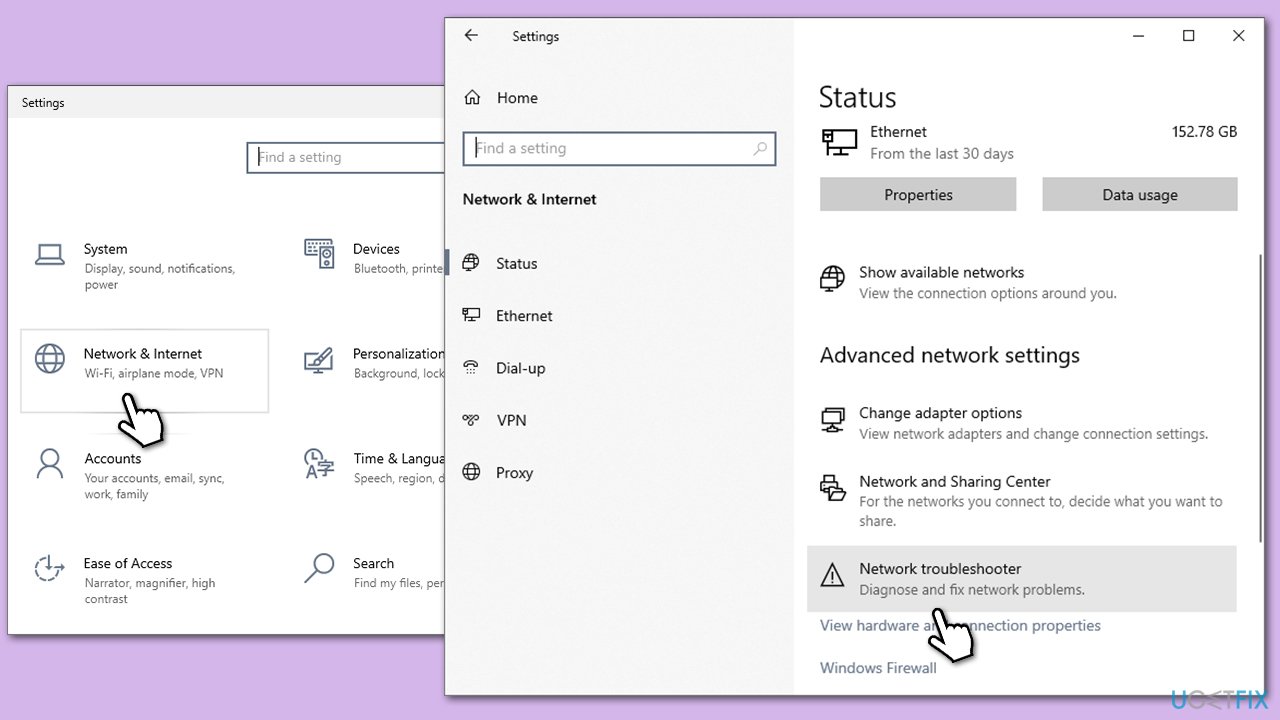
- Right-click on Start and pick Settings.
- Go to Network & Internet section.
- On the right side, find the Advanced network settings section.
- Click Network troubleshooter and wait.
- The fixes will be automatically applied.
Fix 2. Use the GOG web version
The GOG web version can be an alternative to the application and may not have the same download speed issues.
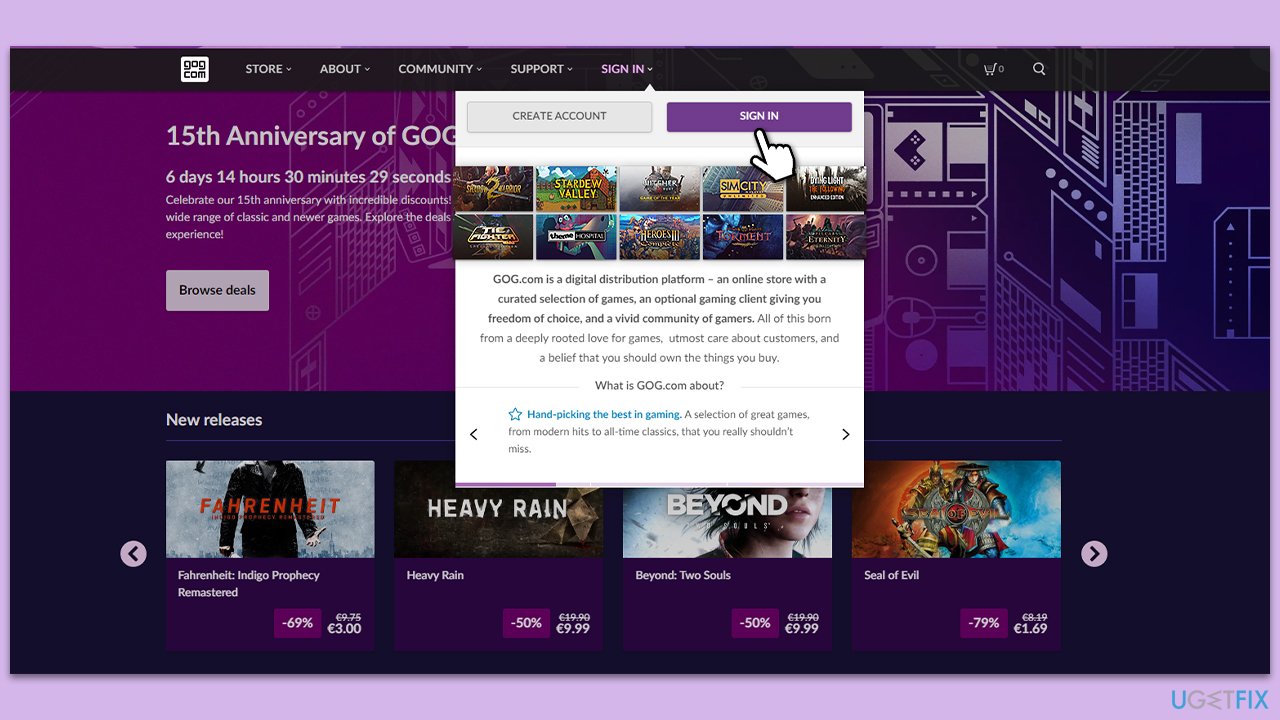
- Open your preferred web browser.
- Visit the official GOG website.
- Log into your account by clicking Sign in at the top.
- Download your desired game directly from the website.
Fix 3. Allow GOG Galaxy through the Firewall
Windows Firewall can sometimes block certain applications from accessing the internet. Allowing GOG Galaxy through can resolve connection issues.
- Type in Control Panel in Windows search and press Enter.
- Go to System and Security and click on Windows Defender Firewall.
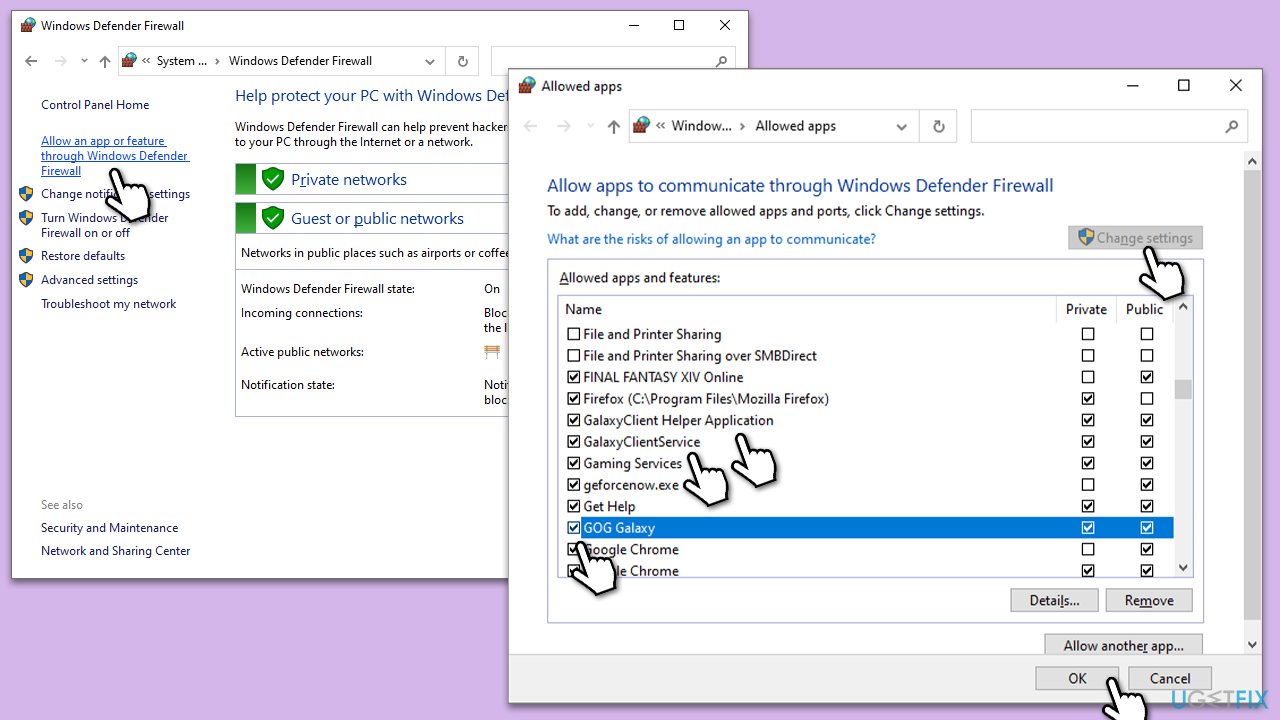
- On the left side of the window, click Allow an app or feature through Windows Defender Firewall.
- Click Change settings (if you are not on an administrator account, you will be asked to enter a password).
- Scroll down and enable Private and Public access to the following entries:
GalaxyClient Helper application
GalaxyClientSertvice
GOG Galaxy - If any of these entries are missing, click Allow another app > browse the location of GOG installation > Add.
- Finally, click OK.
Fix 4. Clear GOG Galaxy cache
Clearing the cache can resolve any potential conflicts or corruption that may slow down downloads.
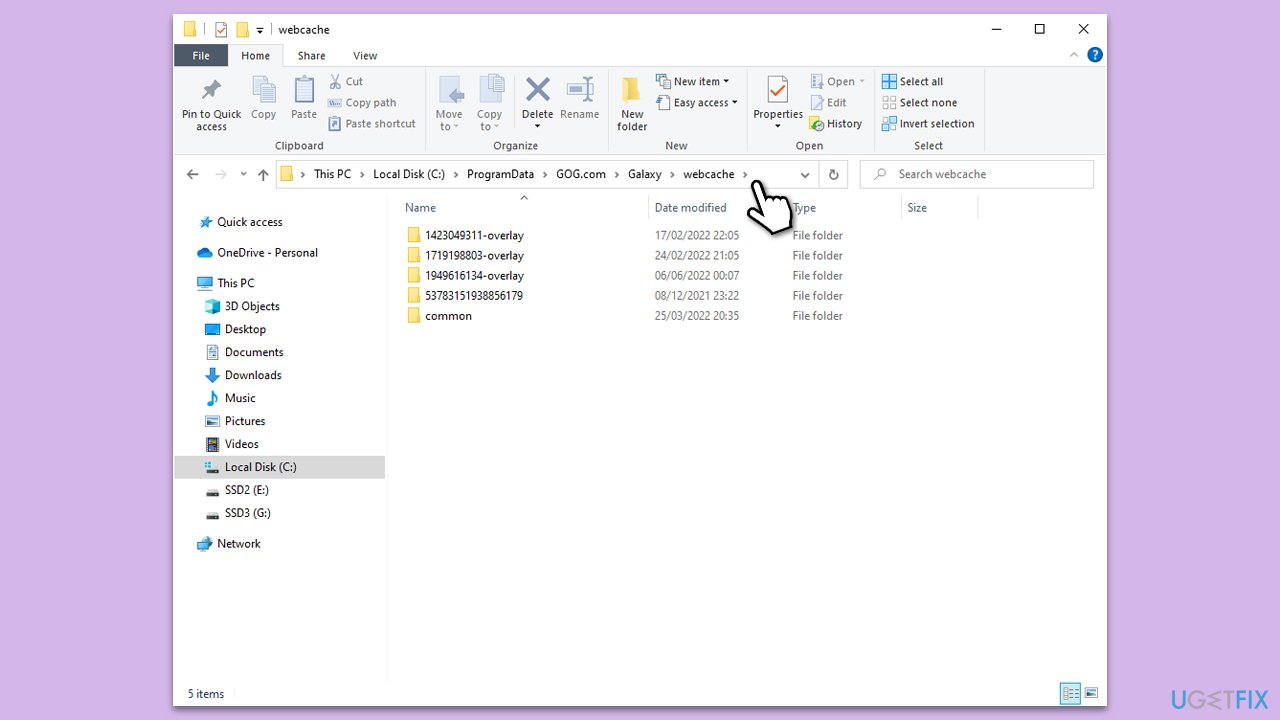
- Press Win + E to open File Explorer.
- Navigate to the following location (make sure the hidden files are visible):
C:\ProgramData\GOG.com\Galaxy\webcache - Delete contents here.
Fix 5. Temporarily disable third-party anti-virus
Some anti-virus software can interfere with application downloads. Temporarily disabling it may improve speed.
- Open your third-party anti-virus application.
- Locate the option to disable or pause protection (this varies by software).
- Choose to disable protection temporarily.
- After downloading, remember to enable your anti-virus again.
Fix 6. Reset your internet connection
Refreshing your internet connection can resolve any temporary connectivity issues.
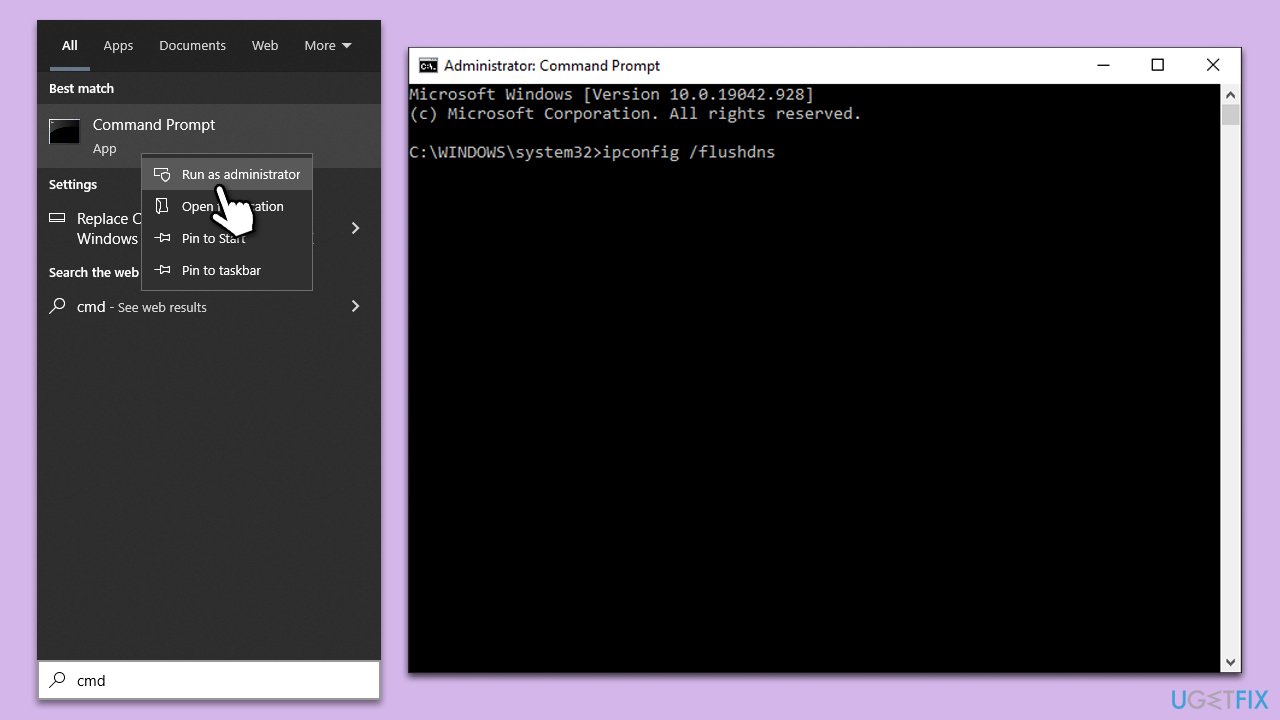
- Type cmd in Windows search.
- Right-click on the Command Prompt result and select Run as administrator.
- Copy and paste each of the following commands, pressing Enter every time:
ipconfig /flushdns
ipconfig /registerdns
ipconfig /release
ipconfig /renew
netsh winsock reset - Restart your PC.
Fix 7. Use alternative DNS settings
Switching to a different DNS can sometimes improve internet performance. Google, for example, provides free DNS for everyone willing to use it.
- Right-click on Start and select Settings.
- Go to Network and Internet section.
- Click on Change adapter options.
- Right-click on your internet connection and pick Properties.
- Click Internet Protocol Version 4 (TCP/IPv4) once and go to Properties
- Select Use the following DNS server addresses option and set your DNS to Google's:
Preferred DNS server: 8.8.8.8
Alternate DNS server: 8.8.4.4 - Click OK.

Fix 8. Reinstall GOG
A fresh installation can resolve any corrupted files or conflicts.
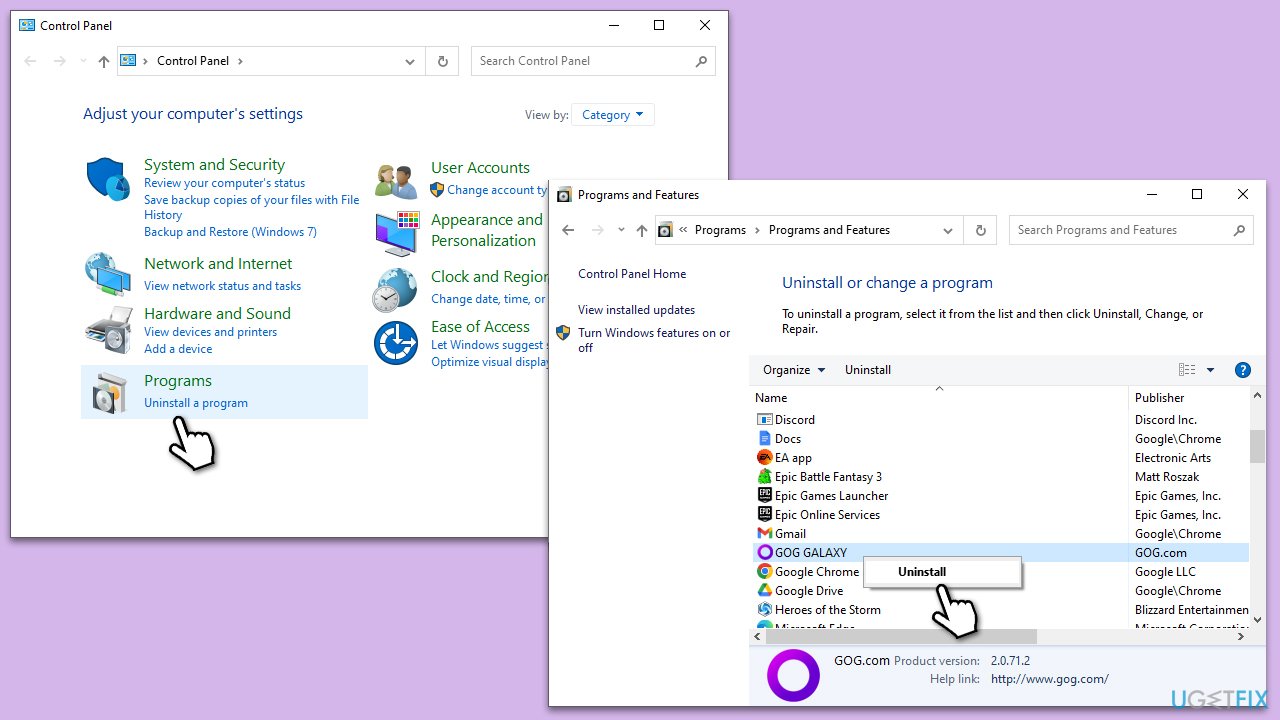
- Type Control Panel in Windows search and press Enter.
- Go to Programs > Uninstall a program.
- From the list, locate GOG Galaxy.
- Right-click and select Uninstall, then follow the prompts to finish the process.
- Restart your PC and reinstall the app from the official website.
Bottom line
To address slow download speeds on GOG Galaxy, consider checking your internet connection, trying to download during off-peak hours, or using a wired connection instead of Wi-Fi. If the issue persists, you may want to check for updates or reinstall the application. If none of these solutions work, consider reaching out to GOG support for further assistance.
Frequently asked questions
You can try changing the download region in the GOG Galaxy settings under 'Downloads' to a closer server location, which may improve speeds on Windows 10.
Yes, you can manage bandwidth limits by going to 'Settings' > 'Downloads' in GOG Galaxy and adjusting the download speed limits for a more efficient download on Windows 11.
You can check your Windows firewall settings to ensure GOG Galaxy is allowed through by going to 'Windows Security' > 'Firewall & network protection' and looking for GOG Galaxy in the allowed apps.




Report an issue
What's wrong with this guide? We review every report and update or remove content.
Report received — thank you. We'll review and fix it.
You need a free account to submit a report.
Be the first to comment