
ffmpeg.dll is missing or fails to load: what the file is and how to fix it
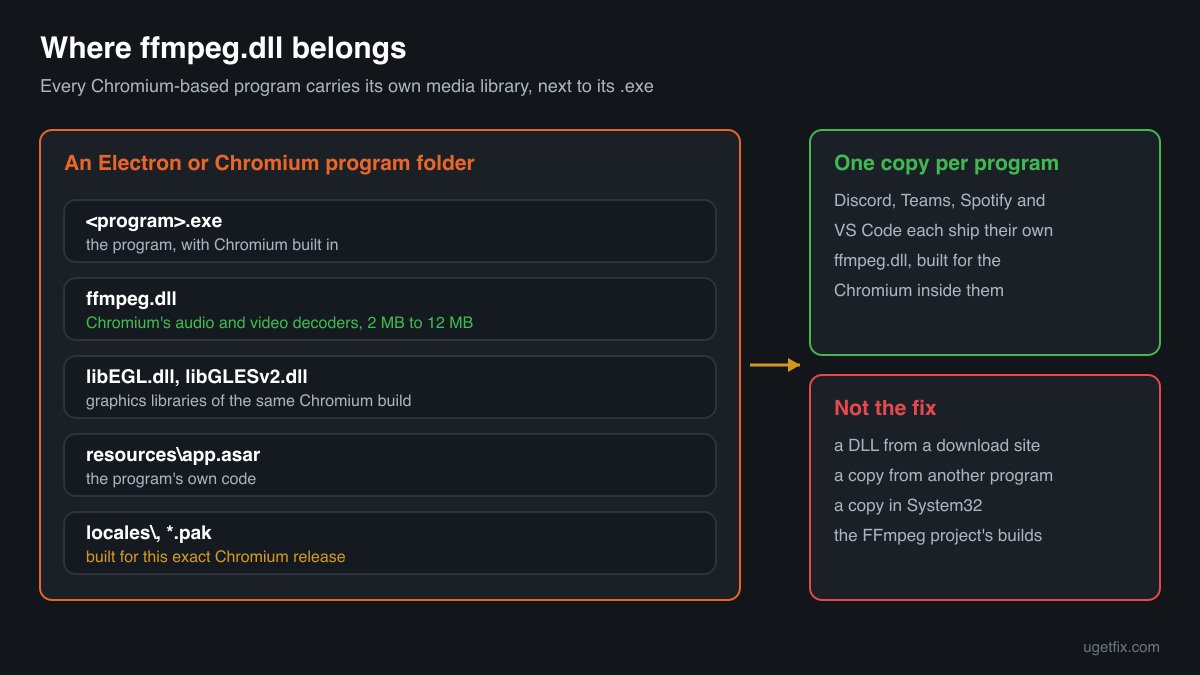
ffmpeg.dll is the audio and video library of Chromium, the browser engine built into Electron and NW.js programs such as Discord, Microsoft Teams, Spotify, Visual Studio Code, Slack and many games. Each of those programs ships its own copy next to its .exe. When one of them says the file is missing, its copy was deleted, quarantined or damaged during an update, and reinstalling that program puts the right one back.

Prefer to fix it yourself? The manual steps follow.
How to fix ffmpeg.dll errors
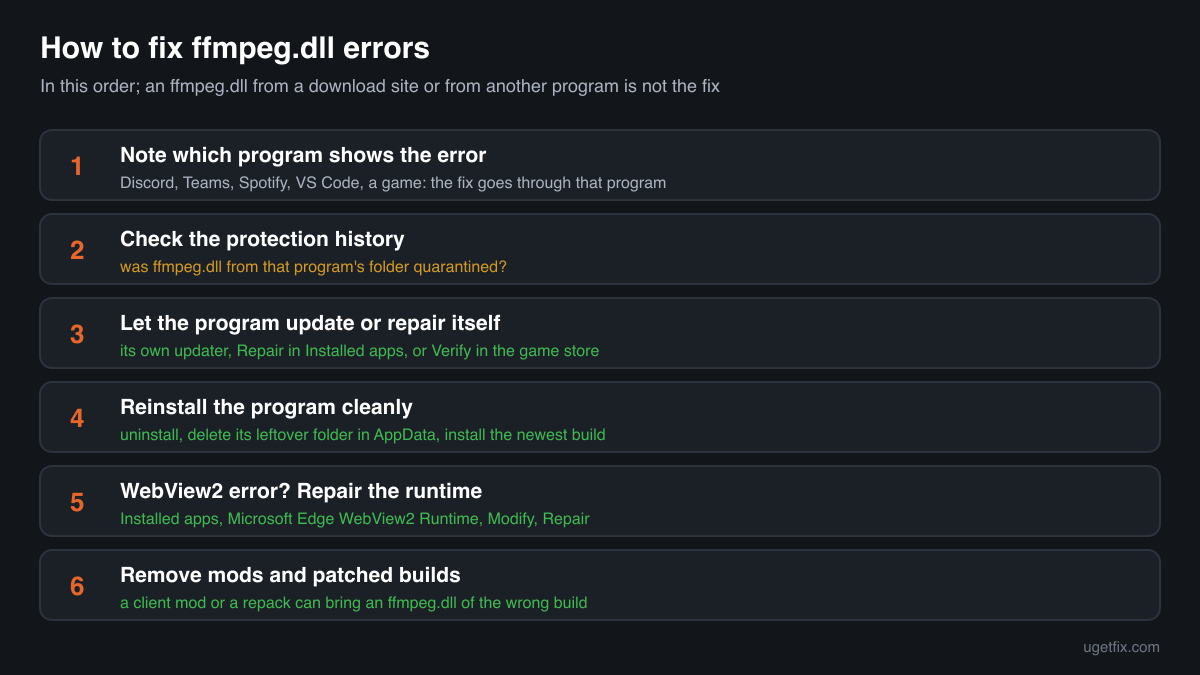
The file belongs to the program that shows the error, not to Windows and not to a package you can install separately. First note which program it is: the error window usually names its .exe in the title bar. Then let that program put its file back. Most Electron programs repair themselves when you uninstall them, delete the leftover folder in AppData and install the newest build from the maker's site or the Microsoft Store. A game is repaired with Verify or Repair in its store. If the file disappears again right after that, your security software is removing it: look at its protection history first.
An ffmpeg.dll from a DLL download site, from another program or from the FFmpeg project is not the fix. Each program's copy is built for the exact Chromium release inside it, with a different set of functions, so a copy from elsewhere fails with an entry point error, crashes the program or leaves video and sound broken.
Which programs ship ffmpeg.dll
Chromium does not use a system-wide media library. Programs built on Electron or NW.js carry Chromium inside them, and with it a file called ffmpeg.dll that decodes audio and video. Electron publishes a matching ffmpeg build with every release. So there is no single ffmpeg.dll on a PC: there is one per program, each built for its own Chromium. These are the cases you will meet.
| Program | Made by | What to know |
|---|---|---|
| Discord | Discord Inc. (Electron app) | The most searched case. Discord installs per user under AppData\Local\Discord, in a folder named after the app version, and updates itself by creating a new folder. An interrupted update or a quarantine leaves the new folder without ffmpeg.dll. A clean reinstall fixes it. |
| Microsoft Teams (classic), Slack, Skype for Desktop | Microsoft, Slack Technologies (Electron apps) | Classic Teams and older Skype and Slack builds are Electron programs with their own ffmpeg.dll in their AppData folders. The newer Teams uses the WebView2 runtime instead. Reinstall the app, or move to its current version. |
| Visual Studio Code and other editors | Microsoft and others (Electron apps) | VS Code keeps ffmpeg.dll next to Code.exe in its install folder. An update cut short by a shutdown can leave the folder half replaced. Install the current build over it; your settings and extensions are kept in a separate folder. |
| Spotify, WhatsApp Desktop (older builds), launchers and chat apps | Their own makers (Chromium-based apps) | Many desktop apps embed Chromium and ship the file in their own folder. Store versions repair through Installed apps, Advanced options, Repair or Reset; the desktop installer versions through a reinstall. |
| RPG Maker MV and MZ games, other NW.js games | The game's developer, built on NW.js | NW.js games ship nw.exe or a renamed .exe together with ffmpeg.dll. The NW.js documentation tells developers they can replace this file with their own build to add codecs, so the copy in a game is the game's choice. Verify or reinstall the game. |
| Microsoft Edge WebView2 Runtime | Microsoft Corporation | On Windows this is the only place Microsoft ships an ffmpeg.dll: inside the runtime folder under Microsoft\EdgeWebView\Application\<version>. Apps that use WebView2 load it from there. A damaged runtime is repaired from Installed apps, not by copying the file. |
Step by step
- Find out which program shows the error. The title bar of the error window names the program's .exe, for example Discord.exe, Teams.exe, Code.exe or Spotify.exe. If the message appears at Windows start-up, open Task Manager, Startup apps, and look for the app that launches itself. Everything below is done to that program, not to Windows.
- Look at your security software's protection history. In Windows Security open Virus and threat protection, Protection history; other security programs have a quarantine list of their own. If ffmpeg.dll from that program's folder is listed, you know why it is gone. Do not restore it yet: the reinstall below brings back a clean copy anyway, and restoring is only safe for a program you got from its maker.
- Let the program update or repair itself. Restart the PC so no half-finished update is still running, then start the program from the Start menu. Many Electron apps finish a broken update on the next start. A Microsoft Store app can be repaired in Settings, Apps, Installed apps, the app's menu, Advanced options, Repair. A game is repaired with Verify integrity in Steam or Verify in its own launcher.
- Reinstall the program cleanly. Uninstall it in Settings, Apps, Installed apps. Then press Win+R, type %LocalAppData% and delete the program's leftover folder (for Discord, the Discord folder); check %AppData% too. Download the newest installer from the maker's own site or the Microsoft Store and install it. Your account data is on the maker's servers, so signing in again restores it.
- If the file was removed again, deal with the detection. Only for a program you downloaded from its maker: when the security program removes the fresh copy a second time, report the file to its maker as a false detection and allow that one program's folder. Never allow a file that came from a patched client, a mod or a repack.
- Repair the WebView2 runtime if the error names its folder. If the path in the message or in Event Viewer contains EdgeWebView, open Settings, Apps, Installed apps, find Microsoft Edge WebView2 Runtime, choose Modify and then Repair. It downloads and reinstalls the runtime, ffmpeg.dll included. Do not uninstall it: Windows features and many apps need it.
- Remove client mods and patched builds. Client mods for Discord and similar apps, codec patches for NW.js games and repacked game installers can replace ffmpeg.dll with another build. Undo the mod with its own uninstaller, then reinstall the program so its own copy comes back.
What not to do
Do not download ffmpeg.dll from a DLL site.
You cannot know which program or Chromium release the file came from, or whether it was altered. This exact file name has been used to deliver malware inside a real program, so a copy of unknown origin in a program folder is a real risk: it runs every time the program starts.
Do not copy ffmpeg.dll from another program.
Discord's copy and VS Code's copy carry the same name but come from different Chromium releases with different functions. A program that gets the wrong one stops with an entry point error, crashes when it plays a sound or a video, or starts without media.
Do not use a build from the FFmpeg project.
The FFmpeg project's own Windows builds are split into avcodec, avformat and other files and are made for tools that play or convert video. Chromium's ffmpeg.dll is one special build of the same code, cut down for the browser. A program never accepts one in place of the other.
Do not put ffmpeg.dll into System32 or SysWOW64.
Windows does not use it from there, and programs look in their own folder first. A copy in the Windows folders fixes nothing and stays behind, unknown, for every program that might pick it up.
Do not restore a quarantined copy from a patched or repacked program.
A detection on an ffmpeg.dll that came with a cracked game, a modded client or a free download bundle may be correct. Restoring it and switching protection off is the way such infections start.
Check the copy on your PC
Choose the ffmpeg.dll from the program folder that shows the error. Its checksum is calculated in your browser and compared with 6 copies of the file collected from PCs.
The file stays on your computer. Nothing is uploaded: the checksum is computed locally.
Found an ffmpeg.dll outside any program folder, in a folder with only one unknown .exe next to it, or in an old build of a program its maker warned about? Then the question is whether the file is the program's own, and that is a security question rather than a missing-file one. Is ffmpeg.dll genuine or planted? On 2-Spyware
The error messages and what each one means
The wording points to the cause: a missing file, a file of the wrong build, a damaged file, or a crash while the program plays media. These are the texts Windows and programs show, with the file name filled in.
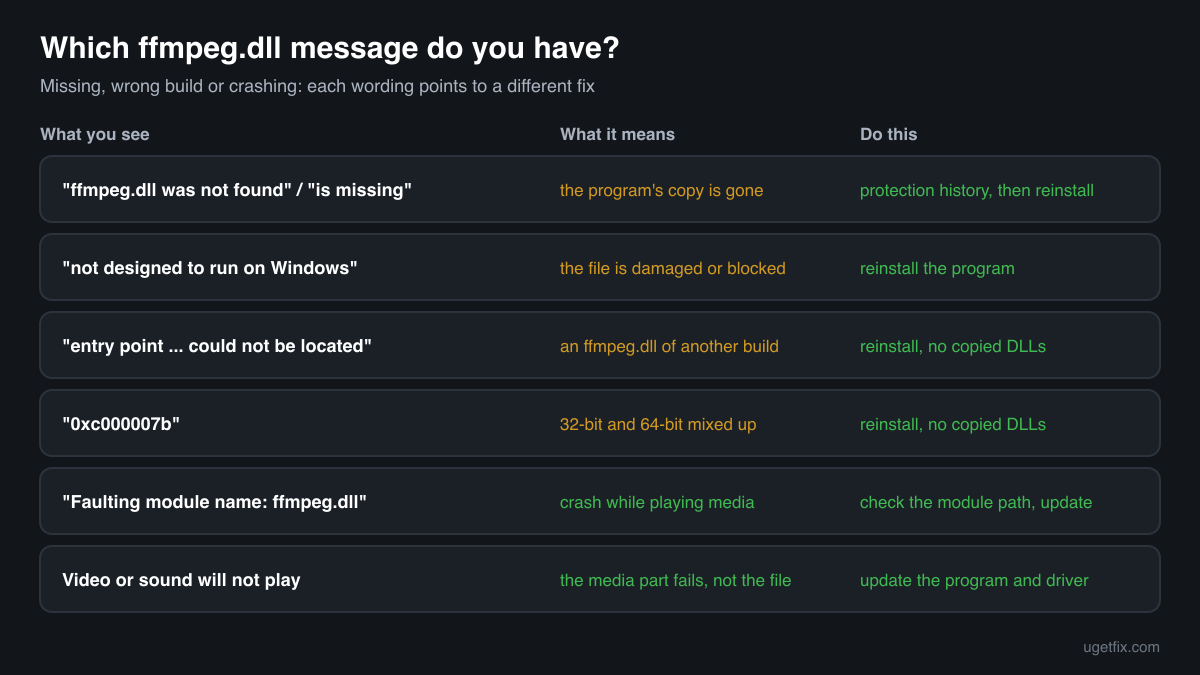
The code execution cannot proceed because ffmpeg.dll was not found. Reinstalling the program may fix this problem.
Windows 10 and Windows 11 wording. The program's own copy is gone: deleted, quarantined, or missing from a new version folder after an interrupted update. Check the protection history, then reinstall the program cleanly.
The program can't start because ffmpeg.dll is missing from your computer. Try reinstalling the program to fix this problem.
The same situation in the older Windows wording. Same fix: reinstall the program, after deleting its leftover folder in AppData.
The procedure entry point ... could not be located in the dynamic link library ffmpeg.dll.
An ffmpeg.dll was found, but it is not the build the program was made with: a function it needs is missing. Typical after copying the file from another program or a download site, or after a mod replaced it. Reinstall the program so its own copy returns.
ffmpeg.dll is either not designed to run on Windows or it contains an error. Error status 0xc000012f.
Windows found the file but it is damaged or not a valid library, often after an update cut short by a shutdown or a disk error. Reinstall the program. If several programs show it, check the drive.
The application was unable to start correctly (0xc000007b).
A 32-bit ffmpeg.dll in a 64-bit program, or the other way round. It almost always follows a copied DLL. Remove the copy and reinstall the program.
Faulting module name: ffmpeg.dll
A line from the Application log in Event Viewer after a crash. Look at the Faulting module path of the same event: it tells you which program's copy failed. Inside that program's own folder, update the program and the graphics driver; outside it, a mod or a stray copy is involved.
File facts
ffmpeg.dll is Chromium's build of FFmpeg, the open source media library, cut down to the decoders and container readers a browser needs. A Chromium-based program loads it at start-up, and through it plays the sounds, voice messages, videos and animated media you see in the app. NW.js documents that its prebuilt ffmpeg.dll carries the free codecs (Vorbis, Theora, VP8, VP9, PCM and, from version 0.22.1, MP3) and that developers may replace it with a build that adds others. What the catalogue copies of the file report:
- Description in the file
- -
- Company in the file
- Chromium-based programs (Electron, NW.js); shipped by each program's maker
A Chromium-based program keeps ffmpeg.dll in its own folder, next to its .exe and to other Chromium files such as libEGL.dll, libGLESv2.dll and the .pak resource files, often in a per-user folder under AppData\Local. The copies collected in the public DLL catalogue carry no file version, company or description at all, which is normal for this file: Properties, Details does not tell you who made it. They range from about 2 MB to 12 MB, in both 32-bit and 64-bit builds. The only reliable comparison is the copy the program's own installer puts there.
Copies of ffmpeg.dll found on PCs
Public DLL catalogues have collected 6 copies of ffmpeg.dll uploaded from PCs. None of them reports a file version, a company or a description, so the table tells them apart by build and size, with their checksums, so you can see whether your file is one of them.
None of them is the right file for your program unless it came from that same program and version. Every Electron and NW.js release builds its own ffmpeg.dll, and a bigger or newer-looking copy is not an upgrade. If your copy matches an entry, it was seen in some program's folder before; whether it fits yours is something only that program's installer can settle.
| Version | Build | Size | MD5 | SHA-1 |
|---|---|---|---|---|
0.0.0.0 | 64-bit | 3.8 MB | 13dbfbd98d49e611ecf838553c150f15 | 0d94d6bfe19148e75e8ae789dead5d6d2dcc2a33 |
0.0.0.0 | 64-bit | 2.1 MB | 560f77f45f78be9a49da5f4b798dae3b | 7f008ce1f05397121b409e39eb3a049fc29bcbd4 |
0.0.0.0 | 64-bit | 2.0 MB | e0d8cc6e2c305f98abca884b0012a43e | 195452501350bc320f9699dd1e3a3f759b824606 |
0.0.0.0 | 32-bit | 11.9 MB | 386f6afe8d447ba0a761efdd722c01cf | 6aa64a2e79539c924a1b7ee43d3a4f444db8877a |
0.0.0.0 | 32-bit | 3.7 MB | 74099c85f006daa91c1432985cf1487f | 11a7f473cd1a2158781a0fbe3386377ce3bb1f5e |
0.0.0.0 | 32-bit | 1.9 MB | b4cc9bc247ebdd406f4335a9b4e3eb8b | d2e41326b051c8f653f7375588d5ab6c34ec6265 |
Copies uploaded by users to a public DLL catalogue, read on 17 October 2026. We list their checksums so you can identify a file; we do not offer them for download and we could not tie each one to the program it came from.
Questions people ask
Is ffmpeg.dll a virus?
No. ffmpeg.dll is the media library of Chromium-based programs and is harmless in its normal place, next to the .exe of a program you installed. The name has been abused inside a real program's installer, which is why a copy of unknown origin deserves a closer look. Read the security page linked above for that.
Why does Discord say ffmpeg.dll was not found?
Discord installs a new version folder for each update and starts from the newest one. If an update was interrupted, or a security scan removed ffmpeg.dll from the new folder, Discord finds no copy and stops. Uninstall Discord, delete the Discord folder in %LocalAppData%, and install it again from Discord's own site.
Can I download ffmpeg.dll and put it in the program folder?
You should not. There is no single correct file: each program needs the build that matches its own Chromium release, and a downloaded one is of unknown origin. Reinstalling the program brings back exactly the right copy, usually within a few minutes.
Is ffmpeg.dll part of Windows?
Not as a system file. Windows carries ffmpeg.dll only inside the Microsoft Edge WebView2 Runtime, in its own version folder, for the apps that use WebView2. There is no ffmpeg.dll in System32, and Windows Update or the system file checker does not restore one for Discord, Teams or any other program.
Do I need to install FFmpeg to fix the error?
No. The FFmpeg project's tools are separate programs for converting and playing video, and installing them changes nothing for Discord, Teams or VS Code. Those programs use only the ffmpeg.dll in their own folder, so the fix is reinstalling the program that shows the error.
Why are there so many copies of ffmpeg.dll on my PC?
Each Electron or Chromium-based program ships its own copy, built for the Chromium release inside it, so five such apps can mean five copies of different sizes. Some apps also keep the previous version folder for a while after an update. That is by design and needs no cleaning.
The program worked yesterday. Why is ffmpeg.dll missing today?
Most often the program updated itself overnight and the update was cut short, or a security scan removed the new copy. Look at the protection history first. Other causes are a mod installed or removed since and a disk problem. A clean reinstall of the program fixes all of them.
Related guides
ffmpeg.dll is missing or fails to load: what the file is and how to fix it
OptimizeHow to extract audio from YouTube videos: what is allowed and what works
FixHow to fix OneDrive.exe - Bad Image error in Windows?
Sources
- NW.js Documentation: Enable Proprietary Codecs (ffmpeg.dll, bundled codecs, replacing the DLL)
- Electron releases on GitHub (a matching ffmpeg build published with every release)
File data read on October 17, 2026.

The editors who write and check uGetFix guides and reference pages. File facts are read from Microsoft's own installers and documentation, and every page shows the date its data was read.
Questions and experiences
Ask about this page: members and our editors answer. Reading is open; writing needs a free account.
…