
steam_api.dll is missing or fails to load: what the file is and how to fix it
steam_api.dll is the Steam Client API, the 32-bit Valve library a game uses to talk to Steam for achievements, cloud saves, friends and multiplayer. Each Steam game built as a 32-bit program ships its own copy in its own folder. When the game reports the file missing, that copy was deleted, quarantined by security software or swapped by a mod, and Steam can put the right one back.

Prefer to fix it yourself? The manual steps follow.
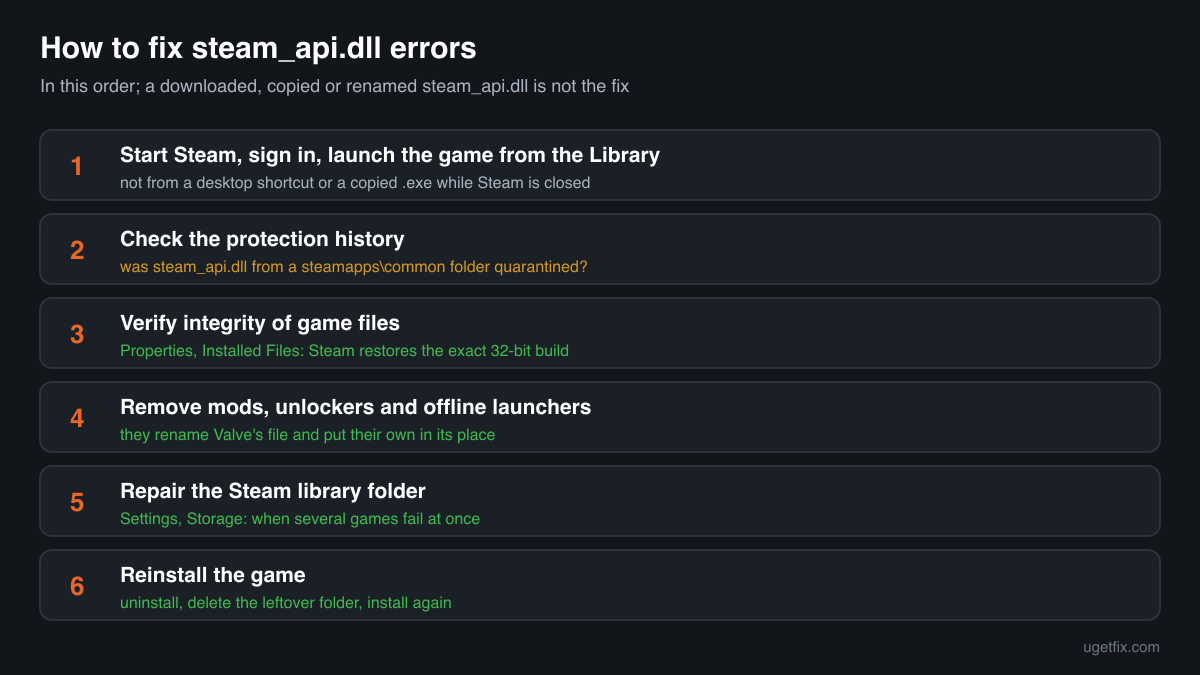
How to fix steam_api.dll errors
The file belongs to the game that shows the error. It is not part of Windows and not part of any runtime package you could install. Open Steam, right-click the game in your Library, choose Properties, then Installed Files, and click Verify integrity of game files. Steam compares the game's files with the copies on its servers and downloads whatever is missing or changed, steam_api.dll included, in the exact build the game was made with. If the file vanishes again after the verify, your security software is removing it, so open its protection history before you try anything else.
A steam_api.dll from a DLL download site, from another game or renamed from steam_api64.dll is not the fix. Each game is built against one release of the Steamworks SDK and expects the matching 32-bit file, so a copy from anywhere else fails with an entry point error, a 0xc000007b error, or loads and then breaks achievements, saves or online play.
Which games and programs ship steam_api.dll
Valve hands the library to game developers in the Steamworks SDK, and the developer places it next to the game's .exe or in the game's DLL search path. So a PC never has one steam_api.dll: it has one per 32-bit game, each in the SDK version that game was built with. These are the cases you will run into.
| Program | Made by | What to know |
|---|---|---|
| 32-bit Steam games that use Steamworks | Valve Corporation (library), shipped by the game's developer | Achievements, statistics, cloud saves, friends, invites, workshop items and the overlay all pass through this file. The copy usually sits in steamapps\common\<game> next to the .exe. Verifying the game restores it. |
| Older Steam games and their tools | Valve Corporation, packaged by the game's developer | Many games released before 64-bit builds became the norm are 32-bit only, and so are some launchers, editors and dedicated server tools that come with games. Each of them loads steam_api.dll from its own folder, sometimes from a bin subfolder. |
| Games that ship both builds | Valve Corporation | A game with a 32-bit and a 64-bit .exe keeps steam_api.dll for the first and steam_api64.dll for the second, often in different subfolders. The error tells you which one the starting .exe wants. Verify the game: Steam restores both. |
| 64-bit Steam games: steam_api64.dll | Valve Corporation | A separate file, the 64-bit twin. A 64-bit game never asks for steam_api.dll, and renaming one into the other fails because the architectures differ. If the message names steam_api64.dll, follow that page instead. |
| The Steam client itself | Valve Corporation | Steam's own folder holds steamclient.dll and steamclient64.dll, which the game's steam_api.dll connects to. They are different files. Reinstalling Steam does not bring back a game's steam_api.dll; verifying the game does. |
| Games from other stores and launchers | Their own publishers | A game bought outside Steam usually has no steam_api.dll and does not need it. If such a game asks for one, a Steam build of the game, a mod or a modified copy is involved. |
Step by step
- Restart Steam and start the game from your Library. Exit Steam completely from the Steam menu, start it again, sign in with the account that owns the game and launch the game from the Library. A game started from a desktop shortcut or straight from its .exe while Steam is closed or signed out can stop at the same point as a missing file. Valve's own documentation lists a closed Steam client, an account without the game and a different user or admin level as reasons the game cannot connect.
- Open your security software's protection history. In Windows Security go to Virus and threat protection, then Protection history. Other security programs keep a quarantine or history list of their own. If steam_api.dll from a Steam library folder appears there, you know where it went. Do not restore it yet: the verify in the next step downloads a clean copy from Steam either way.
- Verify integrity of game files. In Steam right-click the game, choose Properties, Installed Files, Verify integrity of game files. Let it finish and do not run it for several games at once. Steam replaces files that are missing or changed. A note that one or more files failed to verify is normal: those are local settings files that Steam leaves alone.
- If the file is removed again, deal with the detection. Only for a game you installed through Steam: when the security program removes Valve's copy a second time, it is a false positive. Verify again or restore the file from quarantine, then allow that file or the game's folder in the security program and report the file to its maker as a false detection. Never allow a file that came with a cracked copy of the game.
- Remove mods, unlockers and offline launchers that replaced it. Some mods, unlockers and offline launchers rename the original steam_api.dll to steam_api.dll.bak, steam_api_o.dll or a similar name and put their own file in its place, often with a .ini file or a settings folder beside it. Remove them with their own uninstaller, then verify the game. Steam brings Valve's file back but leaves the extra files the mod added, so delete those by hand.
- Repair the Steam library folder. If several games fail at once, open Steam, Settings, Storage, pick the drive, open the menu next to the library and choose Repair Folder. This resets the folder's permissions so that Steam can write game files again. Then verify the game once more.
- Reinstall the game. Uninstall it from the Steam Library, check that its folder under steamapps\common is gone (move your own save files out first if the game keeps them there) and install it again. A clean install also clears out files that a verify does not touch, such as leftovers of old mods.
What not to do
Do not download steam_api.dll from a DLL site.
You cannot tell which game or SDK release the file came from, or whether it is Valve's at all. Cracked and modified versions of this exact file circulate widely, and a file of unknown origin inside a game folder runs with your rights every time you play.
Do not copy the file from another game.
Both copies are Valve's, but they are rarely the same build. A game asks the library for the interfaces of the SDK version it was compiled against, and a copy from another game often lacks them. You get the procedure entry point error, or a game that starts without achievements, cloud saves or online play.
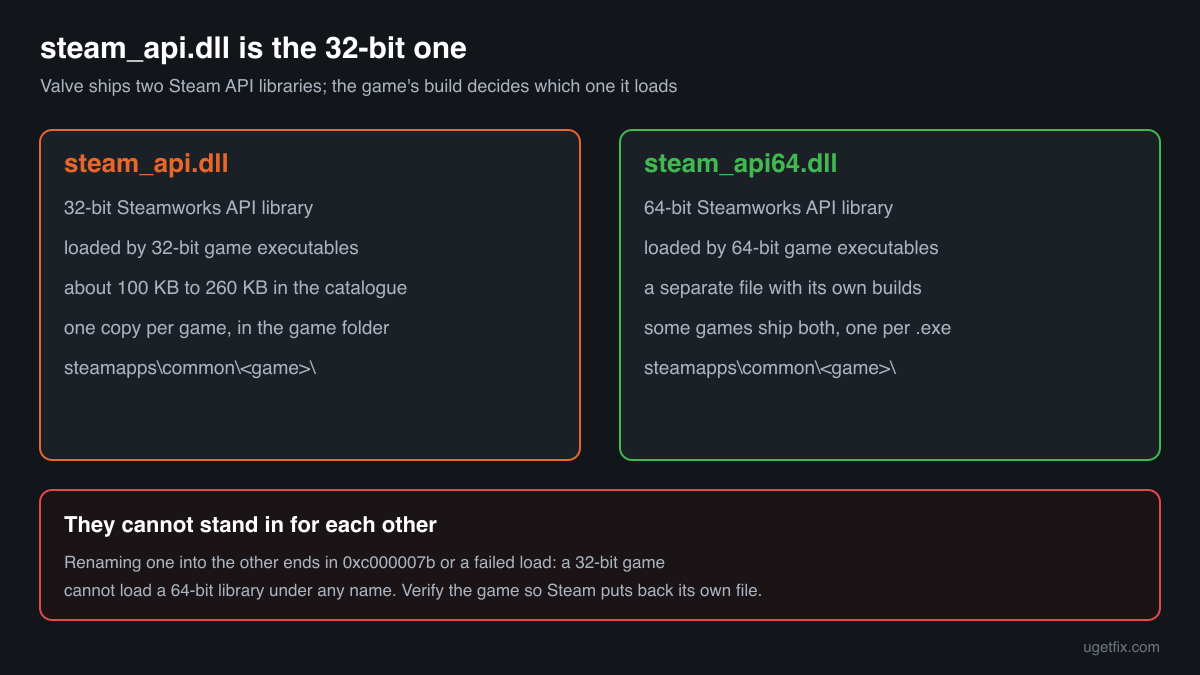
Do not rename steam_api64.dll to steam_api.dll.
steam_api64.dll is the 64-bit library and steam_api.dll the 32-bit one. A 32-bit game cannot load a 64-bit file under any name, and Windows answers with error 0xc000007b or a failed to load message.
Do not restore a quarantined copy from a cracked or repacked game.
In those copies steam_api.dll is usually swapped for a Steam emulator, and such downloads often carry malware too. The detection there may well be correct. Restoring the file and switching protection off is how many infections from free game downloads begin.
Do not put steam_api.dll into System32 or SysWOW64.
Games load it from their own folder, and Valve's documentation tells developers to ship it there. A copy in the Windows folders fixes nothing and stays behind as an unknown file that any program could pick up.
Check the copy on your PC
Choose the steam_api.dll from your game folder. Its checksum is calculated in your browser and compared with 43 copies of the file collected from PCs, all reporting Valve Corporation.
The file stays on your computer. Nothing is uploaded: the checksum is computed locally.
Found a steam_api.dll with a .ini file or a settings folder beside it, in a game you did not get from Steam, or outside any game folder? Then the question is whether it is Valve's file at all, and that is a security question rather than a missing-file one. Is steam_api.dll Valve's file or a crack? On 2-Spyware
The error messages and what each one means
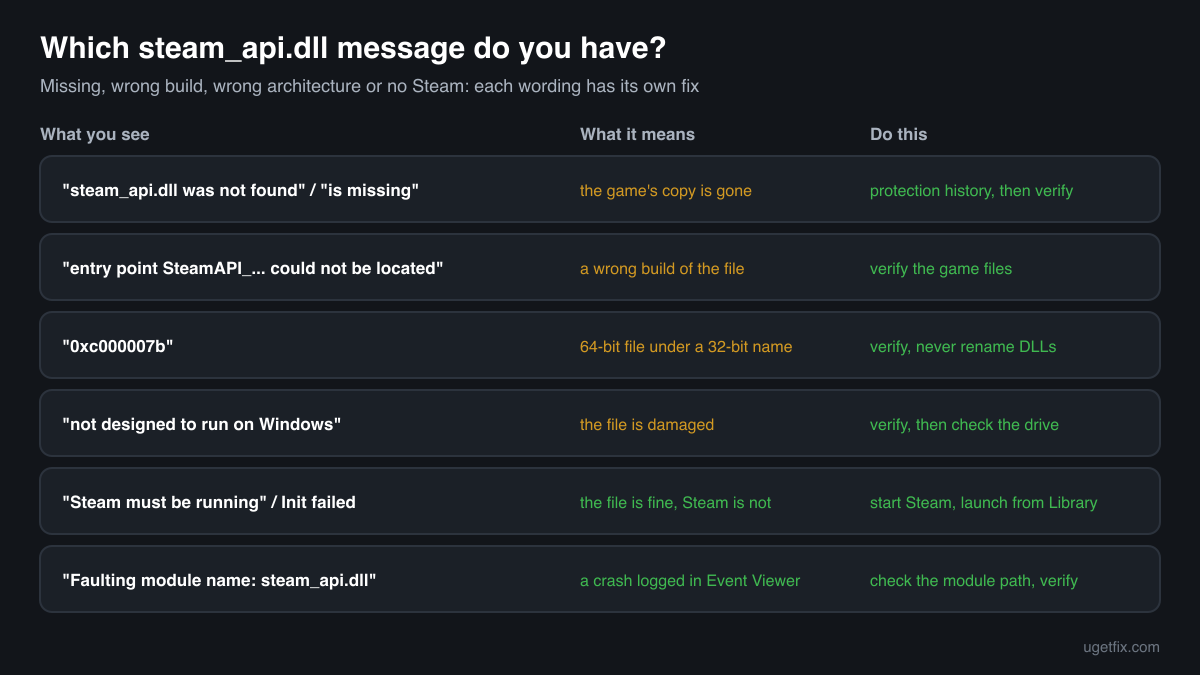
The wording tells you the cause: a missing file, the wrong build of the file, the wrong architecture, a damaged file, or a game that cannot reach Steam. These are the texts Windows and games show, with the file name filled in.
The code execution cannot proceed because steam_api.dll was not found. Reinstalling the program may fix this problem.
The Windows 10 and Windows 11 wording. The game's own copy is gone: deleted, quarantined or moved by a mod. Check the protection history, then verify the game files in Steam.
The program can't start because steam_api.dll is missing from your computer. Try reinstalling the program to fix this problem.
The same situation in the older Windows wording. Same fix: verify the game files, or reinstall the game.
The procedure entry point SteamAPI_... could not be located in the dynamic link library steam_api.dll.
Windows found a steam_api.dll, but not the build the game needs: the function named after SteamAPI_ is not in it. Typical after copying the file from another game or a download site, or after a mod replaced it. Verify the game files so Steam puts the matching copy back.
The application was unable to start correctly (0xc000007b).
A 64-bit file sits where the 32-bit game expects its own, most often a steam_api64.dll renamed to steam_api.dll, or a 64-bit copy from a download site. Delete the copy you added and verify the game.
Failed to load steam_api.dll
Shown by the game or its engine rather than by Windows. The file is there but could not be loaded: it is damaged, blocked, the wrong architecture, or locked by a running scan. Verify the game files; if it comes back, open the protection history.
steam_api.dll is either not designed to run on Windows or it contains an error.
Windows found the file but it is damaged or not a valid library, often after an interrupted download or a disk error. Verify the game files. If several games show it, check the drive and repair the Steam library folder.
Steam must be running to play this game / SteamAPI_Init() failed
The file loaded fine. The game could not reach a running Steam client signed in to an account that owns it. Start Steam, sign in and launch the game from the Library. Steam may restart the game through itself, which is expected.
Faulting module name: steam_api.dll
A line in the Application log of Event Viewer after a crash. Look at the faulting module path in the same event: a path outside the game's Steam folder, or a copy you did not expect, points to a mod or a modified file. Inside the Steam folder, update the game and verify it.
File facts
steam_api.dll is the 32-bit Steamworks API library. A game calls it at start-up to connect to the Steam client running on the same PC, and through it reaches achievements, statistics, leaderboards, cloud saves, friends lists, invites, workshop content and the in-game overlay. The library does little on its own: it passes the game's requests to Steam, which is why a game with a healthy file can still stop and say that Steam must be running. What the catalogue copies of the file report:
- Description in the file
- Steam Client API
- Company in the file
- Valve Corporation
Valve's Steamworks documentation tells developers to ship steam_api.dll in the game's run-time directory, next to the executable or in its DLL search path, and Windows looks there first when the game starts. A Steam game therefore keeps it in its own folder under steamapps\common, sometimes in a bin or engine subfolder, and never in the Windows folders. The genuine file describes itself as Steam Client API from Valve Corporation (Properties, Details). Every copy in the catalogue is a 32-bit build of about 100 KB to 260 KB. The file version differs from game to game and does not tell you the SDK release, so the only reliable comparison is the copy Steam installs for that game.
Copies of steam_api.dll found on PCs
Public DLL catalogues have collected 43 copies of steam_api.dll uploaded from PCs, from version 0.89.39.43 to 7.9.87.40, all reporting Valve Corporation as the company and all 32-bit. Each one came out of some game's folder. The table lists them with their checksums, so you can tell whether your file is one of them.
None of them is the right file for your game unless it came from that same game. Games are built against different SDK releases, and the newest copy here, 7.9.87.40, is not a newer replacement for an older one. If your copy matches an entry, it is most likely a genuine Valve build; whether it fits the game is something only Steam's verify can confirm.
| Version | Build | Size | MD5 | SHA-1 |
|---|---|---|---|---|
7.9.87.40 | 32-bit | 113 KB | c6577b2e9c7c3e98799081534de8494f | 730a6770f80f6bc6beeb4cd58f441d9f756c353d |
7.9.87.40 | 32-bit | 123 KB | d1953334ed302b2be3c509336e5c53b3 | 20867924feab62e443e90f841822a9b43c8c8b12 |
4.95.20.30 | 32-bit | 256 KB | 844785d10e81cb5a99da47b73af09489 | 6446e3c75324f2653975657f940cbcf593ec2e51 |
4.28.51.7 | 32-bit | 225 KB | 67365492ec0c8076840b1764ad2eca5f | 07407c1bc2f3114042dbcfe8183b77f73e178be7 |
4.4.91.85 | 32-bit | 215 KB | fe8e00c889a156836d57919ca23cde50 | 7aba06d474175bd0d7f672e101b0a05104580bb1 |
3.75.32.7 | 32-bit | 215 KB | 7b857c897bc69313e4936dc3dcce5193 | 4ee43374520904fa6d80c12c273d67eb7b5c984e |
3.62.82.82 | 32-bit | 215 KB | a40bf56a38edc7f391b1028b73749a8e | fa28b570915a455af719525c0eb92a7ae1b74117 |
3.42.61.66 | 32-bit | 205 KB | a83ade32811f1419685e90f592adf505 | 840388478557d9a916888451d11c463338684a09 |
3.27.76.74 | 32-bit | 215 KB | 1147b3abee03804b62f11080588dc950 | 1625ed7704f3e6ea8d0e063fbd6170c058957709 |
3.4.27.90 | 32-bit | 184 KB | bb9b7f88879a2a0acef336d5fcd014ff | a4767af5372cd93d11f2ac05202376147b4c73b8 |
2.91.48.22 | 32-bit | 184 KB | d53ffc731969779a8ed3fa7c1c0a138b | 5eb703fd6c9a0adb44d16163a62d9b0521a98ce6 |
2.89.45.4 | 32-bit | 184 KB | a3eee0df77b658fc94231c94e511cce0 | c4ba8ef91b9f3712e83b54ddf24945e2c7fbed45 |
2.77.37.82 | 32-bit | 184 KB | 1bc418e43146805432032d8657eefd67 | 792d166f48a2de1cb780e147a916b983f750b44f |
2.71.29.2 | 32-bit | 184 KB | 455bb122dac731ff85d6ce049b1866d6 | 71595cfcdb98b8bed1a4c31bdf67ec031ecd0eb6 |
2.37.91.26 | 32-bit | 143 KB | 69bee18efe39e0bd24b8ac979b560f39 | a80abfb6d95d59536bb83776258d1094054c3595 |
2.30.48.16 | 32-bit | 143 KB | 9c74890a78b890777692b7b9ac81be4f | a150b7546fa110f940ad46a1291481093749f896 |
2.8.75.99 | 32-bit | 102 KB | 57a21b316c015c80fe41b6099e1613c7 | 594b8ef2e46ba673211972a45e2a3f7fafcb456b |
1.83.31.37 | 32-bit | 102 KB | 33b0c87731a30aa830b0fcb09fa47094 | 82129e02e9414adcfba3ffb9da3fee7e274e14a6 |
1.75.10.15 | 32-bit | 102 KB | b9f58b0daa14761572909dff1762aa98 | 6d0a783c2e9b266a981836c516794cadf289954b |
1.68.8.89 | 32-bit | 102 KB | 36b0a21d3fd736aaed9d461fb3c4d858 | 03bd9f3e352553a0af41f5fe006f6249a168c243 |
1.68.8.89 | 32-bit | 102 KB | f09d6a4ae0554c343a1eb5f8c511875c | 3f1c23f2dd18199ccddb0f70e79e4e64d56489f7 |
1.60.88.17 | 32-bit | 102 KB | cc3d1ca6401e2ab106733c7bd7489cad | 8bc0e66551efe9e6116b6bd21f57c500005686c3 |
1.55.77.96 | 32-bit | 102 KB | e5578450156d19260fc06e2a72856595 | c15657dec995085ec83430c03367ab36f3af67a8 |
1.49.4.54 | 32-bit | 102 KB | cf096fb00135f5350aa466b3ea3d3b9f | b54e2da07cfba56a1c0ecba06412e619a39e10d5 |
1.47.42.9 | 32-bit | 102 KB | 4eb1ee3fcccd26c1032eb5efeaf423ac | 6f56d1ea145730cd82e8eccce9a687036fa04bba |
1.39.29.64 | 32-bit | 102 KB | 662b58c2895a5c8f68031806a98cdb17 | 095c34ad8bdca16d369a9dd439ce1716f9949ce3 |
1.33.85.19 | 32-bit | 123 KB | c72320b33899b5227030cb0d6890a377 | 94927baf99657b123ac0dced96f0ccc55ed7f5cc |
1.30.50.46 | 32-bit | 123 KB | f043d25aa2b8adc848f13625f5c30f12 | 12ee1a1931802942404d0fcca0e82be6b70507fb |
1.28.53.76 | 32-bit | 123 KB | b857fffd1dcaee64d985f14574a73233 | f00845ecd1b75a96083ccc74c2b53481f93810c6 |
1.23.45.93 | 32-bit | 123 KB | fecbbf6833ac8e82175790df1124c7a2 | d04a6af645e14f69c79a963f14d8bf3e1e09de3c |
1.20.70.94 | 32-bit | 123 KB | 0326c06a3305d5768a6be3797d76dcae | c9be5e4594752e3785f4521e70194135f02aae96 |
1.14.66.23 | 32-bit | 123 KB | b7f3385125b78eb33877cc76db01a00f | 4c66d7dc895c90e3d731fbb80c30926cf88f6ae5 |
1.8.87.63 | 32-bit | 123 KB | 8355dfd86e74047760c75ce717ee02ea | 2021aa1522f2c10fe1e954f03ab92ea948c1cee7 |
1.0.0.1 | 32-bit | 102 KB | 6484dc59ba5ec7f5f3f4313ac7a9bfd2 | a0270da83cc928518831523f74c92bde5a343525 |
1.0.0.1 | 32-bit | b7a496139e56a6f923458f3ae3034d52 | 0ad3093eb68b985e518ab2289dee764fc491700a | |
1.0.0.1 | 32-bit | f76e9a295f76b9ea699e4e754f268d1c | e2268c14782fda3865962e59efcab0650d6b5c91 | |
1.0.0.1 | 32-bit | 113 KB | f7a2043f15b698cd8269ee2fcd7b5f19 | 0f3f083510334036fc0b61d82681475ee85a3402 |
1.0.0.1 | 32-bit | 113 KB | fa0c3428937a4c099093b87f7617320f | 19c69151273c6a3239f2e82100482c02d151968f |
0.96.63.52 | 32-bit | 123 KB | 7bd3f0d29c9f5dd2d3257c6b8ca19130 | 83f6512887b8f5f0aba7d9fd6d689a11a316d1ec |
0.96.33.48 | 32-bit | 123 KB | ec6fda83b3ae0f677eee1570ef7452db | 82147b9ca776c7209cf8985be255676a2ad1b0bf |
0.91.58.20 | 32-bit | 123 KB | 47eb9e5c5879a609ab5a126f3b87d907 | ca42c65a71870ede512427cde9f37fa4aca645f0 |
0.89.45.16 | 32-bit | 123 KB | 77e8ee154af1108c8777d6d753b3d37e | 7cd783936a627507c73acb88734fe47453729724 |
0.89.39.43 | 32-bit | 123 KB | a5c80da5c3ce6a8a3c8e5dedee32e4df | aba5feac70a567886b66d8a05c7faca047ae78ed |
Copies uploaded by users to a public DLL catalogue, read on 17 October 2026. We list their checksums so you can identify a file; we do not offer them for download and we did not verify each one against Valve's signature.
Questions people ask
Is steam_api.dll a virus?
Valve's steam_api.dll is a harmless library that ships with Steam games. Cracked copies of games swap it for a Steam emulator, and those downloads often carry real malware, which is why security programs flag the name so often. A copy in a game you installed through Steam is Valve's; verify the game to be sure. For a copy of unknown origin, read the security page linked above.
Why does my security software keep deleting steam_api.dll?
Because the name is so common in cracked game downloads, some detections catch Valve's genuine file too. If the game came from Steam, verify the game files, allow that game's folder in the security program and report the false detection to its maker. If the game did not come from Steam, the detection is most likely about a file a crack put there.
Can I download steam_api.dll and put it in the game folder?
You should not. There is no single correct file: each game needs the build it was compiled with, and a downloaded one is of unknown origin. The right copy for your game is on Steam's servers, and Verify integrity of game files fetches exactly that one in a few minutes.
What is the difference between steam_api.dll and steam_api64.dll?
steam_api.dll is the 32-bit Steam API library and steam_api64.dll the 64-bit one. A game loads the one that matches its own .exe, and games with both a 32-bit and a 64-bit .exe ship both files. Neither can stand in for the other under any name.
Does reinstalling Steam fix steam_api.dll errors?
Usually not. The file lives in each game's folder, not in Steam's own folder, so reinstalling the client leaves the game's copy as it was. Verify the game files instead, and reinstall the game itself if that does not help.
I have a 64-bit Windows. Why does the game want the 32-bit steam_api.dll?
The architecture of the game matters, not the one of Windows. 64-bit Windows runs 32-bit programs, and a 32-bit game loads 32-bit libraries only. That is why the fix is the game's own copy from Steam, not a 64-bit file.
Can I play a game without steam_api.dll?
A game built with Steamworks loads the file at start-up and stops if it is missing, single-player included. Some games are sold on other stores without Steam integration, and those builds do not need it. Removing the file from a Steam game only stops the game from starting.
The game worked yesterday. Why is steam_api.dll missing today?
Most often a security scan or an update of its detection rules removed the file overnight, so open the protection history first. Other causes are a mod installed or removed in between, an interrupted game update and a failing disk. Verifying the game files fixes all of them once you know the cause.
Related guides
How to fix "Failed to find Steam" error in Windows?
FixHow to fix "Steam must be running to play this game" error in Windows?
FixHow to fix Steam_api.dll missing or not found error?
Sources
- Steamworks Documentation: Steamworks API Overview (shipping steam_api.dll, SteamAPI_Init)
- Steam Support: Verify Integrity of Game Files
File data read on October 17, 2026.

The editors who write and check uGetFix guides and reference pages. File facts are read from Microsoft's own installers and documentation, and every page shows the date its data was read.
Questions and experiences
Ask about this page: members and our editors answer. Reading is open; writing needs a free account.
…