
user32.dll error: what the entry point and crash messages mean and how to fix them
user32.dll is the Multi-User Windows USER API Client DLL, the library every Windows program with a window uses to create windows, menus and dialog boxes, pass messages between them and read the keyboard and mouse. It is part of Windows and cannot be installed or swapped on its own. When an error names it, the file itself is rarely damaged: usually the program needs a newer Windows, or the program or an add-on inside it crashed.

Prefer to fix it yourself? The manual steps follow.
How to fix user32.dll errors
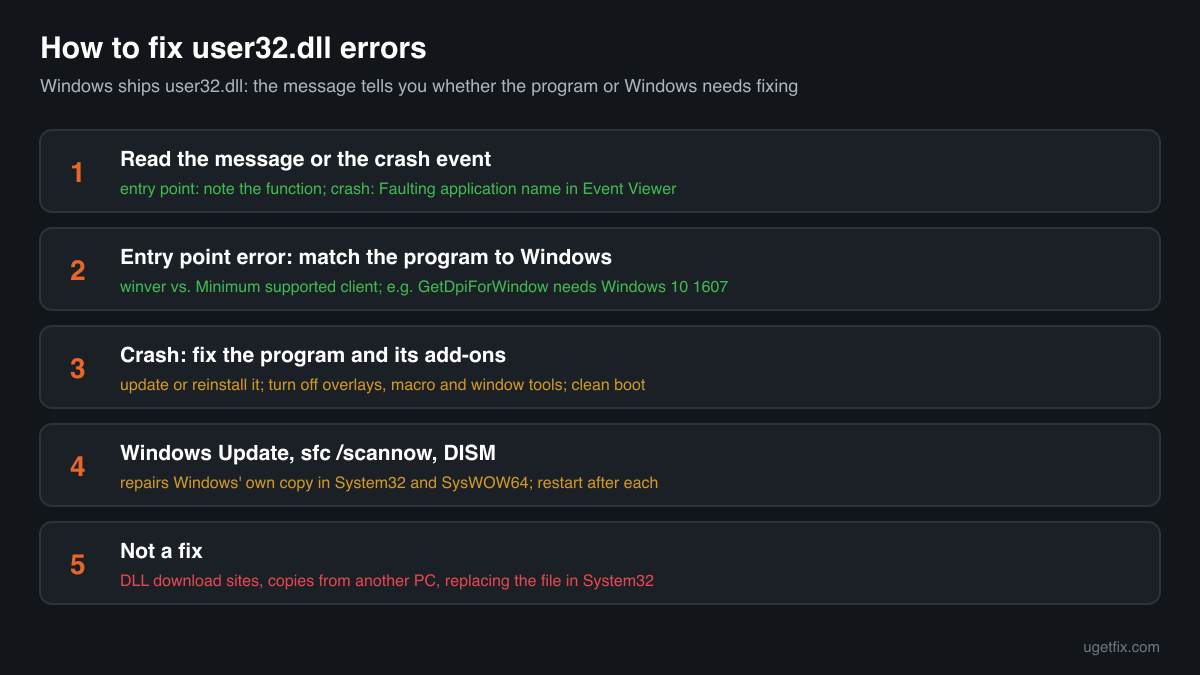
Read the whole message first. If it says that a procedure entry point could not be located in USER32.dll, it names a function that the user32.dll of your Windows does not have: the program was built for a newer Windows than yours. Check the program's system requirements, then install a version that supports your Windows or update Windows. If a program crashes and Event Viewer names USER32.dll as the faulting module, the crash happened while the program was drawing a window or handling input; update or reinstall that program and remove the overlays and tools that hook into other programs' windows. Only when many programs fail, or System File Checker reports damage, is the Windows file the problem: then run Windows Update, sfc /scannow and DISM.
Never copy user32.dll from another computer, an older or newer Windows or a download site into System32, SysWOW64 or a program folder. It does not add a missing function, Windows always loads its own copy for programs, and a replaced file in the Windows folders can leave Windows without a working desktop or unable to start.
Step by step
- Write down the function name. An entry point error reads like this: The procedure entry point GetDpiForWindow could not be located in the dynamic link library USER32.dll. The word between "entry point" and "could not be located" is the function the program asked for. Search for it on Microsoft Learn: the Requirements table of every Windows API function lists the Minimum supported client. For GetDpiForWindow it is Windows 10, version 1607, so the message appears on Windows 7, Windows 8.1 and the first Windows 10 releases. Many such functions deal with screen scaling (DPI), touch and pointer input.
- Compare with your Windows version. Press Windows key + R, type winver and press Enter. The window shows your Windows edition, version (such as 22H2 or 24H2) and build number. If the function needs a newer Windows than the one you have, no file will fix the error: the program does not support your system. The program's download page or readme lists its minimum Windows version.
- Install a program version for your Windows, or update Windows. Developers often keep an older release that still runs on Windows 7 or 8.1, sometimes called a legacy build. Install that one, or move to a supported Windows. On Windows 10 and 11, open Settings, Windows Update and install every update and feature update offered: newer user32.dll functions arrive with Windows releases, and an old Windows 10 version lacks functions that a current one has.
- Crash with USER32.dll as the faulting module: find the program. Open Event Viewer, Windows Logs, Application, and find the Error event at the minute of the crash. The Faulting application name line names the program that crashed; Faulting module name USER32.dll only tells you where the crash surfaced. Windows calls back into the program from user32.dll every time a window is drawn, moved or clicked, so a bug in the program, a damaged installation or a plugin shows up there. Update or reinstall the program named in that line first.
- Turn off overlays and tools that hook into windows. Screen recorders, game and chat overlays, FPS counters, macro and keyboard remapping tools, window managers, theme and taskbar changers and some accessibility tools insert their own code into other programs' windows through user32.dll. When that code fails, the host program crashes with USER32.dll as the module. Close or disable these tools one at a time and test. To find a hidden one, use a clean boot: run msconfig, on Services tick Hide all Microsoft services and Disable all, disable the startup apps in Task Manager, restart and turn them back on in groups.
- Update the graphics and input drivers. Install the newest graphics driver from your PC maker or the graphics card maker, and update mouse, touchpad, pen and keyboard software. user32.dll passes input and window drawing on to these drivers, and an outdated or broken driver package can crash many programs in the same way.
- Install Windows updates and restart. Open Settings, Windows Update, install everything that is offered, including optional quality updates, and restart. Each update replaces user32.dll with the current build for your Windows release, so a damaged copy is fixed in the same pass.
- Run System File Checker, then DISM. Type cmd in the Start menu, right-click Command Prompt and choose Run as administrator. Run sfc /scannow and wait for 100%. It compares protected Windows files, user32.dll in System32 and SysWOW64 included, with the stored originals and repairs any that were damaged or replaced. If it reports files it could not repair, run DISM /Online /Cleanup-Image /RestoreHealth, which repairs the store those originals come from, then run sfc /scannow again and restart.
- Still failing in many programs: repair Windows in place. On Windows 11, Settings, System, Recovery offers Fix problems using Windows Update, which reinstalls the current version of Windows and keeps your files, apps and settings. On Windows 10 the same result comes from running Microsoft's installation media and choosing to keep personal files and apps. If Windows does not reach the desktop, use Startup Repair or System Restore from the recovery environment.
Download the genuine user32.dll for your Windows version
Each file below is Microsoft's own user32.dll for one Windows release, fetched from Microsoft's own server and checked against Winbindex, the index of the files in Windows images and updates. These files are for comparison: to confirm that a user32.dll you have is genuine, or to see which build your release should have. Copying one into Windows or into a program folder does not fix an entry point error, because the missing function is not part of your Windows release, and replacing the file in System32 or SysWOW64 can leave Windows without a working desktop. Repair the real file with the steps above.
Older Windows releases
A free uGetFix account is needed to download. Sign in, or create one in a minute, and you come straight back here.
What not to do
Do not copy user32.dll from another PC or a newer Windows.
The file belongs to one exact Windows build and works only together with the matching win32u.dll, the other USER libraries and the Windows kernel. A copy from Windows 10 or 11 placed on Windows 7, or from one build on another, does not give your system new functions; at best Windows ignores it, at worst nothing with a window starts.
Do not put user32.dll in the program's folder.
For most libraries Windows searches the program's folder first. user32.dll is one of the known DLLs that Windows always loads from its own folder, so a copy next to the .exe changes nothing and the error stays exactly as it was.
Do not download user32.dll from a DLL collection site.
You cannot tell which Windows release, build or architecture such a file comes from, or whether someone changed it. Use the genuine files above only to compare, and the checker below for a file you already have.
Do not take ownership of System32 to replace the file.
Guides that tell you to change the owner and permissions of user32.dll remove the protection Windows puts on its core files. A wrong file there breaks every program with a window at once. System File Checker and DISM repair the file without touching permissions.
Do not use patched system files or extended kernels on old Windows.
Unofficial packs that add newer user32.dll functions to Windows 7 work by changing or redirecting system libraries. Microsoft does not support them, Windows Update may undo them, and they stay on a system that no longer receives security updates.
Check the copy on your PC
Choose the user32.dll you are unsure about, for example one you found outside the Windows folders. Its checksum is calculated in your browser and compared with 1,085 Microsoft builds of the file from Windows releases and updates.
The file stays on your computer. Nothing is uploaded: the checksum is computed locally.
Found a user32.dll outside System32 and SysWOW64, for example in Downloads, Temp, AppData or a program folder? Windows never puts it there. That is a security question, not an error one. Is the user32.dll you found genuine? On 2-Spyware
The error messages and what each one means
The wording tells you which problem you have. These are the texts Windows shows, as written, with the file and a typical function name filled in.
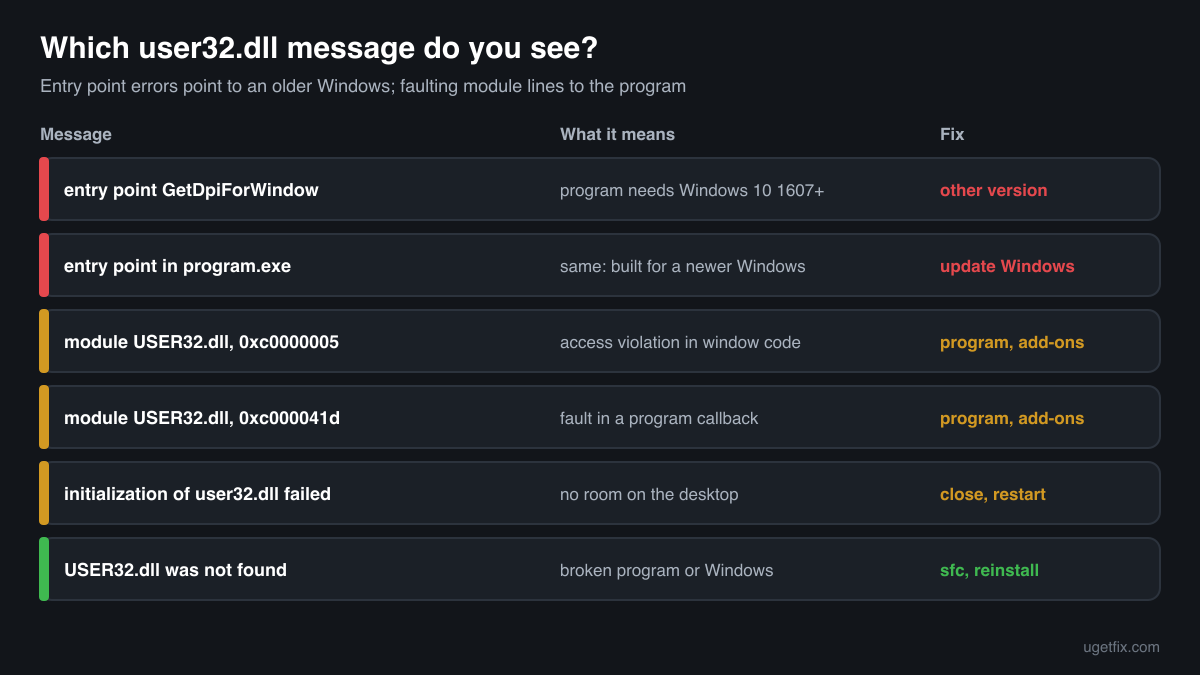
The procedure entry point GetDpiForWindow could not be located in the dynamic link library USER32.dll.
The program asked Windows for a function that your user32.dll does not provide. GetDpiForWindow needs Windows 10, version 1607 or later, so this message is typical for new programs started on Windows 7, 8.1 or an old Windows 10. Other function names appear in the same place; look each one up on Microsoft Learn and compare the Minimum supported client with your Windows. Fix: a program version that supports your Windows, or a newer Windows.
The procedure entry point could not be located in the dynamic link library C:\Program Files\...\program.exe.
Windows 10 and 11 often name the program file instead of USER32.dll, but the cause is the same: the program, or a library it brings along, was built for a newer Windows than the one running it.
Faulting module name: USER32.dll, Exception code: 0xc0000005
A line from the Application log in Event Viewer after a crash. 0xc0000005 is an access violation: code tried to read or write memory it may not use, while user32.dll was handling a window or input for the program. Look at the Faulting application name line. Update or reinstall that program, disable its plugins and close overlays and window tools, then update drivers.
Faulting module name: USER32.dll, Exception code: 0xc000041d
This code means an unhandled error inside a callback: code that the program, or an add-on in it, gave Windows to run while processing a window message. The fault is in that code, not in user32.dll. The fix is the same as above: the program first, then the tools that hook into it.
The initialization of the dynamic link library C:\Windows\system32\user32.dll failed. The process is terminating abnormally.
user32.dll could not set up the program's connection to the desktop, for example because the session has run out of room for new windows, or because a service tries to open windows it is not allowed to. Close programs and restart the PC. If it comes back, note which program or service fails in Event Viewer and update or reinstall it.
The code execution cannot proceed because USER32.dll was not found.
Rare, because no Windows with a desktop starts without this file. On a working PC it usually means a broken program, a damaged Windows installation, or a program for another system run through a compatibility layer. Run sfc /scannow and DISM, then reinstall the program.
File facts
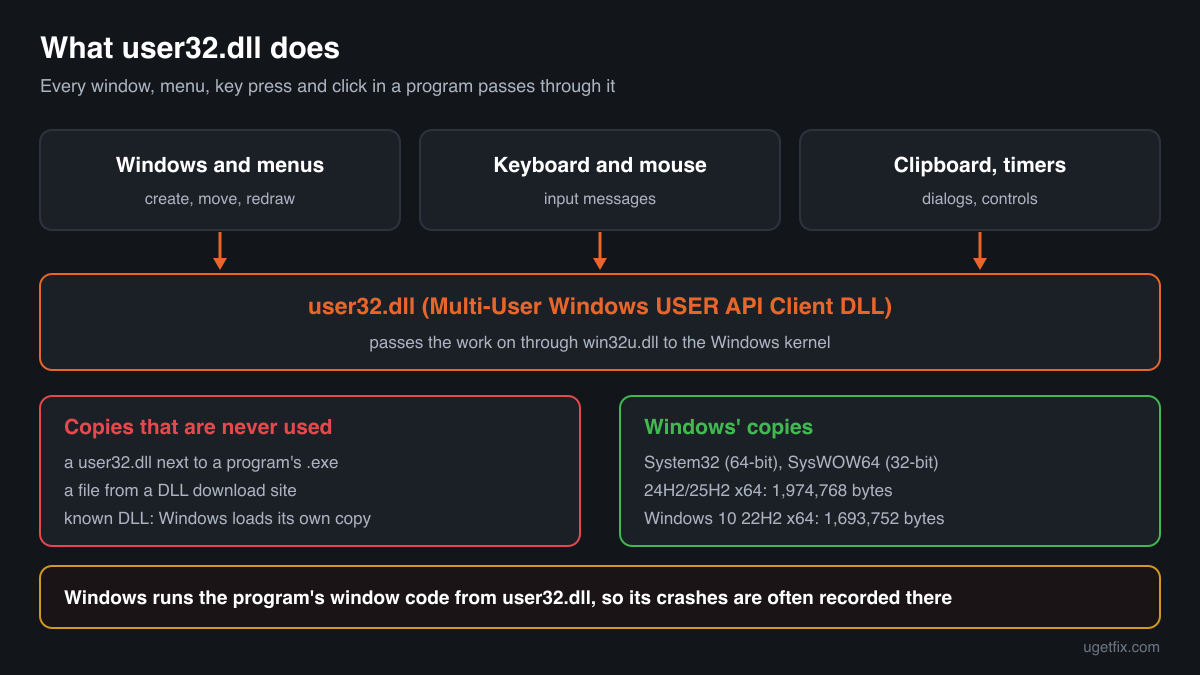
user32.dll describes itself as Multi-User Windows USER API Client DLL. USER is the part of Windows that manages windows and everything the person in front of the screen does with them: creating and moving windows, menus, dialog boxes, buttons and other controls, the clipboard, timers, and the messages through which Windows tells a program that a key was pressed, the mouse moved or a window needs to be redrawn. Programs call user32.dll for all of this, and much of the work is passed on through win32u.dll to the Windows kernel. What Windows reports for the genuine file:
- Description in the file
- Multi-User Windows USER API Client DLL
- Where the genuine user32.dll belongs
C:\Windows\SysWOW64C:\Windows\System32
On 64-bit Windows, System32 holds the 64-bit file and SysWOW64 the 32-bit one used by 32-bit programs; the folder names are historical. user32.dll is listed among the known DLLs (registry key HKEY_LOCAL_MACHINE\SYSTEM\CurrentControlSet\Control\Session Manager\KnownDLLs), which means Windows uses its own copy for every program and never takes one from a program's folder. The genuine file is signed by Microsoft and shows Multi-User Windows USER API Client DLL under Properties, Details, File description. Sizes depend on the release: in Windows 11 24H2 and 25H2 the 64-bit file is 1,974,768 bytes and the 32-bit file 2,023,488 bytes; in Windows 10 22H2 they are 1,693,752 and 1,690,104 bytes. Winbindex also lists smaller Microsoft files named user32.dll, from about 130 KB to 420 KB, in Windows 10 and 11 builds; they are part of Windows too, and the checker on this page knows them.
user32.dll versions by Windows release
Every Windows release has its own build of user32.dll, updated together with Windows through its monthly updates. Winbindex lists 1085 distinct Microsoft builds; the table shows the newest one indexed for each release and the update that delivered it.
| Windows release | File version | Delivered by | Size, 64-bit |
|---|---|---|---|
| Windows 11 26H1 | 10.0.28000.2605 | KB5121000, August 11, 2026 | 1,889,872 bytes |
| Windows 11 25H2 | 10.0.26100.9549 | KB5127648, October 13, 2026 | 1,974,768 bytes |
| Windows 11 24H2 | 10.0.26100.9549 | KB5127648, October 13, 2026 | 1,974,768 bytes |
| Windows 11 23H2 | 10.0.22621.6630 | KB5129242, September 14, 2026 | 1,794,736 bytes |
| Windows 11 22H2 | 10.0.22621.6630 | KB5129242, September 14, 2026 | 1,794,736 bytes |
| Windows 11 21H2 | 10.0.22000.3079 | KB5044280, October 8, 2024 | 1,774,064 bytes |
| Windows 10 22H2 | 10.0.19041.7663 | KB5129236, September 14, 2026 | 1,693,752 bytes |
| Windows 10 21H2 | 10.0.19041.7663 | KB5129236, September 14, 2026 | 1,693,752 bytes |
| Windows 10 21H1 | 10.0.19041.7663 | KB5129236, September 14, 2026 | 1,693,752 bytes |
| Windows 10 20H2 | 10.0.19041.7663 | KB5129236, September 14, 2026 | 1,693,752 bytes |
| Windows 10 2004 | 10.0.19041.7663 | KB5129236, September 14, 2026 | 1,693,752 bytes |
| Windows 10 1909 | 10.0.18362.1766 | KB5013945, May 10, 2022 | 1,656,400 bytes |
Questions people ask
What does "procedure entry point could not be located in USER32.dll" mean?
The program asked Windows for a function by name, and the user32.dll of your Windows release does not contain it, because the function was added in a newer Windows. Look up the named function on Microsoft Learn: its Requirements table shows the minimum Windows version. Then use a program version that supports your Windows, or update Windows. Replacing user32.dll does not help.
Can I download user32.dll to fix the error?
No. user32.dll is part of Windows and works only with the rest of the same Windows build. Windows always loads its own copy, so a downloaded file in a program folder is ignored, and one forced into System32 can leave you without a working desktop. Download a genuine copy only to compare it with a file you have.
Is USER32.dll as the faulting module a sign that Windows is broken?
Usually not. Programs hand user32.dll their window code to run every time something happens on screen, so a bug in the program or in an add-on inside it often surfaces there. If only one program crashes, fix that program and the tools that hook into it. If many unrelated programs crash with the same module, run sfc /scannow, DISM and a memory test.
Why do games crash with USER32.dll in the error?
Games often run with overlays, FPS counters, recording tools, macro software or mods that hook into their window, and a fault in any of them is recorded in user32.dll. Turn the overlays off one by one, verify the game files in its launcher, remove mods, and update the graphics driver. The game's own crash log usually names the add-on.
What is the difference between user32.dll and win32u.dll?
Both are genuine Windows libraries. Programs call user32.dll, which holds the functions for windows, menus and input. Much of that work has to be done by the Windows kernel, and win32u.dll is the thin layer that passes those calls on to it. Crash reports may name either one; the fix is the same.
Can I run a new program on Windows 7 by copying user32.dll from Windows 10?
No. The newer user32.dll depends on matching versions of win32u.dll, the other system libraries and the Windows kernel, and Windows 7 loads only its own copy anyway. Unofficial extended kernels exist, but they modify system files on a system that no longer receives security updates. The supported path is a newer Windows or an older version of the program.
Is user32.dll a virus?
The copies in System32 and SysWOW64 are genuine Windows files, and nothing with a window runs without them. Malware calls user32.dll functions like any other program and has no need to replace the file. A user32.dll in another folder, such as Downloads or AppData, is not Windows' copy: check it with the tool on this page and read the security page linked above.
Related guides
vuser32.dll is missing or fails to load: what the file is and how to fix it
Referenceuser32.dll error: what the entry point and crash messages mean and how to fix them
FixHow to fix Entry Point Not Found error in Windows?
FixHow to fix Windows update error 0x80020010?
Sources
- Winbindex, the Windows binaries index (m417z)
- Microsoft Learn: Use the System File Checker tool to repair missing or corrupted system files
File data read on October 17, 2026.

The editors who write and check uGetFix guides and reference pages. File facts are read from Microsoft's own installers and documentation, and every page shows the date its data was read.
Questions and experiences
Ask about this page: members and our editors answer. Reading is open; writing needs a free account.
…