How to fix
Easy ways to fix Twitch keeps stuttering or lagging
on Windows
Fix Twitch stuttering or lagging on Windows 10 and 11 effortlessly with our expert-tested solutions. Enjoy smooth streaming in minutes!

What causes Easy ways to fix Twitch keeps stuttering or lagging?
- Internet connection issues
- Insufficient bandwidth for live streaming
- Browser-related problems
- Outdated browser version
- Twitch server issues
Repairs Windows system files, removes malware, and restores a clean OS state — without reinstalling.
Hello. I came across a weird problem with Twitch - it started lagging and stuttering a couple of weeks ago out of the blue. Everything used to work fine before, regardless if I watched VODs or livestreams. Now, I can not enjoy anything on the platform because of this. I would appreciate any advice. I am using the Google Chrome browser, by the way.
Twitch became the to-go platform when it comes to video game streaming - there are over 9 million streamers to choose from.[ref en-1] Since its release in 2011, it accumulated an exponential growth in viewer count: almost 3 million people access the website every day. While a competitor, Mixer, was established by prominent tech giant Microsoft, it never lived up to the hype and was shut down only after a little over 4 years of operations, despite hiring streamers such as Ninja or Shroud.[ref en-2]
Over time, Twitch incorporated more different categories than just video games and included sections for music, creative arts, ASMR, the ever-growing Just chatting, the controversial Pools, Hot Tubs and Beaches, and many other categories. This expansion only provided the platform more diversity, inviting more and more people to find something they are interested in.
With such popularity, the streaming platform is expected to perform well by many viewers. Unfortunately, not everything goes smoothly for everybody. For over five years, viewers are complaining about constant Twitch stuttering and lag while viewing streams or Videos on Demand (VODs). And this is not the only issue affecting the platform - we previously talked about Twitch error 2000 and Twitch black screen.
Not only is it annoying to constantly experience the disruptions while watching streams, but in some cases, the issues become so severe that the platform becomes practically unusable. It is evident that something can be done to fix these problems - and there are plenty of things to try.
One of the main reasons for the lag and stutter is internet connection issues. If your internet does not meet the minimum requirements needed for live streaming, you need to acquire a better connection speed. That being said, users who complained about the issue said that they use mid-range to high-end PCs and have stellar internet connections otherwise.
Below you will find several tips and step-by-step solutions that should help you fix Twitch stutter and lag. Keep in mind that you might have to try several methods before finding the one that works for you.
Fix 1. Reduce the quality of the stream
First of all, we highly recommend you check your internet connection speed. There are plenty of websites that can measure it for you, so go ahead and do it. In order to stream a video online via any service at 1080p/720p, you would need a bandwidth speed of at least 5Mbps.[ref en-3]
If your speed is below that, you need either reduce the streaming quality to 480p (or even lower) or contact your internet provider and order a better plan. Keep in mind that reducing the quality to 480p or below will reduce your viewing experience, and you won't be able to enjoy streams properly.
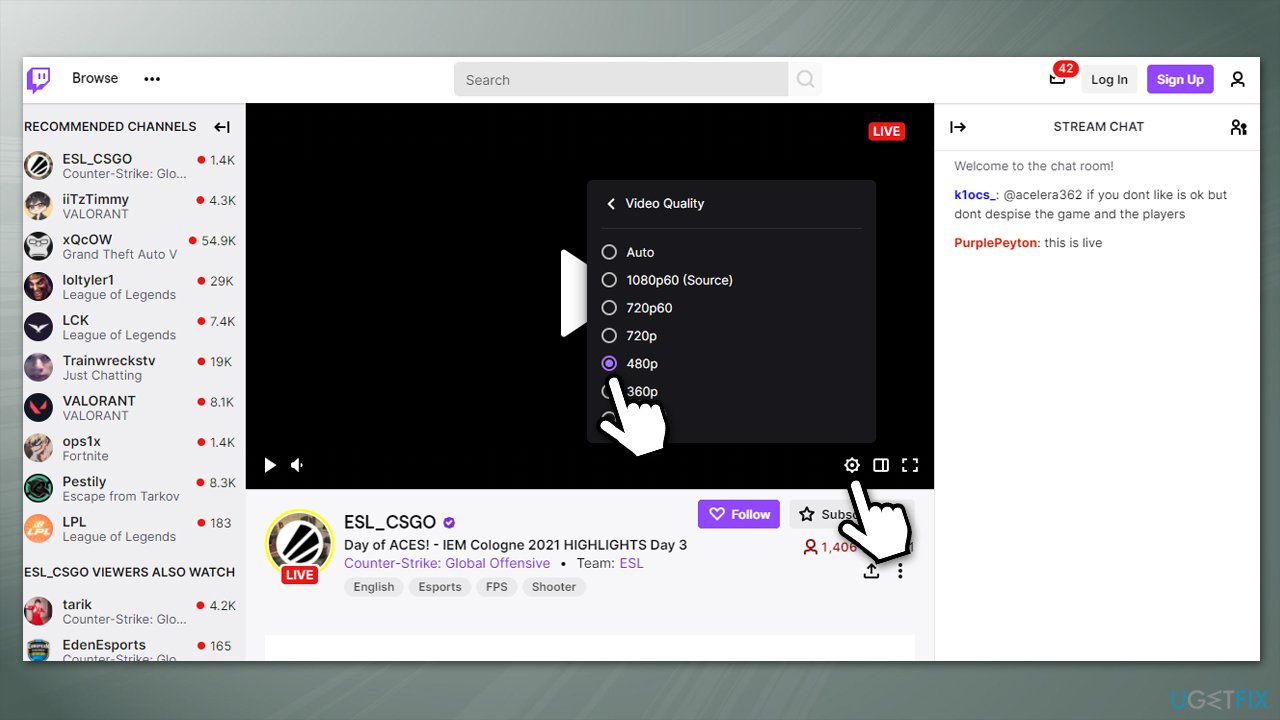
We also recommend using a [rev id="Private Internet Access"] VPN, especially if you are located further from Twitch servers.
Important: make sure that there are not background processes or applications that eat up your bandwidth. For example, updates to Steam games might be as big as 50 GB, so check whether it is the reason for Twitch lag.
Fix 2. Troubleshoot internet problems
If you usually have a good internet connection, there might be some disruptions that are causing the internet connection to abruptly shut down at times. In order to address that, try using the built-in troubleshooter:
- Type troubleshoot in Windows search and hit Enter
- On the right side of the window, select Additional troubleshooters
- From the list, select Internet Connections and click Run the troubleshooter
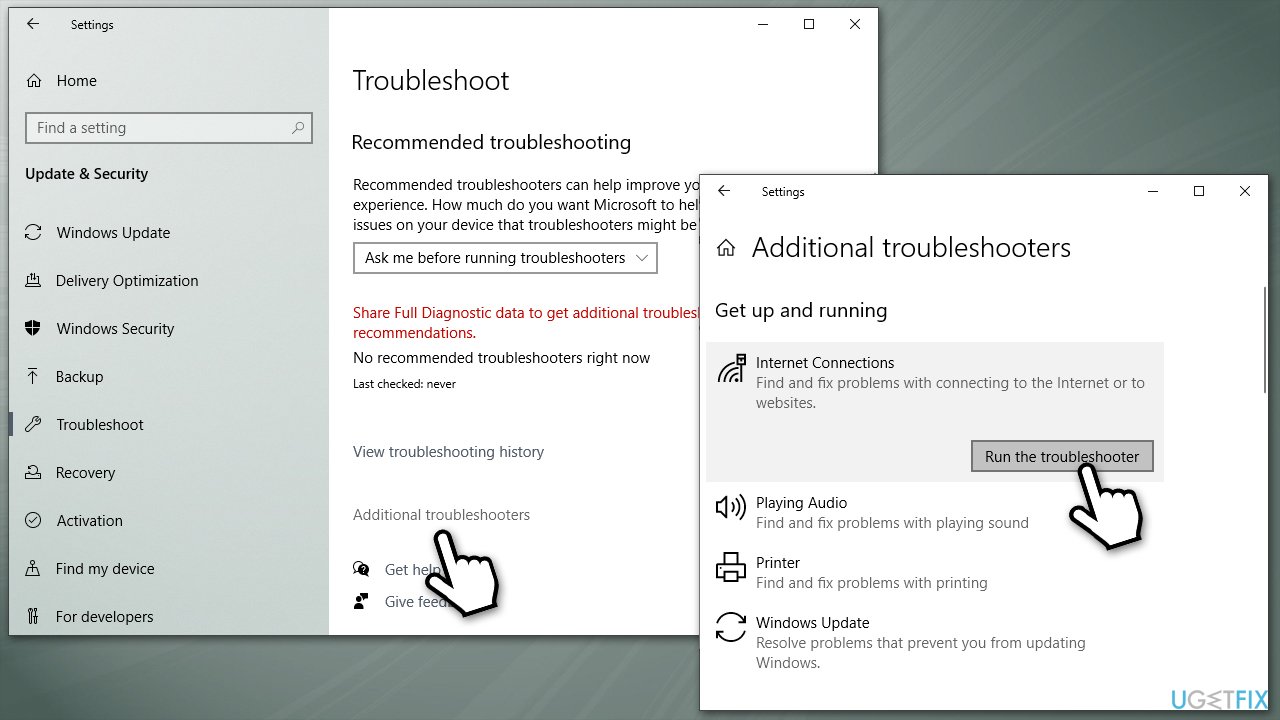
Fix twitch lag and stuttering run troubleshooter - Wait till the scan is complete and the proposed fixes applied, then restart your PC.
Fix 3. Reset your internet connection
Resetting your internet connection might also resolve connectivity issues:
- Type in cmd in Windows search
- Right-click on Command Prompt and select Run as administrator
- Copy and paste the following commands, pressing Enter after each:
ipconfig /flushdns
ipconfig /registerdns
ipconfig /release
ipconfig /renew
netsh winsock reset - After the actions are complete, reboot your system.
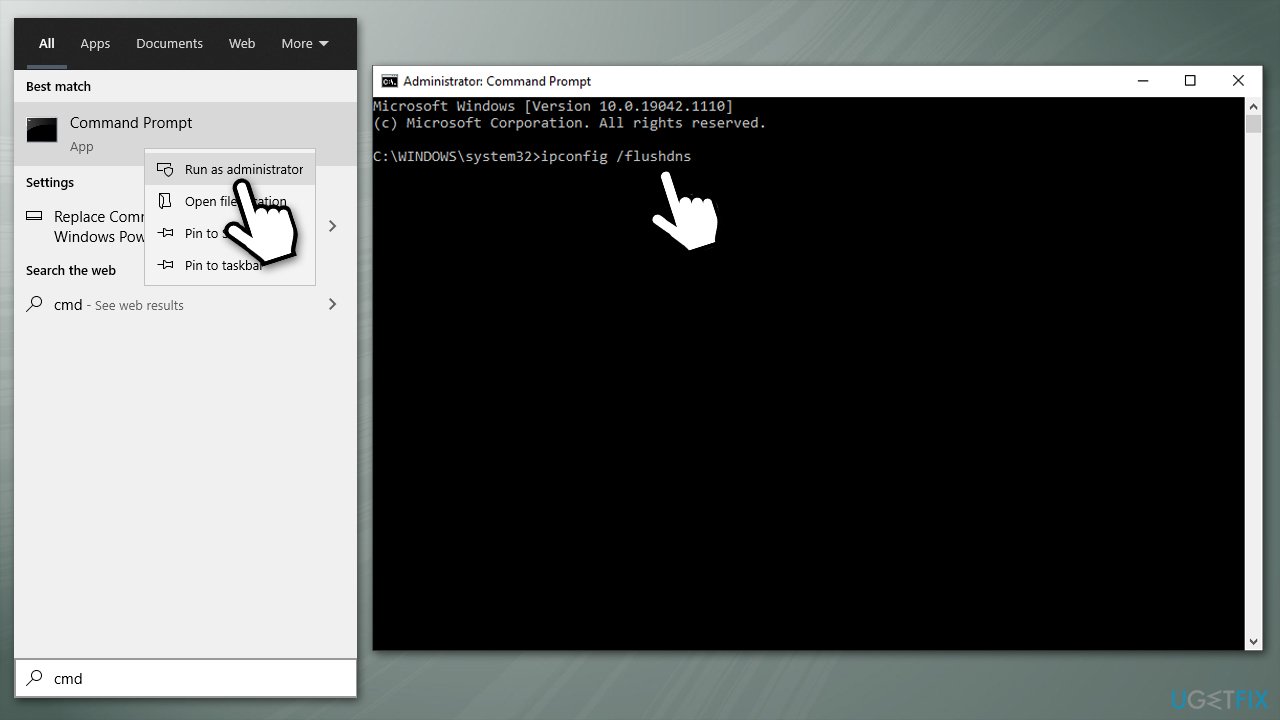
Fix twitch lag and stuttering reset internet connection
Note that malware can cause various computer issues. Therefore, we recommend you perform a scan with [d1] - it can not only find and remove infections thanks to the Avira AntiVir engine but also fix virus damage along with all the underlying issues automatically. Besides, the app can also prove useful in the future if you ever have to deal with BSODs, various system errors, or registry issues.
Fix 4. Try different DNS
DNS is usually provided by your ISP automatically. Many people opt for using alternative DNS servers for multiple reasons (tracking, content restrictions, etc.). If you are having problems with online content, you can try using Google's DNS - it is completely free:
- Press Win + I on your keyboard
- Go to Network & Internet
- Select Change adapter options
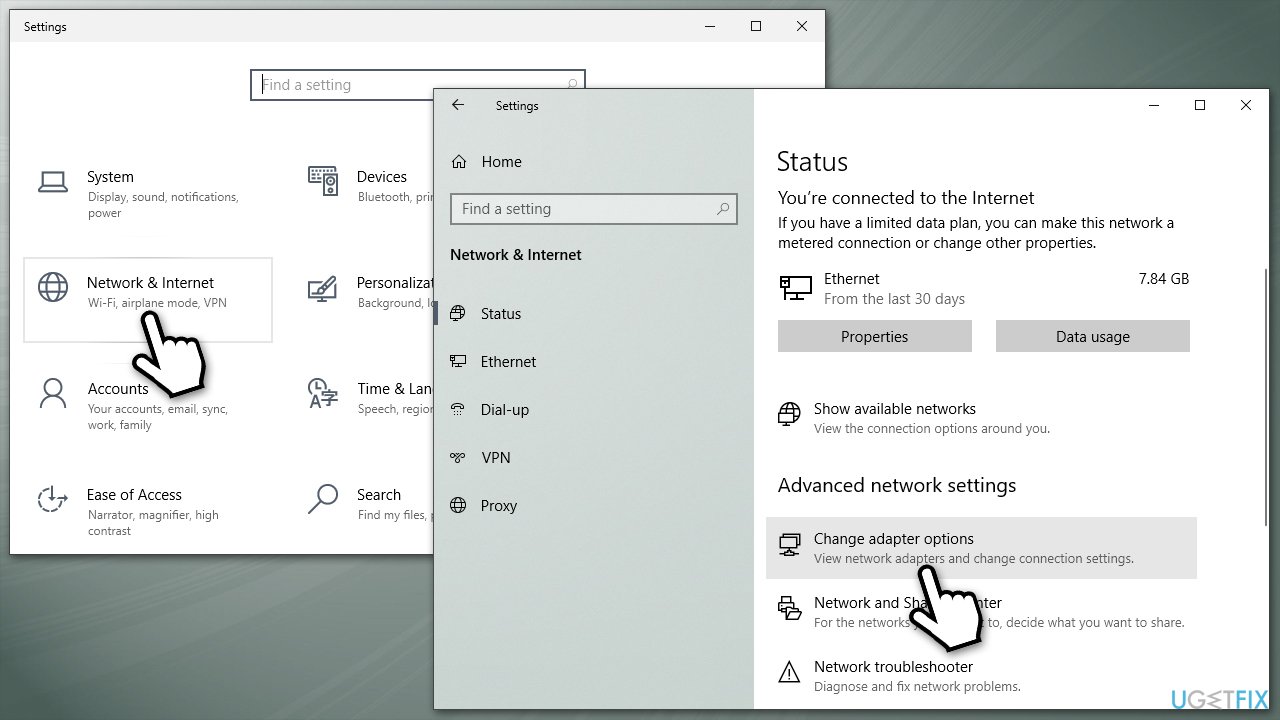
Fix twitch lag and stuttering use different dns - Right-click on your main internet connection and select Properties
- Pick Internet Protocol Version 4 (TCP/IPv4) and click on Properties
- Here, tick Use the following DNS server addresses and enter the following information:
8.8.8.8
8.8.4.4 - Click OK.
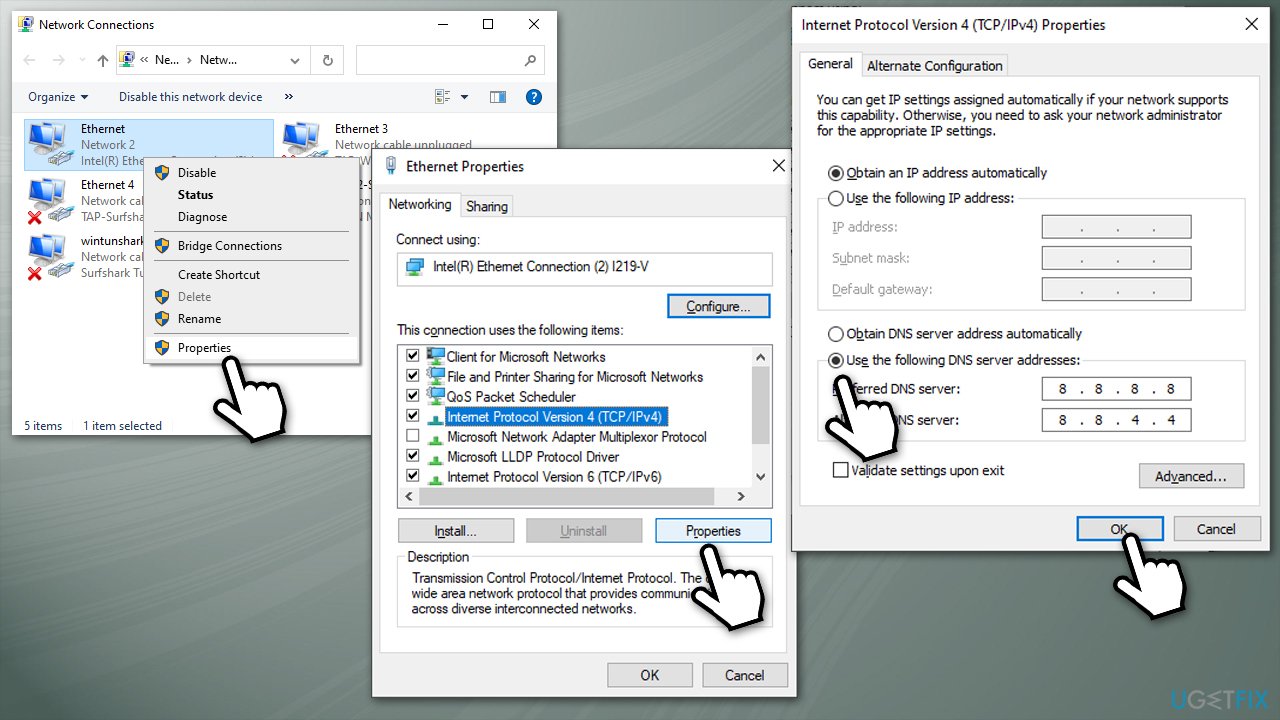
Fix twitch lag and stuttering use different dns2
Fix 5. Disable hardware acceleration on Chrome
This method helped most users:
- Open Chrome, select Menu > Settings
- Scroll down and click Advanced
- Scroll down to locate System section
- Toggle the Use hardware acceleration when available switch to the left.
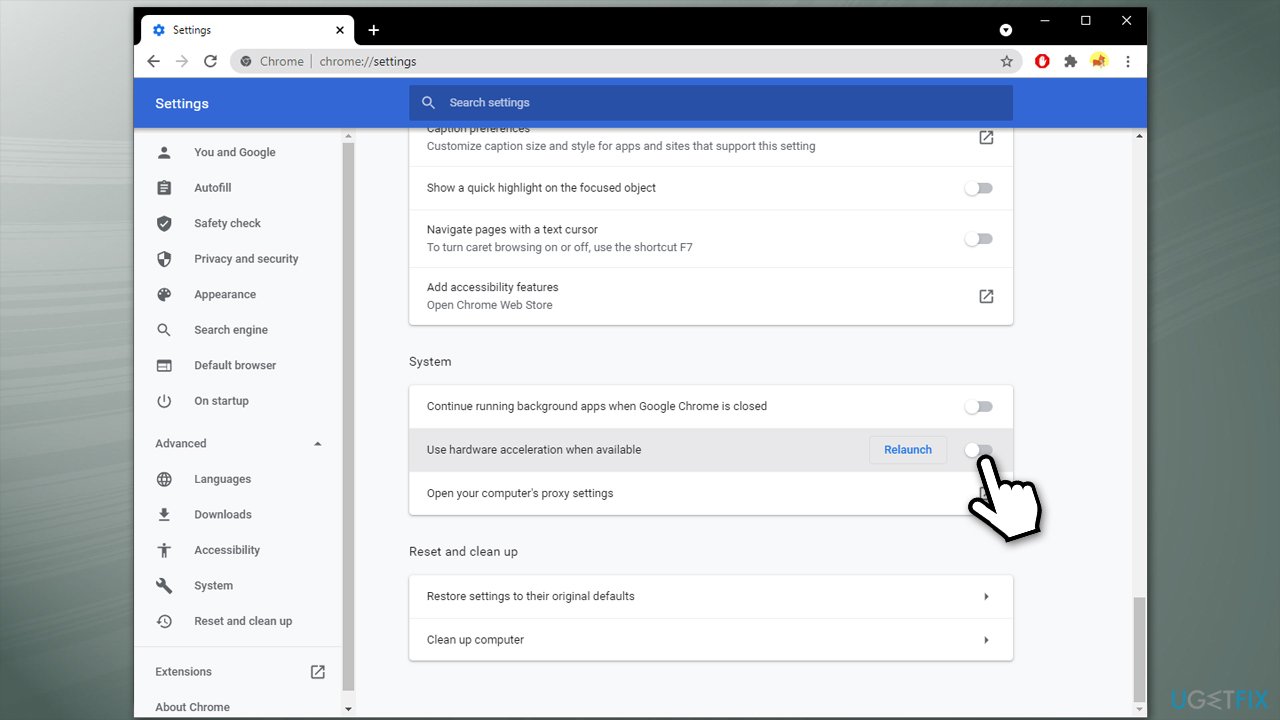
Fix twitch lag and stuttering disable hardware acceleration
Fix 6. Clear browsing data and cookies
If you do not clean your browser on a regular basis, residue files and pieces of data can linger for a long time, slowing down your browser and connection to various websites. Hence, you should get rid of cookies and other data from Chrome:
- Open Chrome and go to Menu > Settings
- Find Privacy and security section, select Clear browsing data
- Under Time range, select All time, and make sure Browsing history, Cookies and other site data, and Cached images and files boxes are checked
- Click Clear data.
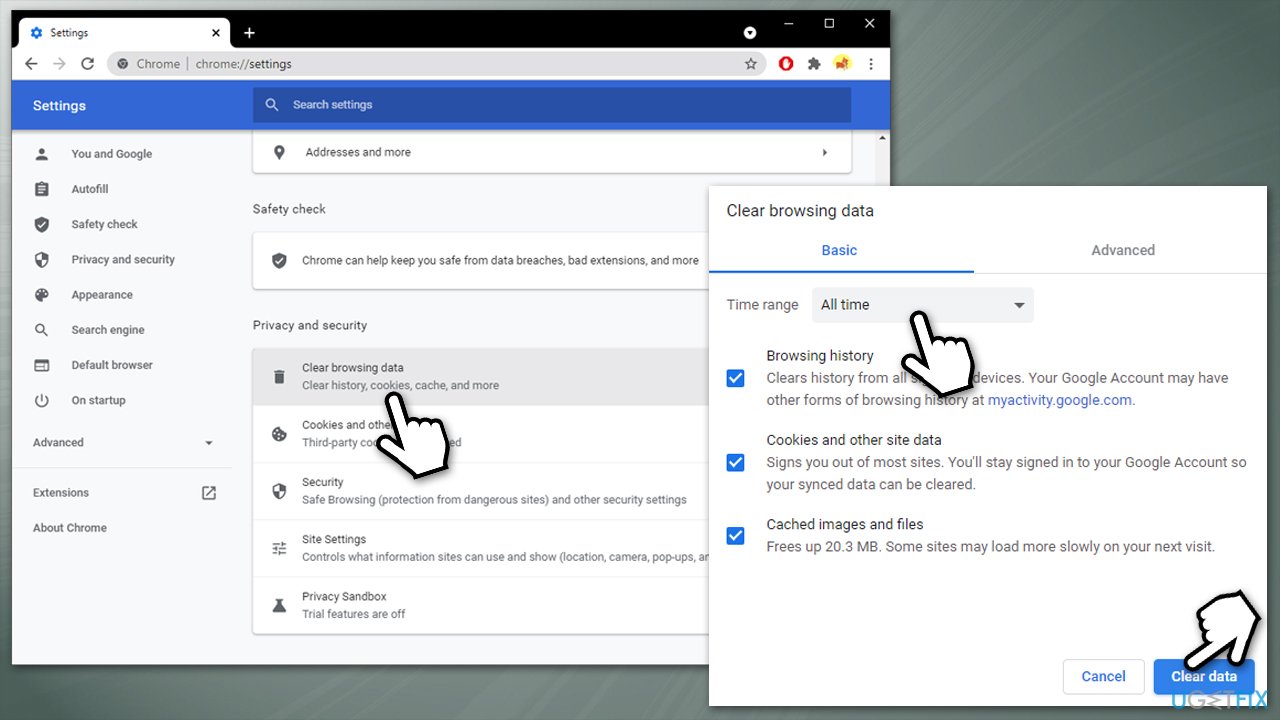
Fix twitch lag and stuttering clear browsing data cookies
Fix 7. Install Twitch client or change the browser
There are many components and preferences that can be incorporated between the streaming services, browsers, and computer configuration. In some cases, it becomes rather difficult and annoying when it comes to determining the real cause for the Twitch lag or stutter.
If none of the above solutions managed to fix the lag or stuttering, you could try installing Twitch client for Windows or Mac on the official website. Additionally, if you are experiencing Twitch lag or stuttering on Chrome, you should try using another browser - MS Edge, Mozilla Firefox, etc.
Bottom line
To fix Twitch stuttering or lagging, ensure your internet connection meets the minimum requirements, consider switching browsers, and check for browser updates. If the problem persists, try troubleshooting your network or contacting Twitch support.
Frequently asked questions
Try clearing your browser cache and cookies, as this can help improve Twitch performance on Windows 10. Additionally, ensure that your internet connection is stable and check for any background applications that may be consuming bandwidth.
Lowering the video quality settings in the Twitch player can help reduce stuttering on Windows 11. Also, consider updating your graphics drivers and disabling hardware acceleration in your browser settings.
Yes, adjusting the network settings and ensuring that Windows 10 is up to date can improve Twitch streaming performance. You can also try disabling any VPNs or proxies that may interfere with your connection.




Report an issue
What's wrong with this guide? We review every report and update or remove content.
Report received — thank you. We'll review and fix it.
You need a free account to submit a report.
Be the first to comment