How to fix
Dolby Atmos no sound issue
on Windows
Resolve the Dolby Atmos no sound issue on Windows 10 or 11 quickly and effectively. Expert-tested solutions for seamless audio, fixed in minutes.

What causes How to fix Dolby Atmos no sound issue on Windows?
- Audio malfunctions due to corrupted system files
- Failures within the configuration process
- Incompatible drivers installed on Windows
- Corrupt drivers that affect audio output
Repairs Windows system files, removes malware, and restores a clean OS state — without reinstalling.
Hi, I am trying to setup my Dolby Atmos for Home Theater on my Dell laptop running Windows 10. It seems like it says "Ready to use," but once I connect everything and choose Dolby Atmos, there is no sound coming out at all (even though it works on other modes). Is there anything that could be done to fix this? Thanks.
Dolby Atmos is a digital surround sound system that allows users to enhance their video or gaming experience by providing various audio enhancements. According to the developer, it allows the playing of multichannel movie soundtracks, which makes the audio more three-dimensional, in addition to the normal 5.1 or 7.1 channel audio[ref en-2] configuration.
The system can be bought separately and then connected to other devices - one of them is a Windows 10 computer. Although it is also important to note that there is ATMOS surround sound technology that can be commonly found in Windows PCs, tablets, phones, and other devices and should not be confused with the Dolby Atmos Home Theater mode.
Unfortunately, many users have been complaining about technical issues surrounding this technology, particularly when they try to connect the Dolby Atmos Home Theater mode via Windows computer. While some people said they could not hear the sound at all, others claimed that they received the "Something went wrong" error during the setup process.
There could be several reasons for audio malfunctions on a Windows PC, especially when talking about new technology being added. If something is fundamentally wrong with the operating system, for example, system files are corrupted, users may struggle with additional assets being added. In this case, we would strongly recommend trying a Windows repair tool [d1] - it can find and fix underlying problems automatically within just a few minutes thanks to its patented technology.
In most cases, Dolby Atmos no sound issue is related to failures within the configuration process or incompatible, corrupt drivers[ref en-3] that are installed on Windows. Below you will find several methods on how to fix various audio issues with this amazing technology.
Fix 1. Set Dolby Atmos for Home Theaters as default output source
- Click on the speaker icon at the bottom-right corner of your screen
- Here, you will see an arrow button next to your playback device - click it
- Set the default to Dolby Atmos for Home Theaters.
Fix 2. Use the "test" function after connecting the sound system to the PC
One of the most simple fixes that many users may overlook is testing the sound via your computer sound settings.
- Right-click on the speaker icon at the bottom-right corner of your screen and select Sounds
- Go to Playback tab
- Right-click select Test
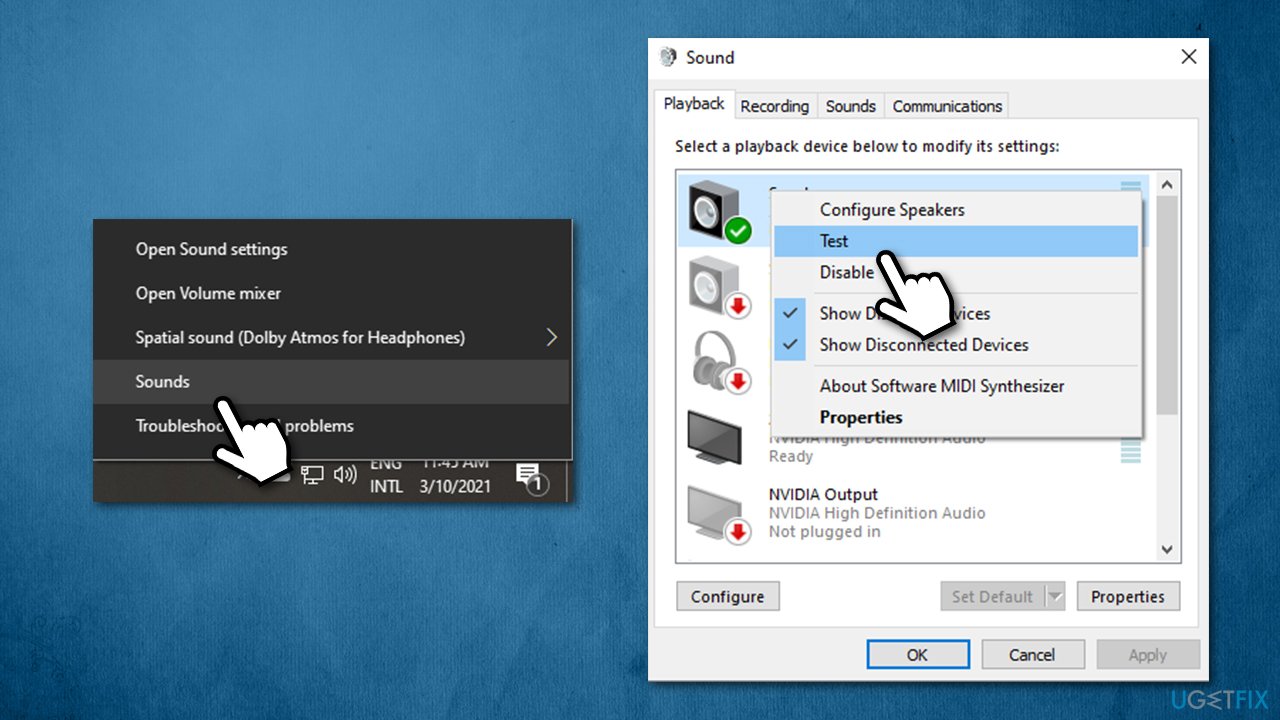
How to fix dolby atmos no sound issue on windows run test audio - See if that helped your sound issues.
Fix 3. Run Audio troubleshooter
Check for audio issues with the built-in Windows troubleshooter:
- Right-click on Start and pick Settings
- Go to Update & Security
- On the left side, pick Troubleshoot
- Here, click on Additional troubleshooters if you can't see them listed on the right side of the window
- Select Playing audio and click Run the troubleshooter.
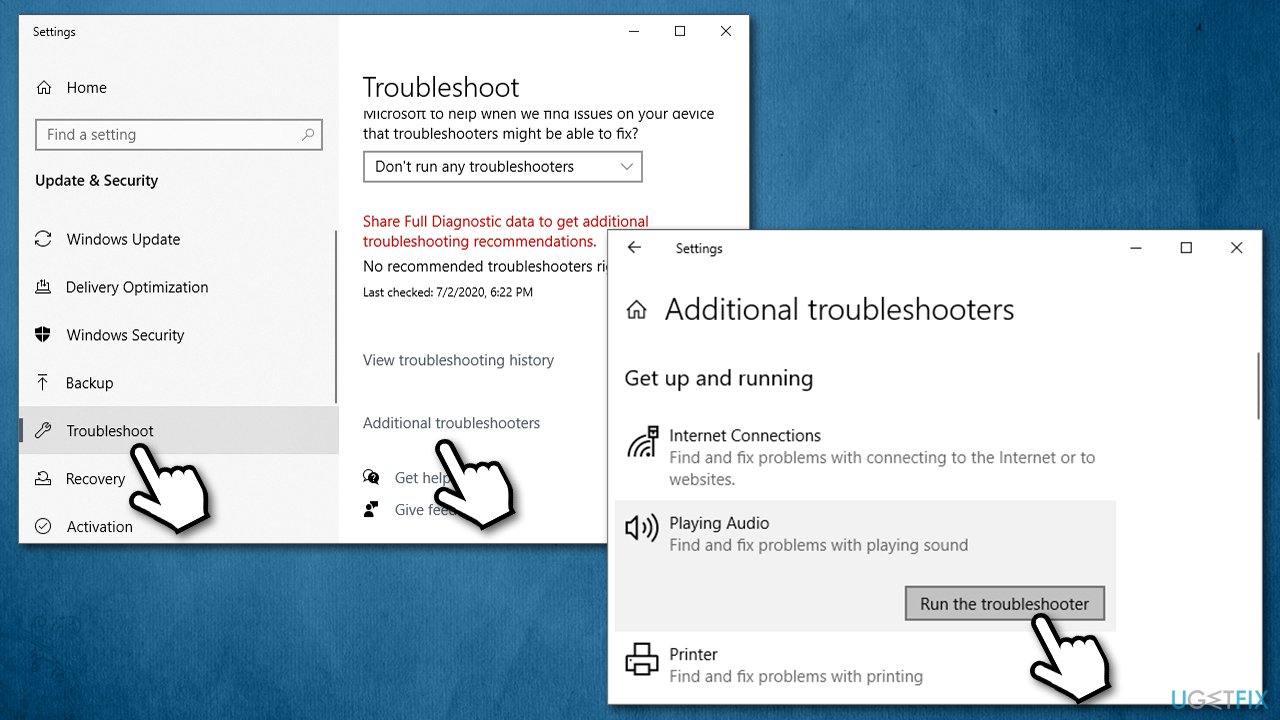
How to fix dolby atmos no sound issue on windows run audio troubleshooter
Fix 4. Roll back your sound driver
- Right-click on Start and pick Device Manager
- Expand Sound, video and game controllers section
- Right-click on the driver and select Properties
- Go to Driver tab
- Click Roll Back Driver
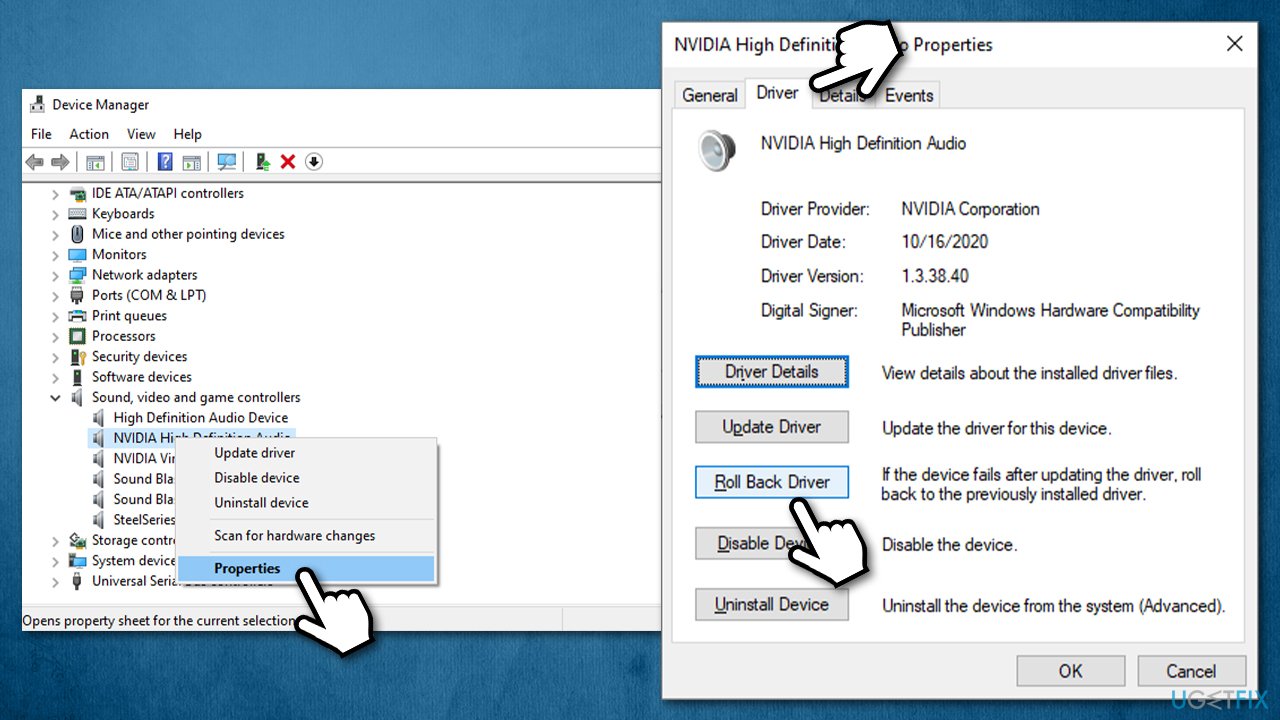
How to fix dolby atmos no sound issue on windows roll back drivers - Select the reason for rolling back and pick Yes.
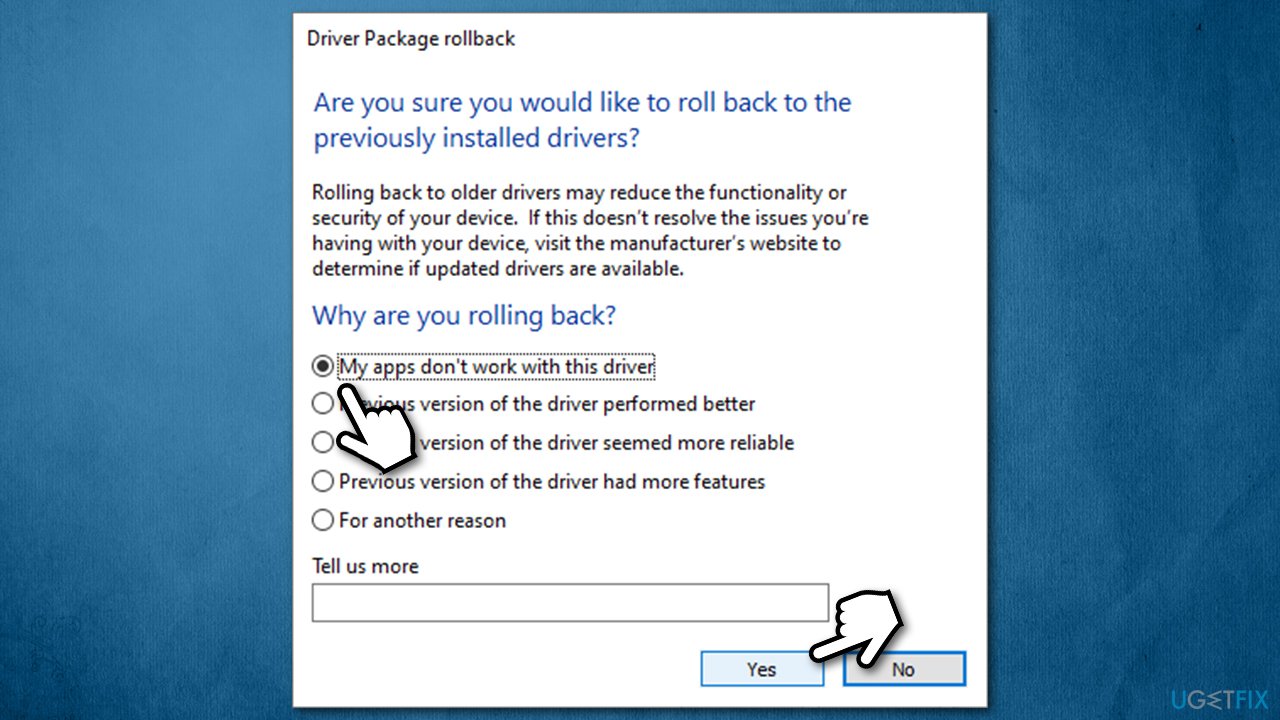
How to fix dolby atmos no sound issue on windows roll back drivers2
Fix 5. Reinstall your sound drivers
In some cases, the reason may lie within incompatible drivers altogether, so you should try reinstalling them altogether. Here's how:
- Go back to the Device Manager and expand Sound, video and game controllers section again
- Right-click on the the device and select Uninstall device
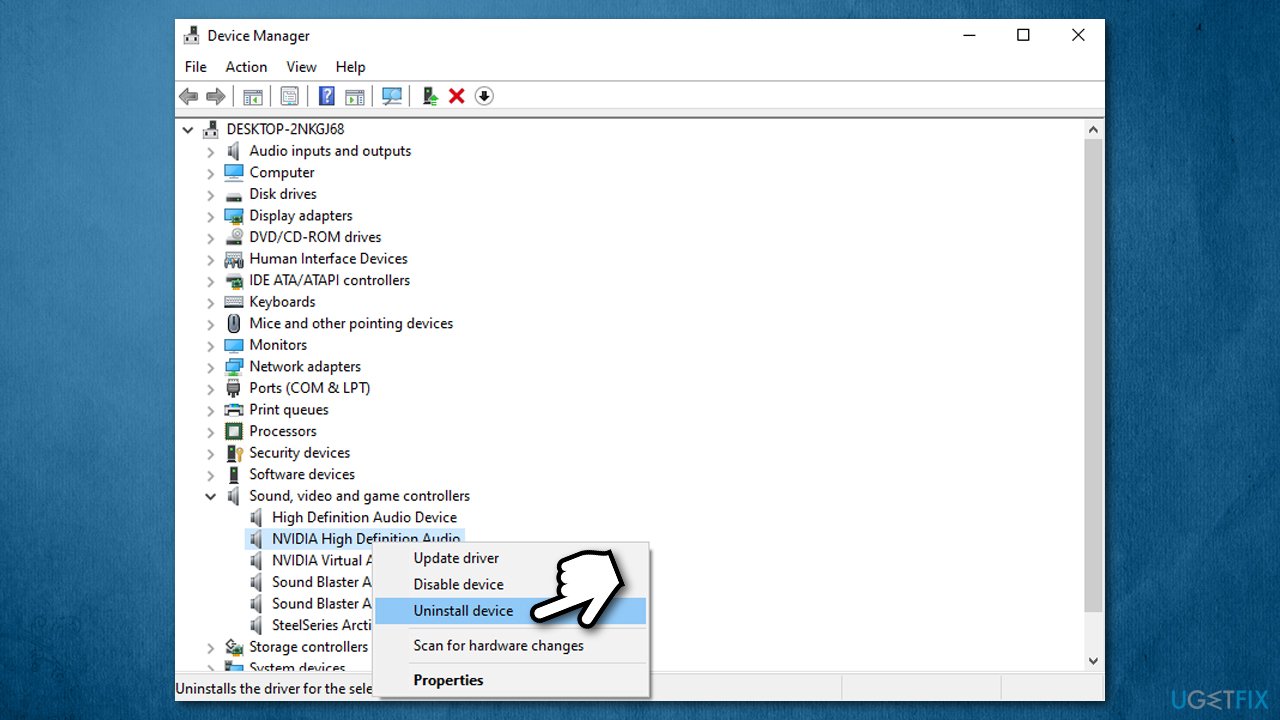
How to fix dolby atmos no sound issue on windows reinstall drivers - Proceed with uninstallation and then reboot your PC.
Now you need to download and install the newest drivers, which can be done via Device Manage also, although it is not the optimal option by far. When dealing with problems, it is highly recommended you download the latest drivers from the manufacturer's website. If you are unsure which driver version you need or which device you are using, you can opt for an automatic option with [rev id="DriverFix"] updater.
Fix 5. Update or rollback Dolby Access app
According to many users, they started having Dolby Atmos sound issues after a Windows update since the Dolby Access app update comes along. Unfortunately, these things happen due to compatibility issues, and software developers need to fix them. Thus, if you are using an older version of the app, you should go to Microsoft Store and download the newest version.
Likewise, if you installed a new update for Windows or Dolby Access, you should roll back to the previous version of the app. Instead of relying on third-party websites (which could be offering malware[ref en-1] instead of a legitimate app) for this option, you should get a legitimate version instead. Here's how:
- Go to Home section of the app
- Scroll down and click on Info
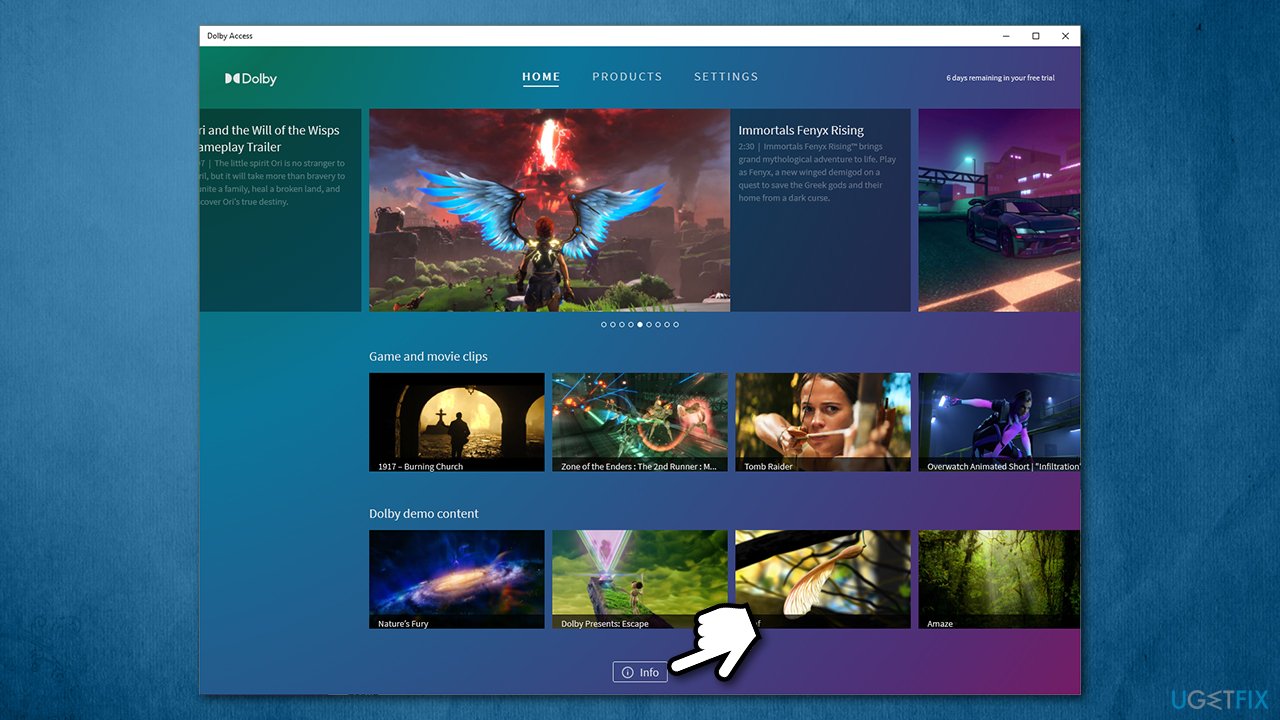
How to fix dolby atmos no sound issue on windows roll back to earlier version of dolbyaccess app - Select Dolby Access Support
- Scroll down until you see Still need help? section
- Click Contact Us
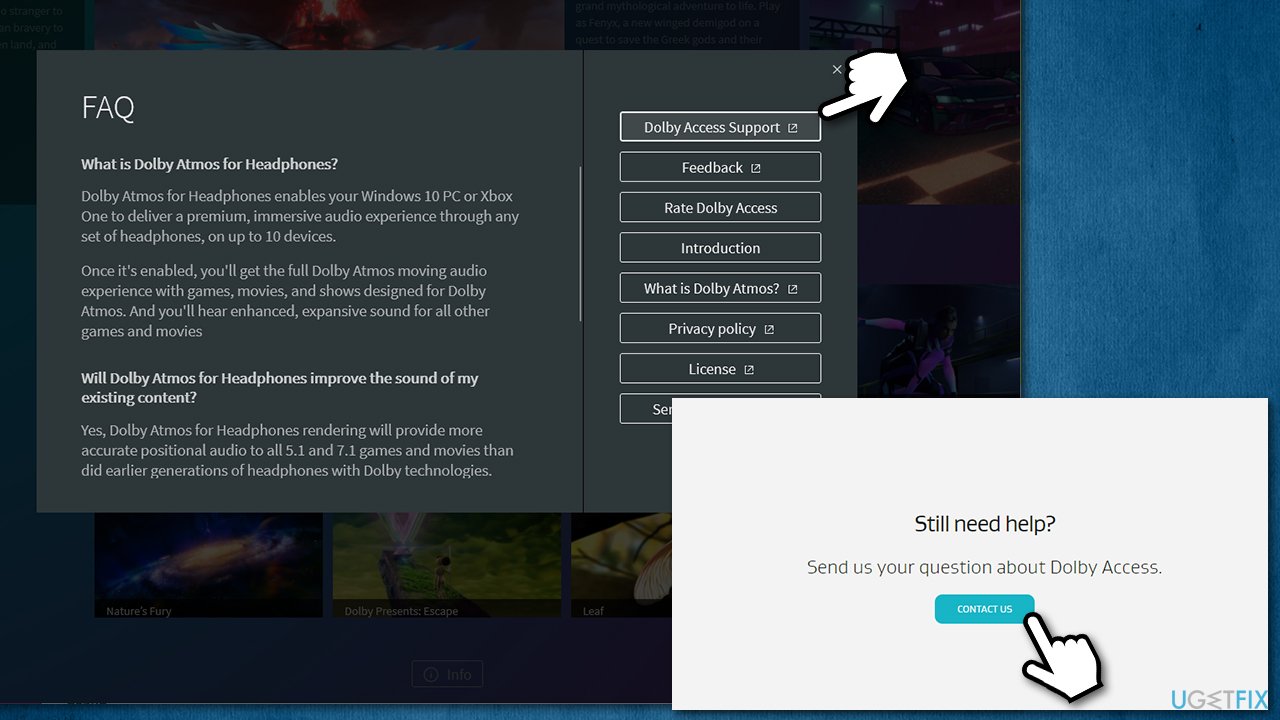
How to fix dolby atmos no sound issue on windows roll back to earlier version of dolbyaccess app2 - Fill in the required fields and describe your problem and submit the form
- You will receive the required information via your email.
Bottom line
To fix the Dolby Atmos no sound issue, users can try using a Windows repair tool to address underlying problems, ensure proper configuration, and update or reinstall drivers. If these methods do not resolve the issue, further troubleshooting may be necessary.
Frequently asked questions
First, check your audio output settings to ensure that the correct playback device is selected. Then, try disabling and re-enabling Dolby Atmos in the sound settings.
To update your audio drivers, go to Device Manager, expand the 'Sound, video and game controllers' section, right-click your audio device, and select 'Update driver'.
Yes, you can reset Dolby Atmos by going to the 'Apps & features' settings, finding Dolby Access, and selecting 'Advanced options' to reset the app.




Report an issue
What's wrong with this guide? We review every report and update or remove content.
Report received — thank you. We'll review and fix it.
You need a free account to submit a report.
Be the first to comment