How to fix
Message pop-up “error code: rundll32.exe”
on Windows
Resolve the "error code: rundll32.exe" pop-up on Windows 10 or 11 swiftly. Follow our expert-tested solutions for a hassle-free fix in minutes!

What causes How to fix message pop-up “error code: rundll32.exe”?
- Fake error message designed by cybercrooks
- Misleading tech support scam pop-up
- Triggered by adware program
- Related to recently installed bundled freeware
- Confusion caused by unknown file name
Repairs Windows system files, removes malware, and restores a clean OS state — without reinstalling.
Hi. From time to time, I encounter Error code: rundll32.exe while browsing the internet on Chrome. I don't know what is wrong or why is this error is showing up, because I do not see any impact on my daily activities. Is there something I need to be concerned about? My PC runs Windows 10 if that makes a difference.
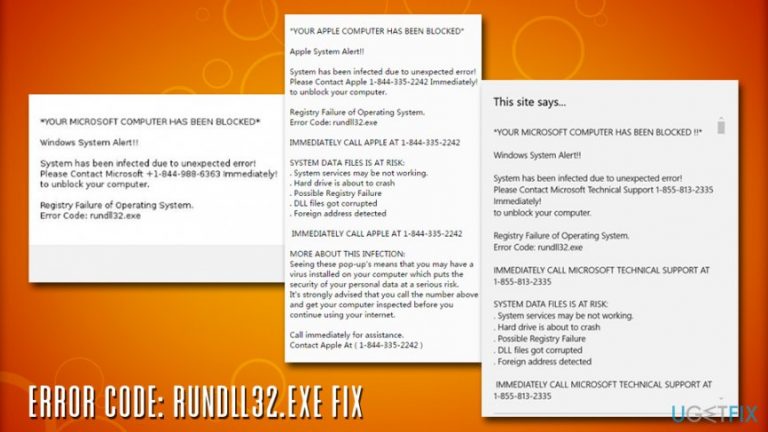
Error code: rundll32.exe is a fake error message designed by cybercrooks to deceptively make users call the provided number of the alleged tech support. The misleading tech support scam[ref en-1] pop-up appears on Google Chrome, Safari, Mozilla Firefox, Internet Explorer, or another browser, as well as Windows and Mac operating systems.
The original rundll32.exe is a legitimate file that runs in the background of all Windows operating systems and is responsible for DLL[ref en-2] library distribution within the memory. Therefore, the executable rarely causes any problems, although users might run into Microsoft Visual C++ Runtime Library error or similar issues. These can usually be fixed by troubleshooting and rarely require any technical support from professionals.
However, Error code: rundll32.exe has nothing to do with the original Windows executable and is just a fake issue invented by adware[ref en-3] authors. They simply hope that novice users will get confused by an unknown file name and think that something is actually wrong with their device, even though executables do not run on Apple systems (.dmg[ref en-4] extensions are used instead).
In contrast to system errors, Error code: rundll32.exe is run while using web browsers (Google Chrome, Mozilla Firefox, IE, Safari, etc.) only, which means that it's browser-specific. The message says:
Confirm Navigation
The problem is caused by an unusual activity performed on this machine. Error code: rundll32.exe. Call Microsoft Support Number Now – +1-844-988-6363 and share this code with the agent.
In reality, Error code: rundll32.exe is related neither to .dll file nor to a PC virus. It‘s a rogue technical support scam, which is triggered by an adware program. In other words, this message is a sign that you have recently installed a bundled freeware and agreed upon the installation of it‘s attachments (plug-ins, add-ons, etc.).
Therefore, do not get tricked by the fake Error code: rundll32.exe, as your system does not experience any significant problems, apart from maybe adware infection. No matter what you do, do NOT call the provided number, as cybercriminals will try to gain a remote access to your computer or make you pay for the bogus support services.
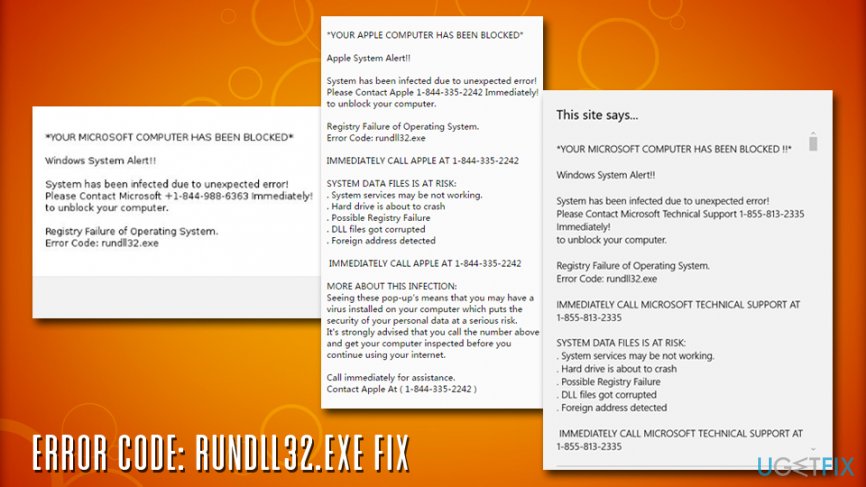
Close down the browser (via the Task Manager if needed), and stop Error code: rundll32.exe from appearing on your browser by eliminating the potentially unwanted program from your device.
Although rundll32.exe error pop-up is not malicious on its own, it may become a very irritating experience because as long as you keep a related adware, the message will pop up from time to time. On top of that, it can‘t be closed easily, which is why you may need to close web browser by force quite frequently. Therefore, do not ignore the appearance of this error and fix Error code: rundll32.exe issue right now.
How to fix Error code: rundll32.exe?
First of all, we would like to encourage you to be more careful when selecting and installing free programs. Keep in mind that freeware/shareware these days serve as distributors of third-party add-ons and plug-ins, which, once installed, turn out to be ad-supported.
That‘s why fake errors like rundll32.exe may occur. To prevent potentially unwanted programs (adware, browser hijackers) from installing on your PC deceptively, you have to pay close attention to the installation process of free programs. It is recommended to select the Advanced or Custom installation option and uncheck all additional components that are checked by default. Now we will explain how to fix Error code: rundll32.exe.
Option 1. Use a professional tool
To fix Error code: rundll32.exe, you have to uninstall a potentially unwanted program/adware, which is a real cause of the pop-up. The easiest and the most reliable way to do so is to perform a full system scan with a reliable anti-malware tool. This way, your device will be checked and restored correctly. Additionally, we recommend using [d1] - it can fix various PC-related issues, in case you encounter any real problems with .dll or .exe files and also repair virus damage.
Option 2. Uninstall Error code: rundll32.exe adware via Control Panel and reset web browsers
Guidelines for Windows users:
- Click on Start → Control Panel → Programs and Features. (Windows 7 or Vista)
- Click on Start → Control Panel → Add/Remove Programs (Windows XP)
- Click on the Windows icon at the bottom-left corner. When a Quick Access Menu appears, select Control Panel → Uninstall a Program. (Windows 8/10)
- Find all suspicious programs that you don't remember installing, right-click on them, and select Uninstall.
- Find Mozilla Firefox shortcut on your computer, right-click on it and open its Properties.
- Open Shortcut tab, and find Target Field. You should see a suspicious URL in it - delete it, and click OK.
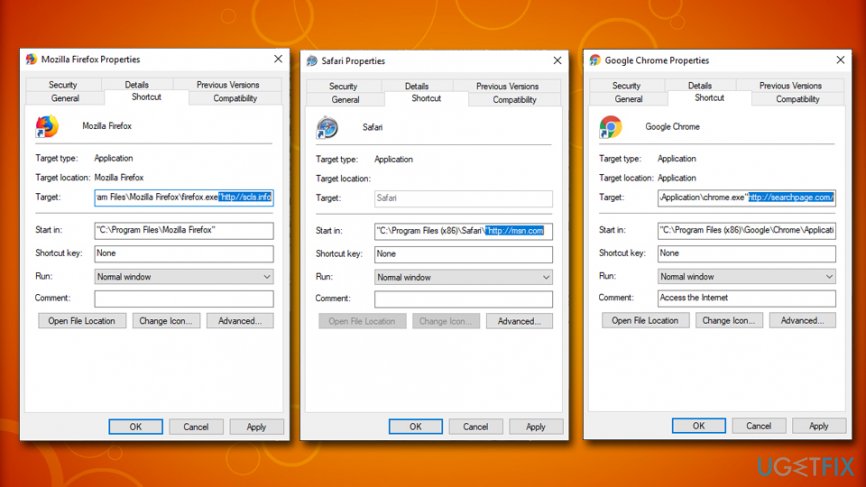
Error code rundll32 exe fix remove shortcuts - Repeat 6-7 steps with Google Chrome and Internet Explorer shortcuts, too.
Guidelines for Mac users:
- Click Go → Applications.
- Find all questionable programs, right-click on them, and move them to Trash.
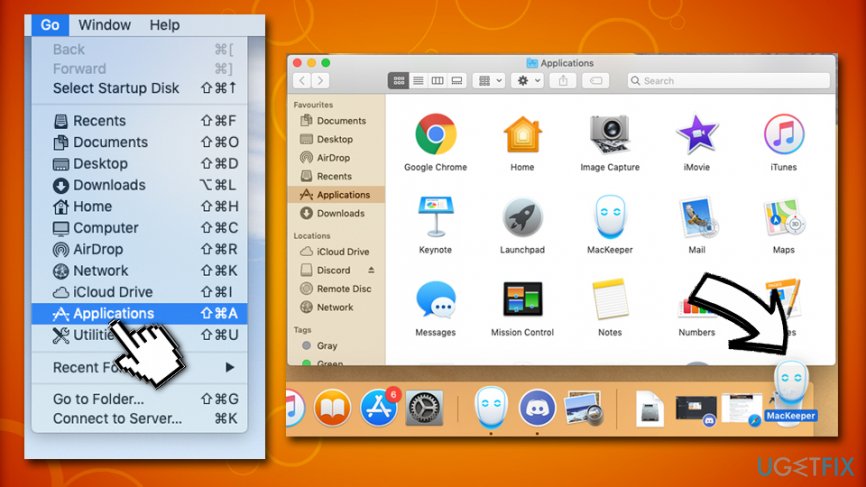
Error code rundll32 exe fix remove from mac - Next, go to Go → Go to Folder… and type in /Library/LaunchAgents.
- Check for any questionable entries that might be connected to a potentially unwanted program and delete them.
- Now go to /Library/Application Support and /Library/LaunchDaemons and repeat steps 3 and 4.
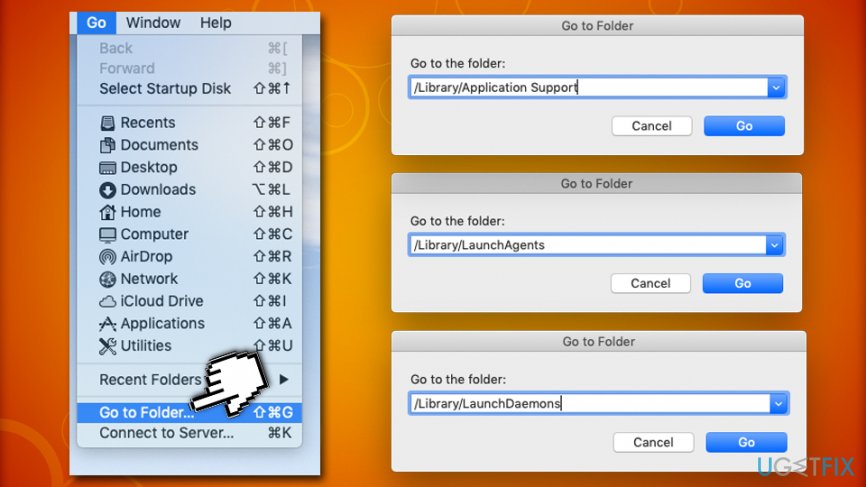
Error code rundll32 exe fix remove from mac go to launch agents
Finally, you need to clean each web browser from Error code: rundll32.exe components.
Reset Mozilla Firefox:
- Launch Mozilla Firefox, open its menu (click on three bars in the top right corner of the window), and then go to Add-ons → Extensions.
- In the Extensions panel, look for suspicious browser extensions that you do not remember installing. Click Remove next to extensions that you do not want to keep.
- Now, check if your homepage wasn’t changed by this computer parasite. Open Mozilla Firefox menu once again, and go to Options → General.
- In the Startup section, click Restore to Default, or just enter another Home Page URL and click OK.
- Reset your browser. Again, open Firefox menu, go to Troubleshooting Information and then click Refresh Firefox.
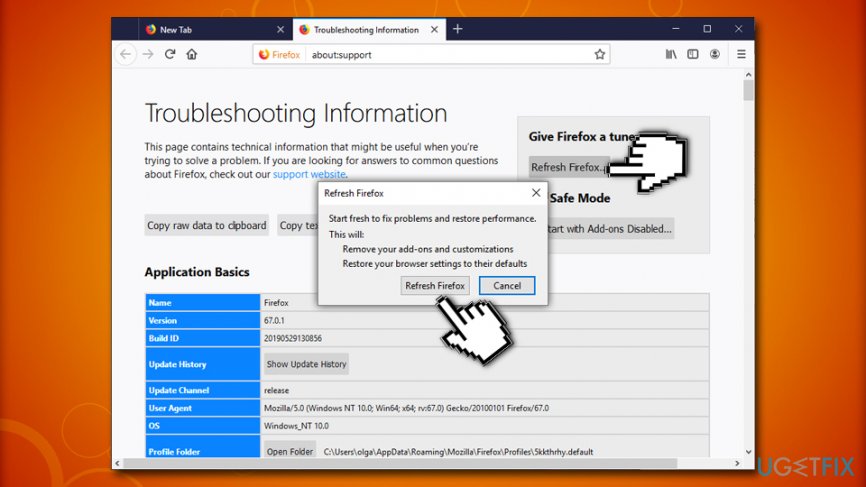
Error code rundll32 exe fix reset firefox - When a pop-up message asking to confirm your choice appears, click Refresh Firefox again.
Reset Internet Explorer:
- Launch IE browser, and then open its menu by clicking on the Gear icon, which is at the top right corner of the browser. Then go to Manage Add-ons.
- When the Manage Add-ons window appears, look through all questionable browser extensions and disable them. For that, right-click each of them and then select Disable.
- Open menu once again and go to Internet Options. In General tab, replace the Homepage address with a URL of your choice. Then hit Apply to save.
- Reset IE. Open its menu, go to Internet Options → Advanced. Click Reset.
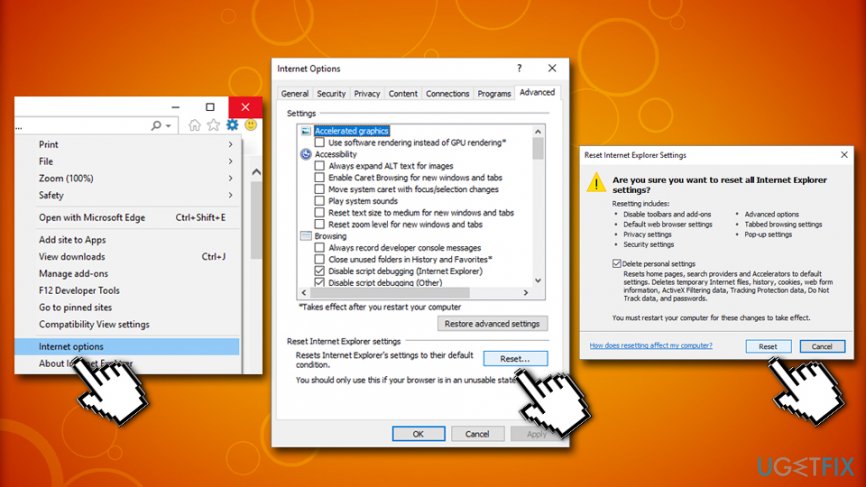
Error code rundll32 exe fix reset internet explorer - When the Reset Internet Explorer Settings window shows up, put a tick next to option Delete personal settings and hit Reset again.
Reset Google Chrome:
- Launch Google Chrome, click on three-bar button at the top right corner (Menu button) and go to Tools → Extensions.
- Look for suspicious browser extensions and eliminate them by clicking Remove next to them.
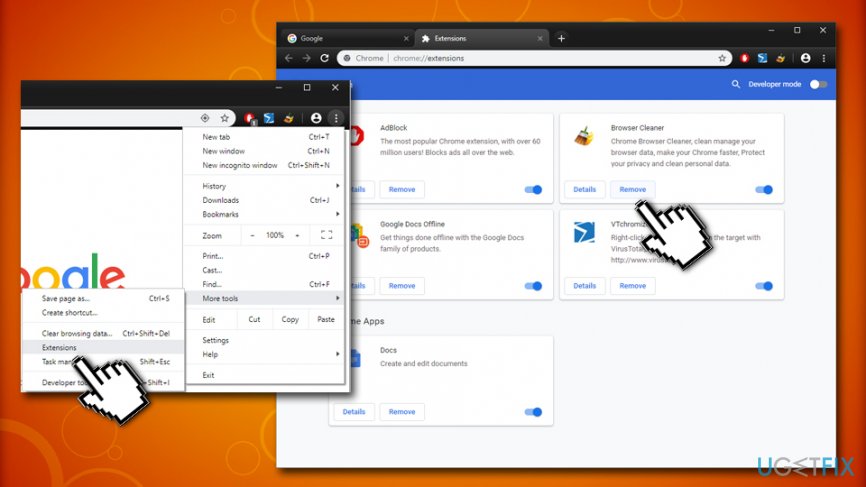
Error code rundll32 exe fix remove malicious chrome extensions - Open menu again, then go to Settings. Find On startup part, and click Set pages next to Open a specific page or a set of pages option.
- Remove suspicious websites by clicking on X next to them, and then enter a URL of the site that you would like to set as your homepage.
- Then go to Menu → Settings → Manage Search engines.
- When Search engine window shows up, remove all suspicious entries and leave only the search engine that you would like to use on a daily basis.
- Reset Google Chrome. Go to Menu → Settings, then click on Reset Browser Settings button at the bottom of the page.
- Once Reset browser settings window appears, click Reset to confirm your choice.
Reset Safari:
- Click on Safari > Preferences...
- In the new window, pick Extensions
- Select the dubious extension and pick Uninstall
- Now go back to Safari > Preferences...
- Go to Advanced tab
- Tick the Show Develop menu in menu bar
- From the menu bar, click on Develop, and then click on Empty Caches
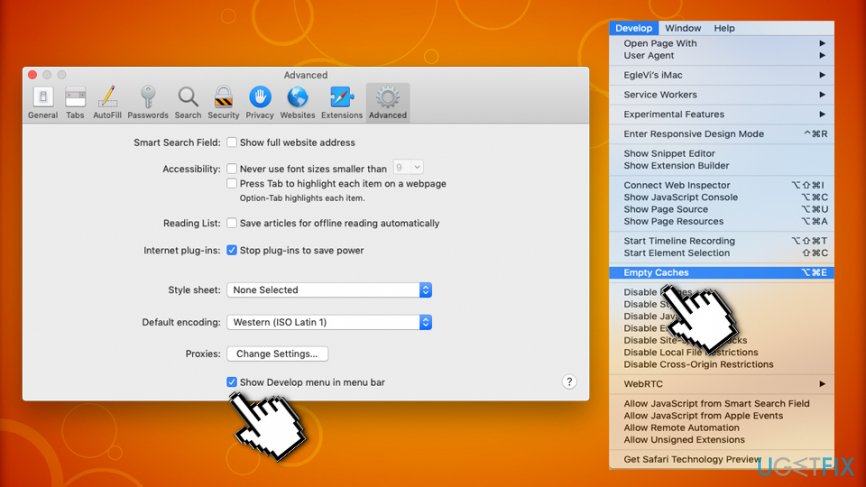
Error code rundll32 exe fix reset safari browser
As you can see, there is no need to fix Error code: rundll32.exe, but rather terminate the adware that is constantly redirecting you to bogus pages while browsing the internet.
Bottom line
To fix the error code: rundll32.exe, users should remove any adware programs, uninstall recently added software, and reset their web browsers. If these steps do not resolve the issue, consider seeking professional technical support.
Frequently asked questions
This error typically indicates that there is a problem with a DLL file that is being called by the rundll32.exe process, often due to corruption or a missing file.
You can start by running the System File Checker tool to repair any corrupted system files by using the command 'sfc /scannow' in the Command Prompt.
Yes, third-party applications, particularly those related to system optimization or security, can sometimes interfere with the rundll32.exe process and trigger this error.




Report an issue
What's wrong with this guide? We review every report and update or remove content.
Report received — thank you. We'll review and fix it.
You need a free account to submit a report.
Be the first to comment