How to fix
ERROR_LOCAL_USER_BX06DE4897_MD9858 Pop-Up
on Windows
Eliminate the ERROR_LOCAL_USER_BX06DE4897_MD9858 pop-up on Windows 10 or 11 effortlessly. Expert-tested solutions ready to implement for immediate results.

What causes How to Fix ERROR_LOCAL_USER_BX06DE4897_MD9858 Pop-Up on Windows?
- Malware infection
- Screen-locker type malware
- Fake tech support scam
- Expired Windows Product key
- User inputting product key into a scam
Repairs Windows system files, removes malware, and restores a clean OS state — without reinstalling.
Hey, I have a problem with my computer, namely, I cannot log into it. I downloaded a game and installed it, and my PC froze. After a restart I was faced with a Blue Screen error, saying that my Windows Product key expired and that I need to come tech support via the number +1-844-459-882. However, I checked and this phone does not match the one provided on the official website, so I suspect it's a scam. The problem is, I cannot use my PC since it is not loading, apart from the message. Is there any way to fix ERROR_LOCAL_USER_BX06DE4897_MD9858? Please help me!
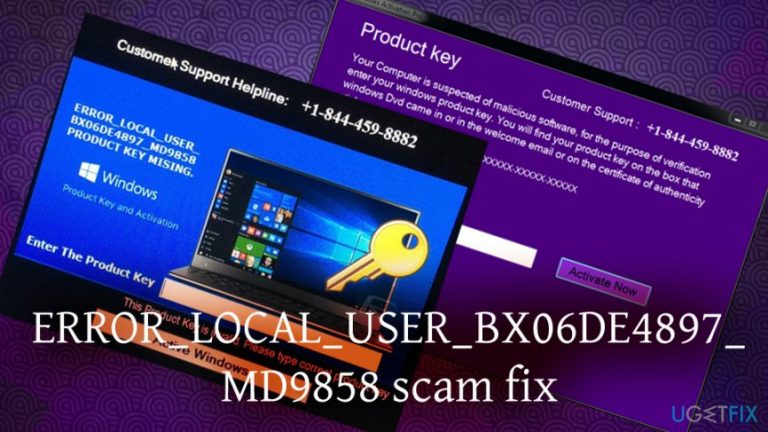
ERROR_LOCAL_USER_BX06DE4897_MD9858 is a fake message and a Tech Support scam[ref en-1] that appears on your PC after it gets infected with a specific type of malware called screen-locker.[ref en-2] It claims that you need to verify the Windows Product key and enter it into the box or call a fake Windows support number.
The scheme is relatively simple: cybercriminals create malware and infect victims with it. The main goal of the ERROR_LOCAL_USER_BX06DE4897_MD9858 scam is to make users believe that something is wrong and the fake alert authors are real technicians willing to help. Many tech support scammers use this tactic in order to extort money or valuable personal information. Previously we discussed a similar case - Windows ran into an unexpected error.
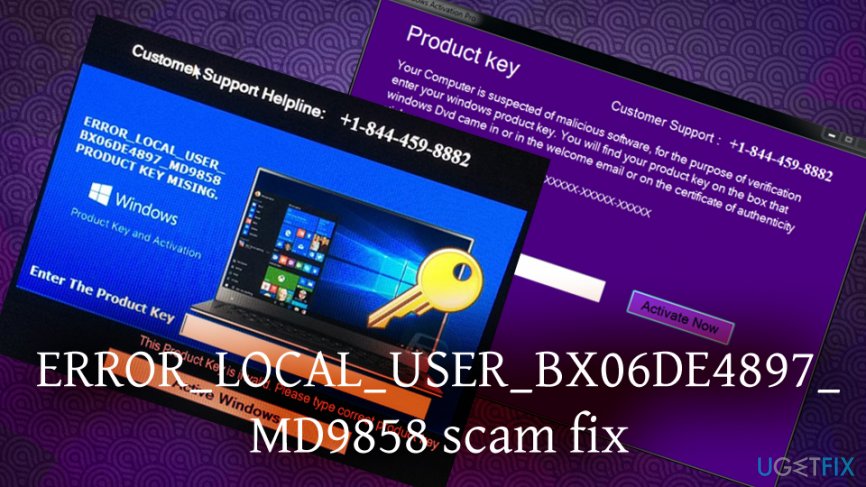
The fake alert states the following:
Product key
Your Computer is suspected of malicious software, for the purpose of verification enter your windows product key. You will find your product key on the box that windows Dvd came in or in the welcome email or on the certificate of authenticity sticker.
It looks similar to this: XXXXX-XXXXX-XXXXX-XXXXX-XXXXXProduct key
Activate Now
By merely looking at the message itself, you can instantly see signs of deception: grammar errors, as well as certain words, are not written in a manner an official Windows message would show it.[ref en-3] By any means, Microsoft would never show a contact number on error messages - error code is displayed instead. Thus, if you noticed a number on your screen that is not coming from the official Microsoft site - it's a scam.
Users have an option of the following buttons: Teamviewer, Supermo, LogMeln, Cmd. ERROR_LOCAL_USER_BX06DE4897_MD9858 fake alert is shown because malware replaced the original sequence of your Windows startup procedure and inserted a different Shell configuration that displays the bogus error instead of the desktop.
ERROR_LOCAL_USER_BX06DE4897_MD9858 pop-up is not malicious on its own. However, it‘s purpose is to deceive inexperienced PC users by spreading false claims that the Windows OS lacks product key and, therefore, could not work correctly. Many users are feeling helpless because their legitimate Windows Activation codes are rejected by ERROR_LOCAL_USER_BX06DE4897_MD9858 pop-up. However, you can try using
That‘s because ERROR_LOCAL_USER_BX06DE4897_MD9858 alert is fake and its real attempt is not to receive an activation code, but rather to prompt people to call for „professional technicians“ available at 1-844-459-8882, or any other number that does not match the official one.
Unfortunately, but these people are not professionals, at least not IT professionals. They are scammers who seek to gain remote access to people‘s computers and, later on, initiate purchases using their credentials or inject malicious programs on their systems. At best, those frauds may offer to subscribe a useless or even bogus service, which will then cost a victim a particular sum of money monthly. Therefore, DO NOT call for 1-844-459-8882 under any circumstances. In case you have received the message shown below, perform several simple steps and fix ERROR_LOCAL_USER_BX06DE4897_MD9858 pop-up immediately.
How to Fix ERROR_LOCAL_USER_BX06DE4897_MD9858 Pop-Up on Windows?
ERROR_LOCAL_USER_BX06DE4897_MD9858 alert typically shows up on Windows OS. Once its malicious code is activated, the web browser will start generating this issue automatically. As usually, tech support scam message freezes web browser's screen, meaning that it can't be closed by pressing the X button at the right-top corner of the page. Therefore, to remove the malicious code from the web browser and terminate the application that triggers the ERROR_LOCAL_USER_BX06DE4897_MD9858 scam, you have to perform the following steps:
Step 1. Enter Safe Mode with Networking
Safe Mode is a safe environment to troubleshoot various problems, including the screen lockers. Once you enter this mode, the screen locker should disappear:
- Enter Sign-in screen of Windows.
- Press and hold Shift, and then click on Power button.
- Once the menu opens, click Restart (while still holding the Shift button!).
- Go to Troubleshoot > Advanced options > Startup Settings.
- Press the number 5 on your keyboard or click on Enable Safe Mode with Networking
- Wait till your PC restarts
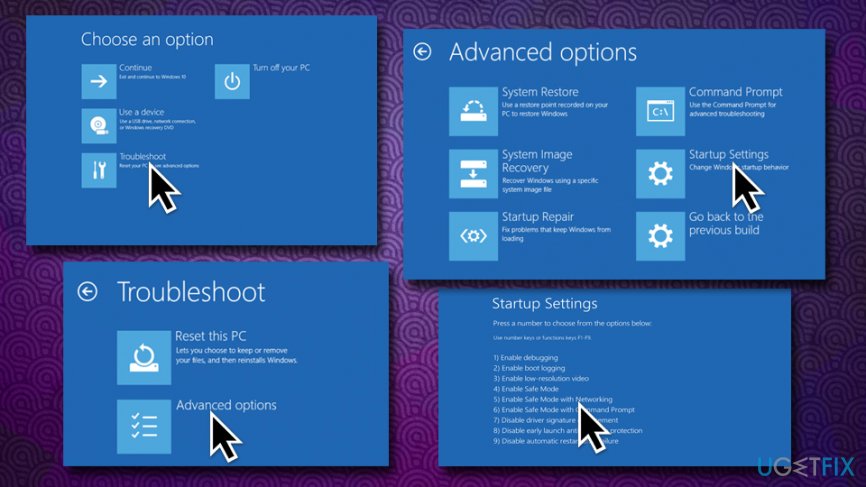
Fix error local user bx06de4897 md9858 start in safe mode with networking
Step 2. Kill malicious processes
- Press Ctrl + Alt + Esc and click on Task Manager.
- Once there, locate Productkeyupdate.exe, fatalerror.exe, or similar processes.
- Shut them down by pressing End task.
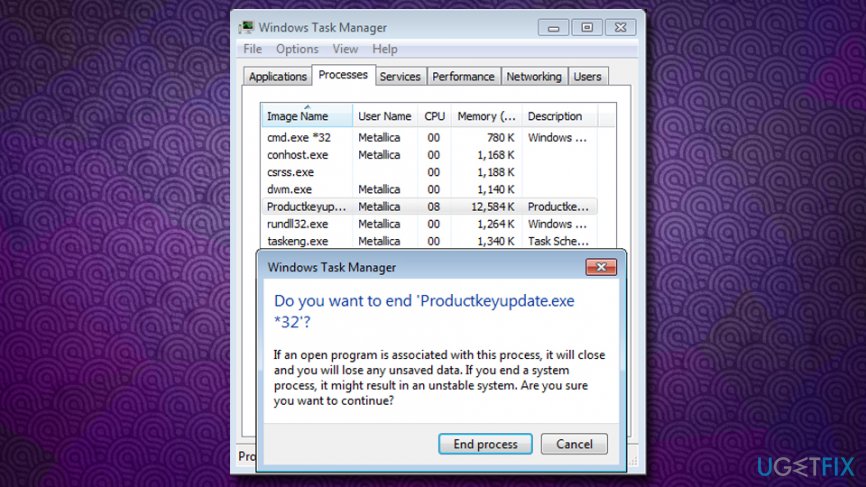
Fix error local user bx06de4897 md9858 kill malicious processes
Step 3. Delete suspicious applications
- Click Start and navigate to Control Panel.
- Open Programs and Features and select Uninstall a Program.
- Find all suspicious programs on the list, click on them, and select Uninstall.
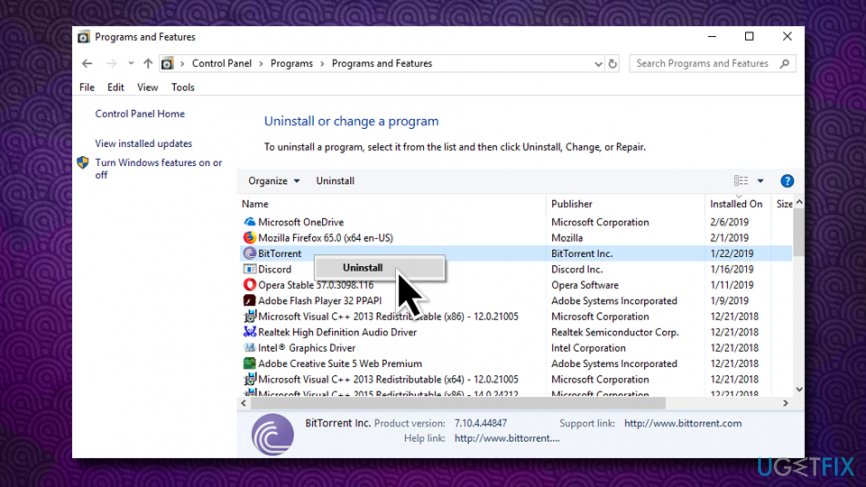
Fix error local user bx06de4897 md9858 uninstall unwanted programs
Alternatively, you can initiate a scan with a powerful security software that would eliminate unwanted applications and fix ERROR_LOCAL_USER_BX06DE4897_MD9858 error automatically.
Step 4. Reset web browser's settings
- Open Google Chrome. Find three-dot button at the top of the screen and click it to open Menu.
- Select More Tools and then click on Extensions.
- Look for suspicious browser extensions, and click Remove.
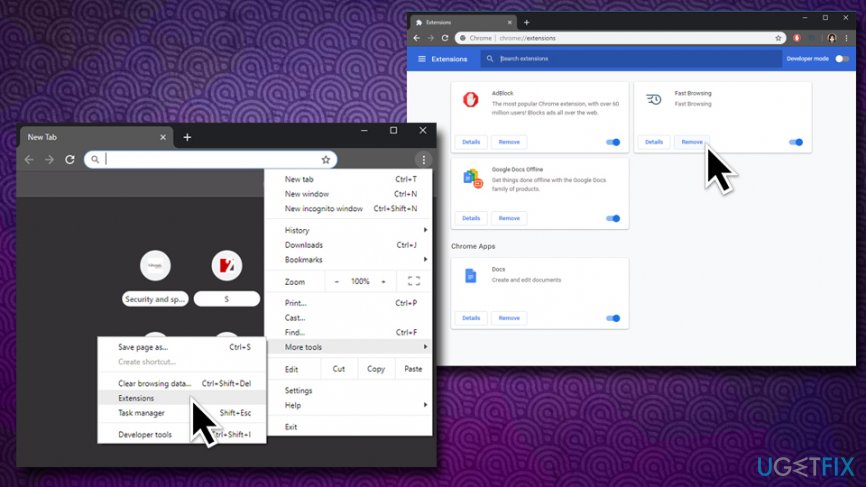
Fix error local user bx06de4897 md9858 remove suspicious extensions - Open menu again and go to Settings. Find On startup part, and click Set pages next to Open a specific page or a set of pages option.
- Remove suspicious websites by clicking X button next to them. Then enter a URL of the site that you would like to set as your homepage.
- Once done, navigate to Menu → Settings → Manage Search engines.
- Remove all suspicious entries and leave only the search engine that you would like to use.
- After that, go to Menu → Settings, and click on Reset Browser Settings..
- Once Reset browser settings window appears, click Reset to proceed.
- After you fix Google Chrome, do the same with the other web browsers.
Step 5. Fix Windows Registry after ERROR_LOCAL_USER_BX06DE4897_MD9858 malware removal
To fix ERROR_LOCAL_USER_BX06DE4897_MD9858 pop-up permanently, you should make sure that Windows Registry is cleared from suspicious entries that might bug your system. Because the registry is a vital part of Windows, we highly recommend staying away from it and rather install profession PC repair software [d1] that would repair it automatically and will ensure that no essential entries are touched.
Bottom line
To fix the ERROR_LOCAL_USER_BX06DE4897_MD9858 pop-up, you should remove the malware using antivirus software, avoid calling the fake tech support number, and refrain from entering your product key. If these steps do not resolve the issue, consider seeking professional technical assistance.
Frequently asked questions
This error typically signifies a problem with local user profiles or system settings in Windows. It may occur due to corrupted user data or system file issues.
To fix this error, try running the System File Checker tool by executing 'sfc /scannow' in the Command Prompt as an administrator. Additionally, consider creating a new user account if the issue persists.
Yes, you can attempt to reset your network settings or perform a system restore to revert your computer to a previous state before the error occurred. Both methods can help eliminate the pop-up.




Report an issue
What's wrong with this guide? We review every report and update or remove content.
Report received — thank you. We'll review and fix it.
You need a free account to submit a report.
Be the first to comment