How to fix
Manor Lords Unhandled Exception: EXCEPTION_ACCESS_VIOLATION error
on Windows
Resolve the Manor Lords EXCEPTION_ACCESS_VIOLATION error on Windows 10 or 11 effortlessly. Expert-tested solutions to get you back to gaming fast!

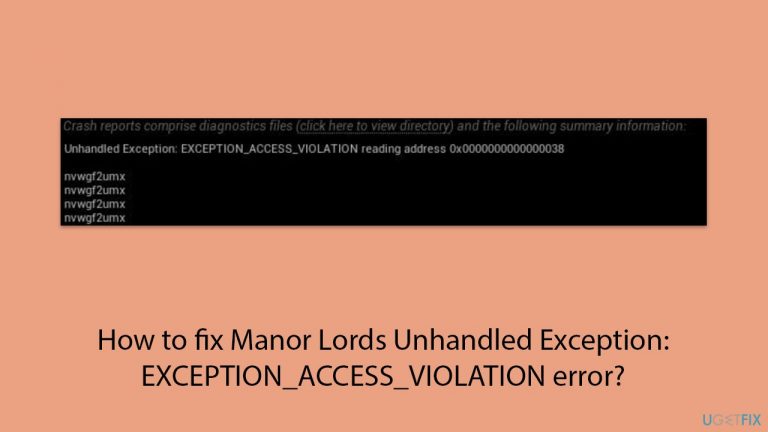
What causes How to fix Manor Lords Unhandled Exception: EXCEPTION_ACCESS_VIOLATION error?
- DLSS settings
- FSR settings
- Memory access violation
- Graphics driver issues
- Windows updates
Repairs Windows system files, removes malware, and restores a clean OS state — without reinstalling.
I suddenly started to have crashes in Manor Lords on Windows 11 and I was wondering if I could somehow get rid of them. I tried turning off DLLS but that did not help, even though I'm using RTX3070 ti, i7, and 32GB RAM system. What else can I do?
Released by Slavic Magic and published by Hooded Horse, Manor Lords is a strategy and city-builder game that became almost an overnight success, with gamers praising it on Steam and other platforms. It immerses players in the medieval era, offering a rich strategy experience that combines detailed city construction, extensive tactical warfare, and intricate economic and social systems.
Unfortunately, just like any other fresh release, Manor Lords crashing can completely ruin the gaming experience for many. Unhandled Exception: EXCEPTION_ACCESS_VIOLATION (Unreal Engine 4 EU4 memory error) is one of the issues that players might encounter - it causes the game to crash to desktop immediately.
Game crashes can be particularly frustrating because there could be so many things that could cause this behavior. Luckily we have an error code "Unhandled Exception: EXCEPTION_ACCESS_VIOLATION," which hints that the game tries to access memory that it is not allowed to access. In most cases, this is related to DLSS or FSR settings.
DLSS and FSR are Nvidia's and AMD's graphic card features that can upscale the game using AI technology and provide much better framerates without compromising the quality. Since the technology is relatively new, it can sometimes cause various issues, including an Unhandled Exception: EXCEPTION_ACCESS_VIOLATION error in Manor Lords.
Players said that disabling this feature does not fix the error, however. Luckily, there are ways around it, and it relates to modifying game files, be it very minimally. Below you will find a method on how to fix the Unhandled Exception: EXCEPTION_ACCESS_VIOLATION error in Manor Lords, although if that does not work for you, there are several other things you can try, including running a powerful PC repair app [d1]. Nonetheless, we also provide several manual methods that might just help you.
Before proceeding, make sure you have your graphics drivers, Windows, and the game up-to-date.

Fix 1. Edit the Settings.ini file in the AppData directory
- Press Win + E to open File Explorer.
- Make sure Hidden items are visible.
- Navigate to the following location:
C:/Users/USERNAME/AppData/Local/ManorLords/Saved\Config\WindowsNoEditor - Here, open the Settings.ini file using Notepad.
- Change the parameter "ML.aaMode=dlss" or "ML.aaMode=fsr" to "ML.aaMode=" (simply delete dlss or fsr string).
- Press Ctrl + S on your keyboard to save the changes.
- Try launching the game again.
Fix 2. Change game launch parameters
If the above solution did not help, try launching the game with the -dx11 parameter.
- Open Steam and go to your Library.
- Right-click on Manor Lords and select Properties.
- Make sure you are in the General tab.
- On the right side, under Launch options, type in -dx11 (you can also try using -dx12 parameter if this does not work).
- Close down Settings, try launching the game, and see if the crashes persist.

Fix 3. Verify the integrity of game files
- Open Steam and go to your Library.
- Right-click on Manor Lords and select Properties.
- Go to the Installed Files section.
- Click Verify integrity of game files and wait till the process is complete.
- Launch the game as normal.

Fix 4. Tweak compatibility issues
You can try several of the configurations from the below.
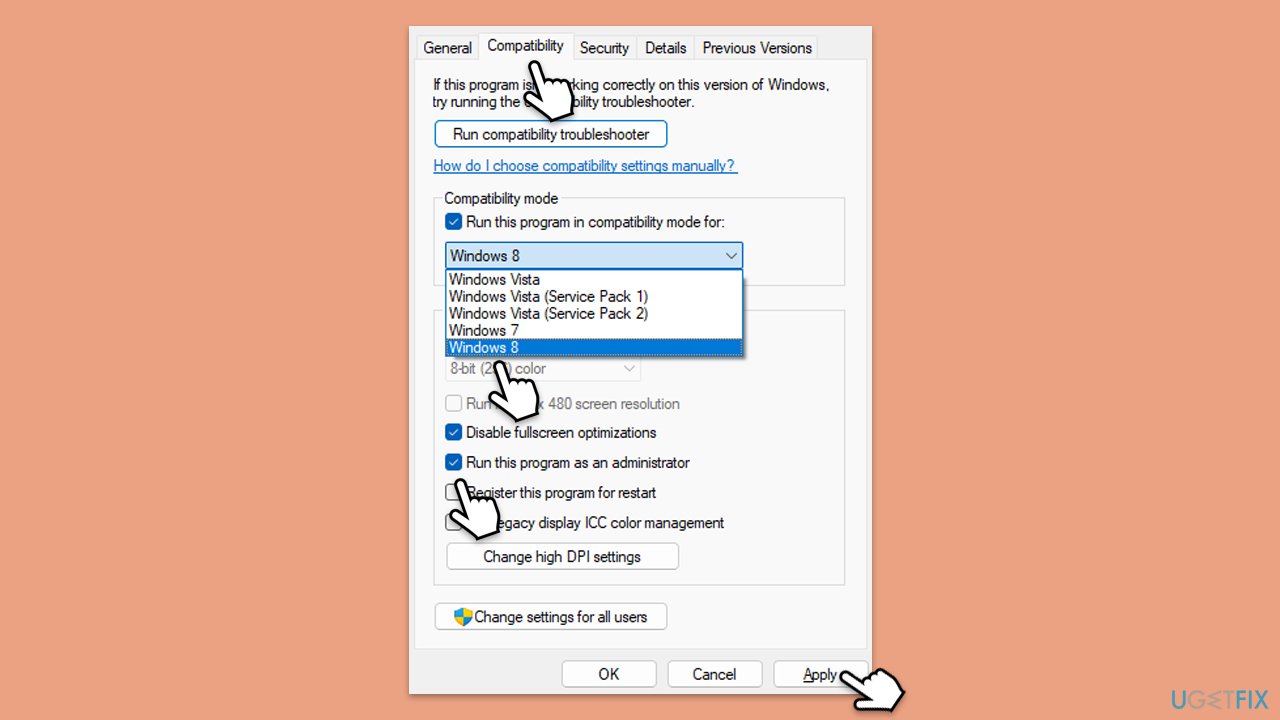
- Right-click on the game's EXE file (on Steam, right-click > Manage > Browse local files) and select Properties.
- Go to the Compatibility tab.
- Here, there are several parameters you could change - start with the Compatibility mode. Click on the drop-down menu and select Windows 8 or another version.
- Under Settings, mark the Disable fullscreen optimizations and Run this program as administrator options.
- Click Apply and OK.
Fix 5. Rename OpenXR
- Navigate to the game's installation directory.
- Access Engine folder.
- Next, go to Binaries and select the ThirdParty folder.
- Here, locate the OpenXR folder and rename it to something else, for example, OpenXR.old.
- Try launching the game.
Fix 6. Delete DirectX Shader cache and clear other files
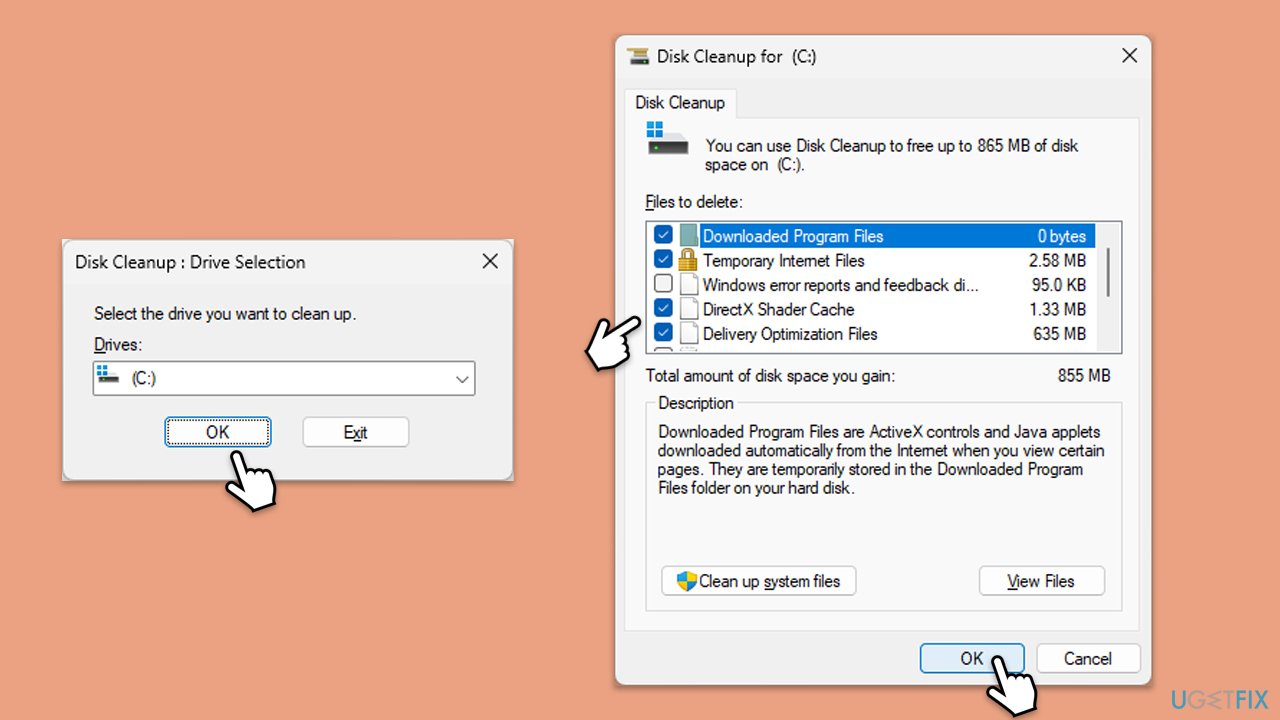
- Type Disk Cleanup in Windows search and hit Enter.
- If your Windows is installed on drive C, pick it from the list (should be by default) and press OK.
- From the list, find and mark the DirectX Shader cache.
- We also recommend marking Delivery Optimization Files, Temporary Internet Files, Windows Update, Temporary Files, and Recycle Bin.
- Click OK - this should delete all the unnecessary files.
Bottom line
To fix the Unhandled Exception: EXCEPTION_ACCESS_VIOLATION error in Manor Lords, consider modifying game files, updating graphics drivers, and ensuring Windows is up to date. If these methods do not resolve the issue, you may want to try running a powerful PC repair app.
Frequently asked questions
This error is typically caused by issues such as corrupted game files, incompatible drivers, or insufficient system resources. Ensuring that your Windows is updated and your graphics drivers are current can help resolve this issue.
If you are using Steam, right-click on Manor Lords in your library, select Properties, go to the Local Files tab, and click 'Verify Integrity of Game Files.' This process will check for and repair any corrupted files on Windows 10 or Windows 11.
If updating drivers does not resolve the issue, try performing a clean boot of Windows 10 or Windows 11 to eliminate software conflicts, or consider reinstalling the game to ensure all components are installed correctly.




Report an issue
What's wrong with this guide? We review every report and update or remove content.
Report received — thank you. We'll review and fix it.
You need a free account to submit a report.
Be the first to comment