How to fix
RESULT_CODE_MISSING_DATA error in Chrome and Edge
on Windows
Fix the RESULT_CODE_MISSING_DATA error in Chrome and Edge on Windows 10 or 11 effortlessly. Expert-tested solutions for quick resolution!


What causes How to fix RESULT_CODE_MISSING_DATA error in Chrome and Edge?
- Corrupted browser data such as cache or cookies
- Outdated browser version
- Conflicting third-party extensions
- Temporary glitches in the browser
- Issues with system settings
Repairs Windows system files, removes malware, and restores a clean OS state — without reinstalling.
Hello there. I am having issues with Google Chrome. When I attempt to load any pages, it always results in an error "RESULT_CODE_MISSING_DATA." This is really annoying because I practically can't access the internet. Would appreciate some help.
Google Chrome and Microsoft Edge, both founded on the Chromium engine, are leading browsers in Windows 11 because of their performance and integration of online services. Regardless, the RESULT_CODE_MISSING_DATA error will disrupt browsing, having a tendency to give an Aw, Snap message that prevents websites from loading. This can exclude key applications like email or dashboards, impacting day-to-day functions and productivity.
The RESULT_CODE_MISSING_DATA error tends to result from problems that can be fixed with specific fixes. Corrupted browser data, such as cache or cookies, can interfere with how pages load, especially if temporary files are outdated - clearing this data can restore normal functionality.
An outdated browser version may also lack recent patches needed to handle modern web content, making an update to the latest release a potential solution. Additionally, third-party extensions can conflict with browser processes, causing data retrieval failures, and disabling these add-ons can help identify and resolve the issue.
Sometimes the error can lead to unexpected browser behavior, like tabs closing unexpectedly or navigation buttons failing to respond, which can be frustrating while doing critical work. These underlying causes fixed ensure a smoother browsing experience.
The following steps offer numerous solutions, starting from simple steps like browser restart and advancing to more sophisticated steps like reinstalling, to fix the RESULT_CODE_MISSING_DATA error in Chrome and Edge. For a faster solution, we recommend using [d1], a system repair tool that can automatically fix system issues likely causing this error.

Fix 1. Restart the browser
A temporary glitch can cause this error, and restarting the browser can resolve it.
- Press Ctrl + Shift + Esc to open Task Manager.
- Scroll down to find Chrome or Edge, right-click and select End Task.
- Wait 30 seconds, then reopen Chrome or Edge.
- Try loading the website again.
- If the error persists, proceed to the next fix.

Fix 2. Check internet connection
An unstable network can trigger this error by interrupting data loading.
Windows 11
- Type Troubleshoot in Windows search and press Enter.
- Select Other troubleshooters.
- Find Network & Internet troubleshooter from the list and select Run.
- Wait till the process is finished and apply the offered fixes.
- Restart your device.

Windows 10
- Right-click on Start and pick Settings.
- Go to Network & Internet section.
- On the right side, find the Advanced network settings section.
- Click Network troubleshooter, specify the problem, and wait till the scan is finished.
- When done, apply all the recommendations.
Fix 3. Update Chrome or Edge
An outdated browser can cause this error, and updating ensures you have the latest fixes.
Google Chrome
- Click on the three vertical dots in the top-right corner of the browser.
- Select Help > About Google Chrome.
- Wait till the browser is updated and click Relaunch.

MS Edge
- Open Microsoft Edge.
- Click on three horizontal dots (Settings and more) at the top-right corner of the browser.
- Select Settings.
- Click on About Microsoft Edge on the left.
- The browser should now automatically be updated to the latest version.

Fix 4. Clear browser cache and cookies
Corrupted cache or cookies can block page loading, and clearing them can help.
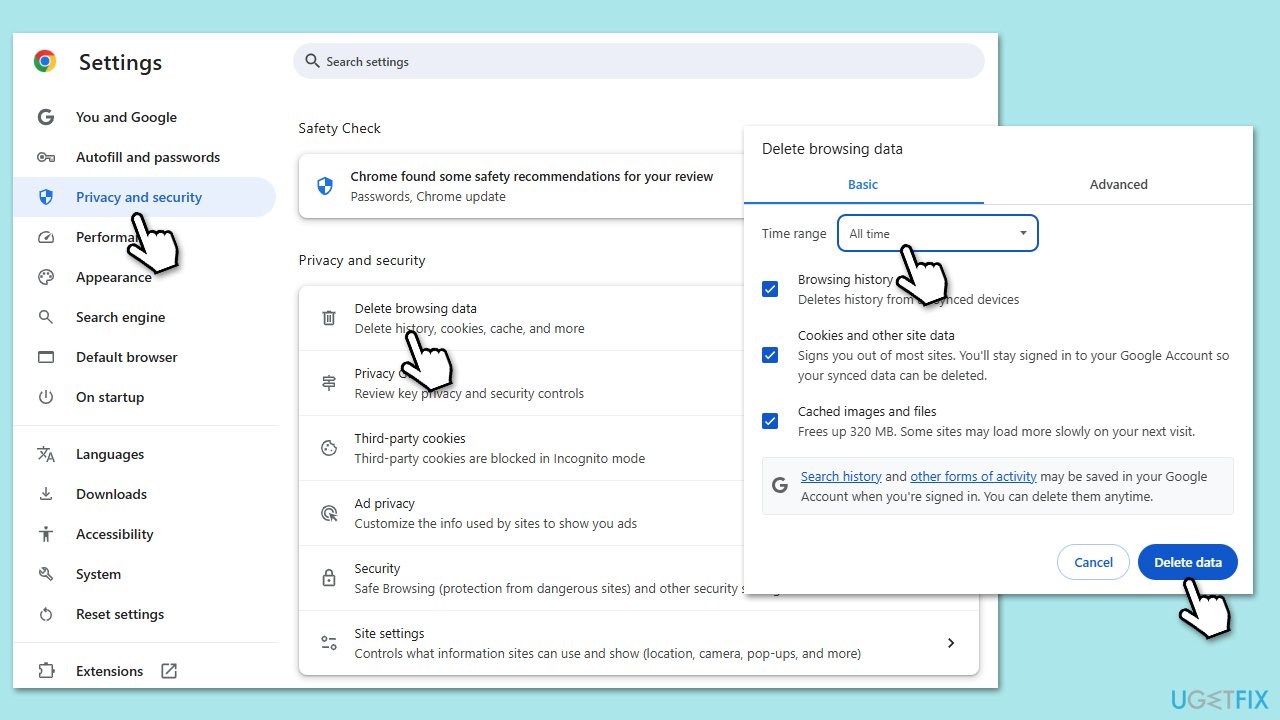
Google Chrome
- Click on Menu and select Settings.
- Under Privacy and security, pick Delete browsing data.
- Select All time under the time range.
- Select Browsing history, Cookies and other site data, as well as Cached images and files.
- Click Delete data.
MS Edge
- Open Edge and click on three horizontal dots (Settings and more).
- Select Settings and then pick Privacy, search, and services on the left.
- On the right side of the window, locate Clear browsing data and click on it.
- Click Choose what to clear.
- Select All time under the time range.
- Pick all the sections and click Clear now.

Fix 5. Disable extensions
Problematic extensions can interfere with browser operations, causing this error.
Google Chrome
- Open Settings and select Extensions.
- Here, you will find the list of the installed extensions.
- You can either delete them by pressing Remove or toggling the switch to disable them.

MS Edge
- Click the Extensions button next to the address bar.
- Select Manage extensions.
- Here, you can either Remove the extension or disable it by toggling the switch.

Fix 6. Run in compatibility mode
Compatibility issues with Windows 11 can cause this error, and adjusting settings can help.
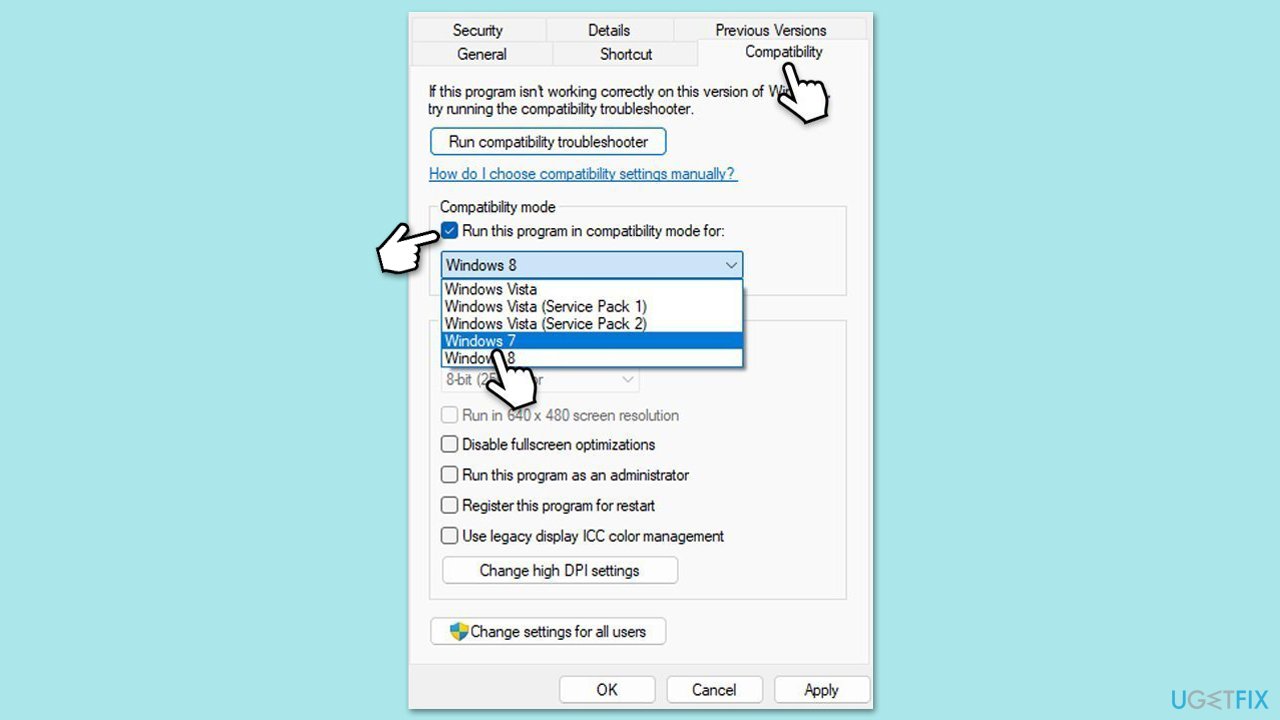
- Right-click the Chrome/Edge shortcut on your desktop, and pick Properties.
- Go to the Compatibility tab.
- Mark the Run this program in compatibility mode for checkbox, and then select one of the Windows versions available, e.g., Windows 8.
- Click Apply and OK.
Fix 7. Reinstall Chrome or Edge
A corrupted installation can cause this error, and reinstalling provides a fresh start.
Google Chrome
- Close Chrome.
- Type Control Panel in Windows search and press Enter.
- Click on Uninstall a program under Programs.
- Find Google Chrome in the list of installed programs, click on it, and then click Uninstall.
- Follow the prompts to complete the uninstallation
- Restart your computer and reinstall Chrome.

MS Edge
- Right-click on Start and pick Installed apps/Apps and Features.
- Click Uninstall and confirm with Uninstall.
- Follow on-screen instructions to remove the app completely.
- Press Win + E to open File Explorer.
- Delete the following folders:
- C:\Program Files (x86)\Microsoft\Edge
- C:\Program Files (x86)\Microsoft\EdgeCore
- Now uninstall Edge from Settings.
- Download and install the browser from the official website.
Bottom line
To fix the RESULT_CODE_MISSING_DATA error, you can restart the browser, clear cache and cookies, update to the latest browser version, or disable third-party extensions. If these solutions do not work, consider reinstalling the browser or using a system repair tool.
Frequently asked questions
The RESULT_CODE_MISSING_DATA error in Chrome on Windows 10 is often caused by corrupted browser cache or extensions that conflict with the browser's performance.
To fix the RESULT_CODE_MISSING_DATA error in Edge on Windows 11, try clearing the browser cache and disabling any problematic extensions.
While updating Windows 10 or Windows 11 may not directly resolve the RESULT_CODE_MISSING_DATA error, keeping your system updated can improve overall browser functionality and security.




Report an issue
What's wrong with this guide? We review every report and update or remove content.
Report received — thank you. We'll review and fix it.
You need a free account to submit a report.
Be the first to comment