How to fix
Windows Defender closing games
on Windows
Resolve the issue of Windows Defender closing games on Windows 10 effortlessly. Get back to gaming with expert-tested solutions that work!

What causes How to fix Windows Defender closing games on Windows 10?
- Windows Defender blocks legitimate applications
- Incompatibility with other anti-spyware tools
- Failure to detect certain viruses
- Issues with adding exclusions
- Common errors like 0x800704ec and 0x80029c4a
Repairs Windows system files, removes malware, and restores a clean OS state — without reinstalling.
Hello. I have recently installed a game called Terraria on my Windows PC, and I am not able to start it correctly. Windows Defender keeps blocking it completely and I cant access it. I downloaded the game from Steam, and it is entirely legitimate. So I don't understand why would anti-virus program block a game. I am not sure if I am infected with some virus or not. But I do want to play the game. Can you please help me to resolve this issue?
Windows Defender is a security tool provided by Microsoft. Its previous variant, Microsoft Security Essentials[ref en-1] was a downloadable component for Windows XP. With Windows Vista/7, the program was already integrated. Windows 8 brought a full anti-virus software that is being used as a default by many users worldwide.
Because Windows Defender is included inside the operating system, users do not have to spend extra money on protecting their computers from malware. Although relatively decent tool, it could still be improved on, and there are definitely better ones available on the market.
Users who decide to trust Windows Defender might encounter several errors, including 0x800704ec, 0x80029c4a, and few others. The software is not compatible with other anti-spyware tools (to be precise, users should never run two different security programs at the same time), and it also might fail to detect certain viruses.
However, the most common trouble users encounter is that Windows defender blocks or closes down certain applications, even if they are legitimate and trustworthy. This issue is prominent in gaming[ref en-2] - whether it contains gaming platform Steam or separate games installed on the PC.
While adding an exclusion to the security program might help, the program is known to fail to recognize them, leading to application closure.
Below you will find several solutions that can help you fix Windows Defender closing games problem.
Protip: many issues can be fixed automatically. If you are not that computer-savvy individual, we suggest you download and install [d1]. This tool is capable of detecting and repairing all Windows issues automatically. What is more, it is also a great security software capable of detecting malware[ref en-3] and eliminating it. Additionally, it is capable of restoring and repairing Windows Registry.
This video will help you:
[youtube fkufJs_R0bw]
Fix 1. Add an exclusion to Windows Defender
In case Windows Defender is blocking legitimate program, you can try adding it to the exclusion list:
- Right-click on Start button and pick Settings
- Go to Updates and Security
- In the right pane, click on Windows Security
- Next, open Windows Defender Security Center
- On the left pane, pick Virus and threat protection
- Then select Virus and threat protection settings
- Scroll down to Exclusions and choose Add or remove exclusions
- Find the directory of the file Windows Defender is blocking and click Exclude this folder
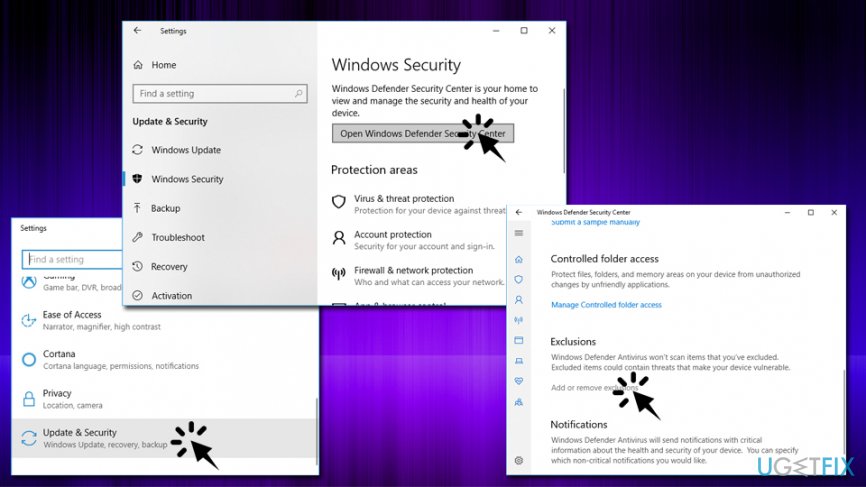
Windows defender closing games add exclusions
Fix 2. Switch to a different anti-virus program
Although Windows Defender does a decent job at protecting the operating system from malware, it is not perfect. Not only can it cause errors, block legitimate files, but might also not protect from all infections. If you have any issues with Windows Defender, we suggest you switch to other security software. We recommend using [d1]. As we already mentioned, it can also fix many computer-related issues automatically.
Fix 3. Turn on Gaming mode
Windows 10 got a feature which is specially designed for gaming. It switches off unnecessary processes to make the gaming experience better. It may also fix Windows blocking games issues as well:
- Go to Settings and pick Gaming
- Select Game Mode and enable the feature
Fix 4. Switch off Controlled folder access
Controlled folder access feature allows Windows to protect certain folders from modifications that third-party programs can inflict. Some users reported that switching off this functionality can fix the issue with Windows Defender switching off games:
- Go to Windows Defender Security Center as explain in Fix No. 1
- Navigate to Virus & Threat Protection > Virus & threat protection settings
- Next, locate Controlled folder access and click on Manage Controlled folder access
- Switch the function off (User Account Control will appear - click Yes)
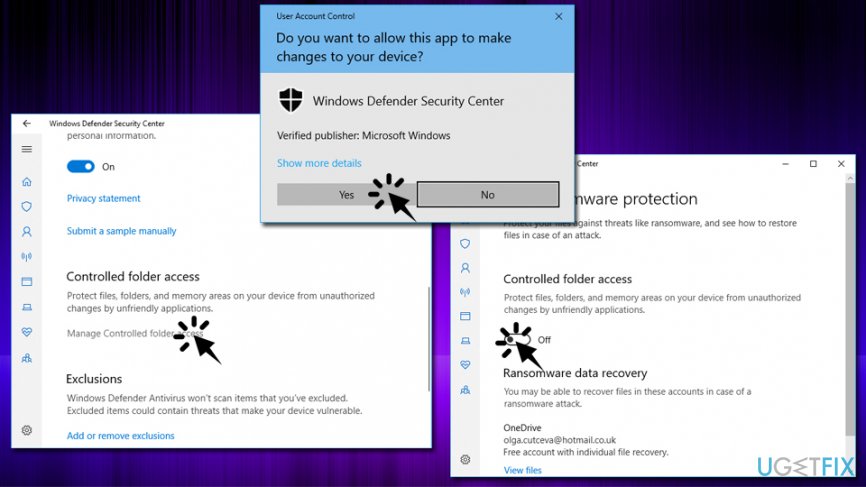
Windows defender closing games disable controlled access
Fix 5. Make sure your Windows OS is up to date
In some cases, the outdated operating system can cause various issues, including ones with Windows Defender. Therefore, check if your device is running on the latest patch:[ref en-4]
- Go to Settings and select Update & Security
- Click on Check for Updates
- Wait till Windows downloads and installs updates
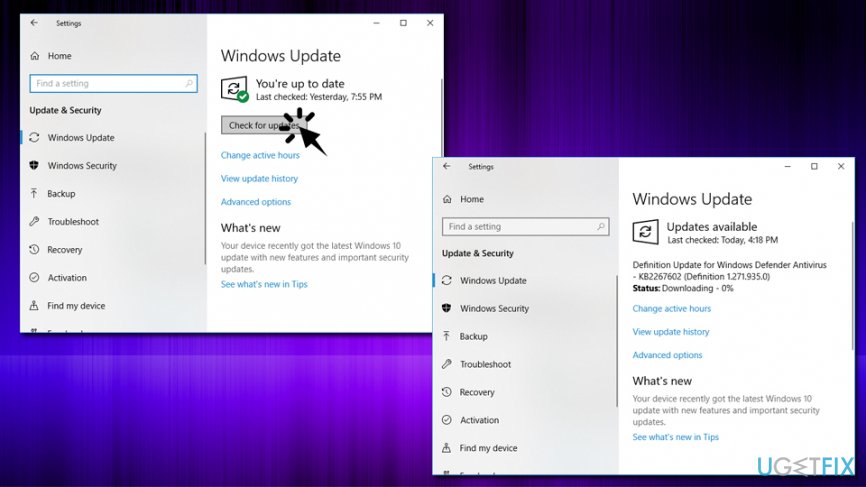
Windows defender closing games update windows
Bottom line
To resolve the issue of Windows Defender closing games, you can try adding exclusions for the game in Windows Defender, ensuring no other security programs are running simultaneously, and checking for common error codes. If these solutions do not work, consider using an automatic repair tool to fix Windows issues.
Frequently asked questions
Windows Defender may mistakenly identify game files as threats, leading to them being closed or blocked during gameplay. This can occur due to aggressive real-time protection settings.
You can add your game’s folder to the exclusions list in Windows Defender settings to prevent it from scanning those files. Go to Settings > Update & Security > Windows Security > Virus & threat protection > Manage settings, then scroll to 'Exclusions'.
In Windows 11, you can also adjust the Windows Defender settings by following the same exclusion process to ensure your games run smoothly without interruptions. Additionally, check for any updates to Windows Defender that may fix this issue.




Report an issue
What's wrong with this guide? We review every report and update or remove content.
Report received — thank you. We'll review and fix it.
You need a free account to submit a report.
Be the first to comment