How to fix
Windows can’t find one of the files in this theme – how to fix
on Windows
Resolve the "Windows can’t find one of the files in this theme" error quickly and easily on Windows 10 or Windows 11. Expert-tested solutions await!

What causes Windows can’t find one of the files in this theme – how to fix?
- Corrupted Windows system files
- Incorrectly installed updates
- Malware infections
- Other programs interfering with themes
Repairs Windows system files, removes malware, and restores a clean OS state — without reinstalling.
Hello, I just was suddenly received an error "Windows can’t find one of the files in this theme" while using my PC normally. I was not tampering with themes at all. I later received the same thing. Why is this happening? Any help with fixing this annoying problem of mine? Thanks.
"Windows can’t find one of the files in this theme" is an error that typically shows up as soon as the operating system is booted or after it wakes up from sleep mode. It seems that the issue is universal and affects 64-bit and 62-bit Windows systems. While this issue is not critical, it can be particularly annoying to users as it might interrupt their work or be a nuisance during other activities on the PC.
Windows theme is a feature that allows users to customize their UI (user interface)[ref en-3] elements, offering a wide selection of personalization features, such as different backgrounds, Windows colors, etc. Even though this is a fun feature to play around with, it is not a vital one for the system's operation.
However, nobody likes when things are not working as they are supposed to. Thus, it is important to make sure that "Windows can’t find one of the files in this theme" error fix is found as soon as possible. In this article, we will explore methods that could help you with this rather annoying issue.
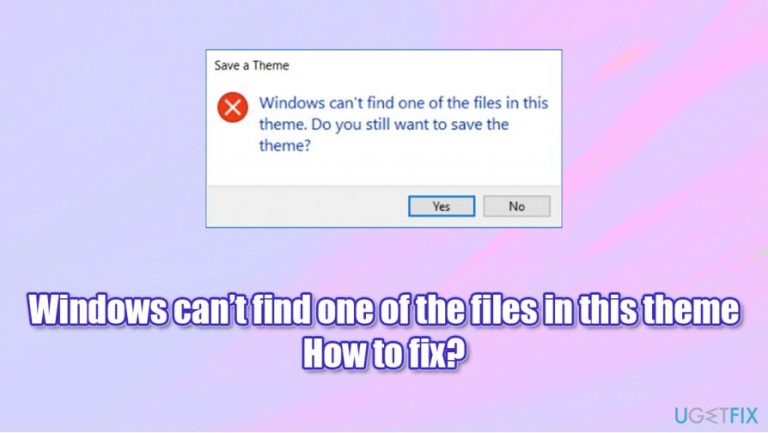
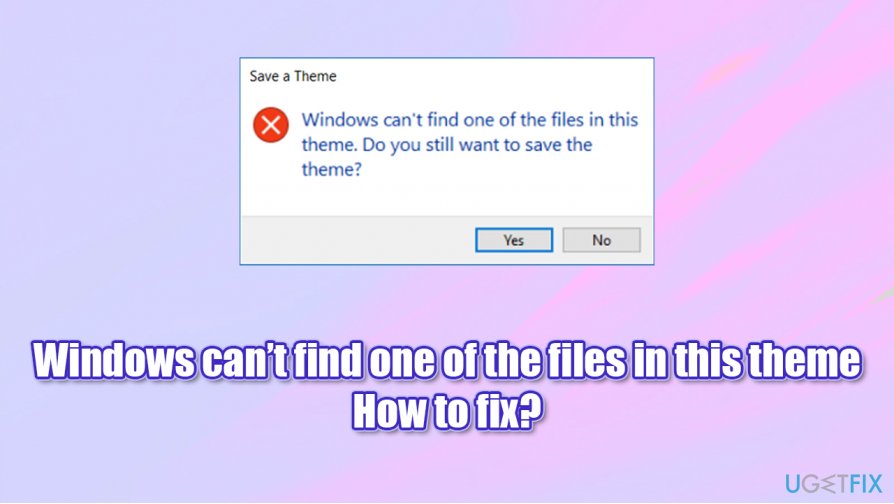
Once you boot your PC, you might see the following error:
Windows can't find one of the files in this theme. Do you still want to save the theme?
Since the error usually occurs not because users are changing something within the themes, it begs the question of why this is happening.
The most likely reason for the "Windows can't find one of the files in this theme" error to occur is due to corrupted Windows system files. In particular, this can be caused by other programs, incorrectly installed updates, or even malware[ref en-1] infections.
Thus, in order to fix Windows can't find one of the files in this theme error, there is no universal solution, as it depends on why the issue occurs in the first place. In case you do not want to bother with manual steps, we highly advise you to try using the [d1] automatic repair option. The app could you in case the issue lies within corrupted system files, as well as other Windows-related matters.
Solution 1. Disable Sync
In some cases, users might experience the "Windows can't find one of the files in this theme" error due to sync incompatibility. To be precise, if you are syncing your Windows account[ref en-2] with another computer, these issues could occur. Therefore, you should simply disable the sync option for your theme:
- Right-click on Start and pick Settings
- Go to Accounts
- On the left, pick Sync your settings
- Under Individual sync settings, find Theme
- Toggle the switch to the left to turn the theme sync off.
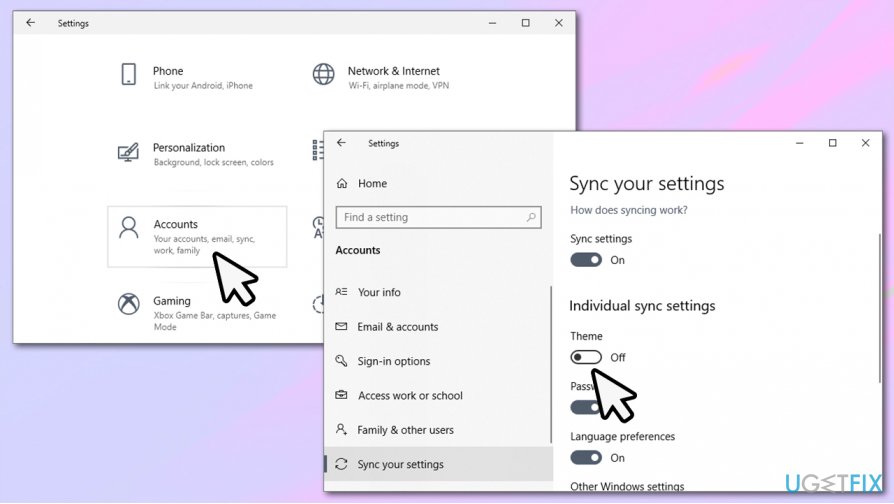
How to fix windows cant find one of the files in this theme turn off sync
Solution 2. Change the theme
- Right-click on Start and pick Settings
- From the menu, select Personalization
- Scroll down and select a different theme from presets
- If you want, you can get more themes from Microsoft by pressing the Get more themes in Microsoft Store.
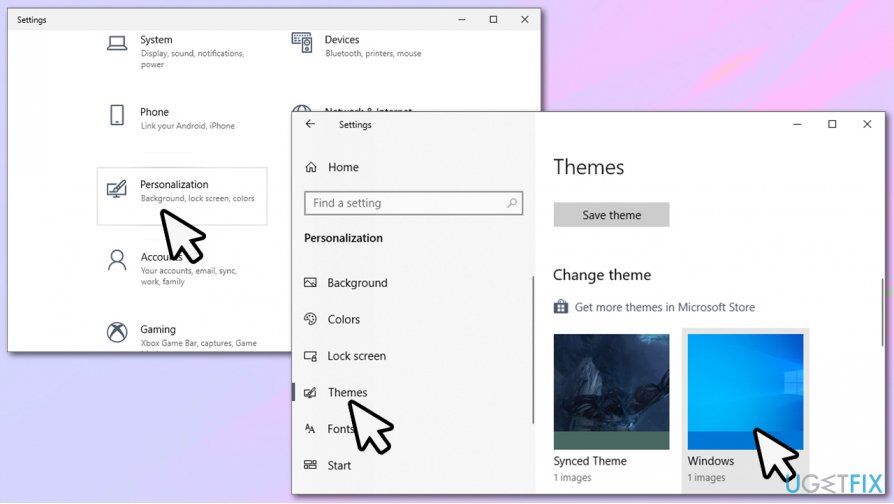
How to fix windows cant find one of the files in this theme change theme
Solution 3. Change background picture
- Go to Personalization as explained in previous step
- Click Background
- You can now choose from pictures on your PC by pressing Browse
- You can find default Windows wallpapers under the following path: C:\\Windows\\Web.
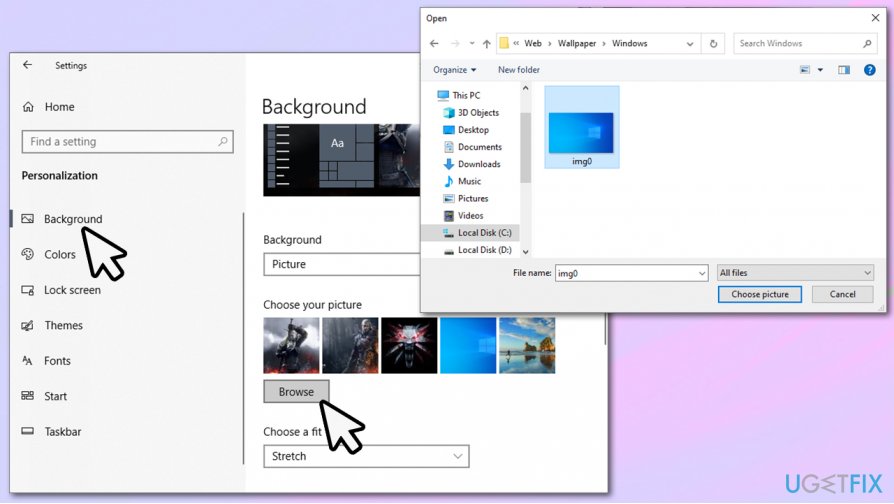
How to fix windows cant find one of the files in this theme change background
Solution 4. Check your system with SFC
System File Checker is an amazing diagnostic and repair tool that is built-in. To use it, you need to open Command Prompt with Administrator's rights as explained below:
- Type in cmd in Windows search (if you can't see the search bar, press the Start button)
- Right-click on Command Prompt result and select Run as administrator
- If User Account Control pop-up shows up, press Yes
- In the new window, paste the following command and press Enter after:
sfc /scannow
- Wait till Windows finishes the scan - it will report whether issues were found and whether they were repaired automatically
- Reboot your PC if repair process took place.
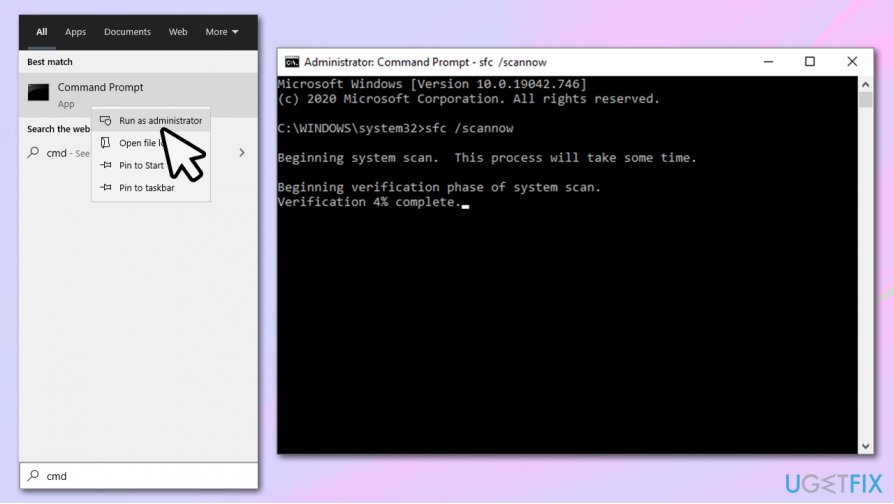
How to fix windows cant find one of the files in this theme run sfc
Solution 5. Run DISM
DISM, otherwise known as Deployment Image Servicing and Management tool, is capable of modifying and repairing various Windows images. Thus, it might also help with fixing various errors.
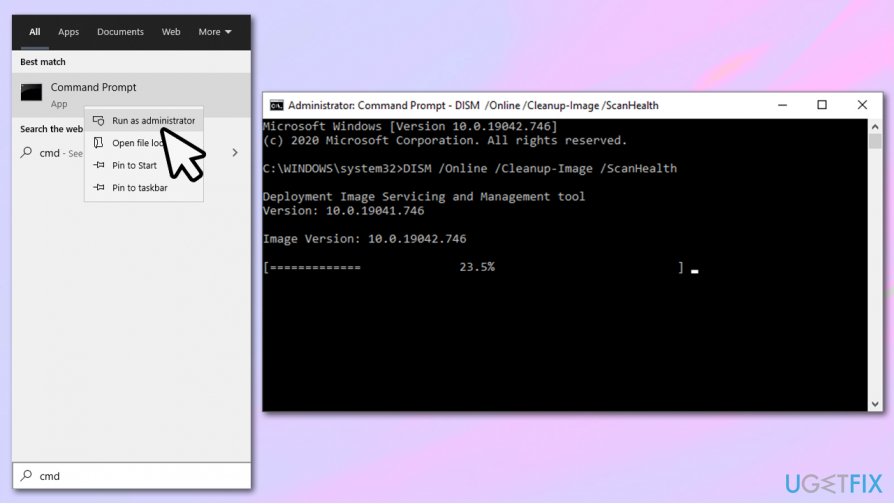
- Open Command Prompt with administrator's rights as explained in previous solution
- Type in the following command and press Enter:
DISM /Online /Cleanup-Image /ScanHealth
- The copy this command and hit Enter:
DISM /Online /Cleanup-Image /RestoreHealth
Bottom line
To fix the 'Windows can’t find one of the files in this theme' error, users can try repairing corrupted system files, uninstalling problematic updates, or scanning for malware. If none of these solutions work, further troubleshooting may be necessary.
Frequently asked questions
Try switching to a different theme in the Settings app, then switch back to your preferred theme to refresh the settings. If the issue persists, consider restoring the theme from a backup or re-downloading it.
You can resolve theme file errors by resetting the theme settings to default in the Personalization section of Windows 11. Additionally, check for any Windows updates that might address compatibility issues.
Yes, you can run the System File Checker tool by executing 'sfc /scannow' in the Command Prompt to repair any corrupted system files that may be affecting your theme.




Report an issue
What's wrong with this guide? We review every report and update or remove content.
Report received — thank you. We'll review and fix it.
You need a free account to submit a report.
Be the first to comment