How to fix
How stop websites from tracking you on Safari 11
on Windows
Protect your privacy on Windows while browsing Safari 11. Discover effective methods to stop websites from tracking you, with expert-tested tips!


Why does How stop websites from tracking you on Safari 11 occur?
- Websites collect information without user awareness
- Users often do not read Privacy Policies
- Users may unintentionally provide personal details
- Non-personally identifiable information can be misused
- Tracking can lead to privacy violations
Repairs Windows system files, removes malware, and restores a clean OS state — without reinstalling.
I have recently found out that many popular websites are tracking and collecting information about its users. I feel unsafe, so could you please help me turn off website tracking on Safari 11? Thanks!
Nowadays privacy is of the most valuable things which is often violated by website tracking. Usually, people are not aware of such actions since they do not read sites' Privacy Policy and Terms of Use. Likewise, visiting the page grants user's permission to collect information about him/her automatically.
Websites not always gather the same details about their users. However, the collected information can usually be categorized as non-personally and personally identifiable[ref en-1]. We want to point out that there is a huge difference between these classifications which should not be ignored.
Personally identifiable information (PII) refers to such details that can help to identify, contact or locate the person, including full name, home and email addresses, date of birth, telephone number, etc. On the contrary, non-personally identifiable information (non-PII) cannot be used to trace user's identity. This data consists of IP address, browser history, clicked ads and many more.

Even though websites usually collect non-PII, there is a high risk that users might unconsciously provide personal details among such data. For example, if they type their email address in website's search bar, developers will have full access to this information. Likewise, people allowing for sites to track them are putting their privacy at risk.
Additionally, non-personally identifiable information is typically used for advertising purposes. Websites analyze and take advantage of the ability to track browser's history. In other terms, users might be lured into clicking on potentially dangerous ad since it will be designed to correspond to his interests.
Therefore, we strongly advise you to turn off website tracking and take other precautionary measures to not only protect your privacy but computer's system as well[ref en-2]. For this reason, we have prepared instructions on how to stop websites from tracking you on Safari 11.
Stop websites from tracking you on Safari 11
Even though this guide is particularly designed for Safari[ref en-3] users, other popular browsers, like Mozilla Firefox, Google Chrome, and Internet Explorer have ways how to turn off or at least minimize website tracking. If you are interested in learning how to stop websites from tracking you on Chrome or other browsers, please contact us.
Turn off website tracking on Safari 11:
- Open Safari;
- Navigate to the upper-left corner of your desktop.
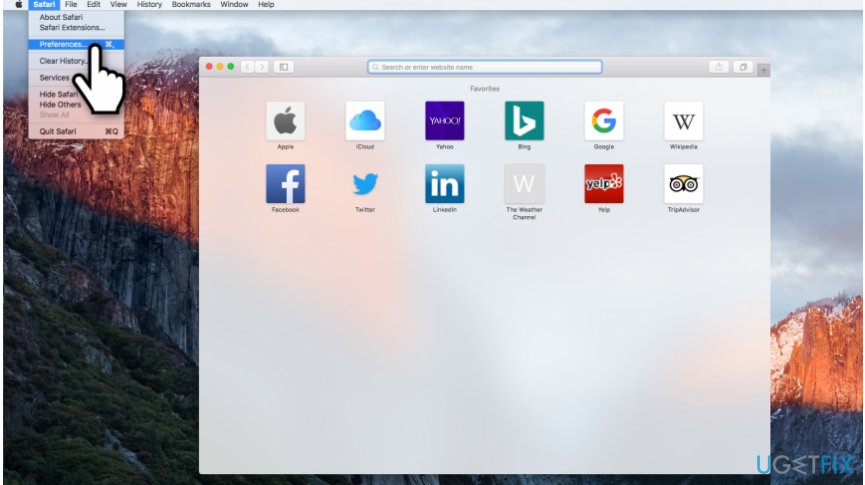
Open safari preferences on mac - Click on Safari and select Preferences;
- Go to Privacy section.
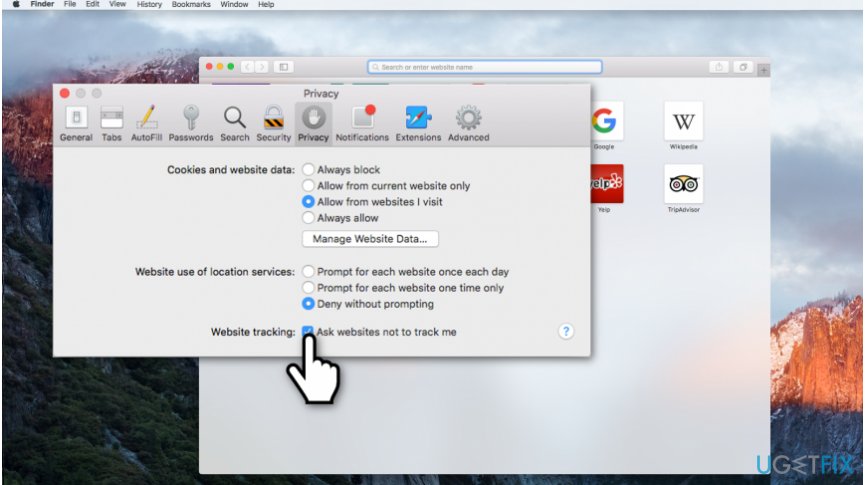
Ask websites not to track me on safari - Mark the checkbox saying Ask websites not to track me.
Bottom line
To stop websites from tracking you on Safari 11, you can adjust your privacy settings and disable tracking features. Additionally, consider using browser extensions designed to enhance privacy. If these methods do not work, further investigation into your browser settings may be necessary.
Frequently asked questions
While Safari 11 is primarily for macOS, you can use browser settings on Windows 10 in browsers like Chrome or Edge to block tracking by adjusting privacy settings.
In Windows 11, you can enhance your browsing security by adjusting the privacy settings in your browser to block third-party cookies and enable Do Not Track requests.
Safari 11 is not officially supported on Windows, but you can use alternative browsers with built-in tracking protection features to limit tracking while browsing on Windows.




Report an issue
What's wrong with this guide? We review every report and update or remove content.
Report received — thank you. We'll review and fix it.
You need a free account to submit a report.
Be the first to comment