How to fix
Block Arendovalka.xyz Referral Spam from Google Analytics Reports
on Windows
Easily block Arendovalka.xyz referral spam in Google Analytics on Windows 10 or 11 with expert-tested tips. Get your reports clean and accurate!

Why does How to Block Arendovalka.xyz Referral Spam from Google Analytics Reports occur?
- Referral spam from Arendovalka.xyz
- Backlinking technique used by spammers
- Requests to access log initiated by spammers
- Disruption of website traffic analysis
- Potential cooperation with cyber criminals
Repairs Windows system files, removes malware, and restores a clean OS state — without reinstalling.
I noticed this website on my website traffic statistics quite a while. It is surely fishy, but what is it actually? An infected domain, perhaps?
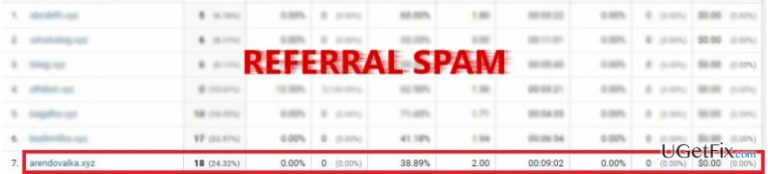
Arendovalka.xyz operates as a referral spam. It is designed to convince website administrators into thinking that a significant amount of traffic comes from this website. The spammer employs the technique called backlinking. He or she initiates requests to the access log. Likewise, the victims of such cyber felony see the link in the overall traffic report. Out of curiosity, web owners enter this domain only to find out that it is purely a spam. Referrers disrupt your analysis of the website and prevent you from improving it according to visitors' traffic. The problem is that such technique might bear a more menacing impact. Usually, the authors of such referral spams intend to boost up the revenue from attacking hundreds of web owners‘ Google Analytics' log files. Thus, hundreds of users will create a delicate amount of traffic and bring profit. A probability remains that such method of earning income might be achieved using vile means, such as cooperating with cyber criminals. Once you look through the deception of Arendovalka.xyz, find the solution below. After you block this spam, research the options how to conceal your website log files and decrease the number of vulnerabilities.
Note. It would be beneficial to check whether your website and the main computer was not infected with any malignant elements. Use [d1] for that purpose.
Step 1. Change Filter Pattern
- Select Admin -> All Filters. Later on, enter New Filter and type Arendovalka.xyz in the Filter Name box.
- Choose Custom Filter Type, then choose Campaign Source from the drop-down Filter Field menu.
- Lastly, in the Filter Pattern field, type Arendovalka.xyz and click Save.
Step 2. Change HTTP settings
- Sign into cPanel account, navigate to File Manager section and click on the checkbox called Document Root for -> your website.
- Click on Show Hidden Files and then Go. Once you locate the .htacess file, right-click on it and select Code Edit. Enter the following text ant click Save Changes.
## SITE REFERRER BANNING
RewriteCond %{HTTP_REFERER} Arendovalka.xyz [NC,OR]
RewriteCond %{HTTP_REFERER} Arendovalka.xyz
RewriteRule .* – [F]
Step 3. Modify Language filter
- In your Analytics account, navigate to Admin Tab.
- Click VIEW, select Filters and then click +Add Filter.
- In the Filter Name box, type: Language Spam.
- In the Filter Pattern box, type in: \s[^\s]*\s|.{15,}|\.|,
- Click on Verify this Filter and save the changes.
Bottom line
To block Arendovalka.xyz referral spam, you can create a custom filter in Google Analytics and modify your .htaccess file to ban the referrer. If these solutions do not resolve the issue, consider researching additional methods to protect your website log files and reduce vulnerabilities.
Frequently asked questions
You can block Arendovalka.xyz by creating a filter in your Google Analytics account, which can be accessed through any browser on your Windows 10 device.
Yes, you can set up a hostname filter to exclude traffic from Arendovalka.xyz, ensuring that it doesn't show up in your reports while using Windows 11.
Log into Google Analytics, navigate to the Admin section, select the desired view, and then click on 'Filters' to create a new filter that excludes Arendovalka.xyz.




Report an issue
What's wrong with this guide? We review every report and update or remove content.
Report received — thank you. We'll review and fix it.
You need a free account to submit a report.
Be the first to comment