How to fix
Block Boltalko.xyz Referral Spam from Google Analytics Reports
on Windows
Stop Boltalko.xyz referral spam in your Google Analytics reports on Windows 10/11. Boost your data accuracy with expert-tested solutions today!

Why does How to Block Boltalko.xyz Referral Spam from Google Analytics Reports occur?
- Referral spam from Boltalko.xyz
- Increased visitor rates from fake traffic
- Use of spamdexing techniques
- Injection of false results into Google Analytics reports
- Pollution of Google Analytics stats
Repairs Windows system files, removes malware, and restores a clean OS state — without reinstalling.
I have a suspicion that Boltalko.xyz is not a reliable URL. It seems to be attracting visitors to visit my site as there are several hundred of new visitors from this domain shown on Google Analytics reports, but I don‘t know anything about this URL. Tried visiting it, but the URL redirects to other sites, but not Boltalko.xyz. Have you heard something about it?
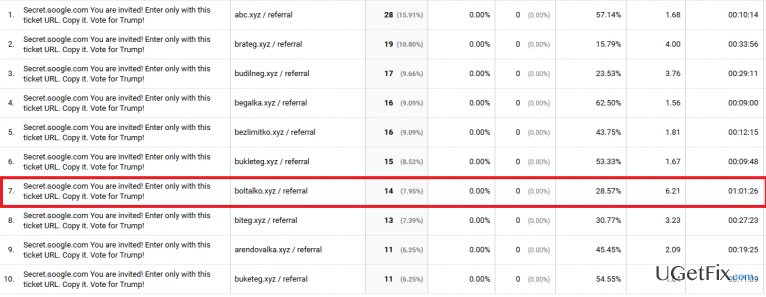
Google Analytics is a website management assistant, which provides information about web traffic generated, new visitors’ rate, the period spent on the site, domains that attracted visitors, and much more. Therefore, website owners and managers are using this tool on a daily basis. However, recent activities recorded on the Google Analytics prompt us to warn people that the stats provided on GA should not be trusted in every way. Nowadays, Google Analytics users often get surprised when they discover a huge traffic from Boltalko.xyz referral domain. Usually, the indexes are very high, for example, counting hundred of new visitors. While an increased visitor‘s rate is an encouraging thing, it‘s advisable to check referral domains that exhibit outstanding indexes. That‘s because Google Analytics reports are often polluted by referral spam, which is a type of spam generated by computers using spamdexing techniques and targeting GA stats directly. It means that all indexes are fake and the indicated traffic can be referred to as ‚Ghost Traffic.‘
The figure standing behind such activity is Vitaly Popov, who have found a way to increase traffic to affiliate websites by injecting false results into Google Analytics reports thus attracting the attention of websites‘ owner/managers and making him/her search for the given URL. In a nutshell, Boltalko.xyz is a referral spam, which pollutes Google Analytics stats and prompts people to visit the shady URL.
While Boltalko.xyz referral spam is not malevolent (does not steal traffic, decrease website‘s rank on Google search results, etc.), having it listed on the Google Analytics reports is not useful either. It distorts the results and prevents the user of Google Analytics from evaluating the indexes of his/her website properly. Besides, Boltalko.xyz fake URL may redirect to a doubtful third-party website, which may be involved in malware distribution or similar activities. It has been found that such domains may contain malicious codes, so visiting Boltalko.xyz referrer might lead to serious issues. Luckily, referral spam can be blocked quite easily, so if you have found Boltalko.xyz URL on your Google Analytics stats, do not wait long and perform the three steps given below:
How to Block Boltalko.xyz Referral Spam from Google Analytics Reports?
Step 1. Change Filter Pattern
- Select Admin -> All Filters. Later on, enter New Filter and type Boltalko.xyz in the Filter Name box.
- Choose Custom Filter Type, then choose Campaign Source from the drop-down Filter Field menu.
- Lastly, in the Filter Pattern field, type Boltalko.xyz and click Save.
Step 2. Change HTTP settings
- Sign into cPanel account, navigate to File Manager section and click on the checkbox called Document Root for -> your website.
- Click on Show Hidden Files and then Go. Once you locate the .htacess file, right-click on it and select Code Edit. Enter the following text ant click Save Changes.
## SITE REFERRER BANNING
RewriteCond %{HTTP_REFERER} Boltalko.xyz
RewriteCond %{HTTP_REFERER} Boltalko.xyz
RewriteRule .* – [F]
Step 3. Modify Language filter
- In your Analytics account, navigate to Admin Tab.
- Click VIEW, select Filters and then click +Add Filter.
- In the Filter Name box, type: Language Spam.
- In the Filter Pattern box, type in: \s[^\s]*\s|.{15,}|\.|,
- Click on Verify this Filter and save the changes.
Bottom line
To block Boltalko.xyz referral spam, you can set up filters in Google Analytics, use the hostname filter, or implement a bot filtering option. If these methods do not resolve the issue, consider seeking further assistance from analytics support or exploring additional anti-spam tools.
Frequently asked questions
You can check your Google Analytics reports for suspicious traffic sources, specifically looking for 'Boltalko.xyz' under the referral section. This can help you confirm if you're dealing with referral spam.
To block Boltalko.xyz, you should set up a filter in Google Analytics that excludes this referral source, ensuring your reports are clean and accurate.
Yes, by regularly monitoring your referral traffic and updating your filters in Google Analytics, you can proactively block Boltalko.xyz and similar spam sources on your Windows device.




Report an issue
What's wrong with this guide? We review every report and update or remove content.
Report received — thank you. We'll review and fix it.
You need a free account to submit a report.
Be the first to comment