How to fix
Block Bukleteg.xyz referral spam on Google Analytics
on Windows
Block Bukleteg.xyz referral spam in Google Analytics effortlessly. Protect your data and optimize settings on Windows 10 or 11. Expert-tested solutions!

Why does How to block Bukleteg.xyz referral spam on Google Analytics occur?
- Increased traffic from Bukleteg.xyz
- High bounce rate and new visitors
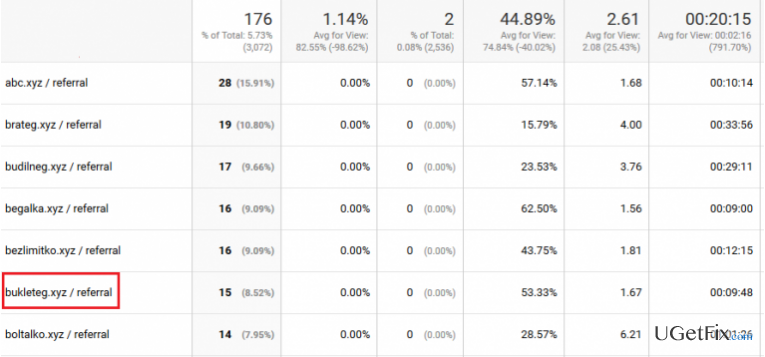
- Referral spam injected into Google Analytics stats
- Creation of ghost traffic
- Distortion of key metrics in Google Analytics
Repairs Windows system files, removes malware, and restores a clean OS state — without reinstalling.
I suspect my Google Analytics to be spammed. The traffic to my website these days increased significantly, and the primary source is Bukleteg.xyz. I appeared on the stats out of nowhere showing almost 100% bounce rate and new visitors. Could you please check if this domain is reliable because I can’t access it. Whenever I try to access this URL, I’m redirected to the totally irrelevant pages...
Bukleteg.xyz is classified as a referral spam. In the middle of 2016, spammers of Russia have released this fake URL to generate traffic to affiliate websites. According to the latest research, this referral has been injected into 20,000 of Google Analytics stats and tricked the owners/managers of small websites into visiting doubtful third-party sites.
The purpose of Bukleteg.xyz spam is to corrupt Google Analytics data with fake web traffic. Once the spam injects the account, key metrics, including total sessions, bounce rate, conversation rate, new users, etc. are distorted. Therefore, if you see that Bukleteg.xyz spam attracts traffic to your website, do not fall for believing that. Bukleteg.xyz referral spam creates Ghost traffic, meaning that no real visitors accessed your site via this domain. This URL uses Google Analytics Management Protocol, which creates fake visits to your website and displays them in Google Analytics stats.
Usually, people worry a lot when they find out Google Analytics data to be polluted by Bukleteg.xyz spam bot. However, there is not much to worry if you are not relying on Google Analytics stats solely for managing your website. That’s because referral spam, in general, does not interact with the website directly, so it neither steals traffic nor decreases your website’s rank on Google search. Nevertheless, Bukleteg.xyz spam distorts the results, which is why you may misinterpret the web traffic to your site, which is why you can make wrong decisions towards its management.
How to block Bukleteg.xyz referral spam on Google Analytics?
Step 1. Change Filter Pattern
- Go to Admin -> All Filters. Then go to New Filter and type bezlimitko.xyz in the Filter Name box.
- Select Custom Filter Type, then choose Campaign Source from the drop-down Filter Field menu.
- Eventually, in the Filter Pattern field, enter Bukleteg.xyz and click Save.
Step 2. Alter HTTP settings
- Sign into cPanel account, navigate to File Manager section and click on the checkbox called Document Root for -> your website.
- Click on Show Hidden Files and click Go. Once you locate the .htacess file, right-click on it and choose Code Edit. Enter the following text ant click Save Changes.
## SITE REFERRER BANNING
RewriteCond %{HTTP_REFERER} Bukleteg.xyz [NC,OR]
RewriteCond %{HTTP_REFERER} Bukleteg.xyz
RewriteRule .* - [F]
Step 3. Modify Language filter
- In your Analytics account, go to Admin Tab.
- Click VIEW, select Filters and then hit +Add Filter.
- In the Filter Name box, type: Language Spam.
- In the Filter Pattern box, type in: \s[^\s]*\s|.{15,}|\.|,
- Click on Verify this Filter, then Save.
In a nutshell, clear Google Analytics data lets users manage their websites and increase its ranking on Google's search. Therefore, any suspicious referral domain should be verified and blocked if necessary. Hopefully, you have managed to remove Bukleteg.xyz spam successfully. Also, you should consider placing your file logs in an area protected by a password, as well as acquiring a reliable spam filter to ensure the protection of your Google Analytics data in the future.
Bottom line
To block Bukleteg.xyz referral spam on Google Analytics, you can change the filter pattern by creating a new filter and selecting the appropriate custom filter type. If these steps do not resolve the issue, consider exploring additional methods to secure your Google Analytics data.
Frequently asked questions
You can identify Bukleteg.xyz referral spam by checking your Google Analytics reports for suspicious traffic sources, filtering out unwanted referrals in the reporting settings of your account.
To block Bukleteg.xyz referral spam, go to your Google Analytics Admin panel, create a filter that excludes the spam domain, and apply it to the relevant views.
Yes, you can prevent Bukleteg.xyz from affecting your data by implementing a hostname filter to ensure only legitimate traffic is recorded in your Google Analytics on both Windows 10 and Windows 11.




Report an issue
What's wrong with this guide? We review every report and update or remove content.
Report received — thank you. We'll review and fix it.
You need a free account to submit a report.
Be the first to comment