How to fix
Block Windows 10 Fall Creators Update
on Windows
Easily block the Windows 10 Fall Creators Update with our expert-tested tips. Keep your system optimized and tailored to your needs, fixed in minutes!


Why does How to Block Windows 10 Fall Creators Update occur?
- Bugs in the Fall Creators Update
- Compatibility issues with older devices
- Server problems during the update process
- Multitude of reported installation problems
- Lack of support for older Windows versions
Repairs Windows system files, removes malware, and restores a clean OS state — without reinstalling.
Hello, all. As far as I heard, Windows 10 Fall Creators Update brings about many bugs, so I would better postpone its installation. My PC is less than a year old and came with Windows 10 pre-installed, so I assume that it will pass compatibility tests easily.
My presumption makes me guessing that I should get an automatic upgrade notification, but I’m not sure if I’m ready to install it. Is it possible to block the update somehow at least temporarily?
Microsoft has pushed the Fall Creators Update in October 17, 2017. The newest feature update is also known as version 1709 and Redstone 3. The upgrading process is being executed in phases starting from the newest devices that run the latest Windows 10 version, the Creators Update.
The Windows 10 OS gets two feature updates per year.[ref en-1] This way, Microsoft attempts to improve the latest OS, maintain its stability, and introduce new features. However, due to compatibility issues, server problems, and multitude of bugs, people tend to refrain from installing feature updates or at least don’t rush to do so.

However, sooner or later users of the earlier Windows versions[ref en-2] will have to upgrade to the latest version. Older versions, including Windows 7, 8, 8.1, will not receive Microsoft’s support, meaning that they will become outdated and vulnerable to cyber infections. On top of that, older versions even now do not support many applications and don’t include many new features, so it may become difficult for people to perform daily tasks.
Besides, Windows 10 is the last OS version of Windows and all future improvements, features, and patches will be introduced with the Windows 10 feature updates like Anniversary Update, Creators Update or Fall Creators Update.
Even if you don’t trust the Windows 10 Fall Creators Update’s initial release version yet due to people’s reports about installation problems, bugs, and other problems, we would still recommend you to install it. BUT you can wait for the update to be improved and install it as soon as it gets stable.
Delay the Installation of Fall Creators Update
No. We do not discourage Windows 10 users from installing the Fall Creators Update. However, if you fall for the first phase, but would like to postpone the installation until the upgrade gets more stable, you can do so by following these steps:
Postpone the installation of Windows 10 Fall Creators Update
If you already received a notification from Microsoft announcing an available update for your device, you can postpone the installation by following these steps:
- Press Windows key + I and open Update & Security.
- Select Windows Update section and click on Restart options link.
- Slide a Schedule a time toggle to On and select the time and date when you think it’s right to install the update.
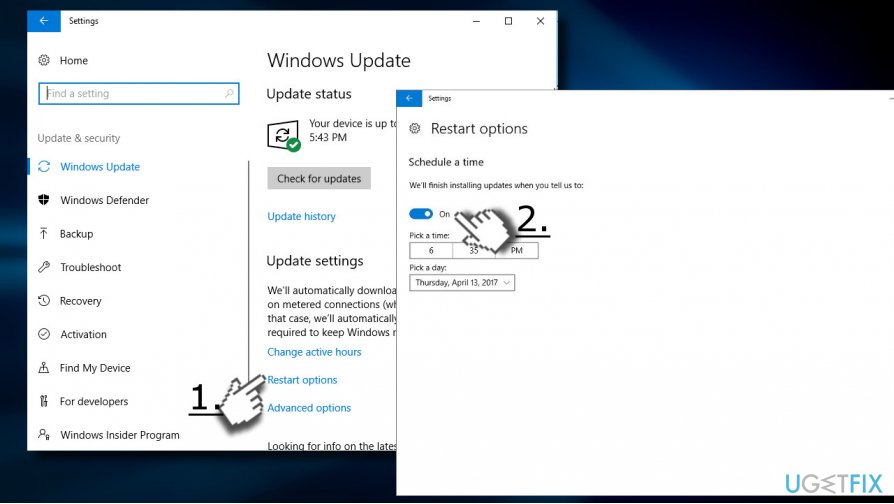
Defer the Windows 10 Fall Creators Update
NOTE: this method is available for Windows 10 Pro[ref en-3] users only.
To defer the update on Windows 10 Pro you’ll have to use a Current Branch for Business option. You will be able to suspend the installation for up to 12 month counting from its original release date.
- Press Windows key + I and select Update & Security.
- Click on Advanced Options link and find the Choose how updates are installed section.
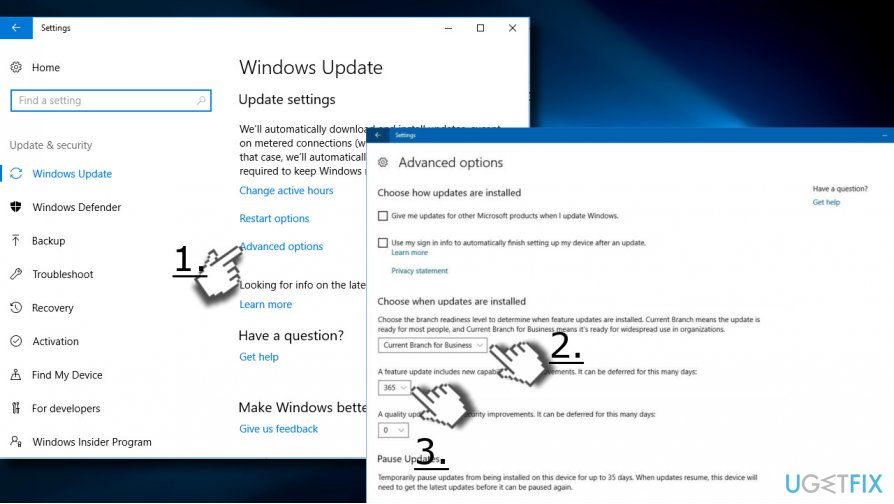
- Under it, select the preferred readiness level:
Current Branch: allows deferring update up to 365 days counting from the original release of Windows 10 Fall Creators Update
Current Branch for Business: allows deferring update up to 365 days counting from the day when the update becomes available for business. - Select the number of days and save the changes.
In case you would change your mind and would like to install the Fall Creators Update earlier, you can revert the changes by following the steps above and changing the number of days.
Block Windows 10 Fall Creators Update
Windows 10 Home users don’t have an option to defer feature updates. Nevertheless, it’s possible to block the update by enabling a metered connection.[ref en-4]
IMPORTANT: The enabled metered connection will not only block feature updates, but also quality updates, and updates of Windows Store apps. Therefore, it’s not advisable to keep metered connection enabled for a long time.
- Press Windows key + I and open Network & Internet.
- Select Wi-Fi and click on your network connection.
- Slide the toggle next to Metered connection option to On.
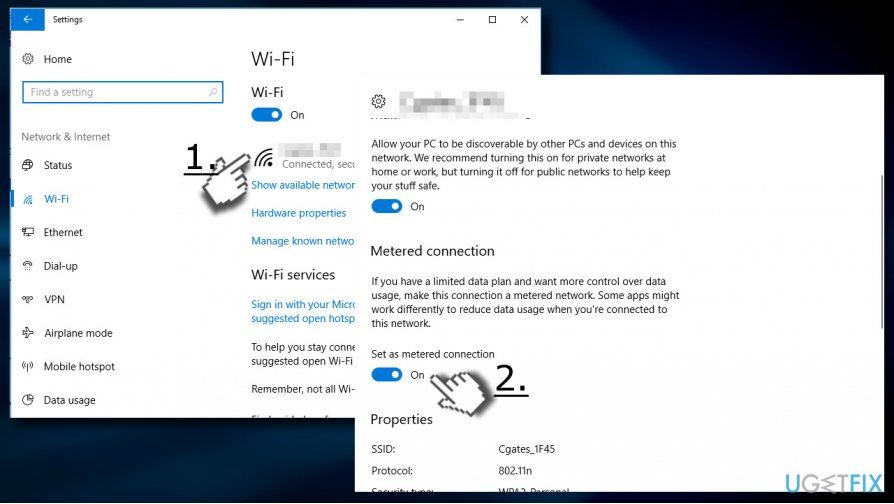
However, DO NOT descend with the Metered connection as it limits the data usage of Windows 10. Disable it as soon as you are ready to install the Fall Creators Update.
Bottom line
To block the Windows 10 Fall Creators Update, you can postpone its installation temporarily. It is advisable to wait for the update to be improved and stable before installing. If none of these options work, consider seeking further assistance or exploring alternative methods to manage updates.
Frequently asked questions
You can use the Group Policy Editor to disable automatic updates or set a metered connection to limit data usage, which helps prevent the update from being downloaded.
Yes, you can use the 'Show or Hide Updates' troubleshooter tool provided by Microsoft to hide the Fall Creators Update from appearing in Windows Update.
If you've recently updated, you can roll back to a previous version within 10 days through Settings > Update & Security > Recovery.




Report an issue
What's wrong with this guide? We review every report and update or remove content.
Report received — thank you. We'll review and fix it.
You need a free account to submit a report.
Be the first to comment