How to fix
Prevent YouTube from blocking Adblock
on Windows
Optimize your Windows 10 or Windows 11 settings to prevent YouTube from blocking Adblock. Enjoy seamless streaming with expert-tested solutions!

Why does How to prevent YouTube from blocking Adblock occur?
- YouTube's reliance on advertisements for revenue
- The introduction of Adblock blocking by YouTube
- Third-party websites tracking users
- Concerns about the legality of blocking Adblock
- Adblockers updating their code to bypass restrictions
Repairs Windows system files, removes malware, and restores a clean OS state — without reinstalling.
Hello. I noticed that I can no longer use Adblock on YouTube, and it's really annoying. Is there any way I could bypass this?
YouTube is a mammoth video platform that has skyrocketed in popularity since its original establishment back in 2005. Nowadays, it boasts millions of everyday users, with billions of hours of content watched. The platform created at the time unique opportunities for various content creators to take the matters of video production and release into their own hands, which allows more creative freedom and independence from large companies.
This widespread popularity is underpinned by a monetization model that is heavily reliant on advertisements, which are usually shown at the beginning of the video, and then several times during the video. While this approach ensures a steady revenue stream for content creators and the platform itself, it has also been a source of frustration among users.
Likewise, concerns were brought up about the quality of the ads, with unauthorized advertisers pushing scams on YouTube, which can be a great security concern, potentially resulting in users losing thousands of dollars to scam schemes. There are also some doubts about whether blocking Adblock is even legal, as it could potentially be a privacy violation, according to EU lawmakers.
Earlier in 2023, YouTube began rolling out the Adblock block, first just asking users to disable it. Later, people were told that after 3 videos, YouTube will no longer be accessible for those using the app. Finally, it began straight out blocking all the videos unless people disable the Adblocker.
In the meantime, adblockers began battling YouTube's new policy, updating their code while trying to bypass the block. The video platform then began to embed the request to disable Adblock within the video, making it harder to bypass it. Nevertheless, there are still ways to prevent YouTube from blocking Adblock - either by implementing different apps or by using other tricks that we will provide below.
Option 1. Use Incognito mode
Whenever you enable Incognito mode, it prevents third-party websites from tracking you (even though it doesn't prevent your ISP from doing that). This also, by default, disables all your browser extensions, which would make YouTube showing ads anyway. To avoid this, you can allow extensions to work in Incognito mode as well - here's how:
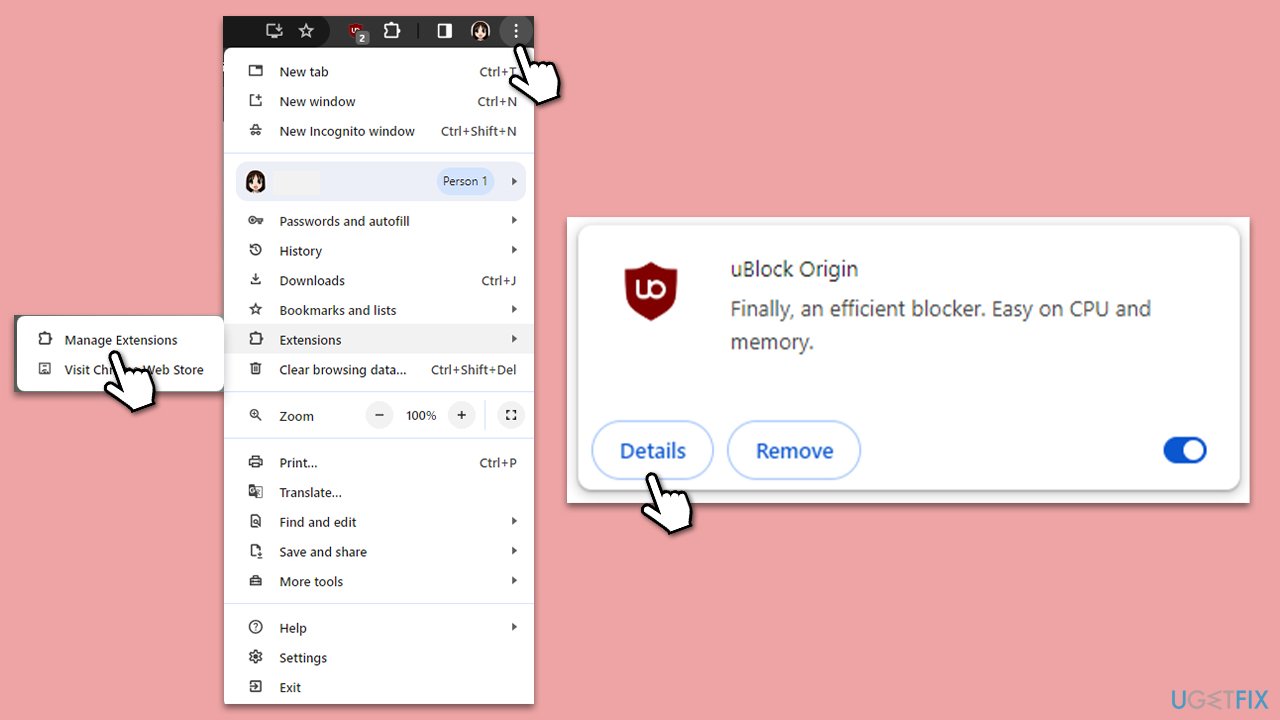
- Open Chrome, and click menu (⋮).
- Go to Extensions and select Manage extensions.
- Under your adblocker, click Details.
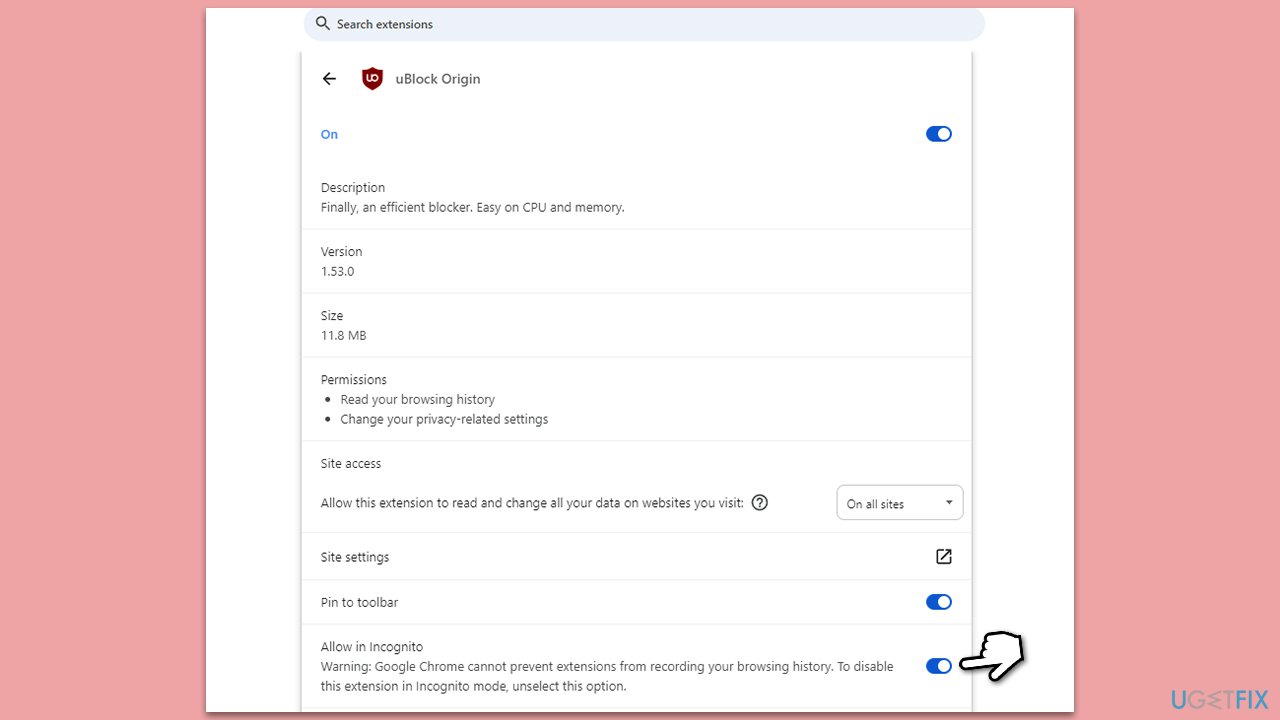
- Scroll down to Allow in Incognito section.
- Enable this option by clicking the switch.
Option 2. Use a filter in uBlock
uBlock is an excellent Adblocker with tons of customization settings. Unfortunately, the default version simply no longer works for YouTube. That said, using filters is the way to go, although you need to do this correctly.
- Close down YouTube if you have it open.
- Go to Extensions > Manage extensions.
- Click Details under uBlock Origin.
- Click on Extension options.
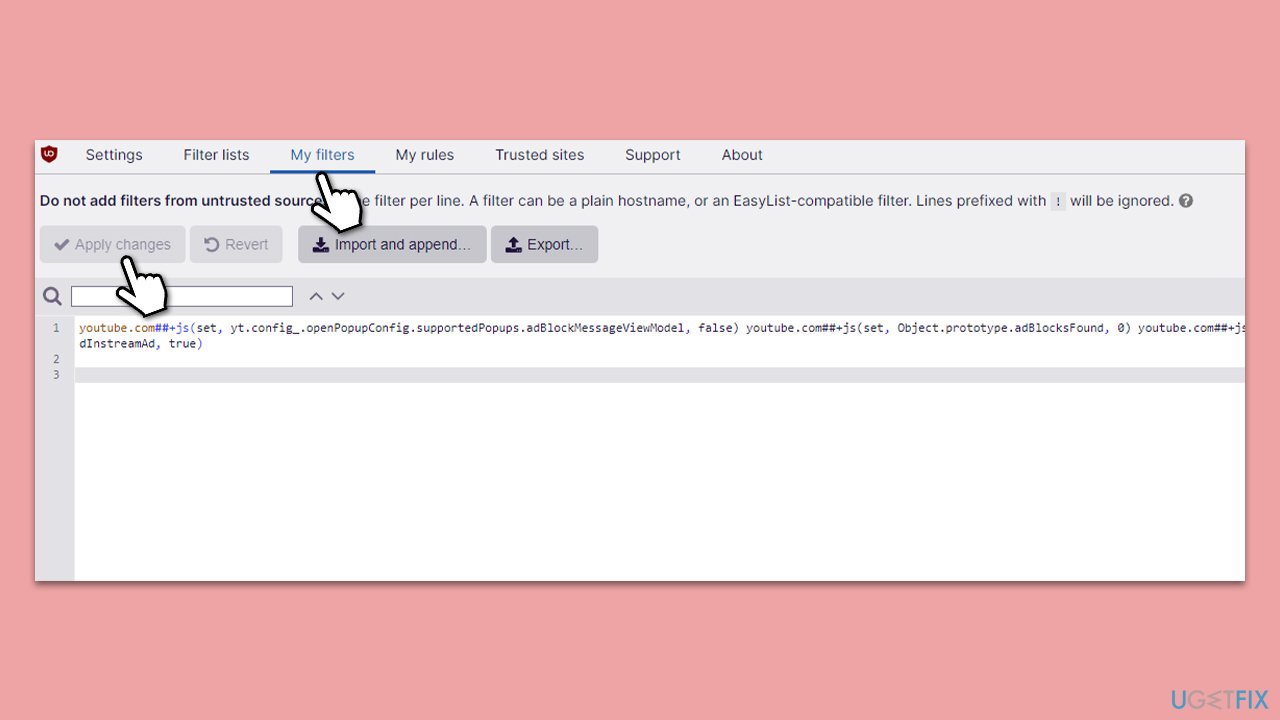
- Go to the My filters tab at the top.
- Copy and paste the following:
youtube.com##+js(set, yt.config_.openPopupConfig.supportedPopups.adBlockMessageViewModel, false) youtube.com##+js(set, Object.prototype.adBlocksFound, 0) youtube.com##+js(set, ytplayer.config.args.raw_player_response.adPlacements, []) youtube.com##+js(set, Object.prototype.hasAllowedInstreamAd, true) - Click Apply changes.
Now that the filter is applied, you need to make sure to clean cookies. You can either employ automatic tools lie [d1] for a quick solution, or perform the following steps:
- Open Chrome and go to menu > Settings.
- Under Privacy and security, select Clear browsing data.
- Under time range, pick All time.
- Select Cookies and other site data, and Cached images and files.
- Click Clear data.
Open your browser, log back into YouTube, and enjoy an ad-free experience. Note that YouTube can make updates and detect the filter at some point. To avoid going through the same process, you can update the filter as follows:
- Open uBlock Origin options.
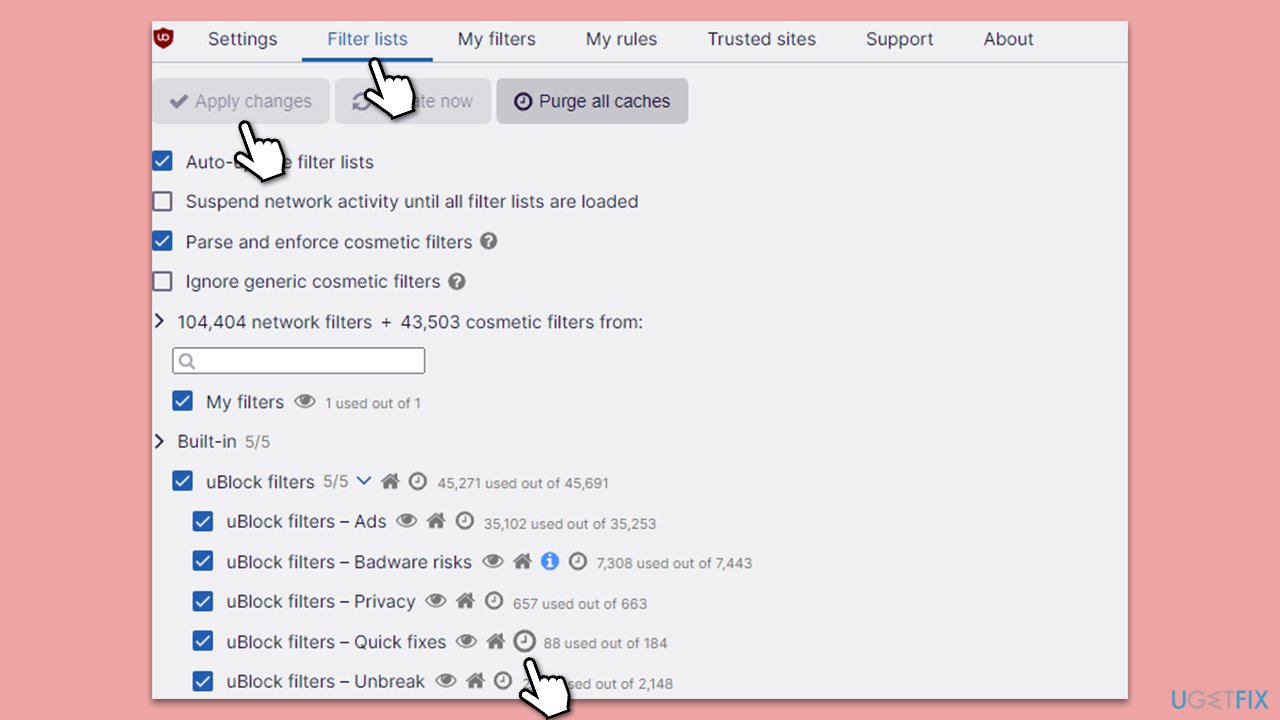
- Go to the Filter lists tab.
- Under Built-in, locate uBlock filters - Quick fixes.
- Click on the Clock icon to update the filter and then click Update now at the top.
Option 3. Use Enhancer for YouTube extension
Another option that reportedly works is by using Enhancer for YouTube extension. Follow these steps:
- Disable any other Adblockers you have installed before proceeding.
- Install Enhancer for YouTube.
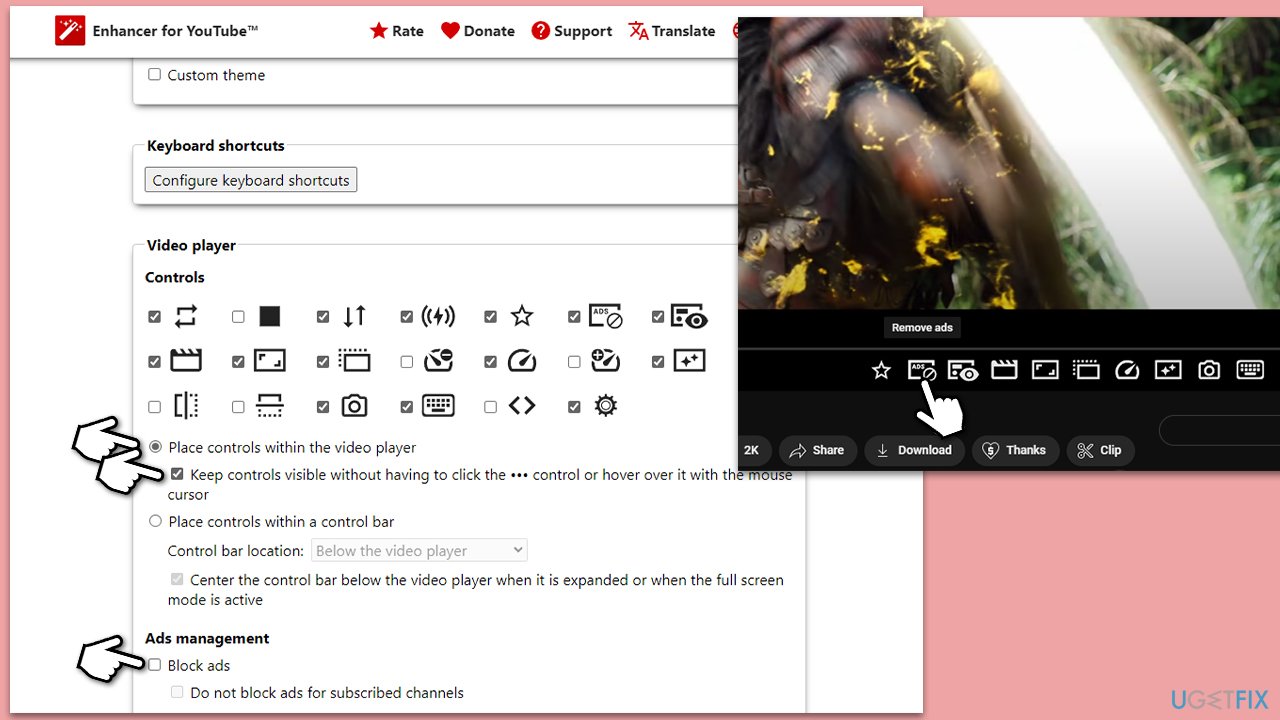
- Go to extension options and look at the Video Player section.
- Under Controls, enable Place controls within the video player.
- Tick the Keep controls visible without having [...] option.
- Under Ads management, disable Block ads.
- Load up any video on YouTube.
- Allow the first ad to play for a bit and click the Remove ads widget at the bottom.
Bottom line
To prevent YouTube from blocking Adblock, you can use Incognito mode or explore different apps and tricks. If these methods do not work, consider looking for alternative ad-blocking solutions or staying updated on new techniques.
Frequently asked questions
You can try using a different user agent string in your browser settings on Windows 10 to avoid detection by YouTube. Additionally, ensure your Adblock extension is updated to the latest version for optimal performance.
In Windows 11, you can adjust your browser's privacy settings to block third-party cookies, which may help Adblock perform better on YouTube. Also, consider using a VPN to further obscure your browsing activity.
Yes, disabling tracking protection in your browser settings on Windows 10 can sometimes help Adblock function more effectively on YouTube. Furthermore, adding exceptions for YouTube in your Adblock settings may also improve its performance.




Report an issue
What's wrong with this guide? We review every report and update or remove content.
Report received — thank you. We'll review and fix it.
You need a free account to submit a report.
Be the first to comment