How to fix
Remove Bezlimitko.xyz Referral Spam from Google Analytics Stats
on Windows
Eliminate Bezlimitko.xyz referral spam from your Google Analytics stats on Windows 10 and 11 with expert-tested tips for accurate data tracking.

Why does How to Remove Bezlimitko.xyz Referral Spam from Google Analytics Stats occur?
- Referral spam is injected into Google Analytics stats
- Bezlimitko.xyz is a fake referral domain
- Spammers use this technique to generate artificial traffic
- The domain distorts actual visit statistics
- The referral is not genuine and does not represent real visitors
Repairs Windows system files, removes malware, and restores a clean OS state — without reinstalling.
Please provide me a guide to remove Bezlimitko.xyz URL from Google Analytics stats. Thanks in advance!
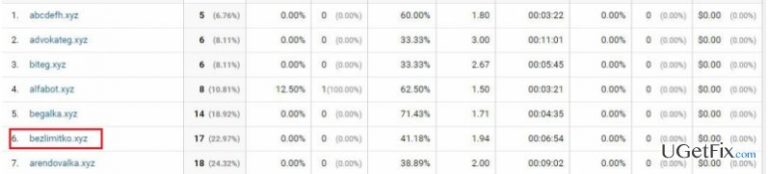
Bezlimitko.xyz is a referral domain that has been injected into thousands of Google Analytics stats. Yes, we say „injected“ because this referral is not genuine. It‘s one of the referral spam examples, which is spread on the Internet by spammers. If you haven‘t heard about Ghost traffic or referral spam, then you should read this post for more information. In short, referral spam is a spamming technique developed by Vitaly Popov, which is implemented using spamdexing technique and works as a traffic generator.
Usually, bezlimitko.xyz shows up in the priority of the Google Analytics stats due to high ratio, an impressive number of new visitor, and so on. Consequently, the owner of the account gets intrigued by those stats and attempt to visit Bezlimitko.xyz URL. Unfortunately, you should not be glad about an increased traffic to your website via this doubtful URL because it‘s fake. Hackers found the gap in Google Analytics and now are able to distort the stats by creating artificial traffic, meaning that there were no actual visitors on your site from this domain. In comparison to malware, referral spam is not malicious. Fake referral domains are distributed with an intention to make people visit particular domains, thus increase their traffic and generate income.
Despite distorting the stats on Google Analytics, Bezlimitko.xyz referral spam is not malicious as it is neither stealing the traffic nor influencing the rank on Google search results. However, security experts distributed a warning that the destination domain of this URL may be filled with doubtful content, including links, pop-ups, software installers, and similar. Therefore, you should not get curious and bypass this referrer without checking. In case you have already checked it, initiate a full system scan with [d1] and then block Bezlimitko.xyz spam on your analytics account.
How to terminate Bezlimitko.xyz referral spam on Google Analytics?
Ghost traffic distorts the stats of Google Analytics, which is why you cannot see the exact number of the visits to your site. Therefore, you should block Bezlimitko.xyz referral spam and other dubious referral domains in order to see the real stats. For this purpose, you should:
Step 1. Change Filter Pattern
- Go to Admin -> All Filters. Then go to New Filter and type bezlimitko.xyz in the Filter Name box.
- Select Custom Filter Type, then choose Campaign Source from the drop-down Filter Field menu.
- Eventually, in the Filter Pattern field, enter bezlimitko.xyz and click Save.
Step 2. Alter HTTP settings
- Sign in to cPanel account, navigate to File Manager section and click on the checkbox called Document Root for -> your website.
- Click on Show Hidden Files and click Go. Once you locate the .htacess file, right-click on it and choose Code Edit. Enter the following text ant click Save Changes.
## SITE REFERRER BANNING
RewriteCond %{HTTP_REFERER} bezlimitko.xyz [NC,OR]
RewriteCond %{HTTP_REFERER} bezlimitko.xyz
RewriteRule .* - [F]
Step 3. Modify Language filter
- In your Analytics account, go to Admin Tab.
- Click VIEW, select Filters and then hit +Add Filter.
- In the Filter Name box, type: Language Spam.
- In the Filter Pattern box, type in: \s[^\s]*\s|.{15,}|\.|,
- Click on Verify this Filter, then Save.
To conclude, we would also recommend you not to show your site log files in public if you want to prevent hackers from accessing technical information of your site. In addition, consider investing a little bit more money into a reputable spam filter.
Bottom line
To remove Bezlimitko.xyz referral spam from Google Analytics, you should block the domain in your analytics account and initiate a full system scan. If these steps do not resolve the issue, consider seeking further assistance or exploring additional methods to filter out referral spam.
Frequently asked questions
You can filter out Bezlimitko.xyz by creating a specific filter in your Google Analytics settings, ensuring that it doesn't skew your data.
Yes, you can use network monitoring tools available for Windows 11 to track incoming traffic and identify any unusual referral sources.
In Google Analytics, navigate to the Admin section, select your view, and then create a new filter to exclude traffic from Bezlimitko.xyz.




Report an issue
What's wrong with this guide? We review every report and update or remove content.
Report received — thank you. We'll review and fix it.
You need a free account to submit a report.
Be the first to comment