How to fix
Remove Brateg.xyz Referral Spam from Google Analytics Reports
on Windows
Eliminate Brateg.xyz referral spam from your Google Analytics reports easily. Optimize your Windows 10 or 11 settings for accurate tracking—expert-tested!

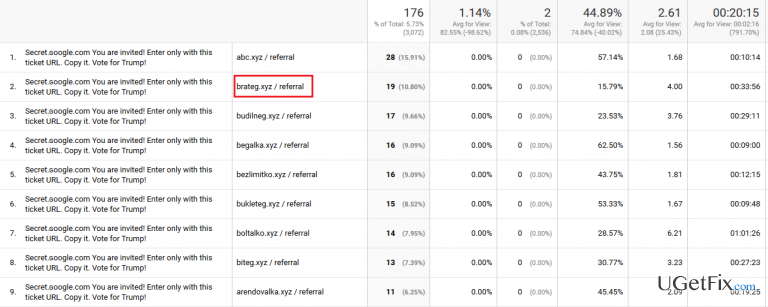
Why does How to Remove Brateg.xyz Referral Spam from Google Analytics Reports occur?
- Referral spam tricks website owners into believing they have real visitors
- Bots send hits to Google Analytics servers without contacting the website
- Fake referral domains are created to distort analytics data
- Referral spam can mislead website owners about their traffic sources
- Some fake domains may be used for spreading malware
Repairs Windows system files, removes malware, and restores a clean OS state — without reinstalling.
Could you please tell me if the domain brateg.xyz is secure? I‘ve noticed this referrer domain on my Google Analytics statistics with a large bounce rate, so I‘ve decided to check it. However, it seems that such domain does not exist as I was redirected to a completely different source page. How is it possible to check that? Thanks!
Brateg.xyz is a fake referral domain, which appears on the statistics of Google Analytics. The domain name is secret.ɢoogle.com and the title is usually something similar to “Vitaly rules google”. That‘s yet another referral spam example used by Russian spammer Vitaly Popov who seeks to increase the rank of his pages on Google search by creating a Ghost traffic on people‘s Google Analytics data. Referral spam tricks people into thinking that their website has been visited by a considerable number of new visitors via a particular domain, which is why the admins or owners of the website often decide to check them. However, in reality, there are no actual visitors because referral spam relies on bots that send hits to Google Analytics servers directly without having a contact with the website. This way, website‘s bounce rate and sections like Acquisition, Behavior, and others are distorted in a way to attract the attention. While Vitaly Popov calls such activity as „creative marketing“, online security experts refer to it as referral spam and blackhat SEO.
Can Brateg.xyz referral spam affect the rank of my website on Google?
Those who have noticed an unusual increase of visitors from domains like Brateg.xyz wonder if such fraudulent activity influences the rank of their website on Google search. Luckily, such behaviour does not have a negative impact on the website directly. However, those who rely on Google Analytics reports for improving the website, the occurrence of Brateg.xyz referral spam may have negavite consequences because the results are distorted. By the way, fake referral domains might be use for spreading malware.
How to block Brateg.xyz referral from Google Analytics reports?
Referrals like Brateg.xyz are used to attract the attention of the owner/admin of a website by indicating a high visitor‘s traffic, which is fictitious. The development of ghost traffic is very useful for those who seek to increase traffic to specific websites (note: not ncessarily safe ones), but not for Google Analytics users whatsoever. Therefore, if you‘ve been suffering from Brateg.xyz referrer spam, you have to create an exclude filter and block the spam rendering .htaccess file. It means that removing the refferer from the GA statistics is certainly NOT enough. All steps that have to be initiated to terminate Brateg.xyz refferal spam from Google Analytics reports are listed down below:
Step 1. Change Filter Pattern
- Go to Admin -> All Filters. Then go to New Filter and type brateg.xyz in the Filter Name box.
- Select Custom Filter Type, then choose Campaign Source from the drop-down Filter Field menu.
- Eventually, in the Filter Pattern field, enter brateg.xyz and click Save.
Step 2. Alter HTTP settings
- Sign in to cPanel account, navigate to File Manager section and click on the checkbox called Document Root for -> your website.
- Click on Show Hidden Files and click Go. Once you locate the .htacess file, right-click on it and choose Code Edit. Enter the following text ant click Save Changes.
## SITE REFERRER BANNING
RewriteCond %{HTTP_REFERER} brateg.xyz [NC,OR]
RewriteCond %{HTTP_REFERER} brateg.xyz
RewriteRule .* - [F]
Step 3. Modify Language filter
- In your Analytics account, go to Admin Tab.
- Click VIEW, select Filters and then hit +Add Filter.
- In the Filter Name box, type: Language Spam.
- In the Filter Pattern box, type in: \s[^\s]*\s|.{15,}|\.|,
- Click on Verify this Filter, then Save.
If you have been checking such URLs as brateg.xyz for some time, it's advisable to check the system for malware. For that, you can use [d1]
Bottom line
To block Brateg.xyz referral spam from Google Analytics reports, you can set up filters to exclude the domain and implement a referral exclusion list. Additionally, consider using advanced segments to analyze genuine traffic. If these methods do not resolve the issue, further investigation into your analytics setup may be necessary.
Frequently asked questions
Brateg.xyz referral spam is a type of bot traffic that inflates your analytics reports, making it difficult to gauge real user activity on your Windows 10 device. It can lead to misleading data, affecting your website's performance analysis.
To block Brateg.xyz referral spam in Google Analytics on Windows 11, create a filter that excludes traffic from this referral source. This can be done in the Admin section under the appropriate view settings.
While there aren't specific tools in Windows 10 designed solely for managing Google Analytics spam, you can use browser extensions that block spam referrals or manage filters directly in your Google Analytics account.




Report an issue
What's wrong with this guide? We review every report and update or remove content.
Report received — thank you. We'll review and fix it.
You need a free account to submit a report.
Be the first to comment