How to fix
Remove Ranking2017.ga referral spam from Google Analytics reports
on Windows
Eliminate Ranking2017.ga referral spam from your Google Analytics reports effortlessly on Windows 10 or 11. Expert-tested solutions for accurate data!

Why does How to remove Ranking2017.ga referral spam from Google Analytics reports occur?
- Spam referral domains appear in Google Analytics reports
- Fake hits are generated by programs or bots
- Spammers know the Google Analytics property ID to inject fake referrals
- Ranking2017.ga aims to increase traffic and rank using unfair techniques
- The referrer may be exploited for malware distribution
Repairs Windows system files, removes malware, and restores a clean OS state — without reinstalling.
I have a suspect that my GA reports have been polluted by spam because ranking2017.ga referrer keeps showing on the list. I’ve tried to access the website to check what it’s about, but web browser was redirected to another domain. After that, I’ve performed a small research on this URL and found clues that it’s a newly released referral spam, so I decided to ask your help to block it. Would highly appreciate your help, guys!
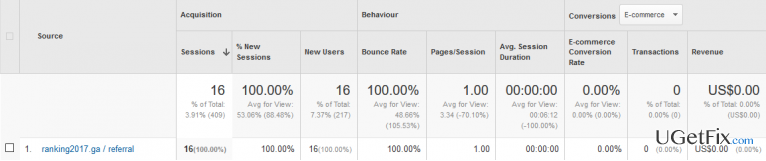
Nowadays the reliability of Google Analytics reports is a heated question ‘thanks’ to the Vitaly Popov and its invention of Ghost Traffic. A couple of years ago, security specialists and Google Analytics experts noticed strange referral domains showing up in the list of referrers, for example, boltalko.xyz, Arendovalka.xyz, Bukleteg.xyz, sharebutton.to, and many others. These sources attract the attention of a GA user as they usually feature a high visitor’s rate even though the website is non-affiliated with a Google Analytics user’s site, which is the reason why GA user may decide to check the URL. That's the trick that spammers have invented to increase traffic to doubtful domains and, therefore, earn an easy profit. Ranking2017.ga referral spam and its predecessors are those domains in question and are sometimes considered to be malicious as they may even be exploited for malware distribution. However, the main goal of Ranking2017.ga is to generate traffic and increase the rank in Google search results using unfair techniques.
Ranking2017.ga referral spam may also be referred to as Ghost traffic. It means that all indicators shown on its behalf are fictitious. The referrer gets injected into the GA reports with the help of fake hits, which are generated by a program or a bot. It means that no human beings were accessing your website via Ranking2017.ga URL because the hits have been channeled directly to Google Analytics. To make this trick, spammers or hackers, it’s up to you how to call, just need to know your Google Analytics property ID to inject fake referrals into the reports. Ranking2017.ga fake referral distorts actual GA statistics, which is a minor harm if compared to the fact that referral spam may be linked to infected websites. Therefore, it’s crucial to ensure Google Analytics by NOT disclosing property ID publicly. If, however, you are receiving reports about Ranking2017.ga spam, take needed actions and block it right away.
How to block Ranking2017.ga referral spam in Google Analytics reports?
Step 1. Change Filter Pattern
- Select Admin -> All Filters. Later on, enter New Filter and type Ranking2017.ga in the Filter Name box.
- Choose Custom Filter Type, then choose Campaign Source from the drop-down Filter Field menu.
- Lastly, in the Filter Pattern field, type Ranking2017.ga and click Save.
Step 2. Change HTTP settings
- Sign into cPanel account, navigate to File Manager section and click on the checkbox called Document Root for -> your website.
- Click on Show Hidden Files and then Go. Once you locate the .htacess file, right-click on it and select Code Edit. Enter the following text ant click Save Changes.
## SITE REFERRER BANNING
RewriteCond %{HTTP_REFERER} Ranking2017.ga
RewriteCond %{HTTP_REFERER} Ranking2017.ga
RewriteRule .* – [F]
Step 3. Modify Language filter
- In your Analytics account, navigate to Admin Tab.
- Click VIEW, select Filters and then click +Add Filter.
- In the Filter Name box, type: Language Spam.
- In the Filter Pattern box, type in: \s[^\s]*\s|.{15,}|\.|,
- Click on Verify this Filter and save the changes.
Bottom line
To remove Ranking2017.ga referral spam from your Google Analytics reports, you can set up filters to exclude the spam domain and ensure that your property ID is secure. Additionally, consider using a bot filtering option in your GA settings. If these methods do not resolve the issue, further investigation into your analytics setup may be necessary.
Frequently asked questions
To prevent Ranking2017.ga referral spam, you should set up a filter in Google Analytics to exclude the spam domain from your reports. This can be done directly in your Google Analytics account settings, regardless of whether you are using Windows 10 or Windows 11.
Yes, you can block the IP addresses associated with Ranking2017.ga in your web server configuration or use a firewall to prevent these requests, ensuring cleaner data in your Google Analytics reports.
To identify and remove Ranking2017.ga spam, check your Google Analytics referral paths and set up filters to exclude it; this can be done easily through your browser on either Windows 10 or Windows 11.




Report an issue
What's wrong with this guide? We review every report and update or remove content.
Report received — thank you. We'll review and fix it.
You need a free account to submit a report.
Be the first to comment