How to fix
Use Microsoft Office 365 for free
on Windows
Unlock Microsoft Office 365 for free on your Windows 10 or 11 device. Get expert-tested tips to maximize productivity with seamless configuration!


Why does How to use Microsoft Office 365 for free occur?
- Microsoft 365 operates on a subscription basis
- Office Online is a free, web-based version
- Basic functionality is limited compared to desktop versions
- Real-time collaboration is available in Office Online
- Requires a Microsoft account for access
Repairs Windows system files, removes malware, and restores a clean OS state — without reinstalling.
Hello. I recently purchased a new PC and wondered if I could use Microsoft 365 for free. Or paying is the only way?
Microsoft 365, formerly known as Office 365, is an evolution of Microsoft's longstanding Office suite. Unlike the traditional Office suite, which is purchased as a one-time installation, Microsoft 365 operates on a subscription basis, offering monthly or yearly plans.
This subscription includes access to fully installed desktop applications like Word, Excel, and PowerPoint, as well as up to 6 TB of secure cloud storage through OneDrive. Microsoft 365 enhances user experience with premium features, the ability to work offline, enhanced security for identity, data, and devices, and provides an ad-free email service.
Despite these extensive features, many users seek access to Microsoft Office for free. In response, Microsoft offers Office Online, a free, web-based version of its popular software suite. This version is accessible to anyone with a Microsoft account and does not require any installation.
While Office Online includes basic functionality for applications such as Word, Excel, PowerPoint, and OneNote, it does not offer the more advanced features found in the desktop versions. However, it excels in real-time collaboration, allowing multiple users to work on the same document simultaneously directly from their web browsers.
If you're interested in using Microsoft Office for free, accessing Office Online is straightforward. You can start by creating a Microsoft account if you don't already have one. Once your account is set up, simply navigate to the Office website and log in with your Microsoft credentials. From there, you can use the various applications directly in your web browser, making it an excellent option for basic document creation and editing without the need for any installation or costs.
How to get Microsoft 365 Online?
If you want a completely free version of Office 365 apps, you simply access the official websites online. Keep in mind that this will not provide you with all the apps accessible via the paid version.
- Open your preferred browser.
- Navigate to the official Microsoft 365 website.
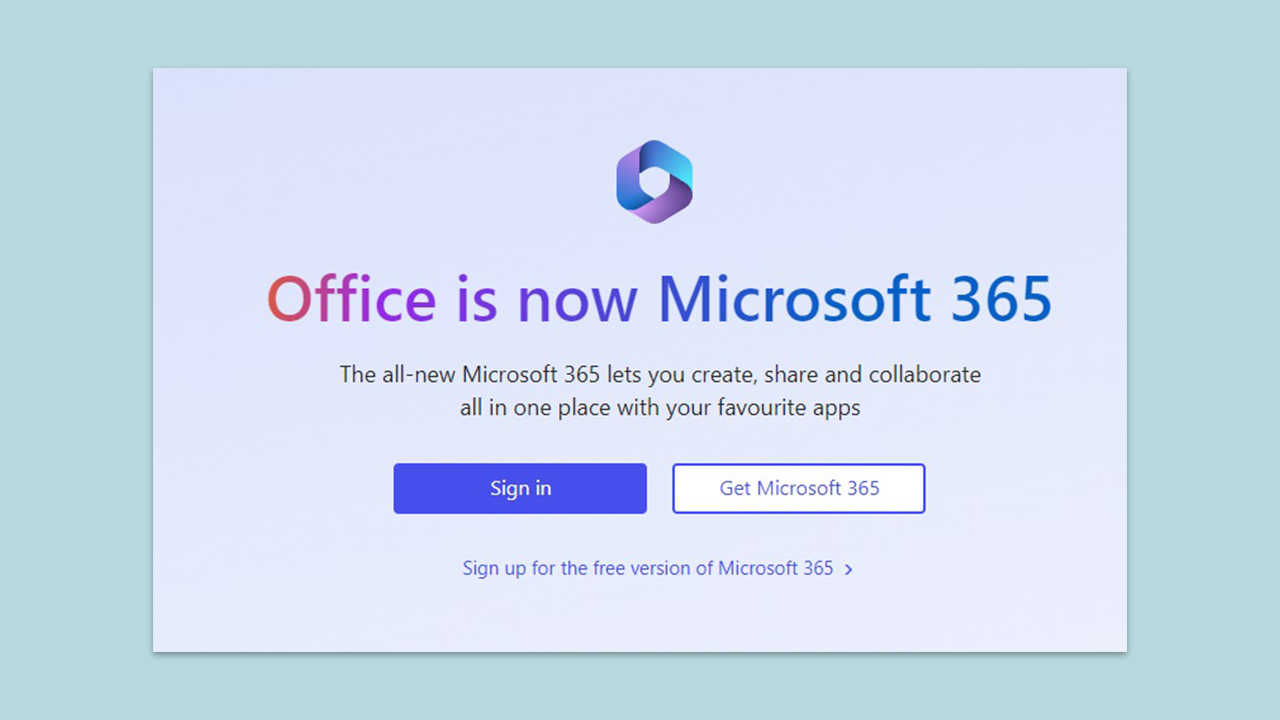
- Here, you will see two options - Sign in and Get Microsoft 365.
- To register for Office 365 Free, you should click the link below - Sign up for the free version of Microsoft 365.
- Create a Microsoft account following the prompts.
- Alternatively, if you already have a Microsoft account, you should click Sign in to log in with your credentials.
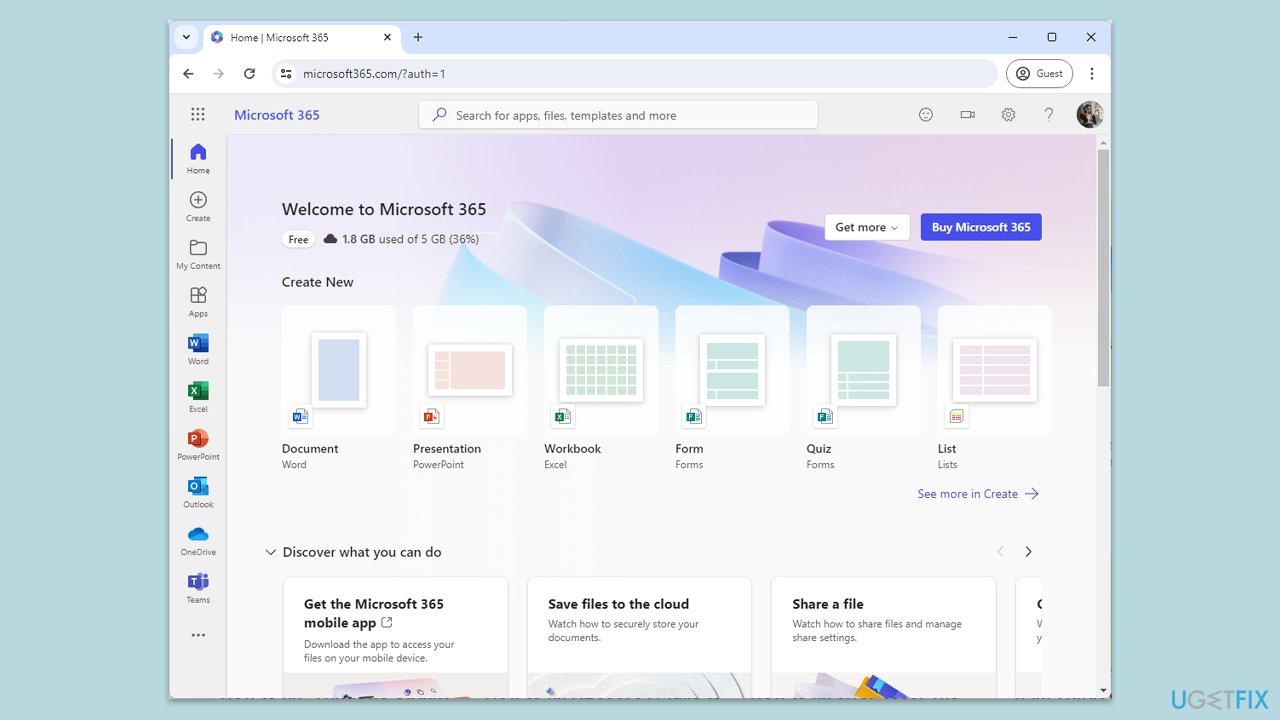
- Here, you will be able to access all the available apps - Word, Excel, and PowerPoint.
- Additionally, here you will see other options, such as Teams or OneDrive.
If you want more features...
If you decide that Microsoft 365 functionality is not enough after all, you can always subscribe to the paid version. There are various plans available, including (not that process might vary depending on your location):
Microsoft 365 Family:
- Price: $99.99/year or $9.99/month.
- Features:
- For one to six people.
- Sign in to five devices simultaneously.
- Use on PCs, Macs, phones, and tablets.
- Up to 6 TB of secure cloud storage.
- Apps with premium features and offline access.
- Identity, data, and device security.
- Ad-free secure email.
Microsoft 365 Personal:
- Price: $69.99/year or $6.99/month.
- Features:
- For one person.
- Sign in to five devices simultaneously.
- Use on PCs, Macs, phones, and tablets.
- 1 TB of cloud storage.
- Apps with premium features and offline access.
- Identity, data, and device security.
- Ad-free secure email.
Office Home & Student 2021 (One-time purchase for PC or Mac):
- Price: $149.99.
- Features:
- Includes Word, Excel, and PowerPoint.
- Licensed for use on one PC or Mac.
Microsoft 365 Business Plans:
- Price: Starting from $6.00/user/month (annual subscription).
- Features:
- Identity, access, and user management for up to 300 employees.
- Custom business email ([email protected]).
Differences between Microsoft 365 and Office Online
To compare easily, here are the key differences between Microsoft 365 and Office 365 Online:
| Microsoft 365 | Office Online | |
| Installed apps | Yes | No |
| Available features | Access to all apps (Online collaboration, mobile apps, cloud-based, email, etc.) | Limited availability (Word, Excel, PowerPoint, OneNote, Teams, etc.) |
| Storage | Up to 6 TB | Up to 5 GB |
| Offline mode | Yes | No |
| Pricing | Varies depending on the version (up to $149/year) | Free |
| Security | Yes | No |
Bottom line
To use Microsoft Office for free, you can create a Microsoft account and access Office Online through your web browser. This allows you to use basic applications like Word and Excel without installation or cost. If you need advanced features, consider subscribing to Microsoft 365.
Frequently asked questions
Yes, you can use Microsoft Office 365 for free by signing up for a free trial or using the web-based versions of apps like Word, Excel, and PowerPoint on both Windows 10 and Windows 11.
Free versions of Office 365 may have limited features compared to the paid subscription, such as fewer templates and options, but they are still functional for basic tasks on Windows 10 and Windows 11.
To install Office 365 apps for free, visit the Office website, sign in with your Microsoft account, and follow the prompts to access the online apps or download the desktop versions if eligible.




Report an issue
What's wrong with this guide? We review every report and update or remove content.
Report received — thank you. We'll review and fix it.
You need a free account to submit a report.
Be the first to comment