How to remove
Uninstall MS Edge (Chromium)
from Windows
Easily remove MS Edge (Chromium) from Windows 10 or 11 with our expert-tested guide. Enjoy a clutter-free system with zero traces left behind.

How does How to uninstall MS Edge (Chromium) in Windows end up on your PC?
- Recent Windows update installed MS Edge
- Users prefer Google Chrome
- MS Edge was shipped with Windows updates
- Legacy Edge was difficult to uninstall
- MS Edge can suffer from issues like INET_E_DOWNLOAD_FAILURE
Repairs Windows system files, removes malware, and restores a clean OS state — without reinstalling.
Hello. I have been using Google Chrome for years now, and I think that it is the best for me. However, after the recent Windows update, I found MS Edge also installed on my computer. Could you provide steps to remove it fully, as I heard that it might be a bit tricky? Thanks in advance.
Microsoft Edge initially was a replacement for the flawed Internet Explorer in 2015, along with the newest version of Windows - Windows 10. Users have seen significant improvements over the terrible IE, as Edge seemed to be much faster and safer to use, although, over time, it became clear that it is far from other modern browsers when it comes to quality. Due to this, the latest Microsoft browser remained pretty much irrelevant.
Therefore, in 2018, Microsoft announced that it is working on Chromium-based Edge,[ref en-2], which was consequently released in January 2020. In fact, this version of the web browser was relatively well-received, as it was more privacy-focused than Chrome, all while allowing users to retain all Google account-related components, such as logins and even extensions.
However, not everybody wanted to upgrade or use the new Edge. Microsoft had a different idea, however, and began shipping the new browser along with Windows updates.[ref en-1] This was not something that people appreciated, although the tech giant warned users that it would replace the legacy app with the Chromium Edge.
This is why many people are willing to uninstall MS Edge from their Windows computers once and for all. That, and the fact that the browser can also suffer from issues such as INET_E_DOWNLOAD_FAILURE. As it turns out, however, that this process might be a bit more difficult than anticipated (it is not a secret that old Edge was a pain to uninstall), as the app cannot be removed in a regular manner, just like its previous version.
Therefore, if you found yourself in a situation where you have no idea how to uninstall MS Edge - we are here to help you. Below you will find steps you have to take in order to remove the program fully from your computer.
How to remove MS Edge from Windows?
Since you are unable to uninstall Edge as you would any other app via Control Panel or the Apps& features section, you will have to employ PowerShell. Here's how:
- Press Win + E to open File Explorer
- Go to the View tab and make sure Hidden items box is ticked
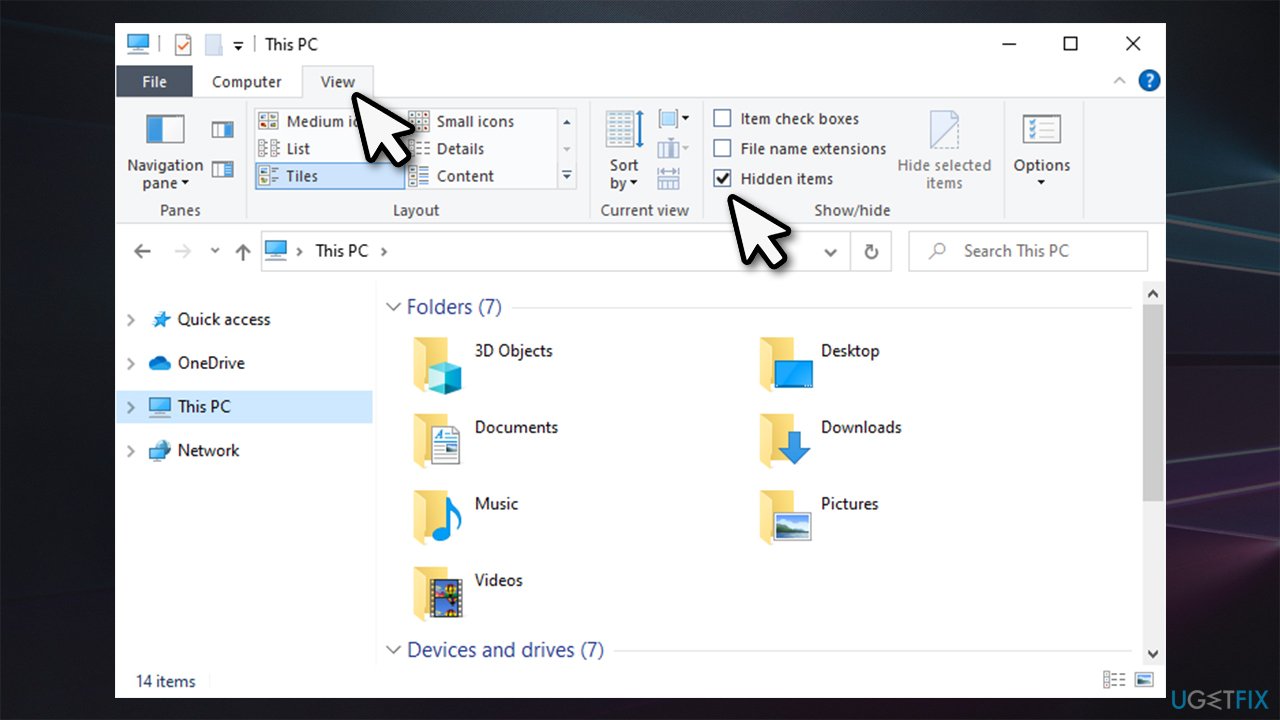
How to uninstall ms edge chromium on windows 10 show hidden items - Navigate to the following location:
C:\\Program Files (x86)\\Microsoft\\Edge\\Application\\
- Double-click on the app version, for example, 88.0.705.68
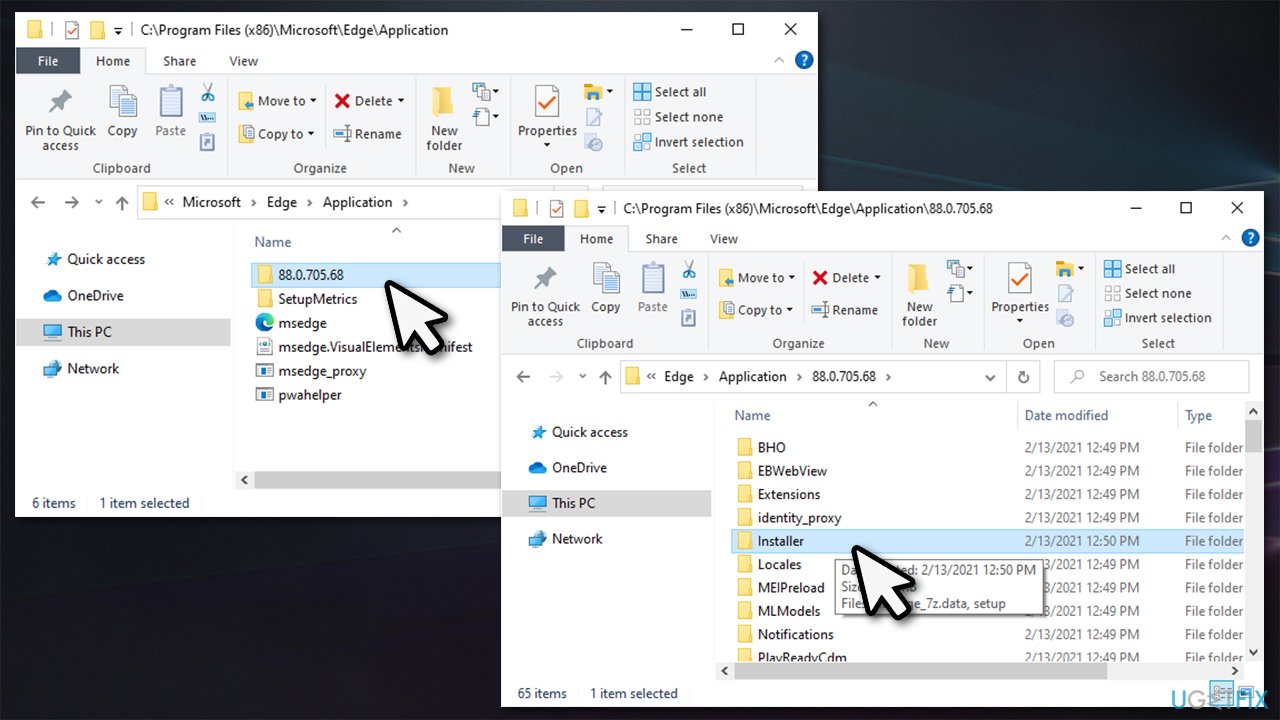
How to uninstall ms edge chromium on windows 10 access installer folder - Go to Installer folder
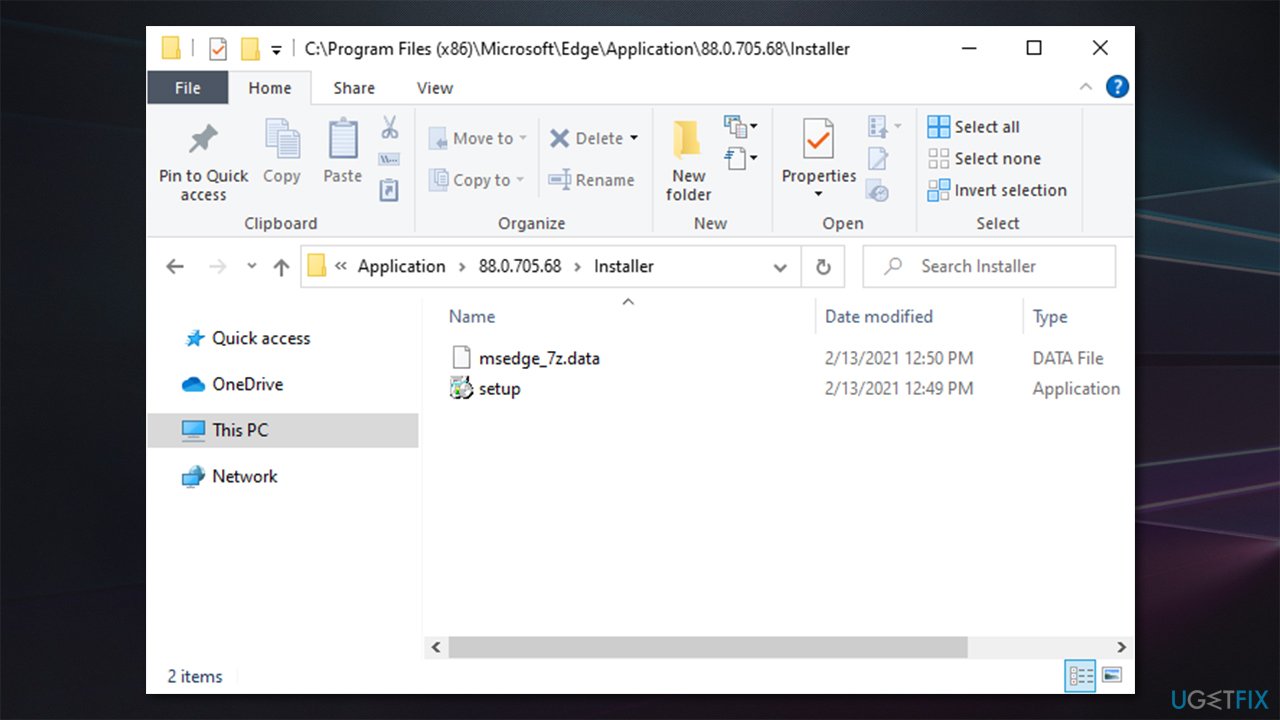
How to uninstall ms edge chromium on windows 10 access installer folder setup - Now click on File and select Open Windows PowerShell > Open Windows PowerShell as administrator
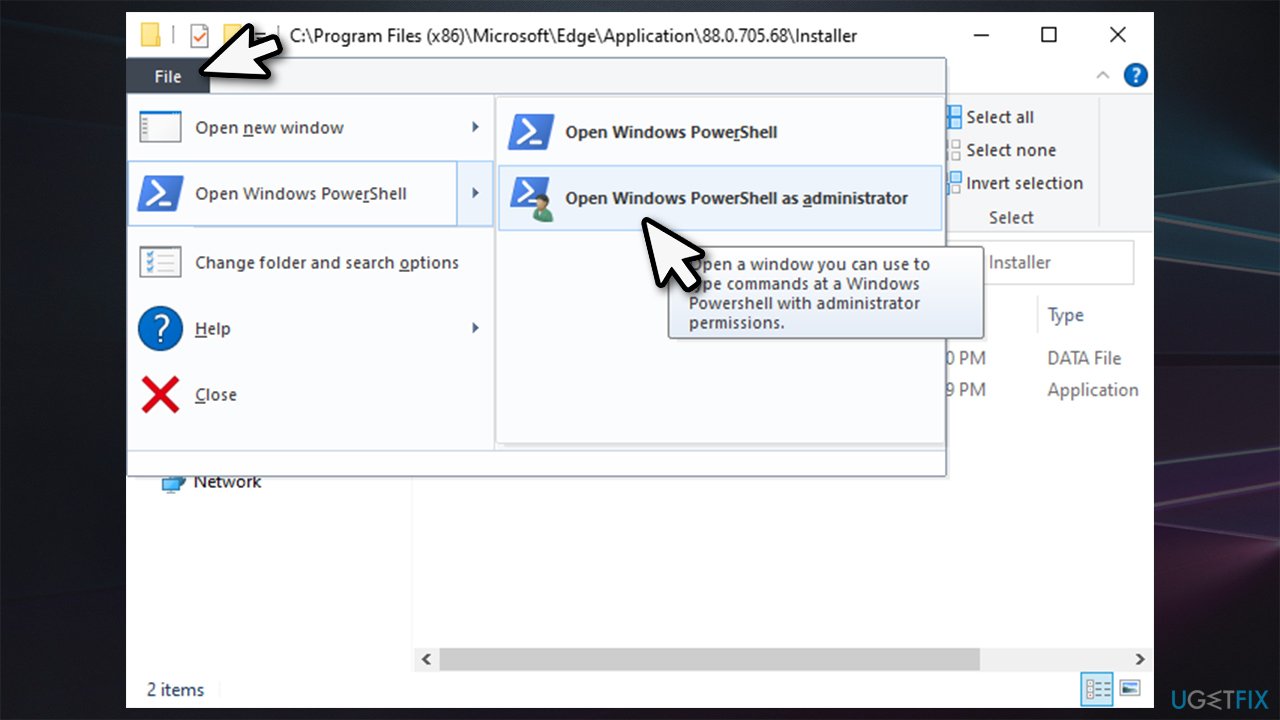
How to uninstall ms edge chromium on windows 10 open powershell as administrator - Next, copy (Ctrl+C) and paste (Ctrl+V) the following command into PowerShell window:
setup.exe --uninstall --system-level --verbose-logging --force-uninstall
- Press Enter.
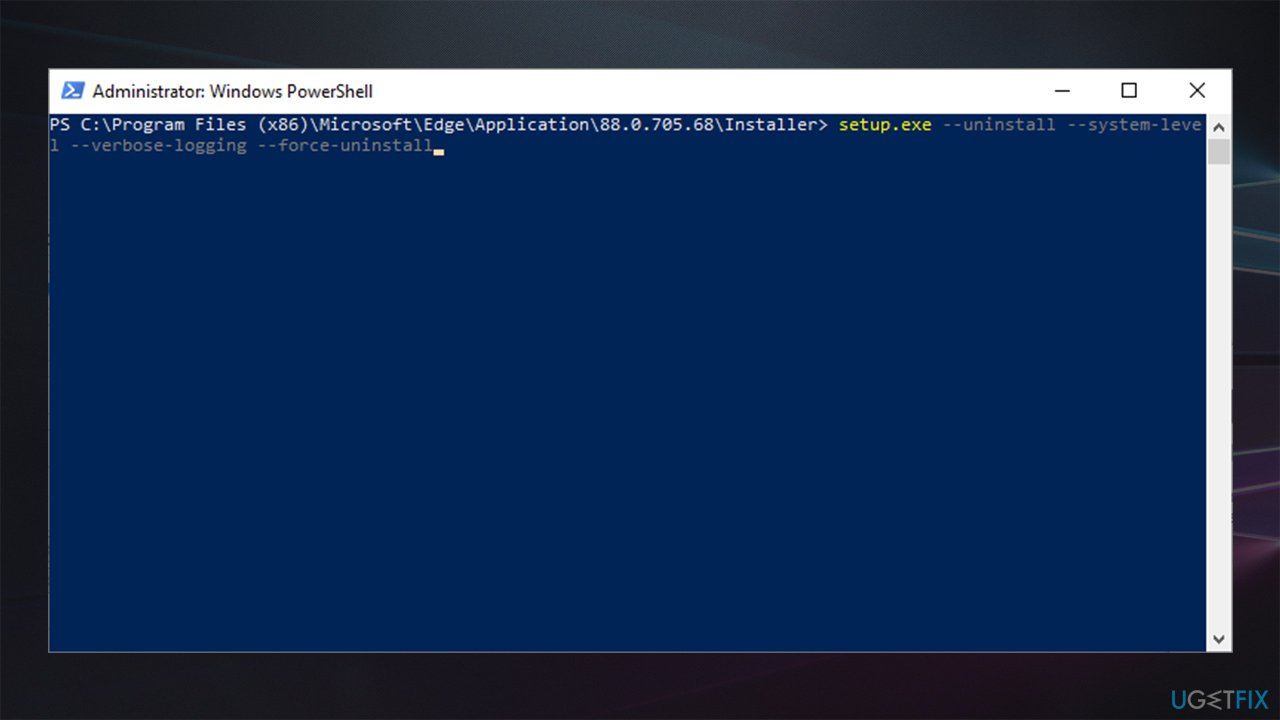
How to uninstall ms edge chromium on windows 10 remove edge
After you complete these steps, Chromium-based MS Edge will be removed from your Windows. However, it is likely to be reinstalled as soon as you apply the newest Windows updates, which brings us to the next point.
Alternative: set another browser to default and don't uninstall Edge
If your main problem with MS Edge is that it was set as your default web browser (for example, if you click a link via another app, Edge is automatically pulled up), then there is no need to uninstall the browser. Since it is integrated into the system rather deeply, removing it might cause all types of instability problems.
If you have encountered such problems, we highly recommend you employ [d1] repair software that could import the missing or damaged files onto your operating system, fixing lag, crashes, BSODs[ref en-3], and other issues.
If you did not uninstall MS Edge browser yet (and you don't want to risk a negative impact on your computer performance) and want to set another browser as your default, follow these steps:
- Right-click on Start and pick Apps and Features
- On the left side, click Default apps
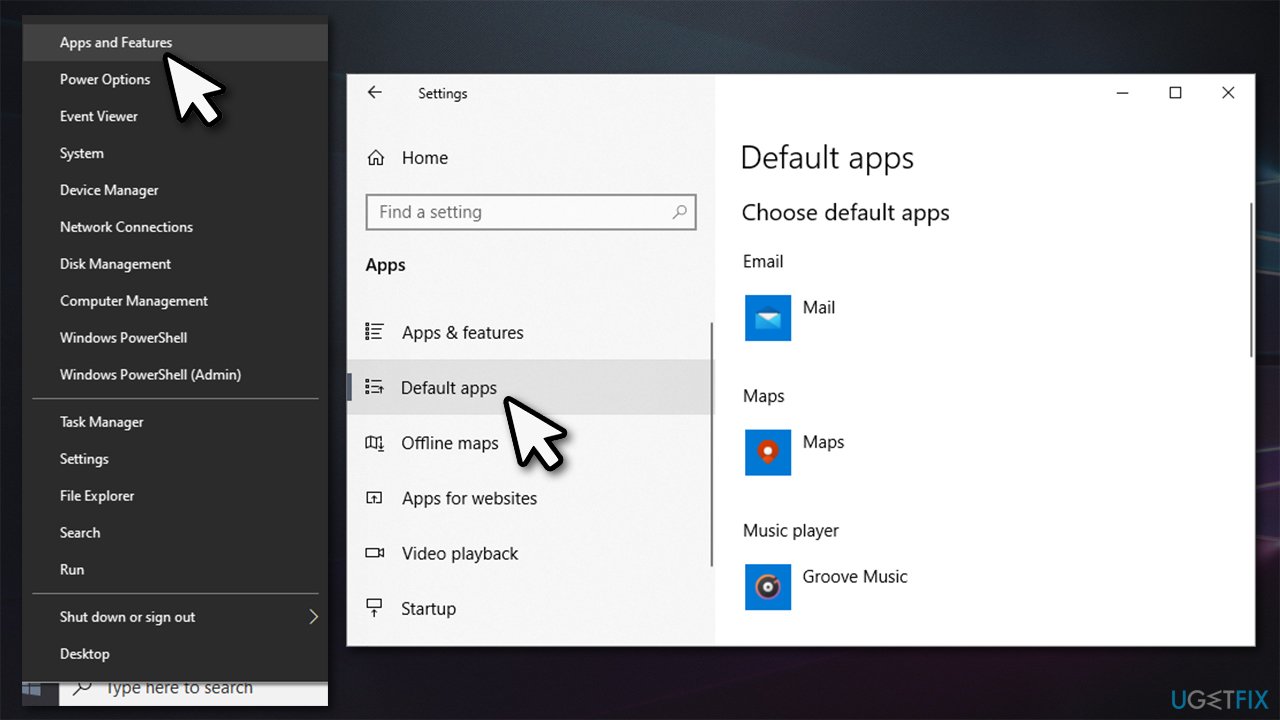
How to uninstall ms edge chromium on windows 10 go to default apps - Scroll down to Web browser section
- Click on MS Edge and pick the browser you want to set as default, e.g., Firefox.
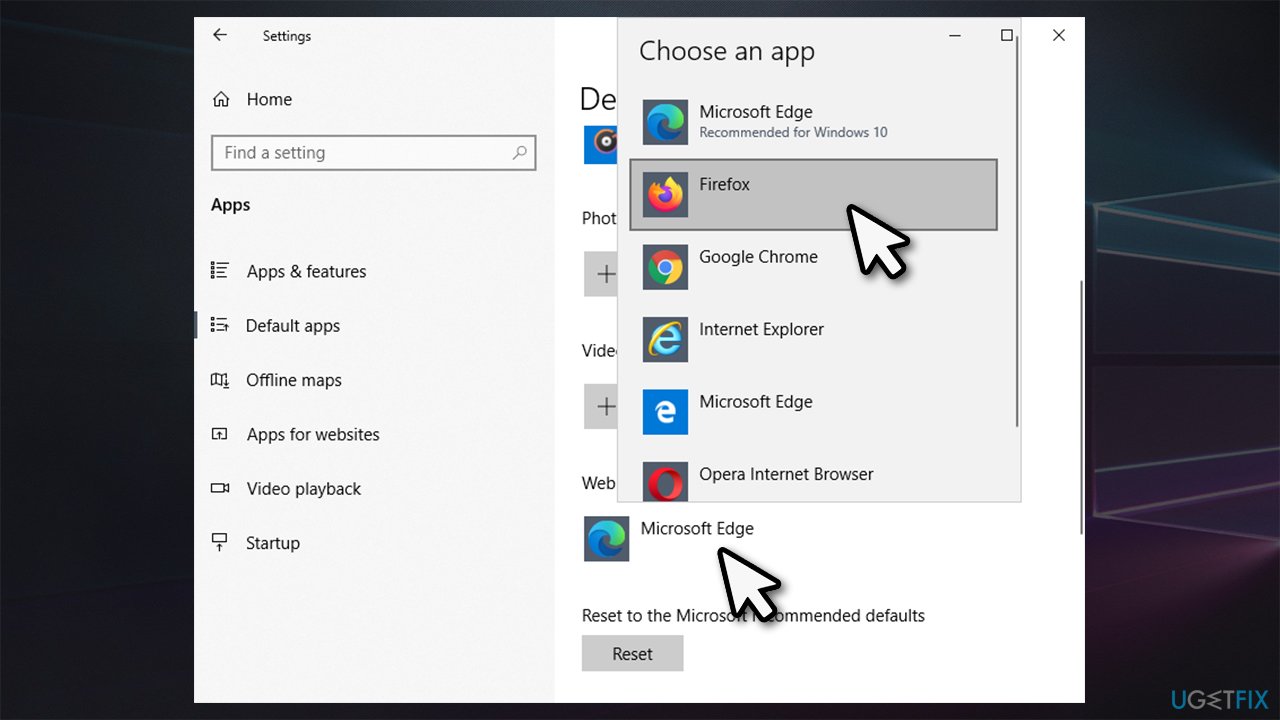
How to uninstall ms edge chromium on windows 10 choose different default app
Bottom line
To uninstall MS Edge, follow the specific steps outlined in the guide. If you encounter difficulties, consider using alternative methods or tools for removal. If none of the suggested fixes work, further assistance may be required.
Frequently asked questions
Yes, you can uninstall MS Edge (Chromium) from Windows 10 using the Settings app, but it requires administrative privileges.
To remove MS Edge (Chromium) in Windows 11, go to Settings > Apps > Apps & features, find Microsoft Edge, and select 'Uninstall'.
Uninstalling MS Edge (Chromium) may affect certain applications that rely on it, but most Windows functionalities will remain unaffected.




Report an issue
What's wrong with this guide? We review every report and update or remove content.
Report received — thank you. We'll review and fix it.
You need a free account to submit a report.
Be the first to comment