How to fix
Windows Update error 0x8007371b
on Windows
Resolve Windows Update error 0x8007371b quickly and efficiently with our expert-tested solutions. Get your system running smoothly again, fixed in minutes!

What causes How to fix Windows Update error 0x8007371b?
- Missing files
- Damaged files
- Incorrect system configurations
- Irregular entries in the Windows registry
- Cluttered registry
- Improper software uninstalls
Repairs Windows system files, removes malware, and restores a clean OS state — without reinstalling.
Hello. I can't install the update and I receive a 0x8007371b error when the upgrading stops. can you help me? Should I change something in settings, or the problem is not on my end at all?
Windows Update Error 0x8007371B is not a new issue with Windows OS because users report[ref en-1]the problem with their upgrade for a while. It was the problem with Windows 7, but right now, it even appears on Windows 10 computers. The main reason why this issue appears is a problem with files. Data is missing or damaged, so the update cannot launch properly.
The error can indicate that there are incorrect system configurations or irregular entries in the Windows registry. The most common causes for the Windows update errors nowadays are faulty updates themselves,[ref en-2] but this Windows Update error 0x8007371b is not the buggy upgrade result. It mainly is triggered by the cluttered registry or missing files.
Improper software uninstalls and other issues with the system or applications can cause these file-related issues. Accidentally deleted data or missing files, incorrect settings can trigger system malfunctions like Windows Update error with 0x8007371b code.
There are a few different variations to this code and the general Windows Update error:
- The error code 0x80073712, which also delivers an ERROR_SXS_COMPONENT_STORE_CORRUPT message.
- The error with code 0x80073701. The problem appearing on x64 systems.
The most frustrating thing about such upgrade errors is the fact that the operating system cannot get updated properly. It is important to fix Windows Update error 0x8007371b, so the machine can get proper upgrades and possibly fixes that come with the latest version of the OS. The particular error can sometimes appear with the message:
ERROR_SXS_TRANSACTION_CLOSURE_INCOMPLETE
or
0x8007371B = ERROR_SXS_TRANSACTION_CLOSURE_INCOMPLETE.
You need to fix Windows Update error 0x8007371b because it might trigger other issues and when the machine shows these errors during security updates, installations the computer is not working as it is supposed to. This is not as difficult as you may think, but follow the instructions closely to achieve the best results.
How to fix Windows Update error 0x8007371b
Windows Update Error 0x8007371b is the problem with files and the system, not online content or issues with security,[ref en-3] infections. So you can be sure that nor cyber threats nor the content you visit constantly has something to do with the issue. Since the problem is related to system files and corruption or missing data, you can achieve quick fixes by running a tool like [d1] that is capable of helping with affected files.
When you can fix Windows Update error 0x8007371b by repairing those issues in system folders with registries and other altered data, you can get back to the update and check if the issue persists. Suppose the problem is already solved - great. If not - rely on the methods below and try a few of them to be sure that the error is fixed.
Troubleshoot the update
- Type troubleshooting in the search bar.
- Find Troubleshoot settings.
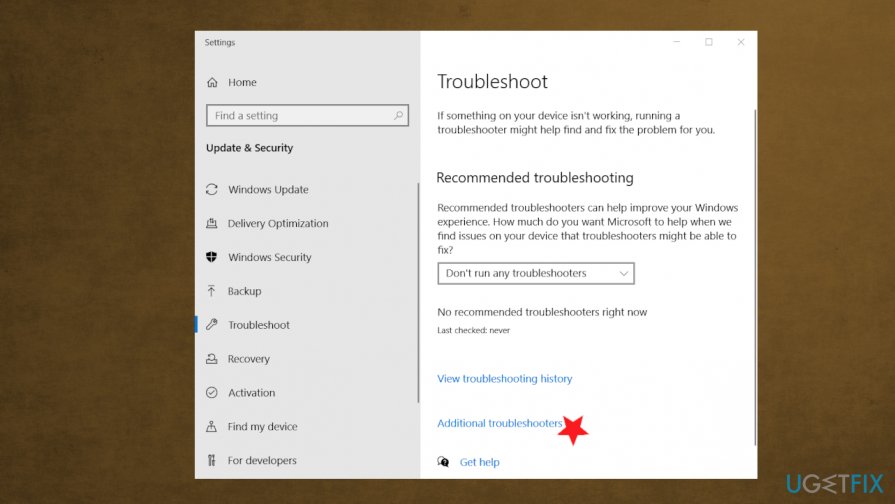
Windows update error 0x8007371b fix troubleshoot additional - Under settings, find Additional troubleshooter.
- Coose Windows Update troubleshooter.
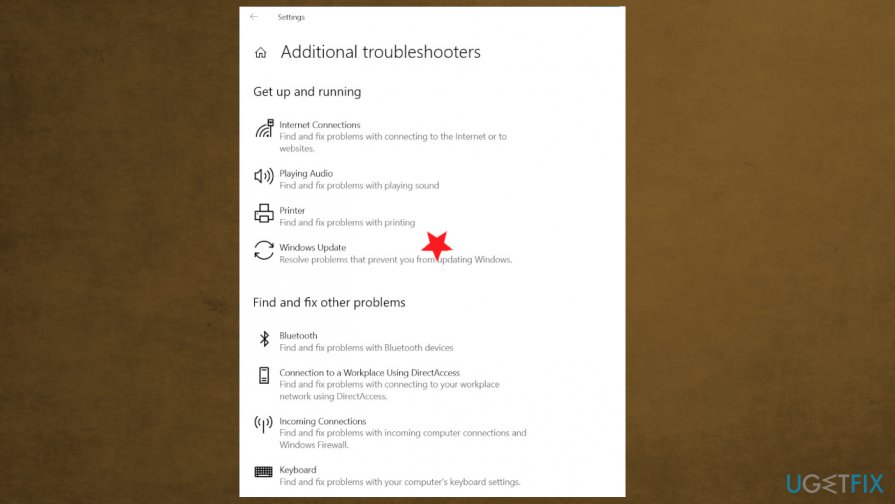
Windows update error 0x8007371b fix troubleshoot additional windows update - Run the tool and apply fixes if any got presented.
Run the DISM tool to fix Windows Update error 0x8007371b
- Open Command Prompt.
- Make sure to run it as administrator.
- Then run the following commands by pressing Enter after each one:
Dism /Online /Cleanup-Image /ScanHealth
Dism /Online /Cleanup-Image /CheckHealth
Dism /Online /Cleanup-Image /RestoreHealth - Restart the PC after all the processes.
Clear Windows cache
- Press Windows and R buttons.
- Once the Run window opens, type services.msc and hit Enter.
- In the Services window, find Windows Update and right-click on it.
- Click Stop option.
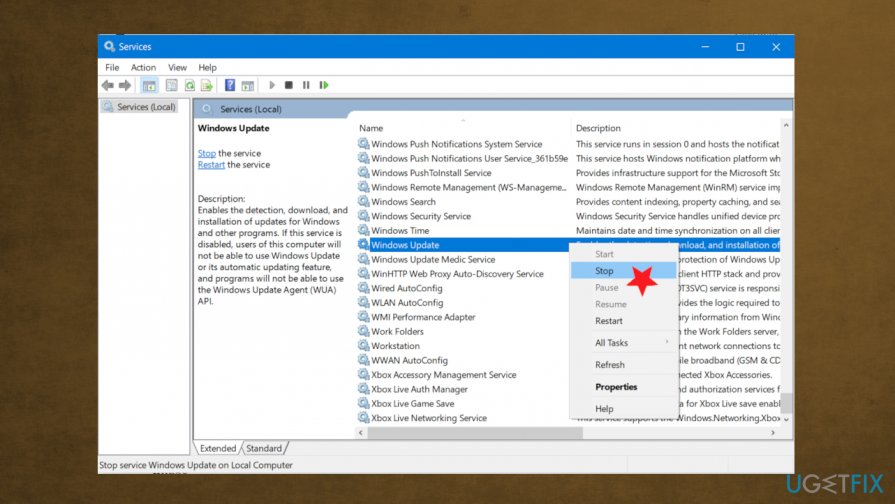
Windows update error 0x8007371b fix services stop - Open File Explorer by clicking Win and E keys.
- Browse: %windir%\\SoftwareDistribution\\DataStore
- Press Ctrl + A .
- Hit the Home tab and delete all.
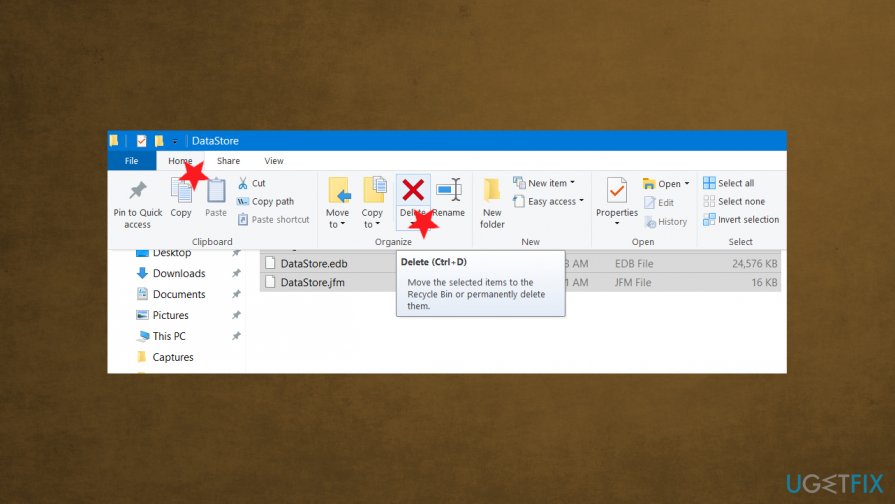
Windows update error 0x8007371b fix delete cache - Open Services again and right-click Windows update.
- Start.
- Try updating again.
Uninstall third-party AV tools to fix error 0x8007371b
- Open Run dialog window.
- Type appwiz.cpl and hit OK to open the Program and Feature window.
- Right-click on the third-party software under the Uninstall or change a program section. Choose to Uninstall the app.
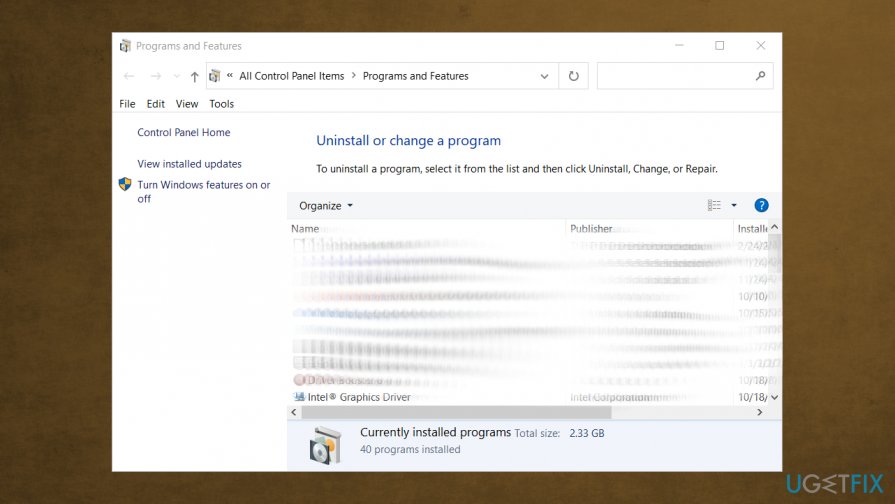
Windows update error 0x8007371b fix uninstall program - Follow steps.
- Check if the error persists.
Bottom line
To fix Windows Update error 0x8007371b, you should follow the instructions closely, which may include repairing missing or damaged files, cleaning the registry, and checking system configurations. If none of these solutions work, consider seeking further technical support.
Frequently asked questions
The error code 0x8007371b usually indicates that a component required for Windows Update is either missing or corrupted, preventing the update process from completing.
To run the Windows Update Troubleshooter, go to Settings > Update & Security > Troubleshoot > Additional troubleshooters, and select 'Windows Update' to identify and fix issues related to updates in Windows 10 or Windows 11.
You can use the 'DISM /Online /Cleanup-Image /RestoreHealth' command in an elevated Command Prompt to repair the Windows image, which may help resolve the 0x8007371b error.




Report an issue
What's wrong with this guide? We review every report and update or remove content.
Report received — thank you. We'll review and fix it.
You need a free account to submit a report.
Be the first to comment