How to fix
What is rundll32.exe and how to fix rundll32.exe error
on Windows
Discover the role of rundll32.exe and effective solutions for fixing its errors on Windows 10 and 11, ensuring smooth performance. Expert-tested.


What causes What is rundll32.exe and how to fix rundll32.exe error on Windows?
- Corrupted data of Visual C++ Redistributable for Visual Studio
- Malware infection interfering with DLL files
- Improperly configured system settings
- Missing or corrupted DLL files
- Conflicts with other software
Repairs Windows system files, removes malware, and restores a clean OS state — without reinstalling.
Hello. Every time I boot my computer I receive the Runtime error rundll32.exe. I don't know why or where it is coming from. I would appreciate some solutions to this issue. Thanks.
Rundll32.exe is probably the most common process you can see after opening the Task Manager on Windows 10. In most cases, you would also observe more than one instance of this process running in the background. It is responsible for assigning the space for the DLL (Dynamic Link Library)[ref en-1] files within the memory and is typically located in the Windows\\System32 folder.
In order to read functions and features correctly, each of the installed programs on your computer needs to call up hundreds of DLL files - there are several thousands of them scattered across the Windows operating system. As these files are not running at all times, Windows uses an intermediary program to load the particular DLL files - Rundll32.exe. This is why, once you open the Task Manager, you could see dozens of Rundll32 instances running simultaneously.
However, when something goes wrong within this process, users might start experiencing errors related to it. There are many different variants of Rundll32.exe errors that might cause serious problems when it comes to normal PC operation. For example, programs might not be able to launch correctly or even result in a Blue Screen of Death.
Here are a few examples of different rundll32.exe errors:
- Runtime error Rundll32.exe (typically related to corrupted data of Visual C++ Redistributable for Visual Studio)
- Rundll32.exe error on bootup or crash on startup
- Rundll32.exe - Entry Point Not Found
- Rundll32.exe - The Instruction at 0x00*** referenced memory at 0x00*** The memory could not be written
- Rundll32.exe - The specified module could not be found, etc.
As evident, these errors, while related, are not identical and can occur due to different reasons. For example, in some cases, a Rundll32 error might be related to malware infection, as malicious programs are known to interfere with various DLL files located on a Windows computer. Crashes could also be one of the symptoms related to virus infections. On the contrary, the error could also be caused by an overly-aggressive anti-virus blocking critical program's functions or DLLs.

Speaking of which, some users might also encounter a fake error code: Rundll32.exe while browsing the web on Google Chrome, Mozilla Firefox, Internet Explorer, MS Edge, or another web browser. If you were shown suspicious pop-up windows that show this error and claim that you need to contact tech support for help, please ignore it and scan your system for malware[ref en-2] immediately.
Aside from malware, the most common reasons for the error are related to missing DLL files, incorrect system settings, corrupted system files, etc. Below you will find the instructions on how to fix Rundll32.exe error on Windows systems. Make sure you follow each step correctly. If you are unsure of something or the solutions below did not help you, do not hesitate to contact us directly, and we will try to help the individual situation.
Fix 1. Use a system repair tool
There are many variables that could impact the severity and symptoms of Rundll32.exe errors. However, as already mentioned above, it is most commonly related to missing or corrupted system files. Therefore, in order to fix the issue, you would have to find which DLL file is related to the problem and replace it manually.
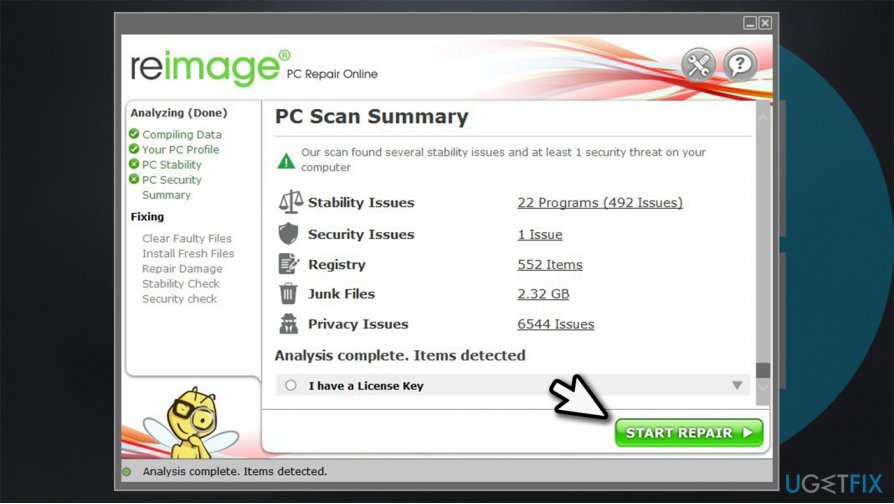
Since this process can be rather difficult for less experienced PC users, we highly recommend you try using [d1] for the Rundll32.exe error fix. With this repair tool, you can find and replace missing or corrupted Windows files in merely a few minutes - the software will do the job for you. Besides, it can also find and fix issues that could prevent future crashes, lag, BSODs, and others.
Fix 2. Update Windows
Windows bugs can be caused by outdated systems or incorrectly installed updates. Therefore, you need to make sure that your Windows is running the latest version:
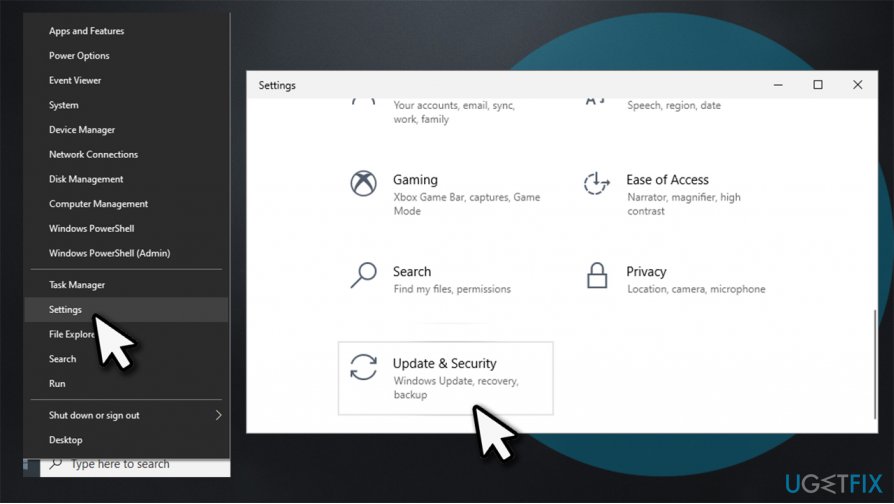
- Right-click on Start and pick Settings
- Pick Update & Security
How to fix rundll32 exe error on windows update windows - On the right, click on Check for updates
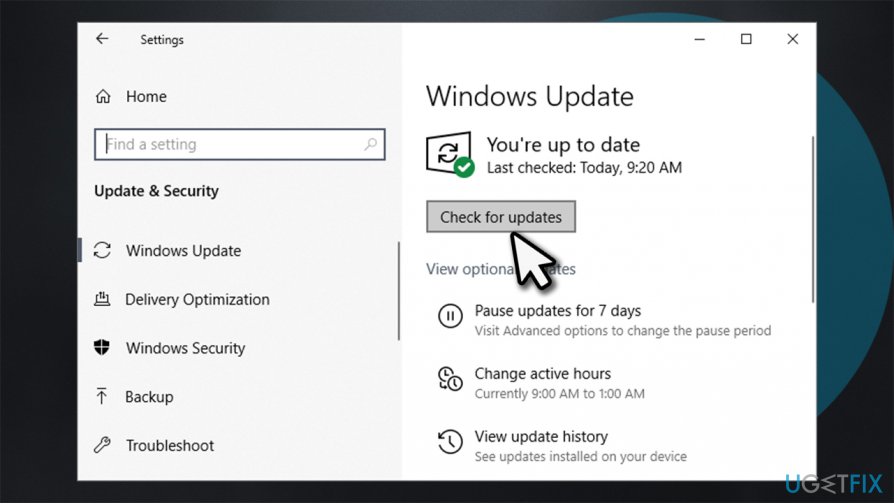
How to fix rundll32 exe error on windows update windows2 - Wait till Windows downloads and updates the system
- Restart your PC.
Fix 3. Run a troubleshooter
Troubleshooters are excellent tools that could help you find the root cause of the problem causing this error.
- Right-click on Start and pick Settings
- Go to Update & Security
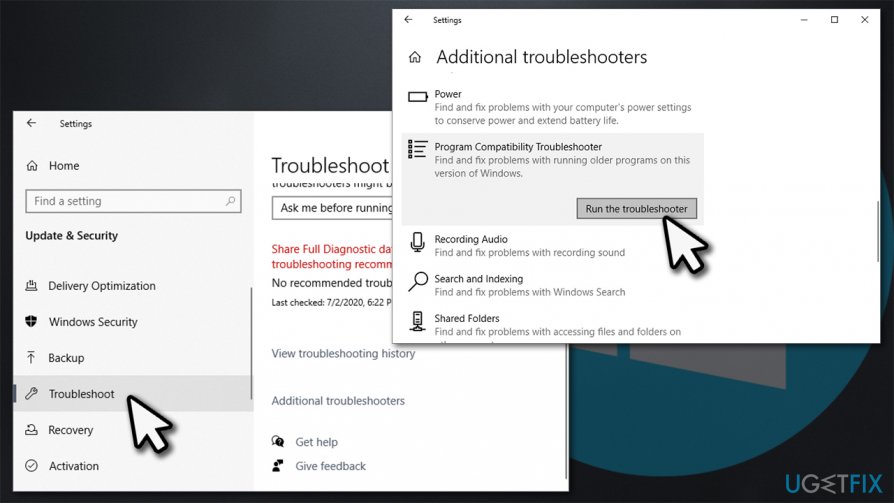
- Pick Troubleshoot on the left
- You should see troubleshooters listed on the right. If not, click Additional Troubleshooters
- Locate Program Compatibility Troubleshooter and press Run the troubleshooter.
How to fix rundll32 exe error on windows run troubleshooter
Fix 4. Run System File Checker and DISM
SFC and DISM are powerful tools that can fix system files and image-related errors. In order to use them correctly, you should open Command Prompt with Administrator's rights:[ref en-3]
- Type cmd in Windows search
- Right-click on Command Prompt and select Run as administrator
- Now type in the the following command and press Enter:
sfc /scannow
- Wait till process is finished and reboot your PC.
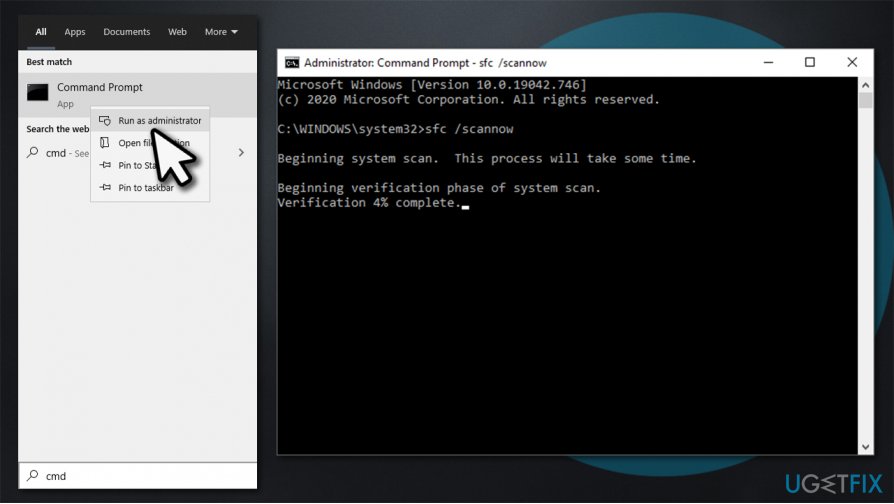
How to fix rundll32 exe error on windows run sfc scan
If that did not help, open Command Prompt again as explained above, and run DISM /Online /Cleanup-Image /RestoreHealth command.
Fix 5. Temporarily disable your antivirus
As already mentioned, and overly-aggressive antivirus can be causing Rundll32.exe error. Therefore, try temporarily disabling your third-party antivirus altogether and see if that helps. Note that keeping your system unprotected is highly dangerous, so we recommend either employing a different third-party security tool or employing the built-in Windows Defender for the time being.
Fix 6. Reinstall Microsoft Visual C++ Redistributable
This method helps users who experience runtime errors related to the executable.
- Type Control Panel in Windows search and press Enter
- Select Programs > Uninstall a program
- Select the most recent Redistributable installed, for example Microsoft Visual C++ 2015 Redistributable
- Now go to the official Microsoft website
- Download and install both, vc_redist.x86.exe (32-bit) and vc_redist.x64.exe (64-bit) versions.
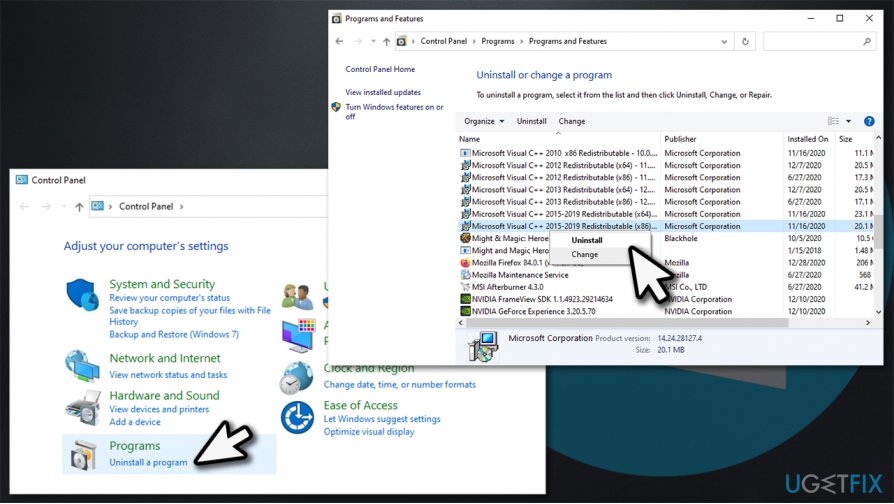
How to fix rundll32 exe error on windows uninstall visual c redistributable
Fix 7. Use System Restore
System Restore can bring your computer state to the previous times, i.e., when the Rundll32 error did not exist. For that, proceed with the following steps:
- Type in Create a Restore Point in Windows search and hit Enter
- Go to System Protection tab
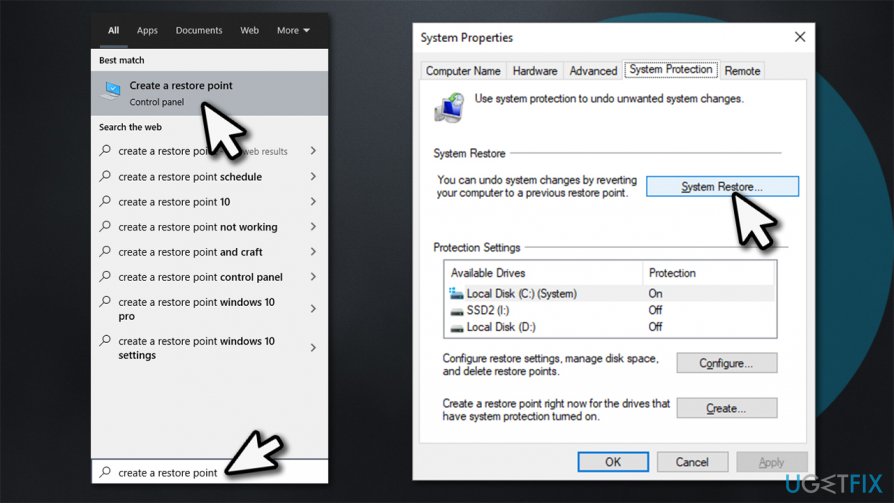
How to fix rundll32 exe error on windows create restore point - Select System Restore and click Next
- Tick the Show more restore points and select the point in time prior to Rundll32 error occurred
- Click Next and then follow on-screen instructions to finalize the process.
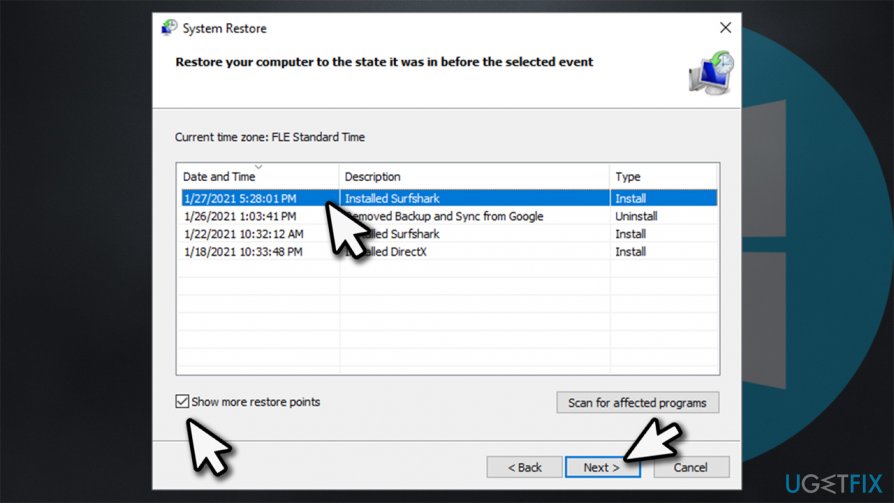
How to fix rundll32 exe error on windows use system restore
Bottom line
To fix rundll32.exe errors, you can try reinstalling the Visual C++ Redistributable, scanning for malware, or checking system settings. If these solutions do not resolve the issue, consider seeking professional help or restoring your system to a previous state.
Frequently asked questions
rundll32.exe is a Windows utility that allows the execution of functions stored in dynamic link libraries (DLLs), enabling various system processes and application functions.
To fix rundll32.exe errors on Windows 10, you can run the System File Checker tool by executing 'sfc /scannow' in the Command Prompt as an administrator.
Yes, rundll32.exe errors can occur on Windows 11 due to corrupted files or malware; running a full system scan with Windows Defender and performing a system restore can help resolve these issues.




Report an issue
What's wrong with this guide? We review every report and update or remove content.
Report received — thank you. We'll review and fix it.
You need a free account to submit a report.
Be the first to comment