How to fix
K7Sentry.sys Blue Screen error
on Windows
Resolve the K7Sentry.sys Blue Screen error on Windows 10 and 11 effortlessly. Get expert-tested solutions that fix the issue in minutes.


What causes How to fix K7Sentry.sys Blue Screen error in Windows?
- K7Sentry.sys component causing crashes
- Conflicts with other software
- Corrupted installation of K7 TotalSecurity
- Changes made to core Windows files by K7 software
- Underlying Windows issues
Repairs Windows system files, removes malware, and restores a clean OS state — without reinstalling.
Hello, I have recently installed the new security program K7 and noticed that by system sometimes started to crash with Blue Screen (K7Sentry.sys). I am using Windows 10. Do I need to uninstall antivirus, or is there another way of fixing this?
Blue Screen of Death[ref en-3] crashes are something that users never expect, and because they come without warning, they can result in a rather frustrating experience. Work disruption, unsaved documents, interrupted gaming sessions, and many other disturbances can result from a BSOD.
Blue Screen of Death errors are vital for any Windows operating system despite these frustrations. They play an important role in protecting the computer from accidental damage due to software or hardware malfunctions. In this case, we are talking about K7Sentry.sys Blue Screen crashes experienced by users who use K7 TotalSecurity created by an Indian developer and is relatively popular locally.
Usually, BSODs get fixed as soon as a system reboot is initiated - Windows is typically capable of repairing the damage automatically. However, in more serious cases, the crashes can reoccur, which can be a sign that something is persistently causing the issue, and it needs to be looked at.

K7Sentry.sys is a component of the security suite. Upon installation, a third-party security application makes changes on the core level of Windows so that it can run on the highest permissions possible. Otherwise, it wouldn't be able to find and successfully remove malware[ref en-2] from the computer.
In order to fix K7Sentry.sys BSOD, you might have to try several solutions below before one works for you. Before you proceed, we recommend trying a PC repair tool [d1] - it could find underlying Windows issues and repair them for you. In fact, it fixes the most common errors, Blue Screen errors, registry[ref en-1] corruption, and similar issues in just a few minutes.
1. Reinstall K7 software
If you are constantly encountering K7Sentry.sys BSODs, you should try reinstalling the K7 security software suite. To do this properly, you should first uninstall the app as follows:
- Type in Control Panel in Windows search and hit Enter
- Go to Program > Uninstall a program
- Find K7 TotalSecurity on the list
- Right-click and select Uninstall
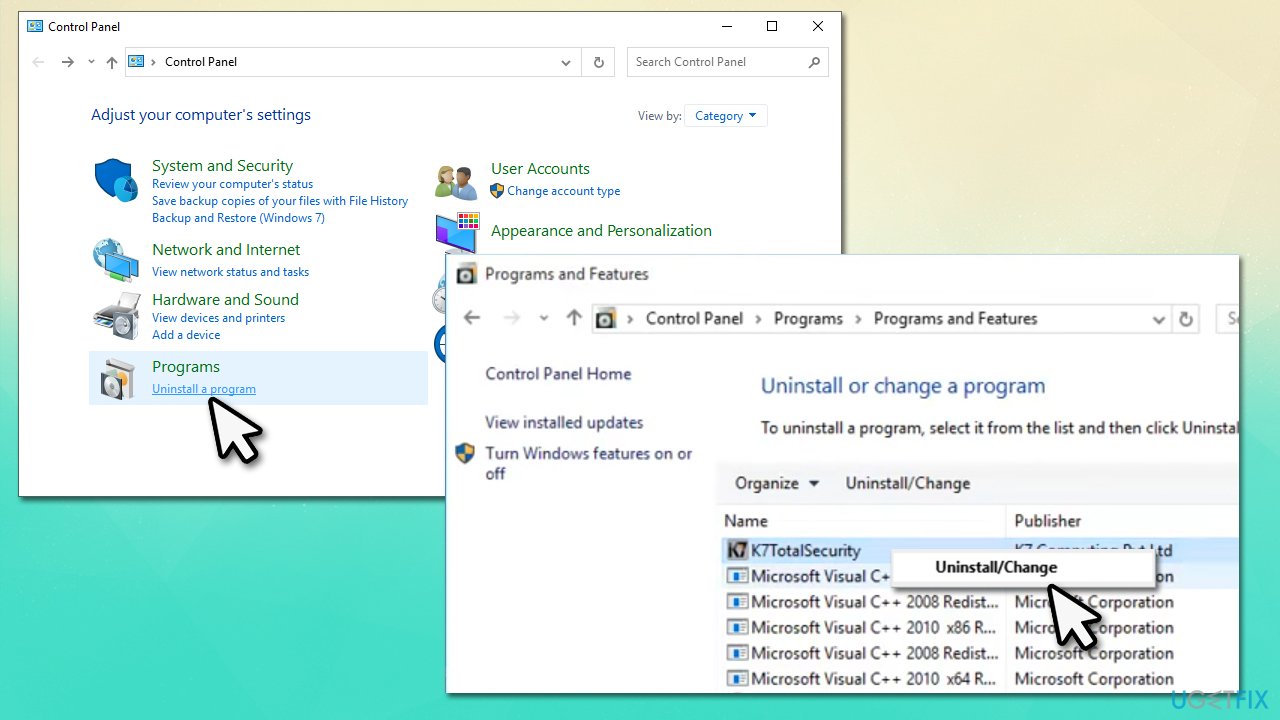
How to fix k7sentry sys blue screen error in windows reinstall k7totalsecurity - Follow on-screen instructions and get rid of the app
- Restart your machine and reinstall the application.
If the steps above did not help, try uninstalling the application using a dedicated tool provided by the vendor.
2. Install all the available Windows updates
- Type Updates in Windows search and press Enter
- Here, click Check for updates
- Wait till Windows downloads and installs all the necessary files
- If optional updates are available, install them too
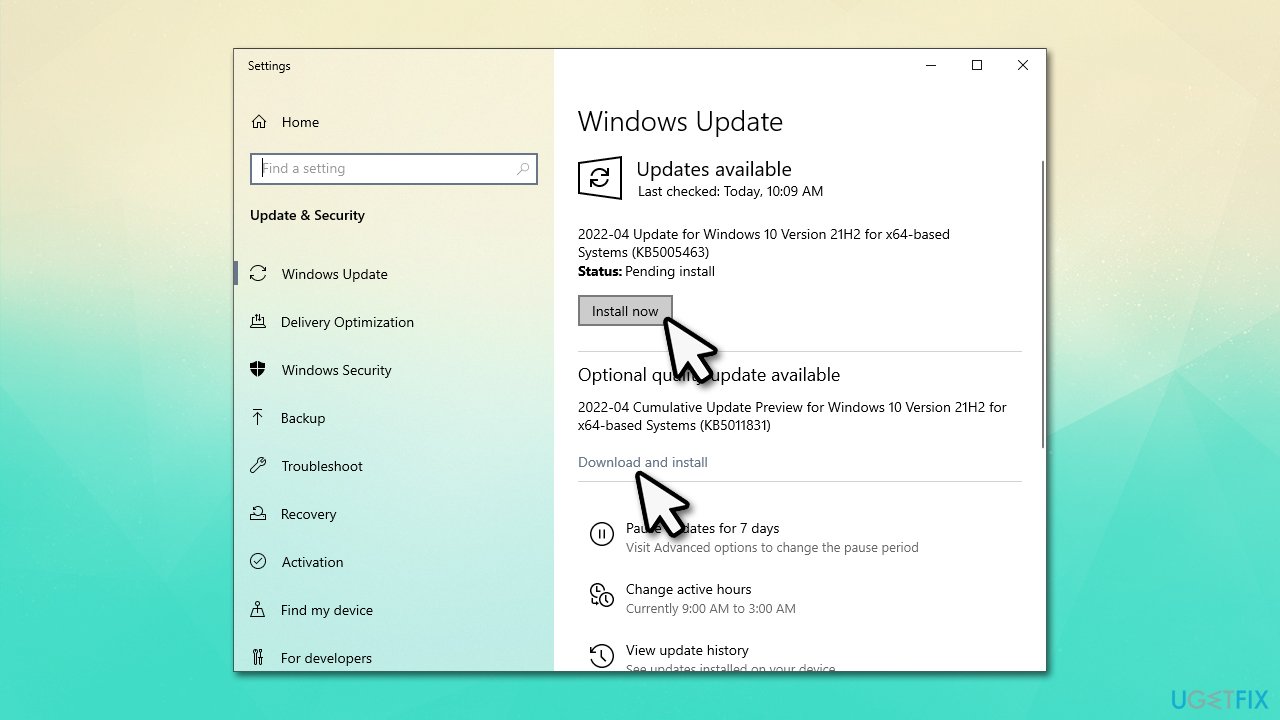
How to fix k7sentry sys blue screen error in windows install all updates - Restart your PC.
3. Disable Driver Verifier
Some users reported that the error code shown is DRIVER_VERIFIER_DETECTED_VIOLATION. In such a case, disabling Driver Verifier might help the situation.
- Press Win + R and type in verifier, press Enter
- When User Account Control shows up, click Yes
- In the Driver Verifier Manager window, select Delete existing settings
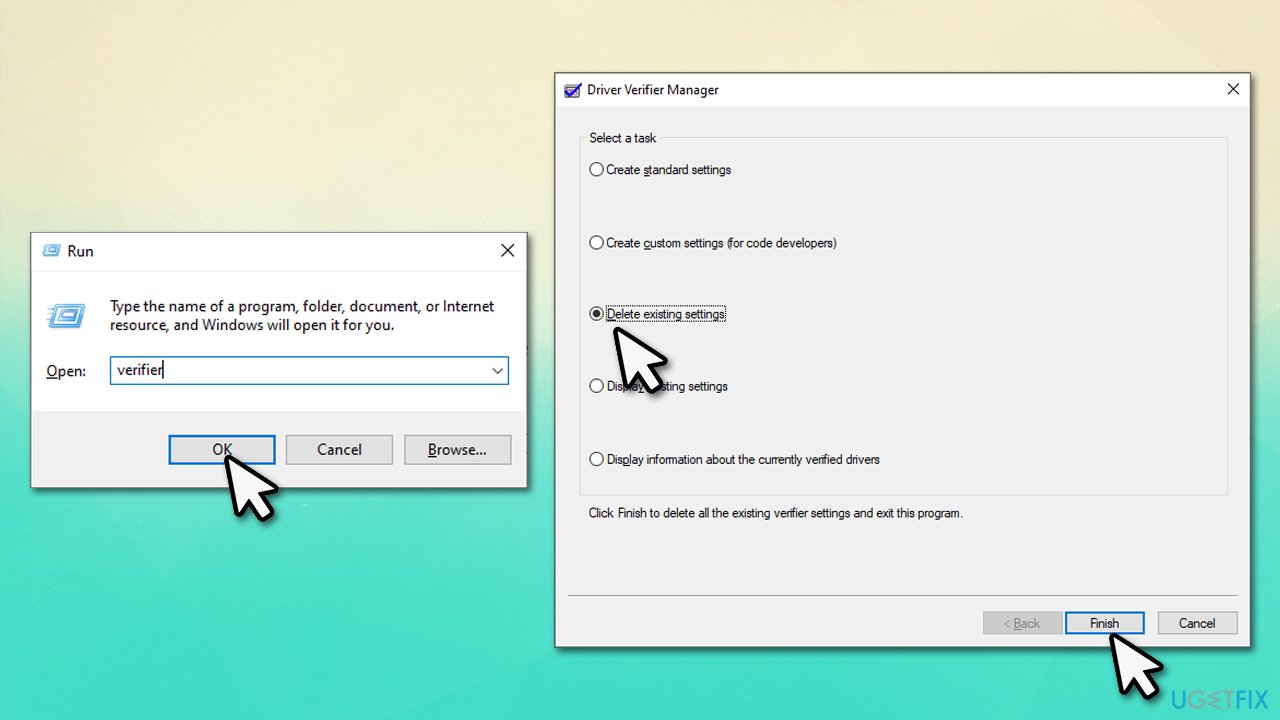
How to fix k7sentry sys blue screen error in windows delete verifier - Click Finish
- When a warning message appears, click Yes
- Reboot your system.
4. Run SFC and DISM
Corrupted system files can always be a cause for BSODs. Attempt to repair them via elevated Command Prompt:
- Type in cmd into Windows search
- Right-click Command Prompt result and select Run as administrator
- When the User Account Control window shows up, click Yes
- In the new window, type in the following command and press Enter:
sfc /scannow - After the scan is done, copy the following command and press Enter:
dism /online /cleanup-image /scanhealth
dism /online /cleanup-image /checkhealth
dism /online /cleanup-image /restorehealth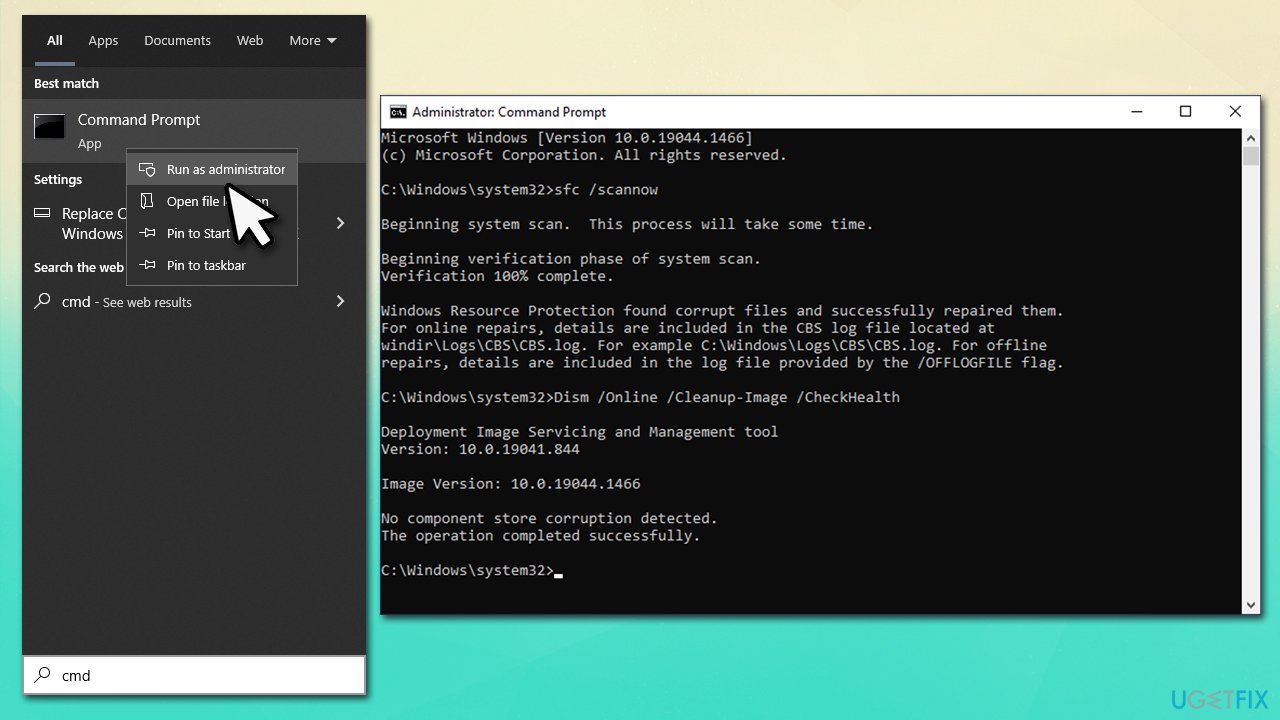
How to fix k7sentry sys blue screen error in windows run sfc dism - Restart your PC.
5. Use System Restore
If none of the solutions above helped you, you could try using System Restore.
- Type in Create a Restore Point in Windows search and hit Enter
- Click System Restore
- Pick Choose a different restore point (if available) and click Next
- Mark the Show more restore points checkbox
- Choose a time before the crashes were troubling you
- Click Next and reboot the system as required.
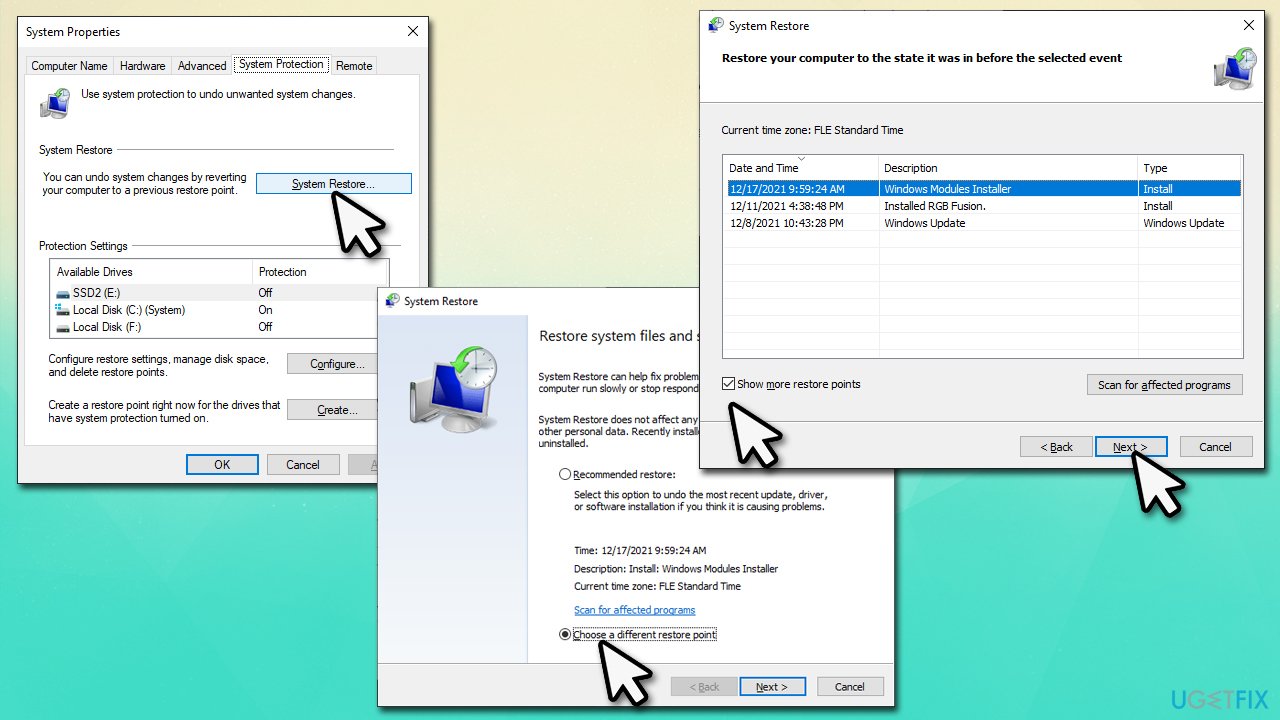
How to fix k7sentry sys blue screen error in windows use system restore
Bottom line
To fix the K7Sentry.sys Blue Screen error, you can try reinstalling the K7 security software, using a PC repair tool to address underlying Windows issues, or uninstalling the antivirus. If these solutions do not resolve the issue, further investigation into system compatibility or hardware problems may be necessary.
Frequently asked questions
The K7Sentry.sys Blue Screen error is typically caused by issues with K7 antivirus software, corrupted system files, or outdated drivers in Windows 10 and 11.
To resolve the K7Sentry.sys error, try uninstalling K7 antivirus, running the System File Checker tool, and updating your drivers in Windows 10 or 11.
Yes, updating to the latest version of Windows 10 or 11 can help fix the K7Sentry.sys Blue Screen error by ensuring you have the latest security updates and driver support.




Report an issue
What's wrong with this guide? We review every report and update or remove content.
Report received — thank you. We'll review and fix it.
You need a free account to submit a report.
Be the first to comment