How to fix
Windows Defender Security Intelligence version 0.0.0.0
on Windows
Resolve the Windows Defender Security Intelligence version 0.0.0.0 issue effortlessly. Quick fixes for Windows 10 and 11, expert-tested solutions included.

What causes How to fix Windows Defender Security Intelligence version 0.0.0.0?
- Bad Windows installation
- Corrupted system files
- General bugs
- Issues after upgrading to Windows 11
- Update installation errors
Repairs Windows system files, removes malware, and restores a clean OS state — without reinstalling.
Hello, my Windows Defender is not updating. Every time I get a message saying my definitions are out of date, I click the Update button, but nothing really happens and the problem keeps coming back. I think that the problem lies with Defender itself, as it shows "Security Intelligence version 0.0.0.0." Any ways to fix this?
Windows Defender, or as it's currently known - Microsoft Defender is comprehensive security software that comes pre-installed with any newer Windows operating system version, which includes 8, 9, 10, and 11.
While it can lack certain extra features, it does its job very well when it comes to malware[ref en-3] protection and is easily comparable to many third-party security applications, according to numerous tests made by independent bodies.[ref en-1] Most importantly - it is free, and that's why so many choose the app as their defense against computer nasties.
Unfortunately, Windows Defender might sometimes malfunction, as we have already seen in previous reports about the "You’ll need a new app to open this windowsdefender" or 0x80073b01 error issues. This time, many users said they were unable to make the app work properly - especially those who upgraded to Windows 11.
According to numerous reports, Microsoft Defender is constantly messaging users that their definitions are out of date. Users also claimed that the version of the app is rather strange - it says "Security Intelligence version 0.0.0.0," and that its creation date is "Not available." Some people got an update installation error code 80070714 or 0x80070643.
Just like any other security software, this one has to be updated regularly to repel all the newest threats. Without it, many users feel vulnerable to cyberattacks, and that's completely understandable, so it's important to fix the bug[ref en-2] as soon as possible.
To make it clear - "Security Intelligence version 0.0.0.0" is not a valid version of the app, and essentially, if you have this problem, your computer security is in jeopardy, and you need to take action immediately. The reason for the error could be many - bad Windows installation, corrupted system files, general bugs, etc.
Before you proceed with the solutions below, we recommend you try using the [d1] repair tool, which can find and replace damaged system components with working ones, automatically fixing various Windows issues.
Method 1. Try to install Windows Defender Manually
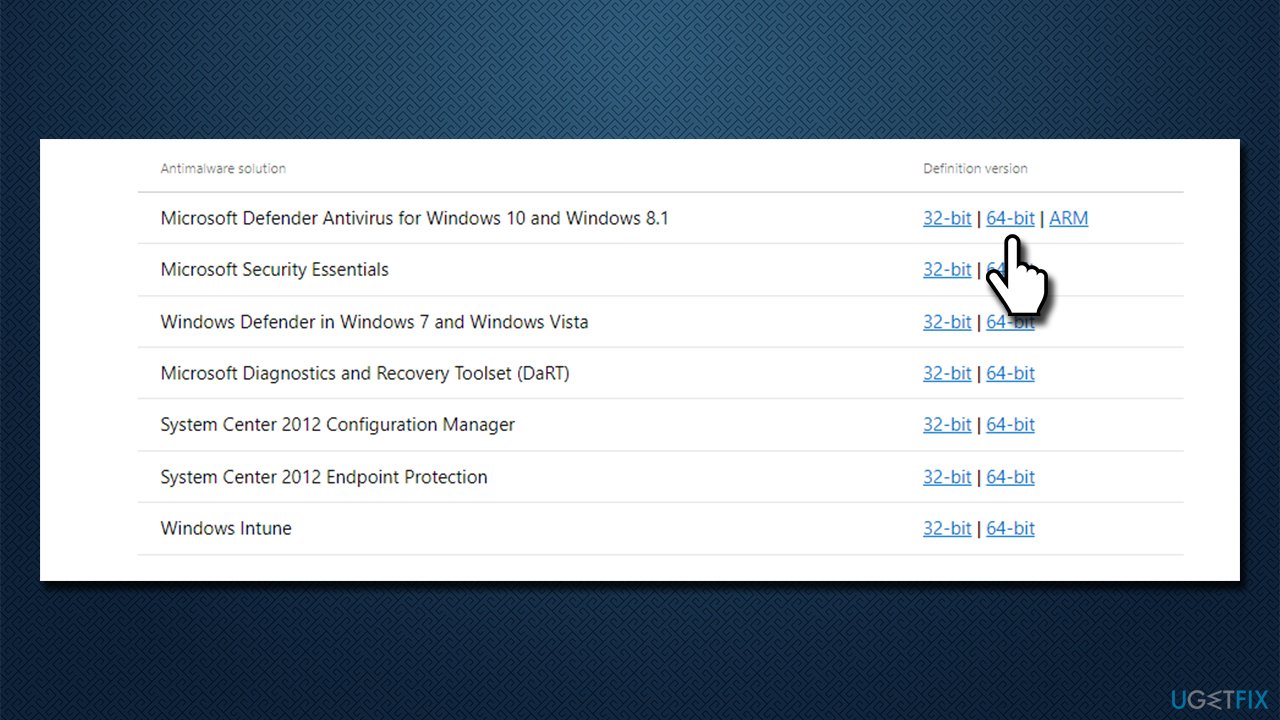
If the built-in version of Windows Defender is buggy, you can always try downloading and installing it yourself from the official Microsoft website. Scroll down and look for Microsoft Defender Antivirus for Windows 10 and Windows 8.1, which is also applicable for Windows 11, and download the 64-bit version. Launch the installer and proceed with on-screen instructions.
Method 2. Reset the app
You can try resetting Windows Defender via PowerShell:
- Right-click on Start and pick PowerShell (Admin)
- When User Account Control (UAC) shows up, click Yes
- In the new window, copy and paste the following command, pressing Enter after:
Get-AppxPackage Microsoft.SecHealthUI -AllUsers | Reset-AppxPackage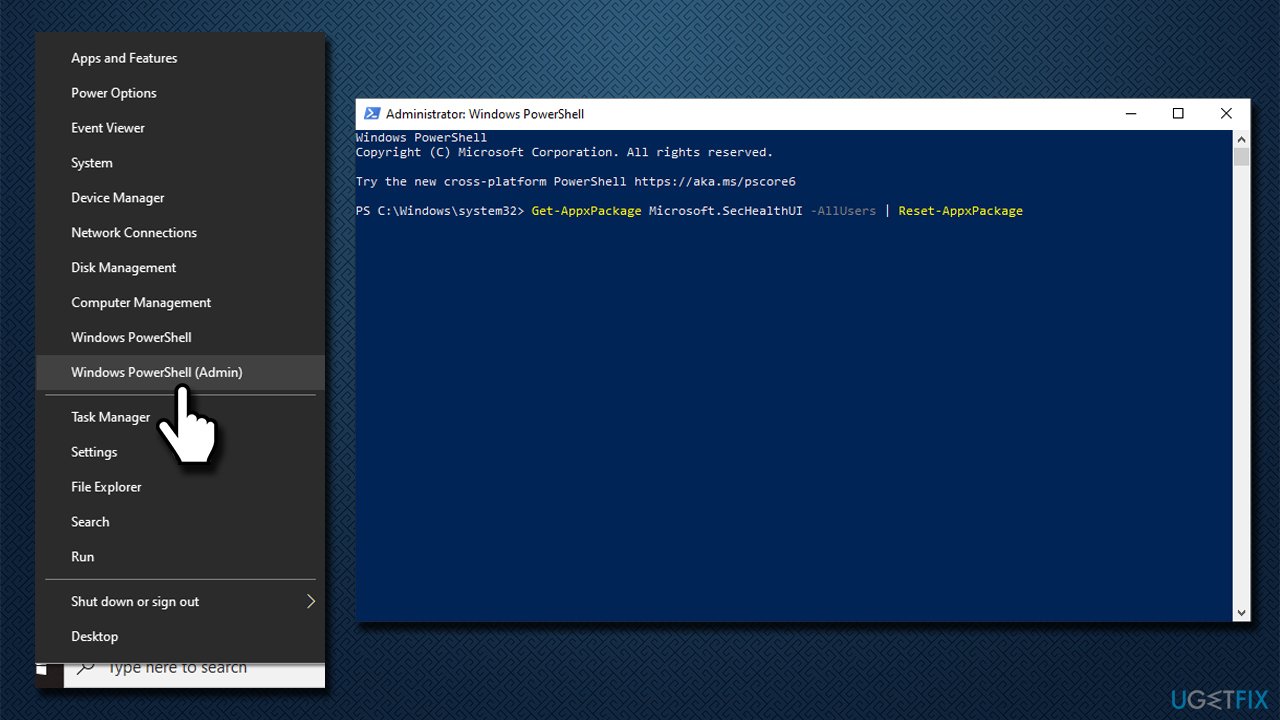
How to fix windows defender security intelligence version 0 0 0 0 reset app - Restart your PC and see if the issue is fixed.
Method 3. Run SFC and DISM
Sometimes, the system file corruption can cause Windows components to malfunction, including Defender. Thus, we recommend running SFC and DISM via elevated Command Prompt/Terminal:
- Type cmd in Windows search
- Right-click on Command Prompt and select Run as administrator
- Use the following command lines, pressing Enter each time:
sfc /scannow
DISM /Online /Cleanup-Image /CheckHealth
DISM /Online /Cleanup-Image /ScanHealth
DISM /Online /Cleanup-Image /RestoreHealth - Restart your PC.
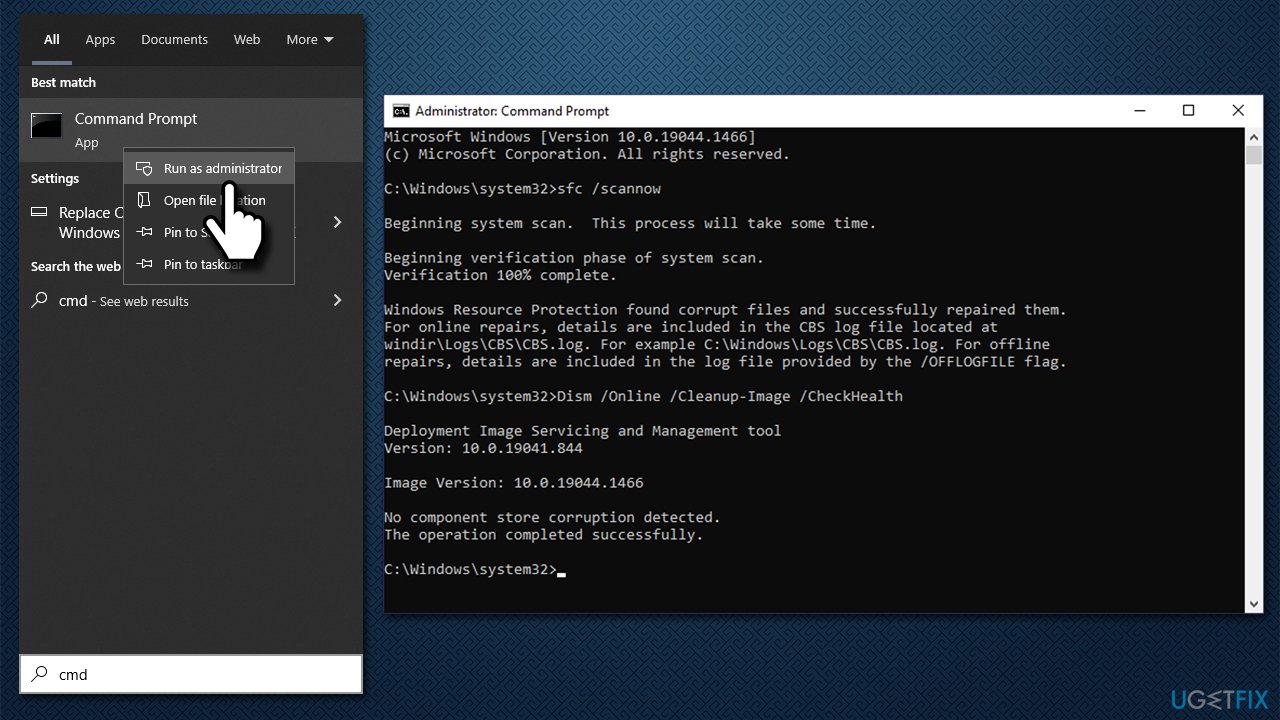
How to fix windows defender security intelligence version 0 0 0 0 run sfc dism
Method 4. Reinstall Windows
If none of the methods above helped you, you can reinstall Windows. Make sure you backup all your personal files just in case and disconnect all the unnecessary devices such as printers and cameras.
- Visit the official Microsoft website and download Windows 10 installation media (Windows 11 version)
- Double-click the installer and select Yes when UAC shows up
- Agree to terms
- Pick Create installation media (USB flash drive, DVD or ISO file) for another PC option and click Next
- Select the Use Recommended options for this PC checkbox and click Next
- Choose the ISO file and click Next
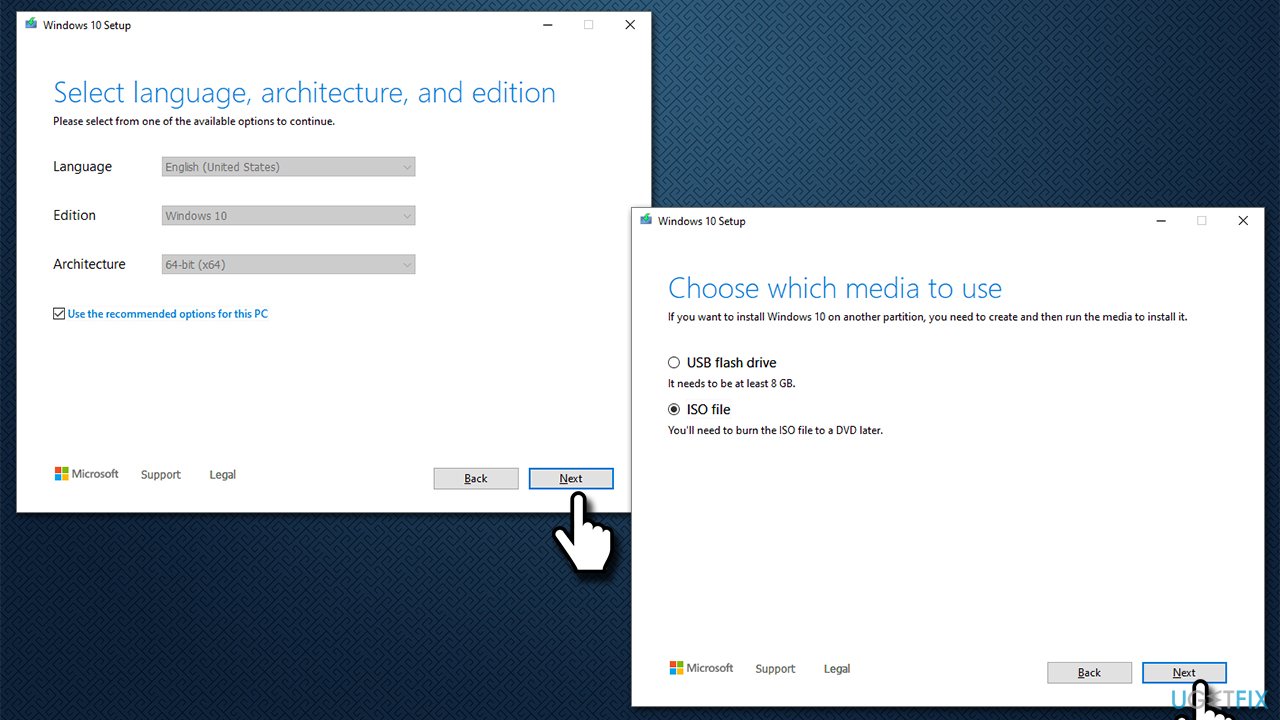
How to fix windows defender security intelligence version 0 0 0 0 run reinstall windows - Once you have prepared the ISO, put it into the malfunctioning PC
- Restart your machine and rapidly press F8, F10, F12, Del, or another button that would let you load into BIOS
- Here, go to the Boot section and set the boot priority to Flash drive
- Restart your system, and then proceed with on-screen instructions to reinstall Windows.
Bottom line
To resolve the issue of Windows Defender showing 'Security Intelligence version 0.0.0.0', users should consider repairing their Windows installation, checking for corrupted system files, and ensuring that they have the latest updates installed. If these fixes do not work, it may be necessary to seek further assistance or consider alternative security solutions.
Frequently asked questions
Try updating Windows Defender by going to Settings > Update & Security > Windows Update and clicking 'Check for updates'. If that doesn't work, you can also run a manual update in the Windows Defender Security Center.
On Windows 11, you can reset Windows Defender by navigating to Settings > Privacy & Security > Windows Security, then selecting 'Virus & threat protection' and clicking on 'Check for updates'.
Yes, restarting your Windows 10 or Windows 11 computer is recommended to ensure that all updates and changes take effect properly.




Report an issue
What's wrong with this guide? We review every report and update or remove content.
Report received — thank you. We'll review and fix it.
You need a free account to submit a report.
Be the first to comment