
d3d11.dll is missing or crashes a game: what the file is and how to fix it
d3d11.dll is the Direct3D 11 Runtime, the part of Windows that games and many ordinary programs use to draw 3D graphics on your graphics card. Windows ships it, so there is nothing to install. When a game says it is missing, crashes in it, or asks for a D3D11-compatible GPU, the cause is usually a graphics mod's copy in the game folder, the graphics driver, or a damaged Windows file.

Prefer to fix it yourself? The manual steps follow.
How to fix d3d11.dll errors
First look in the folder of the game that fails, next to its .exe file. A d3d11.dll there is not Windows' copy: it belongs to a shader or lighting mod, a post-processing injector or a layer that translates Direct3D 11 to another graphics interface, and the game loads it instead of the genuine file in System32. Rename it to d3d11.dll.bak and start the game. If the game now starts, update or remove that mod. If there is no copy in the game folder, install the newest graphics driver from your card's maker and make sure the game runs on the right graphics chip. When several programs fail, repair Windows: install the pending updates, then run sfc /scannow and DISM from an administrator Command Prompt.
The DirectX End-User Runtime is not the fix for this file. That package installs old DirectX SDK libraries such as the D3DX9 files and xinput1_3.dll, which Windows does not include. d3d11.dll is already part of Windows 10 and Windows 11 and is repaired and updated only by Windows itself. A message that asks for Feature Level 11.0 is about the graphics card and its driver, and no DLL file changes that.
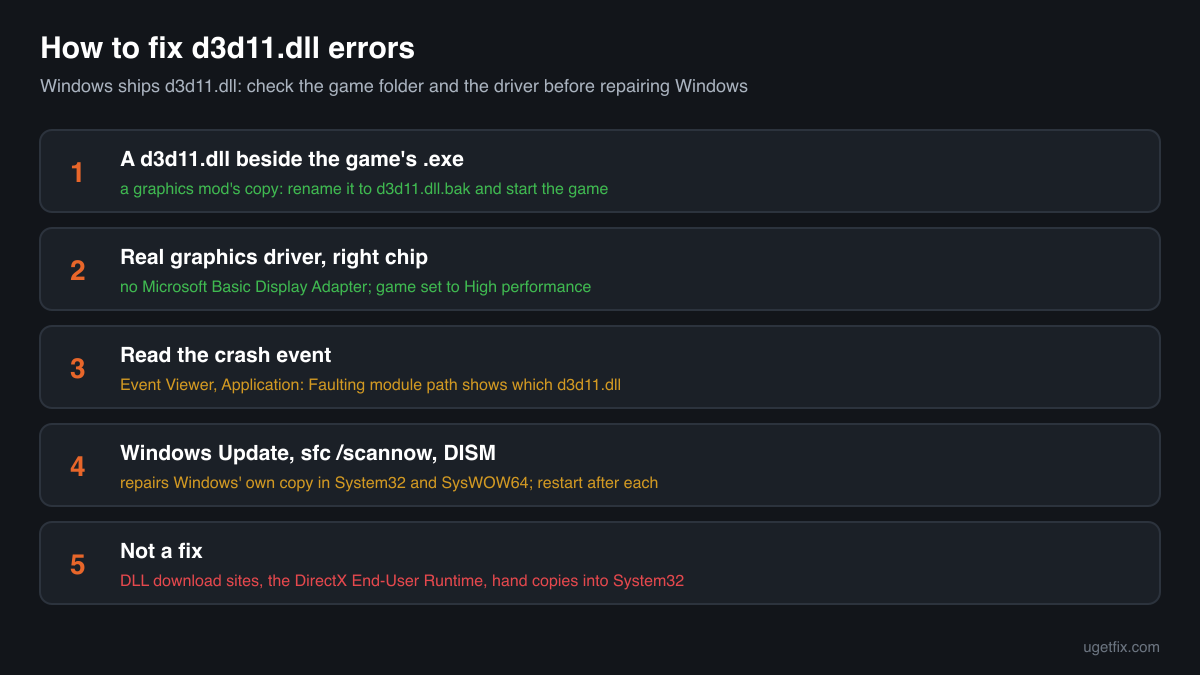
Step by step
- Look in the game folder. Right-click the game's shortcut and choose Open file location, or in a game launcher use the option to browse local files. If you see d3d11.dll next to the .exe, often together with an .ini file, a folder of shaders or presets, or other DLLs such as dxgi.dll, a graphics mod or tool put it there. Games almost never ship their own copy of this Windows file.
- Rename that copy and test. Rename it to d3d11.dll.bak rather than deleting it, so you can put it back. Start the game. If it runs, the mod's copy was the cause. A game update very often breaks these tools until their authors release a new version, and two tools that both want to be d3d11.dll cannot work together. Update the mod, keep only one such tool, or leave it disabled.
- Verifying the game files will not remove it. The verify or repair option of a game launcher checks the files the game shipped and puts back what is damaged. It usually leaves extra files alone, so a mod's d3d11.dll stays in place after a verify. Remove or rename it yourself.
- Check which graphics adapter Windows sees. Right-click Start, open Device Manager and expand Display adapters. If you see Microsoft Basic Display Adapter, the real driver is missing and games cannot use the card for Direct3D 11. Download the driver for your card from the website of its maker, or from the maker of your laptop, and install it. If the crashes started right after a driver update, install the previous version instead.
- Make the game use the right graphics chip. Many laptops have a weak built-in chip and a separate graphics card. Open Settings, System, Display, Graphics, pick the game and set it to High performance. Then press Windows+R, type dxdiag and press Enter: on the Display tab, Feature Levels lists what the chip supports. If 11_0 is not in that list, the chip is too old for games that need Direct3D 11.
- Read the crash event. Press Windows+R, type eventvwr.msc and press Enter. Open Windows Logs, Application, and look for an Error from the source Application Error at the time of the crash. Faulting application name tells you which program crashed; Faulting module path tells you which d3d11.dll was involved. A game folder path means a mod's copy; C:\Windows\System32 or SysWOW64 means Windows' copy, which points to the driver, an overlay or the card.
- Close overlays and undo overclocking. In-game overlays, FPS counters, recording and streaming tools hook into the drawing that d3d11.dll does for the game. Turn them off one at a time and test. If you overclocked the graphics card with a tuning tool, return it to the default clocks: an unstable card often shows up as crashes in d3d11.dll.
- Install Windows updates and restart. Open Settings, Windows Update, install everything that is offered and restart, even if Windows does not ask. Updates replace system files, d3d11.dll included, with the current build for your Windows release, and they bring the graphics fixes that newer games expect.
- Run System File Checker. Type cmd in the Start menu, right-click Command Prompt and choose Run as administrator. Run sfc /scannow and wait until it reaches 100%. It compares protected Windows files with the stored originals and repairs a damaged or replaced d3d11.dll in System32 or SysWOW64. Restart afterwards.
- If System File Checker cannot repair everything, run DISM. In the same administrator window run DISM /Online /Cleanup-Image /RestoreHealth. It repairs the store that System File Checker copies its originals from, using Windows Update. When it finishes, run sfc /scannow once more, then restart.
- Still failing: repair Windows in place. On Windows 11, Settings, System, Recovery offers Fix problems using Windows Update, which reinstalls the current version of Windows and keeps your files, apps and settings. On Windows 10 the same result comes from running Microsoft's installation media and choosing to keep personal files and apps.
Download the genuine d3d11.dll for your Windows version
Each file below is Microsoft's own d3d11.dll for one Windows release, fetched from Microsoft's own server and checked against Winbindex, the index of the files in Windows images and updates. Pick your Windows version (Settings, System, About shows it) and the build: 64-bit for System32, 32-bit for SysWOW64. The repair steps above are still the better fix, because Windows protects these folders and keeps its copy updated. Use a file here to compare it with a copy you have, or when System File Checker and DISM cannot repair the file.
Older Windows releases
A free uGetFix account is needed to download. Sign in, or create one in a minute, and you come straight back here.
What not to do
Do not install the DirectX End-User Runtime for this file.
Many guides suggest it, and it does not help here. It adds legacy DirectX libraries that Windows lacks, and it does not contain or replace d3d11.dll. The error stays exactly as it was.
Do not download d3d11.dll from a DLL collection site.
You cannot tell which Windows release, build or architecture the file comes from, or whether it was changed. d3d11.dll works together with the rest of the graphics stack of your Windows build, so a copy from another release can break every Direct3D 11 program. Use the genuine files above, and the checker below for a file you already have.
Do not copy a file into System32 or SysWOW64 by hand.
These copies are protected Windows files owned by the system, and parts of Windows itself, such as the Desktop Window Manager and Task Manager, load the 64-bit one. A hand-placed file of the wrong build can leave you with a broken desktop, and the next update or System File Checker run may replace it anyway. Repair with sfc /scannow instead.
Do not try to fix Feature Level 11.0 with a file.
If the game says a D3D11-compatible GPU is required, the graphics chip or its driver did not offer Direct3D 11 to the game. A downloaded d3d11.dll cannot add a capability to the card. Install the real driver, pick the right graphics chip, or play on hardware that meets the game's requirements.
Do not keep a flagged copy by turning off protection.
If Microsoft Defender quarantines a d3d11.dll from a game folder, find out where that mod came from before you restore it. Graphics injectors are sometimes flagged because of how they work, but the same name can be used by cheats and by malicious mod packages. The security page linked below explains how to tell them apart.
Check the copy on your PC
Choose the d3d11.dll you are unsure about, for example the one in a game folder. Its checksum is calculated in your browser and compared with 323 Microsoft builds of the file from Windows releases and updates.
The file stays on your computer. Nothing is uploaded: the checksum is computed locally.
13 genuine programs have been documented loading a planted copy of d3d11.dll. Found a d3d11.dll you did not expect, in a game folder you did not mod, in Downloads, Temp or AppData? The name is used by graphics mods, and it can be used by cheats and malware. That is a security question, not a missing-file one. Is the d3d11.dll you found genuine? On 2-Spyware
The error messages and what each one means
The wording tells you which problem you have. These are the texts Windows and games show, as written, with the file name filled in.
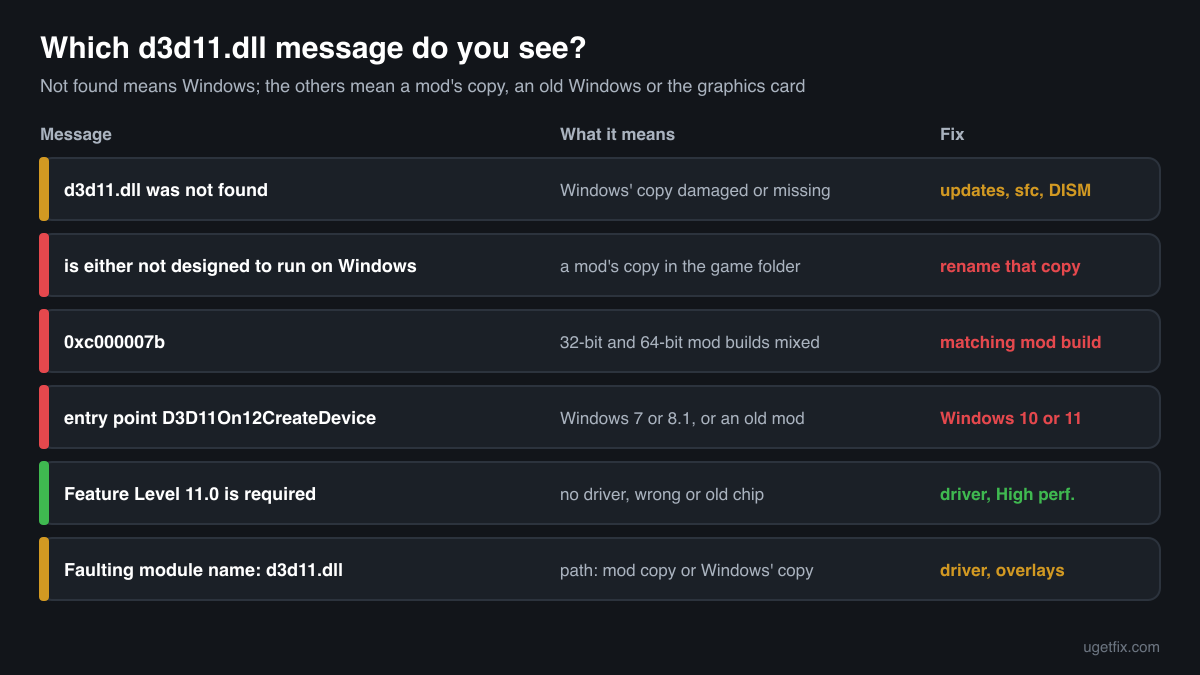
The code execution cannot proceed because d3d11.dll was not found. Reinstalling the program may fix this problem.
The wording of Windows 10 and Windows 11. Windows did not find a usable copy for that program. Because Windows ships the file, this points to a damaged or missing system file: install updates, then run sfc /scannow and DISM.
d3d11.dll is either not designed to run on Windows or it contains an error. Try installing the program again using the original installation media or contact your system administrator or the software vendor for support.
A d3d11.dll was found but could not be loaded. Almost always this is a copy in the game folder: a graphics mod of the wrong build, a damaged download, or a file blocked by security software. Rename the game folder copy and test again.
The application was unable to start correctly (0xc000007b). Click OK to close the application.
This one does not name a file, but after installing a graphics mod it often means a 32-bit d3d11.dll in a 64-bit game folder, or the other way round. Use the build of the mod that matches the game.
The procedure entry point D3D11On12CreateDevice could not be located in the dynamic link library d3d11.dll.
The game asked for a function that your copy of d3d11.dll does not have. D3D11On12CreateDevice is the bridge from Direct3D 11 to Direct3D 12, and Direct3D 12 comes with Windows 10 and Windows 11, so on Windows 7 or 8.1 such a game cannot run. On Windows 10 or 11 the same message points to an outdated mod copy in the game folder: rename it.
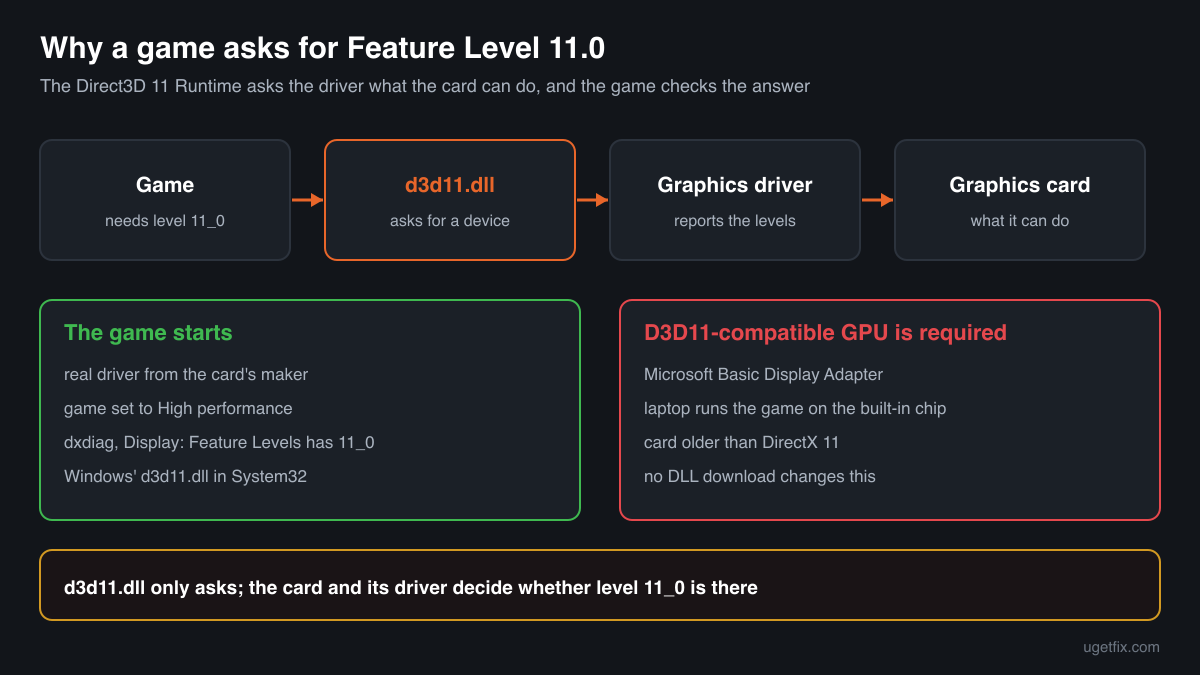
A D3D11-compatible GPU (Feature Level 11.0, Shader Model 5.0) is required to run the engine.
A game engine message, not a broken file. The engine asked Direct3D 11 for feature level 11.0 and did not get it. The usual causes are a missing driver (Microsoft Basic Display Adapter in Device Manager), the game running on an old built-in chip, or a card that is older than DirectX 11. Install the driver, set the game to High performance, and check Feature Levels in dxdiag.
Faulting module name: d3d11.dll
A line from the Application log in Event Viewer after a crash. Look at the Faulting module path line of the same event. A game folder path means the crash happened inside a mod's copy: update or remove that mod. A System32 or SysWOW64 path means the driver, an overlay or the card: update the graphics driver, close overlays and return to default clocks.
File facts
d3d11.dll is the Direct3D 11 Runtime. A game or program creates a Direct3D 11 device through it, sends it the textures, shaders and draw calls for each frame, and the runtime passes that work to the graphics driver. The finished frame then goes through dxgi.dll to the screen. Direct3D 11 runs on cards of several generations through feature levels: a game states the lowest level it needs, and the runtime tells it what the card and driver offer. Besides games, browsers, video players and parts of Windows itself use the file. What Windows reports for the genuine file:
- Description in the file
- Direct3D 11 Runtime
- Where the genuine d3d11.dll belongs
C:\Windows\System32C:\Windows\SysWOW64- Signed by
- Microsoft Windows, with a Windows catalog signature: the file's Properties show no Digital Signatures tab, which is normal. Check it in PowerShell: Get-AuthenticodeSignature <path to the file> (Status: Valid).
On 64-bit Windows, System32 holds the 64-bit file and SysWOW64 the 32-bit one; the folder names are historical. When a game starts, Windows looks for d3d11.dll in the game's own folder first, which is exactly what graphics mods rely on: a file with this name next to the game's .exe is loaded instead of the Windows copy. The genuine file describes itself as Direct3D 11 Runtime (Properties, Details, File description) and is about 2.5 MB: in the Windows 11 24H2 and 25H2 builds the 64-bit file is 2,537,488 bytes and the 32-bit one 2,038,640 bytes, in Windows 10 22H2 the 64-bit file is 2,504,176 bytes. A mod's copy usually shows another description, another size, and no Microsoft signature.
d3d11.dll versions by Windows release
Every Windows release has its own build of d3d11.dll, updated together with Windows. Winbindex lists 289 distinct Microsoft builds; the table shows the newest one indexed for each release and the update that delivered it.
| Windows release | File version | Delivered by | Size, 64-bit |
|---|---|---|---|
| Windows 11 26H1 | 10.0.28000.2605 | KB5121000, August 11, 2026 | 2,522,088 bytes |
| Windows 11 25H2 | 10.0.26100.9711 | KB5127648, October 13, 2026 | 2,537,488 bytes |
| Windows 11 24H2 | 10.0.26100.9711 | KB5127648, October 13, 2026 | 2,537,488 bytes |
| Windows 11 23H2 | 10.0.22621.5415 | KB5126653, October 13, 2026 | 2,476,552 bytes |
| Windows 11 22H2 | 10.0.22621.5415 | KB5126653, October 13, 2026 | 2,476,552 bytes |
| Windows 11 21H2 | 10.0.22000.2600 | KB5044280, October 8, 2024 | 2,641,912 bytes |
| Windows 10 22H2 | 10.0.19041.7663 | KB5126657, October 13, 2026 | 2,504,176 bytes |
| Windows 10 21H2 | 10.0.19041.7663 | KB5126657, October 13, 2026 | 2,504,176 bytes |
| Windows 10 21H1 | 10.0.19041.7663 | KB5126657, October 13, 2026 | 2,504,176 bytes |
| Windows 10 20H2 | 10.0.19041.7663 | KB5126657, October 13, 2026 | 2,504,176 bytes |
| Windows 10 2004 | 10.0.19041.7663 | KB5126657, October 13, 2026 | 2,504,176 bytes |
| Windows 10 1909 | 10.0.18362.1411 | KB5013945, May 10, 2022 | 2,465,272 bytes |
Older copies of d3d11.dll found on PCs
Public DLL catalogues have collected 34 copies of d3d11.dll uploaded from PCs, from version 6.1.7600.16385 to 10.0.19041.1. Many come from older Windows releases. The table lists each with its checksums, so you can tell which one you have.
None of these replaces the file your Windows ships: the newest build indexed for Windows is 10.0.28000.2605, and each release keeps its own. If the check on this page finds your file in this list, it is most likely an older Microsoft build that was copied somewhere by hand. Confirm the Microsoft signature, remove the copy from the game folder, and let Windows use its own.
| Version | Build | Size | MD5 | SHA-1 |
|---|---|---|---|---|
10.0.19041.1 | 64-bit | 2.4 MB | 57aa4e8959730c2d3643f5eebbc16716 | 08f279f4a533170f00712c2ef58e92b3cac1c238 |
10.0.19041.1 | 32-bit | 1.9 MB | 435affc523144df1c68a5576210b1380 | 45aa16e9d40e898d14be7d333975aa5b9457cd8a |
10.0.18362.387 | 64-bit | 2.3 MB | 1afc3f3b546a6d0a0666be68fcb19fa0 | f057603f15859599e2d844e9813d828be6224691 |
10.0.18362.387 | 32-bit | 1.9 MB | e40d05d683d5b8f13db54edbaaaaba56 | 9d75240911edf217777f2b40af2e91aa0f3143c7 |
10.0.18362.329 | 64-bit | 2.3 MB | 764701282d5350315a0a1974d8ec2354 | fb329668a2948f5c14f835c65d2782b3dbca3c18 |
10.0.18362.1 | 64-bit | 2.3 MB | 124c6777238fe63d9d8df3da8a7ecaf5 | 481fd0ee2c735e11d0afffa3b25d0cb9c8fabb73 |
10.0.18362.1 | 32-bit | 1.9 MB | ae6b79dcbeb64a2c26ad67c15c7db97d | cf9420fc9469e29d45e19e8f87ab866aa541e665 |
10.0.17763.1075 | 64-bit | 2.5 MB | 71a0650a7439b4d779a963a1f55bbe1c | 87c8e4a446910610bcbb02809c06cc5699c87027 |
10.0.17763.1 | 64-bit | 2.5 MB | 38ea19a3b635b35b282857317234fd48 | 7d6bfb56a4319562d1e87313101a0dcad3d8a883 |
10.0.16299.98 | 64-bit | 2.9 MB | 20ff9545ebbadf1fda01388f6ff799b3 | 97a9e7582318d29097dffcc08f2568ab2e6def0d |
10.0.15063.0 | 64-bit | 2.9 MB | 7499cd2e950416a76a63dbbc33120e71 | 8f5567485e55891227974dd48d4f5cb6fc93e8f2 |
10.0.15063.0 | 32-bit | 2.3 MB | 772a1378c055dca890634c2670a56a56 | b67448a65eec5fe5de18a6ef4fbbc564ca0cd183 |
10.0.14393.953 | 64-bit | 2.7 MB | df609c27f8e89d1f731ab5082cc4a34d | ba0d70ca8dc01e183ab7586d6682d0e02b15a543 |
10.0.14393.0 | 64-bit | 2.7 MB | cc3e9ca87e7863f62b07cecfbc6e9c1a | a940ac76aa857b08f0accd7ece432a41b1c3453e |
10.0.14393.0 | 32-bit | 2.2 MB | 573d62cec88db77f6cb1e1751cbf09dc | fc77d18f258acf2f8a54ae480535cc70b69d7136 |
10.0.10586.494 | 32-bit | 2.1 MB | 4963662b1cbb0035fd5d6832824dc7b6 | 7b63cb2b2cd60f9008146a755ea8b4729bed3a50 |
10.0.10586.17 | 64-bit | 2.6 MB | 10020730e0e51555a58c20d361f233a9 | ccacd6c75174fd9eac420366cc5a30fe20e68816 |
10.0.10586.17 | 32-bit | 2.1 MB | ebd19d0e20c113468631504bfe56fb3f | f41e595a21907b34a704d619ab66193d8475a525 |
10.0.10240.16384 | 64-bit | 2.6 MB | 29b35ee0c9b5d64cc9ef724be4192ff9 | e97374772eee4638c57c4f9883e3ac22b2b5d6c2 |
10.0.10240.16384 | 32-bit | 2.1 MB | bcb00e704d4bf3d4414b9a3fe3af8341 | 6d9c788a7532cc5837cacc75819a0ca2f1b8ead5 |
7.0.6002.18107 | 32-bit | 512 KB | 6e895bdcb3158e3860a49662332736ba | d1e45dfbb440f1dd9b45bec933d3980b017afd3e |
6.3.9600.17415 | 64-bit | 2.2 MB | 7083f27114d8e96318fd754c542eff65 | 6c1564eb9fdf875be3d5b416e3f63c74822c3684 |
6.3.9600.17415 | 32-bit | 1.9 MB | 6d9bcb1008c0b52a59aa03f635b396d2 | 7c3b9f2f3b6a9f003cb991f23bcf2619790986cb |
6.3.9600.17041 | 64-bit | 2.0 MB | 8e5c2b32ee4166a3084b133183a00f2a | 9ed6e8c63c59b19c6fa93880ac4017567217a4a8 |
6.3.9600.17041 | 32-bit | 1.7 MB | 67d2296474fb0f3b858e1758ffa3ac79 | 7be63985c8a0c32902bf0584c1dd679ab6493f66 |
6.3.9600.16408 | 32-bit | 1.7 MB | 88888b7cce1de9b77e9e691035797de1 | 23514876aa20410efcda3392fb1a14238899321c |
6.3.9600.16384 | 32-bit | 1.7 MB | d8c8c7d172d74d16b5f0700ae923908c | 588b53929e7939022e1d50b6a76f801bbe43af87 |
6.3.9431.0 | 32-bit | 1.7 MB | 204b0b0f33b9a5ed04178d793ef55689 | 1de73c6ab6a69bf7841ce21588a48ed4ebeee41c |
6.2.9200.16699 | 32-bit | 1.6 MB | 5f96687b87b35ab996fe125dc0288544 | c7f0bc4f3b81b05bc3fa13c8e4be6a79d1ae4583 |
6.2.9200.16570 | 32-bit | 1.4 MB | 6de66fe7c526637e74cd066461c7c871 | 8f75e6a846642f7517f2106143232894d2ab671f |
6.2.9200.16492 | 32-bit | 1.4 MB | 7acdfb4cc67f4993df0e0731576309b2 | 1136b87692a9c561d61b21b01c352bd08e564692 |
6.1.7601.17514 | 64-bit | 768 KB | c36968d59834f6c54cc9c351b8ef5405 | a148a18c78c02f23905a310f5200417108adb62a |
6.1.7600.16385 | 64-bit | 768 KB | c0f45b1a543024b40c13e523b44d97a6 | b91047c5887aca66d02ddf8f9cd2c05c55a13514 |
6.1.7600.16385 | 32-bit | 512 KB | d436ff2cbb5653e376a65f7a8874ac04 | a46550ff0a09a6c7d1b5ddfc437926431eeb82cf |
Copies uploaded by users to a public DLL catalogue, read on 18 October 2026. We list their checksums so you can identify a file; we do not offer them for download and we did not verify each one against Microsoft's signature.
Questions people ask
Is d3d11.dll a virus?
The copies in System32 and SysWOW64 are genuine Windows files and are harmless. A d3d11.dll in a game folder is not Windows' copy: most often it is a graphics mod, but other tools can use the same name because games load it automatically. Check the file with the tool on this page and read the security page linked above.
Do I need to install DirectX 11 to get d3d11.dll?
No. d3d11.dll is part of Windows 10 and Windows 11 and cannot be installed separately. The DirectX End-User Runtime adds other, older libraries and does not touch this file. If Windows' own copy is damaged, System File Checker, DISM and Windows Update repair it.
My card supports DirectX 12. Why does the game say it needs a D3D11-compatible GPU?
Because the game did not reach your card. Most often the driver is missing and Windows uses Microsoft Basic Display Adapter, or a laptop starts the game on its built-in chip. Install the driver from the card's maker, set the game to High performance in Settings, System, Display, Graphics, and check Feature Levels in dxdiag.
Why does a game crash at start after an update when it ran fine before?
If you use a graphics mod, the usual reason is its d3d11.dll in the game folder. A game update changes the code the mod hooks into, and it crashes until its author releases an update. Rename d3d11.dll in the game folder to test. Without mods, a new graphics driver or a new overlay is the next thing to check.
Can I delete d3d11.dll?
Not the copies in System32 or SysWOW64: every Direct3D 11 program, browsers and parts of Windows itself need them, and Windows treats them as protected system files. A d3d11.dll in a game folder can be removed or renamed safely as far as Windows is concerned; only the mod that relies on it stops working.
Will System File Checker remove a mod's d3d11.dll?
No. System File Checker repairs protected Windows files in the Windows folders. It does not look inside game folders, so a mod's d3d11.dll there stays until you remove it.
Can I copy a newer d3d11.dll into Windows 7?
No. The file depends on the rest of the graphics stack of the Windows build it came from, so a copy from Windows 10 or 11 does not add new functions to Windows 7 and can stop every Direct3D program from starting. A game that needs those functions needs Windows 10 or 11.
Related guides
d3d11.dll is missing or crashes a game: what the file is and how to fix it
FixHow to fix "D3D11-compatible GPU is required" error in Windows when launching games?
FixHow to fix Fatal D3D Error in Resident Evil 4 Remake?
FixHow to fix "UE4 Game has crashed and will close" error in Windows?
Sources
- Winbindex, the Windows binaries index (m417z)
- Microsoft Learn: Use the System File Checker tool to repair missing or corrupted system files
- HijackLibs: d3d11.dll
File data read on October 18, 2026.

The editors who write and check uGetFix guides and reference pages. File facts are read from Microsoft's own installers and documentation, and every page shows the date its data was read.
Questions and experiences
Ask about this page: members and our editors answer. Reading is open; writing needs a free account.
…