
d3dx9_43.dll not found: what the file is and the safe way to get it back
d3dx9_43.dll is the June 2010 build of D3DX9, the helper library that sits on top of Direct3D 9. Games from roughly 2005 to 2012 use it to load textures and models, compile shaders and do 3D math. Windows 10 and Windows 11 do not include it, so the game stops before its first frame. Microsoft's DirectX End-User Runtimes (June 2010) puts it back.

Prefer to fix it yourself? The manual steps follow.
Download d3dx9_43.dll the official way
9.29.952.3111Install Microsoft's DirectX End-User Runtimes (June 2010). The package writes d3dx9_43.dll version 9.29.952.3111 to the Windows folders where games look for it, along with every earlier D3DX9 file, from d3dx9_24.dll to d3dx9_42.dll, that other old games may ask for next. Files that are already present stay as they are.
There is a single package for every PC. On 64-bit Windows it adds the x64 build for 64-bit games and the x86 build for 32-bit games in the same run. Most games from the D3DX9 years are 32-bit, so the x86 copy is usually the one that matters, and you get it without choosing.
“DLL files only” is for a game that expects the file next to its .exe, or a PC where DXSETUP.exe will not run: d3dx9_43.dll version 9.29.952.3111, taken unchanged out of Microsoft's June 2010 package. It loads without any other file from the DirectX runtime. Downloading needs a free uGetFix account. Sign in or create one in about a minute and you return to this page.
We took this package from Microsoft's download server on October 14, 2026 and opened it. Microsoft's download page lists the file's size and SHA-256 checksum, so you can check that your copy is the same. The package is served from download.microsoft.com, Microsoft's own download server.
Step by step
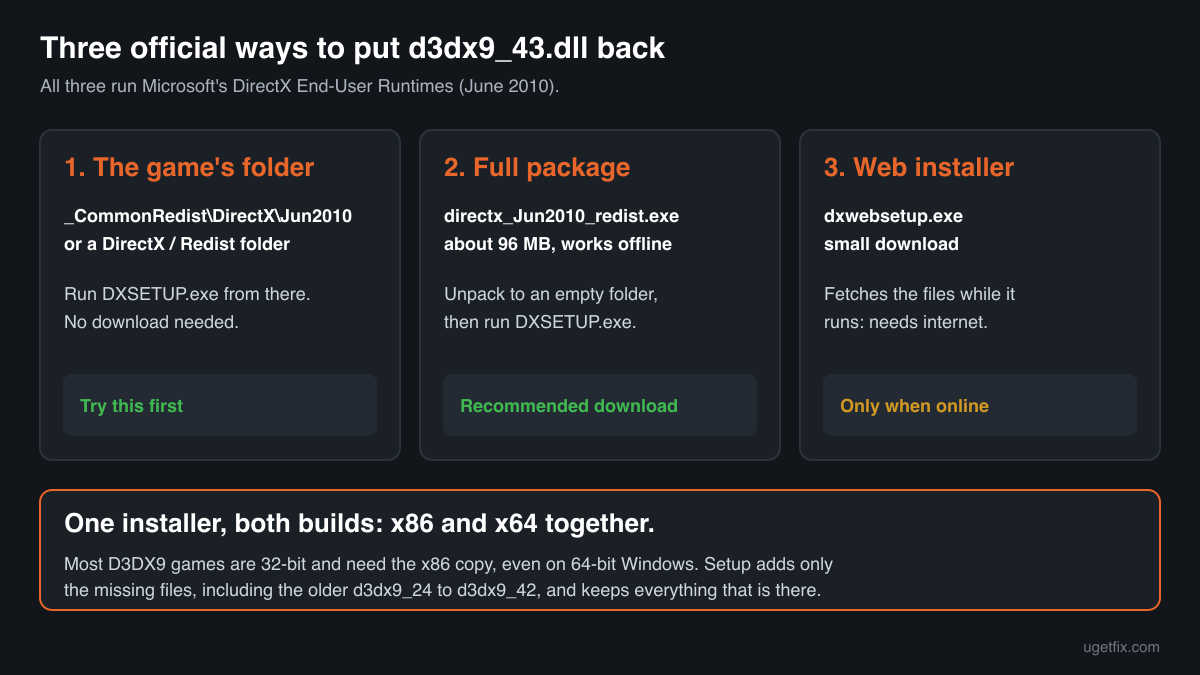
- Look in the game's own folder first. Most retail and Steam games that need D3DX9 carry Microsoft's installer with them. In a Steam library it is the game's _CommonRedist\DirectX\Jun2010 folder; on older discs and installers look for a folder called DirectX, DX9 or Redist. Run DXSETUP.exe from there and you are done without any download.
- No copy with the game: download the full June 2010 package. The file is directx_Jun2010_redist.exe, about 96 MB, from the button above. Running it does not install anything yet: it is an archive that asks where to unpack. Make an empty folder such as C:\DXJun2010 and point it there.
- Run DXSETUP.exe from the unpacked folder. Accept the licence and wait for the success message. Setup copies only the D3DX, XAudio and other legacy files that are missing, so it does no harm on a PC that already has some of them. Start the game again, then delete the unpacked folder if you like.
- No internet on the gaming PC? Use the full package, not the web installer. Microsoft's small web installer, dxwebsetup.exe, fetches the files during setup and fails without a connection. The full package works offline, so you can copy it on a USB stick and keep it for the next reinstall.
- Error still there: find stray copies. Windows uses a d3dx9_43.dll in the game folder before the one in the Windows folders. Graphics mods, shader injectors and old fix packs sometimes leave one there. Rename that copy to d3dx9_43.dll.old and start the game. If it now runs, the stray copy was broken or the wrong build. If the message changes, compare it with the list below.
What not to do
Do not take d3dx9_43.dll from a single-DLL download site.
Such sites rarely say which build you get or where it came from, and a 32-bit game given a 64-bit file fails anyway. A file that matches no Microsoft build is also how modified code reaches a PC. If you truly need the loose file, the “DLL files only” ZIP on this page is unpacked unchanged from Microsoft's package, and the check below tells you what an existing copy is.
Do not rename another D3DX9 file to d3dx9_43.dll.
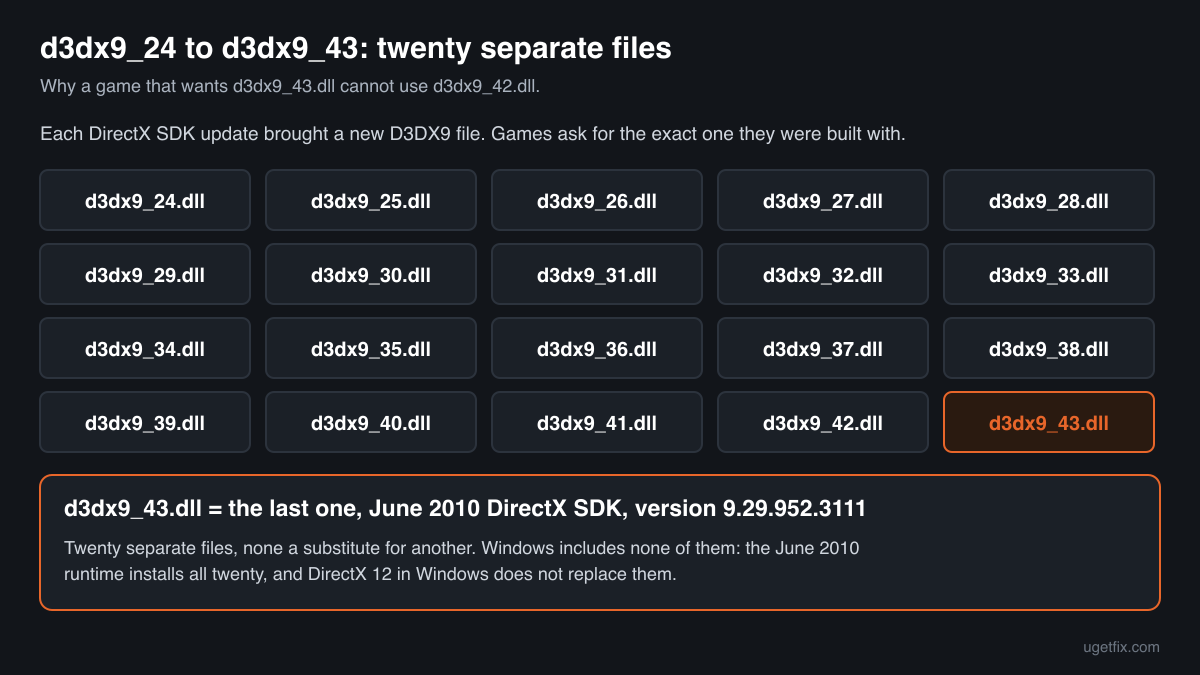
Each of d3dx9_24.dll to d3dx9_43.dll is its own library with its own set of functions. A renamed d3dx9_42.dll or d3dx9_41.dll gives you an “entry point not found” error instead, or a crash later. The installer adds the real file and keeps the older ones that other games need.
Do not drop the file into System32 yourself.
On 64-bit Windows the 64-bit files go to System32 and the 32-bit files to SysWOW64, the reverse of what the names suggest. A 32-bit d3dx9_43.dll placed in System32 is a common source of the 0xc000007b error. Setup places both builds correctly.
Do not try to register it with regsvr32.
d3dx9_43.dll is a plain function library, not a COM component, and has nothing to register. regsvr32 replies with an error about a missing entry point, which only adds confusion.
Do not expect a graphics driver or Windows update to fix it.
Reinstalling the graphics driver or running Windows Update never brings D3DX9 back. dxdiag reports DirectX 12 on the same PC that lacks d3dx9_43.dll, because the two are separate: Direct3D is part of Windows, D3DX was always a separate download.
Check the copy on your PC
Pick the d3dx9_43.dll you want to identify. Your browser calculates its checksums and compares them with 7 builds we know: Microsoft's official files from the June 2010 package and other copies found on PCs.
The file never leaves your computer. The checksum is calculated locally and nothing is uploaded.
1 genuine programs have been documented loading a planted copy of d3dx9_43.dll. Did you find a d3dx9_43.dll you cannot explain, in Downloads, Temp or AppData, or next to a program that is not a game? That needs a security check rather than a fix. Is d3dx9_43.dll genuine or malware? Check on 2-Spyware
The error messages and what each one means
Each wording points to a different cause. These are the texts Windows shows, word for word.
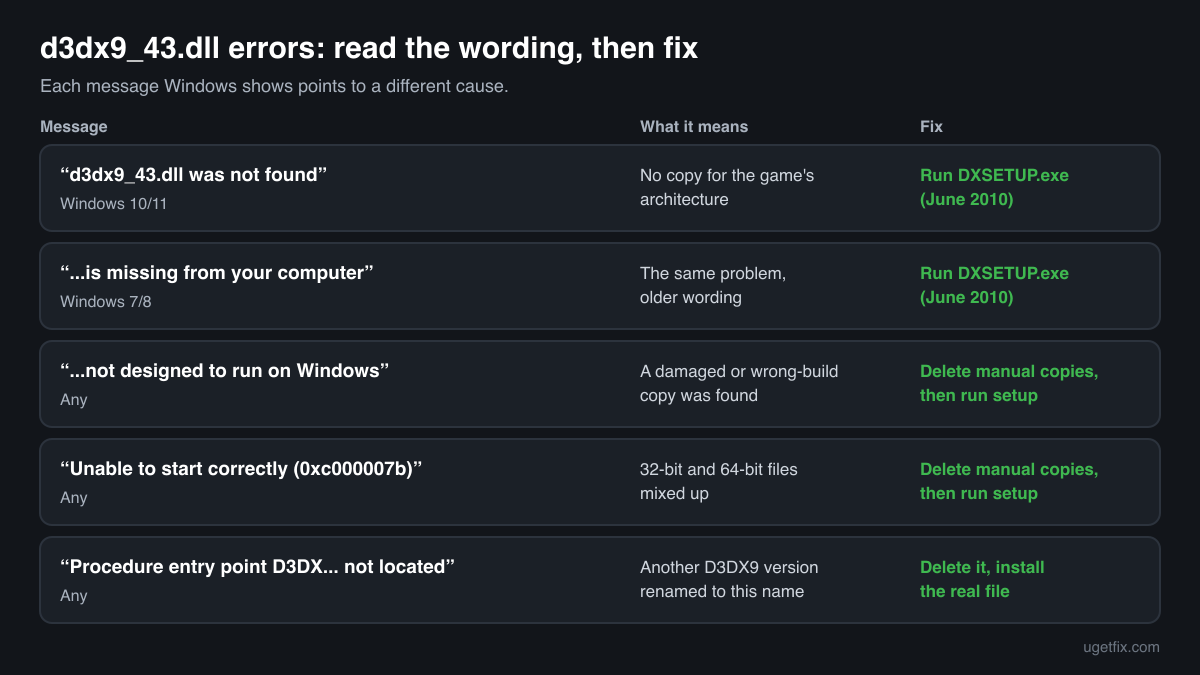
The code execution cannot proceed because d3dx9_43.dll was not found. Reinstalling the program may fix this problem.
Shown by Windows 10 and Windows 11. The game wants the June 2010 D3DX9 library and no copy of the right architecture exists on the PC. Run DXSETUP.exe from the game's folder or from the June 2010 package.
The program can't start because d3dx9_43.dll is missing from your computer. Try reinstalling the program to fix this problem.
The same cause, as Windows 7 and Windows 8 phrase it. The fix does not change.
d3dx9_43.dll is either not designed to run on Windows or it contains an error. Try installing the program again using the original installation media or contact your system administrator or the software vendor for support.
Windows found a file under that name and could not load it. It is cut short, damaged or built for the other architecture, which usually means someone copied it in by hand. Remove the hand-placed copy, check the game folder, and run the installer.
The application was unable to start correctly (0xc000007b). Click OK to close the application.
No file name, but with a game from the DirectX 9 years a 32-bit and 64-bit mix-up of d3dx9_43.dll is a frequent reason. Delete D3DX files you copied into System32, SysWOW64 or the game folder yourself, then let DXSETUP.exe install both builds.
The procedure entry point D3DX… could not be located in the dynamic link library d3dx9_43.dll.
The file loaded, but it is not the real d3dx9_43.dll: usually another D3DX9 version renamed to this name. The function the game wants does not exist in it. Delete that copy and install the genuine one.
Faulting module name: d3dx9_43.dll
An Application log entry in Event Viewer after a crash. The library loaded and the game crashed while running code in it, often while loading a texture, model or shader. With the genuine file this points at a damaged game file or a mod: verify the game's files in its launcher and try without mods.
File facts for the official version
Read from the files inside Microsoft's June 2010 package, version 9.29.952.3111. Direct3D 9 Extensions, Microsoft Corporation.
| Build | Version | Size | Exported functions | Signed by |
|---|---|---|---|---|
| x64 | 9.29.952.3111 | 2,401,112 bytes | 329 | Microsoft Corporation |
| x86 | 9.29.952.3111 | 1,998,168 bytes | 329 | Microsoft Corporation |
- SHA-256 · x64
84b900dbd7fa978d6e0caee26fc54f2f61d92c9c75d10b35f00e3e82cd1d67b4- SHA-256 · x86
0b28546be22c71834501f7d7185ede5d79742457331c7ee09efc14490dd64f5f
- Where the genuine d3dx9_43.dll belongs
C:\Windows\System32C:\Windows\SysWOW64- Signed by
- Microsoft Windows, with a Windows catalog signature: the file's Properties show no Digital Signatures tab, which is normal. Check it in PowerShell: Get-AuthenticodeSignature <path to the file> (Status: Valid).
After setup on 64-bit Windows the x64 file sits in C:\Windows\System32 and the x86 file in C:\Windows\SysWOW64; on 32-bit Windows the x86 file is in C:\Windows\System32. Its 329 exported functions are the D3DX9 toolbox: math for vectors, matrices and quaternions (D3DXMatrixMultiply and similar), texture loading (D3DXCreateTextureFromFile), mesh loading and optimisation (D3DXLoadMeshFromX), shader compilation and effect files (D3DXCreateEffect), and text and sprite drawing (D3DXCreateFont, D3DXCreateSprite). The number 43 is the release counter: this is the last D3DX9 file Microsoft published, with the June 2010 DirectX SDK.
What d3dx9_43.dll itself depends on
Every DLL names, in its import table, the other libraries that must load with it. If one of them is absent, Windows reports that file instead, which is how one missing-file message can lead to another.
For d3dx9_43.dll the list is short and holds no surprises: four libraries that every Windows installation has. The game itself loads Direct3D 9 (d3d9.dll), which is also part of Windows. So when a game names d3dx9_43.dll and then, after you fix it, names another DirectX file such as d3dx9_42.dll, xinput1_3.dll or xaudio2_7.dll, that is not a chain of dependencies. The game simply uses several legacy DirectX libraries, and the same June 2010 package contains all of them.
ADVAPI32.dllGDI32.dllKERNEL32.dllmsvcrt.dllAll four are core Windows libraries. Nothing else from the DirectX runtime has to be present for d3dx9_43.dll to load.
What the DirectX runtime installs for D3DX9
The June 2010 package is a collection of every legacy DirectX library Microsoft shipped outside Windows: twenty D3DX9 versions, D3DX10, D3DX11, the shader compilers, XAudio2, X3DAudio, XACT and XInput. For this file it installs d3dx9_43.dll version 9.29.952.3111, from the cabinets Jun2010_d3dx9_43_x64.cab and Jun2010_d3dx9_43_x86.cab, once for each architecture. The older D3DX9 versions come from their own cabinets in the same package.
| File | Microsoft's description | Size |
|---|---|---|
d3dx9_43.dll | Direct3D 9 Extensions | 2,345 KB |
Other copies of d3dx9_43.dll found on PCs
Games and fix packs have spread copies of d3dx9_43.dll across many PCs. A public DLL catalogue has collected 5 of them, listed here with their checksums so you can identify yours.
A genuine copy is version 9.29.952.3111 and signed by Microsoft Corporation. A file with another version, size or signer under this name was not published by Microsoft as d3dx9_43.dll: it may be another D3DX9 version renamed, or a file a mod or other program put there. Check its digital signature before you keep it.
| Version | Build | Size | MD5 | SHA-1 |
|---|---|---|---|---|
9.29.952.3111 | 64-bit | 2.3 MB | 7160fc226391c0b50c85571fa1a546e5 | 2bf450850a522a09e8d1ce0f1e443d86d934f4ad |
9.29.952.3111 | 32-bit | 1.9 MB | 19cee087813611b42b81a9766564265e | b049d082e933bb505aacd96890604367f71c6c51 |
9.29.952.3111 | 32-bit | 1.9 MB | 433231c934f7415b4fcaa2c86c575235 | e4eb6bd51694f47b970aa91cfe98e1f7ea086b47 |
9.29.952.3111 | 32-bit | 1.9 MB | 86e39e9161c3d930d93822f1563c280d | f5944df4142983714a6d9955e6e393d9876c1e11 |
9.29.952.3111 | 32-bit | 1.9 MB | dd84286269d9971aae1ae7da9a182b4c | d500d8e54b5cc3697f0cbca77ca1657beaa0eb41 |
Copies uploaded by users to a public DLL catalogue, read on 14 October 2026. The checksums are here to identify a file; we do not offer these copies and did not check each one against Microsoft's signature.
Questions people ask
Why does Windows 11 not have d3dx9_43.dll if it has DirectX 12?
D3DX was never part of Windows. Microsoft shipped it only with the DirectX SDK and its end-user runtime, and Microsoft Learn describes D3DX as deprecated and not included with Windows. Direct3D itself is in Windows, the helper library on top of it is not. A game built with the June 2010 SDK asks for d3dx9_43.dll by name, and DirectX 12 does not provide it.
What do the numbers in d3dx9_24 to d3dx9_43 mean?
They are release numbers. Each DirectX SDK update of those years came with a new D3DX9 file under a new name, and games link to the exact one they were built with. d3dx9_43.dll is the last, from June 2010. A game that wants d3dx9_43.dll cannot use d3dx9_42.dll, and the June 2010 package installs all of them.
Do I need the 32-bit or the 64-bit file?
With the installer you get both, so it does not matter. If you place the file in a game folder by hand, match the game, not Windows. Most games that use D3DX9 are 32-bit and need the x86 file even on 64-bit Windows. The Details tab of Task Manager shows whether a running game is 32-bit.
Is d3dx9_43.dll safe?
The genuine file is a Microsoft library signed by Microsoft Corporation and does nothing on its own. The name, however, can be used by other files. Check any copy with the tool on this page; questions about suspicious copies are covered on the security page linked above.
Will sfc /scannow or DISM restore d3dx9_43.dll?
No. Both tools repair files that belong to Windows, and d3dx9_43.dll does not. They will report no problems while the game still fails. Running DXSETUP.exe from the June 2010 package, or from the game's own DirectX folder, is the only official way to put it back.
Is there a newer DirectX runtime than June 2010?
Not for D3DX9. June 2010 was the final DirectX SDK and the final release of this runtime, and version 9.29.952.3111 is the last build of d3dx9_43.dll. Newer games do not use D3DX, so they never ask for it; only older games do, and for them this package is the right one.
Related guides
How to fix DDraw.dll missing or not found error in Windows?
FixHow to fix DSOUND.dll is missing or not found error in Windows?
FixHow to fix D3d12.dll missing or not found error in Windows?
FixHow to fix DirectX error "Setup could not download the file" in Windows?
Sources
File data read on October 14, 2026.

The editors who write and check uGetFix guides and reference pages. File facts are read from Microsoft's own installers and documentation, and every page shows the date its data was read.
Questions and experiences
Ask about this page: members and our editors answer. Reading is open; writing needs a free account.
…