
ntdll.dll crash or faulting module error: what it means and how to fix it
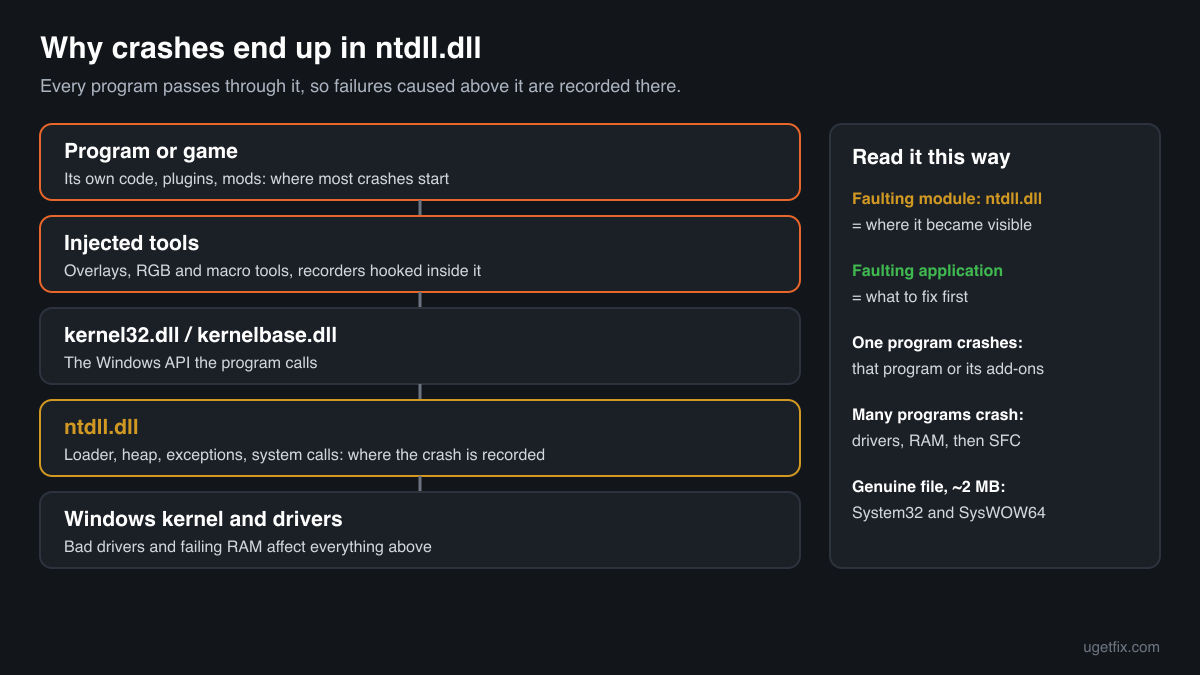
ntdll.dll is the NT Layer DLL, the lowest part of Windows that runs inside every program. Because every program passes through it, a crash caused somewhere else often ends inside it, and Event Viewer then names ntdll.dll as the faulting module. The file itself is almost never broken. The fix is the program that crashed, a tool hooked into it, a driver or the memory of your PC.

Prefer to fix it yourself? The manual steps follow.
How to fix an ntdll.dll crash
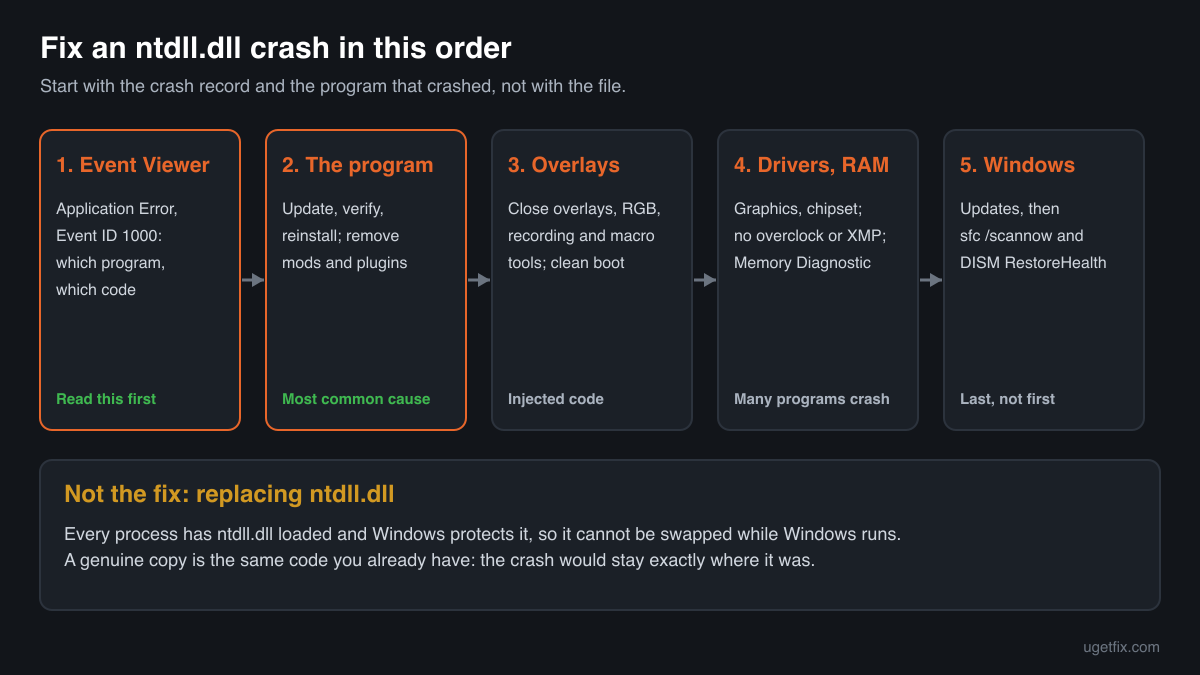
Start with the crash record, not the file. Open Event Viewer, Windows Logs, Application, and find the Error event from the source Application Error at the time of the crash. Note two lines: Faulting application name, which tells you which program crashed, and Exception code, which tells you what kind of failure it was. Then work on that program: update or reinstall it, close or uninstall overlays and tools that hook into it, update your graphics and chipset drivers, and test your memory with Windows Memory Diagnostic. Only when several unrelated programs crash in ntdll.dll is Windows itself a suspect: install updates, then run sfc /scannow and DISM.
Replacing ntdll.dll by hand is not a fix and is not even possible while Windows runs: every process, including Windows itself, has the file loaded from the moment it starts, and Windows protects it. A genuine ntdll.dll from another source is the same code that is already on your PC, so the crash would stay exactly where it was.
Step by step
- Read the Application Error event. Press Windows+R, type eventvwr.msc and press Enter. Open Windows Logs, Application, and look for an Error with the source Application Error and Event ID 1000 at the time of the crash. The Faulting application name line names the program; the Exception code line, such as 0xc0000374 or 0xc0000005, tells you the type of failure. The table further down explains the common codes.
- Check whether it is one program or many. Scroll through the same log, or open Reliability Monitor (type reliability in the Start menu). If one game or app keeps crashing in ntdll.dll, the problem is that program or something attached to it. If browsers, games, Explorer and Office all crash in ntdll.dll, look at drivers, memory and Windows itself, from step 5 onwards.
- Update or reinstall the program that crashes. Install the newest version from its publisher or launcher. For games, use the launcher's verify or repair option. If that does not help, uninstall the program, restart and install it again, and remove plugins, mods and add-ons you added to it.
- Turn off overlays and injected tools. Many crashes in ntdll.dll come from code that another tool puts inside the program: in-game overlays, FPS counters and recording tools, RGB and fan control utilities, macro tools, mod loaders, cheats and trainers, and the injection modules of some security software. Close or disable them one at a time and test. A clean boot (msconfig, Services, Hide all Microsoft services, Disable all, then disable startup apps) tells you quickly whether a background tool is involved.
- Update drivers and undo overclocking. Install the newest graphics driver from the card's maker, and the chipset driver from the maker of your PC or motherboard. If you overclocked the processor, memory or graphics card, or turned on a memory profile (XMP or EXPO) in the firmware settings, go back to the default settings and test again: unstable settings show up as random crashes, often in ntdll.dll.
- Test your memory. Type Windows Memory Diagnostic in the Start menu, choose Restart now and check for problems, and let the test finish. The result appears after Windows starts, or in Event Viewer under the source MemoryDiagnostics-Results. Errors mean faulty or unstable RAM, which corrupts data at random and is a classic reason for crashes in ntdll.dll: reset memory settings and replace a module that keeps failing.
- Repair Windows: updates, System File Checker and DISM. Install everything Windows Update offers and restart. Then right-click Command Prompt, choose Run as administrator, and run sfc /scannow. If it reports files it could not repair, run DISM /Online /Cleanup-Image /RestoreHealth, then sfc /scannow once more and restart. This repairs ntdll.dll if it really is damaged, which is rare, and every other system file the crashing program uses.
- Still crashing everywhere: check the disk and repair Windows in place. Run chkdsk C: /scan in an administrator Command Prompt and check the drive's health in the maker's tool. On Windows 11, Settings, System, Recovery, Fix problems using Windows Update reinstalls Windows and keeps your files and apps; on Windows 10 run Microsoft's installation media and choose to keep personal files and apps.
Download the genuine ntdll.dll for comparison
Each file below is Microsoft's own ntdll.dll for one Windows release, fetched from Microsoft's own server and checked against Winbindex, the index of the files in Windows images and updates. They are here for comparison: to check a copy you found, or to compare a file with your release's build. Replacing ntdll.dll does not fix crashes, because the crash is not in the file, and you cannot replace it while Windows runs. Use the steps above for crashes, and System File Checker and DISM if Windows' own copy is damaged.
Older Windows releases
A free uGetFix account is needed to download. Sign in, or create one in a minute, and you come straight back here.
What not to do
Do not try to replace ntdll.dll to stop crashes.
The crash report names the place where a failure became visible, not the file that caused it. Windows already has the right ntdll.dll for your release, and swapping it, even for a genuine one, changes nothing about the program, the driver or the memory that caused the crash.
Do not download ntdll.dll from a DLL collection site.
You cannot tell which Windows release, build or architecture such a file comes from, or whether it was changed. A wrong build of ntdll.dll would stop Windows from starting at all, because every process depends on it. Use the genuine files above only for comparison.
Do not copy a file into System32 or SysWOW64 by hand.
Windows owns and protects these copies, and a hand-placed ntdll.dll of the wrong build can leave the PC unable to boot. If System File Checker finds the file damaged, let it and DISM repair it from Windows' own store.
Do not put ntdll.dll into a program's folder.
Windows loads ntdll.dll from its own folder into every process before the program's code runs, so a copy next to a program's .exe is not used.
Check the copy on your PC
Choose the ntdll.dll you are unsure about, for example a copy you found outside the Windows folders. Its checksum is calculated in your browser and compared with 823 Microsoft builds of the file from Windows releases and updates.
The file stays on your computer. Nothing is uploaded: the checksum is computed locally.
Found an ntdll.dll outside System32 and SysWOW64, for example in Downloads, Temp, AppData or a program folder? Windows never uses a copy there, so it is a security question, not a crash one. Is the ntdll.dll you found genuine? On 2-Spyware
The error messages and what each one means
Most ntdll.dll messages come from the Application log in Event Viewer or from Reliability Monitor, and the exception code in them tells you what kind of failure happened. These are the texts as Windows shows them, with the details filled in.
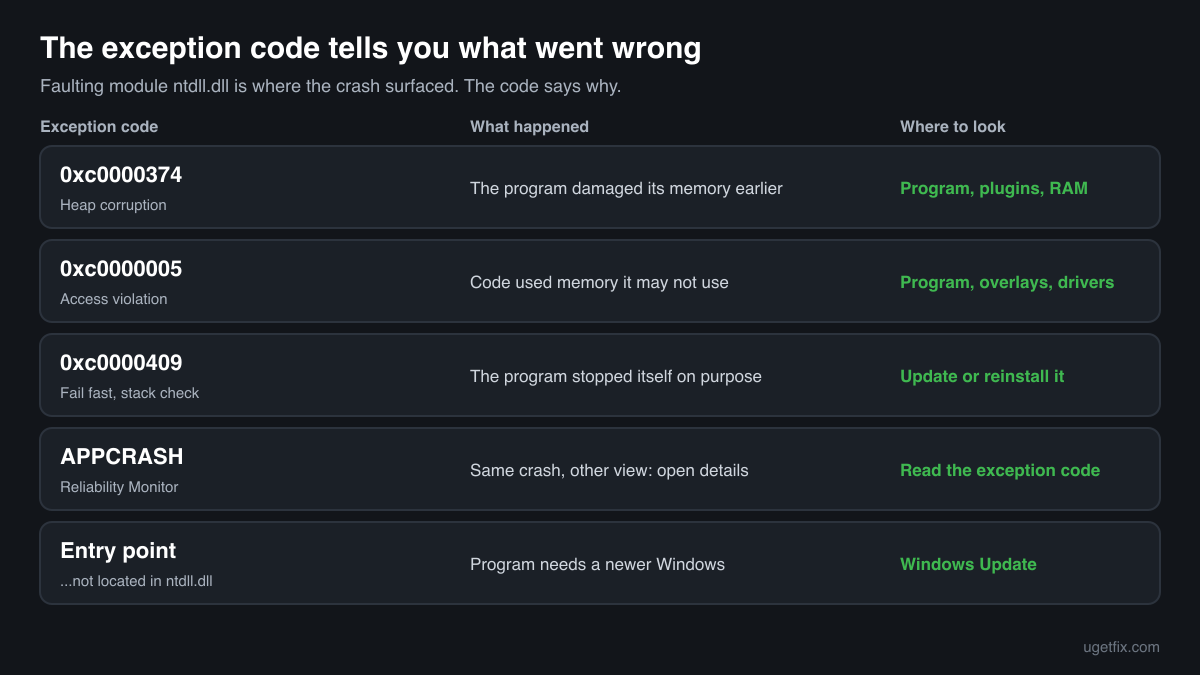
Faulting module name: ntdll.dll, version: 10.0.26100.xxxx, Exception code: 0xc0000374
Heap corruption. The program damaged its own memory earlier, and Windows noticed it when ntdll.dll managed that memory. The usual causes are a bug in the program, a plugin or mod, an injected tool, or unstable RAM. Update or reinstall the program, remove add-ons and overlays, then test memory.
Faulting module name: ntdll.dll, Exception code: 0xc0000005
Access violation: code tried to read or write memory it may not use. The faulty code is usually in the program or a tool hooked into it, and ntdll.dll was only the last function on the way. Same order: program, overlays, drivers, memory.
Faulting module name: ntdll.dll, Exception code: 0xc0000409
The program stopped itself on purpose after a security check failed, for example a damaged stack or an invalid parameter. This is a fail fast in the program's own code or in a library it loaded. Update or reinstall the program; if it is a game, verify its files and remove mods.
Problem Event Name: APPCRASH, Fault Module Name: ntdll.dll
The same crash as seen in Reliability Monitor or a Windows Error Reporting dialog. Open the technical details to see the exception code and the application name, then use the lines above.
The procedure entry point could not be located in the dynamic link library ntdll.dll.
A program asked ntdll.dll for a function that your Windows release does not have. Most often the program needs a newer Windows release than the one you run, or it is an unofficial build. Install Windows updates, or use a version of the program that supports your Windows. A hand-copied ntdll.dll from another release causes this too.
The code execution cannot proceed because ntdll.dll was not found.
Very rare, because Windows cannot start any program without ntdll.dll. It points to a failing disk or a badly damaged installation. Back up your files, check the disk with chkdsk, then repair with DISM and sfc /scannow or an in-place repair of Windows.
File facts
ntdll.dll is the NT Layer DLL. It is the link between programs and the Windows kernel: when a program opens a file, allocates memory or starts a thread, the request passes through kernel32.dll and kernelbase.dll down to ntdll.dll, which makes the system call into the kernel. It also contains the loader that starts every process and loads its DLLs, the heap manager that hands out memory, and the code that dispatches exceptions. That is why it shows up in so many crash reports: when a program fails while doing one of these everyday things, the failure is recorded where it became visible. What Windows reports for the genuine file:
- Description in the file
- NT Layer DLL
- Where the genuine ntdll.dll belongs
C:\Windows\SysWOW64C:\Windows\System32
On 64-bit Windows, System32 holds the 64-bit ntdll.dll and SysWOW64 the 32-bit one used by 32-bit programs; the folder names are historical. Windows maps ntdll.dll into every process from these folders when the process is created, before the program's own code runs, so a file with this name anywhere else is never the one a program uses. The genuine file describes itself as NT Layer DLL (Properties, Details, File description) and is about 2 MB: in the Windows 11 24H2 and 25H2 builds the 64-bit file is 2,558,392 bytes and the 32-bit one 1,849,624 bytes, in Windows 10 22H2 the 64-bit file is 2,063,408 bytes.
ntdll.dll versions by Windows release
Every Windows release has its own build of ntdll.dll, replaced by many monthly updates. Winbindex lists 823 distinct Microsoft builds; the table shows the newest one indexed for each release and the update that delivered it.
| Windows release | File version | Delivered by | Size, 64-bit |
|---|---|---|---|
| Windows 11 26H1 | 10.0.28000.2952 | KB5129194, September 14, 2026 | 2,513,848 bytes |
| Windows 11 25H2 | 10.0.26100.9711 | KB5127648, October 13, 2026 | 2,558,392 bytes |
| Windows 11 24H2 | 10.0.26100.9711 | KB5127648, October 13, 2026 | 2,558,392 bytes |
| Windows 11 23H2 | 10.0.22621.7376 | KB5120240, August 11, 2026 | 2,195,648 bytes |
| Windows 11 22H2 | 10.0.22621.7376 | KB5120240, August 11, 2026 | 2,195,648 bytes |
| Windows 11 21H2 | 10.0.22000.3260 | KB5044280, October 8, 2024 | 2,133,664 bytes |
| Windows 10 22H2 | 10.0.19041.7802 | KB5126657, October 13, 2026 | 2,063,408 bytes |
| Windows 10 21H2 | 10.0.19041.7802 | KB5126657, October 13, 2026 | 2,063,408 bytes |
| Windows 10 21H1 | 10.0.19041.7802 | KB5126657, October 13, 2026 | 2,063,408 bytes |
| Windows 10 20H2 | 10.0.19041.7802 | KB5126657, October 13, 2026 | 2,063,408 bytes |
| Windows 10 2004 | 10.0.19041.7802 | KB5126657, October 13, 2026 | 2,063,408 bytes |
| Windows 10 1909 | 10.0.18362.2037 | KB5013945, May 10, 2022 | 1,999,448 bytes |
Questions people ask
Is ntdll.dll a virus?
No. The ntdll.dll files in System32 and SysWOW64 are core Windows files that every program needs. A crash that names ntdll.dll is not a sign of malware either. Only a file with this name in another folder deserves a closer look; the security page linked above explains how to check it.
Why does Event Viewer blame ntdll.dll when it is not the cause?
Event Viewer records the module in which the crash became visible. ntdll.dll manages memory, loads DLLs and handles exceptions for every program, so when a program corrupts its memory or passes bad data, the damage is often noticed inside ntdll.dll. The real cause sits higher up: in the program, a plugin, an injected tool, a driver or faulty RAM.
Can I reinstall or replace ntdll.dll?
Not by hand. Every running process uses it, so Windows cannot release the file while it runs, and it is protected as a system file. If it is genuinely damaged, sfc /scannow and DISM repair it from Windows' own store, and an in-place repair of Windows replaces it along with everything else.
Only one game crashes with ntdll.dll. What should I do?
Treat it as a problem of that game. Update it, verify its files in the launcher, remove mods, and close overlays, recording tools and RGB or fan utilities while you play. If that does not help, reinstall the game and update the graphics driver. Windows repairs make sense only when other programs crash too.
Many programs crash in ntdll.dll. What does that mean?
When unrelated programs fail in the same module, something they share is at fault: memory, overclocking or memory profiles, a driver, a tool that injects into every process, or a damaged Windows installation. Test memory with Windows Memory Diagnostic, return to default firmware settings, update drivers, then run SFC and DISM.
What does exception code 0xc0000374 mean?
It is STATUS_HEAP_CORRUPTION: the program's memory heap was damaged, and Windows stopped the program when ntdll.dll's heap manager found the damage. The code that caused it ran earlier, usually in the program, a plugin or an injected tool. Faulty RAM can cause it as well.
Can a Windows update cause ntdll.dll crashes?
Sometimes a program stops working with a new Windows build until its publisher releases an update, and the crash is then recorded in ntdll.dll. Update the program first. If the crashes started on the day of a Windows update and affect many programs, check Microsoft's release health notes and uninstall that update from Windows Update, Update history, Uninstall updates as a test.
Is the 32-bit or the 64-bit ntdll.dll the one that crashes?
Look at the Faulting module path line in the event. C:\Windows\System32\ntdll.dll means a 64-bit program crashed, C:\Windows\SysWOW64\ntdll.dll means a 32-bit one. Both are genuine and needed; the path only tells you which kind of program to look at.
Related guides
How to fix Chrome.exe application error in Windows?
FixHow to fix ".exe has stopped working" error on Windows 10 and Windows 11?
FixHow to fix "Unknown Hard Error" on Windows 10?
FixHow to fix Forza Horizon 5 error 0xc0000005 in Windows?
Sources
- Winbindex, the Windows binaries index (m417z)
- Microsoft Learn: Use the System File Checker tool to repair missing or corrupted system files
File data read on October 14, 2026.

The editors who write and check uGetFix guides and reference pages. File facts are read from Microsoft's own installers and documentation, and every page shows the date its data was read.
Questions and experiences
Ask about this page: members and our editors answer. Reading is open; writing needs a free account.
…