
ucrtbase.dll is missing or crashes a program: what the file is and how to fix it
ucrtbase.dll is the Universal C Runtime, the library that almost every program built with Visual C++ 2015 or later uses for files, memory, text and maths. On Windows 10 and Windows 11 it is part of Windows and is updated by Windows Update, so there is nothing to install. A missing file means a damaged Windows or an old Windows 7 or 8.1 without its update; a crash in it is almost always the program's own fault.

Prefer to fix it yourself? The manual steps follow.
How to fix ucrtbase.dll errors
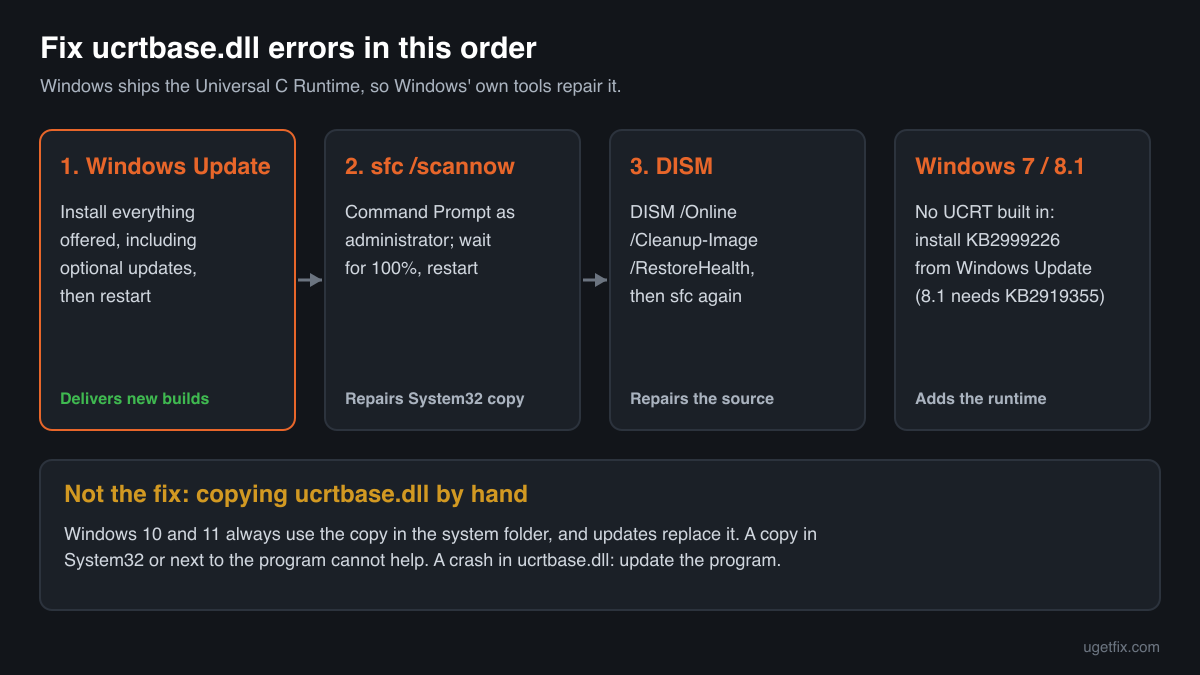
On Windows 10 and Windows 11, install every pending update from Windows Update and restart. Then open Command Prompt as administrator and run sfc /scannow, followed by DISM /Online /Cleanup-Image /RestoreHealth and one more sfc /scannow. These three repair the Windows copy of ucrtbase.dll in System32 and SysWOW64. On Windows 7, 8 or 8.1 the file arrives with the separate Update for Universal C Runtime in Windows (KB2999226): install it through Windows Update. If a program crashes with ucrtbase.dll named as the faulting module, update or reinstall that program instead.
Reinstalling the Visual C++ 2015-2022 Redistributable repairs vcruntime140.dll, msvcp140.dll and the other files of that package, but on Windows 10 and Windows 11 it does not replace ucrtbase.dll: the redistributable relies on the Universal C Runtime that Windows already has. Only Windows itself repairs and updates this file.
Step by step
- Read which file the message names. If it names ucrtbase.dll or a file that starts with api-ms-win-crt-, it is about the Universal C Runtime and the steps below apply. If it names vcruntime140.dll, msvcp140.dll or vcruntime140_1.dll, the Visual C++ 2015-2022 Redistributable is missing or damaged instead, and that package is the fix. If it names ucrtbased.dll, with a d at the end, skip to the last step.
- Install Windows updates and restart. Open Settings, Windows Update, install everything that is offered, including optional quality updates, and restart even if Windows does not ask. Cumulative updates for Windows 10 and Windows 11 deliver new builds of ucrtbase.dll and repair the component store, so a pending update can be the repair by itself.
- Run System File Checker. Type cmd in the Start menu, right-click Command Prompt and choose Run as administrator. Run sfc /scannow and wait until it reaches 100%. It compares protected Windows files with the stored originals and puts back a damaged or replaced ucrtbase.dll in System32, SysWOW64 and their downlevel subfolders. Restart afterwards.
- If System File Checker cannot repair everything, run DISM. In the same administrator window run DISM /Online /Cleanup-Image /RestoreHealth. It repairs the component store that System File Checker copies its originals from, downloading clean parts from Windows Update. When it finishes, run sfc /scannow once more, then restart.
- On Windows 7, 8 or 8.1, install the Universal C Runtime update. These releases did not ship with the Universal C Runtime. Microsoft delivered it as the Update for Universal C Runtime in Windows, KB2999226, through Windows Update. Windows 8.1 needs the April 2014 update rollup (KB2919355) first, and Windows 7 needs Service Pack 1. Without it, programs built with Visual C++ 2015 or later stop with an api-ms-win-crt-runtime-l1-1-0.dll is missing message.
- A program crashes in ucrtbase.dll: update that program. When Event Viewer or a crash dialog names ucrtbase.dll as the faulting module, Windows' file is rarely damaged. The runtime is where a program stops itself after its own error. Install the program's update, reinstall it, or remove the plugin or add-on you added last. Running sfc /scannow costs nothing, but expect it to find no problem.
- Still failing: repair Windows in place. On Windows 11, Settings, System, Recovery offers Fix problems using Windows Update, which reinstalls the current version of Windows and keeps your files, apps and settings. On Windows 10 the same result comes from running Microsoft's installation media and choosing to keep personal files and apps.
- ucrtbased.dll is missing: ask the developer for a release build. ucrtbased.dll is the debug build of the Universal C Runtime. It exists only on PCs where Visual Studio is installed, and Microsoft does not allow it to be redistributed. A program that asks for it was built in debug mode by mistake. The developer has to publish a release build; no download or Windows repair adds this file legitimately.
Download the genuine ucrtbase.dll for your Windows version
Each file below is Microsoft's own ucrtbase.dll for one Windows release, fetched from Microsoft's own server and checked against Winbindex, the index of the files in Windows images and updates. Pick your Windows version (Settings, System, About shows it) and the build: 64-bit for System32, 32-bit for SysWOW64. The repair steps above are still the better fix, because Windows protects these folders and replaces the file with every cumulative update. Use a file here to compare it with a copy you have, or to see which build your release should have.
Older Windows releases
A free uGetFix account is needed to download. Sign in, or create one in a minute, and you come straight back here.
What not to do
Do not copy ucrtbase.dll into System32 or SysWOW64 by hand.
These copies are protected Windows files owned by the system, and nearly every program on the PC loads them. A hand-placed file from another release or build can stop programs, Windows components included, from starting at all, and the next cumulative update or sfc /scannow run replaces it anyway. Repair it with Windows' own tools.
Do not put a copy into the program's folder.
On Windows 10 and Windows 11 Microsoft documents that the Universal C Runtime in the system folder is always used, even when a program carries its own copy and even when that copy is newer. A copy next to the program's .exe changes nothing, so it cannot fix the error either.
Do not download ucrtbase.dll from a DLL collection site.
You cannot tell which Windows release, build or architecture the file comes from, or whether it was changed. A file that matches nothing Microsoft has published is how tampered libraries get onto a PC. Use the genuine files above, and the checker below for a file you already have.
Do not hunt for ucrtbased.dll.
The debug build is part of Visual Studio and is not licensed for redistribution. A copy from the internet may let a debug program start, but it is the wrong fix: the program itself has to be rebuilt in release mode by its developer.
Do not keep reinstalling the Visual C++ redistributable for a ucrtbase.dll crash.
The redistributable installs its own files and leaves the Windows copy of ucrtbase.dll alone on Windows 10 and Windows 11. If a program keeps crashing in ucrtbase.dll after the first reinstall, the cause is in the program, its plugins or its data, not in the runtime packages.
Check the copy on your PC
Choose the ucrtbase.dll you are unsure about. Its checksum is calculated in your browser and compared with 323 Microsoft builds of the file from Windows releases and updates.
The file stays on your computer. Nothing is uploaded: the checksum is computed locally.
Found a ucrtbase.dll outside the Windows folders, in Downloads, Temp, AppData or next to a program you do not know? Windows never puts it there, and on Windows 10 and Windows 11 programs do not need their own copy. That is a security question, not a missing-file one. Is ucrtbase.dll genuine or fake? On 2-Spyware
The error messages and what each one means
The wording tells you which problem you have. These are the texts Windows shows, as written, with the file name filled in.
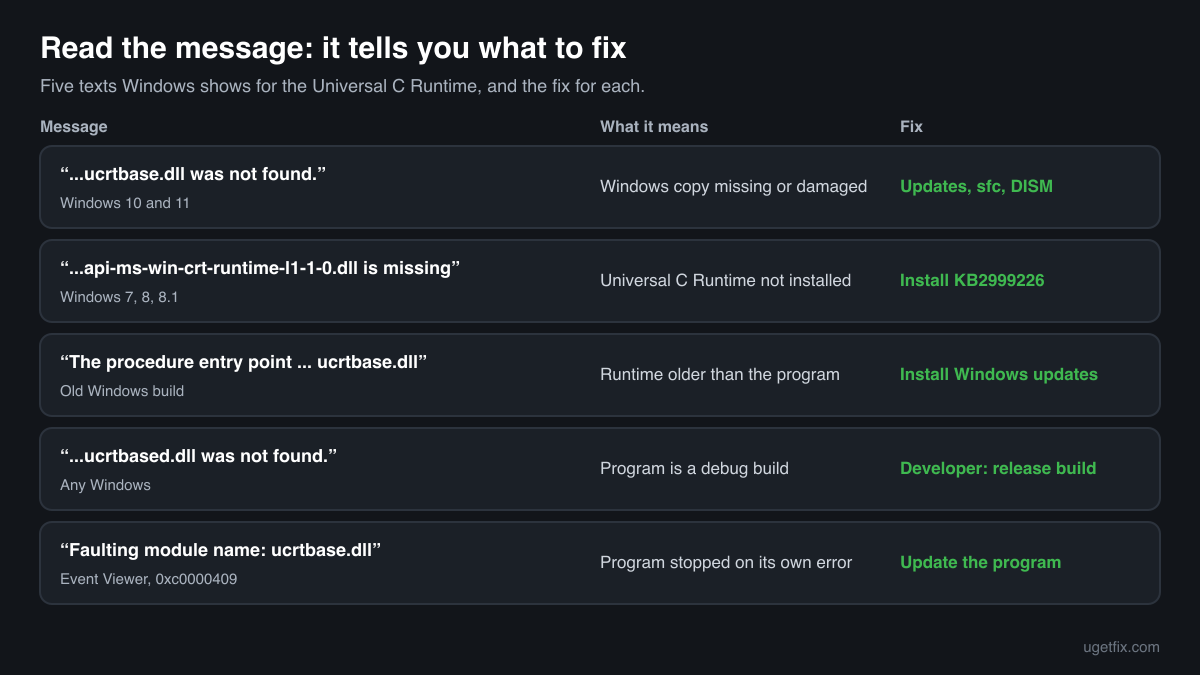
The code execution cannot proceed because ucrtbase.dll was not found. Reinstalling the program may fix this problem.
The wording of Windows 10 and Windows 11. Windows did not find a usable copy of its own file. Because Windows ships ucrtbase.dll, this points to a damaged system: install updates, then run sfc /scannow and DISM.
The program can't start because api-ms-win-crt-runtime-l1-1-0.dll is missing from your computer. Try reinstalling the program to fix this problem.
The classic message on Windows 7, 8 and 8.1. The api-ms-win-crt files forward to ucrtbase.dll and arrive together with it in KB2999226. Install that update through Windows Update. Other names from the same family, such as api-ms-win-crt-heap-l1-1-0.dll or api-ms-win-crt-stdio-l1-1-0.dll, mean the same.
The procedure entry point could not be located in the dynamic link library ucrtbase.dll.
The program asked for a function that the ucrtbase.dll it loaded does not have. On Windows 7 or 8.1 this means an old build of the Universal C Runtime: install the pending Windows updates. On Windows 10 or 11 it usually means a very old Windows release; a hand-copied file from another release causes it too.
ucrtbase.dll is either not designed to run on Windows or it contains an error. Try installing the program again using the original installation media or contact your system administrator or the software vendor for support.
A ucrtbase.dll was found but could not be loaded: damaged on disk, from another architecture, or blocked by security software. Run sfc /scannow and DISM, and check that nobody placed a copy in System32 by hand.
The code execution cannot proceed because ucrtbased.dll was not found.
The program is a debug build, made for testing on a developer's PC with Visual Studio. ucrtbased.dll is not part of Windows and may not be redistributed. Ask the developer for a release build.
Faulting module name: ucrtbase.dll, exception code: 0xc0000409
A line from the Application log in Event Viewer after a crash. The code means the program stopped itself through the runtime, for example after abort or an invalid parameter. The runtime is where it ended, not why: update or reinstall the program named in the same event and remove recent plugins or mods. If the path of the faulting module is not System32 or SysWOW64, check that copy.
File facts
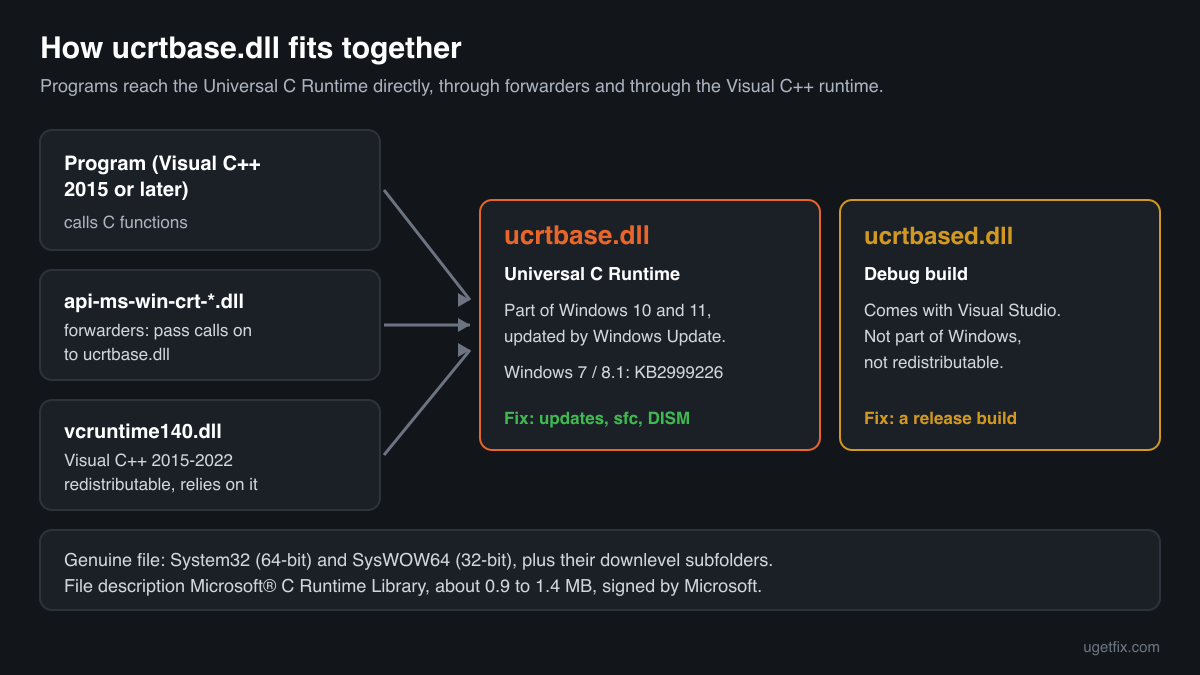
ucrtbase.dll is the Universal C Runtime, often shortened to UCRT: the standard C library of Windows, with functions for files, memory, strings, time, locale and maths that programs built with Visual C++ 2015, 2017, 2019 and 2022 call constantly. Before 2015 every Visual C++ version brought its own runtime, such as msvcr120.dll; since then the C part is one shared Windows component, and the Visual C++ 2015-2022 Redistributable adds only the compiler-specific part on top of it. Microsoft made the UCRT part of Windows 10, Windows 11 and Windows Server 2016 and later, and delivered it to Windows Vista, 7, 8 and 8.1 as update KB2999226. The api-ms-win-crt-*.dll files are small forwarders: a program asks for them by name and Windows passes the calls on to ucrtbase.dll. What Windows reports for the genuine file:
- Description in the file
- Microsoft® C Runtime Library
- Where the genuine ucrtbase.dll belongs
C:\Windows\SysWOW64C:\Windows\SysWOW64\downlevelC:\Windows\System32C:\Windows\System32\downlevel
On 64-bit Windows, System32 holds the 64-bit file and SysWOW64 the 32-bit one; the folder names are historical. Winbindex also lists copies in the downlevel subfolders of both; they belong to Windows too and are repaired the same way. The genuine file describes itself as Microsoft® C Runtime Library (Properties, Details, File description), carries a Windows version such as 10.0.26100 and is about 0.9 to 1.4 MB: in the Windows 11 24H2 and 25H2 builds the 64-bit file is 1,377,512 bytes, in Windows 10 22H2 it is 1,045,976 bytes. ucrtbased.dll, with a d, is the debug build that comes with Visual Studio and is not part of Windows.
ucrtbase.dll versions by Windows release
Every Windows release has its own build of ucrtbase.dll, updated together with Windows by the monthly cumulative updates. Winbindex lists 289 distinct Microsoft builds; the table shows the newest one indexed for each release and the update that delivered it.
| Windows release | File version | Delivered by | Size, 64-bit |
|---|---|---|---|
| Windows 11 26H1 | 10.0.28000.1450 | KB5127646, October 13, 2026 | 1,389,840 bytes |
| Windows 11 25H2 | 10.0.26100.9444 | KB5124010, September 22, 2026 | 1,377,512 bytes |
| Windows 11 24H2 | 10.0.26100.9444 | KB5124010, September 22, 2026 | 1,377,512 bytes |
| Windows 11 23H2 | 10.0.22621.6931 | KB5093998, June 9, 2026 | 1,133,736 bytes |
| Windows 11 22H2 | 10.0.22621.6931 | KB5093998, June 9, 2026 | 1,133,736 bytes |
| Windows 11 21H2 | 10.0.22000.1 | original release | 1,132,544 bytes |
| Windows 10 22H2 | 10.0.19041.6807 | KB5126657, October 13, 2026 | 1,045,976 bytes |
| Windows 10 21H2 | 10.0.19041.6807 | KB5126657, October 13, 2026 | 1,045,976 bytes |
| Windows 10 21H1 | 10.0.19041.6807 | KB5126657, October 13, 2026 | 1,045,976 bytes |
| Windows 10 20H2 | 10.0.19041.6807 | KB5126657, October 13, 2026 | 1,045,976 bytes |
| Windows 10 2004 | 10.0.19041.6807 | KB5126657, October 13, 2026 | 1,045,976 bytes |
| Windows 10 1909 | 10.0.18362.1110 | KB5013945, May 10, 2022 | 1,024,656 bytes |
Older copies of ucrtbase.dll found on PCs
Public DLL catalogues have collected 34 copies of ucrtbase.dll uploaded from PCs, from version 10.0.10137.0 to 10.0.18362.815. Many come from older Windows releases or from the Windows 7 and 8.1 update. The table lists each with its checksums, so you can tell which one you have.
None of these replaces the file your Windows ships: the newest build indexed for Windows is 10.0.28000.1450, and each release keeps its own. If the check on this page finds your file in this list, it is most likely an older Microsoft build that was copied somewhere by hand. Confirm the Microsoft signature, remove the stray copy, and let Windows use its own.
| Version | Build | Size | MD5 | SHA-1 |
|---|---|---|---|---|
10.0.18362.815 | 64-bit | 1004 KB | f0da14e390f0ccb58eaad34d9b309e4b | 53f8b431d10fdb2c001d58120280a417b01073be |
10.0.18362.387 | 64-bit | 1004 KB | b1399c7bcc6ac3806a6b904212faf547 | bb75cb27c951f7e5d34cc514d598e34e372b18d1 |
10.0.18362.387 | 32-bit | 1.1 MB | 56c025c8d0c108bdf7000471adb20a92 | 516e45cb54b1ec2c39c3845a66cc132e587fb4b1 |
10.0.18362.1 | 64-bit | 993 KB | e3e6f8cf136910305da93f81101177a1 | 375beff676d1823a67e7c9cd4c1f5fee23aea291 |
10.0.18362.1 | 32-bit | 1.1 MB | a20aab46167ffb31e2d1b243e8013f2b | 56f7063036d53fd9f47f3551115d7530f18eedba |
10.0.17763.719 | 64-bit | 1004 KB | ce45f9fa43823145e4aa401750f079ec | e8d72cf9afda3affb9cb6e5503b4328d38e4989f |
10.0.17763.404 | 64-bit | 1004 KB | 1d310a5d76313c9751d6f3298828ecc3 | 72a1fb60343e78d3a06972d437d293aaa8f51f74 |
10.0.17763.404 | 32-bit | 1.1 MB | 184207751c21ed71a8c5bd1f0bbaf433 | 2fdb0fcfd3a69a21bd0ba06e8c0507ac737d96b3 |
10.0.17763.348 | 64-bit | 1004 KB | 7ad5816a8d24333f90aa8f71b7ac8b1c | 30ce8c160b445246de5b3c0090c08476f5c6da5a |
10.0.17763.348 | 32-bit | 1.1 MB | 2df3113b612a3afb068d900d01381beb | 519ae3fce4e92aec18787579aecc32c003cea29c |
10.0.17763.132 | 64-bit | 1004 KB | 298e85be72551d0cdd9ed650587cfdc6 | 5a82bcc324fb28a5147b4e879b937fb8a56b760c |
10.0.17763.132 | 32-bit | 1.1 MB | 6c2810f92a98551650cb268e68a12441 | 0086b73b79da608bfb969d06d72b6cb9fed948f4 |
10.0.17763.1 | 64-bit | 1004 KB | 1496601a77e4f569733c33f5f27ddd53 | c8d23330b2d8792137ea03f3ca0de5c0a89caf7c |
10.0.17763.1 | 32-bit | 1.1 MB | a9c6f300aa2e8259cb5e9d92ffe25f49 | b55f533bbcde76cc160c28bc98ca9d3c4360307b |
10.0.17134.12 | 64-bit | 993 KB | 0e0bac3d1dcc1833eae4e3e4cf83c4ef | 4189f4459c54e69c6d3155a82524bda7549a75a6 |
10.0.17134.12 | 32-bit | 1.1 MB | 6343ff7874ba03f78bb0dfe20b45f817 | 82221a9ac1c1b8006f3f5e8539e74e3308f10bcb |
10.0.16299.98 | 64-bit | 983 KB | c5483662773c9745e8d7c340f1093c1f | cf5c8ad3678d8431cff51eecd5b98317c9d29e2a |
10.0.16299.15 | 32-bit | 1.1 MB | d6326267ae77655f312d2287903db4d3 | 1268bef8e2ca6ebc5fb974fdfaff13be5ba7574f |
10.0.14393.2990 | 32-bit | 891 KB | a924b24d71829da17e8908e05a5321e4 | fa5c69798b997c34c87a8b32130f664cdef8c124 |
10.0.14393.795 | 32-bit | 891 KB | f0270079e98f80cd59ee4c45fe9c7697 | 9faf9ca18036c83d83d1c2c3107c4d285381049f |
10.0.14393.0 | 64-bit | 973 KB | 5de7acb69b53add389eb8412862346c3 | aed720fe91240da93ce4237f023cd8e8cb94db3c |
10.0.14393.0 | 32-bit | 901 KB | 2e0694a49824cf82c1972020db227d8c | 7a9bcd5e301df52201b71778ee6c0d9f71670269 |
10.0.10586.1171 | 64-bit | 973 KB | db193bc981ee6b08a733775140b64361 | 25c0a9ac8824bf0d3b5b39bd920952a2312b06cf |
10.0.10586.212 | 32-bit | 901 KB | 015b30309491a911e75748ad69c9e680 | 2f2243b6ea99689cd54e45b67d9b7d98847f904c |
10.0.10586.15 | 32-bit | 901 KB | d0d8cf4e5302fdef07168d7ce184de5d | 872b72e0910a3d5f142e85c309ed4295a8cbd95f |
10.0.10586.9 | 64-bit | 983 KB | f981f0cb3a0da2180965e1e2fd726878 | 2638a2ff27691ef10a50e914115d57b7f9b9838a |
10.0.10586.0 | 64-bit | 973 KB | 9b783523c6f537173b57e60ef1837953 | 41be495ba230602ef0fbb043b754b3431519594d |
10.0.10586.0 | 32-bit | 901 KB | 99ae22579c868e707bdd3d1b7f8bea87 | 6c76f6b4ac51489e0bf6148dc5d81aa857b1793d |
10.0.10240.16390 | 64-bit | 963 KB | 2381e189321ead521ff71e72d08a6b17 | 0db7fea07b4bc14f0f9d71ecfa6ddf3097229875 |
10.0.10240.16390 | 32-bit | 881 KB | 5b55e9a1360a6c52cc988da6804d6ca2 | ab36f680029c672b885d52ae376b80b4752f5f80 |
10.0.10240.16390 | 32-bit | 891 KB | 957445817bf55762008033c6063c77fc | d3dd7cecbe521030cc40e55e251d8f909d03c9fe |
10.0.10240.16384 | 32-bit | 881 KB | 3e0303f978818e5c944f5485792696fd | 3b6e3ea9f5a6bbdeda20d68b84e4b51dc48deb1d |
10.0.10137.0 | 64-bit | 942 KB | d4b22fb86c88c071335fe2fb623e40ce | cc722eb1098b3a630a990dbceb62e3338b064110 |
10.0.10137.0 | 32-bit | 860 KB | 8ed02a1a11cec72b6a6a4989bf03cfcc | 172908ff0f8d7e1c0cbf107f7075ed1dba4b36c8 |
Copies uploaded by users to a public DLL catalogue, read on 14 October 2026. We list their checksums so you can identify a file; we do not offer them for download and we did not verify each one against Microsoft's signature.
Questions people ask
Is ucrtbase.dll a virus?
No. The copies in System32, SysWOW64 and their downlevel subfolders are genuine Windows files. A copy anywhere else deserves a check with the tool on this page and the security page linked above.
Do I need to install the Visual C++ Redistributable to get ucrtbase.dll?
Not on Windows 10 or Windows 11: ucrtbase.dll is part of Windows there and the redistributable relies on it rather than replacing it. On Windows 7, 8 and 8.1 the Visual C++ 2015-2022 installer needs the Universal C Runtime too, which Windows Update delivers as KB2999226. Install the redistributable when a message names vcruntime140.dll or msvcp140.dll.
Why does a program keep crashing in ucrtbase.dll?
Because the runtime is where the program ends after its own error. Many crashes stop inside ucrtbase.dll, often with exception code 0xc0000409, when the program hits an invalid parameter, a corrupted buffer or calls abort. Update or reinstall the program, remove plugins or mods you added, and check its own settings and data. A damaged Windows file is the rare case.
Can I delete ucrtbase.dll?
No. Almost every modern program on the PC, and many parts of Windows itself, load it, and Windows treats it as a protected system file. Deleting or replacing it can stop programs from starting at all. If you suspect a copy, compare it with the checker on this page and repair it with sfc /scannow.
What are the api-ms-win-crt-*.dll files?
Small forwarder files with names such as api-ms-win-crt-runtime-l1-1-0.dll. Programs ask for them by name and Windows passes the calls on to ucrtbase.dll. They belong to the same Universal C Runtime, so when one of them is reported missing on Windows 7 or 8.1, the fix is the same update, KB2999226.
What is ucrtbased.dll and where do I get it?
It is the debug build of the Universal C Runtime, installed with Visual Studio for developers testing their own programs. Microsoft does not allow debug runtimes to be redistributed, so no legitimate download exists for other PCs. A program asking for it was published in debug mode by mistake; the developer needs to release a normal build.
Should I use the 32-bit or the 64-bit file?
Windows needs both and already has both: the 64-bit file in System32 and the 32-bit file in SysWOW64, each matched to its programs. You do not choose between them, and you should not copy either one by hand. Windows Update and sfc /scannow keep both in step with your Windows release.
Related guides
How to fix ucrtbase.dll application error on Windows?
FixHow to fix Entry Point Not Found error in Windows?
FixHow to fix ".exe has stopped working" error on Windows 10 and Windows 11?
FixHow to fix Forza Horizon 5 error 0xc0000005 in Windows?
Sources
- Winbindex, the Windows binaries index (m417z)
- Microsoft Learn: Use the System File Checker tool to repair missing or corrupted system files
File data read on October 14, 2026.

The editors who write and check uGetFix guides and reference pages. File facts are read from Microsoft's own installers and documentation, and every page shows the date its data was read.
Questions and experiences
Ask about this page: members and our editors answer. Reading is open; writing needs a free account.
…