
xinput1_3.dll is missing: why games ask for it and how to install it properly
xinput1_3.dll is XInput 1.3, Microsoft's controller library that lets a game read an Xbox controller: buttons, sticks, triggers, vibration and battery level. Windows 10 and Windows 11 do not include it. It comes only with Microsoft's DirectX End-User Runtimes (June 2010), and an older game built against it will not start without it. The fix is that installer, not a loose DLL.

Prefer to fix it yourself? The manual steps follow.
Download xinput1_3.dll the official way
9.18.944.0Run Microsoft's DirectX End-User Runtimes (June 2010) installer. It puts xinput1_3.dll version 9.18.944.0 into the right Windows folders, together with the other legacy DirectX libraries older games ask for, such as the D3DX9 and XAudio files. It only adds what is missing and does not replace anything newer that Windows already has.
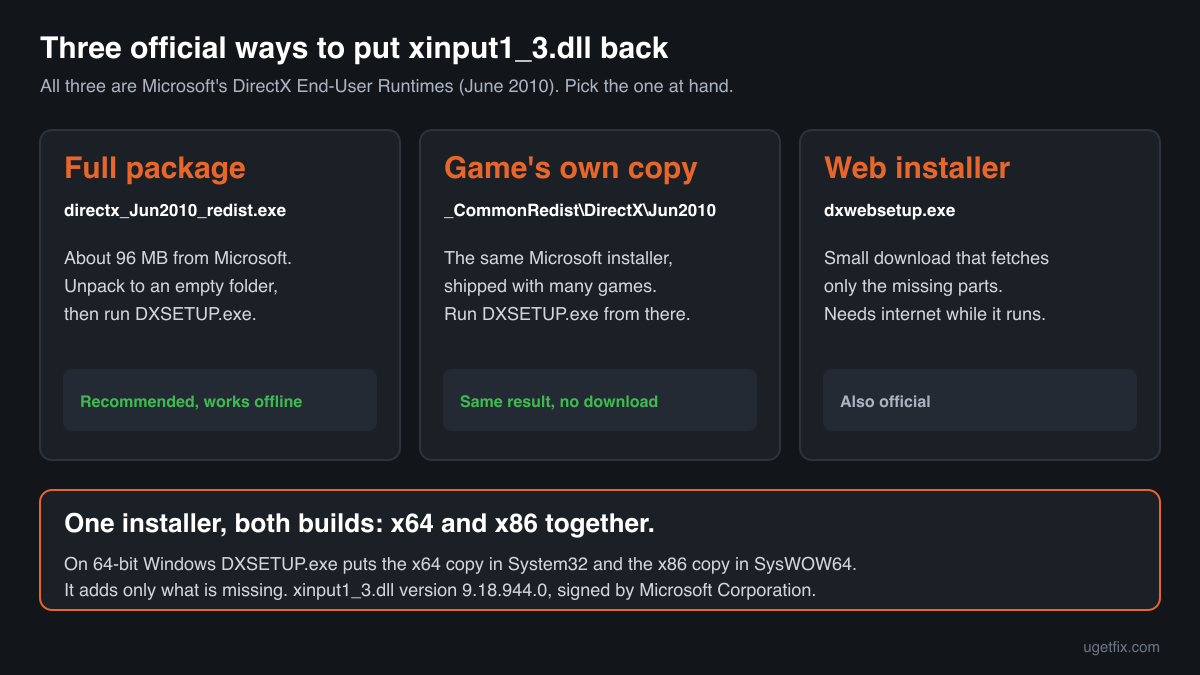
One installer serves every PC. On 64-bit Windows it installs both builds at once: the x64 copy for 64-bit games and the x86 copy for 32-bit games, which many games of that era are. You do not have to pick an architecture.
“DLL files only” is for a game that needs the file in its own folder, or a PC where the installer will not run: xinput1_3.dll version 9.18.944.0, unpacked unchanged from Microsoft's installer. It needs nothing else from the DirectX runtime. A free uGetFix account is needed to download. Sign in, or create one in a minute, and you come straight back here.
We downloaded this installer from Microsoft on October 14, 2026 and unpacked it. The download page shows the size and SHA-256 checksum of the files, so you can compare what you get. The installer comes from Microsoft's own download server (download.microsoft.com).
Step by step
- Download the full runtime package and unpack it. The file is directx_Jun2010_redist.exe, about 96 MB. It is a self-extracting archive, not the setup itself: when you run it, it asks for a folder. Create an empty one, for example C:\DX, and let it unpack there.
- Run DXSETUP.exe from that folder. Accept the license and let it finish. It installs only the files that are missing, so it is safe on a PC that already has some of them. Then start the game again. You can delete the C:\DX folder afterwards.
- Prefer the copy that came with the game, if it has one. Many games carry the same Microsoft installer. In a Steam library it is usually in the game's _CommonRedist\DirectX\Jun2010 folder; on discs and older installers it is a folder called DirectX or Redist. Running DXSETUP.exe from there gives the same result without a download.
- The web installer works too, with a catch. Microsoft also offers a small web installer, dxwebsetup.exe, which downloads only the missing parts. It needs a working internet connection while it runs. The full package above works offline and can be kept for the next PC.
- Still failing: look in the game's own folder. If the game folder contains its own xinput1_3.dll, Windows loads that copy first. Mod loaders and controller emulators put a replacement there under the same name. If that copy is damaged or the wrong build, the error stays. Rename it to xinput1_3.dll.bak, start the game, and if it works, the replacement was the problem. Then read the exact error message below.
What not to do
Do not download xinput1_3.dll from a DLL collection site.
You cannot tell which build or architecture you get, or whether the file was changed. A copy that matches nothing Microsoft published is how tampered files get onto a PC. If a game needs the loose file, use the “DLL files only” ZIP above, unpacked unchanged from Microsoft's installer, and the checker below for a file you already have.
Do not rename xinput1_4.dll or xinput9_1_0.dll.
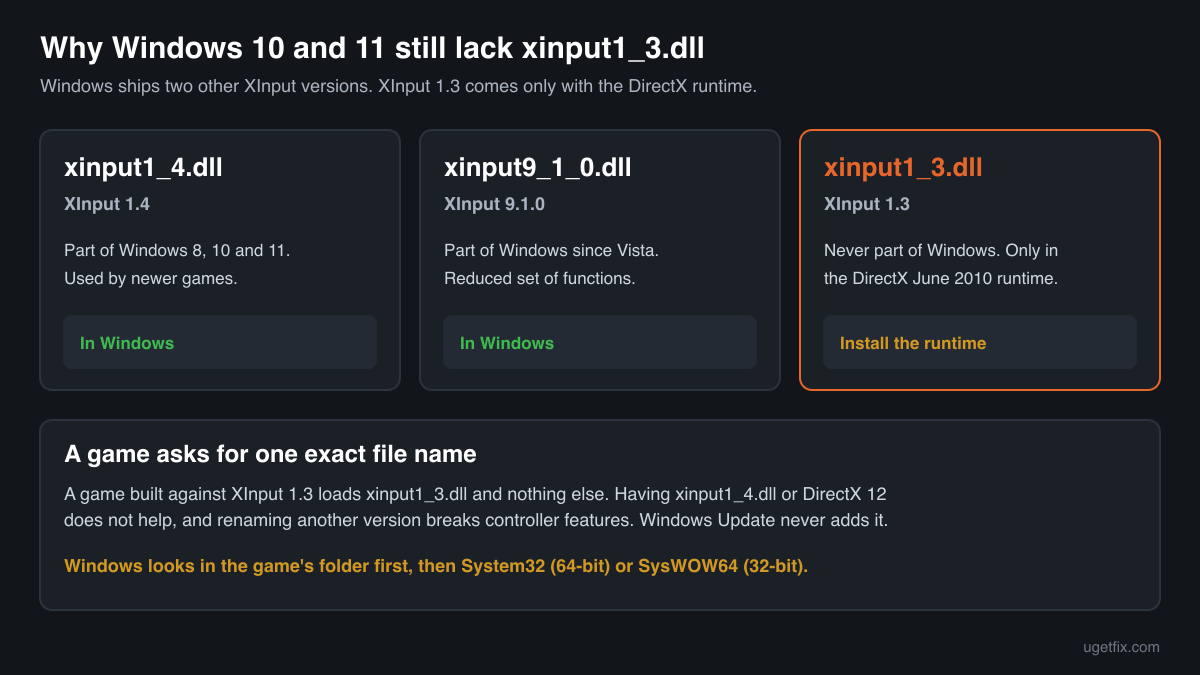
Windows does include those two XInput versions, and some guides suggest copying one under the name xinput1_3.dll. They are different libraries with different functions, so the game either fails with another error or loses controller features such as battery level or headset audio. Install the real XInput 1.3 instead.
Do not copy the file into System32 by hand.
The folder names are counterintuitive: on 64-bit Windows, System32 holds 64-bit files and SysWOW64 holds 32-bit ones. A 32-bit xinput1_3.dll put into System32 is the classic cause of the error 0xc000007b. The installer puts each build in the right place.
Do not run regsvr32 on it.
xinput1_3.dll is not a COM library and has no registration entry point. regsvr32 only produces another error message. Guides that tell you to register it are copying a step that applies to other files.
Do not chase it with Windows Update or a DirectX 12 update.
No Windows update, feature update or graphics driver installs XInput 1.3. Windows 10 and 11 report DirectX 12 in dxdiag and still lack this file, because it belongs to the separate legacy runtime.
Check the copy on your PC
Choose the xinput1_3.dll you have. Its checksums are calculated in your browser and compared with 13 builds we know: the official files from Microsoft's DirectX installer and the other copies found on PCs.
The file stays on your computer. Nothing is uploaded: the checksum is computed locally.
Found a copy you did not expect, in a Downloads, Temp or AppData folder, or one that came with a game crack or trainer? That is a security question, not a missing-file one. How to tell if xinput1_3.dll is malware, on 2-Spyware
The error messages and what each one means
The wording tells you which problem you have. These are the texts Windows shows, as written.
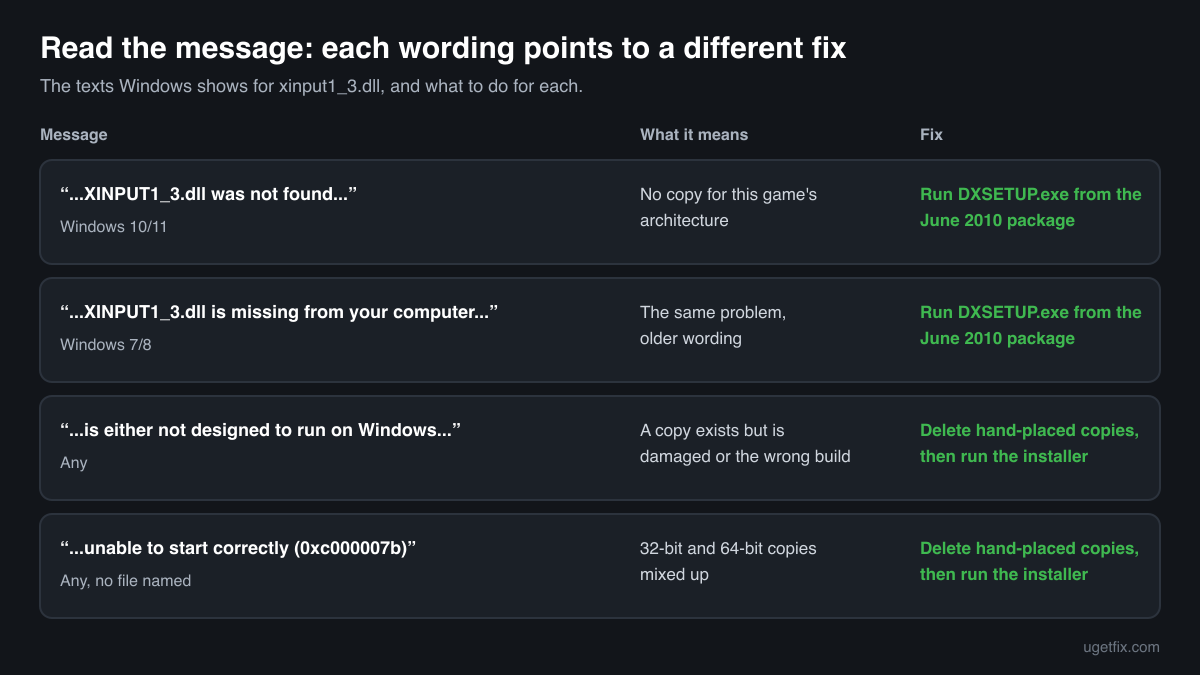
The code execution cannot proceed because XINPUT1_3.dll was not found. Reinstalling the program may fix this problem.
The wording of Windows 10 and Windows 11. The game asked for XInput 1.3 and Windows found no copy for that game's architecture. Install the DirectX End-User Runtimes (June 2010).
The program can't start because XINPUT1_3.dll is missing from your computer. Try reinstalling the program to fix this problem.
The same situation in the older wording of Windows 7 and 8. Same fix.
XINPUT1_3.dll is either not designed to run on Windows or it contains an error. Try installing the program again using the original installation media or contact your system administrator or the software vendor for support.
A file was found but could not be loaded: it is damaged, truncated or of the wrong architecture. This is typical after a copy was placed in System32 by hand. Delete that manual copy, run DXSETUP.exe, and check the game's own folder for a stray copy.
The application was unable to start correctly (0xc000007b). Click OK to close the application.
This one does not name a file, but with older games a mixed-up xinput1_3.dll is a common cause: a 32-bit game found a 64-bit copy, or the other way round. Remove hand-placed copies from System32, SysWOW64 and the game folder, then run the installer.
Faulting module name: XINPUT1_3.dll
A line from the Application log in Event Viewer after a crash. The file loaded and the game crashed while running code inside it. With a genuine copy this usually points at a replacement library from a mod or controller emulator in the game folder, or at a controller driver problem. Try without the replacement and with the controller reconnected.
File facts for the official version
Read from the files inside Microsoft's installer, version 9.18.944.0. Microsoft Common Controller API, Microsoft Corporation.
| Build | Version | Size | Exported functions | Signed by |
|---|---|---|---|---|
| x64 | 9.18.944.0 | 107,368 bytes | 12 | Microsoft Corporation |
| x86 | 9.18.944.0 | 81,768 bytes | 12 | Microsoft Corporation |
- SHA-256 · x64
756cad002e1553cfa1a91ebe8c1b9380ffabe0b4b1916c4a4db802396ddfbef8- SHA-256 · x86
8d540d484ea41e374fd0107d55d253f87ded4ce780d515d8fd59bbe8c98970a7
After installation on 64-bit Windows the x64 file is in C:\Windows\System32 and the x86 file is in C:\Windows\SysWOW64. On 32-bit Windows the x86 file is in C:\Windows\System32. The exported functions are the XInput 1.3 interface: XInputGetState, XInputSetState, XInputGetCapabilities, XInputEnable, XInputGetBatteryInformation, XInputGetKeystroke and XInputGetDSoundAudioDeviceGuids, plus the library entry point and four functions exported by number only.
What xinput1_3.dll itself depends on
A DLL is rarely self-sufficient. The import table of the official file lists the libraries Windows must load together with it. If one of them were absent, the game would fail with an error naming that other file.
xinput1_3.dll is unusual here: it needs only four core parts of Windows, so it does not trade one missing-file error for the next the way C++ runtime files do. When a game reports xinput1_3.dll and right after that another DirectX file such as d3dx9_43.dll, that is not a dependency of XInput. The game needs both, and the same installer provides both.
ADVAPI32.dllKERNEL32.dllntdll.dllSETUPAPI.dllAll four libraries are part of every Windows installation. Nothing from the DirectX runtime is needed for xinput1_3.dll to load.
What the DirectX runtime installs for XInput
The June 2010 package carries dozens of legacy DirectX libraries (D3DX9, D3DX10, D3DX11, XAudio2, X3DAudio, XACT). For XInput 1.3 it installs one file, version 9.18.944.0, from its cabinet APR2007_xinput, once for x64 and once for x86. The same package also holds the even older xinput1_1.dll and xinput1_2.dll from the 2006 releases, for games built against those.
| File | Microsoft's description | Size |
|---|---|---|
xinput1_3.dll | Microsoft Common Controller API | 105 KB |
Other copies of xinput1_3.dll found on PCs
Games, mods and controller tools spread copies of xinput1_3.dll across many PCs. A public DLL catalogue has collected 11 of them. The table lists each with its checksums, so you can tell which one you have.
Most are Microsoft builds: version 9.18.944.0, the same one the installer above provides, sometimes with a different size or checksum, and an earlier version, 9.15.779.0. Some are not Microsoft files at all: controller emulators replace xinput1_3.dll in a game folder with their own library under the same name, with their own version number. If the check on this page finds your file in this list, look at its digital signature: Microsoft Corporation means a genuine build, anything else means a replacement that a program put there.
| Version | Build | Size | MD5 | SHA-1 |
|---|---|---|---|---|
9.18.944.0 | 64-bit | 113 KB | 99be130372c36fbf943415ece7c4e280 | 14c48fca8531554c77e7b89c4ee509f06de4f4bb |
9.18.944.0 | 64-bit | 102 KB | bfb3091b167550ec6e6454813d3db244 | 87e86a7c783f607697a4880e7e063ab87bf63034 |
9.18.944.0 | 32-bit | 1b39ba63e8801cefbfa4c6a4b90f1e38 | dad190ac0e9a5f5e3396cf3445caad5edb3e02d8 | |
9.18.944.0 | 32-bit | 4214e1eab701de87c2151c30a1ada24a | 1a97d6b77230855c19fd8a92a0a3a59645a84b75 | |
9.18.944.0 | 32-bit | 4b964a2530a64baad749bf8457c03515 | c04d0990c7ae194be394873809a28b6e010fd490 | |
9.18.944.0 | 32-bit | 77f595dee5ffacea72b135b1fce1312e | d2a710b332de3ef7a576e0aed27b0ae66892b7e9 | |
9.18.944.0 | 32-bit | 7b15c48d175b46ce65b8b72b0b8e2375 | c5dae06ce789da59d346a7bba7d07c93b8419aac | |
9.15.779.0 | 64-bit | 9a74119643271c05fd0cfe91ec757807 | 1d551b44b04b6f56a92bef55a871007865f2dbee | |
9.15.779.0 | 32-bit | da9506e800e13da0abba32bb0c105382 | 78447c8fc4633b86d3cea374fb619fb53e9f9ad7 | |
3.4.1.1357 | 64-bit | 143 KB | f26b59ba3bece9d04b92415a3205667a | 09337ad2b5b345aa75ef32a31c828038fd892166 |
3.4.1.1357 | 32-bit | 123 KB | 5236623449893c0e1e98fc95f067fcff | 50b4f1e2340b7c7ad065b2111fc075b2cafe6231 |
Copies uploaded by users to a public DLL catalogue, read on 14 October 2026. We list their checksums so you can identify a file; we do not offer them for download and we did not verify each one against Microsoft's signature.
Questions people ask
Is xinput1_3.dll a virus?
The genuine file is a signed Microsoft library and is harmless. Other programs can use the same name, so the name alone proves nothing. Check your copy with the tool on this page: a file that matches the build Microsoft published is the real one. Copies that come with cracks or trainers are covered on the security page linked above.
Why does Windows 11 not have xinput1_3.dll when it has DirectX 12?
Windows includes two other XInput versions, xinput1_4.dll and xinput9_1_0.dll. XInput 1.3 was never part of Windows: Microsoft shipped it with the DirectX SDK and its end-user runtime, the last time in June 2010. A game built against it asks for that exact file, and DirectX 12 does not replace it.
I do not even use a controller. Why does the game need it?
The game loads xinput1_3.dll when it starts, whether a controller is connected or not, because the code that checks for a controller is linked against it. Without the file the game cannot start at all, even if you only play with mouse and keyboard.
Do I need the x64 or the x86 version?
With the installer you do not have to choose: on 64-bit Windows it installs both. If you copy the file into a game folder yourself, use the build of the game, not of Windows. Many games that ask for xinput1_3.dll are 32-bit and need the x86 file even on 64-bit Windows; Task Manager's Details tab can show a game's architecture while it runs.
Is the June 2010 runtime outdated? Is there a newer one?
It is the last release and there is no newer one for these files. Version 9.18.944.0 of xinput1_3.dll is the final build of XInput 1.3, and the June 2010 package is still the one Microsoft offers. Newer games use the XInput versions that Windows includes and do not need it.
Will System File Checker (sfc /scannow) restore it?
No. System File Checker repairs Windows' own protected files, and xinput1_3.dll is not one of them. It comes from the DirectX runtime, so running DXSETUP.exe from the June 2010 package is the direct fix.
Related guides
How to fix DDraw.dll missing or not found error in Windows?
FixHow to fix Microsoft GameInput is crashing the PC?
FixHow to fix DirectX error "Setup could not download the file" in Windows?
FixHow to fix Bluetooth missing Power Management tab in Windows 11 and 10
Sources
File data read on October 14, 2026.

The editors who write and check uGetFix guides and reference pages. File facts are read from Microsoft's own installers and documentation, and every page shows the date its data was read.
Questions and experiences
Ask about this page: members and our editors answer. Reading is open; writing needs a free account.
…