How to fix
Valorant causes problems
on Windows
Resolve black icon issues in Valorant on Windows 10 and 11 with our expert-tested solutions. Enjoy seamless gaming experience, fixed in minutes!

![[Fix] Valorant causes problems on Windows – icons turn black](https://ugetfix.com/wp-content/uploads/articles/askit/fix-valorant-causes-problems-on-windows-icons-turn-black_en-768x432.jpg)
What causes [Fix] Valorant causes problems on Windows – icons turn black?
- Windows version 21H1 update
- Incompatibility with Valorant
- Third-party software not adhering to OS changes
- Performance issues with Windows after update
- Glitches in Windows UI when Valorant is launched
Repairs Windows system files, removes malware, and restores a clean OS state — without reinstalling.
Yesterday I did update to Windows version 21H1, and everything seemed to work as normal. The problems start once I launch Valorant: my taskbar looks completely weird and glitchy (like icons overlapping each other or becoming black), and the Nvidia overlay does not work anymore. I am not sure whether the problem is coming from Windows 10 or Valorant itself, but it is really frustrating. Please advise.
Windows feature and security updates are shipped in regular intervals by Microsoft. These are usually installed automatically, so users rarely pay attention to them. Major version upgrades are also contently delivered by the tech giant - these typically include larger changes within certain aspects of the OS operation, technical improvements, and other new stuff that simply makes everything better and improves overall user experience.
Unfortunately, this does not happen to everybody, and instead, they are left with a system malfunction that previously did not exist. In most cases, such scenarios are common when manufacturers of third-party software do not adhere to the latest changes to the OS done by Microsoft.
Consequently, various performance issues may arise or even prevent users from using a certain third-party app. In this case, we are talking about free-to-play tactical FPS game by Riot, which is well-known after its ultra popular League of Legends game.
Many users complained that, after installing the latest Windows update (21H1), they encountered multiple glitches within Windows as soon as the Valorant app is launched. This weird bug[ref en-2] impacts the OS negatively - Valorant icon goes black, and so do other icons within the taskbar or elsewhere.
However, this is just one side-effect of the bug. Many people claimed that they were unable to use certain built-in Windows and faced other issues - here are a few reported ones:
- Inability to open File Explorer or use Search feature
- Inability to drag windows
- Ghosting[ref en-1] issues
- Windows being unresponsive.
Regardless of whether you experience one of several issues, Windows instability when playing Valorant should not be something present at all - and we are here to help you resolve this annoying bug.
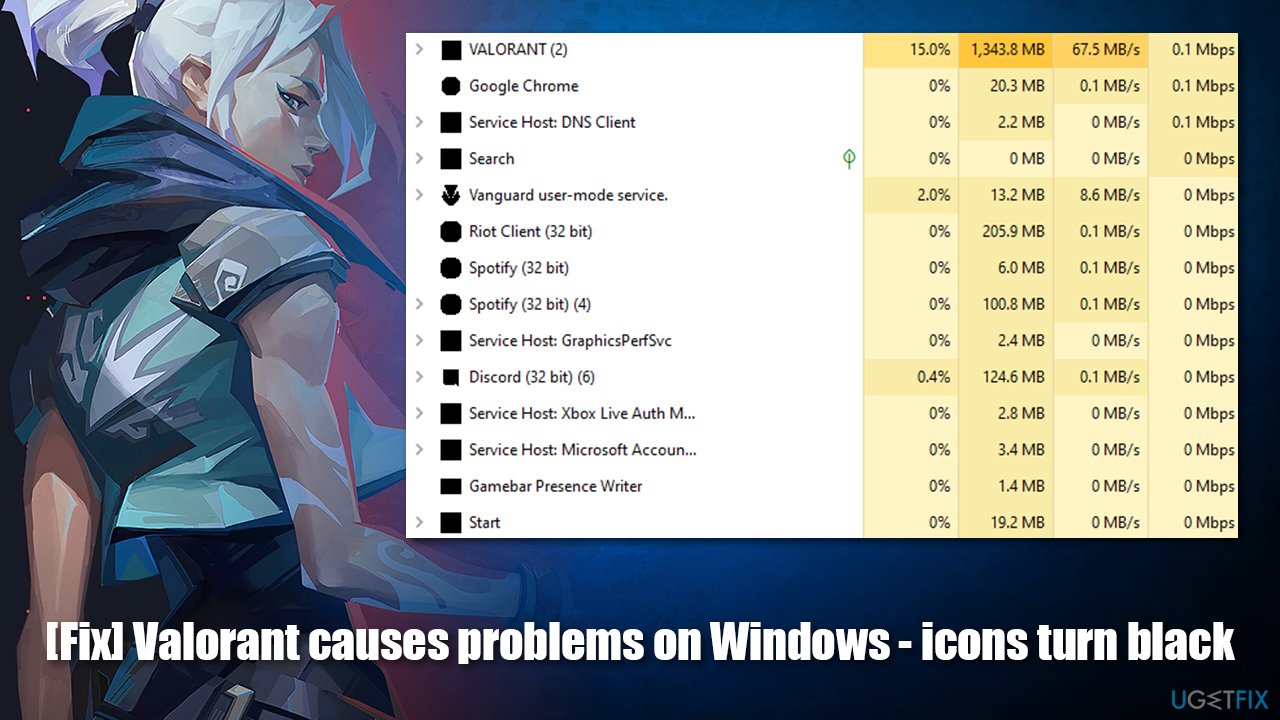
It is yet not completely clear whether the issue is related to the game itself or Windows updates. However, since players reported that there are no problems with the device stability before launching Valorant, it is likely to be a fault within the latter. The problem likely lies within Riot's anti-cheat system known as Vanguard - it is installed along with the game as a driver at the kernel level, which is the highest access right possible on any Windows operating system (it is also known for causing people major security and privacy concerns).[ref en-3]
Having that said, some might believe that reinstalling the game would solve this problem, however, it is not the case and was tried by many users who experience this issue.
The only true solution for this problem so far is for you to wait until game developers release the patch or uninstall the Windows update, which caused the issue in the first place. Below you will find methods on how to do that step-by-step.
Before you proceed, we would highly recommend you running a scan with PC repair software [d1] - it can help you fix underlying Windows problems that cause BSODs, stability issues, and other computer problems. To keep your games running at their peak performance, you should also ensure your video drivers are updated - [rev id="DriverFix"] is a perfect tool to do that automatically with no hassle.
Method 1. Roll back Windows updates [version 2004 and 20H2]
If your previous Windows version was 2004 or 20H2, you could uninstall the most recent update via the Control Panel. This would remove the enablement package from the system but would not change the initial code of the OS. Hence, proceed with the following steps:
- Type Control Panel in Windows search and press Enter
- Go to Programs > Uninstall a program
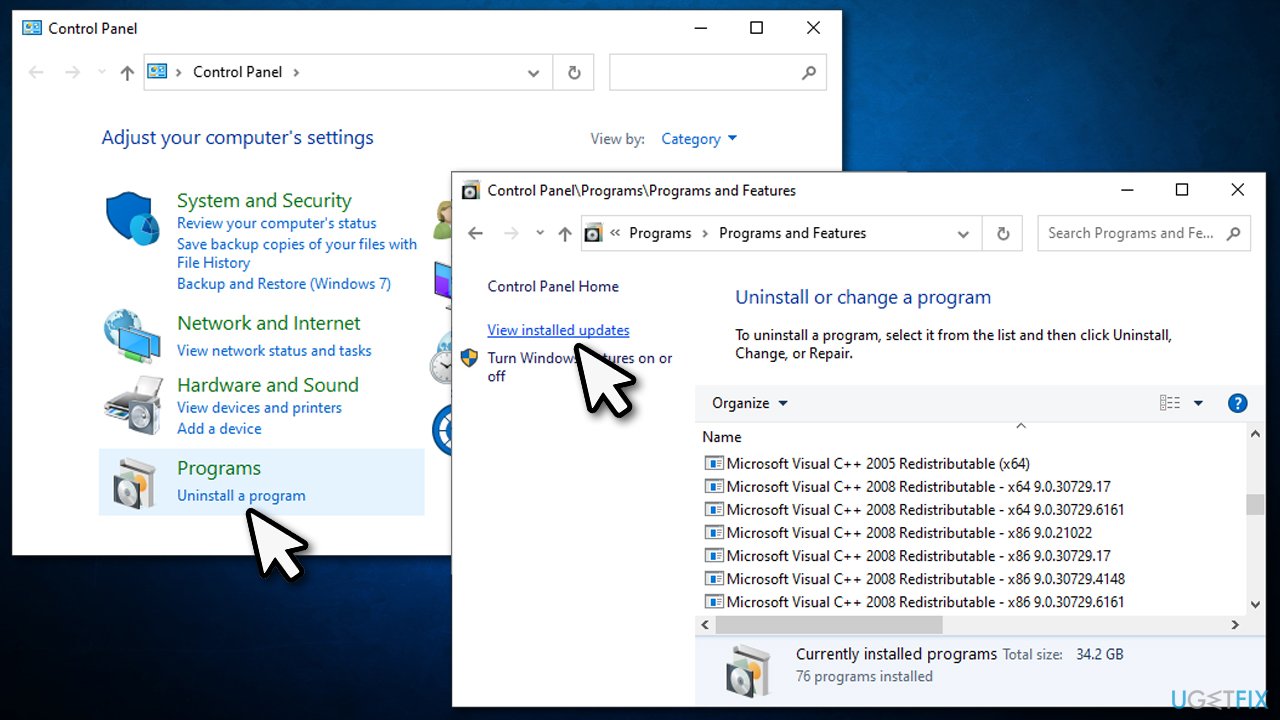
- On the left, select View installed updates
- Sort the updates by date and find the Feature Update to Windows 10 21H1 via Enablement package
- Click once on the update and click Uninstall at the top
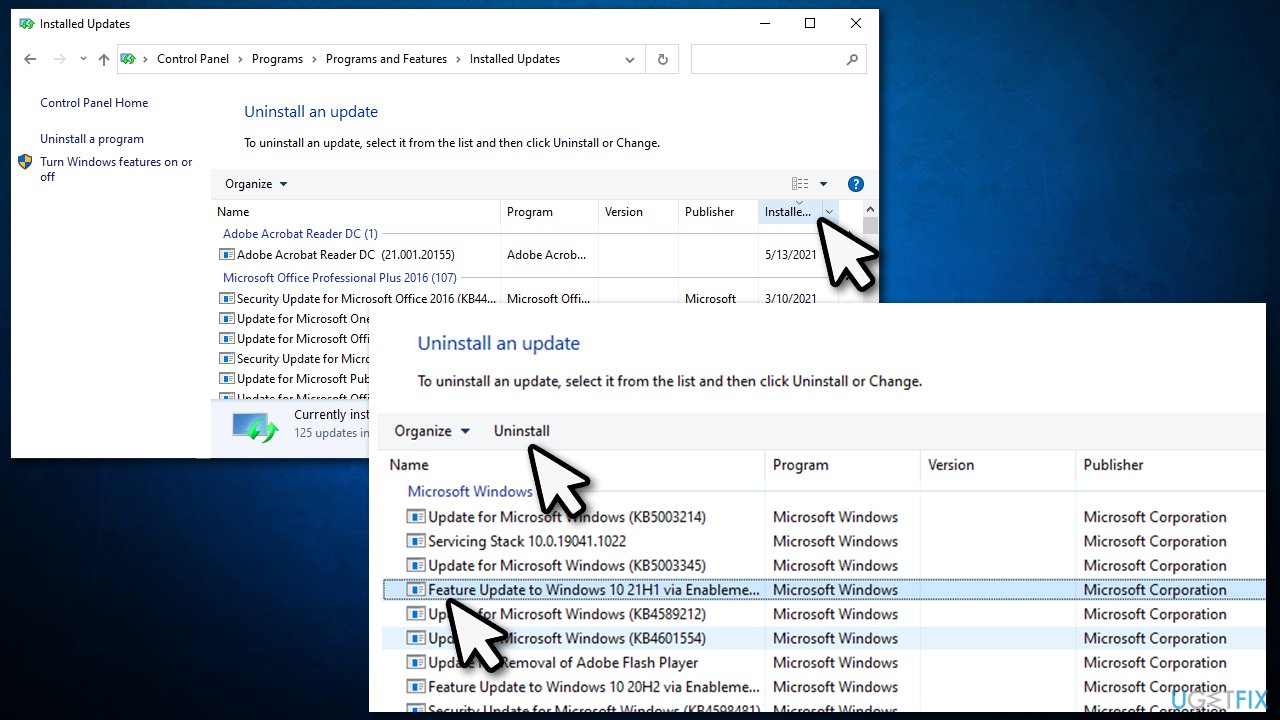
- Restart your system.
Method 2. Downgrade from Windows 21H1 to 1909 or older
If you upgraded from 1909 or older version, you must take a different approach to downgrade the OS:
- Right-click on Start and pick Settings
- Go to Update & Security
- Select Recovery on the left
- Find the Go back to the previous version of Windows 10 section
- Click Get started
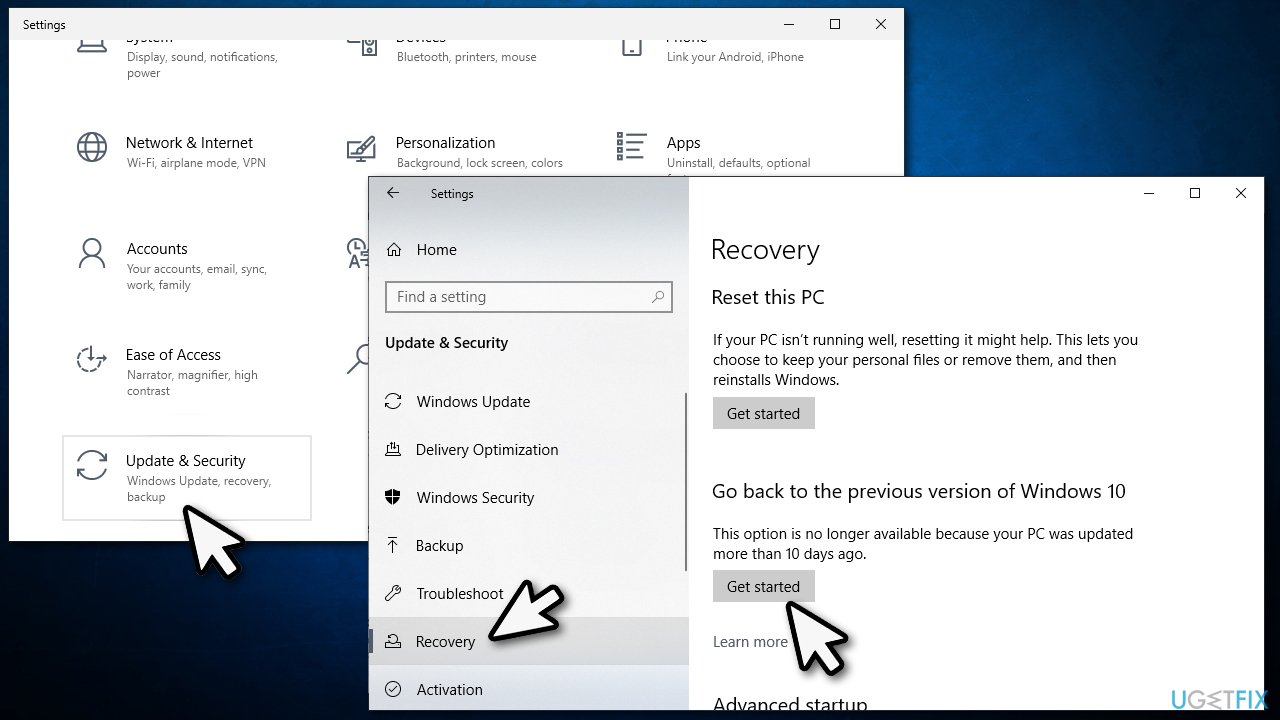
- Choose the reason to begin the process.
Note: this method works only 10 days after you applied the most recent Windows version.
Final thoughts
It is evident that this problem is temporary, and game developers need to figure out what is causing Valorant making icons black and other issues. However, it might take a while before that happens, so be patient. The game should automatically apply the latest patches shipped by Riot, so all you have to do is start the launched to begin this process once that happens. As for now, you should stick to an older version of Windows if you do not wish to experience the mentioned bugs.
Bottom line
To resolve the issues caused by the Valorant app after the Windows 21H1 update, users can try updating their graphics drivers, reinstalling Valorant, or adjusting Windows settings. If none of these solutions work, consider reaching out to support for further assistance.
Frequently asked questions
This issue is often related to graphics driver conflicts or settings that interfere with the game's rendering. Updating your graphics drivers or adjusting the in-game settings can help resolve the problem.
You can try disabling the full-screen optimization feature for Valorant or running the game in compatibility mode to prevent the black icon issue. Additionally, clearing the game's cache may also help.
Yes, ensuring that your Windows 10 is updated and adjusting the display settings to match your monitor's resolution can minimize graphical issues like black icons while playing Valorant.




Report an issue
What's wrong with this guide? We review every report and update or remove content.
Report received — thank you. We'll review and fix it.
You need a free account to submit a report.
Be the first to comment