How to fix
AppDataLocalUpdatesRun.vbs Windows Script Host error
on Windows
Resolve the AppDataLocalUpdatesRun.vbs Windows Script Host error quickly with expert-tested solutions for Windows 10 and Windows 11. Fixed in minutes!


What causes How to fix AppDataLocalUpdatesRun.vbs Windows Script Host error?
- Missing file
- Malware infection
- System file corruption
- Script not associated with a particular application
- Issues during Windows boot or program launch
Repairs Windows system files, removes malware, and restores a clean OS state — without reinstalling.
Hello. Whenever I boot up Windows, I receive an error titled Windows Script Host. Below, I can see more details, such as "C:\Users\Username\AppData\Local\Updates\Run.vbs, Line: 31, Char: 1. The System cannot find the file specified." Can you tell me whether this is dangerous and how I can fix it, please?
Windows Script Host errors are relatively common, and many users are reporting getting them at some point. The AppData\Local\Updates\Run.vbs Windows Script Host error is one of the variations of this issue, which provides more details about it and makes it much easier to troubleshoot.
There are several error messages and more details that can come with the error. In this case, the message says, "The system cannot find the file specified" - the error code 80070002 is also provided, although these parameters can vary. While it may seem like the issue lies within a simple missing file or malware infection,[ref en-1] it is not really the case usually.
The AppData\Local\Updates\Run.vbs Windows Script Host error is somewhat of a mystery to users, as it usually shows up whenever they boot up Windows, although, in more rare cases, the issue can occur whenever a certain program is being launched, on system shutdown, or at any time during system operation.
Computer admins use the Windows Script Host tool to manage and automate various tasks, which allows scripts from different programming languages to be executed. It is usually associated with VBS, VBE (VBScript), or JS/JSE (JScript) files, which explains why the line that fails is almost always related to a VBS file - in this case, we are talking of "Run.vbs," which is located in the AppData folder.
Nonetheless, this file is not necessarily related to a particular application since it's a script that different apps can use. Whenever you get a Script Host error, it means that Windows can't run one of these VBS files.
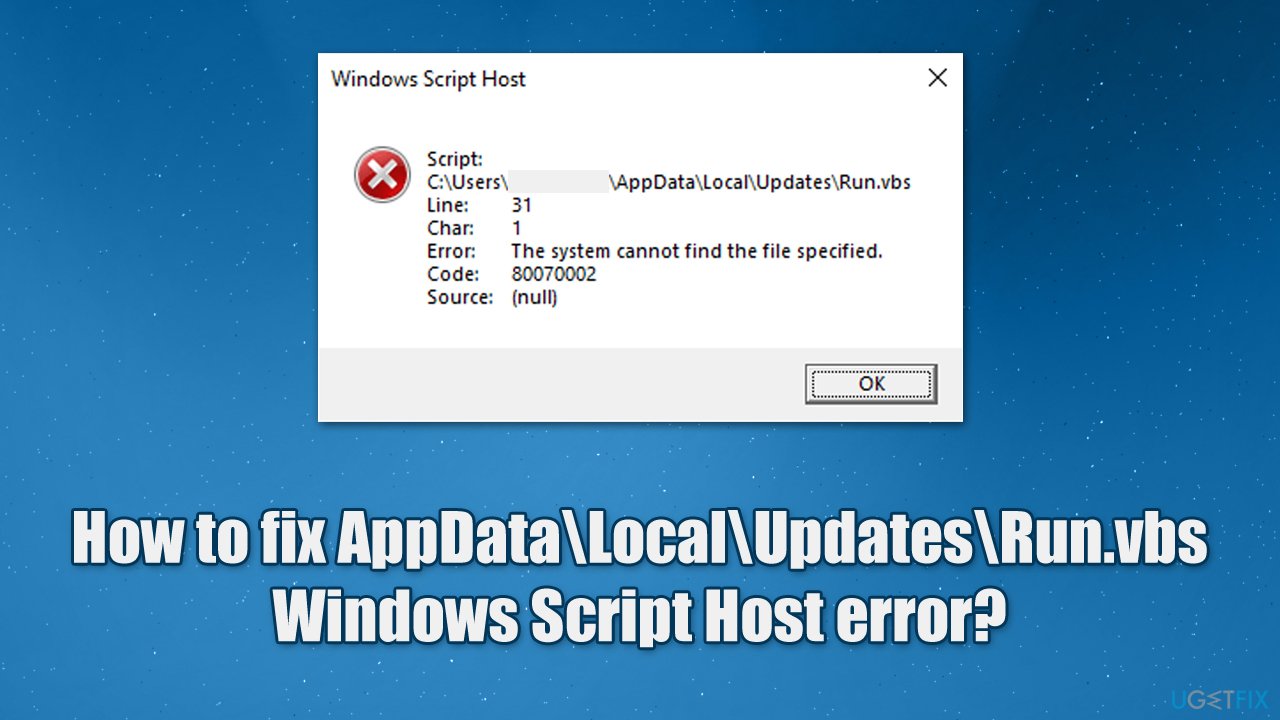
Now, the reason for this may vary greatly - from malware infection to simple system file corruption. In some cases, it could be that the Script Host tool is attempting to run a malware-related file that was already deleted by the security software, which results in the AppData\Local\Updates\Run.vbs error every time Windows attempts to launch it during bootup. In this case, downloading an official tool from Microsoft can help you solve the issue.
We recommend first running a scan with a powerful PC repair tool [d1], which can find underlying Windows issues, repair various malware damage, and clean the system from useless files. This could help you solve common Windows problems if you are facing them in the future, including Blue Screen[ref en-2] crashes, DLL errors, registry corruption issues, and more.
1. Scan your system with security software
To ensure that all the malicious programs are eliminated from your system, you should use reputable anti-malware. Some viruses are simply more advanced, and anti-malware may struggle to delete them fully, resulting in repeated reinfections of errors such as AppData\Local\Updates\Run.vbs error.
While you can use security software from a third party, you can employ Microsoft Defender instead, which performs very well when it comes to malware detection and removal.[ref en-3] For the most thorough scan, we recommend running the Microsoft Defender Offline scan:
- On your taskbar, click Show hidden items (located on the right side, next to the time and date) and click on the Windows Security icon
- Select Virus and threat protection
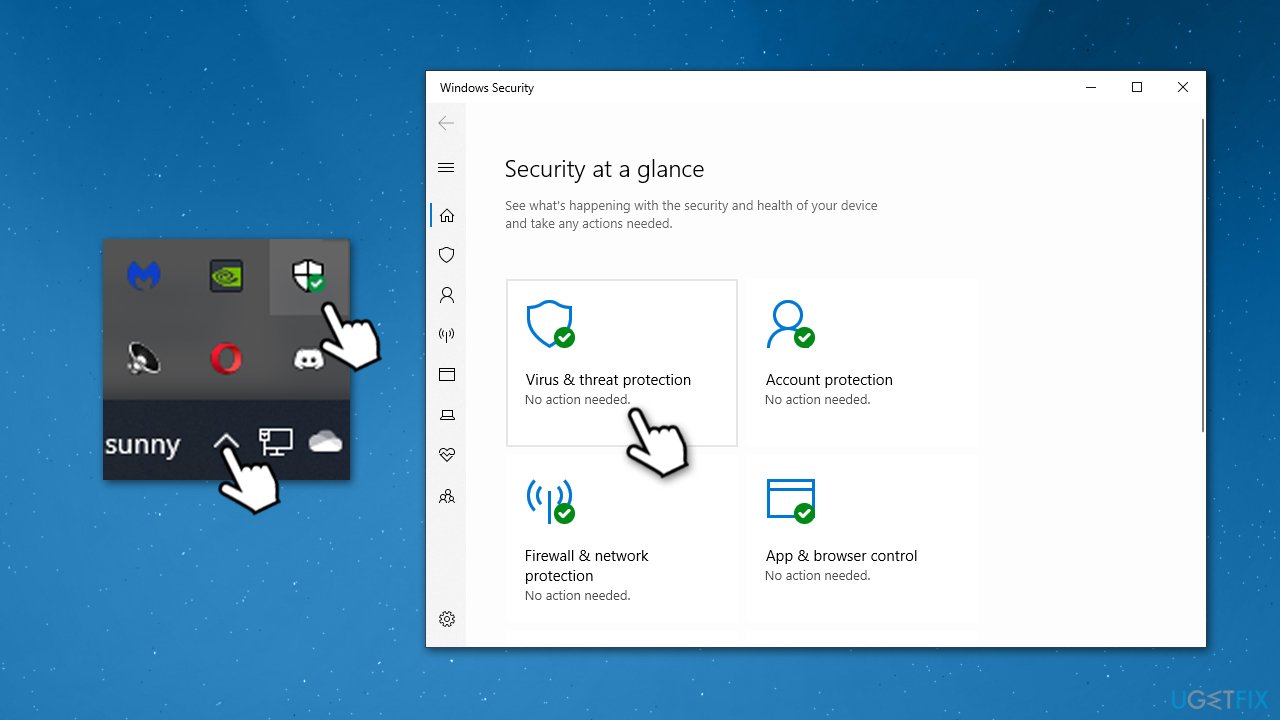
How to fix appdata local updates run vbs windows script host error scan with security software - Pick Scan options
- Scroll down, select Microsoft Defender Offline scan and click Scan now
- Your PC will restart, and the scan will begin.
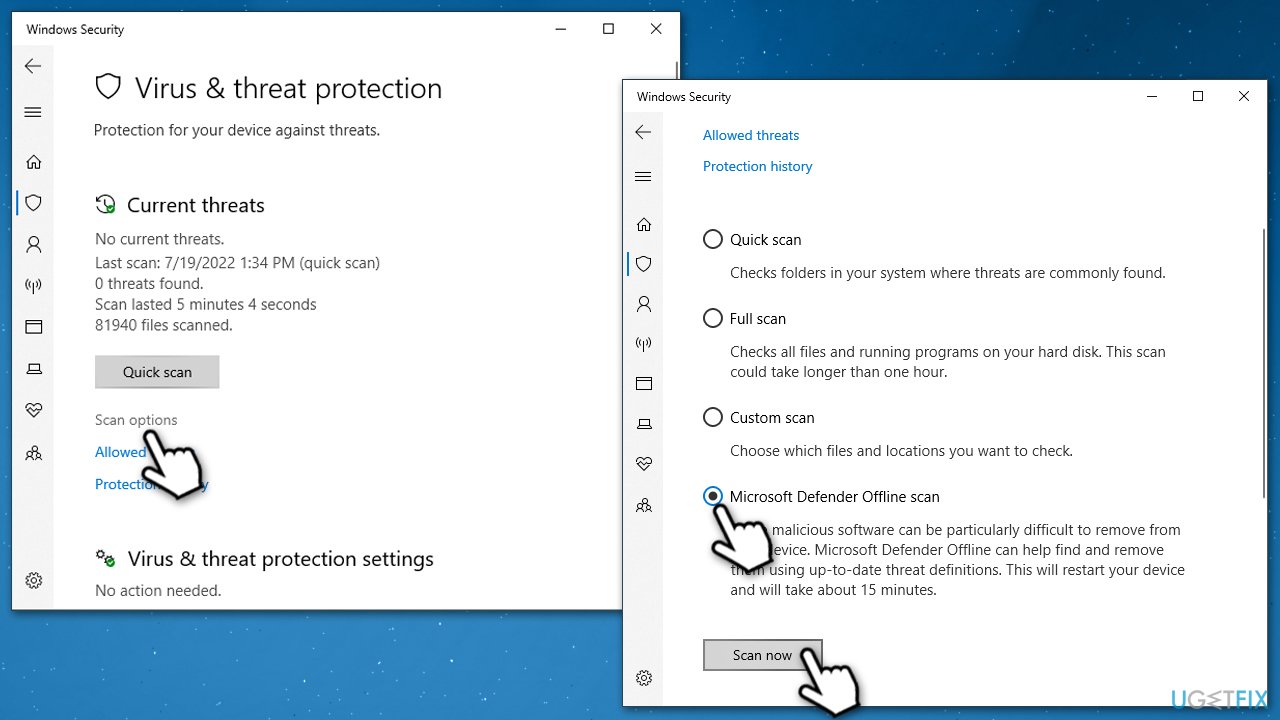
How to fix appdata local updates run vbs windows script host error scan with security software2
2. Run SFC and DISM to repair damaged system files
System file corruption of Windows OS could also cause unexpected VBS errors. Please follow these steps to fix corrupted files:
- Type cmd in Windows search
- Right-click on Command Prompt and pick Run as administrator
- When User Account Control shows up, click Yes
- Use the following command lines, pressing Enter after each:
sfc /scannow
DISM /Online /Cleanup-Image /CheckHealth
DISM /Online /Cleanup-Image /ScanHealth
DISM /Online /Cleanup-Image /RestoreHealth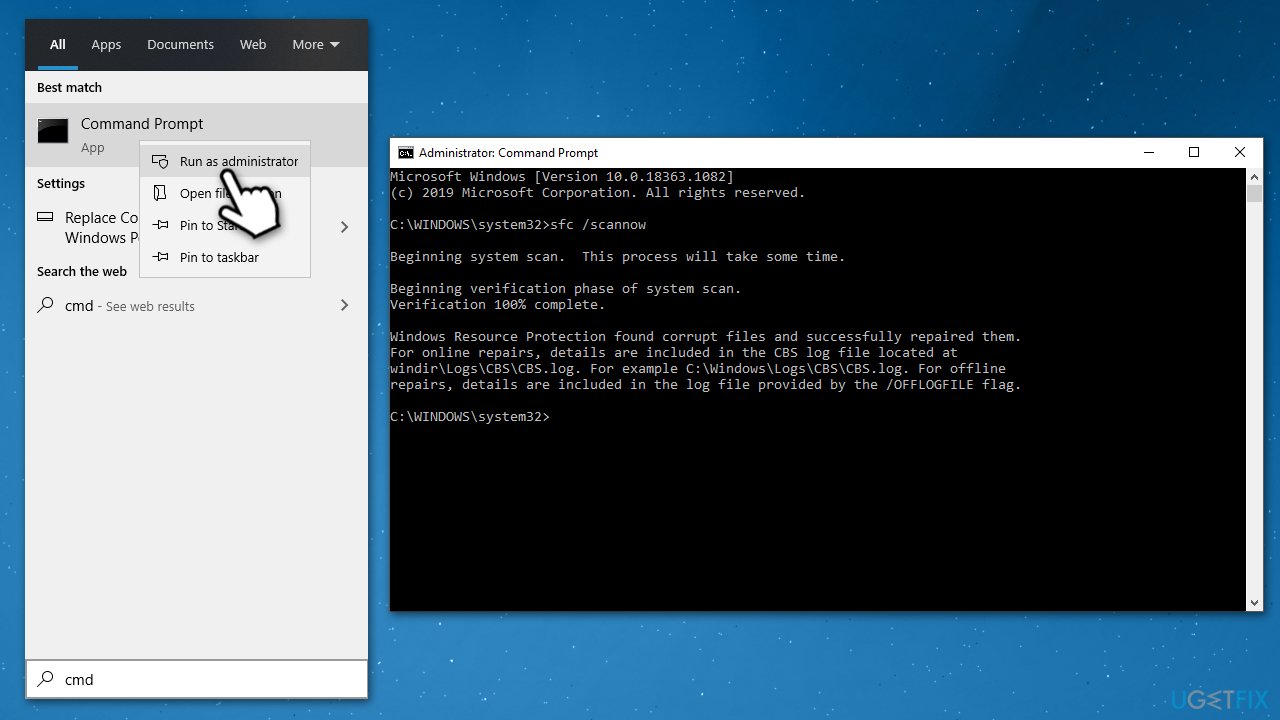
How to fix appdata local updates run vbs windows script host error run sfc dism - Restart your PC.
3. Use Autoruns to disable the leftover task
Autoruns is the official software from Microsoft that is extremely valuable in situations like these, although it does not come pre-installed with the OS. Thus, you will have to download and install it as follows:
- Download Autoruns for Windows from the official website
- Go to the Downloads folder or anywhere else your files are directed to be placed
- Right-click on the ZIP file and select Extract to Autoruns and enter the folder once done
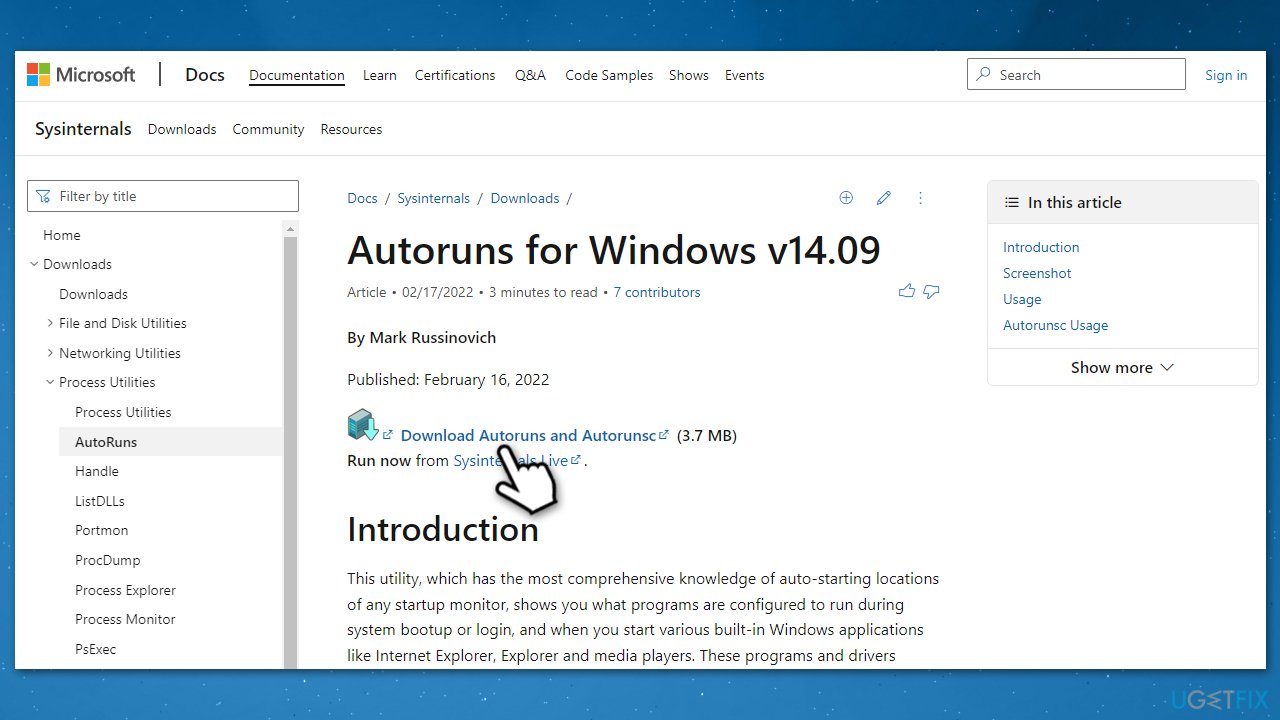
How to fix appdata local updates run vbs windows script host error downoad autoruns - Right-click on the correct EXE file and select Run as administrator
- In the UAC window, click Yes
- Type VBS in the filter box and press Enter
- Look through the found entries - you are looking for entries marked in red
- Right-click the red entries (in this case, it is likely to be \Windows Update) and select Delete or click it once and pick the trash can icon at the top
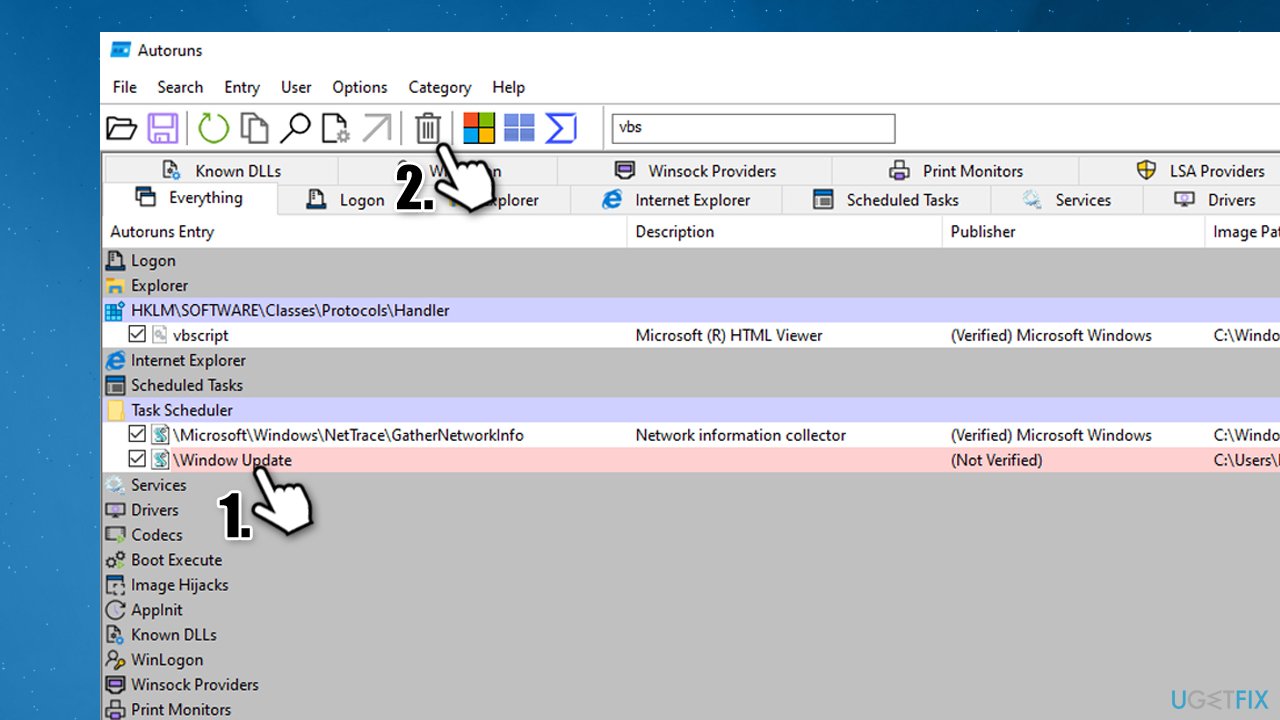
How to fix appdata local updates run vbs windows script host error delete unwanted task via autoruns - Restart your system.
4. Disable Windows Script Host [workaround]
As a security practice, some people tend to disable Windows Script Host altogether. This way, not only HTML malware won't be executed on the system, but annoying startup errors will also disappear. To disable it, you will have to access Registry Editor (requires Administrator).
Important:
1. Before performing any changes to Windows Registry, you should make its full backup to avoid issues.
2. Disabling Windows Script Host would prevent certain programs that rely on it from running. If you are using programs like that, we recommend you not proceed with this solution. Nonetheless, you can always revert this change by setting the string value back to 1. Some users claimed they did not run into any issues after disabling the Script Host, although proceed at your own risk.
- Type in regedit in Windows search and press Enter
- When User Account Control shows up, click Yes
- Go to the following location in the Registry Editor:
HKEY_CURRENT_USER\Software\MicrosoftWindows Script Host\Settings\
- If you can't see the Enabled key on the right, create it as follows:
- Right-click on an empty space within the right window and select New > DWORD (32-bit) Value
- Double-click the key and set its value to 0
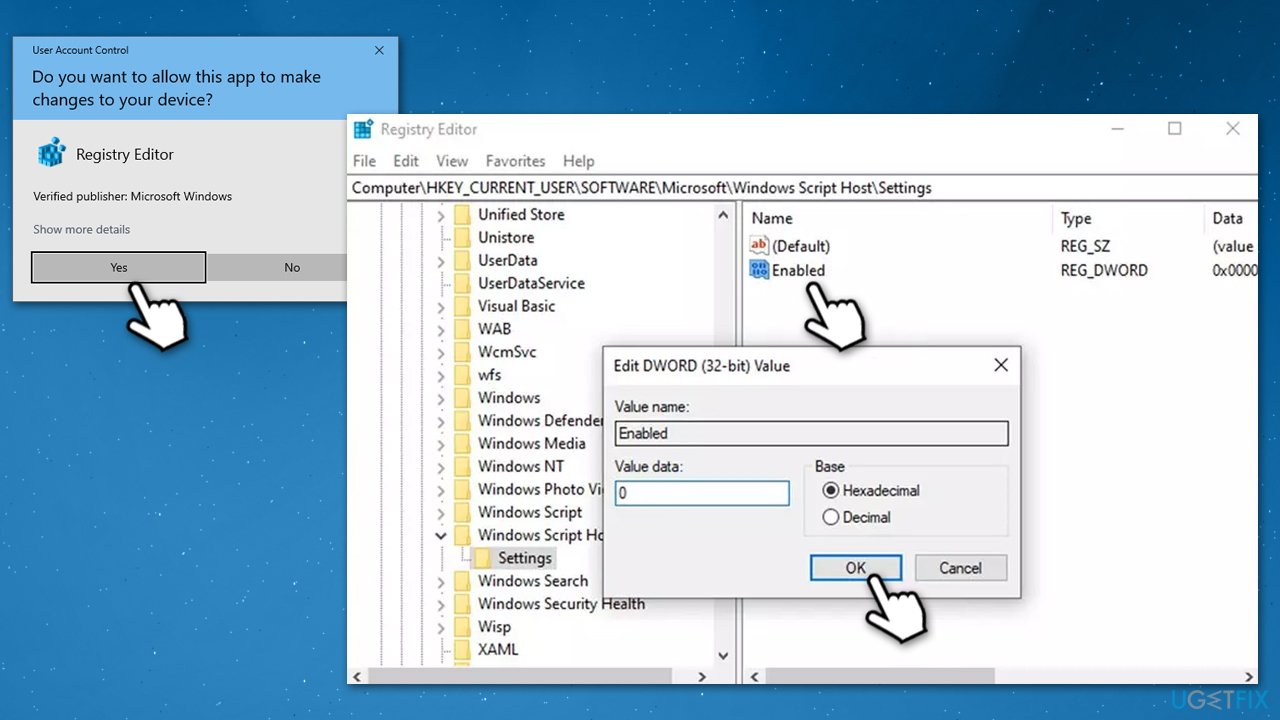
How to fix appdata local updates run vbs windows script host error disable script host workaround - Now go to the following location, and repeat the steps above:
HKEY_LOCAL_MACHINE\Software\Microsoft\Windows Script Host\Settings\
Bottom line
To fix the AppDataLocalUpdatesRun.vbs Windows Script Host error, you can check for malware, restore missing files, or repair system files. If these solutions do not resolve the issue, consider seeking further assistance or exploring additional troubleshooting methods.
Frequently asked questions
This error typically occurs due to corrupted script files or issues with Windows Script Host settings. It can also arise from malware interference or incomplete Windows updates.
To fix this error on Windows 11, run a system file check using the 'sfc /scannow' command in Command Prompt and ensure your Windows updates are fully installed.
Yes, you can try resetting Windows Script Host settings, checking for malware, and ensuring that your user permissions are correctly set for the AppData folder.




Report an issue
What's wrong with this guide? We review every report and update or remove content.
Report received — thank you. We'll review and fix it.
You need a free account to submit a report.
Be the first to comment