
How to fix DirectX error code 0x887A0002 “DXGI_ERROR_NOT_FOUND” on Windows 10?

Prefer to fix it yourself? The manual steps follow.
3 methods in this guide
I’m a devoted gamer of video games, so errors occurring while playing is a big problem for me, of course. Recently, I’ve started receiving pop-up errors while playing League of Legends and it is said that there are some problems with DirectX 12. Error code: 3 0x887A0002:DXGI_ERROR_NOT_FOUND. When the error comes out, the game crashes and could not be launched again, so I have to reboot the system. After that, the game works for a while, but max 10 min and then the error pop ups again. What should I do?
"Fatal Direct X error Code:3 0x887A0002: DXGI_ERROR_NOT_FOUND" is a Windows OS error, which occurs due to some problems related to DirectX - a set of Microsoft’s application programming interfaces (API), which is employed by multimedia and video applications to perform routine, graphic-intensive tasks.
DirectX was released in 1996 when Microsoft has realized that the demand for easy-access to PC games is huge, and the new feature ensured Windows OS to be the leader platform for gaming up till now. From 1996 till now, Direct X has been improved/updated hundreds of times and each update brought some issues - error code: 0x887A0002: DXGI_ERROR_NOT_FOUND is being one of them.
This issue has been recorded a couple of years ago, but some video game players have reported about it recently. Games like League of Legends, FIFA, Just Cause 4, and many others, still suffer from the same error code: 0x887A0002.
Therefore, even though the issue is not very common, it hasn’t been fixed completely, so we’ll try to help you. In most of the cases, the DXGI_ERROR_NOT_FOUND error occurs after the installation of Windows updates or when a PC user installs additional software to the system.
Anyway, the problem is not very likely to happen without significant Windows OS changes, so before you start performing any fixes, try to recall if you have recently installed a program/update or modified some settings. This will help to determine the culprit quicker. Down below, we will provide several fixes that you can try in resolving error Code DXGI_ERROR_NOT_FOUND 0x887A0002 on Windows 10.
How to Fix DirectX Error Code 0x887A0002 “DXGI_ERROR_NOT_FOUND” on Windows 10?
Method 1. Update graphics drivers
- Right-click on Start and pick Device Manager.
- Expand Display adapters.
- Right-click on your graphics card and choose Update driver.
- Pick Search automatically for updated driver software.
- Wait till Windows installs updates and reboot.
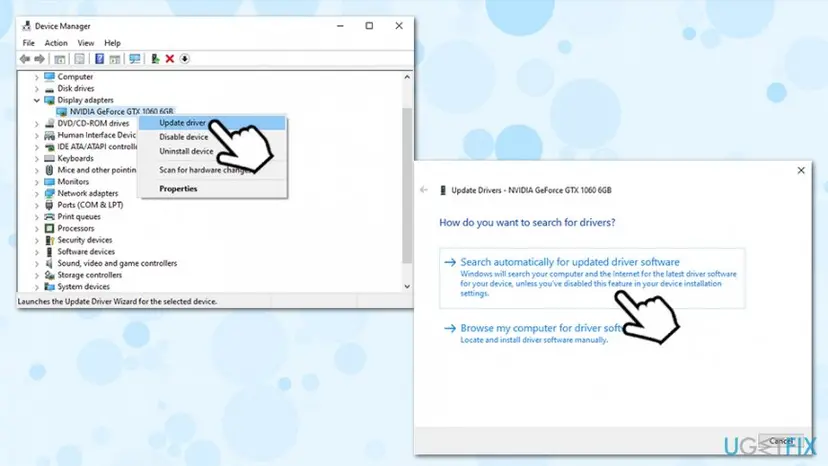
Fix directx 0x887a0002 dxgi error not found update video drivers
In case that did not work, you can download the latest drivers from the manufacturer:
Method 2. Use a System Restore Point
As we have already pointed out, DXGI_ERROR_NOT_FOUND error code usually happens after performing some important system changes whether it’s the installation of a software, update or modification of some system settings.
Therefore, one of the solutions would be to use a System Restore Point. The problem is that this DirectX error 0x887A0002 fix is not possible if you haven’t created a system restore point before. If you have it created, the perform the following steps:
- Press Win + R on your keyboard.
- Type in rstrui.exe and hit Enter.
- Click Choose a different restore point and Next.
- Pick out the restore point you would like to restore Windows back to and click Scan for affected programs.
- Carefully analyze what modifications will be initiated and click Close.
- When you are ready to restore the system, click Next.
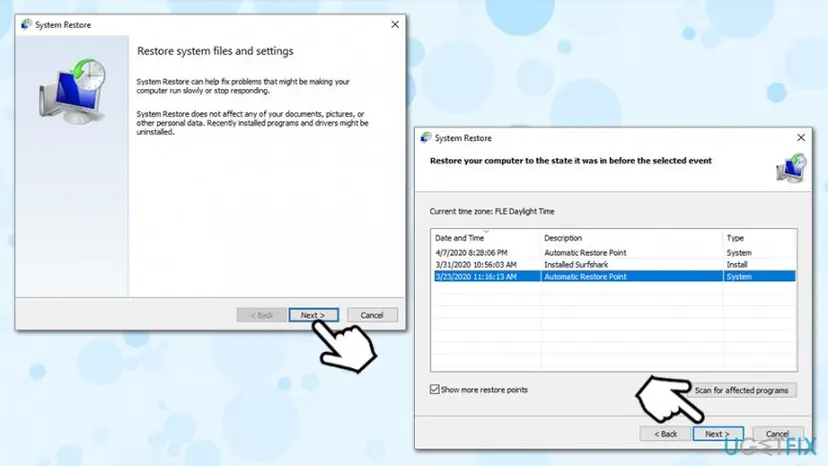
Fix directx 0x887a0002 dxgi error not found use system restore - Wait for the process to complete and click Finish.
- Once you click Yes, the System Restore Point will be completely launched and the system restarts automatically.
Method 3. Use DirecX Diagnostic Tool
For this purpose, you will have to run the DirectX Diagnostic Tool, which is installed on all Windows OS by default. To run it, perform the following:
- Type in dxdiag into Windows search.
- Hit Enter.
- Now you should see a list of tabs reporting about the display, sound, and input specificities.
- Click on each tab and check if there any issues.
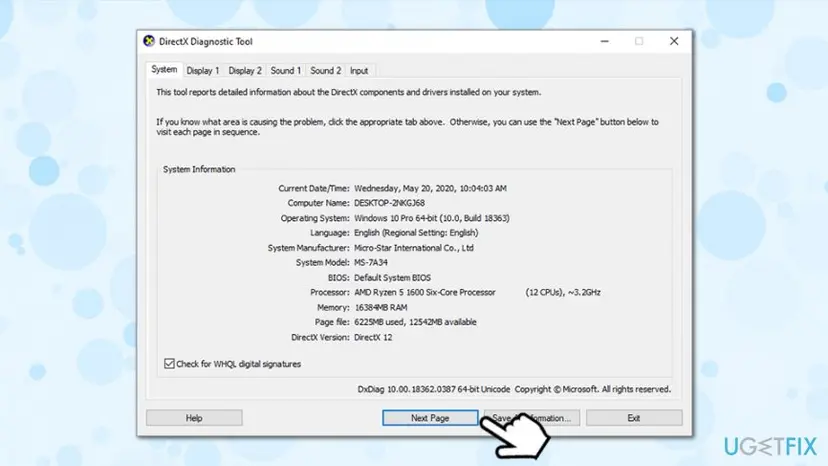
Fix directx 0x887a0002 dxgi error not found use directx diagnostic tool - If there are some problematic files, the best way to fix them is to download the latest DirectX version from the official Microsoft website. This solution applied to all DirectX errors, including “Fatal Direct X error Code:3 0x887A0002: DXGI_ERROR_NOT_FOUND.”
Did this fix work?
One click, no account. It tells the next reader which guides are worth their time.
Questions and experiences: fix DirectX error code 0x887A0002 “DXGI_ERROR_NOT_FOUND” on Windows 10
Still broken, or found a fix we did not cover? Ask here: members and our editors answer. Reading is open; writing needs a free account.
…