How to fix
“It looks like you don’t have permission to save changes to this file”
on Windows
Resolve the "You don’t have permission to save changes" error on Windows 10 and 11 effortlessly. Quick solutions await you here, expert-tested!

What causes How to fix “It looks like you don’t have permission to save changes to this file” in Windows?
- Insufficient permissions on the file
- File moved from one system drive to another
- File moved from cloud storage to personal device
- File is blocked due to security settings
- Error occurs in multiple editing applications
Repairs Windows system files, removes malware, and restores a clean OS state — without reinstalling.
Hi. I have encountered a weird problem I have never dealt with before, so I hope I can get some help. I have a photo that I need to crop, and every time I try to save it, I receive an error "It looks as though you don't have permission to save changes to this file. Try saving a copy instead." I am running Windows 10.
Many users reported an error "It looks as though you don't have permission to save changes to this file" when trying to save a file on a Windows computer. This affects picture files mostly, although some people reported having the same problem with video or audio files. This can be particularly annoying to deal with, so we are here to help you to fix this problem.
Editing pictures is something most people do once in a while - be it cropping, increasing brightness or saturation, reducing or increasing size, and much more. There are plenty of file editing programs, from advanced tools such as Adobe Photoshop to basic Windows Paint or Microsoft Photo App. It seems like it does not matter which apps users use when they encounter the error, however.
This means that the problem does not lie within the application but rather in Windows itself. The most common reason for the error is insufficient permissions, as the error message describes.
There is something to clarify here, however. When we are talking about insufficient permissions, we do not mean insufficient permissions over the file, as most people have that covered already. Most users receive the error when they do have control over it, hence it becomes really frustrating.
In most cases, the error shows up only after users move the picture from one system drive (HDD, SSD)[ref en-1] to another or from cloud storage to their personal device and then try to edit it. In such a case, simply unblocking the file via Properties should help you fix the "It looks as though you don't have permission to save changes to this file" error.
However, there could be many other different scenarios that users might be experiencing, and the reason (and solution) could lie somewhere else. For example, when you are using a non-administrator[ref en-2] account or when Windows system files are corrupt.[ref en-3]
Speaking of which, if the reason for this error is corrupt system files, you should fix them easily and remove any other inconsistencies within the Windows with [d1].
1. Unblock the picture
If the picture's attributes are set to Read-only, you will not be able to edit it. You can remove this attribute via the Properties:
- Right-click on the image you want to edit and select Properties
- In the General tab, look at the Attributes section at the bottom of the window
- Untick the Read-only marker
- If Unblock is not ticked, tick it.
- Click Apply and OK.
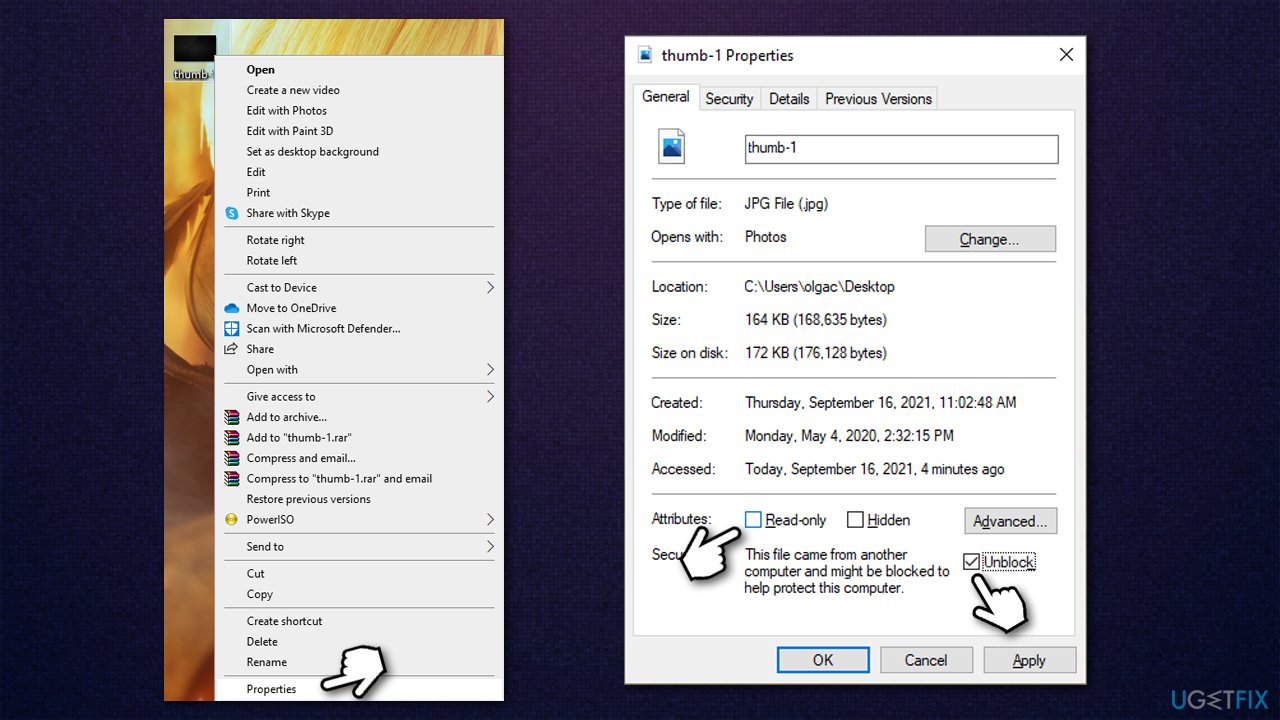
How to fix it looks like you dont have permission to save changes to this file unlock in properties
2. Run the editing software as administrator
Another way to fix this problem is by running the editing software as admin.
- Type in the name of the application you use to edit pictures in Windows search
- Right-click on the result and pick Open file location
- Right-click on the EXE file and select Run as administrator
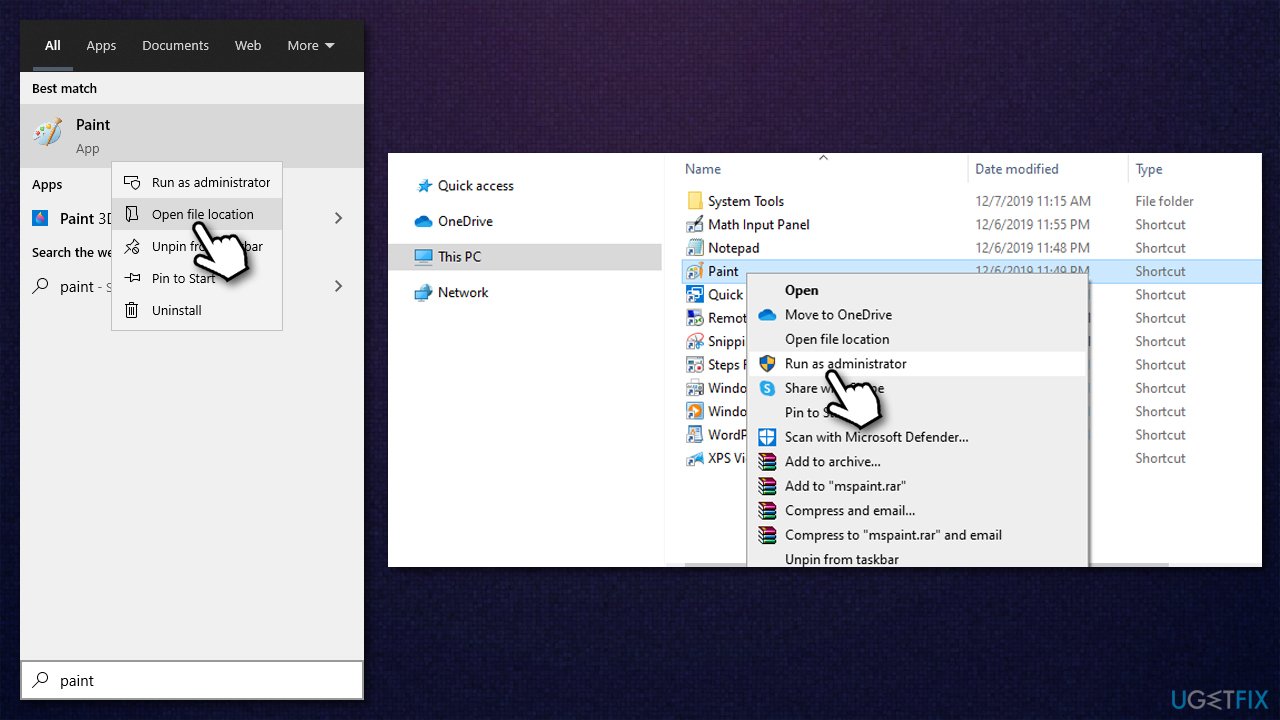
How to fix it looks like you dont have permission to save changes to this file run as administrator - Try editing the picture once more.
3. Run SFC and DISM
Corrupted system files can be one of the reasons for not being able to edit some files. Here's how to fix it:
- Type cmd in Windows search
- Right-click on Command Prompt result and select Run as administrator
- When User Account Control shows up, click Yes
- In the new window, type in the following commands, pressing Enter after each:
sfc /scannow
DISM /Online /Cleanup-Image /CheckHealth
DISM /Online /Cleanup-Image /ScanHealth
DISM /Online /Cleanup-Image /RestoreHealth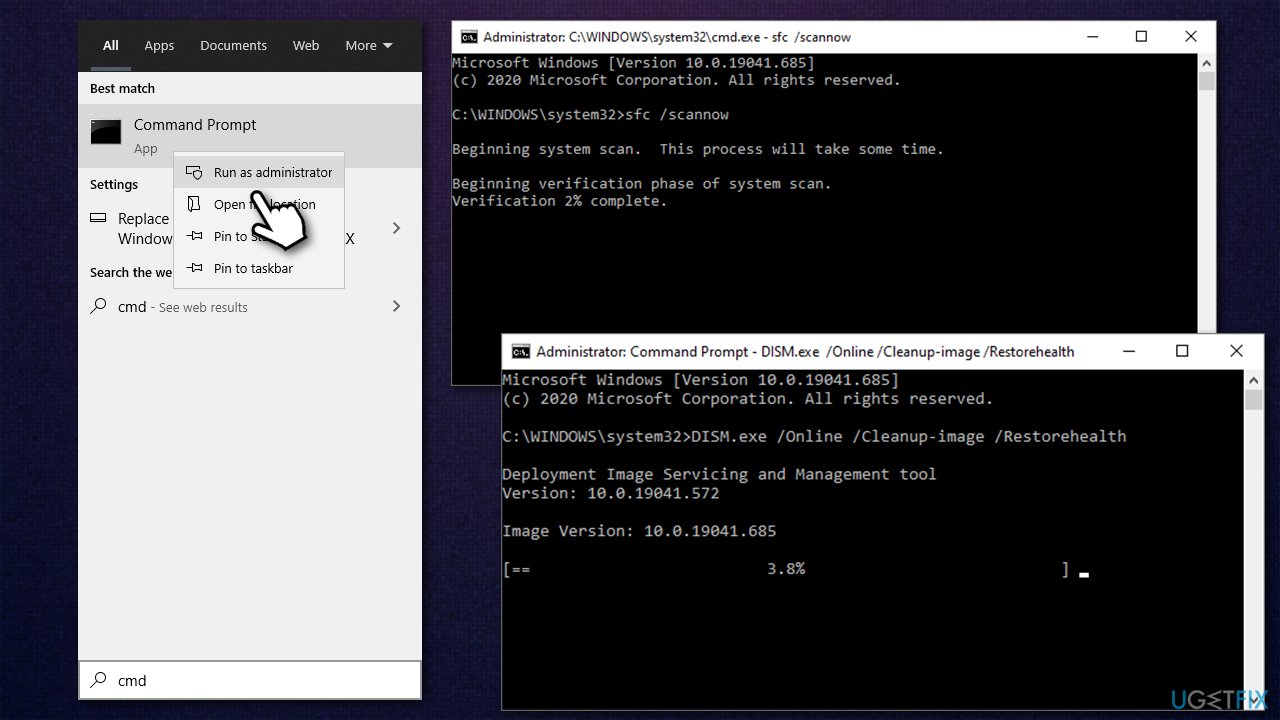
How to fix it looks like you dont have permission to save changes to this file run sfc dism
4. Fix Windows Photo App
If you are experiencing the problem on Windows Photo App alone, this step might help you fix the problem.
- Right-click on Start and pick Apps & Features
- Scroll down until you find Microsoft Photos - click it
- Here, pick Advanced options
- Scroll down and click Terminate and Reset
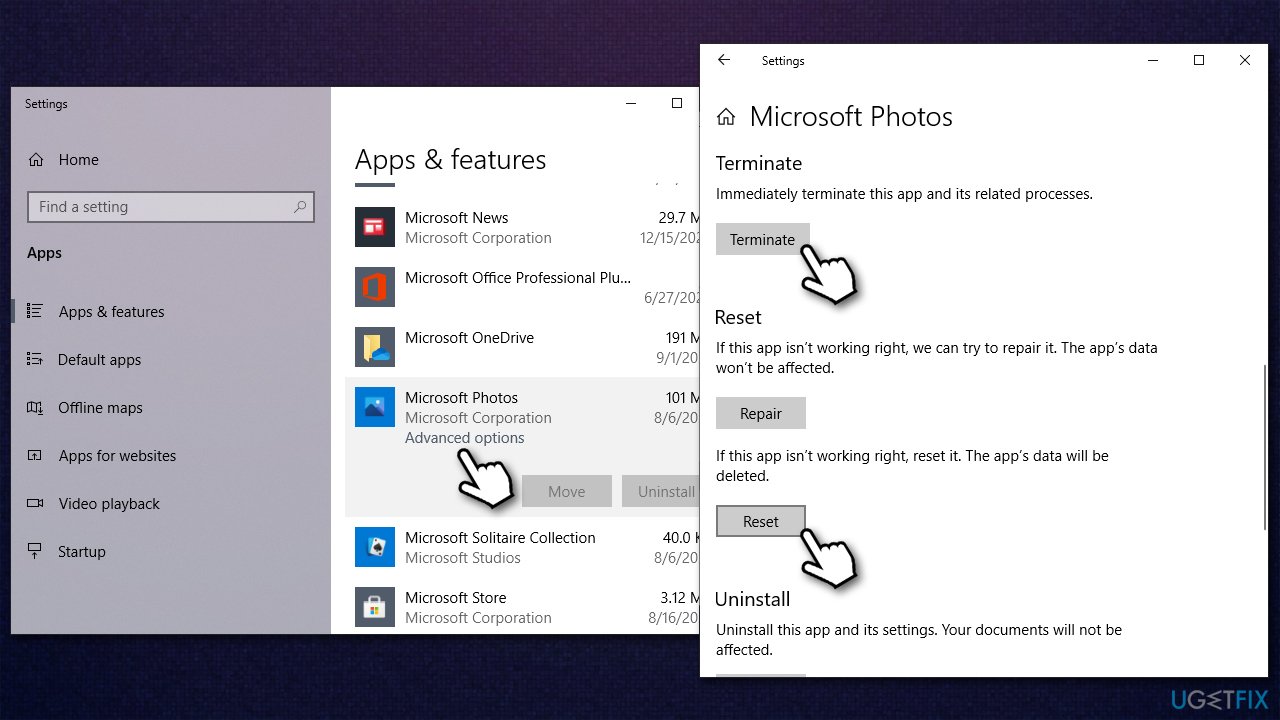
How to fix it looks like you dont have permission to save changes to this file reset microsoft photo app - Try editing the picture once again.
Other topics that might help you:
Bottom line
To fix the error, you can unblock the file via its Properties or ensure you have the necessary permissions. If these solutions do not work, consider checking for other underlying issues or seeking further assistance.
Frequently asked questions
First, try running the application as an administrator by right-clicking on it and selecting 'Run as administrator'. If that doesn't work, check the file's properties to ensure that your user account has the necessary permissions.
Right-click the file, select 'Properties', go to the 'Security' tab, and click 'Edit' to modify permissions. Ensure your user account has 'Full control' checked.
Disabling UAC can help bypass some permission issues, but it is not recommended as a long-term solution due to security risks. Instead, consider adjusting the file permissions or running the application as an administrator.




Report an issue
What's wrong with this guide? We review every report and update or remove content.
Report received — thank you. We'll review and fix it.
You need a free account to submit a report.
Be the first to comment