How to fix
Localbridge.exe Bad Image error 0xc000012f
on Windows
Resolve the Localbridge.exe Bad Image error 0xc000012f on Windows 10 and 11 quickly and easily with our expert-tested solutions. Fixed in minutes!

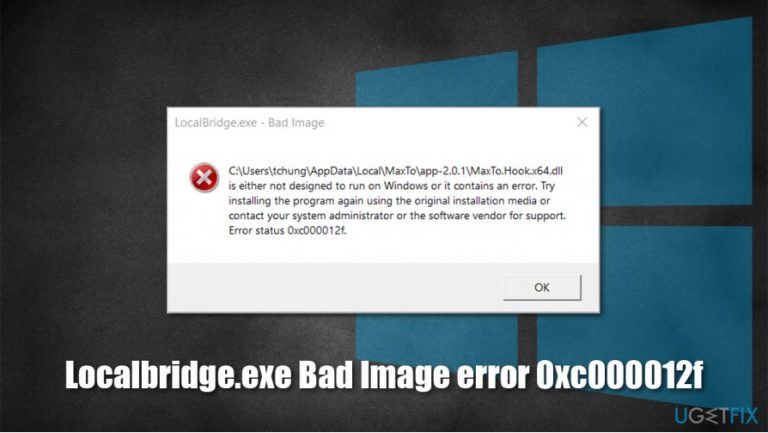
What causes How to fix Localbridge.exe Bad Image error 0xc000012f?
- Corrupted LocalBridge.exe binary
- Corrupted Windows.Storage.ApplicationData.dll component
- Malfunctioning Microsoft Office suite
- Issues with other applications like OneDrive.exe or Origin.exe
- Improper installation of Windows or applications
Repairs Windows system files, removes malware, and restores a clean OS state — without reinstalling.
Hello, I keep getting an error LocalBridge.exe Bad Image error 0xc000012f. I can't use many of the main Windows functions, such as the Start button and some Windows apps (Paint, Windows Store, etc.). This seriously handicaps my Windows 10 usage. Is any help available for this?
Multiple users have complained about LocalBridge.exe Bad Image 0xc000012f error for quite some time now - on various IT forums.[ref en-3] The error pops up at random times and greatly limits the functionality of main Windows functions, including Windows Start button, Task Manager, Search bar, Windows built-in apps such as Windows Store, etc. Therefore, it can be extremely frustrating for many users, and the need to fix LocalBridge.exe Bad Image error 0xc000012f is of the utmost priority.
As evident, the 0xc000012f this time refers to LocalBridge.exe - a process that mainly relates to the Microsoft Office suite, which includes applications such as Excel, Word, Outlook, OneNote, and many others. Due to its nature - in case of malfunction - it might hinder the operation of vital Windows functions.
The code can also refer to other applications, however, such as OneDrive.exe, Origin.exe, AfterFX, and many others. In this article, we will focus on the LocalBridge.exe Bad Image error 0xc000012f fix, as the solution might differ for other cases. This particular error reads as follows:
C:\\Windows\\System32\\Windows.Storage.ApplicationData.dll is either not designed to run on windows or it contains an error. Try installing the program again using the original installation media or contact your system administrator of the software vendor for support. Error status 0xc000012f
While the description might be quite confusing, the problem is not that difficult to understand. LocalBridge.exe Bad Image 0xc000012f error occurs when the associated program's binary is corrupted, hence Windows is unable to load it correctly. In particular, the Windows.Storage.ApplicationData.dll component is at fault.
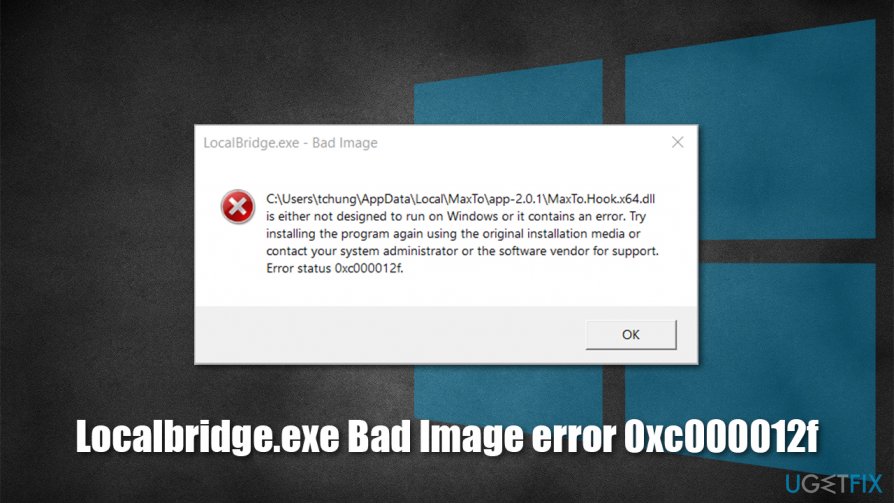
Therefore, the main goal is to repair the executable - and there are several ways of doing that. Keep in mind that each Windows computer is different, thus there can not be a unified solution for every one of them. Below we provide ways to fix LocalBridge.exe Bad Image error 0xc000012f, which should allow you to take back control of your PC.
Before you begin, we highly recommend you try using [d1] - it might be able to repair many broken Windows functions automatically. The operating system is a complicated mechanism, and in some cases, underlying issues can cause major ones. Automatic repair tools are great for such a purpose, so we highly encourage you to try them.
Fix 1. Use Disk Cleanup function
One of the main solutions for LocalBridge.exe Bad Image error 0xc000012f is to clean your disk from junk. You can use the built-in Windows feature for that:
- Press Win + R to open the Run dialog
- Type in cleanmgr and press Enter or click OK
- If your Windows is installed on drive C, pick it from the list (should be by default) and press OK
- Mark the Setup log files, Recycle bin, and Temporary files
- Click Clean up System Files and wait till the process is finished.
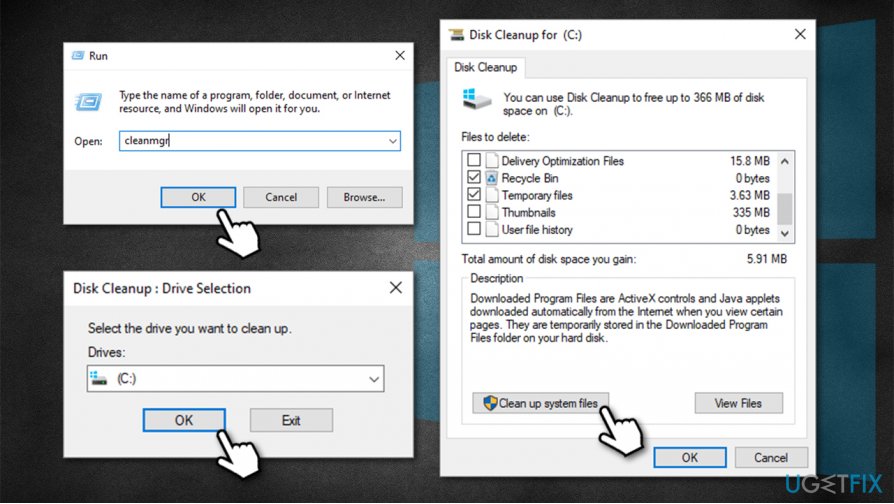
How to fix localbridge exe bad image error 0xc000012f use disk cleanup - Reboot the computer and see if the problem persists.
Fix 2. Run Program Compatibility Troubleshooter
Program compatibility is crucial and can cause major issues if an incorrect version is installed.
- Press Win + R, type in ms-settings: and press Enter
- Here, go to Update & Security
- On the left, pick Troubleshoot
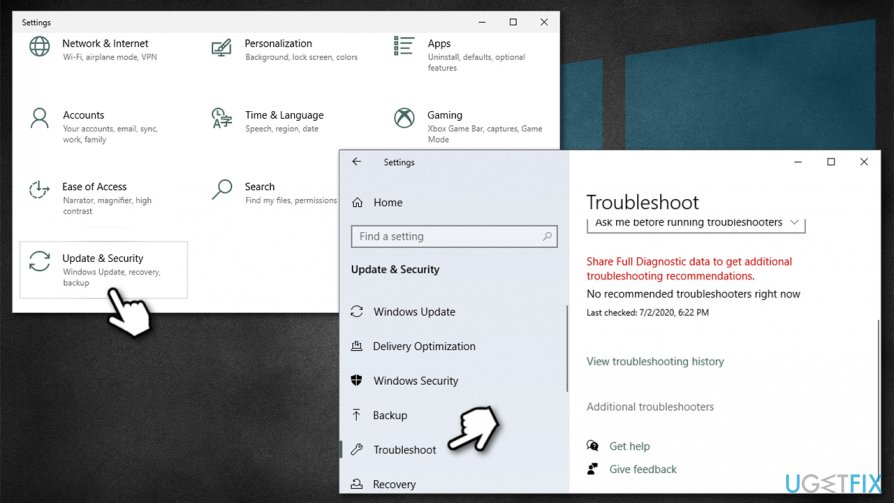
How to fix localbridge exe bad image error 0xc000012f access settings - On the right, you will find the list of Troubleshooters (if not, select Additional Troubleshooters - this ca nary depending on your Windows version)
- Find Program Compatibility Troubleshooter
- Click on it once, and select Run the troubleshooter
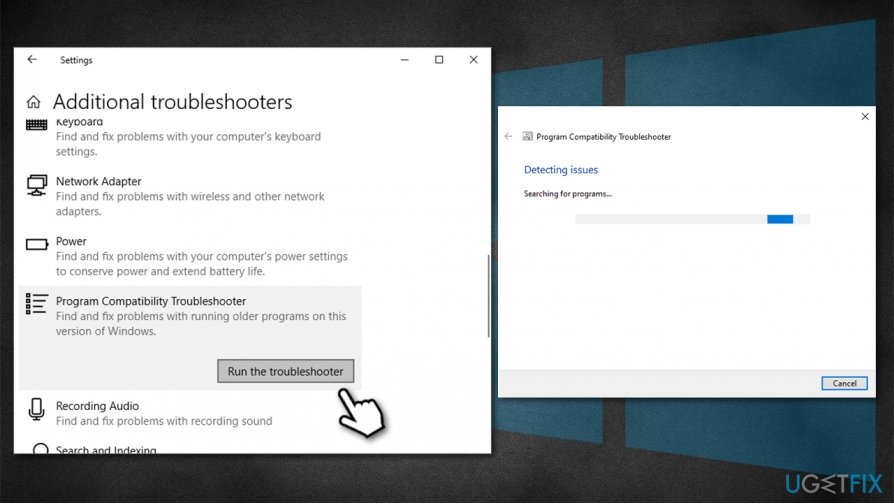
How to fix localbridge exe bad image error 0xc000012f run program compatibility troubleshooter - Wait till scan completes - Windows will report the findings and will attempt to fix issues automatically.
Fix 3. Run SFC and DISM tools
Built-in System File Checker and DISM[ref en-1] can help you repair issues with Windows system files. Here's how:
- Press Win + R and type in cmd
- Press Ctrl + Shift + Enter to open Command Prompt as Administrator
- If User Account Control shows up, press Yes
- Type in the following command and press Enter:
sfc /scannow
- When scan completes, reboot the PC
- If that did not help, type in the following command in Command Prompt and press Enter:
DISM.exe /Online /Cleanup-image /Restorehealth
- Reboot once again.
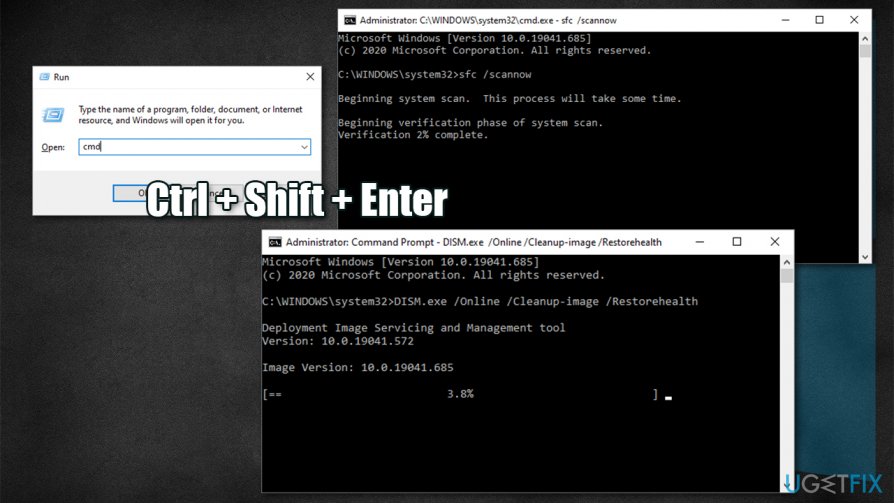
How to fix localbridge exe bad image error 0xc000012f run sfc and dism
Fix 4. Uninstall potentially defective Windows update
Some Windows updates can create problems. In case LocalBridge.exe Bad Image 0xc000012f error issue began after an update to your operating system, it is likely that it did not install correctly, or maybe some files were corrupted during the installation. Thus, you should uninstall the latest updates and then re-launch the update:
- Press Win + R and type in appwiz.cpl
- In here, select View installed updates option located on the left side of the window
- Sort the updates by date (Installed On column)
- Select the newest update and pick Uninstall
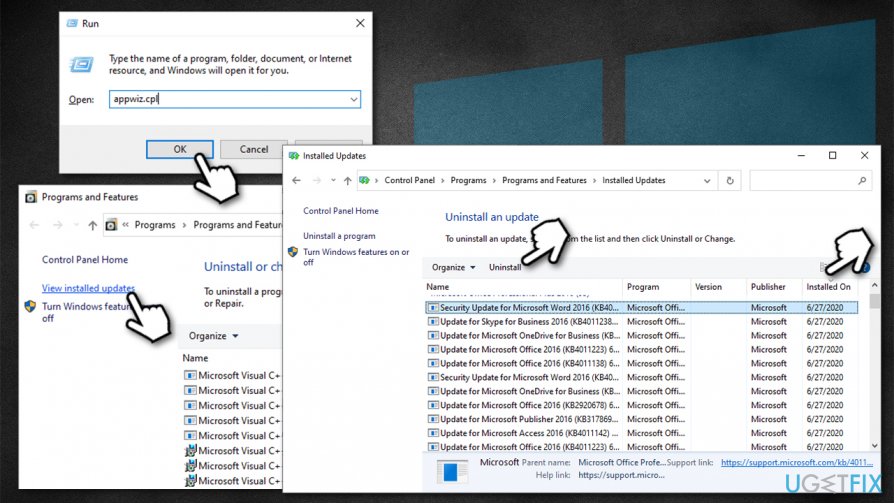
How to fix localbridge exe bad image error 0xc000012f uninstall faulty windows updates - Reboot.
Fix 5. Use System Restore
If none of the above methods helped you, you can try running System Restore.[ref en-2] Don't worry about your personal files, they will remain intact, although apps that were installed during the time after the restore point will be deleted.
- Press Win + Pause or Win + Break on your keyboard
- Select Change settings at the bottom-right corner of the window
- Go to System Protection tab and select System Restore
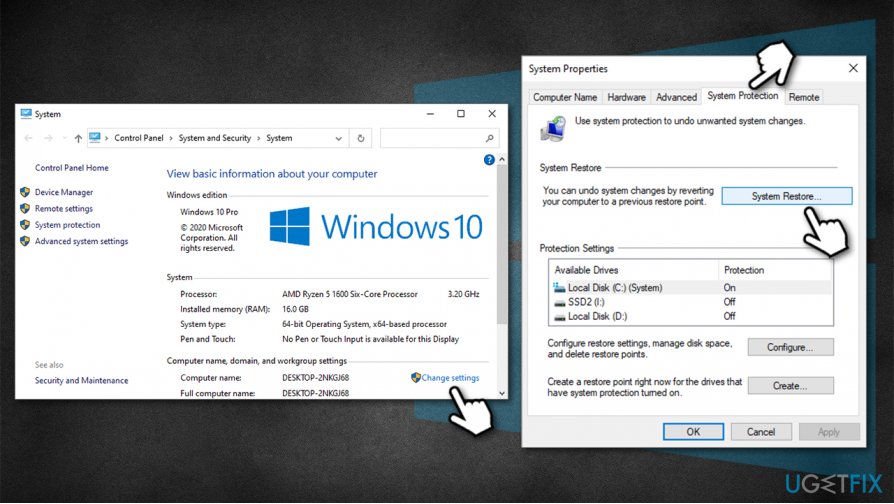
How to fix localbridge exe bad image error 0xc000012f go to system properties - Select the appropriate restore point, press Next and follow on-screen instructions to finish the process.
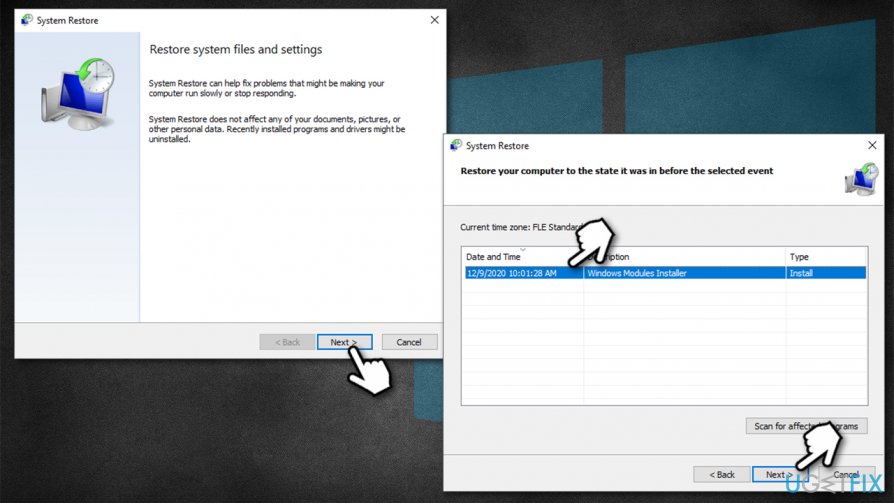
How to fix localbridge exe bad image error 0xc000012f use system restore
Finally, you can factory reset Windows without losing your files, so this solution, while sounding scary (it isn't - Windows reset is nowadays a very straightforward process), might help you fix 0xc000012f error once and for all.
Bottom line
To fix the LocalBridge.exe Bad Image error 0xc000012f, users can repair the corrupted executable, reinstall the affected applications, or use the original installation media. If these solutions do not resolve the issue, contacting a system administrator or software vendor for support is recommended.
Frequently asked questions
This error typically occurs due to corrupted files or issues with application installations, affecting the Localbridge.exe process in Windows 10.
You can use the System File Checker tool by running 'sfc /scannow' in the Command Prompt as an administrator to repair corrupted system files in Windows 11.
Yes, uninstalling and then reinstalling the application associated with Localbridge.exe can resolve the Bad Image error on both Windows 10 and Windows 11.




Report an issue
What's wrong with this guide? We review every report and update or remove content.
Report received — thank you. We'll review and fix it.
You need a free account to submit a report.
Be the first to comment