
How to fix Roblox Error Code 277?

Prefer to fix it yourself? The manual steps follow.
6 methods in this guide
Hello, I play many games on my Windows PC, and recently I was unable to join any Roblox game on it (other games work fine). Instead of being connected to the server, "Error Code 277" is shown. Is there any way to bypass this issue, seeing how other games work fine?
Roblox is, without a doubt, one of the most popular game platforms that allow players to create their own unique experiences within the 3D environment and invite others to join it. While the game was released in 2006, it gained popularity only recently (currently reaching as many as 164 million monthly players), partly due to lockdowns of the COVID-19 pandemic. Unfortunately, even a massive game like this one does not avoid issues, and Roblox Error Code 277 is one of them.
As described by many users on various IT forums, Roblox Error Code 277 can either show up abruptly, kicking them out of the on-going game or be there, to begin with. Many also said that the issue is this game-specific and only occurs on one machine but not the other. This does not tell much about the origin of the error, so users began to look for Roblox Error Code 277 fix.
The error can show up at any time when trying to connect to a new game or during one. Here's the full message you might receive:
Disconnected
Lost connection to the game server, please reconnect (Error Code 277)
The explanation is relatively straight-forward - Roblox dropped connection because of networking or connectivity issues. The problem would be only temporary if players would be able to log back in, but that usually does not happen, and they can not play the game at all.
The main reason for the Roblox Error Code 277 to arise is either problem with your local internet connection (which can be caused by many different issues with hardware or system settings, for example) or due to the game's servers being down. The latter is not uncommon when it comes to online games, and other major brands experience it from time to time.
This error is just one of a few issues that users encountered while playing this game - users were also complaining about similar error 267, although the latter occurs for completely different reasons.
In any case, below, you will find quite a few solutions to fix Roblox Error Code 277 once and for all.
Fix 1. Use Compatibility Mode
- Right-click on Roblox shortcut and pick Properties
- Select Compatibility tab and pick Run this program in compatibility mode
- Pick a different Windows version than you are using
- Click Apply and OK - try launching the game.
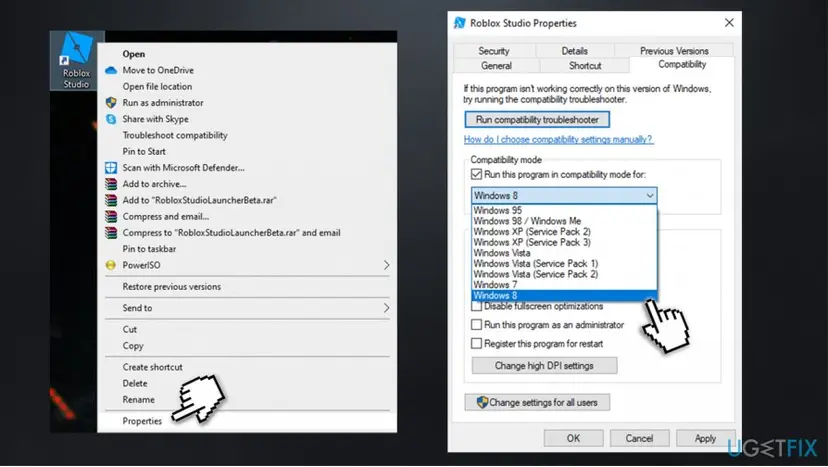
How to fix roblox error code 277 run program in compatibility mode
Fix 2. Clear Roblox logs
- Press Win + R on your keyboard
- Paste the following and press Enter or click OK:
%localappdata%\\Roblox\\logs
- Select all the logs and delete them (right-click > Delete or press Del on your keyboard)
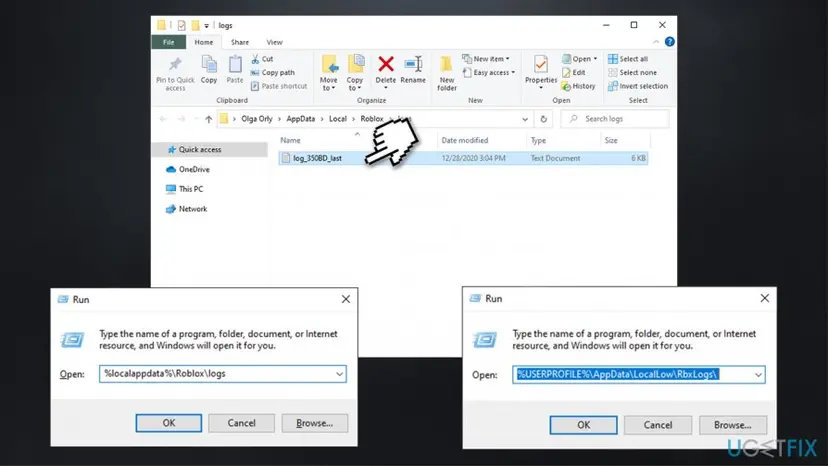
How to fix roblox error code 277 clear logs - Now go to the following folder and clear all logs there as well:
%USERPROFILE%\\AppData\\LocalLow\\RbxLogs\\
Fix 3. Update your browser
If you are playing via your browser, you should ensure that it runs on the latest version. Here's how to update the main browsers:
Google Chrome
On Google Chrome, click on Menu, select Help and choose About Google Chrome. If your browser is not running the latest update, you can update it easily.
Mozilla Firefox
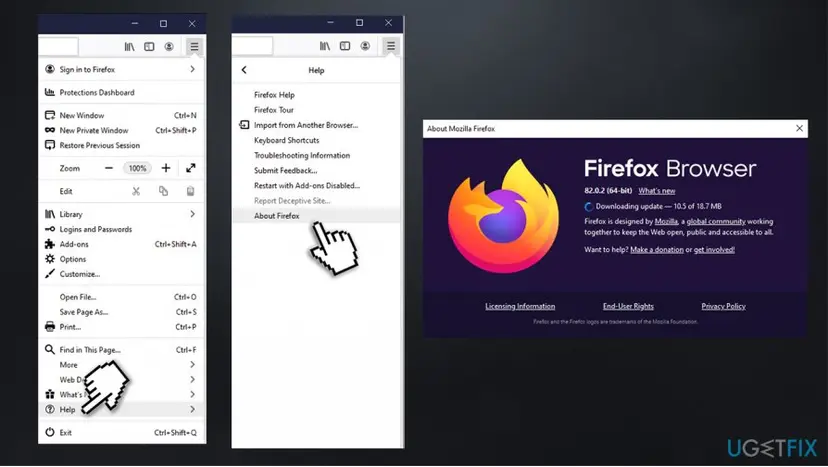
Click on Menu and then go to Help > About Firefox – this should prompt an automatic update.
MS Edge (Chromium)
Select Menu on the top-right, and pick Help and feedback > About Microsoft Edge – browser will update and you should restart it right after.
Fix 4. Run Troubleshooters
Troubleshooters are built-in tools within the Windows environment that allows the system to find the underlying issues and fix them automatically or point users in the correct direction. Since Roblox Error Code 277 can be related to network connectivity and program compatibility issues, you should run Program Compatibility and Internet Connections troubleshooters:
- Right-click on Start and pick Settings
- Select Updates & Security
- Go to Troubleshoot, located on the right side of the window
- Click Additional troubleshooters on the right (alternatively, they should all be listed on the right)
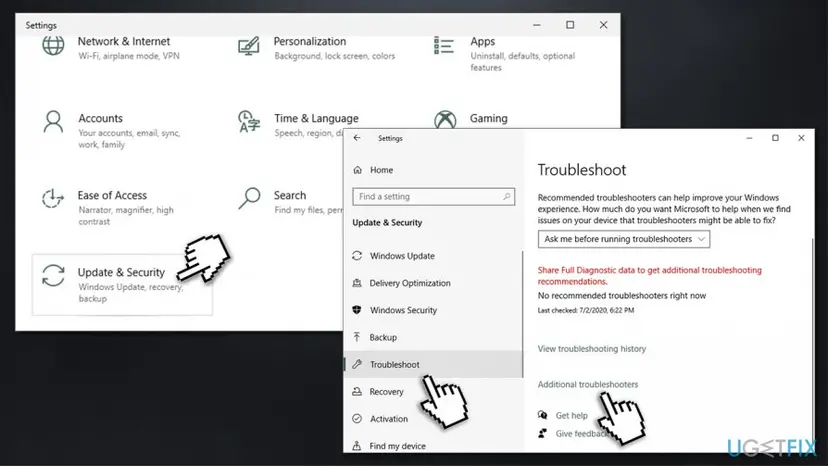
How to fix roblox error code 277 go to windows settings - Select Internet Connections and pick Run troubleshooter
- Wait till windows finds the connectivity issues and reports its findings
- After that, you should also run Program Compatibility Troubleshooter the same way.
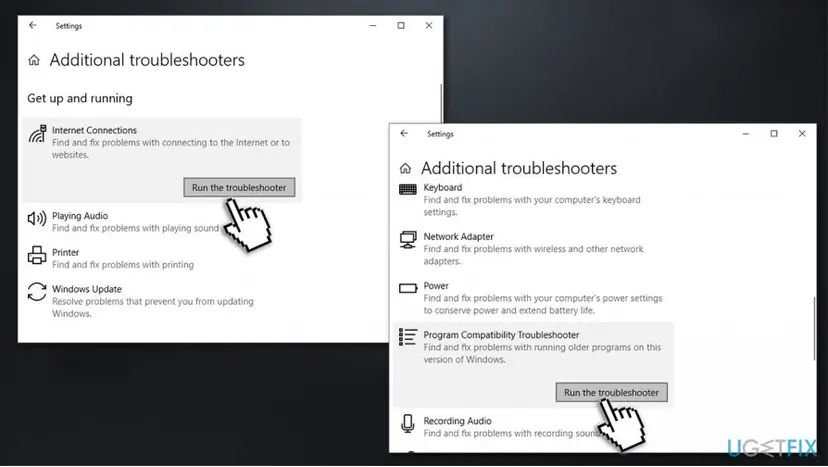
How to fix roblox error code 277 run troubleshooters
Fix 5. Switch to ethernet or a different network
Many users who reported the problem were using a WiFi connection. There could be many reasons why this is happening - low signal strength, old router, etc. If possible, you should try connecting ethernet cable instead, and ensure that your connection reaches at least 4 MB/s speed, as required for the game to run properly. You can check your connectivity speed on various websites.
Since there are places that high-speed internet is not easy to get, you could also try making a hotspot via your 4G or 5G phone network. This could sometimes be a great alternative for WiFi, especially if you cannot connect an ethernet cable to the computer you play the game on. Note that the game is also available on mobile, so you can try using it instead.
Fix 6. Tweak your router settings
This error fix might be a bit difficult for some users, as router settings vary depending on the device type used. Here are the general instructions on how to set correct ports
- Type in cmd in Windows search and press Enter
- In the new window, type in the following command and press Enter:
ipconfig /all
- Scroll down to find Default Gateway address - write it down
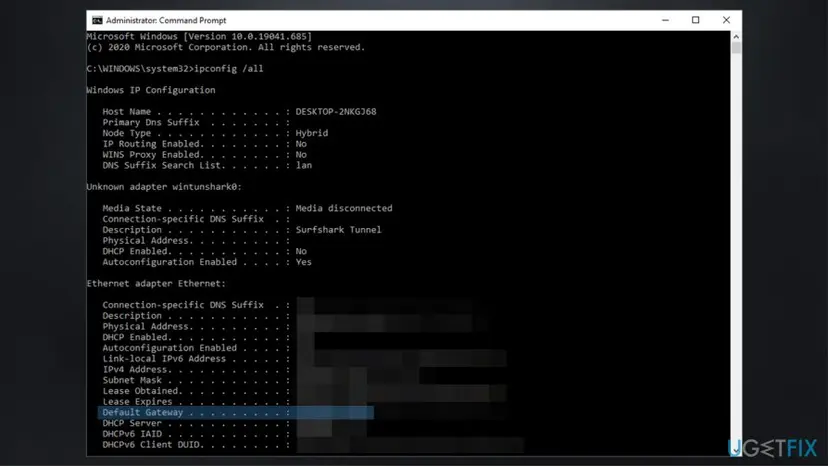
How to fix roblox error code 277 write down gateway - Exit Command Prompt
- Now open your browser and type in the Default Gateway address and press Enter
- This should open your login panel - find the login details on your router (usually at the back)
- Once logged in, look for Port forwarding which can usually be found under Advanced settings
- Fill in the required information:
Name/Description: Roblox
Type/Service: UDP
Inbound/Start: 49152
Private/End: 65535
Did this fix work?
One click, no account. It tells the next reader which guides are worth their time.
Questions and experiences: fix Roblox Error Code 277
Still broken, or found a fix we did not cover? Ask here: members and our editors answer. Reading is open; writing needs a free account.
…