How to fix
Windows error 0x800701E1
on Windows
Resolve Windows error 0x800701E1 quickly with proven solutions. Get back to smooth computing on Windows 10 or 11 today! Expert-tested methods included.

What causes How to fix Windows error 0x800701E1?
- File Corruption
- Issues with Windows Updates
- Problems Copying Files
- Backup Creation Failures
Repairs Windows system files, removes malware, and restores a clean OS state — without reinstalling.
Hello. I have been trying to update Windows for several days now but it keeps failing with error code 0x800701E1. Any advice on how to bypass this? Thank you.
There are thousands of Windows errors, and it's not surprising that users are rather confused when they have to deal with one or several of them. To make it easier for users, Microsoft devised an error code system. This way, whenever somebody deals with a problem on a PC, it makes it easier to solve.
While some codes are distinctive to a particular problem, others can occur under different circumstances - Windows error 0x800701E1 comes from the latter category. Users who encountered it were performing different actions at the time, so ultimately, there are different ways to fix it. Most commonly, users encounter it when dealing with the following:
- Downloading Windows updates
- Copying files
- Creating a backup.
As evident, there are different reasons for all of these instances, although the most prominent one is file corruption due to one reason or another. Therefore, there are different steps that need to be undertaken when trying to fix the 0x800701E1 error. Below we compiled two sections that should help you with the process, depending on your personal circumstances.
It is important to note that Windows errors, crashes, and similar issues can be rather frustrating and confusing, especially for users who are not that familiar with all the peculiarities of troubleshooting. If you rather get rid of the problems automatically and quickly, we strongly recommend you try running a scan with a PC repair tool [d1].
It can find the corrupted system files and repair them for you, without having to reinstall the operating system. Likewise, it can clean various system junk to improve computer performance, remove corrupted registries, and fix system file damage after a virus infection.
Fix 0x800701E1 when dealing with Windows updates
Windows updates are particularly important to any operating system, as they improve system stability, fix bugs,[ref en-2] implement new features, and, most important, patch security vulnerabilities.[ref en-3] We have talked about many Windows update errors before (for example, 0x8024a105, 0x80070541, or 0x800f0900), and we will help you tackle this one as well.
1. Run Windows update troubleshooter
- Type Troubleshoot in Windows search
- Select Additional troubleshooters
- Find Windows Update from the list
- Click it and select Run the troubleshooter
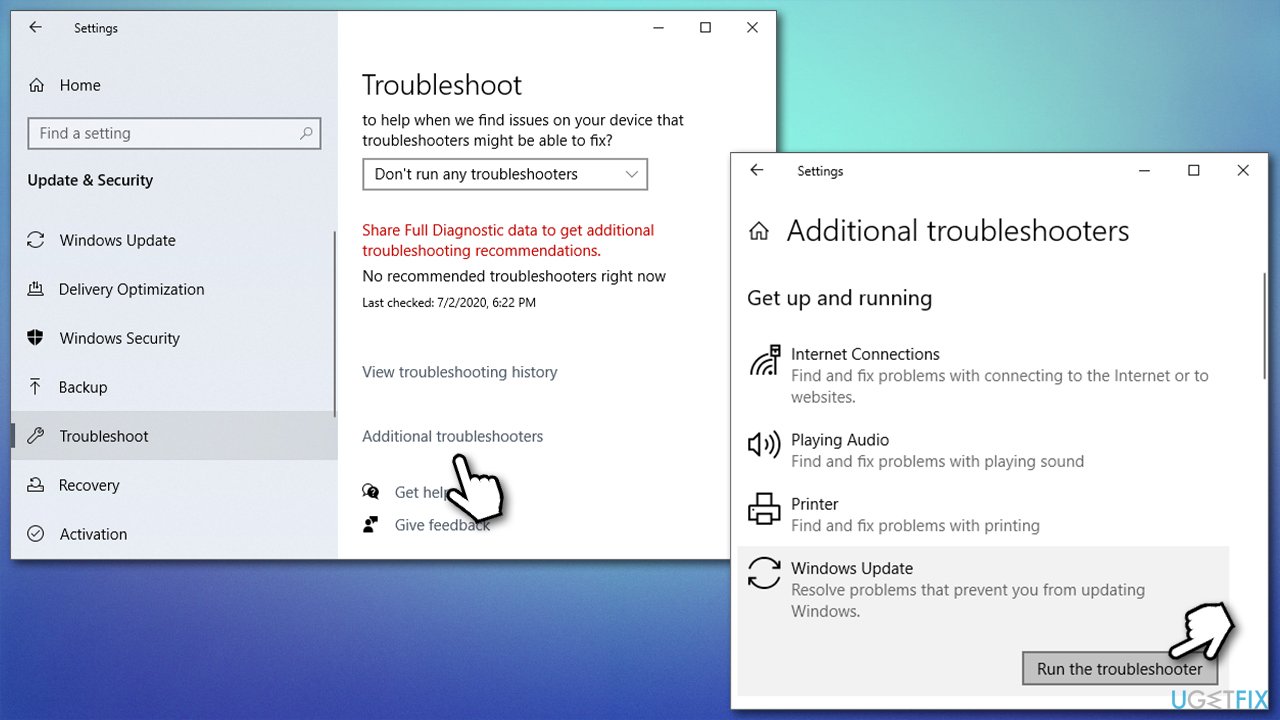
How to fix windows error 0x800701e1 run update troubleshooter - Apply the fixes and reboot.
2. Reset Windows update components
- Type cmd in Windows search
- Right-click on Command Prompt result and select Run as administrator
- When User Account Control (UAC) window shows up, click Yes
- In the new window, copy and paste the following commands, pressing Enter each time:
net stop wuauserv
net stop cryptSvc
net stop bits
net stop msiserver - Press Win + E to open File Explorer (make sure Hidden Files are visible)
- Go to the following locations and delete the contents of these folders:
C:\\Windows\\System32\\catroot2
C:\\Windows\\SoftwareDistribution
How to fix windows error 0x800701e1 reset windows update components - Open Command Prompt again and use the following commands (don't forget to press Enter after each):
- net start wuauserv
net start cryptSvc
net start bits
net start msiserver - Reboot your PC.
3. Use Media Creation Tool
- Go to the official Microsoft website and download Media Creation Tool
- Double-click the installer, agree to terms, and click Next
- Pick Upgrade this PC now > Next
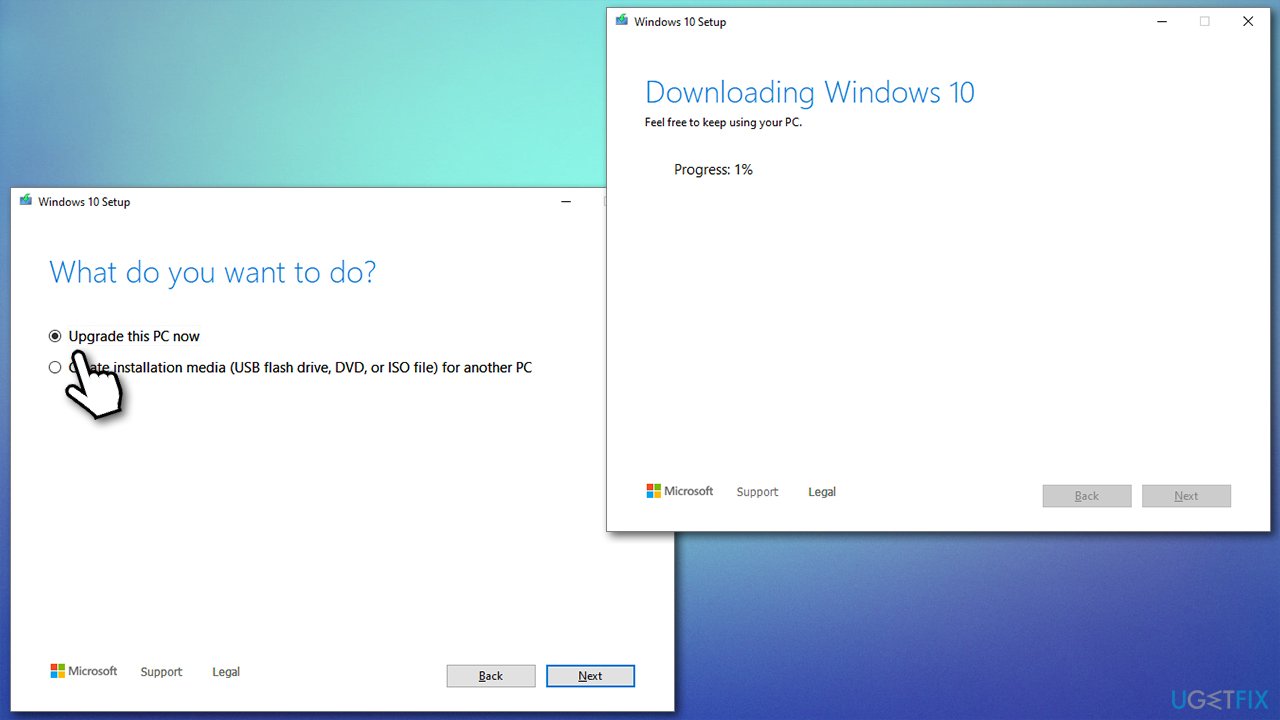
How to fix windows error 0x800701e1 use media creation tool - Wait till Windows downloads and installs all the needed files
- Your system will restart.
Fix 0x800701E1 when copying files
One of the main reasons for experiencing the error when copying files is malware. For example, if you are trying to copy files from an external drive that Windows sees as unsafe, you might receive this error.
1. Temporarily disable anti-malware protection
If you are completely sure that the files you are trying to import are secure (for example, scripts or apps created unprofessionally might commonly be causing this issue), you can temporarily disable the protection of your anti-malware. If you are using the default Microsoft Defender, proceed with the following:
- Type Windows Security in Windows search and hit Enter
- Select Virus & threat protection
- Under Virus & threat protection settings, select Manage settings
- Here, disable Real-time protection, Cloud delivered protection, Automatic sample submission, and Tamper protection options by clicking the switch once and putting it into the left position.
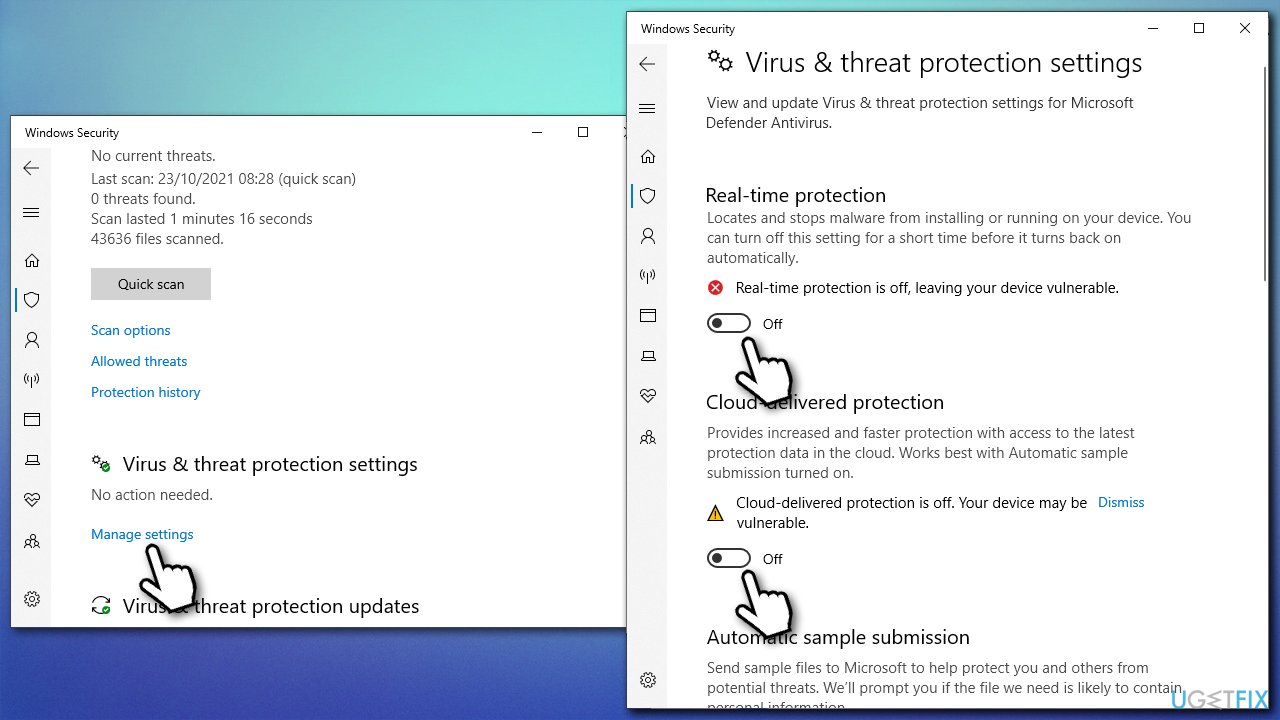
How to fix windows error 0x800701e1 temporarely disable microsoft defender
Note: using software cracks and other illegal installers can directly cause malware infection. If you disable security on your device to import these illegal files, you might be a victim of system compromise, data loss, and other issues caused by a virus infection.
Fix 0x800701E1 when making backups
The culprit of this situation is system file corruption. In order to address that, proceed with the steps below.
1. Run System File Checker and DISM
- Open Command Prompt as administrator, as explained before
- In the new window, type in the following commands, pressing Enter after each:
sfc /scannow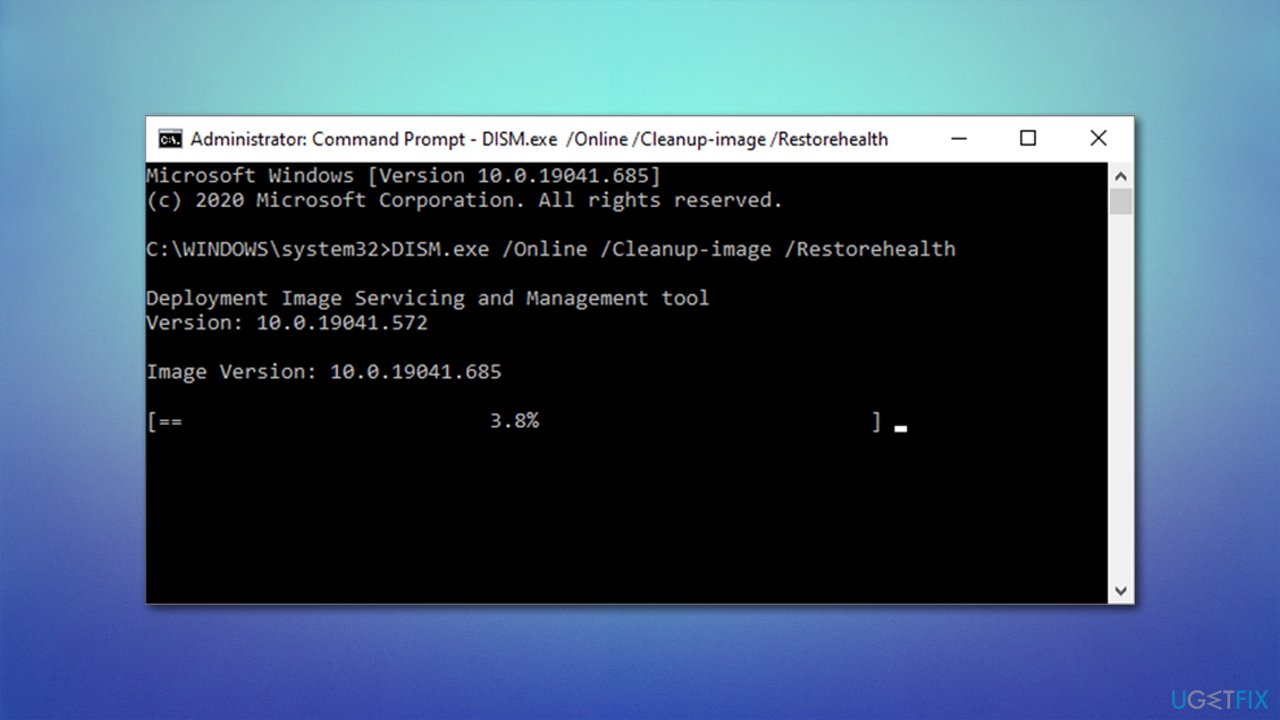
How to fix windows error 0x800701e1 run dism - Restart your machine.
2. Update your disk drivers
Ensure that drivers[ref en-1] are not corrupt or outdated:
- Right-click on Start and pick Device Manager
- Expand the Disk drives section
- Right-click on your hard drive and select Update driver
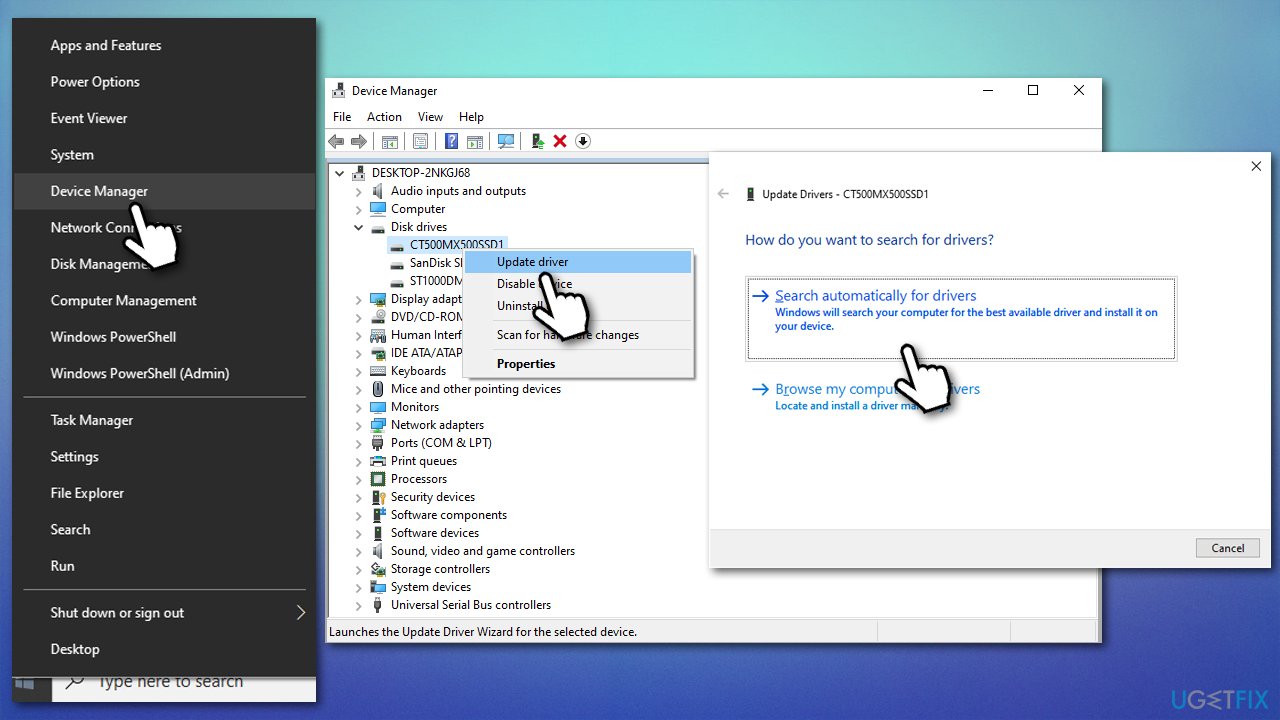
How to fix windows error 0x800701e1 update disk drivers - Select Search automatically for drivers
- Install the updates and restart your PC.
If the Device Manager fails to find any updates, you should either visit the manufacturer's website to get the newest drivers or employ an automatic driver updater such as [rev id="DriverFix"], and you will never have to worry about driver problems.
Bottom line
To fix the 0x800701E1 error, you can run a scan with a PC repair tool to identify and repair corrupted system files. Additionally, ensure that your Windows updates are installed correctly and check for any issues related to file copying or backup creation. If none of these solutions work, consider seeking further assistance or reinstalling the operating system.
Frequently asked questions
Windows error 0x800701E1 typically indicates that there is a problem with a connected storage device or a failure in reading data from that device in Windows 10 or Windows 11.
To resolve error 0x800701E1 in Windows 10, try reconnecting the external storage device or running the Windows Check Disk utility to fix any file system errors.
In Windows 11, you can fix error 0x800701E1 by using the built-in Troubleshooter for hardware and devices, which can help identify and resolve issues with connected devices.




Report an issue
What's wrong with this guide? We review every report and update or remove content.
Report received — thank you. We'll review and fix it.
You need a free account to submit a report.
Be the first to comment