
How to fix Windows update error 0x800f0247?
Prefer to fix it yourself? The manual steps follow.
4 methods in this guide
Hi. I tried to update Windows 10 and, after clicking "Check for updates," I received an error - 0x800f0247. Please could you advise on a solution? Thanks.
Windows update errors are something that most users came across over the years. While in some cases, these errors disappear in a day or two, others can cause a headache to those affected and might require serious troubleshooting to be resolved.
One of such issues is the 0x800f0247 error, which occurs when users try to update their operating systems. It has been prevalent for several years now, but it does not seem that a permanent solution was found, as reports keep coming back from time to time.
The error is visible in the Windows Update window. It claims that there "were some problems" while applying updates - it is a pretty much standard message for every error, and no explanation why it occurs is provided. Nonetheless, the error code is a good indication enough, as we are here to help you with it.
Users claimed that the error is somewhat partial in some cases, i.e., definition updates were applied correctly, while driver and feature updates failed. The affected areas include system drivers for printers or updates to the MS Office suite. However, the problem is often quite broad, and people claimed that they couldn't update Windows to a new version (recently - 21H1) because of it.
One of the reasons why you could receive the 0x800f0247 error is Windows registry file corruption. The registry is a database that resides on every operating system, and its main job is to keep the parameters and settings of everything that is on your computer.
If these do get corrupt (and it could also be due to an array of other problems), related applications or Windows features might stop functioning correctly. In some cases, issues with the registry might even cause serious system malfunctions, to the point where users might have to reinstall their OS.
In general, it is not advised for less experienced computer users to meddle with this database, as incorrect modifications can lead to malfunctions.
Fix 1. Run Windows Update troubleshooter
Let's start from built-in tools that could help you resolve the issue automatically:
- Right-click on Start and select Settings
- Go to Update & Security section
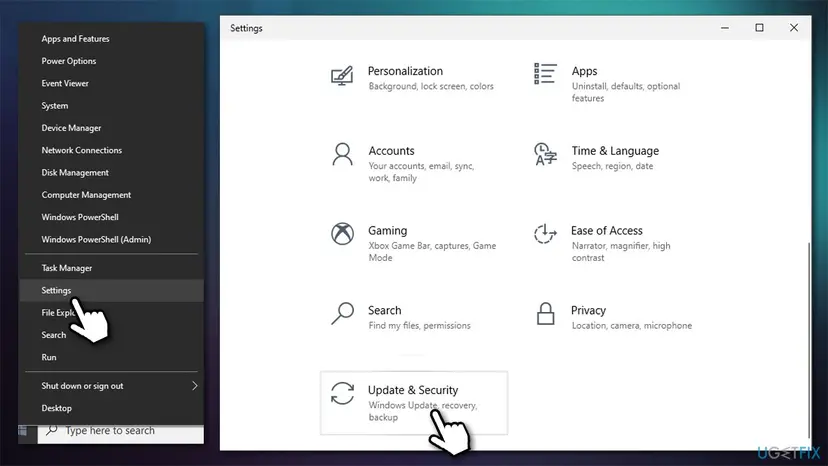
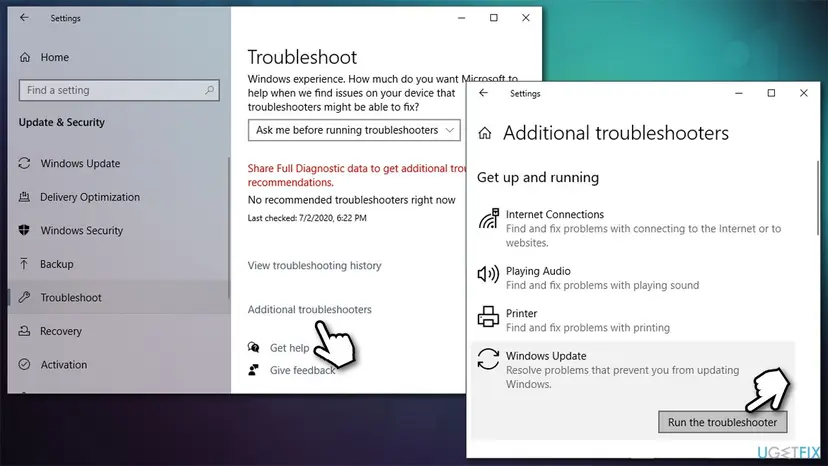
- Select Troubleshoot on the left
- Click Additional troubleshooters
- Pick Windows Update and select Run the troubleshooter.
Fix 2. Run System File Checker and DISM
While corrupted registry files are likely to be the cause of the problem, other system files, including those related to Windows updates, can also be the cause of the update failure. You can try to fix it with the help of an elevated Command Prompt:
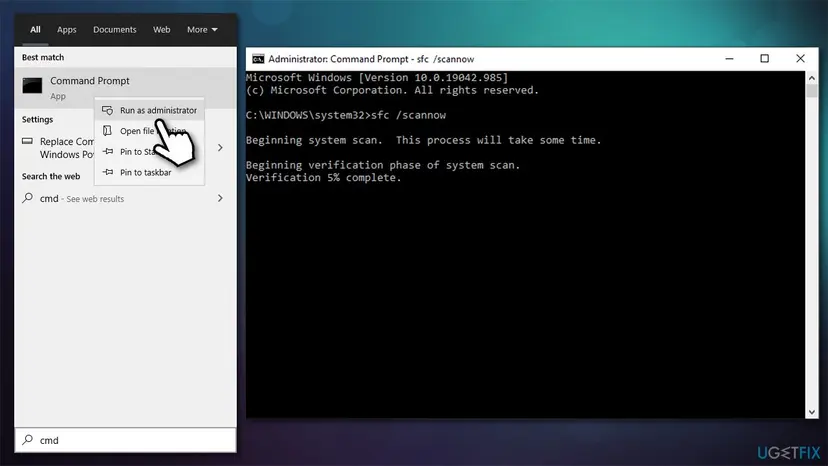
- Type cmd in Windows search
- Right-click on Command Prompt and select Run as administrator
- Paste the following command and press Enter:
sfc /scannow - Wait till scan is complete.
If SFC revealed that errors were fixed, restart your machine and see if that helped you fix the 0x800f0247 error. However, if you received an error "Windows Resource Protection found corrupt files but was unable to fix some of them. Details are included in the CBS.Log windir\\Logs\\CBS\\CBS.log.", proceed with the following:
- Open Command Prompt (Admin) once again
- Cope and paste the following command lines, pressing Enter each time:
DISM /Online /Cleanup-Image /CheckHealth
DISM /Online /Cleanup-Image /ScanHealth
DISM /Online /Cleanup-Image /RestoreHealth
Fix 3. (Re)Start Windows Update services
Some services that are required for the update process to be successful might not be running. Proceed with the following:
- Type in Services in Windows search and press Enter
- Scroll down to find Background Intelligent Transfer Service (BITS) - double click it
- If the service is not running, click on the dropdown menu and pick Automatic, then click on Start, Apply and OK
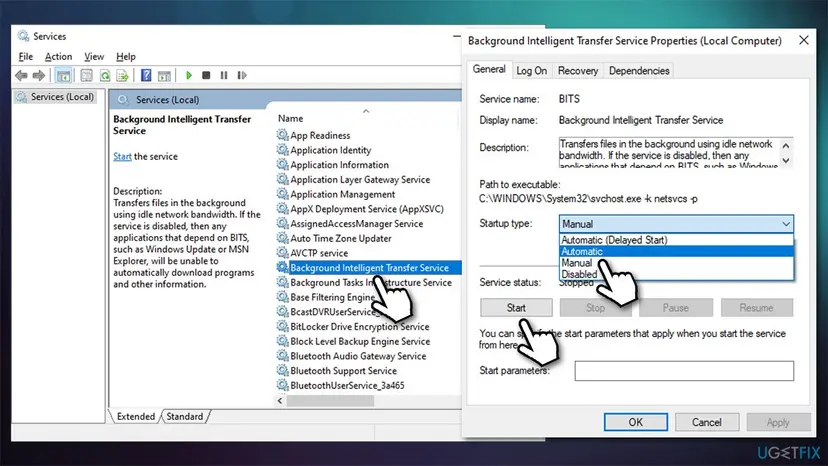
- After, do the same thing with Windows Update service
- Finally, restart your computer and see if that helps.
Note: if both of these services are already running, right-click and select Restart
Fix 4. Reset Windows Update components
- Open Command Prompt as administrator
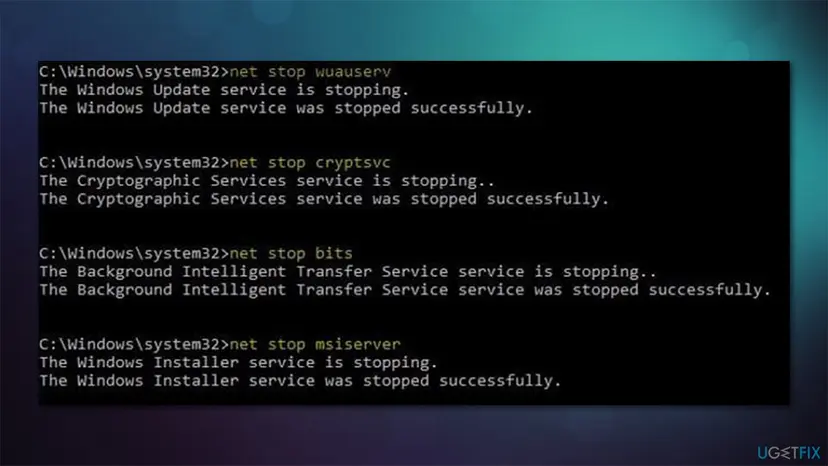
- Paste each of the following commands, pressing Enter every time:
net stop bits
net stop wuauserv
net stop appidsvc
net stop cryptsvc
Del "%ALLUSERSPROFILE%\\Application Data\\Microsoft\\Network\\Downloader\\qmgr*.dat"
Ren %systemroot%\\SoftwareDistribution SoftwareDistribution.bak
Ren %systemroot%\\system32\\catroot2 catroot2.bak
cd /d %windir%\\system32
regsvr32.exe atl.dll
regsvr32.exe urlmon.dll
regsvr32.exe mshtml.dll
regsvr32.exe shdocvw.dll
regsvr32.exe browseui.dll
regsvr32.exe jscript.dll
regsvr32.exe vbscript.dll
regsvr32.exe scrrun.dll
regsvr32.exe msxml.dll
regsvr32.exe msxml3.dll
regsvr32.exe msxml6.dll
regsvr32.exe actxprxy.dll
regsvr32.exe softpub.dll
regsvr32.exe wintrust.dll
regsvr32.exe dssenh.dll
regsvr32.exe rsaenh.dll
regsvr32.exe gpkcsp.dll
regsvr32.exe sccbase.dll
regsvr32.exe slbcsp.dll
regsvr32.exe cryptdlg.dll
regsvr32.exe oleaut32.dll
regsvr32.exe ole32.dll
regsvr32.exe shell32.dll
regsvr32.exe initpki.dll
regsvr32.exe wuapi.dll
regsvr32.exe wuaueng.dll
regsvr32.exe wuaueng1.dll
regsvr32.exe wucltui.dll
regsvr32.exe wups.dll
regsvr32.exe wups2.dll
regsvr32.exe wuweb.dll
regsvr32.exe qmgr.dll
regsvr32.exe qmgrprxy.dll
regsvr32.exe wucltux.dll
regsvr32.exe muweb.dll
regsvr32.exe wuwebv.dll
net start bits
net start wuauserv
net start appidsvc
net start cryptsvc - Once done, restart your PC and try to update Windows once again.
Did this fix work?
One click, no account. It tells the next reader which guides are worth their time.
Questions and experiences: fix Windows update error 0x800f0247
Still broken, or found a fix we did not cover? Ask here: members and our editors answer. Reading is open; writing needs a free account.
…