
How to fix Windows update error 0x800f0986?

Prefer to fix it yourself? The manual steps follow.
7 methods in this guide
Hi. Usually, I have no problems with Windows updates. However, I recently can't seem to install KB5003173, as I always receive an error 0x800f0986. It would be nice to find a way to fix this. Thanks in advance.
Windows update errors might not only cause operation problems due to bugs but also render the device more vulnerable to cyberattacks. Since the operating system is shipped with automatic updates turned on, most people keep this feature, although a failed update should cause concern.
Microsoft ships updates every second Tuesday of every month - they include important bug fixes and provide additional features and improvements. Windows update error 0x800f0986 is not a new phenomenon, users have experienced for years now, and it stops them from receiving the latest vulnerability patches or UI improvements regularly.
There are myriad other error codes that people might encounter when trying to update Windows, including 0x8024ce0e, 0x800f0900, 0x800f0247, etc. While many of such issues can go away by themselves within a few hours or days, some people are unable to update their devices for weeks or even months.
First of all, if you experienced the error for the first time, you should wait some time and try running the update process once again. In some cases, Windows servers might be suffering from overload or other technical issues, or your internet connection might be unstable.
Unfortunately, this advice does not help most people to fix the 0x800f0986 error. Most users who encountered this error were running Windows version 1909, although it seems like the issue prevails in older or newer versions of the OS. While one of the most effective methods to fix this problem is by using Media Creation Tool, there are several other things you can try before that.
It will check your system and ensure that everything is running how it is supposed to, so you might not have to go through the tedious troubleshooting steps below.
Method 1. Run Windows update troubleshooter
- Type Troubleshoot in Windows search and hit Enter
- On the right side of the window, click Additional troubleshooters
- Select Windows Update and click Run the troubleshooter
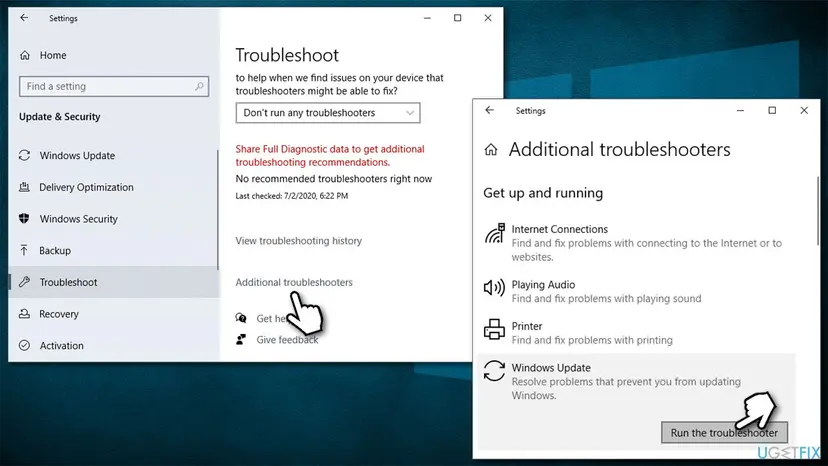
How to fix windows update error 0x800f0986 run troubleshooter - Once done, apply all the suggested fixes and restart your machine.
Method 2. Check relevant services
- Type in Services in Windows search and hit Enter
- Scroll down to Background Intelligent Transfer Service (BITS) and double-click it
- Under the Startup type section, click on the dropdown menu and pick Automatic, then click on Start, Apply and OK
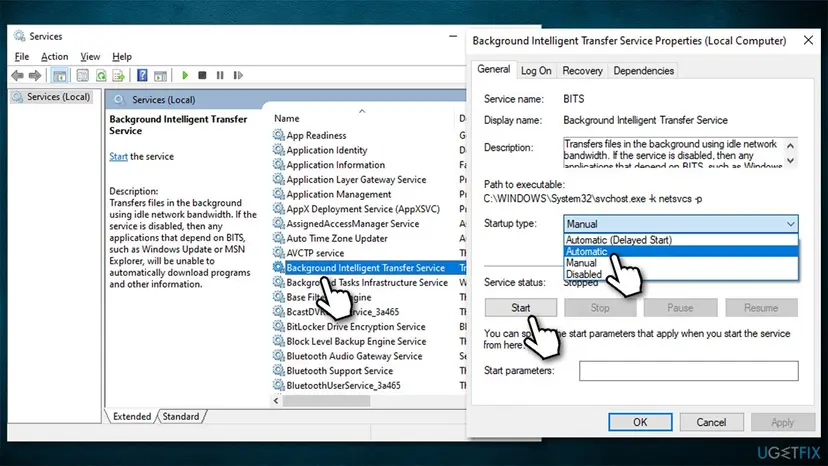
How to fix windows update error 0x800f0986 restart relevant services - Now do the same with Windows Update Service
- If these services were already running, right-click on each of them and select Restart
- Finally, reboot your PC.
Method 3. Use SFC and DISM
- Type cmd in Windows search
- Right-click on Command Prompt result and select Run as administrator
- Paste the following command into the new window:
sfc /scannow - Press Enter and wait till the scan is finished
- Once done, run this set of commands, pressing Enter after each:
DISM /Online /Cleanup-Image /CheckHealth
DISM /Online /Cleanup-Image /ScanHealth
DISM /Online /Cleanup-Image /RestoreHealth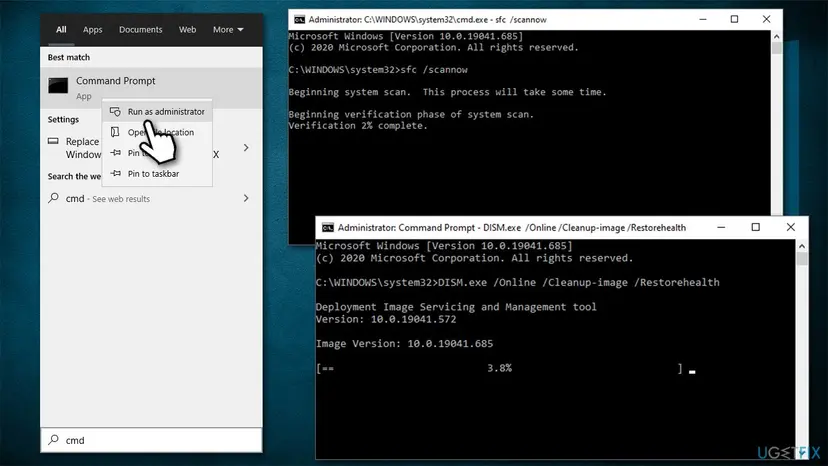
How to fix windows update error 0x800f0986 run sfc and dism - Restart your PC.
Method 4. Install updates manually
You can try installing the update yourself. Follow these steps:
- Type Update in Windows search and press Enter
- Go to View update history
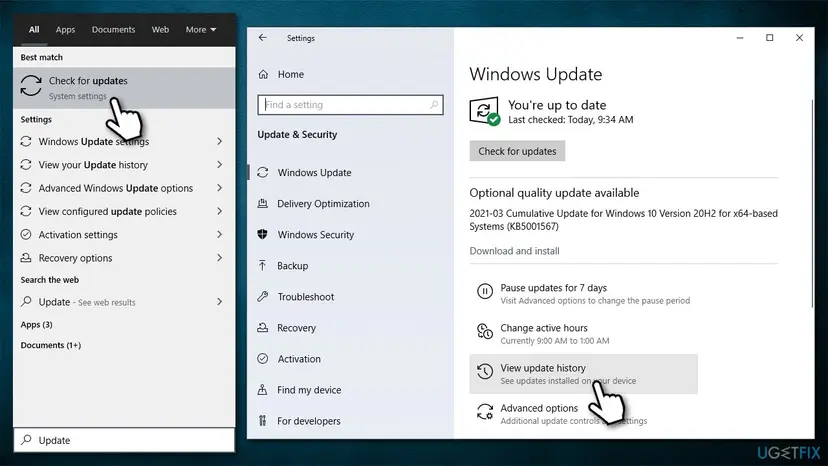
How to fix windows update error 0x800f0986 access settings - Here, you will find the list of updates which were installed, as well as those that failed
- Note the KB number (for example, KB5003173) next to the 0x800f0986 error code
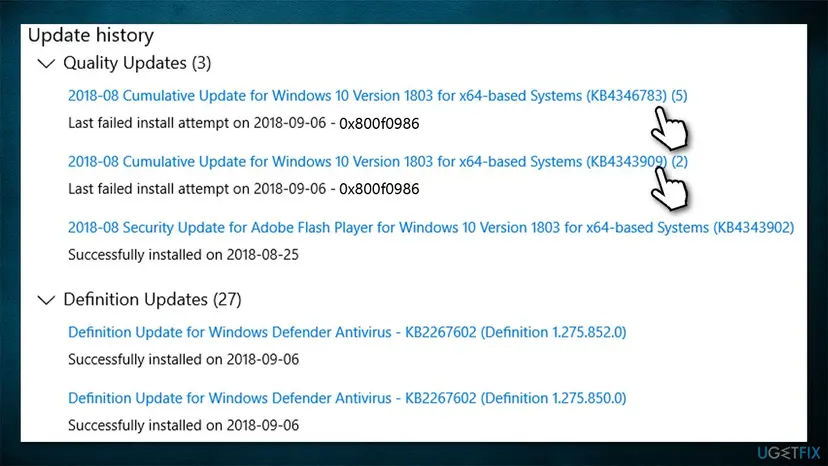
How to fix windows update error 0x800f0986 check update history - Open your browser and go to Microsoft Update Catalog
- Copy and paste the relevant KB number into the search box and press Search
- Here, find the correct version of the update for your operating system (to check this, right-click on Start and pick System. Under Device specifications and check the System type)
- Click Download and proceed with on-screen instructions
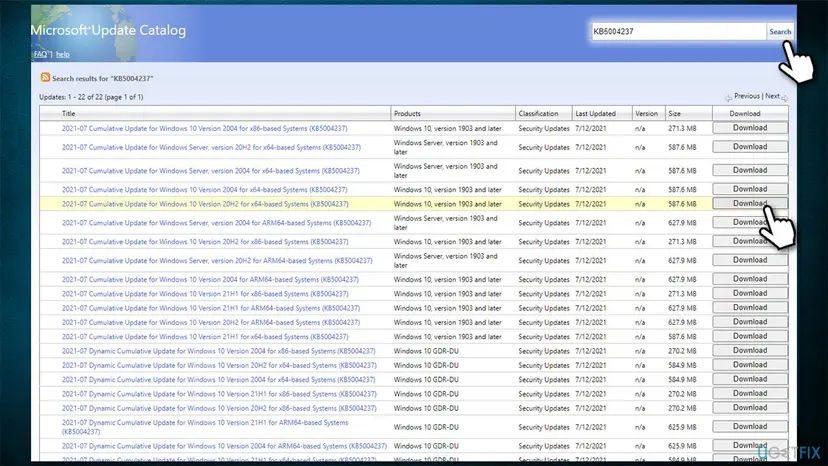
How to fix windows update error 0x800f0986 install updates manually - Once installed, reboot the system.
Method 5. Reset Windows update components
- Open Command Prompt (Admin) as explained above
- Copy and paste the following commands, pressing Enter each time:
net stop wuauserv
net stop cryptSvc
net stop bits
net stop msiserver - Press Win + E to open File Explorer
- Go to the following locations and delete the contents of these folders:
C:\\Windows\\System32\\catroot2
C:\\Windows\\SoftwareDistribution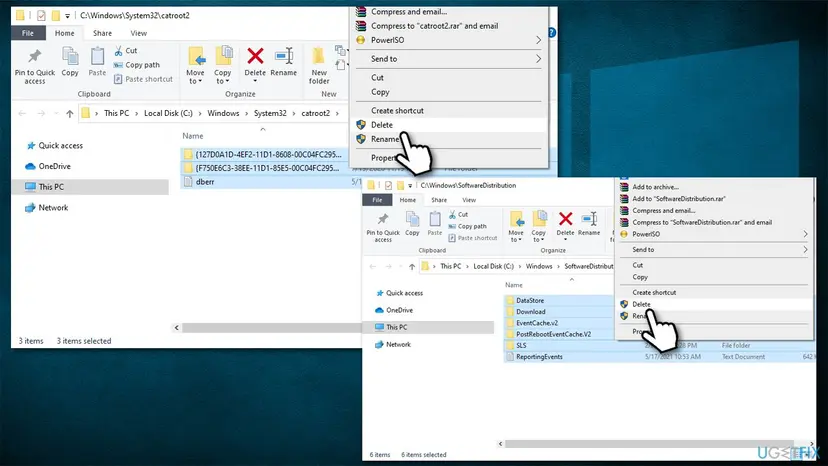
How to fix windows update error 0x800f0986 reset windows update components - Open Command Prompt again and paste these command lines:
net start wuauserv
net start cryptSvc
net start bits
net start msiserver - Restart your system.
Method 6. Fix socket errors via Command Prompt
Winsock holds all the information related to your internet connectivity. If some of the settings get corrupted, separate data packets might not be downloaded correctly, which would fail the download process with an error. You can reset these settings as follows:
- Open Command Prompt as administrator
- Type the following command and press Enter:
netsh winsock reset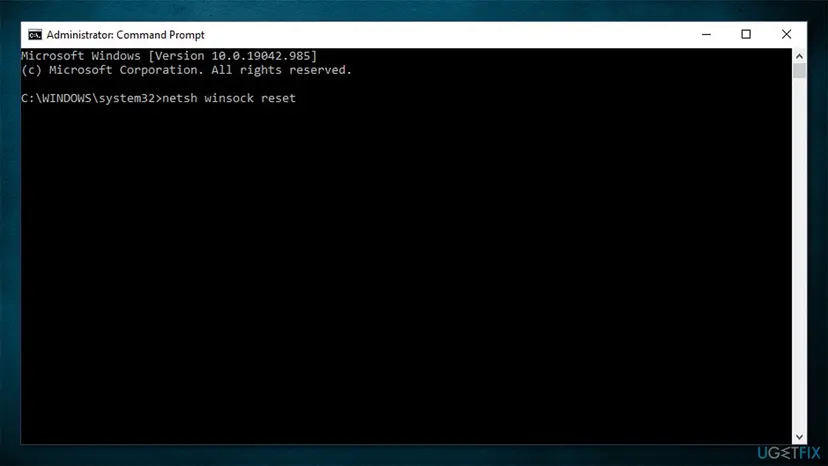
How to fix windows update error 0x800f0986 winsock reset - Restart your PC.
Method 7. Use Media Creation tool
If none of the solutions above worked for you, you should try using the Windows Media Creation tool. It is very easy to use, and it helped most people resolve Windows update errors quickly.
- Go to the official Microsoft website and download Media Creation Tool
- Double-click the installer, agree to terms and click Next
- Select Upgrade this PC now > Next
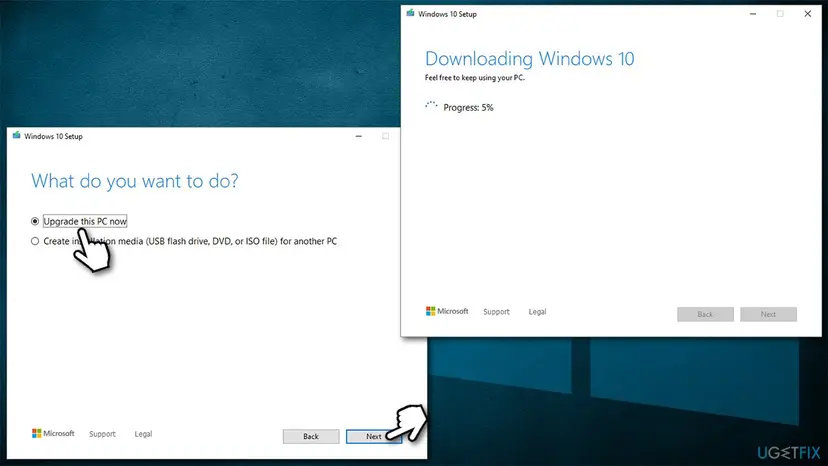
How to fix windows update error 0x800f0986 use media creation tool - Windows should now download and install all the necessary files
- Your system will restart and the operation complete.
Did this fix work?
One click, no account. It tells the next reader which guides are worth their time.
Questions and experiences: fix Windows update error 0x800f0986
Still broken, or found a fix we did not cover? Ask here: members and our editors answer. Reading is open; writing needs a free account.
…