How to fix
WUDFHost high CPU usage and freezes
on Windows
Resolve WUDFHost high CPU usage and freezing issues on Windows 10 and 11 with our expert-tested solutions. Get your PC running smoothly again!

What causes How to fix WUDFHost high CPU usage and freezes in Windows?
- Failing hardware
- Badly written drivers
- NFC data transfer devices
- Corrupt drivers
- Underlying Windows issues
Repairs Windows system files, removes malware, and restores a clean OS state — without reinstalling.
Hello. I bought my PC just a few months ago, and everything was working fine. Recently, I noticed that it started freezing while I was playing games, streaming videos, or doing other regular activities. My PC is from a legitimate retailer, and I don't understand why it would struggle to do tasks that it should easily handle. During these struggles, I noticed that WUDFHost.exe spikes in resource consumption.
High usage of resources is something that nobody wants to deal with on a Windows computer. It can disrupt normal activities while using it, and sometimes even result in crashes or other serious issues. While in some cases, high resource usage might be caused by technical issues such as failing hardware, WUDFHost.exe was reported as a culprit of the issue in many cases.
WUDFHost stands for Windows User-mode Driver Framework Host, which is a part of any Windows operating system through versions Vista to 11. To be more precise, it is a device-driver development platform and is responsible for preventing badly written drivers from spiraling out of control and damaging the system even more than it should.
It creases a certain "bubble" within the OS, preventing direct access to the kernel[ref en-1] of such drivers, instead, it is interacting through the API.[ref en-2] This prevents corrupt drivers from impacting the system on a larger scale. In other words, it is used for system stability and integrity, and the process should not be turned off.
Unfortunately, sometimes WUDFHost.exe high CPU, memory, or other resource usage can occur. It is important to mention that the issue is usually not with the process itself but rather outside factors. For example, NFC data transfer devices could be causing it, as well as particular drivers.
While the file might, in some cases, be mimicked by malware,[ref en-3] it is usually not the case. We strongly recommend performing a full system scan with reputable anti-malware to ensure this is not the case before you proceed with fixes.
Likewise, the problem might lie in underlying Windows issues, such as system file corruption, so employing [d1] PC repair software could fix the problem automatically in those cases. Otherwise, proceed with the troubleshooting steps below.
Fix 1. Update all your drivers
There are plenty of bugs that can be encountered during software development, although they are mainly fixed before they are shipped to the public. Unfortunately, some drivers might be buggy or get corrupted due to outside factors. Thus, we recommend you update all the drivers first.
- Type Update in Windows search and hit Enter
- Click Check for updates
- Click View optional updates
- Find the Driver Updates section, tick the checkboxes, and click Download and Install
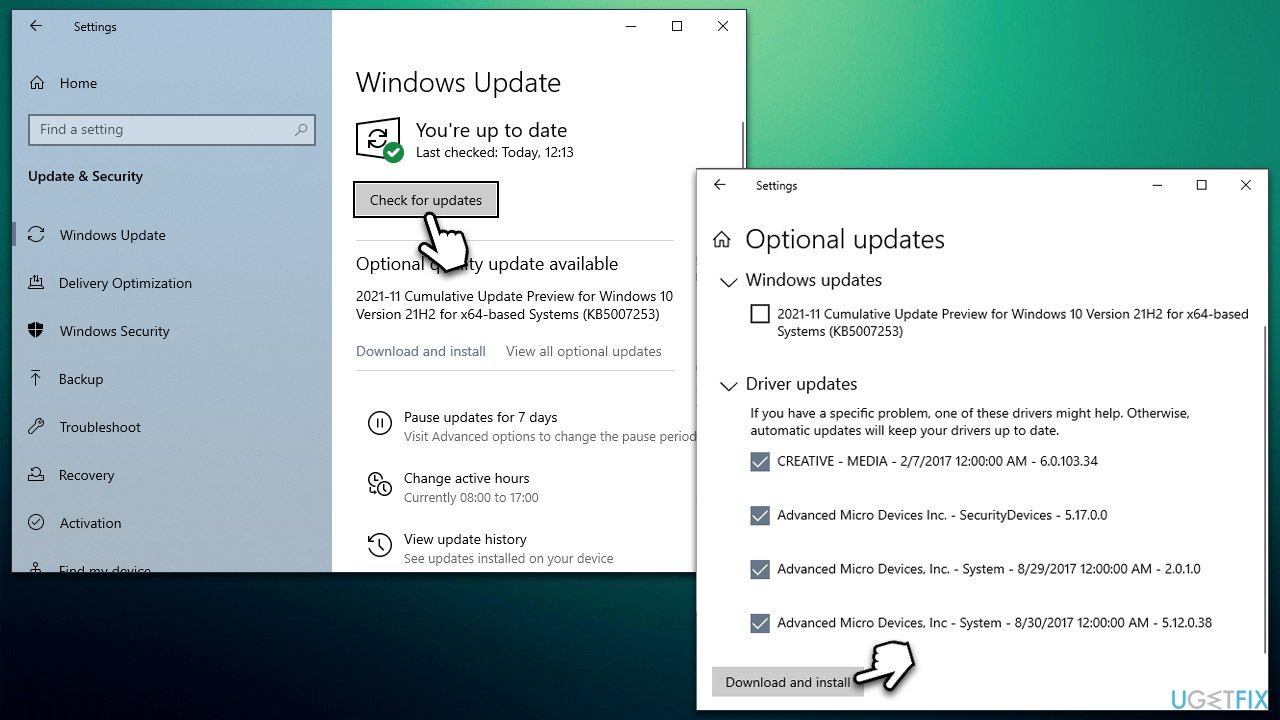
How to fix wudfhost high cpu usage and freezes in windows update drivers - Once done, restart your computer.
Note that you have other options to keep your drivers up to date, as Windows does not always find all the newest drivers available for your hardware. Thus, we recommend checking your hardware manufacturer websites or employing [rev id="DriverFix"] to ensure that all the latest drivers for all computer components are installed.
Fix 2. Disable NFC
Near-Field Communication technologies are usually used in smartphones and other portable devices, similar to Bluetooth. It has a very short range and would rarely be useful for desktop machines. If you have NFC enabled and you don't use it on your computer, disable it as follows:
- Right-click on Start and pick Settings
- Go to Network & Internet section
- Select Airplane mode on the left
- On the right side, click the switch next to NFC once to disable it.
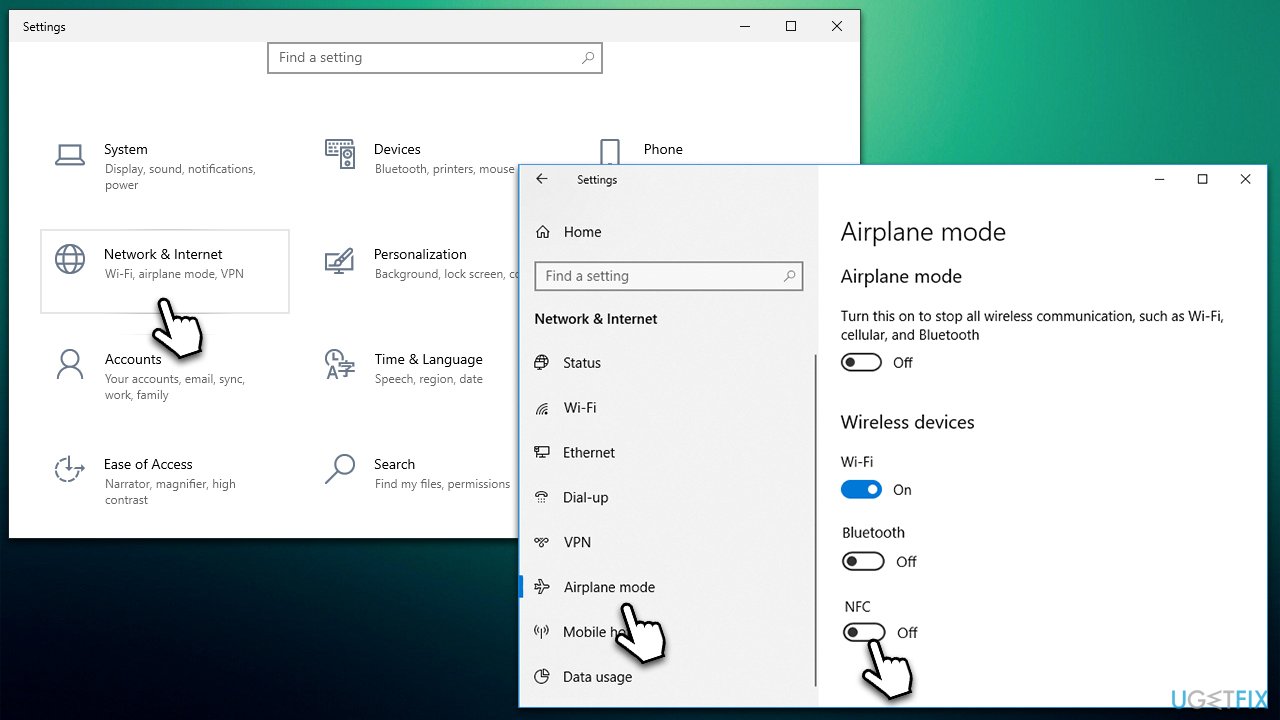
How to fix wudfhost high cpu usage and freezes in windows disable nfc
Fix 3. Disable Device Install Service
- Type in Services in Windows search box and hit Enter
- Here, scroll down until you find Device Install Service
- Right-click and select Properties
- Under Startup type, select Disabled
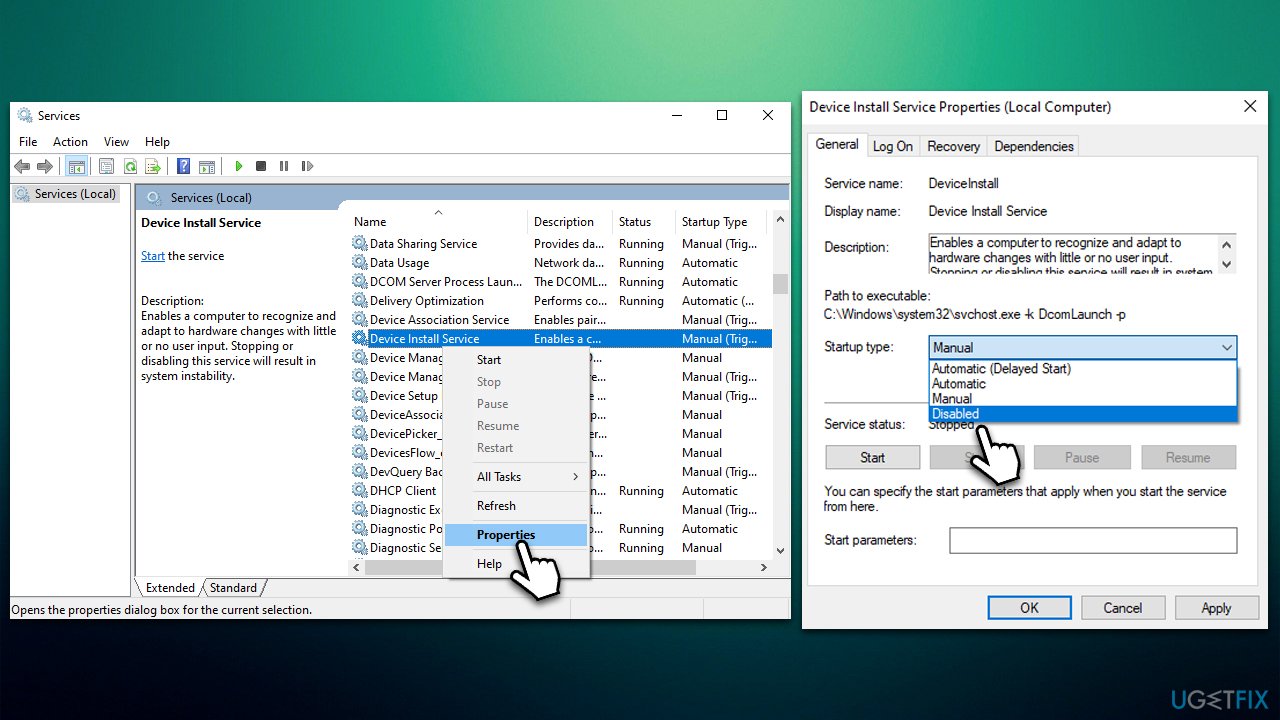
How to fix wudfhost high cpu usage and freezes in windows disable device install service - Click Stop, OK, and Apply.
Fix 4. Check for system corruption
Damaged or corrupted system files can cause various issues, including high usage of resources. If you have already scanned your device for malware, you also might want to check this aspect:
- Type cmd in Windows search
- Right-click on Command Prompt and select Run as administrator
- When User Account Control shows up, click Yes
- Paste the following command and press Enter:
sfc /scannow - Wait till the scan is finished
- Once done, proceed with the following command (don't forget to press Enter):
dism /online /cleanup-image /restorehealth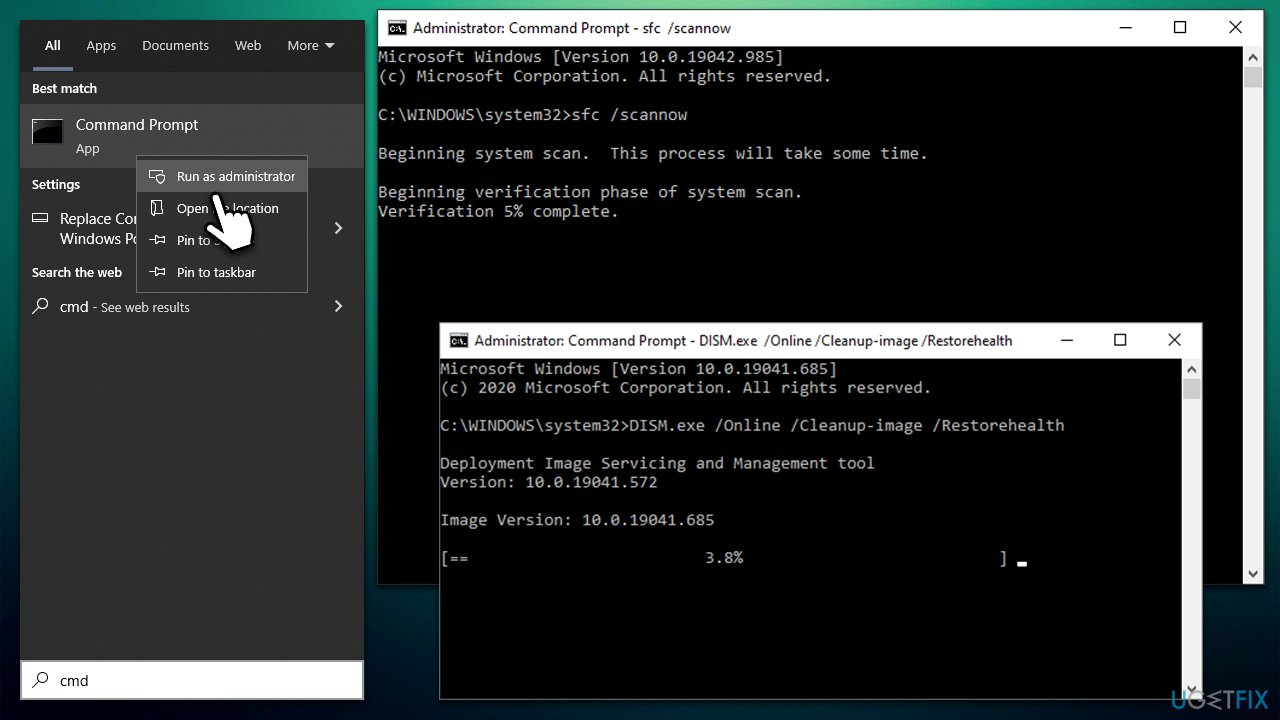
How to fix wudfhost high cpu usage and freezes in windows run sfc dism - Restart Windows.
Fix 5. Disable Intel Wireless Gigabit User Mode Driver
Disabling this driver will not affect your wireless connectivity in any capacity. However, if you want to keep the driver running, you can try reinstalling it instead.
- Right-click on Start and pick Device Manager
- Find the Intel Wireless Gigabit Drivers section and expand it
- Right-click Intel Wireless Gigabit User Mode Driver and select Disable device
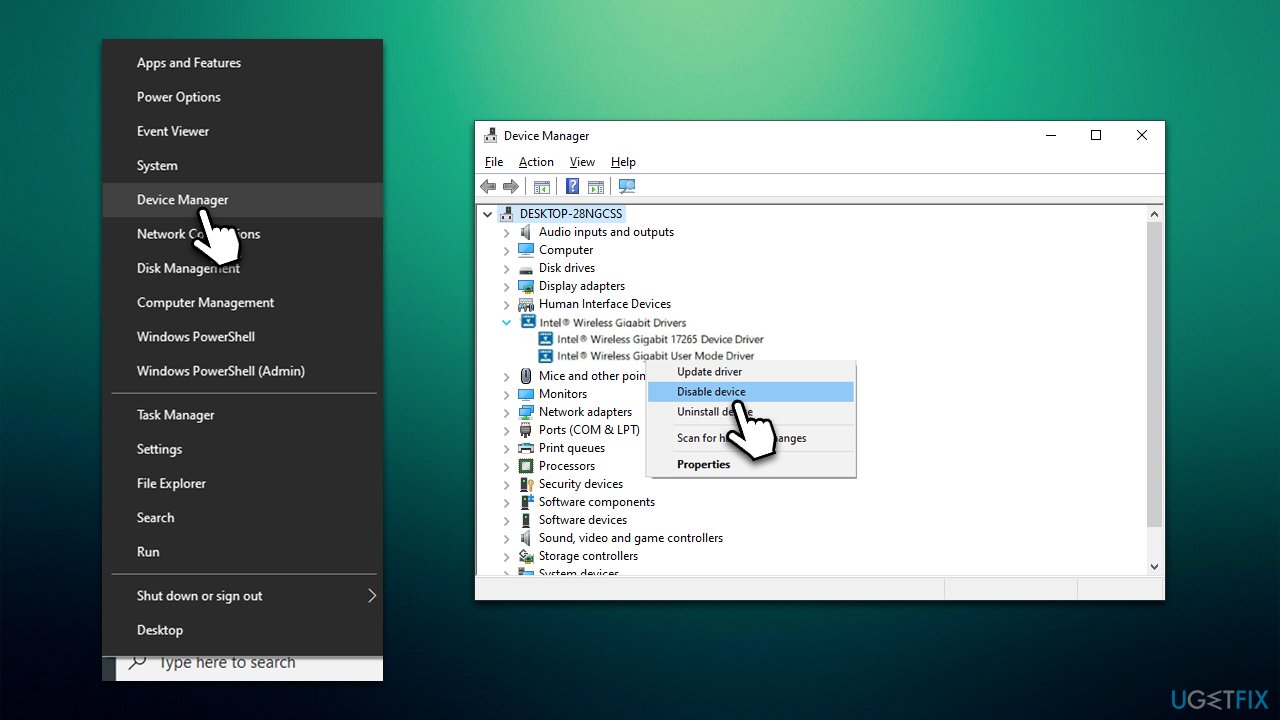
How to fix wudfhost high cpu usage and freezes in windows disable wireless gigabit dreiver - Confirm with Yes.
Similar issues we have previously talked about:
Bottom line
To address the high CPU usage of WUDFHost.exe, consider performing a full system scan with reputable anti-malware software and using PC repair software to fix any system file corruption. If these solutions do not resolve the issue, further investigation into specific drivers may be necessary.
Frequently asked questions
WUDFHost is the Windows User-Mode Driver Framework Host process that helps manage drivers for devices. High CPU usage can occur due to faulty drivers or conflicts with software, especially after a Windows 10 or Windows 11 update.
You can use the Device Manager in Windows 10 or Windows 11 to check for any devices with a yellow exclamation mark, indicating driver issues. Additionally, checking the Event Viewer may provide logs related to driver errors.
Try updating your device drivers through Device Manager, or uninstall and reinstall the problematic driver. If the issue persists, consider running the Windows Troubleshooter for hardware and devices.




Report an issue
What's wrong with this guide? We review every report and update or remove content.
Report received — thank you. We'll review and fix it.
You need a free account to submit a report.
Be the first to comment