
Microsoft Store error 0x80070005 - can't update apps - how to fix?
Prefer to fix it yourself? The manual steps follow.
On this page
- How to fix Microsoft Store error 0x80070005
- Disable Proxy
- Reboot the machine fix Microsoft Store error 0x80070005 - can't update apps
- Reset Windows Store
- Correct the permissions to fix Microsoft Store error code 0x80070005
- Ensure that all date and time settings are correct
- Troubleshoot the WIndows to fix Microsoft Store error 0x80070005
- Run SFC scan to fix 0x80070005 error
Hello. I have an issue with Microsoft Store. I receive the error with code 0x80070005 while trying to update some applications. I also tried to install a game through the Windows store app. Whenever I try, I run into a random error code, and the download cannot load. The error code is always 0x80070005. Can you offer any tips for me?
Microsoft Store error 0x80070005 - can't update apps is the issue that people complain about for a few years, unfortunately. The error might be related to an outdated version of the Windows operating system or particular Microfost Store issues. If you update the OS and reset the store to default and still receive the error - the problem might stem from other parts of the machine.
Various errors appear in Microsoft Store, including the error code 0x80070005. All of them are extremely annoying because you either cannot update applications or update existing ones. Keeping applications and software up-to-date can be crucial for all the other functions on the system, so you need to solve this issue.
It might seem too difficult to fix Microsoft Store error 0x80070005 because the particular pop-up with the error code appears, and processes cannot run as expected. The generic error means that the application fails to update. Typically it means that permission or access is denied for some reason.
Something happened and this app couldn’t be installed” 0x80070005
Error code 0x80070005 is the universal issue, so the same error code might appear on other Windows programs or services when the permission is denied. However, the most frequent one is the somewhen people receive a "something went wrong" pop-up that delivers error code in particular.
How to fix Microsoft Store error 0x80070005
We can calm you down and determine that this is not crucial or damaging. You can fix the Microsoft Store error 0x80070005 and update your applications normally. It is not a problem with malicious programs or different application corruption. Of course, there is a possibility that other problems with your machine can be related to altered outdated files in parts of the system. Then you can help your machine by relying on other solutions that fix third-party application or background process problems and should help you with the general performance improvement.
The particular issue with a problem that gets more and more reported - Microsoft Store error 0x80070005 - can't /update apps can be fixed. This is the problem mainly occurring on Windows 8/8.1/10 devices, but the message might appear on different OS versions too, but not that commonly. The following solutions can be applied to various versions of Windows. Make sure to try a few, at least before giving up.
Disable Proxy
- Click Start and choose Settings in the menu.
- Go to Network & Internet. Then Proxy.
- Click the option Automatically detect settings to On.
- Turn Off the Use a proxy server.
Reboot the machine fix Microsoft Store error 0x80070005 - can't update apps
- Open the Run box by clicking the Windows key and R at the same time.
- Then type MSConfig in the bar. Click OK.
- Once the window is opened, make sure you are on the General tab.
- Click selective startup and make sure to check Load system service and Load startup items.
- Go to services.
- Check Hide All Microsoft Services.
- Click Disable all.
- Go to the Startup tab and select Open Task Manager.
- Disable all applications you are not using.
- Hit OK to apply changes.
Reset Windows Store
- In Search type WSReset.
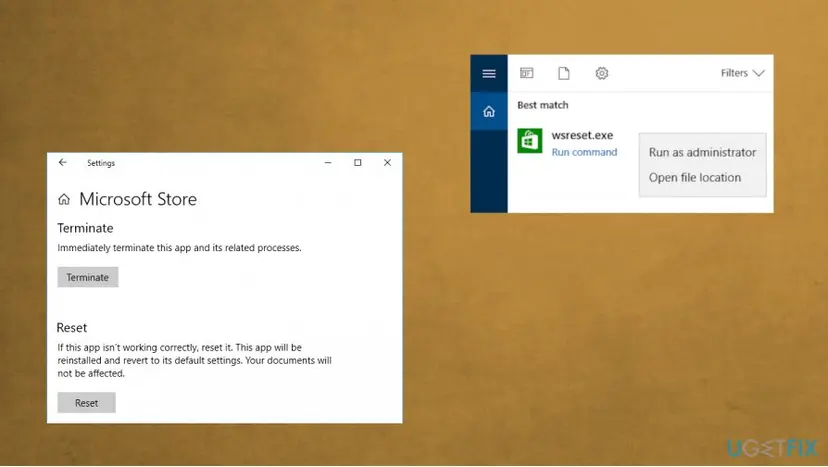
Microsoft store error code 0x80070005 fix reset ws - Right-click the result and Run as administrator.
- Caches should reset in few minutes.
- Restart the computer.
Correct the permissions to fix Microsoft Store error code 0x80070005
- Open the Run box and type %appdata% in the address bar.
- Click OK.
- Click on AppData once the window opens and select AppData and then Local.
- Search for Packaged file in the Local folder.
- Right-click the packet and choose Properties.
- Select the Security tab and click the Advanced button.
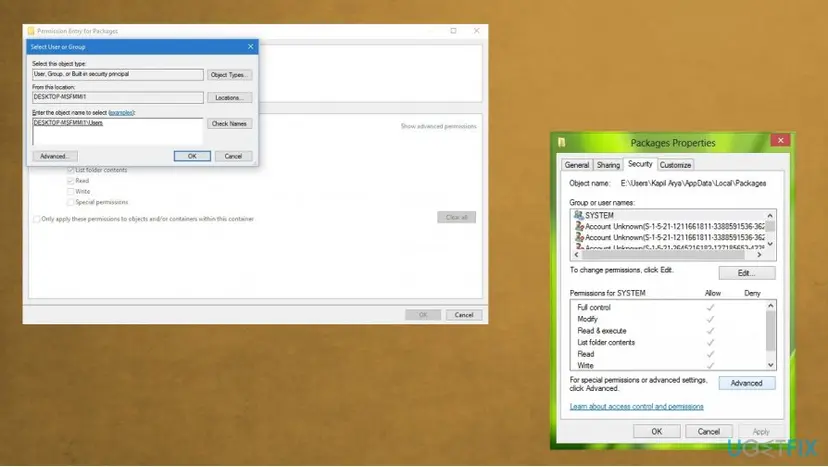
Microsoft store error code 0x80070005 fix packages - Make sure that all users have full control.
- Click Apply and authorize these changes.
Ensure that all date and time settings are correct
- Click the date and time in the notification area.
- Select Change date and time settings.
- Click on Change date and time, make sure that it is the right date and time.
- Click OK.
- Change time zone. Make sure that your computer is set to the right time zone, click on OK.
- Apply changes.
- Restart the computer.
Troubleshoot the WIndows to fix Microsoft Store error 0x80070005
- Go to Settings and then Update & Security to find Troubleshoot option.
- Select the Microsoft Store Apps troubleshooter.
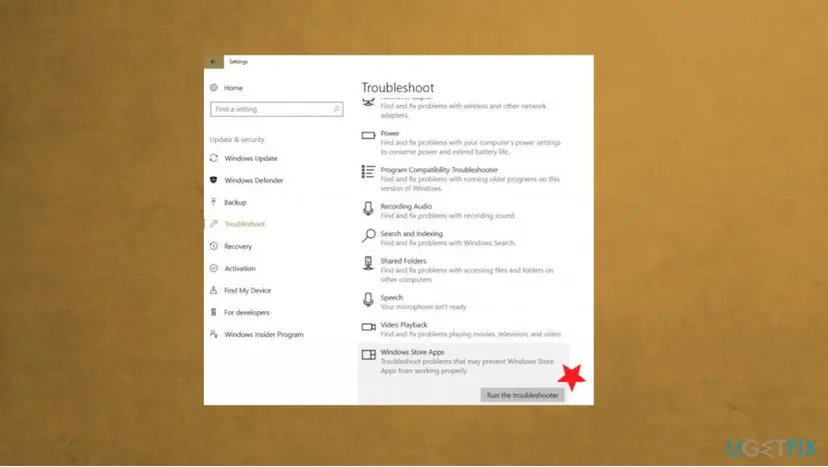
Microsoft store error code 0x80070005 fix troubleshooter - Launch the troubleshooting.
Run SFC scan to fix 0x80070005 error
- Type cmd in Search and right-click the Command Prompt to launch it with administrator rights.
- Enter sfc /scannow and hit Enter to run the command.
- Wait until the process is done.
- Restart the device.
Did this fix work?
One click, no account. It tells the next reader which guides are worth their time.
Questions and experiences: Microsoft Store error 0x80070005 - can't update apps - how to fix
Still broken, or found a fix we did not cover? Ask here: members and our editors answer. Reading is open; writing needs a free account.
…