
What is .AAE file and should you delete it?

Prefer to fix it yourself? The manual steps follow.
6 methods in this guide
- The first minute
- What an AAE file is
- What is inside the file
- Why Windows shows the original
- Should you delete it
- Chances for the edits
- The methods
- 1. Find the E file
- 2. Share from the iPhone
- 3. Download from iCloud
- 4. Export from a Mac
- 5. Open it in Notepad
- 6. Delete the AAE files
- When it cannot be recovered
- Avoid it next time
- Common mistakes
- FAQ
Hello, I recently uploaded all the photos I had on my old iPhone to my Windows PC. I used my phone to modify some of these pictures, so the .AAE files are included. However, I cannot view those files on a Windows machine. Do you know if it is possible at all? Thanks for the advice.
An .AAE file is a small text file in which Apple Photos on an iPhone, iPad or Mac records the edits made to one photo or video: it holds no picture. On a Windows PC or an Android phone it is safe to delete, and you lose only the edit recipe, which Windows cannot use anyway. First check that you have the edited version of the photos you care about.
IMG_1234.AAE is the edit record of IMG_1234.JPG (or .HEIC, .MOV), written by Apple Photos as an XML property list. Windows cannot apply it, so the photo next to it opens unedited. You can delete AAE files on a PC: the photos stay as they are. To get the edited picture, first look for IMG_E1234.JPG in the same folder. If it is not there, share the photo from the iPhone or download it from iCloud.com.
| What was lost | Nothing is deleted. The edits you made on the iPhone (crop, filter, light, slow motion) do not show on the PC: IMG_1234.JPG opens as the unedited original, and the edit sits in IMG_1234.AAE, which Windows cannot read as a picture. |
|---|---|
| Where the data is | The edited picture lives in the Photos library on the iPhone, iPad or Mac and in iCloud Photos. In the PC folder it may already exist as IMG_E1234.JPG or IMG_E1234.HEIC. The AAE file is only the recipe. |
| Chances | Likely while the photo is still in Photos or iCloud Photos. Possible for 30 days after it was deleted there. Unlikely when only the original and its AAE file on a PC are left. Not possible from an AAE file alone. |
| First thing to do | Do not delete the photos from the iPhone and do not select Revert to Original. Check the PC folder for a file with an E in its name, then export the edited copies you need. |
| Safe to delete | Yes on Windows, Android and any drive that will never go back into Apple Photos. The photos are not changed. Keep the AAE files if the folder may return to a Mac or an iPhone. |
| File type | Apple property list in XML, plain text. ExifTool identifies it as file type AAE with the MIME type application/vnd.apple.photos. Its own sample is 827 bytes. |
| Created by | The Photos app on iPhone, iPad and Mac, through Apple's PhotoKit adjustment data (iOS 8.0 and macOS 10.11 or later). Developers report files written by the Camera too. |
| Opens with | Any text editor: Notepad on Windows, TextEdit on a Mac. You see XML keys and an encoded block, never a picture. No program on Windows turns it into a JPG. |
| Cost | Free. Every step on this page uses Windows, the iPhone, a Mac or Apple's own iCloud tools. |
| Stops working when | The photo is removed from Photos and 30 days in Recently Deleted have passed, or the edit was reverted on the device. |
Facts checked on 14 October 2026. Steps written for Windows 11 25H2 and Windows 10 22H2, with Apple's current instructions for iOS 27, macOS 27 and iCloud for Windows.
The first minute: what to do before you delete any AAE file
The copy you see on the PC is usually the photo before your edits. The edited version is kept by the Photos app on the iPhone and by iCloud Photos, not by the AAE file in a form Windows can use. If you delete the photos from the phone now, the edited versions go with them, and after 30 days in Recently Deleted they cannot be brought back.
- Turn on file name extensions in File Explorer (View > Show > File name extensions) so you can tell
IMG_1234.JPGfromIMG_1234.AAE. - Look in the copied folder for files with an E after the underscore, such as
IMG_E1234.JPG: open one and compare it withIMG_1234.JPG. - Keep the photos on the iPhone until every edited picture you care about is on the PC and opens there.
- Keep the AAE files for now if you may move the folder back to a Mac or an iPhone one day.
- Do not select Revert to Original on the iPhone: it removes the edit from the photo on every device that uses iCloud Photos.
- Do not rename
IMG_1234.AAEtoIMG_1234.JPG. Changing an extension does not convert a file, and there is no picture inside. - Do not rename the photos while their AAE files keep the old names, if you still want the pair to belong together.
- Do not pay for an AAE converter or an AAE viewer. A text editor shows everything the file holds.
If you only want to know whether the files are junk, the answer for a Windows PC is yes, they are. The rest of this page matters when some of those photos were cropped, straightened or filtered on the phone and you want them that way on the computer too.
What an AAE file is and which program creates it
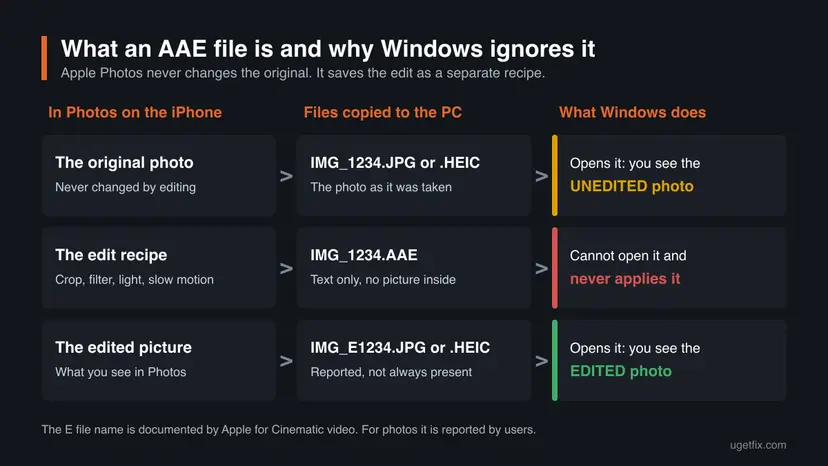
When you edit a photo in Photos on an iPhone, iPad or Mac, the app does not write over the picture. Apple's developer documentation says that Photos saves an adjustment data object along with the modified image or video, and calls it a recipe that can reconstruct the edit. The original stays untouched, which is why Revert to Original works at any time.
The AAE file is that recipe written to disk. It is a sidecar file: it has the same name as the photo, IMG_1234.AAE for IMG_1234.JPG, IMG_1234.HEIC or IMG_1234.MOV, and it only makes sense next to it. It is the AAE file format that people call the AAE picture format, but it is not a picture format at all.
- Full name
- Apple does not publish what the letters AAE stand for. We could not confirm any of the expansions that circulate, so we do not repeat them.
- Format
- An Apple property list (plist) in XML, readable as plain text.
- Since
- PhotoKit adjustment data is available from iOS 8.0, iPadOS 8.0 and macOS 10.11.
- One per photo
- Photos stores only one adjustment data object for each photo, the most recent edit. A new edit replaces the old record.
- Editor
- The record names the app that wrote it. The built-in editor writes the format identifier
com.apple.photo, a slow-motion videocom.apple.video.slomo. Other apps write their own.
You never see AAE files inside the Photos app. They show up when the photo library is read as plain files: an iPhone connected to a Windows PC with a USB cable, photos sent by AirDrop with All Photos Data turned on, or a card or drive copied by hand.
| File next to your photo | What it is | Opens as a picture |
|---|---|---|
IMG_1234.JPG or IMG_1234.HEIC | The photo as it was taken. | Yes. HEIC may need the HEIF extension from the Microsoft Store. |
IMG_1234.AAE | The edit record for that photo: text only. | No. |
IMG_E1234.JPG or IMG_E1234.HEIC | The photo with the edits applied. Apple documents the E name for Cinematic video. For photos it is what users and developers report. | Yes. |
IMG_O1234.AAE | A second edit record. Apple lists it for Cinematic mode clips sent by AirDrop. | No. |
IMG_1234.MOV next to a photo | The video half of a Live Photo, which is exported as a still image and a video. | It plays as a short video. |
IMG_1234.XMP | A different sidecar: IPTC keywords and captions that Photos on a Mac can export on request. | No. |
What is inside an AAE file when you open it
Opened in Notepad or TextEdit, an AAE file is a short list of keys and values. This is the shape of a file written by the iPhone's own editor, with the long encoded block shortened:
A typical AAE file (the data block is shortened)
<?xml version="1.0" encoding="UTF-8"?>
<!DOCTYPE plist PUBLIC "-//Apple//DTD PLIST 1.0//EN" "http://www.apple.com/DTDs/PropertyList-1.0.dtd">
<plist version="1.0">
<dict>
    <key>adjustmentBaseVersion</key>
    <integer>0</integer>
    <key>adjustmentData</key>
    <data>bZBNT8JAEIb/y5wrKaBg9mbwIBdJ (several lines of letters and digits)</data>
    <key>adjustmentEditorBundleID</key>
    <string>com.apple.camera</string>
    <key>adjustmentFormatIdentifier</key>
    <string>com.apple.photo</string>
    <key>adjustmentFormatVersion</key>
    <string>1.6</string>
    <key>adjustmentTimestamp</key>
    <date>2020-03-21T17:37:31Z</date>
</dict>
</plist>| Key | What it tells you |
|---|---|
adjustmentFormatIdentifier | The format of the edit record. Apple's documentation calls it a string that uniquely identifies the format. com.apple.photo is the built-in photo editor. |
adjustmentFormatVersion | The version of that format, for example 1.1 or 1.6. An app uses it to decide whether it can continue the edit. |
adjustmentData | The edit itself: the data needed to reconstruct the adjustment. It is encoded, so you cannot read the crop or the filter by eye. |
adjustmentEditorBundleID | The app that made the edit, such as com.apple.camera. |
adjustmentTimestamp | The date and time of the edit, in UTC. |
adjustmentBaseVersion, adjustmentRenderTypes | Internal values. Apple does not document them for users, and we could not confirm what each number means. |
Developers who decoded these files report that the Camera writes one when it applies something on its own. In their example, a 16:9 photo was stored as the full 4:3 original plus an AAE file that holds the crop. Slow-motion videos carry an AAE file with the slow section, and Apple lists AAE files next to every Cinematic mode clip. So an AAE file does not prove that somebody edited the photo by hand.
Developers also report that in recent versions the adjustmentData block is a compressed list of settings such as crop size and angle, while older slow-motion files held a small binary property list. Apple does not publish this inner format. Treat it as something only Apple's apps are meant to read.
Why Windows shows the unedited photo and cannot open the AAE file
Windows treats each file on its own. IMG_1234.JPG is a complete picture, the one the camera saved, so Photos and File Explorer show it exactly as it is. Nothing in Windows knows that the file with the same name and the extension .AAE holds instructions for it, and no Microsoft app can carry those instructions out.
Double-click an AAE file and Windows normally asks which app to use, because no app is set for that extension. If you once picked a media player for it, the player complains instead, as in the old picture below. Neither reaction means the file is damaged.
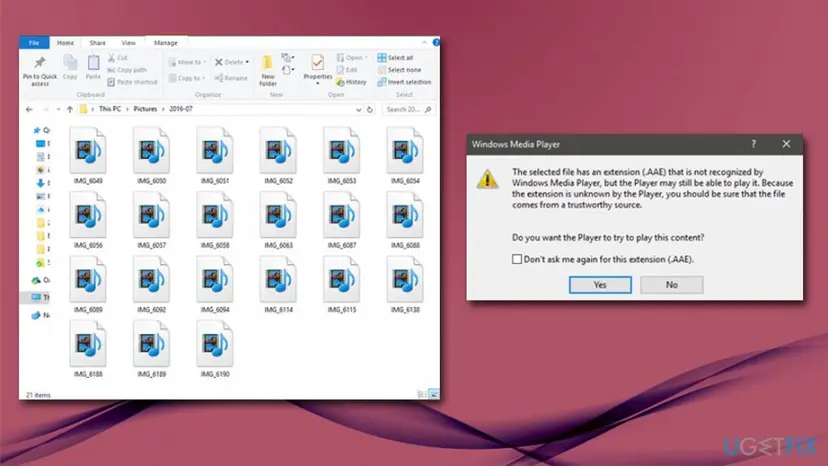
- The photo on the PC is not broken. It is the original. The edit was never written into it.
- The edit is not lost either. It still shows on the iPhone, on iCloud.com and on every device that uses the same iCloud Photos library.
- The AAE file is not the edited photo. It has no pixels. A JPG of several megabytes cannot hide in a text file of about a kilobyte.
- A photo sent by Mail or Messages normally looks edited. Apple documents only the two options that send the original, All Photos Data and Export Unmodified Original. It follows that an ordinary share sends the picture as you see it, and that is what users report.
Any system that reads the photos as plain files shows the original and an AAE file it has no use for. Apple's own Motion guide says of the AAE files that arrive with a Cinematic clip that they are not used by Motion and can be ignored.
Should you delete AAE files? The answer by where the file is
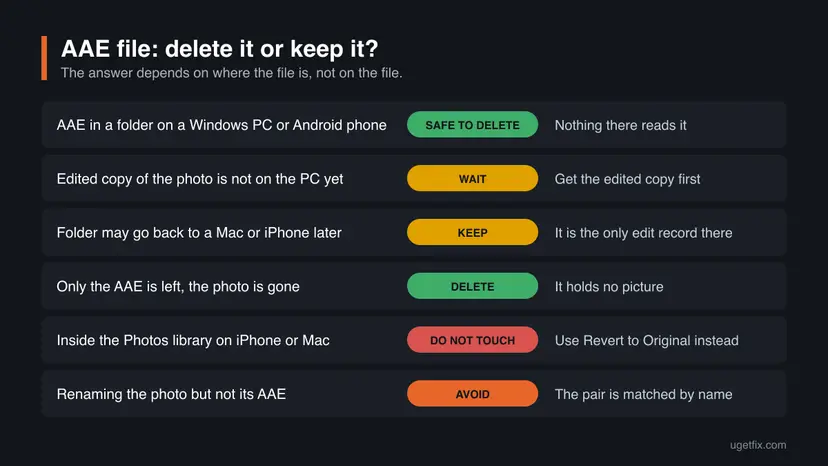
On a Windows PC, yes. Deleting an AAE file changes nothing about the photo beside it: the JPG, HEIC or MOV opens exactly as before. What you give up is the edit record for that copy, and it is only worth something to Apple's Photos.
| Where the AAE file is | Delete it? | What you lose |
|---|---|---|
| A folder on a Windows PC, an Android phone, a NAS or a USB drive that stays outside Apple devices. | Yes. | Nothing you can use there. |
| The same folder, but you have not yet saved the edited versions of the photos. | Wait. | Nothing by deleting, but get the edited copies first while the photos are still on the iPhone. |
| A folder you may import into Photos on a Mac or copy back to an iPhone later. | Keep it. | The only record of the edit in that folder. We could not confirm from Apple that Photos applies an AAE file again on import, so do not count on it. |
| A folder where the photo itself is gone and only the AAE file is left. | Yes. | Nothing. The file cannot rebuild a photo. |
| Inside the Photos library on a Mac, or on the iPhone itself. | Do not touch it. | You could break the edit or the library. To remove an edit, use Revert to Original in Photos. |
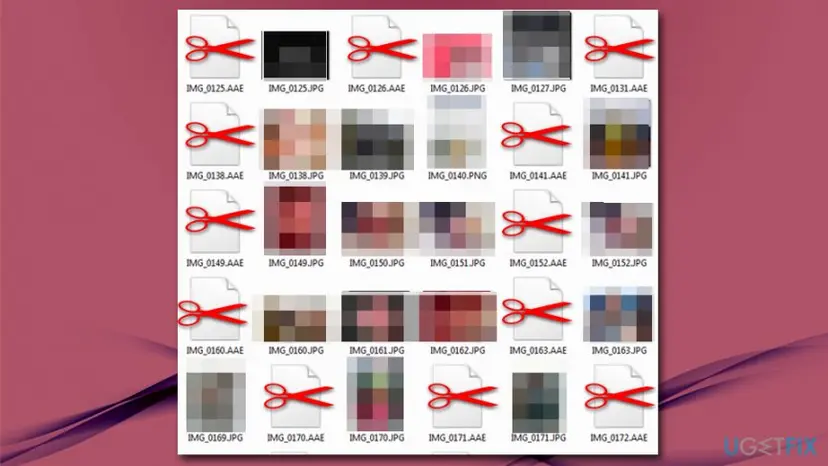
Space is not a reason to hurry. The samples we read are about a kilobyte of text each, so even a thousand such files take less room than one photo. The reason people delete them is tidiness: they double the number of files in the folder and confuse backup and gallery apps.
Chances of getting the edited version of a photo onto the PC
The edited picture can be produced only by Apple's Photos, or it already exists as a finished file. That gives a short list of cases. No percentages: nobody has published reliable ones.
| Your situation | Chances | What to use |
|---|---|---|
The copied folder holds IMG_E1234.JPG or IMG_E1234.HEIC. | Likely. | Method 1: by all reports that file is the edited photo. Open it to check. |
| The photo is still in Photos on the iPhone or iPad and looks edited there. | Likely. | Method 2: share it from the phone. |
| The photo is in iCloud Photos. | Likely. | Method 3: download it from iCloud.com or with iCloud for Windows. |
| The photo is in Photos on a Mac. | Likely. | Method 4: export it as JPEG. |
| The photo was deleted from the iPhone less than 30 days ago. | Possible. | Recover it from Recently Deleted in Photos, then use method 2. |
Only IMG_1234.JPG and IMG_1234.AAE on the PC are left. | Unlikely. | No Windows program applies the AAE file. Importing the pair into Photos on a Mac is unconfirmed. Editing the photo again is the reliable way. |
| You selected Revert to Original on the device. | Not possible. | The edit was removed. Edit the photo again. |
| Only the AAE file is left. | Not possible. | There is no picture in it. |
If you deleted AAE files on the PC and now regret it, nothing about these chances has changed. The edits never depended on the PC copy of the AAE file. They depend on the photo still being in the Photos library.
How to get the edited photo onto a PC, open an AAE file and delete AAE files
The first four methods bring the edited picture to the computer, from the one-minute check to the route that needs a Mac. Each says where its steps run: on the PC, on the iPhone or on a Mac. Method 5 shows what is inside an AAE file, and method 6 removes the files from a Windows folder once you no longer need them.
| What you have | Start with |
|---|---|
A folder of iPhone photos on a Windows PC and files named IMG_E. | Method 1 (on the PC). |
| The iPhone or iPad with the edited photos still on it. | Method 2 (on the iPhone). |
| iCloud Photos turned on, with or without the phone at hand. | Method 3 (on the PC, in a browser). |
| A Mac whose Photos library holds the pictures. | Method 4 (on the Mac). |
| Curiosity about what the file says, or a need to see the edit date. | Method 5 (on the PC). |
| All edited copies saved, and a folder full of AAE files. | Method 6 (on the PC). |
Method 1. On the PC: look for the edited copy that is already in the folder
2 minutesNo riskYou copied the photos from the iPhone with a USB cable and File Explorer.
When an iPhone is read as a camera, an edited item can be exposed as more than one file. Apple documents this for Cinematic video, where the file with an E in its name has the effects baked in. Developers and users report the same pattern for edited photos on Windows: IMG_1234.HEIC is the original and IMG_E1234.HEIC has the edit applied.
- Open the folder with the copied photos in File Explorer.
- Select View > Show > File name extensions. On Windows 10, open the View tab and tick File name extensions.
- Find a photo that has an AAE file, for example
IMG_1234.AAE. - Look for a file with the same number and an E after the underscore:
IMG_E1234.JPGorIMG_E1234.HEIC. - Open both
IMG_1234andIMG_E1234and compare them. The E file should show your crop or filter. - Keep the E files of the photos you edited. Rename them only after you have decided what to do with the AAE files.
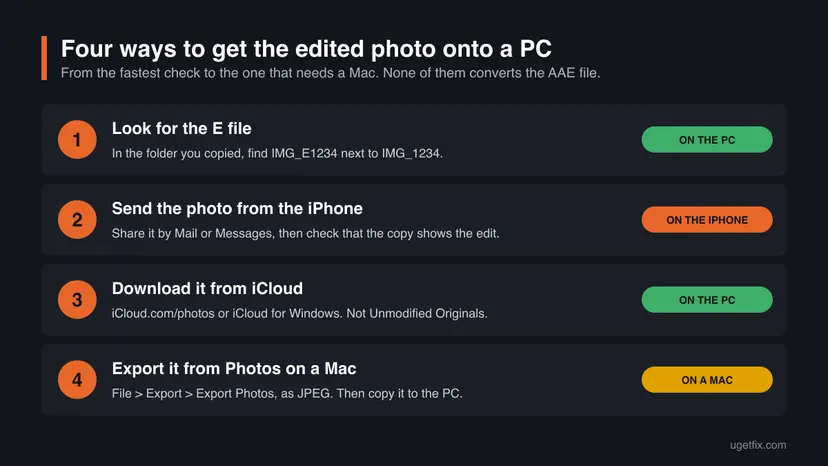
Connect the iPhone again, unlock it and look in its photo folders for the IMG_E files. If you imported with the Photos app of Windows, check what it brought in before you copy by hand. Microsoft's import instructions do not say which of these files the app picks, so we cannot tell you in advance.
It worked if: A file such as IMG_E1234.JPG opens in Photos and shows the picture as you edited it on the iPhone.
If not: No E file exists for the photo, or it also looks unedited: go to method 2 if you have the iPhone, or method 3 if you use iCloud Photos.
Method 2. On the iPhone: send the edited photo to yourself
5 minutesNo riskThe edited photos are still in the Photos app on the iPhone or iPad.
Apple documents two ways in which the original leaves the Photos app: All Photos Data, which sends the original file with its edit history and works with AirDrop only, and Export Unmodified Original. Apple does not say in so many words what an ordinary share sends. It follows from those two exceptions, and users report, that Mail or Messages gets the photo as it looks now, as one ordinary file. So check the copy that arrives.
- Open the Photos app on the iPhone.
- Open the edited photo. For several photos, tap Select and tap each thumbnail.
- Tap the Share button.
- Tap Options. Under the file format, tap Most Compatible, which converts the photo to JPEG where needed, and leave All Photos Data off.
- Close the options, then choose Mail or Messages, or the cloud storage app you use on both devices.
- Send the photo to your own address or save it to your own cloud folder.
- On the PC, open the message or the cloud folder, save the picture and open it to check that the edit is there.
Export Unmodified Original exports the photo without your edits: Apple's guide says that for edited photos and videos the unmodified original is exported. All Photos Data sends the original together with its edit history, which is exactly the pair of files a PC cannot use. For a Windows PC, use neither.
Mail and messaging services limit the size of attachments, and Apple notes that the limit is set by your provider. For a few pictures this route is the fastest. For hundreds of photos, method 3 is less work.
It worked if: The picture saved on the PC shows the crop, filter or light adjustment, and there is no AAE file with it.
If not: The photo arrives without the edit or the phone is not at hand: use method 3 and download the photo from iCloud.
Method 3. On the PC: download the edited version from iCloud Photos
10 minutesNo riskiCloud Photos is turned on for the iPhone, and you can sign in to your Apple Account on the PC.
iCloud Photos keeps the original and the edit, and it hands out a finished picture. Apple states that to save the edited version of a photo to a PC, you can download it from iCloud.com, and that the latest iCloud for Windows downloads edits automatically.
- On the PC, open a browser and go to
iCloud.com/photos, then sign in to your Apple Account. - Select the photos. Hold the Ctrl key to select several. Apple allows up to 1,000 at a time.
- Click the More button, then choose More Download Options.
- Choose Most Compatible for JPEG and MP4 files, or Highest Resolution if your PC opens HEIC. Do not choose Unmodified Originals: that is the photo as captured.
- Click Download and open one of the downloaded pictures to check the edit.
If you would rather have the whole library on the PC, install iCloud for Windows and turn on iCloud Photos in it. Your pictures then appear under iCloud Photos in the File Explorer navigation pane, as thumbnails until you double-click one to download it. Apple says that a photo edited or deleted on an Apple device changes there automatically.
In iCloud for Windows 10 and earlier, a photo was downloaded once and an edit made later was not downloaded again. If your PC still has such a version, update it or use iCloud.com for the edited pictures. Version 11.1 and later download optimized versions first and the full file when you open it.
It worked if: The downloaded file is a JPG or HEIC that shows the edit, and the download folder contains no AAE files.
If not: The photo is not in iCloud because iCloud Photos was never on: use method 2 on the iPhone, or method 4 if the library is on a Mac.
Method 4. On a Mac: export the edited photos from Photos
10 minutesNo riskThe pictures are in the Photos library of a Mac, and you want files for a PC or a drive.
The Export command of Photos renders each photo with its edits into the format you pick, so the result needs no sidecar. The neighbouring command, Export Unmodified Original, does the opposite and gives the file as it was imported.
- Open the Photos app on the Mac.
- Select the photos you want.
- Choose File > Export > Export [number] Photos.
- Click the Photo Kind pop-up menu and choose JPEG.
- Click Export, choose a folder or a USB drive, then click Export again.
- Copy that folder to the PC.
Apple also notes that the easiest way to export is to drag photos from Photos to a location in the Finder. If you bring photos in with Image Capture or AirDrop instead of Photos, you get loose files again, with the AAE files beside them, exactly as on Windows.
It worked if: The exported JPEG files open on the PC with the edits visible, and the export folder has no AAE files.
If not: The photos are not in a Mac library at all: go back to method 2 or method 3, which need only the iPhone or iCloud.
Method 5. On the PC: open an AAE file in Notepad to see what it holds
1 minuteLow riskYou want to read the file, check which app made the edit or see when the photo was edited.
An AAE file is XML text, so a text editor is the only viewer it needs. Opening it this way shows the keys described above and proves that there is no picture to extract. It does not show the edited photo.
- Right-click the AAE file in File Explorer.
- Select Open with > Choose another app.
- Pick Notepad from the list.
- Choose to open it this one time, not always, so that the choice does not become the default for every AAE file.
- Read the keys:
adjustmentFormatIdentifier,adjustmentEditorBundleIDandadjustmentTimestampare the readable ones. - Close Notepad without saving.
Open the AAE file with TextEdit to see the same text. Photos does not open an AAE file on its own, because the file is nothing without its photo.
Do not edit and save the file. A changed AAE file no longer describes the edit that Photos made, and nothing on Windows needs the change.
It worked if: Notepad shows a few lines of XML that begin with a plist header and contain the adjustment keys.
If not: Notepad shows unreadable characters only: the file is not a normal AAE file or was damaged in the copy. It is still safe to delete on a PC, see method 6.
Method 6. On the PC: delete the AAE files from the folder
3 minutesLow riskYou have the edited copies you need, and the folder will stay on Windows.
The photos do not refer to their AAE files, so removing them cannot damage a single picture. The deleted files go to the Recycle Bin first, which gives you time to change your mind.
- If the photos are your only copy, make a backup of the folder first. Step by step: Back up your files (Windows Backup, File History, Time Machine).
- Open the folder in File Explorer and make sure View > Show > File name extensions is on.
- Sort the folder by file type so that all AAE files sit together.
- Select the AAE files: click the first one, hold Shift and click the last one.
- Check the selection once: every selected name must end in
.AAE, not.JPG,.HEICor.MOV. - Press Delete.
- Open a few photos to confirm that they still open.
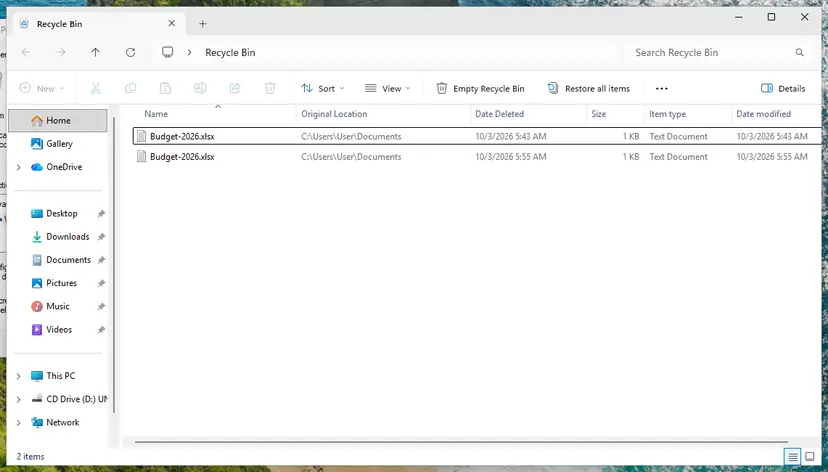
If you deleted a photo or the wrong files by mistake, restore them from the Recycle Bin: Recover deleted files (Recycle Bin, backups, OneDrive). On a USB stick or a network drive, check the selection twice before you delete, because a deleted file may not pass through the Recycle Bin there.
It worked if: The folder holds only pictures and videos, and each of them opens as before.
If not: A photo is missing afterwards: open the Recycle Bin, sort by date deleted and restore it, then repeat the selection more carefully.
When the edited version of a photo cannot be recovered
Sometimes the honest answer is that the edit is gone and the quickest way forward is to edit the photo again. These are the cases.
- The photo left the Photos library long ago. Apple keeps a deleted photo in Recently Deleted for 30 days. After that it is deleted permanently, and with iCloud Photos the deletion reaches every device.
- The edit was reverted. Revert to Original removes the edit, and with iCloud Photos the change is saved across all your devices.
- Only the original and its AAE file on a PC are left. The recipe is there, but no Windows or Android program reads it. Apple documents AirDrop with All Photos Data as the way to move an original with its edit history between Apple devices. It does not document rebuilding an edit from a loose pair of files.
- Only the AAE file is left. It never held the picture. If the photo was deleted from the PC, look for the photo itself in the Recycle Bin or a backup.
- The edit was made by an app you no longer have. Apple's documentation explains that an app continues an edit only when it understands the format in the adjustment data. The picture is still fine, but that edit cannot be reopened.
A converter cannot find a picture in a file that holds a kilobyte of text. Programs sold for this job either show you the original photo, which you already have, or ask you to load the photo as well and apply a generic filter. The edited picture comes from Apple's Photos, or from the E file where one was copied, both free.
Editing again is less painful than it sounds for the usual cases. A crop or a straighten takes little time in any photo editor on the PC, and you work from the untouched original that the PC already has.
How to move iPhone photos to a PC next time without losing the edits
We found no setting in Apple's documentation that stops Photos from creating AAE files, and you would not want one: the files are what makes every edit reversible. What you can change is how the photos travel.
- For edited photos, prefer iCloud for Windows or
iCloud.com/photosto a USB copy. They deliver the current version of each photo. - If you copy by USB, copy the
IMG_Efiles too and compare one pair before you clear the phone. - Before you sell or erase an iPhone, share or download the edited versions of the photos that matter, then check them on the PC.
- For photos that Windows opens without extra software, go to Settings > Camera > Formats on the iPhone and tap Most Compatible. New photos are then JPEG and new videos H.264.
On the iPhone, Settings > Apps > Photos has a choice for transfers to a Mac or PC. Apple describes it for formats only: media can be converted to JPEG or H.264 during a USB import unless you tap Keep Originals. It does not decide whether edits are applied, and Apple does not say that it removes AAE files.
If iCloud Photos is on and the phone stores space-saving versions, Apple says you must download the original, full-resolution photos to the iPhone before a USB import to a PC. Otherwise some pictures may be missing from the copy.
Common mistakes and myths about AAE files
| Claim | What is true |
|---|---|
| An AAE file is a photo in Apple's own format. | It is a text file with the edit record. The photo is the JPG, HEIC or MOV with the same name. |
| Renaming .AAE to .JPG makes it open. | Microsoft's own help says that changing an extension does not convert a file. The renamed file is still text. |
| An AAE file is a virus or a leftover of one. | It is a normal file written by Apple Photos. It contains no program code and cannot run. |
| Deleting AAE files damages the photos. | On a PC the photos do not depend on them. Only the edit record for that copy goes. |
| Deleting AAE files on the PC removes the edits on the iPhone. | The PC folder is a copy. The Photos library on the phone keeps its own record. |
| An online converter can apply the AAE file to the photo. | The inner format is not published by Apple. We found no tool that Apple or Microsoft documents for this. |
| AAE files appear only when you edit by hand. | The Camera can write them too, for example for slow-motion and Cinematic video. |
Most confusion comes from one habit: judging a file by its place in the folder. The AAE file sits between the photos and has the same name, so it looks like a broken picture. Read the extension and the rest follows.
Frequently asked questions
What is an AAE file?
An AAE file is the record of the edits made to one photo or video in Apple Photos on an iPhone, iPad or Mac. It is an XML property list, plain text, with the same name as the photo it belongs to, for example IMG_1234.AAE for IMG_1234.JPG. It holds no image. Apple's Photos uses it to rebuild the edited picture from the untouched original and to let you revert the edit. Windows and Android do not use it at all.
Is it safe to delete AAE files from my PC?
Yes. On a Windows PC nothing reads AAE files, and the photos next to them stay exactly as they are after you delete them. The one thing that goes is the edit record for that copy, which matters only if the folder will be brought back into Apple Photos one day. Before you delete, make sure you have the edited version of every photo you care about, from the IMG_E files, from the iPhone or from iCloud.com. Deleted files stay in the Recycle Bin for a while if you change your mind.
How do I open an AAE file on Windows 11 or Windows 10?
Right-click the file, select Open with > Choose another app and pick Notepad. You will see a short XML text with keys such as adjustmentFormatIdentifier and adjustmentTimestamp and a block of encoded data. That is all the file contains. There is no AAE file viewer that shows a picture, because the picture is in the JPG or HEIC file with the same name. To see the edited photo, look for an IMG_E file in the same folder, which users report is the edited copy, or get the photo from the iPhone or iCloud.
Can you convert an AAE file to JPG?
No. An AAE file has no image data, so there is nothing to convert, and renaming it to .JPG only produces a file that no viewer can open. What people want when they ask this is the edited photo as a JPG. There are three places to get it: the IMG_E1234.JPG file in the copied folder, which users report holds the edit, a share from the iPhone with the format set to Most Compatible, or a download from iCloud.com with Most Compatible selected. Apple documents the iCloud.com route for edited versions. Open the result of the other two to check.
What is an AAE file on an iPhone, and can I see it there?
On the iPhone it is the stored edit of a photo, kept by the Photos app next to the original. You cannot see or open it on the phone: Photos shows you only the edited picture and offers Revert to Original to remove the edit. The file becomes visible when the phone's photos are read as plain files, most often on a Windows PC over a USB cable, or when a photo is sent by AirDrop with All Photos Data turned on. You do not need to manage it on the phone.
Why is there an AAE file for a video?
Videos can carry adjustments too. A slow-motion video has an AAE file that marks which part plays slowly, and ExifTool's sample AAE file holds exactly such a slow-motion region with the identifier com.apple.video.slomo. Apple's Motion guide lists two AAE files next to every Cinematic mode clip sent by AirDrop. On a PC the plain MOV file plays without them. A video whose name contains an E, such as IMG_E0001.mov, has the effect baked in according to Apple.
Why do AAE files come back after I delete them?
They come back because the source still has them. Each time you copy or import the same photos from the iPhone, the AAE files are copied again, and a sync tool that mirrors a phone or a cloud folder restores them too. Deleting the files on the PC does not remove anything from the phone. To stop collecting them, bring the photos over through iCloud.com or iCloud for Windows, which deliver finished pictures, or leave the AAE files out when you copy from the phone by hand.
Do AAE files exist on a Mac or on Android?
On a Mac they stay hidden inside the Photos library, and you meet them only when photos arrive as loose files through Image Capture, AirDrop with All Photos Data or a manual copy. Apple's Motion guide shows exactly that file list. On Android the files appear when a folder of iPhone photos is copied to the phone, and Android has no use for them because they are not pictures. In both places the rule from Windows applies: a loose AAE file outside Apple Photos does nothing.
Is an AAE file dangerous, and is this page about anything else called AAE or AEE?
An AAE file from an iPhone is harmless: it is text, it cannot run, and antivirus tools have no reason to flag it. This page is only about that Apple Photos file. People who type AEE usually mean the same .AAE extension. Readers who searched in Indonesian (aae file adalah, .aae file apa) or Russian (aae формат) get the same answer: it is the edit record of an iPhone photo, safe to delete on a computer, and the page is written in English only.
What happens to my edits if I delete the AAE file and later copy the photo back to an iPhone?
The photo comes back as the unedited original, because the record of the edit is gone from that copy. Even with the AAE file we could not confirm from Apple that a loose pair of files is turned back into an edited photo on import. The transfer Apple documents for keeping the edit history is AirDrop with All Photos Data between Apple devices. If the edit matters, keep the finished picture as its own JPEG: that file looks the same on every device and needs no sidecar.
Sources
- Apple Developer Documentation: PHAdjustmentData (developer.apple.com)
- Apple Developer Documentation: PHAssetResourceType (developer.apple.com)
- Apple Support: Move Cinematic mode clips to your Mac before importing them into Motion (support.apple.com)
Did this fix work?
One click, no account. It tells the next reader which guides are worth their time.
Questions and experiences: What is .AAE file and should you delete it
Still broken, or found a fix we did not cover? Ask here: members and our editors answer. Reading is open; writing needs a free account.
…