
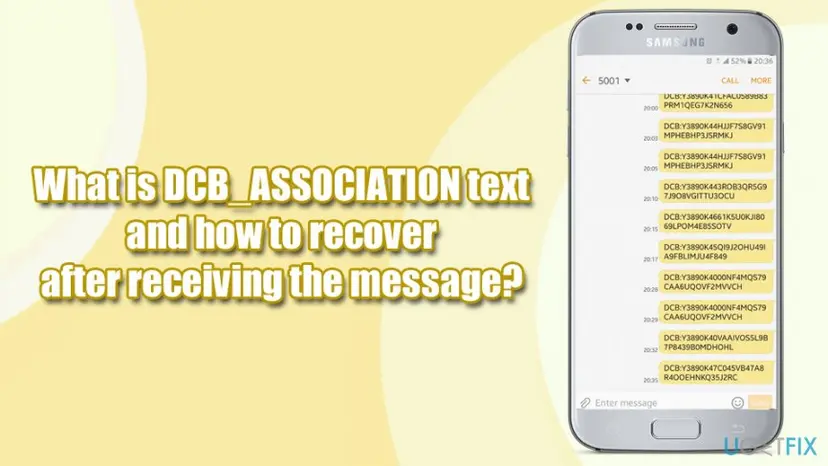
What is DCB_ASSOCIATION text and how to recover after receiving the message?

Prefer to fix it yourself? The manual steps follow.
- 6methods
- 10 to 20 minutes
- Easy
Applies to Android phones and tablets with a SIM card and the Google Play Store
6 methods in this guide
- The first five minutes
- What the text means
- Why your phone sent it
- Scam or not
- The short numbers
- Your chances
- The methods
- 1. Check payment methods
- 2. Check orders and the bill
- 3. Remove carrier billing
- 4. Report unknown charges
- 5. Secure the Google account
- 6. Block it at the carrier
- What cannot be recovered
- Prevent unwanted charges
- FAQ
Hello, I have received a message that says the following: "DCB_ASSOCIATION: 149427a0982c12478497b8a". I have no clue what triggered this message. Is it a scam? Do I need to do anything after receiving this SMS? Please help.
DCB_ASSOCIATION is a text message that your Android phone sends to your mobile carrier when Google Play sets up mobile phone billing, also called direct carrier billing (DCB). It is a setup message, not a receipt and not a charge, and on its own it is not a sign of fraud. Check your Google Play payment methods and order history first.
The DCB_ASSOCIATION text is generated automatically to enrol your phone number in mobile phone billing for Google Play, as Google's own help page says. Nothing is charged by the text itself. Open the Play Store app, tap your profile icon, then Payments & subscriptions > Payment methods and see whether your carrier is listed. Then open Budget & history. If you find no unknown orders, you have lost nothing. If you find some, report them within 60 days.
| What was lost | Usually nothing. The text only links a phone number to a Google account for billing. Money is at risk only if purchases you did not make were then charged to your phone bill or prepaid balance. |
|---|---|
| Where the data is | The evidence is in three places: Play Store > profile icon > Payments & subscriptions > Payment methods, the order list under Budget & history (also at payments.google.com under Activity), and your carrier bill. |
| Chances | Of getting money back: possible for a carrier billing charge reported within 60 days, through Google or the carrier. After 60 days only the carrier's fraud department can act. If there is no charge, there is nothing to recover. |
| First thing to do | Do not reply to the text and do not tap links in any follow-up message. Check the payment methods and order history of every Google account signed in on the phone. |
| What DCB stands for | Direct carrier billing. Google Play Help calls it mobile phone billing. UK carriers call it Charge to Bill (EE, Vodafone) or ThreePay (Three). |
| Who sends the text | Your own phone, to a number of your carrier. Google's developer documentation calls it SMS-MO authentication: a mobile originated SMS. |
| Works on | Android only. Google says mobile phone billing is available only in the Google Play Store app, not on the Play website, and not on rooted devices. |
| Time and cost | 10 to 20 minutes on the phone. Every check and every report on this page is free. |
| Stops working when | For refunds through Google: 60 days after a mobile phone billing charge, 120 days after a card or PayPal charge. |
Facts checked on 14 October 2026. Steps written for Android with the current Google Play Store app, following Google's help pages as published in October 2026; we did not trigger the message on a test phone.
The first five minutes after a DCB_ASSOCIATION text: what to do and what not to do
The real message is a line that starts with DCB or DCB_ASSOCIATION: followed by a code, and it asks you for nothing. If a later text, call or email refers to it and asks you to tap a link, to reply with a code or to pay, that second message is not part of Google's setup. Treat it as phishing.
- Open the Play Store app, tap your profile icon and open Payments & subscriptions > Payment methods.
- Open Payments & subscriptions > Budget & history and read the list of orders.
- Repeat both checks for every Google account that is signed in on the phone, including a child's or a partner's account.
- Ask the people who use the phone whether they tried to buy something or started a free trial around that time.
- Do not reply to the text and do not forward the code to anyone who asks for it.
- Do not tap links in any message that claims to be about the DCB_ASSOCIATION text.
- Do not reset the phone to factory settings. It deletes your data and does not undo a charge or a saved payment method.
- Do not wait with a charge you do not recognise. Google's time limit for mobile phone billing is 60 days.
What DCB_ASSOCIATION means: the text that enrols your number in Google Play carrier billing
DCB stands for direct carrier billing: you buy an app, a game item or a subscription on Google Play, and the price is added to your phone bill or taken from your prepaid balance. "Association" is the step that links, or associates, a Google account with a phone account at the carrier.
Google Play Help, on the payment methods page of every country with carrier billing: "You may see an SMS (text message) starting with "DCB" or "DCB_Association" on your phone when you sign up for mobile phone billing. The message is automatically generated and sent to complete enrollment in mobile phone billing for your Google Play account."
Google's developer documentation for carriers explains the mechanism: the goal is to prove that the user has control of the SIM card tied to the carrier account, and the proof is a text message sent from the phone itself.
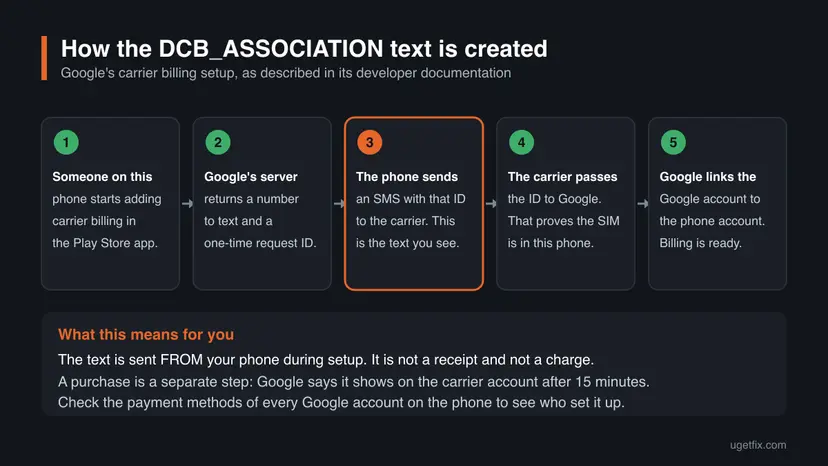
- The user selects the carrier as a payment method to add in a Google app on the phone.
- The app asks Google's server to start the SMS challenge.
- Google's server returns the SMS instructions: a destination number and a body that contains an Authentication Request ID.
- The app on the phone sends that SMS to the carrier. This is the message you find in your sent texts.
- The carrier's server reports the Authentication Request ID back to Google.
- Google validates the ID. After that the association step creates a long-lived token that stands for the link between the Google account and the carrier account.
- Direction
- Outgoing. The phone sends it, so it normally sits in your sent messages, addressed to a short number.
- Content
DCB_ASSOCIATION:orDCB:followed by a string of letters and digits. No words, no link, no price.- What it does not prove
- That anything was bought. A purchase is a separate request to the carrier. Google says a charge shows on the carrier account after 15 minutes.
Google's developer pages describe the SMS body as containing an Authentication Request ID, and its older specification as carrying a Google user token. They do not print the literal text DCB_ASSOCIATION. That the code after the colon is this ID is our reading of the two Google sources together, not a quotation.
Why the DCB_ASSOCIATION text was sent from my phone when I did nothing
The flow in Google's documentation starts in an app on the phone that holds the SIM card. By this design, a person who only knows your Google password and sits at another device should not be able to make your phone send the text. So ask what happened on this phone.
- You chose the carrier in the payment setup. In Google's flow the check starts when the carrier is selected as the method to add. That can be one tap on a suggested option during a first purchase or a free trial. Google does not document whether the Play Store ever starts the check earlier.
- Someone else used the phone. A child in a game or a friend who borrowed the phone can start the same setup. EE's help page says the same about charges: someone with access to the handset may have paid.
- A second Google account is on the phone. The link is made per Google account. Google's documentation says two Google users can link to the same carrier account, each with a separate token. The carrier may be saved on an account you do not look at.
- The setup was repeated. The summary of Google's developer page says the request can be sent again by SMS when the session is close to expiring or when the user resends it. That fits a thread with several codes one after another.
Do not guess. Methods 1 and 2 show whether the enrolment was completed and whether anything was bought, and that decides the next step.
Is the DCB_ASSOCIATION text a scam? What is and what is not a sign of fraud
The text itself is a documented part of Google Play and of the carriers' billing services, so it is not a scam and not malware. EE describes the same step: "Google will automatically verify your mobile number before it can be added as a payment method." Judge what happened around the text.
| What you see | Sign of fraud? | Why |
|---|---|---|
One or a few DCB_ASSOCIATION: texts in your sent messages, to a short number. | No. | This is the enrolment message Google documents. Adding a payment method or starting a first purchase triggers it, and it carries no charge. |
| Your carrier is listed under Payment methods and you do not remember adding it. | Not by itself. | It means the enrolment was completed on this phone. Remove it if you do not want it (Method 3). |
| Orders in Budget & history that nobody in the household made. | Yes, check today. | Someone is buying with your Google account. Go to Methods 4 and 5. |
A charge on the phone bill that starts with GOOGLE* and matches no order in your account. | Yes, check today. | Your number may be linked to another Google account. EE notes that someone with access to the handset may have paid with their own account. |
| A device you do not recognise under Your devices in your Google Account. | Yes. | Google lists this as a sign that someone else may be using the account. |
| An incoming text, call or email that mentions the code and asks for a reply, a link tap or a payment. | Yes, phishing. | Google's message is sent by your phone and asks you for nothing. |
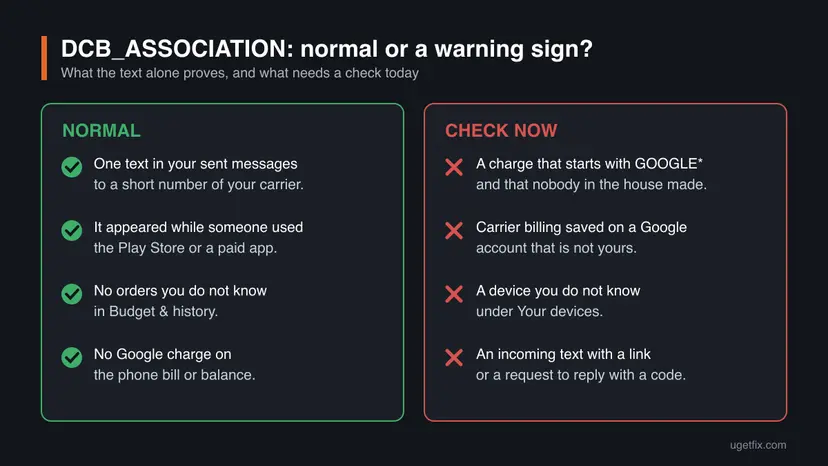
The text shows that carrier billing was being set up on this phone. Only an order or a charge that is not yours shows fraud. Judge by the order history and the phone bill, never by the text.
- To check or report a suspicious follow-up text, use the US Federal Trade Commission's advice: legitimate companies do not ask for account information by text, so contact the company through a number you know. In the United States, forward the scam text to 7726 (SPAM).
Which number the text goes to: 5495, 40406, 21725, 34664, 2060 and other short codes
The number is not Google's and it is not the same for everyone. In Google's documentation the destination of the SMS is supplied by Google's server for the carrier in question, so each carrier has its own number. That is why readers search for so many different ones.
We found no page from Google or from a carrier that lists 5495, 40406, 21725, 34664, 2060, 806545 or +447860006999 as its carrier billing number. Readers reach this page with these numbers, often together with the Philippines, Kenya or the United Kingdom, so other people clearly see the text go there. Ask your carrier before you trust any list.
| Country | Carriers Google lists for mobile phone billing | DCB note on the page |
|---|---|---|
| United Kingdom | Three, EE, O2, Vodafone. | Yes. |
| Philippines | Dito, Smart Communications, Sun. | Yes. |
| Spain | Orange, Vodafone. | Yes. |
| South Africa | MTN, Telkom, Vodacom. | Yes. |
| Kenya | None. Google lists only the carrier wallet Airtel Money. | No. |
| United States | None. Google says US Cellular stopped being accepted on 29 January 2026. | No. |
- To identify a number in the UK, use the carrier's own lookup. Three has a ThreePay and shortcode checker, Vodafone has a Charge Checker, and EE's Charge to Bill page has a search by the 5 or 7 digit reference on the bill.
- Elsewhere, call the carrier's customer service from the phone that sent the text and ask which service the number belongs to.
The chances of getting money back, by what happened after the text
The text does not take money, so in most cases there is nothing to recover. The table covers the cases where a charge followed. Nobody publishes success rates for these claims, so it uses words and Google's time limits.
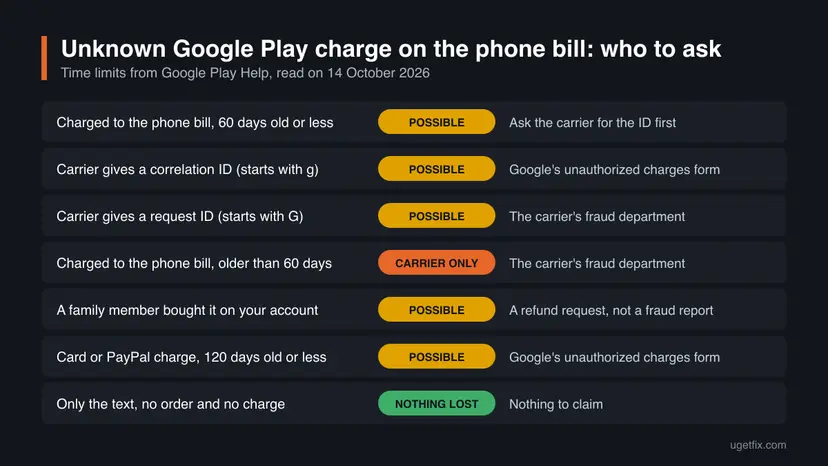
| What happened | Chances | Start with |
|---|---|---|
| Only the text. No carrier under Payment methods, no unknown orders, no charge. | Nothing was lost. | Methods 1 and 2, then stop. |
| The carrier is saved as a payment method, but there are no unknown orders. | Nothing was lost. | Method 3 if you do not want it. |
| An unknown order on your account, charged to the phone bill 60 days ago or less. | Possible. | Method 4. |
An unknown GOOGLE* charge on the phone bill, 60 days old or less, with no order in your account. | Possible. | Method 4, starting with the carrier. |
| A carrier billing charge older than 60 days. | Unlikely through Google. Possible only through the carrier. | Method 4, the carrier's fraud department. |
| A child or another family member bought something on your account. | Possible. | Method 4, as a refund request. |
| Purchase verification was turned off and someone with the phone bought things. | Unlikely. | Method 4, then the prevention section. |
A charge that does not start with GOOGLE on the bill. | Not through Google. | The carrier. It did not come from Google Play. |
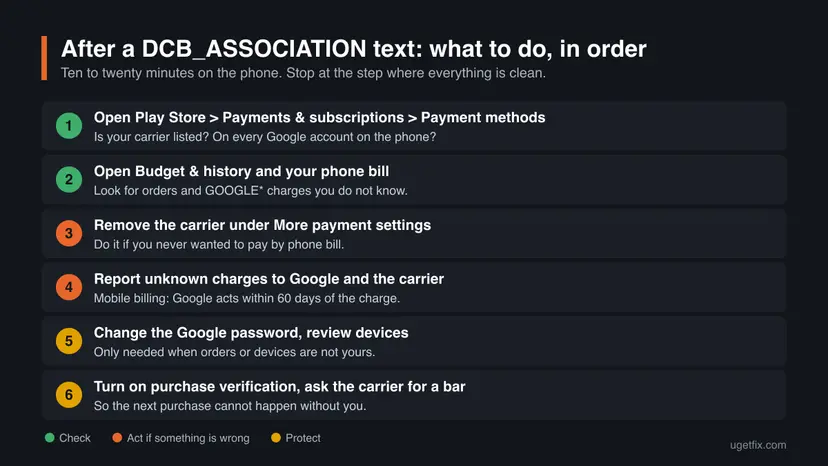
How to recover after a DCB_ASSOCIATION text: check, remove, report, protect
Go in this order. Methods 1 and 2 are checks that change nothing, and for most people they are the whole job. Methods 3 to 6 are for the cases where a check shows a payment method, an order or a charge that you did not want.
| What you see | Start with |
|---|---|
| The text only, and you want to know whether anything happened. | Method 1, then Method 2. |
| Your carrier is listed as a payment method and you want it gone. | Method 3. |
An order or a GOOGLE* charge that nobody in the household made. | Method 4, then Method 5. |
| A device or a sign-in you do not recognise in your Google Account. | Method 5. |
| A child keeps buying, or you never want purchases on the phone bill. | Method 6 and the prevention section. |
Method 1. Check whether carrier billing was added to your Google Play payment methods
3 minutesNo riskYou saw the text and do not know whether the setup behind it was completed.
The text is the first half of the enrolment. If it was completed, the carrier is saved as a payment method on the Google account that started it. That screen tells you which account it was, which the text never does.
- Open the Play Store app on the phone that sent the text.
- Tap your profile icon at the top right.
- Tap Payments & subscriptions, then Payment methods.
- Read the list of saved methods. Carrier billing is named after the carrier. EE, for one, calls the option EE Billing.
- Switch to every other Google account that is signed in on the phone and repeat the check.
- Write down which account has the carrier saved, if any.
A supported carrier can also be offered in the list of methods to add. That only means your carrier takes part. What matters is whether it appears among the methods already saved. We have no current screenshot of this screen, so go by the wording on your own phone.
- The carrier is saved and you added it. The text is explained.
- The carrier is saved and you did not add it. Someone completed the setup on this phone. Do Method 2 at once, then remove it with Method 3.
- The carrier is not saved on any account. The setup was started and not completed, or it was removed again. Still do Method 2.
It worked if: You know for each Google account on the phone whether your carrier is a saved payment method.
If not: If the Play Store shows no carrier option at all, your carrier or plan is not supported. Go to Method 2 and check the phone bill anyway.
Method 2. Check your Google Play order history and your phone bill for charges
5 minutesNo riskAlways after Method 1, whether or not the carrier is saved as a payment method.
Fraud shows as an order or a charge, never as the text. Google keeps every Play order in one list and sends a confirmation email for each one, and the carrier shows each charge on the bill. Comparing the two finds every case in the chances table.
- In the Play Store app, tap your profile icon, then Payments & subscriptions, then Budget & history.
- Read the orders around the date of the text and after it. Free trials and in-app purchases are listed too.
- Open
payments.google.comin a browser, tap the menu at the top left and open Activity for single orders and Subscriptions & services for subscriptions. - Open your carrier's app or your latest bill and look for charges that begin with
GOOGLE*, followed by an app name, a developer name or a content type. - On a prepaid plan, compare your balance history with the dates of the Play orders.
- Repeat steps 1 to 3 for every other Google account on the phone.
Then the purchase was made with a different Google account. EE says it directly: if you cannot find the charges in your store account, someone with access to your handset may have paid with their own account. On an EE bill such charges are under Extra Charges, as Services from other companies. Ask at home first, then go to Method 4.
It worked if: Every order in the list and every GOOGLE* line on the bill is something you or your family bought, or there are none at all.
If not: If you find an order or a charge that nobody made, go to Method 4 today and then to Method 5. If you only want the carrier gone, go to Method 3.
Method 3. Remove carrier billing from your Google Play payment methods
3 minutesLow riskThe carrier is saved as a payment method and you do not want to pay through the phone bill.
This is what people mean by removing DCB association. The text cannot be unsent, but the link it created is a saved payment method, and Google lets you delete that like a card. Without it, the Play Store cannot charge your phone account.
- On the phone, open the Play Store app, tap your profile icon and go to Payments & subscriptions > Payment methods. The same list opens at
play.google.com/store/paymentmethods. - Tap More payment settings.
- If asked, sign in to Google Pay at
payments.google.com. - Find your carrier in the list of payment methods.
- Under it, tap Remove, then Remove again to confirm.
- Go back to Payment methods in the Play Store and check that the carrier is no longer among the saved methods.
A subscription that is paid through the carrier needs another payment method before you remove this one, or its next renewal can fail. Your subscriptions are listed at play.google.com/store/account/subscriptions.
Removing the method deletes the link on Google's side for this Google account, so repeat it on a second account if the carrier was saved there. We could not confirm what the carrier keeps on its side.
It worked if: The carrier is gone from the saved payment methods of every Google account on the phone.
If not: If there is no Remove under the carrier, or it comes back, contact Google Play support from the Help page and ask your carrier for a bar as in Method 6.
Method 4. Report charges you do not recognise to Google and to the carrier
20 minutes, an answer typically within 7 business daysNo riskMethod 2 found an order or a GOOGLE* charge on the phone bill that nobody in the household made.
A carrier billing charge has two parties, so Google needs the carrier's ID of the transaction before it can look at it. Google's help page sets the route by the kind of ID the carrier gives you and by the age of the charge.
- Check that the charge is from Google Play: it is in your order history, or it starts with
GOOGLE*on the bill. - Contact your carrier and ask for the correlation ID or the request ID of that charge.
- If you get a correlation ID, which starts with a small letter g followed by numbers such as
g1234567890, fill out Google's form atpayments.google.com/payments/unauthorizedtransactions. - If you get a request ID, which starts with a capital G followed by letters and digits, report the charge to the carrier's fraud department. Google sends this kind of case to the carrier.
- If the charge is more than 60 days old, go straight to the carrier's fraud department.
- Submit a separate claim for each payment method that was used. Google says to expect an email update typically within 7 business days.
- Keep the Claim ID from Google's email. On the same form, Check your claim status shows the result when you enter your email address and that ID.
- If the charge went to a card or PayPal instead, the same form applies and Google's limit is 120 days from the transaction.
- If a family member made the purchase, it is not fraud. Go to
play.google.com, click your profile picture, then Payments & subscriptions > Budget & order history, click Report a problem next to the order and ask for a refund in the form. - If the charge does not begin with GOOGLE, it did not come from Google Play. Google says to contact the fraud department of the payment method, here the carrier.
It worked if: You have a Claim ID from Google or a case number from the carrier, and later a refund or a credit on the phone bill.
If not: If Google refuses the claim, ask the carrier's fraud department to review the charge and read the section on what cannot be recovered. Do Method 5 in any case.
Method 5. Secure the Google account that the purchases were made with
15 minutesLow riskThere are orders, devices or security events in your Google Account that are not yours.
The text needs the phone, but orders are made with the account. We could not confirm whether a saved carrier method can be used from a second device, so treat the account as the thing to protect. Google says a password change signs you out almost everywhere.
- Open the phone's Settings app, tap Google, then your name, then Manage your Google Account.
- Tap Security & sign-in. Under "How you sign in to Google", tap Password, enter a new password and tap Change Password.
- On the "Recent security events" panel, select Review security events. For anything that was not you, select No, it wasn't me and follow the steps on the screen.
- Tap Your devices, then Manage devices. For a device you do not know, select Don't recognize a device?.
- Turn on 2-Step Verification, so a stolen password alone is no longer enough to sign in.
- Check the recovery phone number and the recovery email address, and correct them if someone changed them.
- If you cannot sign in any more, use Google's account recovery page at
accounts.google.com/signin/recovery. - If you used the same password on other sites, change it there as well, as Google's page for a compromised account says.
It worked if: Only your own devices are listed under Your devices, the security events are all yours, and no new unknown orders appear.
If not: If unknown orders keep coming after the password change, remove every payment method with Method 3 and contact Google Play support and your carrier the same day.
Method 6. Ask your carrier to block or limit charges to the phone bill
5 to 15 minutesLow riskYou never want purchases on the phone bill, or a child uses the phone.
Removing the payment method works per Google account, and it can be added again from the phone. A bar at the carrier works on the phone number itself, so no store and no Google account can charge it until the bar is lifted.
- Find your carrier's name for the service: Charge to Bill, ThreePay, carrier billing, mobile payments or premium services.
- Ask for a bar on it through the carrier's app, chat or phone line, using the phone number that sent the text.
- If you want to keep the service, ask for a monthly spending limit on it.
- Ask the carrier to confirm the bar in writing, by text or email.
- Ask how you can see that the bar is active. EE says a barred number gets an error when Charge to Bill is tried.
| Carrier (UK) | How to block or limit | Stated limits |
|---|---|---|
| EE | Text BAR to 150, or call EE. Text UNBAR to 150 to lift it. | £40 per transaction, £240 a month. |
| Vodafone | Apply a bar to stop all charges, or set a monthly limit per handset in My Vodafone Spend Manager, which does not cover every type of purchase. | £40 per transaction, £240 in a billing period. |
| Three | The ThreePay page names no bar, so contact Three. ThreePay is no longer available on Pay As You Go. | £40 per transaction, £240 a month. |
EE states that having a Spend Cap will not prevent Charge to Bill charges, so ask specifically for the bar on charges to the bill. A bar also stops things you may use, such as charity donations by text.
It worked if: The carrier confirms in writing that charges to the bill are barred for your phone number.
If not: If the carrier cannot bar the service, keep the payment method removed (Method 3) and turn on purchase verification as described in the prevention section.
What cannot be undone or recovered after a DCB_ASSOCIATION text
Know the limits before you write to Google or the carrier. In these cases a claim is unlikely to succeed, and no app or paid service changes that.
- The text itself. It was sent and cannot be recalled, and it does not need to be: the link it creates is removed with Method 3. Blocking the short number does not stop it either, because a block works on incoming messages.
- A carrier billing charge older than 60 days, through Google. Google says it can only take action on mobile carrier billing transactions within 60 days. After that the carrier's fraud department is the only door.
- Purchases made while purchase verification was off. Google's refund policy says that if you do not protect your account with authentication, it usually cannot issue a refund. Its verification page adds that you assume responsibility for those charges.
- Purchases made by someone you gave the account or the phone to. The same policy excludes cases where you gave your account or payment details to someone else. A refund request can still be tried for a recent order.
- A charge that is not from Google Play. If the line on the bill does not start with
GOOGLE, Google cannot help. That is a matter between you, the carrier and the merchant.
The two reports that can return money are free: Google's unauthorized charges form and the carrier's own fraud or billing team. A person or a site that offers to get a refund for a fee, or asks for remote access to the phone to remove DCB_ASSOCIATION, is not connected to Google or to your carrier.
How to make sure nobody can buy on your phone bill without you
Purchase verification is the setting that decides whether a tap on a price is enough. Google's refund policy leans on it, so check it even if nothing was bought this time.
- Open the Play Store app and tap your profile picture at the top right.
- Tap Payments & subscriptions, then Purchase verification.
- Tap Verification requirement or Verification frequency, whichever your region shows.
- Choose Always, or All payment methods where the setting is based on the payment method, and confirm the change.
- On the same screen, turn on Biometric verification if you prefer a fingerprint or face check to typing the Google password.
| Setting | What Google says it does |
|---|---|
| Always (the default) | Verification is required for every purchase through Google Play's billing system, including within apps. |
| Never | No verification for any purchase. Google warns that you assume responsibility for all charges, including unauthorized ones. |
- To stop new DCB_ASSOCIATION texts, keep another payment method such as a card saved in Google Play and do not tap the carrier option. The text is sent only when a carrier setup starts.
- If you share the phone, do not choose the screen lock PIN for purchases. Google points out that anyone who knows the PIN can then verify purchases for all accounts on the device.
- Keep Play Protect on. In the Play Store, tap your profile icon, then Play Protect, then Settings, and check that Scan apps with Play Protect is on. Google says it is on by default.
- Review which apps can send texts. Open Settings > Security & Privacy > Privacy > Permission manager, tap SMS and set Don't allow for any app that has no reason to send messages.
Frequently asked questions
What does the "DCB_Association" message mean?
It means that mobile phone billing for Google Play was being set up with your phone number. DCB stands for direct carrier billing, and the association is the link between a Google account and your account at the carrier. Google Play Help says the message is automatically generated and sent to complete enrollment in mobile phone billing. It is a line with a code and nothing else: not a receipt, no price, and no proof that anything was bought.
Is the DCB_ASSOCIATION text a scam?
No. The text is a documented part of Google Play's carrier billing, and carriers such as EE describe the same number check on their help pages. Your own phone sends it, and it asks you for nothing. What can be fraud is what follows: an order in your Google Play history that nobody made, or a charge on the phone bill that starts with GOOGLE and that you cannot explain. A separate incoming message that mentions the code and asks for a reply or a link tap is phishing.
I'm receiving a DCB_Association text message from my phone. Is this normal?
Yes, it is normal that the text is sent from your phone and not to it. Google's documentation for carriers describes a mobile originated SMS: the phone sends a one-time ID to the carrier, which proves that the SIM card is in that phone. It happens when someone on the phone starts adding the carrier as a payment method, often during a first purchase or a free trial. If nobody used the phone at that time, check the payment methods and the order history.
How do I remove DCB association from my phone?
Remove the carrier from your Google Play payment methods. In the Play Store app, tap your profile icon, then Payments & subscriptions > Payment methods > More payment settings. Sign in to Google Pay if asked, find your carrier and tap Remove, then Remove again. Do this for every Google account on the phone that has the carrier saved. The old text can stay in your messages or be deleted. To make sure the link cannot be created again, ask your carrier for a bar on charges to the bill.
Does the DCB_ASSOCIATION text mean I was charged?
No. The text belongs to the setup of the payment method, and a purchase is a separate step. Google says a purchase with mobile phone billing shows on your carrier account after 15 minutes. To be sure, open the Play Store app, tap your profile icon, go to Payments & subscriptions > Budget & history, and look at your phone bill for lines that start with GOOGLE. We could not confirm whether carriers bill the text itself as an ordinary SMS.
What number is 5495, 40406 or 21725 in a DCB_ASSOCIATION text?
We could not confirm these numbers from Google or from any carrier, so we will not name an owner. The destination is set per carrier, which is why people see different numbers: 5495 in searches from the Philippines, 21725 from Kenya, 40406 or +447860006999 from the United Kingdom, and also 34664, 2060 and 806545. Ask your carrier which service the number belongs to. In the UK, Three, Vodafone and EE each have a lookup tool for short codes and charges.
Can I get a DCB_ASSOCIATION text on an iPhone?
Not from Google Play. Google says mobile phone billing is only available in the Google Play Store app, which is an Android app, and not on the Play website. UK carriers offer a separate charge to bill service for Apple's App Store, and we found no document that mentions a text with this wording for it. If an iPhone shows the message, check whether the SIM card was in an Android phone before, and ask the carrier what the number is.
Should I delete the DCB_ASSOCIATION message, and is the code secret?
You can delete it or keep it, and neither changes anything. The link between the Google account and the phone account is stored by Google and the carrier, not in the message. In Google's documentation the code is a one-time request ID that its server validates during setup, and nothing in the documents gives it a use afterwards. Nobody needs it from you. If a caller or a message asks you to read out or forward the code, refuse.
What does DCB_ASSOCIATION mean in Spanish, Arabic or other languages?
The same thing everywhere. The message is technical and is not translated. Readers who search for "que es dcb_association" or "dcb رسالة" see the same line as English speakers: the text an Android phone sends to the carrier when Google Play sets up payment through the phone bill. What differs by country is the carrier and the number. Google lists Orange and Vodafone for Spain, for example. This page is in English only.
Does Google Play still offer carrier billing in the United States?
Not according to Google's own list. The United States page of Accepted payment methods on Google Play, read on 14 October 2026, has no mobile phone billing section. It carries a notice that US Cellular would no longer be accepted for Google Play purchases or subscriptions from 29 January 2026. So a DCB_ASSOCIATION text on a US number is most likely an old one. Check its date, and ask your carrier about a new one.
Sources
- Google Play Help: Accepted payment methods on Google Play (United Kingdom page: mobile phone billing, the DCB note, troubleshooting) (support.google.com)
- Google Play Help: Accepted payment methods on Google Play (United States page: no mobile phone billing, US Cellular notice) (support.google.com)
- Google for Developers, Carriers API: SMS-MO Authentication Flow (developers.google.com)
Did this fix work?
One click, no account. It tells the next reader which guides are worth their time.
Questions and experiences: What is DCB_ASSOCIATION text and how to recover after receiving the message
Still broken, or found a fix we did not cover? Ask here: members and our editors answer. Reading is open; writing needs a free account.
…