How to fix
What is Adobe GC Invoker Utility? Can I stop AdobeGCClient.exe process
on Windows
Discover the role of Adobe GC Invoker Utility and learn how to safely stop AdobeGCClient.exe on Windows 10 and Windows 11. Expert-tested insights await!

Why does What is Adobe GC Invoker Utility? Can I stop AdobeGCClient.exe process occur?
- AdobeGCInvokerUtility is installed with Adobe products
- AdobeGCClient.exe checks for licensing issues
- High demand for Adobe products leads to piracy
- Subscription model makes it difficult for users to afford licenses
- Illegitimate versions of Adobe software are often downloaded from torrent sites
Repairs Windows system files, removes malware, and restores a clean OS state — without reinstalling.
Hi, I found Adobe GC Invoker Utility running in the background. Is this legitimate? Should I disable it?
Adobe GC Invoker Utility is an application that can be found in C:/Programs Files(x86)/Common Files/Adobe folder. It creates a startup instance and is set to be started with every Windows boot. Once launched, it runs a background process known as AdobeGCClient.exe.
Both of these can be found on any Windows system that has Adobe products installed, such as Photoshop or Premiere Pro. Many users had questions about what this process and the startup item are for. To put it simply, AdobeGCClient.exe is a part of Adobe Software Integrity Service validation testing - it checks for issues related to licensing process.
It is a well-known fact that Adobe products are in very high demand, as they are feature-packed and considered among the best tools for a picture, video, and other file editing available. While the desire to have such powerful utilities is strong for many, application prices are something that not all users can handle.
Currently, everyone who wants to purchase a license to use Photoshop or another Adobe program would have to sign up for a monthly subscription. In other words, it is not a one-off payment anymore, and as soon as users stop paying, they lose access to all products immediately.
Due to the relatively high subscription price, many users resort to pirating Adobe's software, primarily via torrent websites. While the action is illegal and potentially dangerous, many people still prefer risking it rather than paying the price of the full product.
And that is where Adobe GC Invoker Utility comes along. It is installed along with any Adobe product and would launch the AdobeGCClient.exe process. In other words, it makes it much more difficult to install illegitimate versions of Adobe programs.
Does Adobe GC Invoker Utility and AdobeGCClient.exe have to be running in the background?
As already mentioned, illegitimate versions of various Adobe products are downloaded from various software distribution websites. They can be found on many popular torrent websites such as The Pirate Bay. What many users don't think is true that these versions might often tamper with much more than initially thought.
While you might install a pirated version of the app, a malicious process of malware can also be implemented without your knowledge. While it is unlikely that AdobeGCClient.exe and Adobe GC Invoker Utility can indicate something malicious, it is always important to investigate, as malware authors can name malicious processes and files as anything. To be precise, the process is unlikely to be fake, although it could be the case if you downloaded the pirated version of an app.
If both of these are legitimate, they do not pose any danger for your computer and should be left running in the background. If you disable Adobe GC Invoker Utility, it will simply reappear as soon as you reboot your PC.
Overall, you should not disable or turn off these processes, as any tampering might lead to your Adobe programs failing to start or malfunction during the operation.
How to stop Adobe GC Invoker Utility
If you use Adobe software regularly, you should not disable Adobe GC Invoker Utility and let it run in the background. However, there are more reasons why users asked for these to be removed. The main reasons are:
- Anti-malware software detects the process as malicious, causing various compatibility issues;
- AdobeGCClient.exe high CPU issues were observed;
- Various errors, including "MSVCP140.dll is missing" or "Bad image" might occur.
Therefore, if you are experiencing any of the issues listed above, you might want to stop AdobeGCClient.exe process along with GC Invoker Utility for good. Check the solutions below.
Fix 1. Reinstall the program
If you are using a legitimate copy of an Adobe product, a software bug could be causing high CPU usage when running. Besides, the missing DLLs can also be fixed after reinstalling the related app.
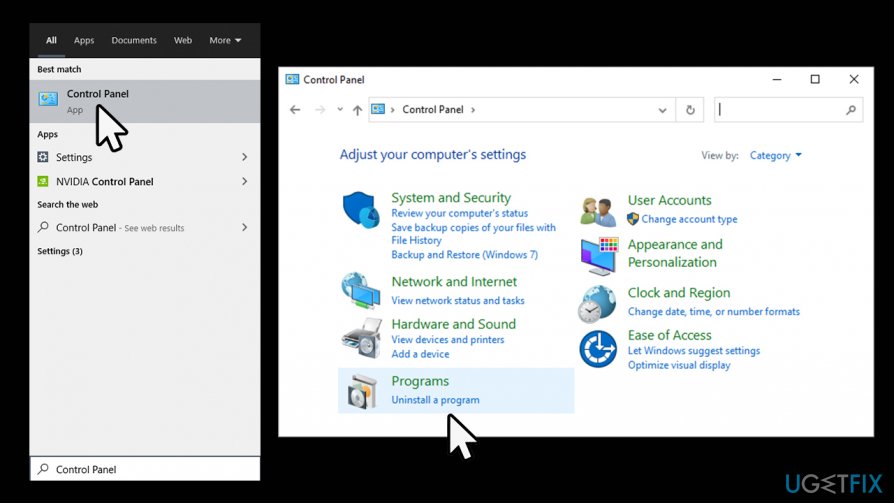
- Type in Control Panel in Windows search and press Enter
- Select Programs > Uninstall a program
What is adobe gc invoker utility stop adobegcclient exe process access contol panel - Right-click on the Adobe product and select Uninstall
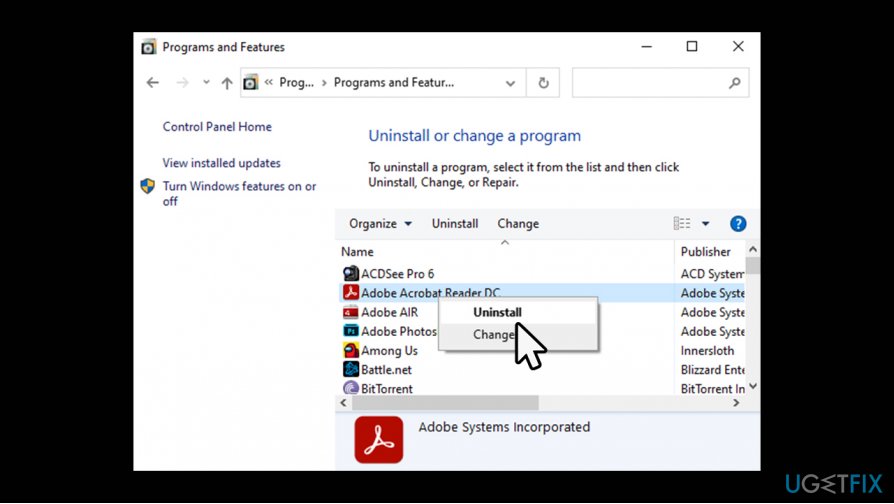
What is adobe gc invoker utility stop adobegcclient exe process uninstall a program - Follow on-screen instructions
- Reboot the PC and then install the app anew.
Fix 2. Use system repair tool
In some cases, various DLL[ref en-1] and similar errors can be caused by underlying problems with Windows operating system itself. For example, system file corruption is a known culprit of malfunctioning programs. Therefore, if you suffer from various errors related to your Adobe programs, you should employ an automatic repair tool [d1]. We recommend this app because it can determine Windows error causes and fix them automatically. Consequently, many problems, such as high CPU usage, might be gone right away.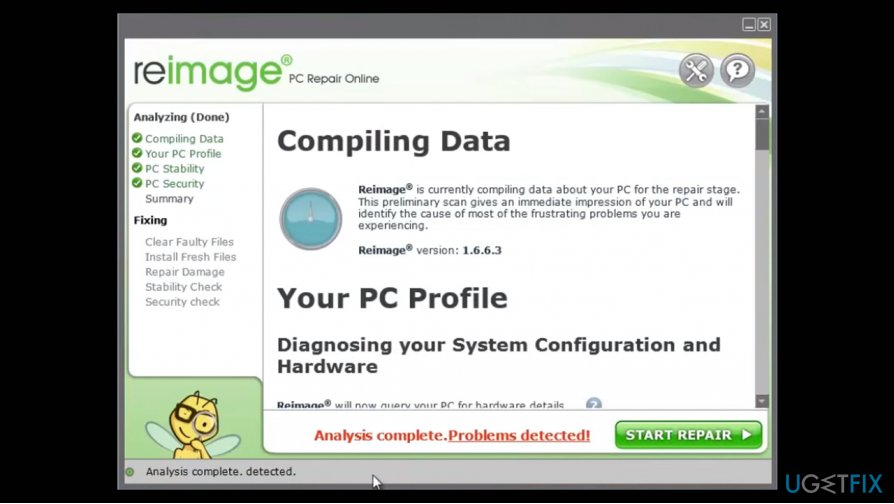
Fix 3. Fix a false positive
If you have downloaded a legitimate version of the app and your anti-malware is showing you AdobeGCClient.exe being malicious, you need to either make an exception via the settings of your security software or simply opt for a different anti-virus altogether.
In most cases, false positives are resolved relatively quickly by security software vendors, as long as the issue is reported. Therefore, it is up to you what to do next. If you are otherwise happy with the anti-malware you are using now, simply add an exclusion. You can find the precise steps on how to do that by visiting the official website of your security product.
Just to remind you, you can find the file in the following location:
C:/Programs Files(x86)/Common Files/Adobe
Fix 4. Do not use pirate software
If you are using a pirated version of the Adobe program, you should immediately terminate it and perform a full system scan with reliable anti-malware. Even if you are not having any problems with AdobeGCClient.exe or Adobe GC Invoker Utility, some malicious code could be running in the background due to tampered installer you used before. Never ignore warnings from security software as you might be infected with Pola ransomware[ref en-2] or other dangerous malware.[ref en-3]
Fix 5. Disable Adobe GC Invoker Utility Startup
There is an easy way to disable GC Invoker Utility via the Task Manager.
- Press Ctrl + Shift + Esc on your keyboard
- When Task Manager shows up, press More details
- Now go to the Process tab
- Right-click on Adobe GC Invoker Utility and select Disable.
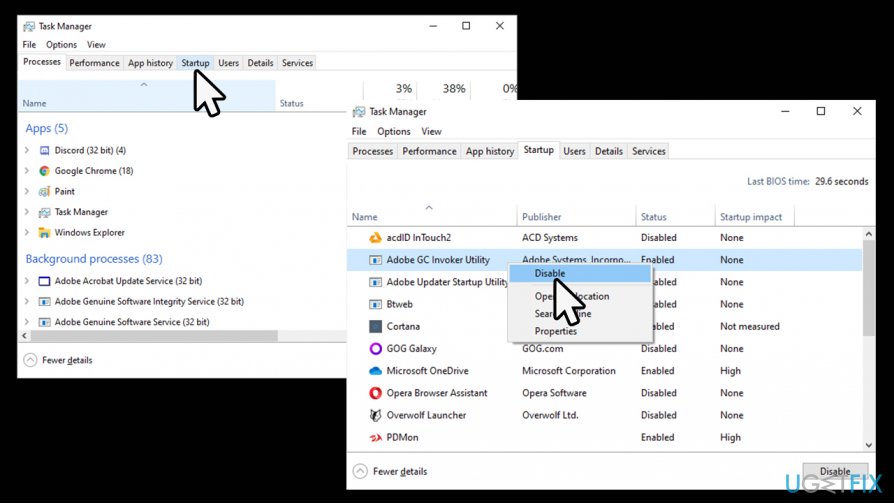
What is adobe gc invoker utility stop adobegcclient exe process disable gc invoker utility
Bottom line
To address concerns about Adobe GC Invoker Utility, users can consider disabling the startup item or uninstalling Adobe products if they are not needed. If issues persist or if users are unsure about the legitimacy of their software, they should seek further assistance or consult Adobe support.
Frequently asked questions
The Adobe GC Invoker Utility is responsible for managing the Adobe Creative Cloud applications and ensuring they are updated and licensed properly on your Windows system.
Yes, you can stop the AdobeGCClient.exe process if you're not using Adobe applications frequently, but doing so may prevent automatic updates and licensing checks for those apps.
To disable the Adobe GC Invoker Utility, you can use the Task Manager's Startup tab to prevent it from launching at startup or adjust the settings within the Adobe Creative Cloud application.




Report an issue
What's wrong with this guide? We review every report and update or remove content.
Report received — thank you. We'll review and fix it.
You need a free account to submit a report.
Be the first to comment