How to fix
Outriders crashes and freezes
on Windows
Resolve Outriders crashes and freezes on Windows 10 and 11 effortlessly with expert-tested solutions for smooth gameplay. Fixed in minutes!

What causes How to fix Outriders crashes and freezes?
- Game bugs
- Server connectivity issues
- System file corruption
- Missing DLLs
- Random Blue screens
Repairs Windows system files, removes malware, and restores a clean OS state — without reinstalling.
Hi, I have recently picked up Outriders on Steam, and I really enjoy the game. The unfortunate thing is that every time I use the inventory, the game crashes. This happens in both multiplayer and single-player modes. I am using GTX 1060 / 16 GB ran Windows 10 PC.
Outriders, developed by People Can Fly and published by one of the largest game studios, Square Enix, took the gaming world by storm. It is a science fiction first-person shooter that many people have been enjoying in single-player and multiplayer modes since its release on April 1, 2021. And, while each game launch is by default expected to have some issues, Outriders technical problems have been spoiling the fun for many - many negative reviews of the game are the precise reason for player dissatisfaction.[ref en-1]
There are problems with the game that only developers can fix, e.g., server connectivity issues, items disappearing from the inventory, users being stuck at the Sign In phase of the game, and much more. Some players said that these problems come and go from time to time and that they are awaiting a proper fix from Square Enix.
Players complained about Outriders crashes and freezes a lot. And, while this can also be attributed to game bugs, several solutions could help to reduce or even stop such issues completely.
Some users said that they receive EXCEPTION_ACCESS_VIOLATION Blue Screen of Death error at random times while playing. Others said that no errors are displayed and that they are simply returned to the desktop without warning. The consistency and timing of crashes also differ. To some, the game shuts down when using a certain feature within the game (for example, when trying to access inventory), while others experience crashes at random intervals.
In any case, there are certain things that could help you fix Outriders crashes in most cases. The underlying Windows 10 issues are often at fault. System file corruption, missing DLLs, random Blue screens[ref en-2] might not be caused by the game at all but rather by a malfunction within the OS. Thus, performing a scan with a PC repair tool [d1] could eliminate these problems for you quickly.
Crashes, errors, lag, and other issues upon a game release are not uncommon - we previously talked about titles like Cyberpunk 2077 and Valheim having exactly the same problems. While there is no guarantee that you will be able to run the game smoothly until the developer releases some patches, you should try fixes below that should definitely improve the performance of the game and, in some cases, even stop Outriders crashes, freezes, and other annoying issues.
Fix 1. Install the latest graphics drivers
Many users can get away with using relatively outdated drivers[ref en-3] for a long time without anything going wrong. However, outdated or corrupt drivers might cause several issues (for example, it's one of the main culprits of BSODs such as WHEA UNCORRECTABLE ERROR pshed.dll) if not adhered to in time.
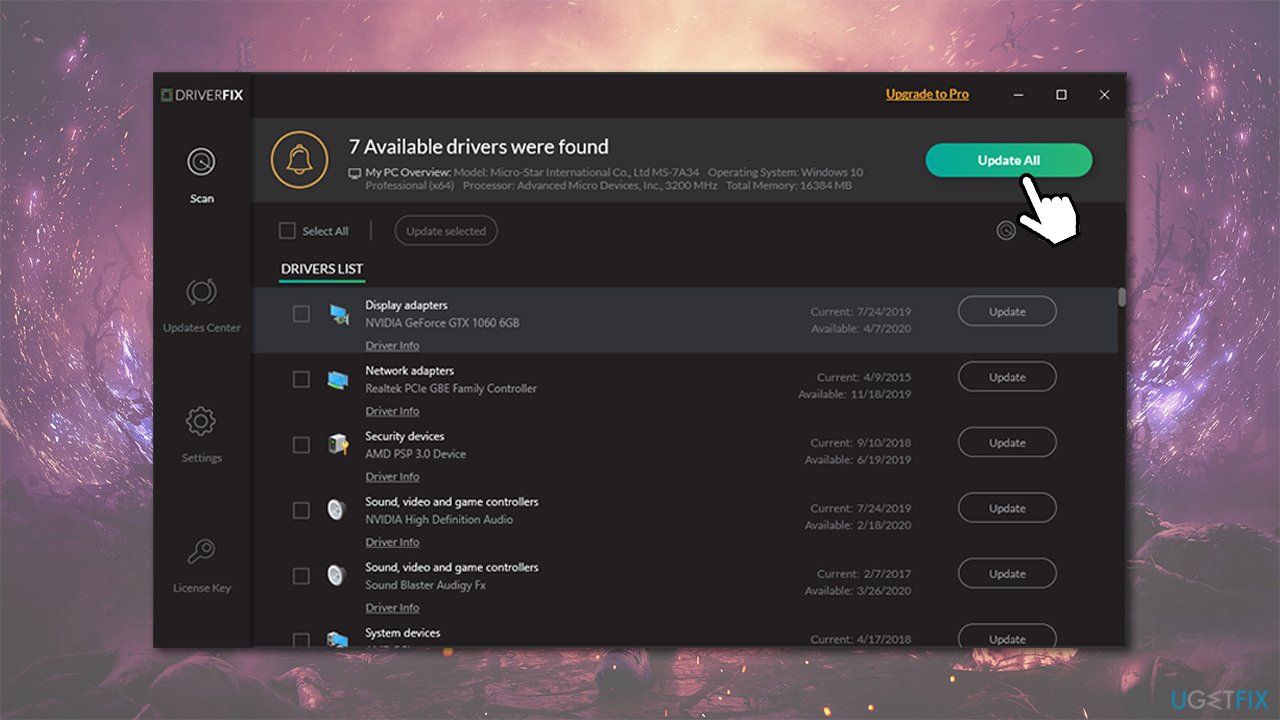
GPU drivers are particularly important for games, as they can fix numerous bugs in-game as well as other issues such as crashes and freezes. However, Device Manager is not a sufficient option for video driver updates, as it often fails to find the most recent drivers.
You should either visit your graphics card manufacturer website and download drivers from there or employ an automatic driver updater such as [rev id="DriverFix"], and you will never have to worry about that part of your Windows PC again.
Fix 2. Update your game
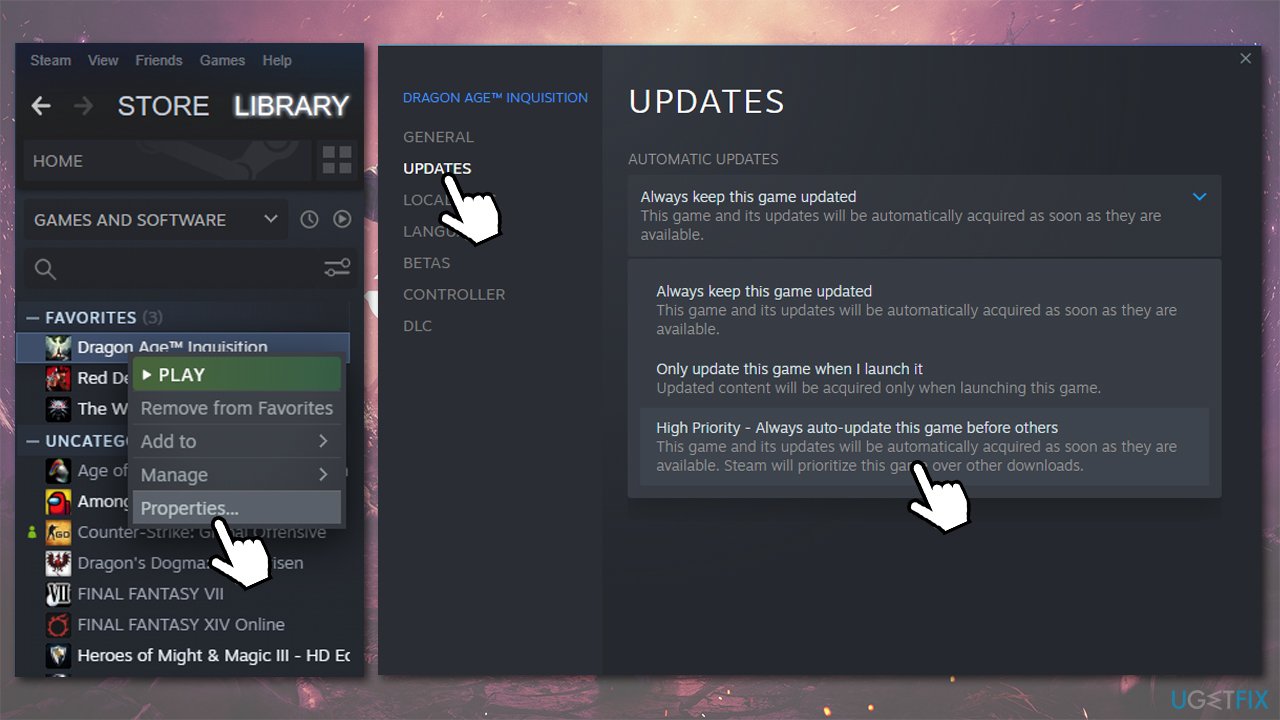
Developers are working on improving the game constantly, thus it is not unusual to see patches coming out very often. If you purchased the game on Steam or other platforms, it should be updated automatically. Here's how to ensure that the game is always updated on Steam:
- Go to your Library
- Right-click on Outriders and select Properties
- Go to Updates section
- Under Automatic Updates, pick High Priority option.
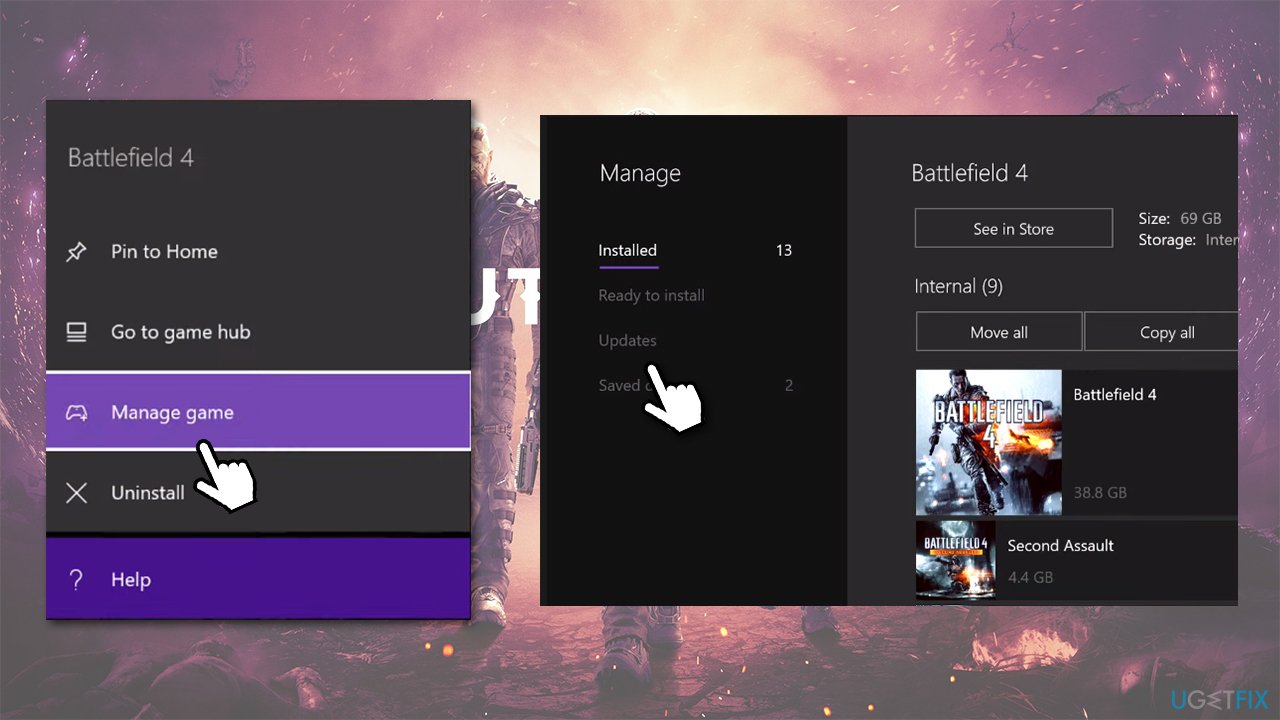
If you are playing on Xbox One:
- Select My games and Apps
- Select Outriders and pick Manage game
- On the left, select Updates and download everything available.
PlayStation 4 users:
- Go to Game Library and select Outriders
- Press Options button on your controller
- From the side menu, pick Check for Update.
Fix 3. Tweak in-game settings
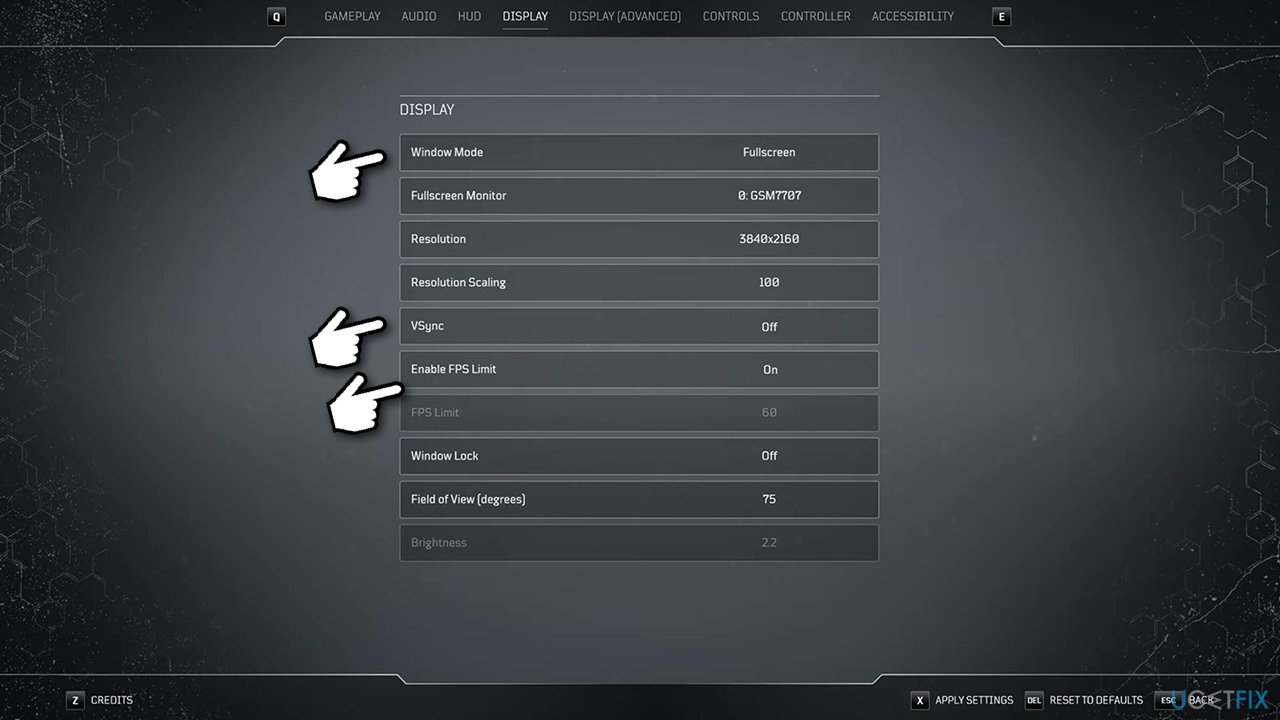
Some users said that changing in-game settings helped them fix them many problems with Outriders, including the game crashes and freezes. Here's what you should do:
- Launch the game and go to Settings
- Select Display
- Here, set Window Mode to Borderless windowed
- Turn off Vsync
- Click on Enable FPS Limit and set it to 59.
Fix 4. Verify integrity of game files
If you purchased game on Steam, do the following:
- Go to Library, right-click on the game entry
- Select Properties
- Go to Local Files section
- Here, pick Verify integrity of game files
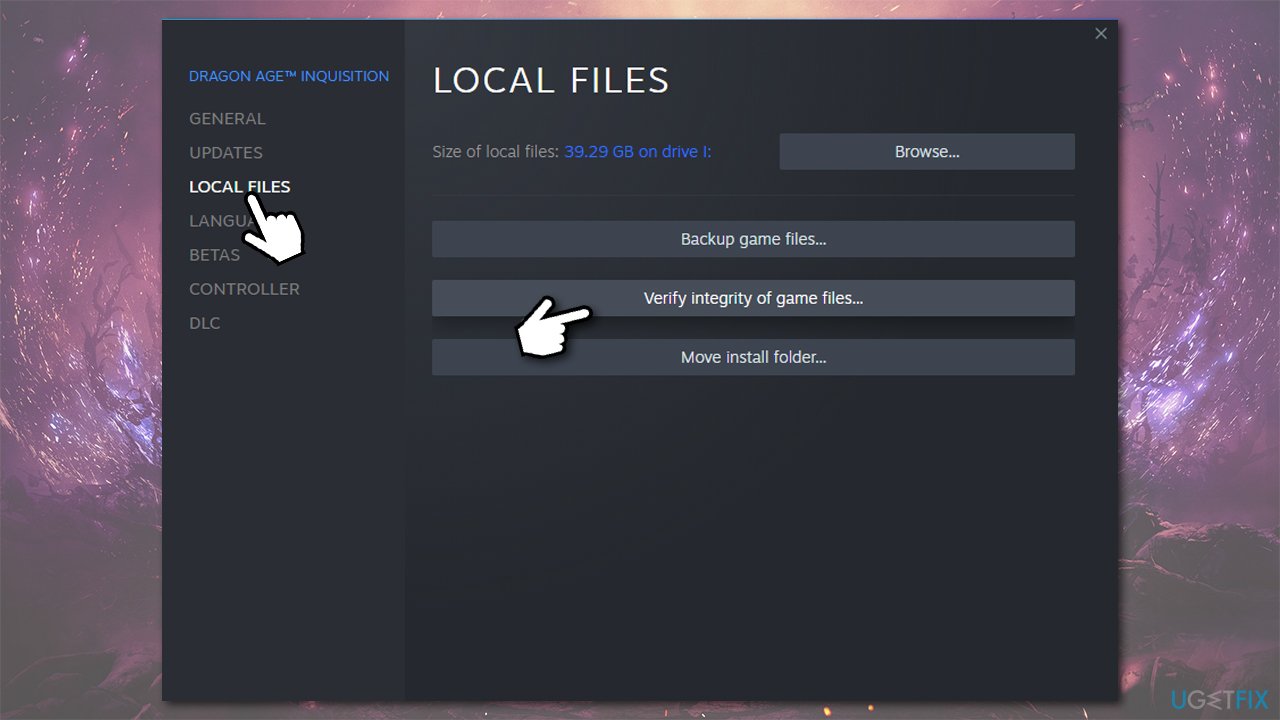
- Wait till process is finished and launch the game to see if crashes are gone.
Fix 5. Wait
Unfortunately, but there is little more that can be done in order to fix the game issues. Nonetheless, both Square Enix and People Can Fly are trying to address massive issues that players are having. Over time, more patches will be delivered, so make sure you update your game on a regular basis (set it to be updated automatically).
Bottom line
To fix Outriders crashes, players can perform a system file scan, check for missing DLLs, and ensure their Windows 10 is up to date. If these solutions do not resolve the issue, players may need to wait for a patch from Square Enix or seek further technical support.
Frequently asked questions
Common causes include outdated graphics drivers, system overheating, and software conflicts. Ensuring your system meets the game's requirements can also help prevent crashes.
You can update your graphics drivers by visiting the manufacturer's website or using Device Manager in Windows 10 or Windows 11. Simply search for 'Device Manager', expand 'Display adapters', right-click your graphics card, and select 'Update driver'.
Yes, you can verify the game files through the game launcher, such as Steam or Epic Games. This process checks for any corrupted files and replaces them, which can help fix crashing issues.




Report an issue
What's wrong with this guide? We review every report and update or remove content.
Report received — thank you. We'll review and fix it.
You need a free account to submit a report.
Be the first to comment