How to fix
Microsoft Office error 0x426-0x0
on Windows
Resolve Microsoft Office error 0x426-0x0 on Windows 10 or 11 quickly and efficiently. Follow our expert-tested solutions for a hassle-free fix!


What causes How to fix Microsoft Office error 0x426-0x0 in Windows?
- Misconfigured services
- General bugs within the software
- Corrupted installation files
- Corrupted system files
Repairs Windows system files, removes malware, and restores a clean OS state — without reinstalling.
Hello. I can no longer use any of the Microsoft Office apps because of the 0x426-0x0 error whenever I attempt to open them. I need Excel, in particular, for my work. Please, I need help, if possible.
Microsoft Office is a comprehensive suite of productivity tools developed by Microsoft. It features a variety of applications, including Word for document processing, Excel for spreadsheets, PowerPoint for presentations, and Outlook for emails, among others. Renowned for its ease of use and advanced features, Microsoft Office has become an integral part of day-to-day operations in many businesses and homes worldwide.
However, despite its widespread popularity and comprehensive feature set, Microsoft Office is not without its share of issues. One such issue that users often encounter is the Microsoft Office error code 0x426-0x0. This error prevents users from opening or using their Office applications, creating significant disruption in their workflow.
The error code 0x426-0x0 can be attributed to various factors, all of which revolve around system and application integrity. These factors include misconfigured services, general bugs within the software, corrupted installation files, and corrupted system files. Misconfigured services can result from inappropriate system settings or irregularities in the Windows registry. General bugs can occur due to software glitches or compatibility issues with the operating system.
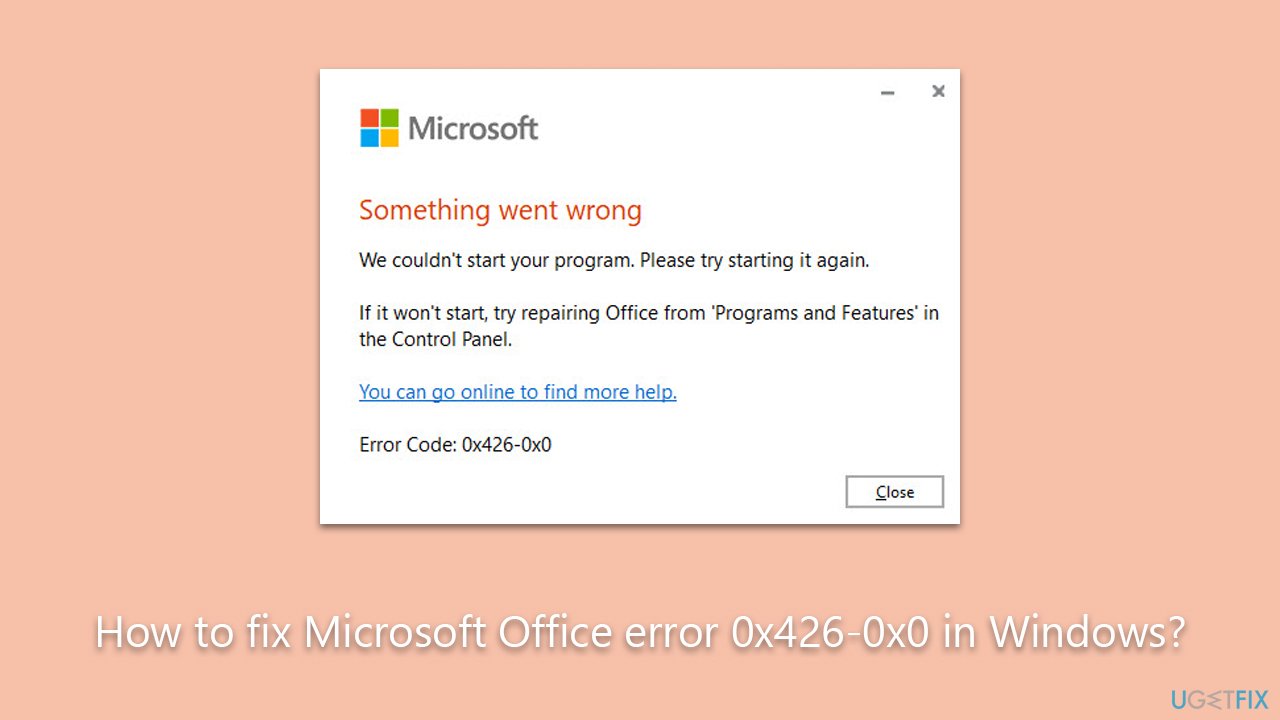
Corrupted installation files can be the result of an incomplete or interrupted installation process, while corrupted system files might be due to malware infection or hardware failure. In order to fix the 0x426-0x0 error, it is essential to identify its root cause and apply the appropriate troubleshooting steps.
Below we provide numerous methods that should help you get rid of Microsoft Office error 0x426-0x0. Keep in mind that you might have to try several of them before you find one that works for you. Before proceeding, we recommend trying [d1] PC repair tool, which can make sure that no underlying Windows issues are present.
1. Run the troubleshooter
You should run the troubleshooter first - it can sometimes resolve issues with Windows apps automatically.
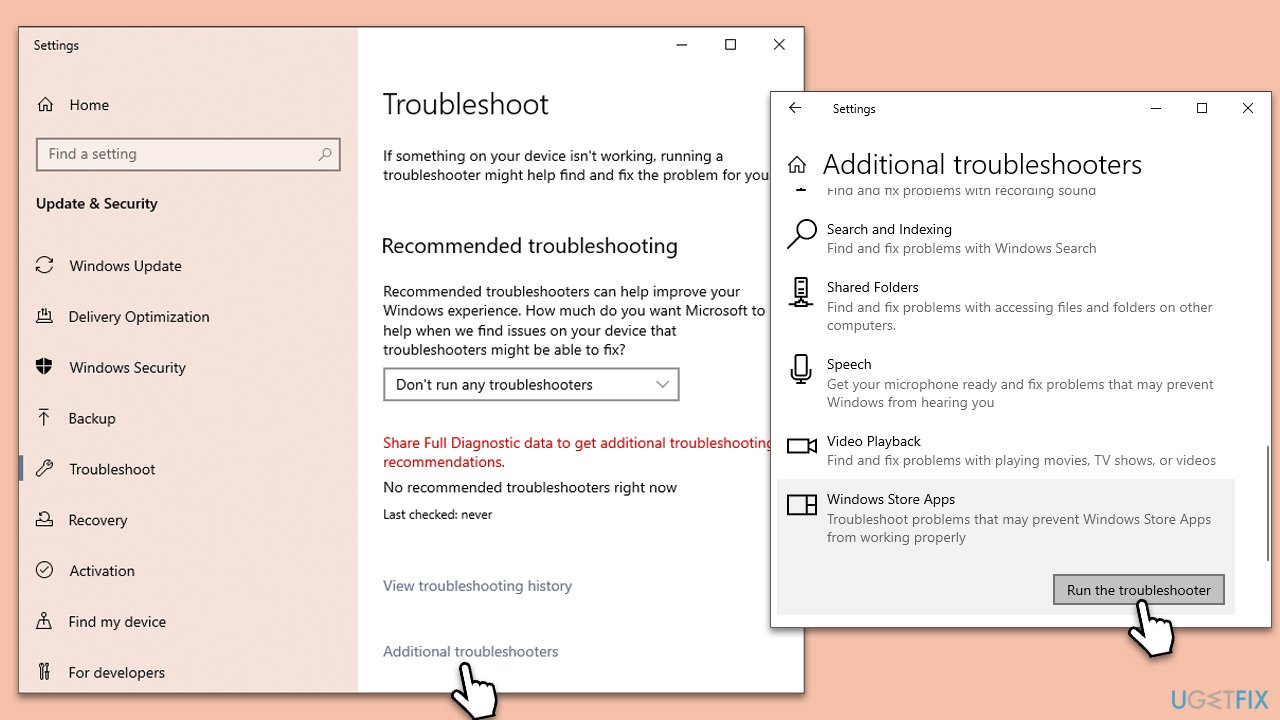
- Type Troubleshoot in Windows search and press Enter.
- On the right side, click Additional troubleshooters/Other troubleshooters.
- Scroll down to find the Windows Store Apps entry.
- Select it and click Run the troubleshooter/Run.
- Wait until the scan finishes, apply the suggested fixes, and reboot your PC.
2. Check relevant service
For Office to run smoothly, its service should be running too. Proceed with the following:
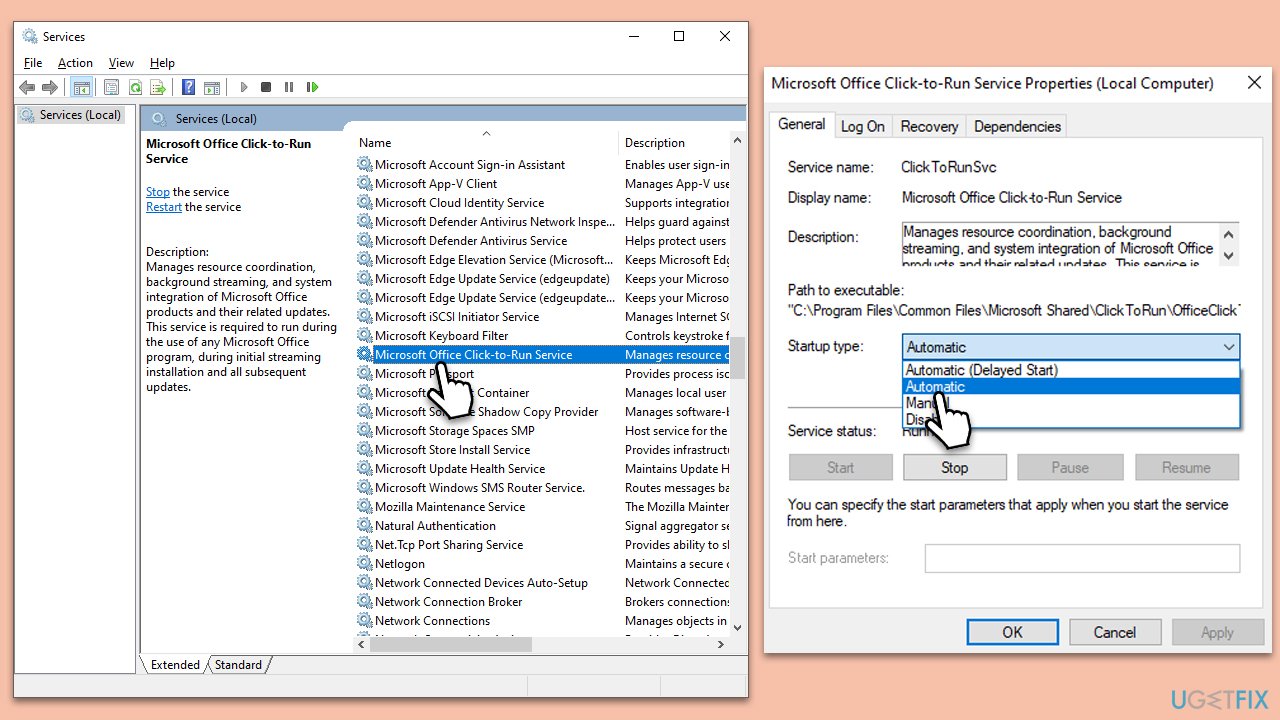
- Type Services in Windows search and press Enter.
- In the new window, scroll down to locate the Microsoft Office Click-to-Run service.
- Double-click the service to open Properties.
- Under Startup type, select Automatic from the drop-down menu.
- Click Start, Apply, and OK.
3. Repair the app
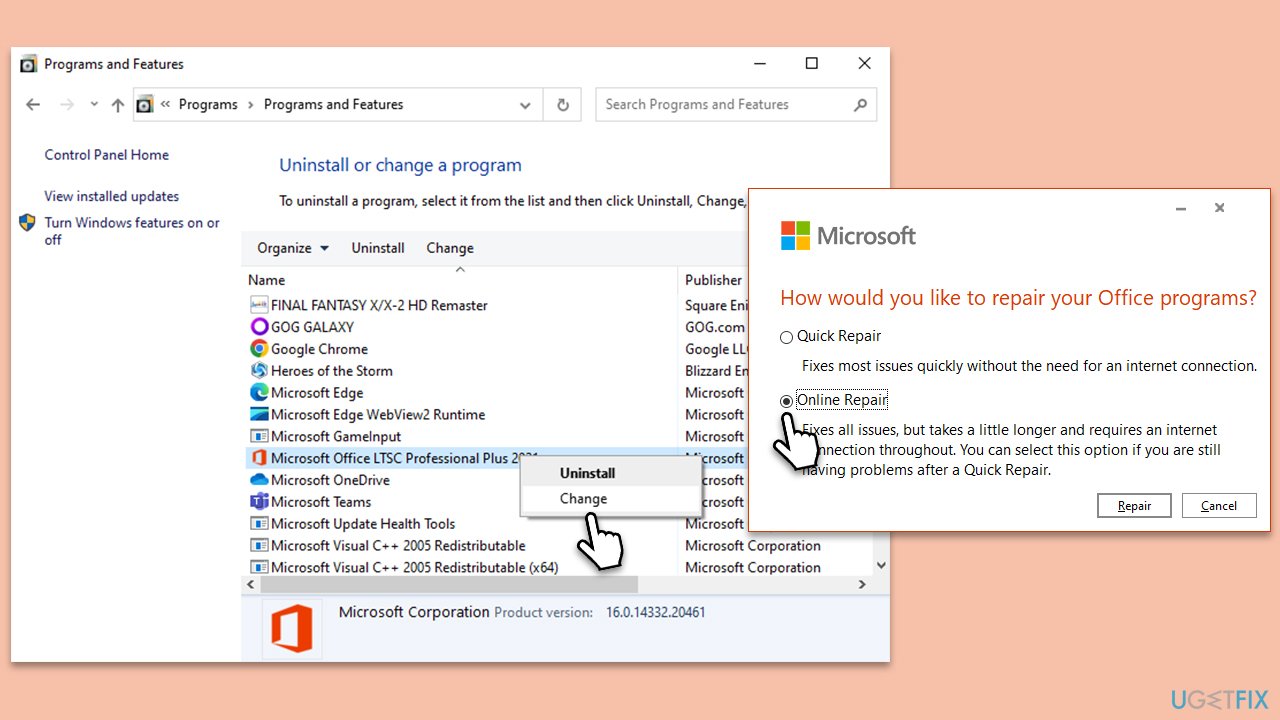
- Type Control Panel in Windows search and press Enter.
- Select Programs > Programs and Features.
- Select Microsoft Office and click on Change.
- Choose the option for Online Repair and click Repair.
- Follow the prompts to finish the process.
4. Check your antivirus
Disabling security software can sometimes resolve Microsoft Office apps not opening issue due to the potential conflicts between the security software and the Office applications. Security software, such as antivirus or firewall programs, are designed to protect your computer from threats, including malware, viruses, and unauthorized access.
However, these programs can occasionally be overzealous in their protective measures and may mistakenly identify legitimate software, like Microsoft Office apps, as potential threats.
When this happens, the security software might block or restrict access to certain features or functions of the Office applications, preventing them from opening or functioning correctly. This is known as a false positive, and it can be a source of frustration for users who are unable to use their Office apps due to interference from their security software.
Users reported that disabling Avast, AVG, and similar antivirus apps helped them to resolve the problem. Alternatively, you can update your antivirus to the latest version, add Office to the exclusion list, or contact your antivirus vendor for support.
5. Reinstall Office
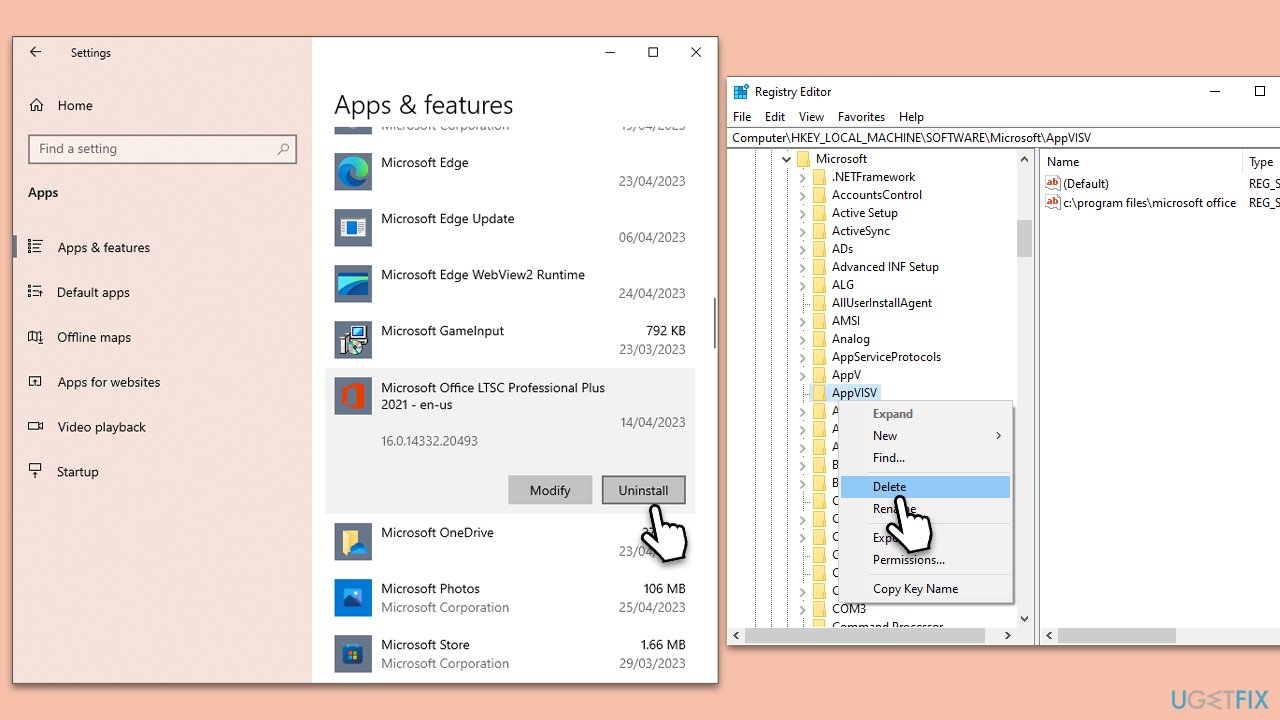
- Right-click on Start and pick Apps and Features.
- Scroll down to find the MS Office installation.
- Click Uninstall and confirm with Uninstall.
- Follow on-screen instructions to remove the app completely.
- Press Win + E to open File Explorer.
- Navigate to the following location and delete its contents:
C:\Program Files\Microsoft Office - Next, type regedit in Windows search and press Enter.
- Go to the following locations in the Registry Editor and delete these items:
Computer\HKEY_LOCAL_MACHINE\SOFTWARE\Microsoft\AppVISV
Computer\HKEY_LOCAL_MACHINE\SOFTWARE\Microsoft\Office\ClickToRun
Computer\HKEY_CURRENT_USER\Software\Microsoft\Office - Reboot the PC and then reinstall Microsoft Office.
Similar topics that might be useful:
Bottom line
To fix the 0x426-0x0 error, you can run the troubleshooter, check for corrupted files, and ensure that your installation of Microsoft Office is complete. If none of these methods work, consider using a PC repair tool to address any underlying Windows issues.
Frequently asked questions
This error is often caused by issues with the Office installation or conflicts with other software on your Windows 10 system. Corrupted files or outdated software can also trigger this error.
To fix the error on Windows 11, try repairing the Office installation through the Settings app or uninstalling and reinstalling Office completely. Additionally, ensure that your Windows 11 is updated to the latest version.
Yes, you can use the Microsoft Support and Recovery Assistant tool, which helps diagnose and fix various Office issues, including the 0x426-0x0 error in both Windows 10 and Windows 11.




Report an issue
What's wrong with this guide? We review every report and update or remove content.
Report received — thank you. We'll review and fix it.
You need a free account to submit a report.
Be the first to comment