
msvcp140.dll is missing: what the file is and how to put it back properly
msvcp140.dll is Microsoft's C++ Standard Library runtime. Windows does not install it for you: it arrives with the Microsoft Visual C++ Redistributable, and a program that was built with Visual Studio cannot start without it. The fix is to install or repair that package from Microsoft, not to download the DLL on its own.

Prefer to fix it yourself? The manual steps follow.
Download msvcp140.dll the official way
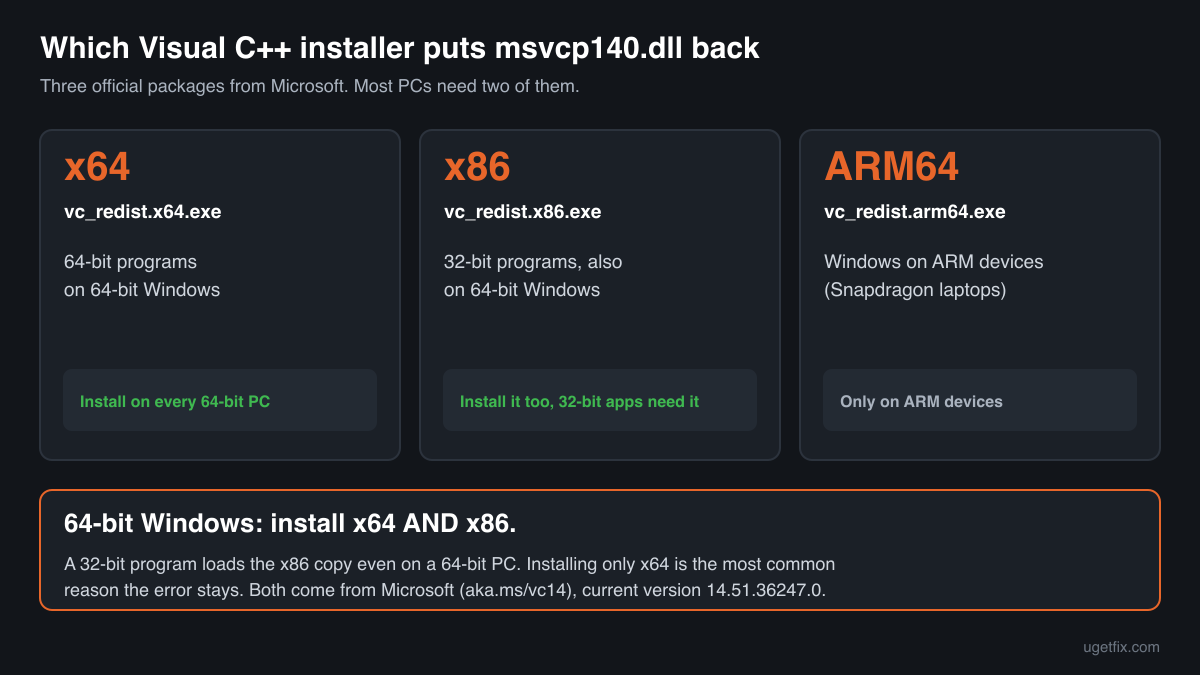
14.51.36247.0Install the current Microsoft Visual C++ Redistributable (version 14.51.36247.0). It places msvcp140.dll and the files it depends on in the right Windows folders, registered with the installer so that updates and repairs keep working.
On 64-bit Windows install both the x64 and the x86 package. 32-bit programs load the x86 copy even on a 64-bit PC, and a missing x86 runtime is the most common reason the error stays after installing only x64.
“DLL files only” is for a program that needs the files in its own folder, or a PC where the installer will not run: msvcp140.dll with vcruntime140.dll and the other libraries it loads (version 14.51.36247.0), unpacked unchanged from Microsoft's installer. A free uGetFix account is needed to download. Sign in, or create one in a minute, and you come straight back here.
We downloaded these installers from Microsoft on October 2, 2026 and unpacked them. Each download page shows the size and SHA-256 checksum of those files, so you can compare what you get. The installers come from Microsoft's own server (aka.ms).
Step by step
- See what is installed. Open Settings, Apps, Installed apps and type “Visual C++” in the search box. Look for “Microsoft Visual C++ 2015-2022 Redistributable” or “Microsoft Visual C++ v14 Redistributable”, once for x64 and once for x86.
- Nothing there, or only one of the two: install. Run the x64 installer and the x86 installer from the links above, then start the program again. A restart is rarely needed, but if the installer asks for one, do it.
- Both are there: repair. In Installed apps open the menu next to the redistributable, choose Modify, then Repair. This rewrites msvcp140.dll and its companions without touching your programs.
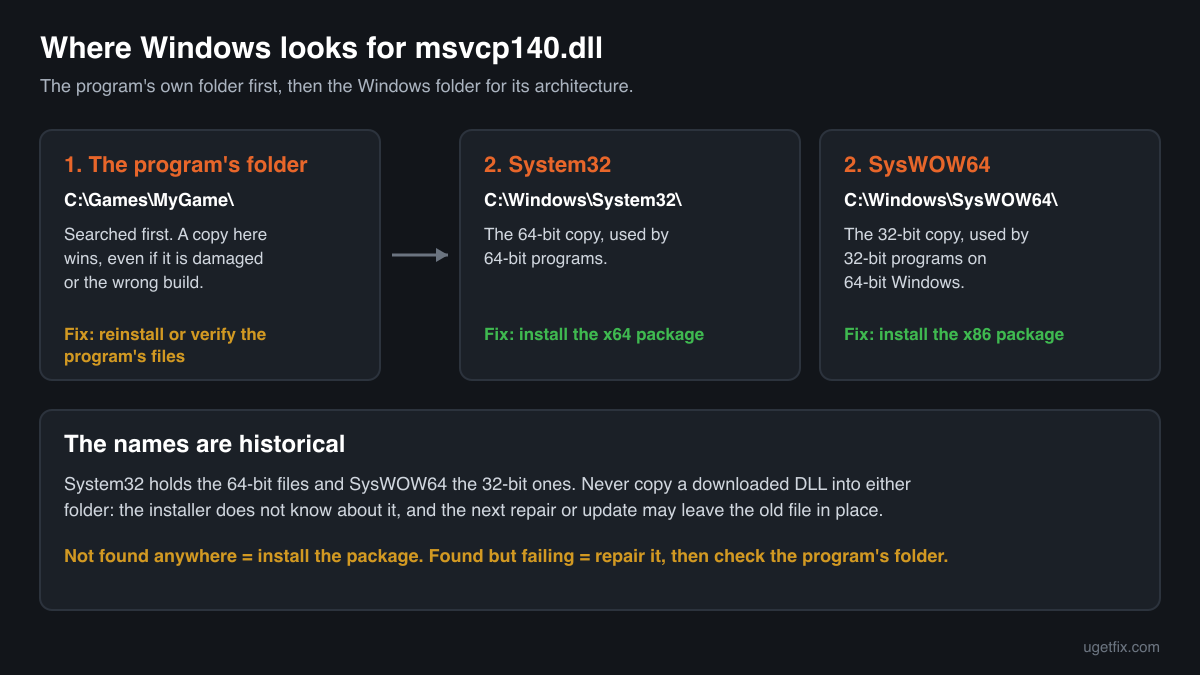
- The error names one program only: look in its folder. Some programs and many games ship their own msvcp140.dll next to their .exe. If that copy is damaged or is the wrong architecture, Windows loads it first and fails. Reinstall the program, or in Steam use Properties, Installed files, Verify integrity of game files.
- Still failing: read the exact message. “Was not found” and “is either not designed to run on Windows” are different problems with different causes. The messages section below explains each.
What not to do
Do not download msvcp140.dll from a DLL collection site.
You cannot tell which version or architecture you get, the file is copied without the files it depends on, and nothing updates it afterwards. A copy that matches nothing Microsoft has published is also how tampered files get onto a PC. If a program needs the loose files, use “DLL files only” above, and the checker below for a file you already have.
Do not copy the file into System32 by hand.
A manually placed file is invisible to the installer: the next redistributable update or repair may refuse to replace it, and you keep an outdated runtime.
Do not run regsvr32 on it.
msvcp140.dll is not a COM library and has no registration entry point, so regsvr32 only produces another error. Guides that tell you to register it are copying a step that applies to other files.
Do not delete the other copies you find on the disk.
Windows components and installed programs carry private copies of this file (see the section on copies inside Windows). They are normal and removing them breaks those programs.
Check the copy on your PC
Choose the msvcp140.dll you have. Its checksums are calculated in your browser and compared with 145 builds we know: the current official redistributable files, the copies indexed from Windows images and the older versions found on PCs.
The file stays on your computer. Nothing is uploaded: the checksum is computed locally.
2 genuine programs have been documented loading a planted copy of msvcp140.dll. Found a copy you did not expect, in a Downloads, Temp or AppData folder, or next to a program you do not recognise? That is a security question, not a missing-file one. How to tell if msvcp140.dll is malware, on 2-Spyware
The error messages and what each one means
The wording tells you which problem you have. These are the texts Windows shows, as written.
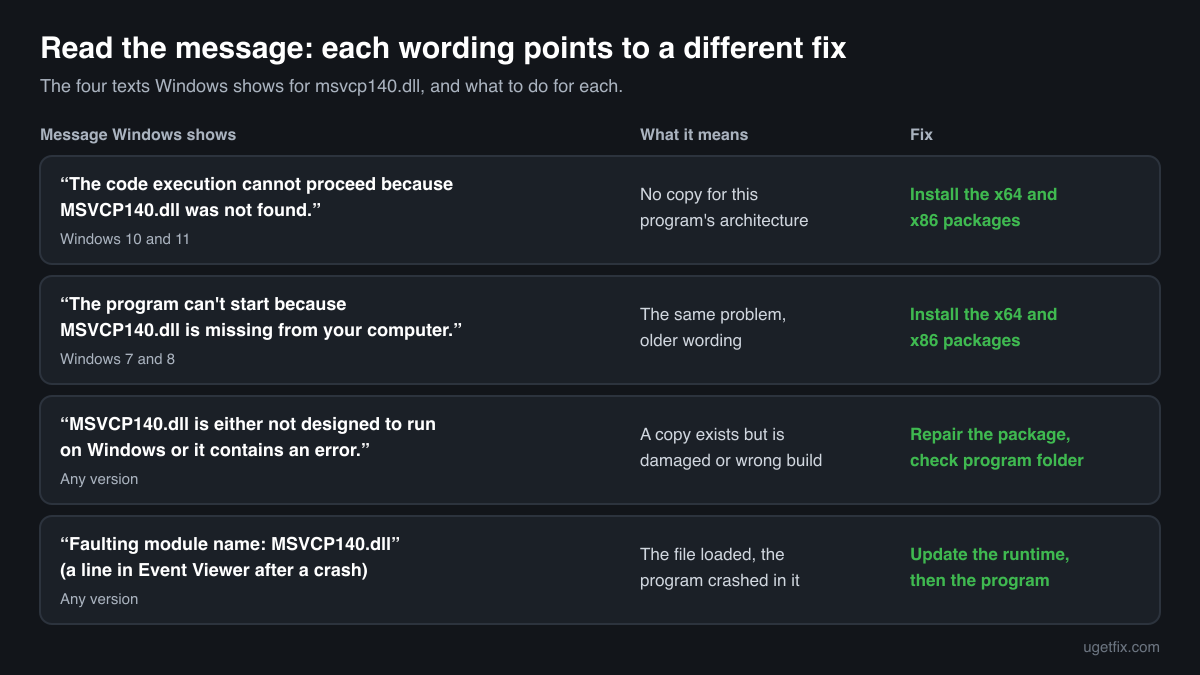
The code execution cannot proceed because MSVCP140.dll was not found. Reinstalling the program may fix this problem.
The wording of Windows 10 and Windows 11. The program asked for the file and Windows found no copy for that program's architecture. Install the redistributable, both x64 and x86.
The program can't start because MSVCP140.dll is missing from your computer. Try reinstalling the program to fix this problem.
The same situation in the older wording of Windows 7 and 8. Same fix.
MSVCP140.dll is either not designed to run on Windows or it contains an error. Try installing the program again using the original installation media or contact your system administrator or the software vendor for support.
The file was found but could not be loaded: it is damaged, truncated, or of the wrong architecture. This is typical after a copy was placed by hand or by a broken installer. Repair the redistributable, and remove any stray copy in the program's own folder.
Faulting module name: MSVCP140.dll
A line from the Application log in Event Viewer after a crash. The file is present and the program crashed while running code inside it. That usually points at the program itself or at a runtime older than the one it was built for: update the program and install the current redistributable.
File facts for the current official version
Read from the files inside Microsoft's installers, version 14.51.36247.0. Microsoft® C Runtime Library, Microsoft Corporation.
| Build | Version | Size | Exported functions | Signed by |
|---|---|---|---|---|
| x64 | 14.51.36247.0 | 643,512 bytes | 1,515 | Microsoft Windows Software Compatibility Publisher |
| x86 | 14.51.36247.0 | 618,944 bytes | 1,515 | Microsoft Windows Software Compatibility Publisher |
| ARM64 | 14.51.36247.0 | 1,588,064 bytes | 1,493 | Microsoft Corporation |
- SHA-256 · x64
7c26614e1d733892c2deac7e245ce115504b1d80592dd0a01b08e3e5a55f89ca- SHA-256 · x86
f0cda2a0cf1fe6fbbf579b9098462329d3aaa7513a207af2e0f33b01456e388a- SHA-256 · ARM64
167ceac85c2d726c4cd9e39b8881fafdc6de1520c0e67c4f6b271235f9d2a6c5
- Where the genuine msvcp140.dll belongs
C:\Windows\System32C:\Windows\SysWOW64C:\Program Files
After installation the x64 file is in C:\Windows\System32 and the x86 file is in C:\Windows\SysWOW64 (on 64-bit Windows). The folder names are historical: System32 holds the 64-bit files.
What msvcp140.dll itself depends on
A DLL is rarely self-sufficient. The import table of the official file lists the libraries Windows must load together with it. If one of them is absent, the program fails with an error that names that other file instead.
This is why copying a single DLL so often trades one error for the next: after msvcp140.dll you are asked for vcruntime140.dll, then for vcruntime140_1.dll. The redistributable installs the whole set at once.
VCRUNTIME140_1.dllVCRUNTIME140.dllapi-ms-win-crt-convert-l1-1-0.dllapi-ms-win-crt-environment-l1-1-0.dllapi-ms-win-crt-filesystem-l1-1-0.dllapi-ms-win-crt-heap-l1-1-0.dllapi-ms-win-crt-locale-l1-1-0.dllapi-ms-win-crt-math-l1-1-0.dllapi-ms-win-crt-runtime-l1-1-0.dllapi-ms-win-crt-stdio-l1-1-0.dllapi-ms-win-crt-string-l1-1-0.dllapi-ms-win-crt-time-l1-1-0.dllapi-ms-win-crt-utility-l1-1-0.dllKERNEL32.dllThe api-ms-win-crt files belong to the Universal C Runtime, which is part of Windows 10 and Windows 11 and is serviced by Windows Update. The highlighted files come from the same redistributable as msvcp140.dll.
What the redistributable installs
The runtime payload of the x64 installer, version 14.51.36247.0: 12 files that are installed and updated together.
| File | Microsoft's description | Size |
|---|---|---|
concrt140.dll | Microsoft® Concurrency Runtime Library | 365 KB |
msvcp140.dll | Microsoft® C Runtime Library | 628 KB |
msvcp140_1.dll | Microsoft® C Runtime Library _1 | 35 KB |
msvcp140_2.dll | Microsoft® C Runtime Library _2 | 268 KB |
msvcp140_atomic_wait.dll | Microsoft® C Runtime Library _atomic_wait | 56 KB |
msvcp140_codecvt_ids.dll | Microsoft® C Runtime Library _codecvt_ids | 30 KB |
vcamp140.dll | Microsoft® C++ AMP Runtime | 408 KB |
vccorlib140.dll | Microsoft ® VC WinRT core library | 342 KB |
vcomp140.dll | Microsoft® C/C++ OpenMP Runtime | 208 KB |
vcruntime140.dll | Microsoft® C Runtime Library | 174 KB |
vcruntime140_1.dll | Microsoft® C Runtime Library | 49 KB |
vcruntime140_threads.dll | Microsoft® C Runtime Library | 38 KB |
Copies of msvcp140.dll that ship inside Windows
Searching a disk for msvcp140.dll usually finds more than one file. That is expected. Windows components and Microsoft apps carry private copies in their own folders, so that they do not depend on what the user has installed.
Winbindex, an index of the binaries in Windows installation images and updates, lists 88 distinct builds of msvcp140.dll in 21 versions. In the indexed images none of them is in the System32 folder itself: the System32 copy is put there by the redistributable.
| Windows component or app | Builds indexed |
|---|---|
Windows\System32\Microsoft-Edge-WebView | 38 |
Program Files\Windows365 | 32 |
Microsoft.VCLibs.140.00.UWPDesktop | 5 |
MSTeams | 2 |
Windows\System32\HealthAttestationClient | 2 |
Microsoft.MicrosoftOfficeHub | 1 |
| Version | Builds indexed | Windows releases |
|---|---|---|
14.50.35719.0 | 4 | Windows 11 23H2, Windows 11 24H2, Windows 11 26H1 |
14.44.35211.0 | 7 | Windows 11 23H2, Windows 11 24H2, Windows 11 26H1 |
14.44.35112.1 | 1 | Windows 11 24H2, Windows 11 25H2, Windows 11 26H1 |
14.42.34438.0 | 7 | Windows 11 23H2, Windows 11 24H2, Windows 11 25H2 |
14.40.33816.0 | 1 | Windows 11 25H2 |
14.40.33810.0 | 1 | Windows 11 24H2 |
14.40.33728.0 | 1 | Windows 11 25H2 |
14.38.33135.0 | 12 | Windows 11 22H2, Windows 11 24H2 |
14.34.31938.0 | 10 | Windows 11 22H2, Windows 11 23H2, Windows 11 24H2 |
14.32.31326.0 | 1 | Windows 11 24H2 |
Older versions of msvcp140.dll found on PCs
Programs and games often install their own copy of msvcp140.dll, and those copies stay behind long after Microsoft has released a newer runtime. A public DLL catalogue has collected 54 such copies, from version 14.0.22816.0 to 14.26.28804.1. The table lists each with its checksums, so you can tell which one you have.
None of them is the current version. The redistributable above installs 14.51.36247.0, newer than every copy in this list. If the check on this page finds your file in this list, it is most likely an old Microsoft build (confirm the Microsoft signature, since the list itself is not verified): install or repair the redistributable and the program that uses the old copy will get the current runtime from System32, unless it keeps its own copy in its folder.
| Version | Build | Size | MD5 | SHA-1 |
|---|---|---|---|---|
14.26.28804.1 | 64-bit | 573 KB | 7b92a6cb5d2cad407c457ab12d2b211d | e04020b3448fc6084fa31b7f791f22ff15e31328 |
14.26.28720.3 | 64-bit | 573 KB | 01b946a2edc5cc166de018dbb754b69c | dbe09b7b9ab2d1a61ef63395111d2eb9b04f0a46 |
14.26.28720.3 | 32-bit | 440 KB | eceff9c92e14b580ea84365f3d60f7de | 00699126456379fa48cb122e21b7f4731a72c57c |
14.26.28619.0 | 32-bit | 440 KB | f50d2e2eb3a3fe18c96068af38887cef | fdedfee09362d46d271e3334879b19001d916985 |
14.25.28508.3 | 64-bit | 573 KB | a11a1d761d757d367146f0f772632d8c | 9fd3eee4c4111dc386510a930192d56a2e938dfe |
14.25.28508.3 | 32-bit | 440 KB | 697220335e5c4b4126af45f6f8207896 | 8106f2dd4665aec0d1c652e29378ef46ea4e5801 |
14.24.28127.4 | 64-bit | 604 KB | a1d30ef2114e18e26e2bb96555be81bf | a5e3e5a5910dd0781caf0a9f58dd7b519de8c927 |
14.24.28127.4 | 32-bit | 440 KB | 5fd0772c30a923159055e87395f96d86 | 4a20f687c84eb327e3cb7a4a60fe597666607cf3 |
14.23.27820.0 | 64-bit | 604 KB | 5489742d41ffc2630476ec0489e4a0bf | 92cddcbd3376c8797845adbbe5d52cf70497126e |
14.22.27821.0 | 64-bit | 604 KB | 18920afd13872383f9aa1893fce4a575 | 74728ded8f77a8db172ddde019575c9c05dd675e |
14.22.27821.0 | 32-bit | 440 KB | ea91b66bcc2f5233f36d5df5ed849626 | 6af867761e3596962101f3733033d03255b6dab8 |
14.22.27724.0 | 32-bit | 440 KB | 4437730dfff0fd038f884c47da47bb49 | a98e5fab58df7e1f38562f03e0a28d36b288ab2d |
14.22.27706.1 | 32-bit | 440 KB | 388513337fe09d2973f7ef65f01e5ef4 | 3567422bbcb7a83f11a3fd9ecf1bc1cb4a1cbfb2 |
14.20.27508.1 | 64-bit | 604 KB | 5b87055d003de54c70f79825752d2325 | b81066eb260df44e173c8c89e6c660ff9b4b5407 |
14.16.27033.0 | 64-bit | 614 KB | c1b066f9e3e2f3a6785161a8c7e0346a | 8b3b943e79c40bc81fdac1e038a276d034bbe812 |
14.16.27033.0 | 32-bit | 440 KB | 5ff1fca37c466d6723ec67be93b51442 | 34cc4e158092083b13d67d6d2bc9e57b798a303b |
14.16.27012.6 | 64-bit | 614 KB | ba72c2f6f465926980adc2fb7f8b3490 | 63de0e3c14d0f45c1edab1c3ecd4adfb78ee8cdd |
14.16.27012.6 | 32-bit | 440 KB | 1fb93933fd087215a3c7b0800e6bb703 | a78232c352ed06cedd7ca5cd5cb60e61ef8d86fb |
14.15.26706.0 | 64-bit | 604 KB | 39ae0aa5b0888909b169c7ddf63e4cce | cb124f2b21611b2d01273914d51a8a748bbdd3a5 |
14.15.26706.0 | 64-bit | 614 KB | eb1b46c4b900e4c83066760a737986cd | 90444980a36e79c043e6f037841822a9ef89af9d |
14.15.26706.0 | 32-bit | 440 KB | 9dda681b0406c3575e666f52cbde4f80 | 1951c5b2c689534cdc2fbfbc14abbf9600a66086 |
14.15.26706.0 | 32-bit | 430 KB | a03cea8ab566ca38f8cc8d1e160536ca | f206d8e7cb3f88cd3f29f04b11981e6406d8f1de |
14.14.26429.4 | 64-bit | 655 KB | 89bb632dcbe07cd7aff17440fff46526 | ee173fe3eca2a0164f63ab1f7bfb5746d56869c0 |
14.14.26405.0 | 64-bit | 655 KB | bcf85f55392240e2110b0608d0cef70a | d8067ad8a9046eb34579b09d94cbfc4af13c1dfb |
14.14.26405.0 | 32-bit | 451 KB | f027303816d6d2afeab12183c67b1348 | 735e1625b17e4122608eb3aff3702b97e08f1e51 |
14.13.26020.0 | 64-bit | 655 KB | 28d16214f6726f019273231497c749a9 | 4185474a7ac9c06a02436be46047be12bcc9894d |
14.13.26020.0 | 32-bit | 451 KB | b33902774ce0eded02b0cf1b54622736 | 05c4ffb6b9b9ba8a56b7a3187b7d100ab20fe8d5 |
14.12.25810.0 | 64-bit | 676 KB | 2fe42eb09647f5ac31dd7e125105ef73 | fd886fbe78eaafeb474167d32656605d78b3af2a |
14.12.25810.0 | 32-bit | 451 KB | 4835a9b8749970d0ad04f22a546042af | f89d579c0b0c4afe2ca8283d222f44051d2e7c94 |
14.11.25506.0 | 64-bit | 625 KB | 324497c7a02864c089dc6bb9483cbf97 | 51dc32822af4a8844a37bdedeb9147eabda6a7c8 |
14.11.25325.0 | 32-bit | 430 KB | 109f0f02fd37c84bfc7508d4227d7ed5 | ef7420141bb15ac334d3964082361a460bfdb975 |
14.10.25008.0 | 64-bit | 614 KB | d1bd63f4bb6d9565af5f82137acdb434 | aeefda48d04ae9402ef2424ba8181c38de14d60a |
14.10.25008.0 | 32-bit | 430 KB | 0a252601b942f683c2c60beacb4f1a72 | a9d80cad7885e64c5724b70472ff4f1d2b1466c0 |
14.10.25008.0 | 32-bit | 430 KB | 71a0aa2d05e9174cefd568347bd9c70f | cb9247a0fa59e47f72df7d1752424b33a903bbb2 |
14.0.24215.1 | 64-bit | 625 KB | 7050d4d0f219fb57db78f35dbfd7c362 | fcb3a1bf63621611428b6df8532ce03614655531 |
14.0.24215.1 | 64-bit | 614 KB | b9abe16b723ddd90fc612d0ddb0f7ab4 | b323de242f21f39cf1cca4198ba1abb52e6aa0fb |
14.0.24215.1 | 32-bit | 440 KB | 328d83d22f0c1e4122b7dc12378c5e5a | 21bf93c161b8fb705c2369499c22f065b190df46 |
14.0.24215.1 | 32-bit | 430 KB | cfbdf284c12056347e6773cb3949fbba | ad3fa5fbbc4296d4a901ea94460762faf3d6a2b8 |
14.0.24212.0 | 64-bit | 614 KB | 733479ce9eddd094de51ebc5b5795f36 | 082afb6efb4e807f94d36812b82d0d2528ca2fd2 |
14.0.24210.0 | 64-bit | 614 KB | 9ff712c25312821b8aec84c4f8782a34 | 1a7a250d92a59c3af72a9573cffec2fcfa525f33 |
14.0.24210.0 | 32-bit | 430 KB | d25c3ff7a4cbbffc7c9fff4f659051ce | 02fe8d84d7f74c2721ff47d72a6916028c8f2e8a |
14.0.23918.0 | 64-bit | 625 KB | c754fa2eb5badc2c841133b30dd004e3 | d5ecc6acdac2412db16cef50e80661e4760c1415 |
14.0.23918.0 | 64-bit | 635 KB | f9d84d4559e5f7aa908cdf2fa5c05449 | 5917c05287fbe7942536bb38eb7ccebb0cacbf40 |
14.0.23918.0 | 32-bit | 430 KB | a84a8a708751e2cb1f2bb117e9b7f390 | a9378bae50093465e2ea1567958a1bb656d42149 |
14.0.23506.0 | 64-bit | 625 KB | 1c33cb1547a1c5ba7455bb0bf0215a7c | 7952bec4fa818a443c7199e3bf46c680cc0b0c38 |
14.0.23506.0 | 32-bit | 430 KB | 54628f77144e17530a8b8882d1789c90 | 6b63d1cb13524b664330574fd7911f1f25dfad16 |
14.0.23026.0 | 64-bit | 625 KB | 45ccb4783cd53f8c2b208dd08f9ea06f | 379f3eee652da2adc4c39f8269e74e525c232879 |
14.0.23026.0 | 64-bit | 614 KB | 8d55109b9757f997fce995b2020eb8ff | a92330cb5bbec0310f3cfad3ccfde6b7b01cd377 |
14.0.23026.0 | 64-bit | 625 KB | ab15feb56d735f4589217d02464b1a06 | 1362b65006aad34031e51ab005ea54b7337c734a |
14.0.23026.0 | 64-bit | 635 KB | e93af998fa3b81e32817788077ad0a66 | 47499ce62da8ae7355c884ce66bb957999b12819 |
14.0.23026.0 | 32-bit | 430 KB | 1d8c79f293ca86e8857149fb4efe4452 | 7474e7a5cb9c79c4b99fdf9fb50ef3011bef7e8f |
14.0.23026.0 | 32-bit | 420 KB | eaa9e3d174c82bde78994074384f6d8a | 417cccae696b2f53788f681abfc7a9ab716c76c6 |
14.0.22816.0 | 64-bit | 625 KB | 8e5926c798e62e3862e86d12bc2c09c1 | 4ef4655d38dd9354a70453f7dc363a6e69bb2ab4 |
14.0.22816.0 | 32-bit | 430 KB | 18ed48cb7eb16a041f35ca80de8ae804 | e4ae2d9acafe672e913ef7d8f69deed52939d923 |
Copies uploaded by users to a public DLL catalogue, read on 14 October 2026. We list their checksums so you can identify a file; we do not offer them for download and we did not verify each one against Microsoft's signature.
Questions people ask
Is msvcp140.dll a virus?
The genuine file is a signed Microsoft library and is harmless. Malware does sometimes use the same name, so the name alone proves nothing. Check your copy with the tool on this page: a file that matches a build Microsoft published is the real one. Where a copy sits and how attackers have used the name is covered on the security page linked above.
Do I need the 2015, 2017, 2019 and 2022 redistributables separately?
No. All of them are the same version 14 runtime, and the newest installer replaces the older ones. The earlier runtimes are different files with different names: Visual C++ 2013 uses msvcp120.dll and Visual C++ 2010 uses msvcp100.dll, and those need their own redistributables.
I installed the x64 package and the error is still there. Why?
The program is most likely 32-bit and looks for the x86 runtime. Install the x86 package as well. Task Manager shows “(32 bit)” after the name of 32-bit programs on older Windows versions, and on Windows 11 the Details tab can show an Architecture column (right-click a column header, Select columns).
Can I delete msvcp140.dll to free space?
No. The file is small, and every program built with Visual Studio 2015 or later that uses the shared runtime stops starting without it.
Will System File Checker (sfc /scannow) restore it?
System File Checker repairs Windows' own protected files. msvcp140.dll in System32 belongs to the redistributable, so repairing or reinstalling the redistributable is the direct fix. Run sfc when the errors name Windows files instead.
Related guides
How to fix VCRUNTIME140_1.dll missing or not found error in Windows?
FixFix: this application failed to start because no Qt platform plugin could be initialized
FixHow to fix error code 0xe06d7363 on Windows?
FixHow to fix Entry Point Not Found error in Windows?
Sources
- Microsoft: Latest supported Visual C++ Redistributable downloads
- Winbindex, the Windows binaries index (m417z)
File data read on October 2, 2026.

The editors who write and check uGetFix guides and reference pages. File facts are read from Microsoft's own installers and documentation, and every page shows the date its data was read.
Questions and experiences
Ask about this page: members and our editors answer. Reading is open; writing needs a free account.
…