
vcruntime140.dll was not found: what the file does and how to restore it
vcruntime140.dll is the core of Microsoft's Visual C++ runtime: the small library that almost every program built with Visual Studio 2015 or later loads first, and that msvcp140.dll itself needs. Windows does not provide it. It comes with the Microsoft Visual C++ Redistributable, so the fix is to install or repair that package from Microsoft, not to fetch the DLL by itself.

Prefer to fix it yourself? The manual steps follow.
Download vcruntime140.dll the official way
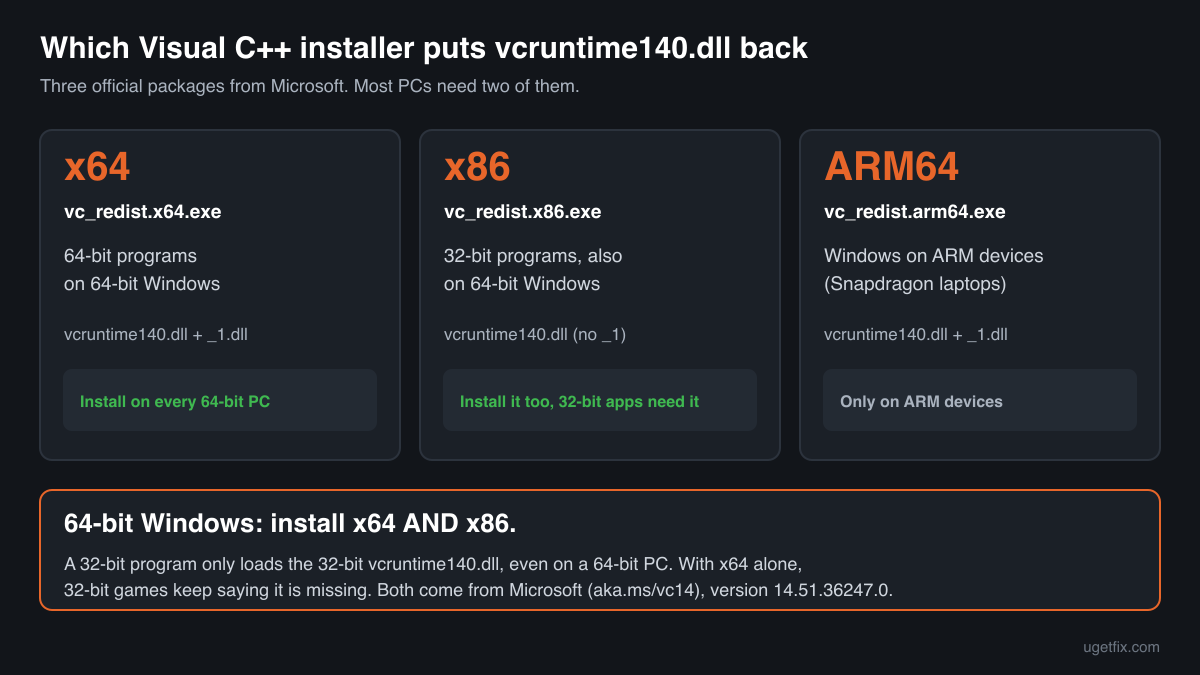
14.51.36247.0Install the current Microsoft Visual C++ Redistributable (version 14.51.36247.0). It puts vcruntime140.dll, vcruntime140_1.dll and the rest of the runtime into the Windows folders where programs look for them, and registers them so later updates and repairs replace them correctly.
On 64-bit Windows install the x64 and the x86 package. A 32-bit program always loads the 32-bit vcruntime140.dll, even on a 64-bit PC, so with only the x64 package installed a 32-bit program or game keeps reporting the file as missing.
“DLL files only” is for a program that expects the runtime in its own folder, or a PC where the installer refuses to run: vcruntime140.dll together with vcruntime140_1.dll, msvcp140.dll and the other files of the same package (version 14.51.36247.0), unpacked unchanged from Microsoft's installer. A free uGetFix account is needed to download. Sign in, or create one in a minute, and you return straight to this page.
We downloaded these installers from Microsoft on October 14, 2026 and unpacked them to read the files inside. Each download page lists the size and SHA-256 checksum, so you can compare the file you receive. The installers come from Microsoft's own server (aka.ms).
Step by step
- Check which packages you have. Open Settings, Apps, Installed apps and search for “Visual C++”. You want “Microsoft Visual C++ 2015-2022 Redistributable” or “Microsoft Visual C++ v14 Redistributable” listed twice: once with (x64) and once with (x86) in the name.
- One or both missing: install them. Run the x64 installer and the x86 installer from the links above, accept the licence, and start the program again. If the installer asks for a restart, restart before you test.
- Both listed: repair them. Open the menu next to each redistributable, choose Modify, then Repair. The repair writes a fresh vcruntime140.dll and vcruntime140_1.dll into System32 and SysWOW64 without touching your programs.
- The error names VCRUNTIME140_1.dll: update, do not add a file. That file was added to the runtime later than vcruntime140.dll. A program built with a newer Visual Studio needs it, and an old redistributable does not have it. Installing the current x64 package above adds it.
- Only one program fails: look in its folder. Many programs and games carry their own vcruntime140.dll next to their .exe. Windows uses that copy before the one in System32, so a damaged or wrong copy there keeps the error alive. Reinstall the program, or in Steam use Properties, Installed files, Verify integrity of game files.
What not to do
Do not download vcruntime140.dll on its own from a DLL site.
You cannot tell which version or architecture you are getting, nothing updates it later, and a single loose file does not bring vcruntime140_1.dll or msvcp140.dll with it, so the next error follows. A file that matches no build Microsoft published is also how modified copies reach a PC. If a program needs loose files in its folder, use “DLL files only” above; to judge a copy you already have, use the checker below.
Do not drop the file into System32 or SysWOW64 yourself.
The installer does not know about a hand-placed file. A later repair or update may skip it, and you keep an outdated or wrong-architecture runtime that is hard to spot.
Do not run regsvr32 on it.
vcruntime140.dll is a plain function library, not a COM component, and has nothing to register. regsvr32 only answers with “The module was loaded but the entry-point DllRegisterServer was not found”.
Do not delete the extra copies you find.
Program folders, Microsoft apps and Windows components keep private copies of vcruntime140.dll. Finding many is normal, and removing one breaks the program it belongs to.
Check the copy on your PC
Choose the vcruntime140.dll you have. Its checksums are calculated in your browser and compared with 144 builds we know: the current official redistributable files, the copies indexed from Windows images and the older versions found on PCs.
The file stays on your computer. Nothing is uploaded: the checksum is computed locally.
3 genuine programs have been documented loading a planted copy of vcruntime140.dll. Found a vcruntime140.dll somewhere unexpected, such as Downloads, Temp, AppData or beside a program you never installed? That is a security question rather than a missing-file one. How to tell if vcruntime140.dll is malware, on 2-Spyware
The error messages and what each one means
The exact wording tells you whether the file is absent, damaged or only the place where a program crashed. These are the texts Windows shows.
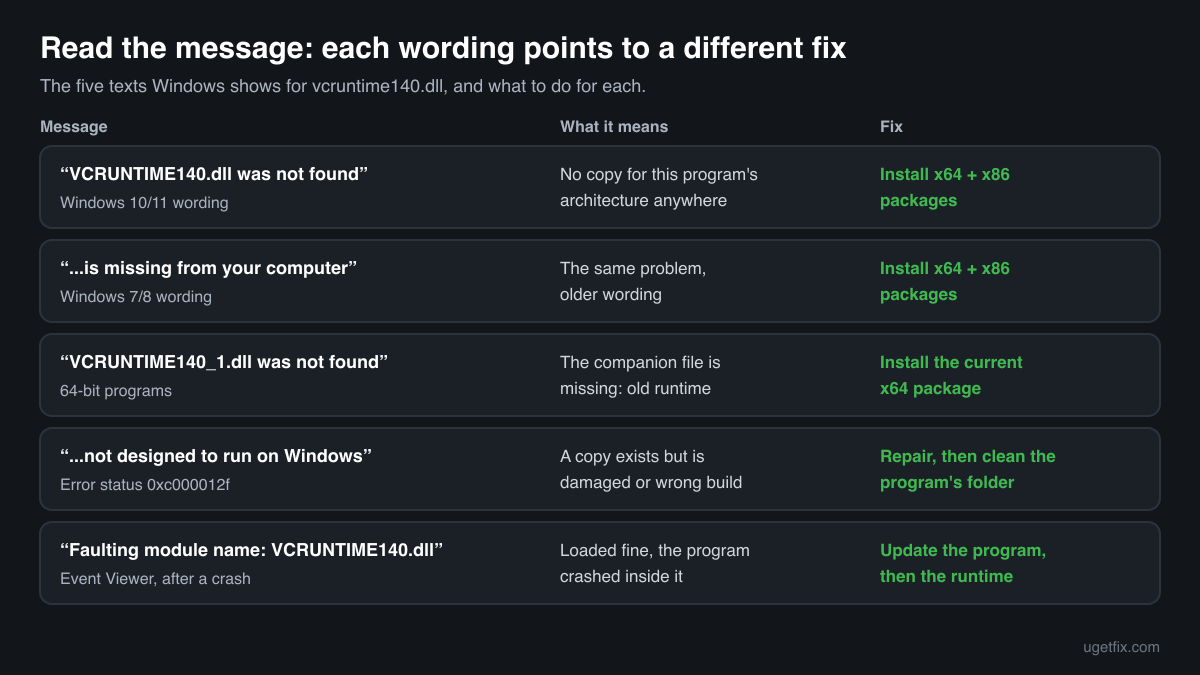
The code execution cannot proceed because VCRUNTIME140.dll was not found. Reinstalling the program may fix this problem.
Windows 10 and Windows 11 wording. No copy of the file for that program's architecture was found in the program's folder or in the Windows folders. Install the redistributable, x64 and x86.
The program can't start because VCRUNTIME140.dll is missing from your computer. Try reinstalling the program to fix this problem.
The same situation, worded as Windows 7 and 8 showed it. The fix is the same: install both packages.
The code execution cannot proceed because VCRUNTIME140_1.dll was not found. Reinstalling the program may fix this problem.
vcruntime140.dll is present but its companion is not. This happens with 64-bit programs built with a newer Visual Studio on a PC whose redistributable is older. Install the current x64 package.
VCRUNTIME140.dll is either not designed to run on Windows or it contains an error. Try installing the program again using the original installation media or contact your system administrator or the software vendor for support. Error status 0xc000012f.
A file with that name was found and could not be loaded: it is damaged, empty, or built for the other architecture. This is typical after a manual copy. Repair the redistributable, then delete any stray copy in the program's own folder and reinstall that program.
Faulting module name: VCRUNTIME140.dll
A line in the Application log of Event Viewer after a crash. The file loaded fine, and the program crashed inside one of its functions, often the memory copy routines the program called. The cause is nearly always the program, not the DLL: update the program first, then install the current redistributable.
File facts for the current official version
Read from the files inside Microsoft's installers, version 14.51.36247.0. Microsoft® C Runtime Library, Microsoft Corporation.
| Build | Version | Size | Exported functions | Signed by |
|---|---|---|---|---|
| x64 | 14.51.36247.0 | 178,616 bytes | 71 | Microsoft Windows Software Compatibility Publisher |
| x86 | 14.51.36247.0 | 123,328 bytes | 81 | Microsoft Windows Software Compatibility Publisher |
| ARM64 | 14.51.36247.0 | 246,112 bytes | 70 | Microsoft Corporation |
- SHA-256 · x64
d1f4225df2cd877dbf130d5668a021dce3f94118455ff5ec952061c30afc9ce7- SHA-256 · x86
2fa6efc053203460a23d3a25158f227d895d2dadc63acc1a372da97c3a4281c3- SHA-256 · ARM64
3c56f4167e2b3d8e6338497731e6aae8cd7ec46bd6789f9423a8d9cf9a630310
- Where the genuine vcruntime140.dll belongs
C:\Windows\System32
After installation the 64-bit file is in C:\Windows\System32 and the 32-bit file is in C:\Windows\SysWOW64 on 64-bit Windows. The names are historical: System32 holds the 64-bit files. The exported functions are the basics every Visual C++ program calls: memory copy and fill (memcpy, memset), C++ exception handling, type information for C++ objects and a few string searches.
What vcruntime140.dll itself depends on
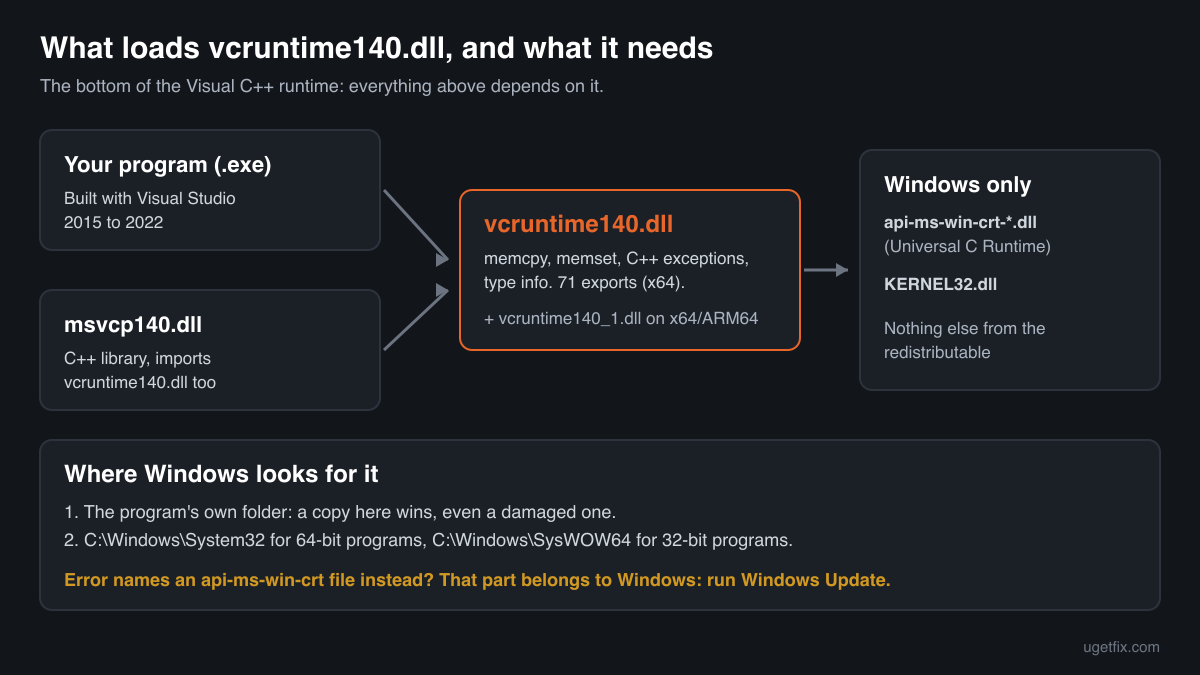
vcruntime140.dll sits at the bottom of the Visual C++ runtime. Programs import it directly, and so does msvcp140.dll: every build of msvcp140.dll lists VCRUNTIME140.dll in its imports, and the x64 build also lists VCRUNTIME140_1.dll. That is why a missing vcruntime140.dll so often shows up right after someone copied msvcp140.dll by hand.
Below it there is only Windows. Its import table names the Universal C Runtime (the api-ms-win-crt files) and KERNEL32.dll, nothing from the redistributable. If an error names one of the api-ms-win-crt files instead of vcruntime140.dll, the problem is in Windows, not in the Visual C++ package.
api-ms-win-crt-convert-l1-1-0.dllapi-ms-win-crt-heap-l1-1-0.dllapi-ms-win-crt-runtime-l1-1-0.dllapi-ms-win-crt-stdio-l1-1-0.dllapi-ms-win-crt-string-l1-1-0.dllKERNEL32.dllThe api-ms-win-crt files belong to the Universal C Runtime, which is part of Windows 10 and Windows 11 and is kept up to date by Windows Update.
What the redistributable installs
The runtime files of the x64 installer, version 14.51.36247.0: 12 files that are installed and updated together. vcruntime140_1.dll is in the x64 and ARM64 packages only; 32-bit programs do not use it.
| File | Microsoft's description | Size |
|---|---|---|
concrt140.dll | Microsoft® Concurrency Runtime Library | 365 KB |
msvcp140.dll | Microsoft® C Runtime Library | 628 KB |
msvcp140_1.dll | Microsoft® C Runtime Library _1 | 35 KB |
msvcp140_2.dll | Microsoft® C Runtime Library _2 | 268 KB |
msvcp140_atomic_wait.dll | Microsoft® C Runtime Library _atomic_wait | 56 KB |
msvcp140_codecvt_ids.dll | Microsoft® C Runtime Library _codecvt_ids | 30 KB |
vcamp140.dll | Microsoft® C++ AMP Runtime | 408 KB |
vccorlib140.dll | Microsoft ® VC WinRT core library | 342 KB |
vcomp140.dll | Microsoft® C/C++ OpenMP Runtime | 208 KB |
vcruntime140.dll | Microsoft® C Runtime Library | 174 KB |
vcruntime140_1.dll | Microsoft® C Runtime Library | 49 KB |
vcruntime140_threads.dll | Microsoft® C Runtime Library | 38 KB |
Copies of vcruntime140.dll that ship inside Windows
A search of the disk usually turns up several vcruntime140.dll files. That is by design: Windows components and Microsoft apps bundle their own copy of the runtime so that they keep working whatever the user installs or removes.
Winbindex, an index of the binaries in Windows installation images and updates, lists 92 distinct builds of vcruntime140.dll in 22 versions. The copy in System32 that programs share comes from the redistributable; leave the private copies where they are.
| Version | Builds indexed | Windows releases |
|---|---|---|
14.51.36247.0 | 1 | Windows 11-23H2, Windows 11-24H2, Windows 11-26H1 |
14.50.35719.0 | 5 | Windows 11-23H2, Windows 11-24H2, Windows 11-26H1 |
14.44.35211.0 | 7 | Windows 11-23H2, Windows 11-24H2, Windows 11-26H1 |
14.44.35112.1 | 1 | Windows 11-24H2, Windows 11-25H2, Windows 11-26H1 |
14.42.34438.0 | 7 | Windows 11-23H2, Windows 11-24H2, Windows 11-25H2 |
14.40.33816.0 | 1 | Windows 11-25H2 |
14.40.33810.0 | 1 | Windows 11-24H2 |
14.40.33728.0 | 1 | Windows 11-25H2 |
14.38.33135.0 | 12 | Windows 11-22H2, Windows 11-24H2 |
14.34.31938.0 | 10 | Windows 11-22H2, Windows 11-23H2, Windows 11-24H2 |
Older versions of vcruntime140.dll found on PCs
Installers and games often put their own vcruntime140.dll into their folder, and those copies stay long after Microsoft has released a newer runtime. A public DLL catalogue has collected 49 such copies, from version 14.0.22013.1 to 14.28.29304.1. The table lists each one with its checksums, so you can tell which you have.
None of them is the current version. The redistributable above installs 14.51.36247.0, newer than every copy in this list. If the check on this page finds your file here, it is most likely an old Microsoft build (confirm the Microsoft signature, because the list itself is not verified). Install or repair the redistributable; a program that keeps its own old copy in its folder will still use that copy until the program is updated.
| Version | Build | Size | MD5 | SHA-1 |
|---|---|---|---|---|
14.28.29304.1 | 32-bit | a075828073369628bcca8a80fa225744 | 2d576b316860c141d81ba9916d5915aceb336c7e | |
14.28.29115.0 | 64-bit | 102 KB | 7a2b8cfcd543f6e4ebca43162b67d610 | c1c45a326249bf0ccd2be2fbd412f1a62fb67024 |
14.27.29111.0 | 64-bit | 102 KB | b977ee6d76f2f454c4d7b95ffa4d3084 | 3d744f248745e9d6f16ccc92a9a4a9925ac39e56 |
14.26.28720.3 | 32-bit | cfc08fca16c3647a42e78ef7556e4090 | 83c0d044850ce034632e4ea8deabdb6a44fb2652 | |
14.26.28619.0 | 32-bit | 22b54673e541e2e611e73a9656075255 | cf323774a261647db9c8a76dc7195e815184b59a | |
14.25.28508.3 | 64-bit | 102 KB | 6ba0dbcd2db8f44243799c891dbd2a59 | 30a2719d4b8667fd237bcfb781660901c993d9fc |
14.25.28508.3 | 32-bit | 4c360f78de1f5baaa5f110e65fac94b4 | 20a2e66fd577293b33ba1c9d01ef04582deaf3a5 | |
14.24.28127.4 | 64-bit | 23105a395b807d9335219958b4d0cec1 | fb60050d82e3bc1be3b10877b9355f5d48e04854 | |
14.24.28127.4 | 32-bit | e51018e4985943c51ff91471f8906504 | 5899aaccdb692dbdffdaa35436c47d17c130cfd0 | |
14.23.27820.0 | 64-bit | 3d0ce0b5fc53feee3fd663e9c470ba49 | f5759790280453b8414d6e2afe36a5b3b10455d3 | |
14.21.27619.1 | 64-bit | 64ec2398a224c7512b7ba0eb01649216 | 55d0d809163a6ea5d4b2faa30bd349e0d7cc7add | |
14.20.27508.1 | 64-bit | 9f2b3fac3440db16e0c13473b551d12c | fee53a40b376900621e0f897378de8f161af00f7 | |
14.16.27033.0 | 64-bit | 1453290db80241683288f33e6dd5e80e | 29fb9af50458df43ef40bfc8f0f516d0c0a106fd | |
14.16.27033.0 | 32-bit | a37ee36b536409056a86f50e67777dd7 | 1cafa159292aa736fc595fc04e16325b27cd6750 | |
14.16.27012.6 | 64-bit | 0c583614eb8ffb4c8c2d9e9880220f1d | 0b7fca03a971a0d3b0776698b51f62bca5043e4d | |
14.16.27012.6 | 32-bit | 1b171f9a428c44acf85f89989007c328 | 6f25a874d6cbf8158cb7c491dcedaa81ceaebbae | |
14.15.26706.0 | 64-bit | 6e2b2ddb1bc783122018d99d38497298 | 414dfc02289926416399fd986a303e32e812c595 | |
14.15.26706.0 | 32-bit | e79ef25890b214b13a7473e52330d0ec | e47cbd0000a1f6132d74f5e767ad91973bd772d8 | |
14.14.26405.0 | 64-bit | c1986d58421ba6ca3050d7d5a01f8929 | aaccc47a71fbcadf980932874056c9570a824890 | |
14.14.26405.0 | 32-bit | ac139e08070885a2f021e30fab609eee | 3d3c2877cf3c4aa1a1f62708494375404d02cf22 | |
14.13.26118.0 | 32-bit | 9b22263a62dcd0556e4bd9cea223cb3b | 187f72efe048ab663be0caae776c2d1a2cbfc881 | |
14.13.26020.0 | 32-bit | cc5902b7b94f0e213e02225238723aed | 5fff49fc19f8f426ffd360fed3e1a59f0f70feb4 | |
14.12.25810.0 | 64-bit | 0e675d4a7a5b7ccd69013386793f68eb | 6e5821ddd8fea6681bda4448816f39984a33596b | |
14.12.25810.0 | 32-bit | ae96651cfbd18991d186a029cbecb30c | 18df8af1022b5cb188e3ee98ac5b4da24ac9c526 | |
14.11.25325.0 | 32-bit | 7587bf9cb4147022cd5681b015183046 | f2106306a8f6f0da5afb7fc765cfa0757ad5a628 | |
14.10.25017.0 | 64-bit | 9b571a1343aac25215ae254ad8cc6d1e | b9340b5e00dfc57f499639ef8db3f648681c896e | |
14.10.25008.0 | 32-bit | f4b8a73c18e65eb5af950751eb71994a | d8d379bf2cf7c844f12ba644254122f24535b1e3 | |
14.0.24215.1 | 64-bit | 238dae6c4bb494893d01b99f6effdb93 | b3c96c7187191a70c0088641542dec48bf4b5baf | |
14.0.24215.1 | 64-bit | 72129b0d4082804f9096beccf2aaaa6a | 02e484a83120f2169113b22799ed64d9f33a14b1 | |
14.0.24215.1 | 32-bit | 333d9af1fbf4b3dfd92f220646f9ac92 | dd4d6659898bb02bfa5209e471647b149d7b7d4b | |
14.0.24215.1 | 32-bit | 8e65e033799eb9fd46bc5c184e7d1b85 | e1cc5313be1f7df4c43697f8f701305585fe4e71 | |
14.0.24215.1 | 32-bit | 97b245f4933af8e2d9d565b424a91b45 | 9b74b2c6d49f820c52c7a70b170ae993ec1c95ba | |
14.0.24215.1 | 32-bit | c8fa9ffb8ac56bb62ddbd75114eca982 | d99e733c0afd27a4039e5d389b78ae717dc62e0c | |
14.0.24212.0 | 64-bit | daf70832e304e14ef4e19abbc7b151bd | 6749c23de095b82550d9a061debae979402e56d4 | |
14.0.24212.0 | 32-bit | d783e99fce7840747050ca0f8b79854d | 98c1539927ea6642effe71f45601a81317969d89 | |
14.0.24210.0 | 64-bit | edf9d5c18111d82cf10ec99f6afa6b47 | d247f5b9d4d3061e3d421e0e623595aa40d9493c | |
14.0.24210.0 | 32-bit | a2523ea6950e248cbdf18c9ea1a844f6 | 549c8c2a96605f90d79a872be73efb5d40965444 | |
14.0.24123.0 | 64-bit | e538ce88555d1efaa86f02d50670a9e1 | e6ede6b2f91a619327c8a8d7ac83e3e5a0d2b986 | |
14.0.23918.0 | 64-bit | 419cbc91b0847e3d1457aa5af6847b8c | 131b37e549e1a6af0bf889a303f24f95669edcdc | |
14.0.23918.0 | 32-bit | b7ebc19a5b23d0d32ff014e30be26061 | efb3b58b31a27407402a2be0d41aee120519c282 | |
14.0.23506.0 | 64-bit | a8666a7c014c4125886cc49cdb0ccaa5 | 62d85ae64771d0c85c0e0484774771b3ca233246 | |
14.0.23506.0 | 32-bit | 607b9eef0c8173d1e8e75947aeed6a13 | 43a575271718f44f4aadacf6476c54c29c2c096b | |
14.0.23026.0 | 64-bit | 266ba4021a2631dee470e49122321eb7 | 934f8b4614dcd5002d101941d355cc618dc94232 | |
14.0.23026.0 | 64-bit | 102 KB | 5b1b11a81e6c0ac10003155caa64bedb | 73a4f04475035fe8b460320e70295e16d50c0ed6 |
14.0.23026.0 | 64-bit | 6c2c88ff1b3da84b44d23a253a06c01b | 488c95acda13dce2f099774ee506e47869e9284e | |
14.0.23026.0 | 32-bit | b77eeaeaf5f8493189b89852f3a7a712 | c40cf51c2eadb070a570b969b0525dc3fb684339 | |
14.0.22816.0 | 64-bit | c2bbcb5aae069c22711d8e49d6107401 | 475944ffa91d04fc2ef99de22755e46c09b66ac5 | |
14.0.22816.0 | 32-bit | d0520569180accd7e17ed9697711d6ec | 46cb7e2db7efda70b9a5b75b2fe0bb6038499008 | |
14.0.22013.1 | 32-bit | 9c69bfbde540727d56701a26531e0c4c | 4760db73829dbde8a0b4310a7d18659b6b1492aa |
Copies uploaded by users to a public DLL catalogue, read on 14 October 2026. We list their checksums so you can identify a file; we do not offer them for download and we did not verify each one against Microsoft's signature.
Questions people ask
What is the difference between vcruntime140.dll and vcruntime140_1.dll?
Both are part of the same Visual C++ runtime, version 14. vcruntime140.dll holds the basic functions every program needs. vcruntime140_1.dll was added later and holds a newer C++ exception handler (__CxxFrameHandler4) that 64-bit programs built with newer Visual Studio versions call. It exists for x64 and ARM64 only. The current redistributable installs both, so one installer fixes an error about either file.
Which Visual C++ year do I need for vcruntime140.dll?
Any program that asks for vcruntime140.dll was built with Visual Studio 2015, 2017, 2019 or 2022, and all of them share this one runtime. The newest 2015-2022 (v14) redistributable serves them all. Older Visual Studio versions used other file names, such as msvcr120.dll for 2013 and msvcr100.dll for 2010, which come from their own packages.
Is the vcruntime140.dll on my PC safe to keep?
The genuine file is a signed Microsoft library and is safe. A file can carry the same name and still be something else, so check the copy you are unsure about with the tool on this page; the security page linked above covers where suspicious copies turn up.
Can I copy vcruntime140.dll from another computer?
It may work if the other PC has the same or a newer version and you pick the right architecture, but you carry over whatever state that copy is in and the installer will not know about it. Installing the redistributable takes a minute and gives you the current, registered version with all its companion files.
I installed both packages and one game still says the file is missing. Why?
The game most likely keeps its own copy in its folder or in a subfolder such as bin or Binaries, and that copy is missing or damaged. Windows looks there first. Verify the game files in its launcher or reinstall the game; the copy in System32 cannot help while the game points to its own folder.
Related guides
How to fix VCRUNTIME140_1.dll missing or not found error in Windows?
FixFix: this application failed to start because no Qt platform plugin could be initialized
FixHow to fix error code 0xe06d7363 on Windows?
FixHow to fix Entry Point Not Found error in Windows?
Sources
- Microsoft: Latest supported Visual C++ Redistributable downloads
- Winbindex, the Windows binaries index (m417z)
File data read on October 14, 2026.

The editors who write and check uGetFix guides and reference pages. File facts are read from Microsoft's own installers and documentation, and every page shows the date its data was read.
Questions and experiences
Ask about this page: members and our editors answer. Reading is open; writing needs a free account.
…